

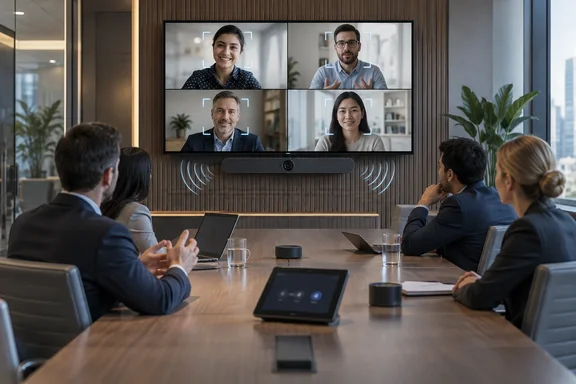
For Windows and Microsoft 365 administrators, the more practical points are about platform and lifecycle. The Bar Pro runs on Microsoft's Android-based device platform, which decides how it gets updated, how long it stays certified, and how you enroll it.
What Shure is shipping
Shure describes the product as a Certified for Microsoft Teams all-in-one conferencing solution that brings medium and large rooms "the clean audio and video that reliable AI requires." The kit pairs the bar with a touch panel, so a single product handles capture, compute and room control. In a larger room that job usually falls to ceiling mics, a separate DSP, cameras, a compute box and a console.
The main parts:
- Audio: Onboard IntelliMix audio processing isolates voices and minimizes background noise. When Shure first announced the product in January 2026, it said the bar integrates Shure Microflex Advance array microphones with high output, premium stereo loudspeakers.
- Video: IntelliMix View AI video framing keeps participants clearly visible. Shure says the cameras cover people sitting closest to the display as well as those at the far end of the table. The launch announcement credited patent-pending camera placement and AI-framing technology for picking up non-verbal cues.
- Deployment model: Shure's product page describes the kit as one device, one install path, and a faster, more standardized deployment experience for enterprise meeting rooms.
Shure's announcement gives no price, no regional rollout schedule and no specific first-shipment date. It says only that the company recently announced general availability. It also tells buyers to ask their local Shure representative whether the Try Before You Buy program is offered in their market.
Section summary: The product is a Teams-certified, single-device kit for bigger rooms, and it is now shipping. Pricing and regional availability depend on your Shure rep.
The AI argument, and how much weight it can bear
Shure's messaging centers on AI. CTO Sam Sabet says every transcript, summary and AI-generated insight "begins with what your room's devices can hear and see." Microsoft adds its own support to the release. Albert Kooiman, General Manager of Teams Partner Engineering and Customer Enablement, says clear transcription and diarization by Teams make AI experiences more accurate and useful. Craig Durr of The Collab Collective, an industry analyst, also endorses the idea that clean capture strengthens the "AI intelligence layer."
The basic logic holds up. Diarization, meaning the ability to tell who said what, gets worse when voices blur together or a far-end speaker is barely audible. A Copilot recap built on a muddy transcript will have gaps. But the announcement contains no test data. Shure gives no word-error-rate figures, no comparison with other bars, and no customer deployment results. Real outcomes will still depend on:
- Room acoustics, such as glass walls and hard ceilings
- Seating layout and how deep the table runs
- Where the bar is mounted and at what height
- Firmware, Teams app versions and network quality
Why should a speech-intelligibility problem be solved with a better microphone and not a better transcription model? Either can help, but the microphone is the part you control and the model isn't. Treat the AI framing as a reasonable design goal, not a promised accuracy figure.
Section summary: Better capture probably improves Teams transcripts and Copilot summaries. Shure has not published measurements of how much.
MDEP: what "Android-based" means here
The Bar Pro is built on the Microsoft Device Ecosystem Platform (MDEP). Shure calls it Microsoft's enterprise-grade extension of the Android operating system. Microsoft's own MDEP documentation presents it as a consistent platform for connected and specialty devices, with hardware-rooted trust, familiar enterprise management and predictable lifecycle support across multiple OEMs. For IT leaders, Microsoft describes it as a way to standardize devices "beyond the traditional Windows estate."
It's an appliance, so nobody is sideloading apps onto it. Its maintenance still follows Microsoft's rules for Teams Android devices, and those rules matter.
The lifecycle detail buyers tend to skip
Microsoft's Android version-support page for Teams devices makes three points procurement teams should note:
- OEMs own certification status. Microsoft says each manufacturer is responsible for keeping its devices certified. Decisions to stop recertifying, end sales or end life are made by the OEM.
- Firmware must come through Microsoft's channels to be supported. Android OS and OEM firmware updates go to Microsoft for certification and are then distributed through the Teams Admin Center or the Teams Rooms Pro Management portal. Firmware installed through an OEM's own service must be Microsoft-certified and visible in those consoles for the device to qualify for support on defects in Microsoft apps.
- Teams apps follow the Modern Lifecycle Policy. Microsoft tests and supports the latest and latest-minus-one versions and recommends automatic updates. If you hit a bug on an older build, the fix is to update.
Microsoft's table also ties certification and support dates to the Android version:
| Android version | Teams certification end | Microsoft support end |
|---|---|---|
| Android 12 | August 15, 2028 | August 15, 2030 |
| Android 13 | August 15, 2028 | August 15, 2030 |
| Android 14 | October 4, 2028 | October 4, 2030 |
| Android 15 | October 15, 2029 | October 15, 2031 |
Before you buy a fleet, ask Shure which Android base your units ship with and whether an OS upgrade is planned. A device bought in late 2026 on an older base could reach its certification deadline well before the hardware wears out. Microsoft has extended these dates before; the Android 12/13 certification end moved from October 2026 to August 2028. That's welcome, but you shouldn't plan a refresh cycle around future extensions.
Section summary: "Teams-certified" is a status the OEM has to keep up, not a permanent guarantee. Check the Android base against Microsoft's lifecycle table.
Management: ShureCloud, PMP and ServiceNow
Shure says IT teams can securely manage, control and update IntelliMix Bar Pro remotely using ShureCloud and other enterprise IoT systems like Pro Management Portal and ServiceNow. That matches what Shure did with its earlier IntelliMix Room Kits for Teams. For those kits, the company advertised zero-touch provisioning and management via ShureCloud, Teams Admin Center and Teams Rooms Pro Management Portal.
Shure hasn't said which controls each console exposes, whether the ServiceNow integration needs extra licensing, or whether the three paths offer the same features. Ask before you standardize.
What Microsoft's Pro Management portal enrollment looks like
Microsoft's current documentation (updated July 2026) describes how Teams Android devices are provisioned in the Teams Rooms Pro Management portal. It covers Teams Rooms on Android, panels, phones and SIP devices. It has not been confirmed specifically for the Bar Pro, but it gives a good picture of the general workflow:
- Check prerequisites. Each device needs Admin Agent version 1.0.0.202407020009 (Code: 855) or later, plus a device account in Microsoft Entra ID. Personal credentials aren't supported for remote sign-in. The admin needs the Global Administrator, Teams Administrator or Teams Device Administrator role.
- Add devices. Go to Planning > Android Devices, then add units one at a time by MAC address or upload a CSV of up to 500 devices.
- Generate verification codes. Each device gets a six-digit code valid for 24 hours. You can export codes in bulk to a CSV for on-site technicians.
- Activate on-site. The technician enters the code during initial setup, and the device moves to Ready for provisioning.
- Sign in remotely. Use Sign in a user to attach the Entra device account. Bulk remote sign-in isn't supported, so each device is signed in individually.
Common snags, according to Microsoft:
- Code expired before activation: generate a new one. An expired code won't work.
- You edited a MAC address: the existing code is invalidated immediately, so reissue it.
- Device offline during sign-in: the sign-in waits until the device reconnects.
- CSV with bad rows: valid rows are imported and the bad ones appear in an error summary with row numbers.
With a 24-hour code window, it pays to coordinate with installers. Generate codes on the day the bar goes on the wall, not the Friday before.
Section summary: Remote management is plausible across several consoles. Pin down which features each path supports, and plan PMP enrollment around the Admin Agent version and the 24-hour code window.
Where it fits in Shure's lineup
The Bar Pro is part of a broader Shure push into Teams Rooms. Shure's newsroom also lists Express Install bundles built with Heckler Design and Salamander Designs, which pair the Bar Pro with modular furniture and, according to Shure, install in under an hour. Liem says Shure is "working closely with Microsoft" to expand certified options "for every space."
The competitive question is simple. Can a single bar cover a room size that used to need an integrated system of ceiling arrays and separate DSP? Shure says yes. The honest answer is probably "for many rooms, not all." Long boardroom tables and poor acoustics can still call for distributed mics, and the Bar Pro's expansion ports suggest Shure plans for that.
Pre-purchase checklist
- Confirm the Android/MDEP base and where it sits on Microsoft's certification timeline.
- Ask Shure for published microphone pickup range and camera field-of-view figures, then check them against your actual room dimensions.
- Clarify which management path (ShureCloud, PMP, TAC or ServiceNow) you'll treat as the source of truth for updates.
- Make sure Entra device accounts and Teams Rooms licensing are in place before installers arrive.
- Ask about warranty. On earlier kits, Shure offered an optional three-year extended warranty on top of a standard limited warranty for coverage of up to five years. Confirm the terms for the Bar Pro.
- Ask whether Try Before You Buy is available in your region, and pilot the bar in your worst room, not your best one.
The IntelliMix Bar Pro looks like a serious attempt to bring big-room Teams audio and video down to one box. The AI benefits are plausible but unmeasured, and the long-term value depends on the lifecycle and management details covered above.
References
- Shure begins shipping IntelliMix Bar Pro for larger meeting rooms - Installation-international Installation-international · 2026-09-30T08:30:04+00:00
- Shure IntelliMix Bar Pro Shipping Now - Shure USA shure.com
- Shure Redefines the All-in-One Bar: The IntelliMix™ Bar Pro Empowers Modern Collaboration in AI-Powered Workplaces - Shure USA shure.com