

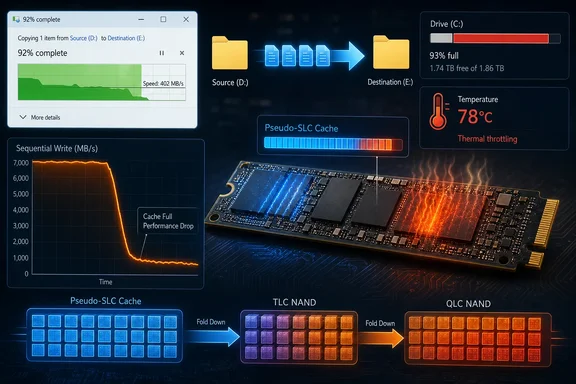
Consumer TLC and QLC SSDs commonly program part of their flash in a one-bit-per-cell mode, temporarily treating denser NAND as faster SLC-like storage. AnandTech’s long-running SSD testing has documented this behavior across consumer drives, including variable caches that become smaller as free space disappears. But “commonly” is not “every.” Western Digital’s documentation for its PC SN730, for example, describes a controller that can continue writing directly to TLC after its SLC blocks are full, while moving cached data in the background when the drive is idle.
For someone moving a 500GB project archive, cloning a PC, ingesting video, or restoring backups, the number that matters is sustained write performance after the cache fills—and retail listings often make that number hard to find.
The speed on the box measures the best case
A modern NVMe SSD may advertise 6,000MB/s, 7,000MB/s, or far more for sequential writes. Those figures are not necessarily false. They usually describe a favorable workload: a fast enough source drive, large sequential blocks, enough queue depth, proper cooling, a largely empty destination, and available fast cache space.
Pseudo-SLC caching helps make those peak figures possible. A TLC cell normally represents three bits by settling into one of eight voltage ranges; QLC must distinguish among sixteen ranges for four bits. Programming those tighter ranges takes more work than programming one bit. By treating a portion of the same physical NAND as one-bit storage, the controller can accept incoming writes much faster before it later consolidates them into TLC or QLC form.
The process is invisible to Windows. File Explorer sees a successful copy, while the SSD firmware decides where data lands, when cached blocks get folded into denser storage, and how aggressively to reclaim space. A copy graph that starts near the drive’s advertised write ceiling and then falls off a cliff is often the moment this temporary workspace has been consumed.
But the shape of that drop is a product design decision, not a universal SSD law. Some drives reserve a small static cache. Some deploy a much larger dynamic cache when the drive is empty. Some switch to direct TLC writes before they are forced to wait for cached data to be reorganized. Others can stall harder because incoming writes and background folding contend for the same NAND resources.
Tom’s Hardware’s sustained-write testing has repeatedly shown why that distinction matters. Its testing of modern drives measures both the cache’s capacity and the speed remaining after it is saturated; some TLC models continue around 1GB/s or better, while certain budget-oriented QLC designs have historically fallen into hard-drive territory under prolonged writes. A PCIe 4.0 label alone says almost nothing about which behavior a buyer will get.
A nearly full SSD loses more than empty capacity
The submitted report’s most important point is that a full drive can slow sooner. Dynamic pseudo-SLC cache schemes borrow unused NAND capacity. As the SSD fills with games, media, VM images, backup sets, and old installers, there are fewer blocks the controller can temporarily operate in the faster mode.
AnandTech documented that behavior in its Intel SSD 660p testing: when the drive was relatively empty, it could assign a very large portion of its free NAND to SLC-style caching; as capacity was consumed, the cache contracted and sustained writes became easier to expose. That does not mean an SSD becomes permanently slow after one big copy. Given idle time and sufficient free blocks, the drive can clear and rebuild its cache. It does mean that a drive used at 90% capacity may hit its slower native-writing mode far earlier than it did on the day it was installed.
This is why a generic “keep the SSD under 70–80% full” rule is directionally sensible but too neat. There is no universal threshold. A 2TB SSD at 85% full still has roughly 300GB free, while a 500GB drive at the same percentage has around 75GB. Their controller design, over-provisioning, NAND type, firmware, temperature, and cache policy may be completely different.
For Windows users, leaving meaningful free capacity is still prudent. It gives the SSD more room for garbage collection, wear leveling, cache management, Windows updates, temporary files, hibernation, restore points, and application data. The practical target should be workload-based: if a workstation routinely writes 200GB video projects or exports disk images, it needs materially more spare space than a PC used mainly for browsing and office work.
TLC versus QLC is a clue, not a purchase verdict
The XDA article advises buying TLC rather than QLC for large transfers. That is a defensible default for a workstation scratch disk, an active video-editing drive, or a backup target that will frequently absorb hundreds of gigabytes. QLC’s native write behavior is generally more dependent on caching, and AnandTech’s whole-drive tests have shown much steeper post-cache write penalties in several QLC consumer products.
Still, NAND type is only one line in the specification. A well-designed QLC drive with substantial capacity may be perfectly appropriate for a mostly read-heavy Steam library, photo archive, home media collection, or secondary storage volume. Conversely, a cheap TLC SSD with a weak controller, little over-provisioning, aggressive caching, or thermal limits can disappoint in sustained work.
Capacity matters, too. Larger versions of the same SSD family often have more NAND dies operating in parallel, which can raise sustained throughput and expand a dynamic cache. The reverse is also common: a 500GB model can behave very differently from its 2TB sibling despite sharing a product name and peak sequential-read rating.
The product recommendation embedded in XDA’s piece illustrates the buying problem. It points readers toward the 2TB XPG Gammix S70 Blade on the strength of its quoted peak transfer speed, but the article does not provide a sustained-write result, a cache-size measurement, or a comparison with alternatives under a full-drive write. Those omissions do not make the drive poor; they mean the recommendation does not substantiate the precise workload concern the explainer raises.
Do not blame the destination SSD until the copy path is isolated
A plunging Windows copy-speed graph can indicate cache exhaustion, but it can also reveal a limitation elsewhere. The source drive must read quickly enough; an external enclosure may be limited by USB, Thunderbolt, bridge-chip behavior, cable quality, or heat; a network transfer may be constrained by Ethernet, Wi-Fi, server storage, or SMB overhead. Antivirus scanning, encryption, compression, and copying millions of tiny files can also make File Explorer’s displayed rate look far worse than a clean sequential-write test.
Temperature deserves particular attention with high-speed NVMe drives. A drive that begins fast and declines after several minutes may be exhausting cache, throttling thermally, or doing both. Task Manager can show the destination disk’s active time and transfer rate, while a sensor-monitoring utility can reveal whether controller temperatures rise toward a throttle point. Those observations are more useful than assuming every slowdown is caused by NAND.
The cleanest diagnostic is to test the destination SSD with a sufficiently large sequential-write workload while it has known free capacity and adequate cooling, then compare the result with an ordinary file copy. Reviewers such as Tom’s Hardware use extended writes precisely because short benchmarks often end before the cache has been meaningfully challenged. A 1GB benchmark can confirm burst speed; it cannot characterize a drive expected to receive a 400GB backup.
For managed PCs, this distinction affects purchasing policy. A standard desktop image and everyday user workload may never fill an SSD cache, so a lower-cost QLC drive can be rational. Devices used for endpoint backups, forensic captures, media creation, virtual machines, CAD assets, database exports, or local software builds should be selected using sustained-write reviews, endurance ratings, thermals, and capacity headroom—not only peak PCIe numbers.
Sustained-write data belongs in the buying checklist
SSD vendors are under no obligation to make their slowest long-write state the largest number on a box. Peak ratings are easier to communicate and better match the short, bursty writes that dominate many consumer PCs. The problem starts when a buyer interprets that peak as a promise that a drive will maintain the same speed through a full disk image or multi-hour data ingest.
Before buying an SSD for write-heavy work, look for independent whole-drive or extended-write testing for the exact capacity being sold. Check whether the review identifies TLC or QLC NAND, describes static versus dynamic caching, records post-cache throughput, and tests temperatures. Treat a product-family review cautiously if it tested a different capacity, since the 1TB and 2TB versions may not perform alike.
The useful lesson is not that SSDs are secretly defective, or that every large transfer should trigger a hardware return. It is that an SSD’s headline speed is its burst-speed ceiling. Once the temporary fast area is gone, the controller, NAND configuration, free capacity, cooling, and the rest of the copy path decide how quickly the remaining data gets written.
References
- Every SSD has a hidden fast lane, and running out of it is why big file copies crawl XDA · 2026-09-14T20:30:16+00:00