

Stardock's Snipboard Moves Windows 11 Clipboard History Into a Dock
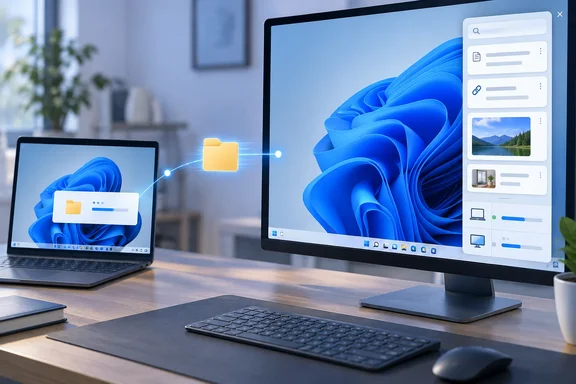
In Stardock's announcement, Snipboard is "a new clipboard manager for Windows that introduces a dock-style interface for accessing, organizing, and reusing copied content". The press release is dated Plymouth, Michigan, September 23, 2026. According to Stardock, instead of digging through a traditional clipboard history, copied content appears as recognizable cards that make it easy to see what you copied. The dock can be positioned on any side of the monitor.
Thurrott.com also covered the launch and adds a technical detail: Snipboard is a native WinUI-based Clipboard manager utility for Windows 11. WinUI is Microsoft's current native UI framework for Windows apps. That fits Stardock's pitch that the dock should look like part of the OS and not a skinned add-on. Stardock's product page says Snipboard is designed for Windows 11, and the Object Desktop listing mentions support for ARM devices. That ARM note applies to the suite as a whole, and Stardock doesn't make a separate ARM claim for Snipboard.
Stardock says the app handles text, links, images, files, and folders. The two groups work differently, though. Text, links and images get previews, search, pinning and pasting. Files and folders are mainly described as things you can transfer to other PCs.
Brad Sams, General Manager of Stardock Software, explained the reasoning in the announcement: "Copy and paste is something everyone uses every day, but the experience hasn't evolved much beyond the basics."
What Windows 11's Built-In Win+V Clipboard Already Does
Before paying for a clipboard manager, it helps to know what Windows already includes. Microsoft's clipboard support page covers both Windows 11 and Windows 10. It says you can paste multiple items from clipboard history, pin items you use all the time, and sync history to the cloud. Clipboard history is off by default. The first time you press Win+V you get a Turn on prompt.
Microsoft also documents some hard limits that are useful for comparison:
| Capability | Windows clipboard history (per Microsoft) | Snipboard (per Stardock) |
|---|---|---|
| History size | 25 entries; older unpinned items drop off | Retention limits the user sets; no specific numbers published |
| Persistence | Cleared on restart except pinned items | Not specified |
| Per-item limit | 4 MB; text, HTML and bitmap formats | Not specified |
| Cross-device | Cloud sync tied to a Microsoft account or work account | Local-network sharing between connected PCs |
| Files and folders | Not among documented formats | Transfer between connected PCs |
| Search | Not documented | Search of clipboard history |
The 25-entry cap, the restart behavior, the 4 MB limit and the supported formats all come from Microsoft's troubleshooting guidance for its clipboard. Microsoft also says the sync feature is tied to your Microsoft account or your work account, and it has to be turned on under Settings > System > Clipboard. Thurrott.com draws the same line, noting that Snipboard offers multi-item access, functionality that Windows 11 already provides via an optional Clipboard History feature. In Thurrott's words, it goes further and rethinks the user interface entirely.
Stardock says you open the dock by pressing Winkey + V, the same key combination as Windows' own clipboard history. My inference is that Snipboard takes over that shortcut instead of running alongside the built-in panel. Stardock hasn't said what happens to the native Win+V panel while Snipboard is installed, or how to get it back. The product page does say the shortcuts can be customized.
Local-Network Sharing Is Snipboard's Real Differentiator
Snipboard's cross-device feature works in a different way from Microsoft's. Stardock says the app brings your clipboard across PCs connected on your local network. Users can copy text, links, and images on one PC and paste them on another, as well as transfer copied files and folders directly between connected devices. Windows' own sync goes through the cloud and needs the same account on each device. Snipboard's is a LAN feature.
Moving files is the part Windows' clipboard history doesn't cover. Stardock's product page pitches it as a way to move files without emailing attachments to yourself or grabbing a USB drive. Users can also choose whether files download automatically and set a size cap for those automatic downloads. For households or small offices with a desktop and a laptop side by side, that's a real workflow change. It isn't just a new look for a feature you already have.
Stardock has done this kind of thing before. Its Multiplicity app, which shares a keyboard and mouse across PCs, has long included clipboard sharing and file dragging between machines. Posts on Stardock's forums show both the appeal and the rough edges. One Multiplicity user on a domain network reported that after the secondary PC was moved to a different subnet, clipboard sharing and file dragging worked from the secondary to the primary but failed in the other direction. That's a different, older product, and it says nothing about how Snipboard behaves. It does show that LAN-based sharing depends on firewall and network layout in ways cloud sync doesn't.
Stardock hasn't published how Snipboard finds other PCs, whether the transfers are encrypted, or how devices are paired and authenticated. If you plan to use it anywhere other than a trusted home network, you need those answers first.
Privacy Controls in the Snipboard Beta, and What They Leave Open
Clipboard history collects passwords, one-time codes, account numbers and private messages, so the controls matter. Stardock says users can exclude selected applications from history and sharing, set retention limits so older unpinned content is removed automatically, and pause sync between devices while still using local history.
Windows Central's hands-on found a related option, a Temporary mode that stops any content from being sent to other devices. Stardock's own materials describe the feature as pausing synchronization. These are probably the same control under different names, but that's my inference.
Keep these controls in perspective. They're vendor-described features in a beta, not audited guarantees. Stardock doesn't say how app exclusions are enforced, what retention periods are available, or where history is stored on disk. The practical move is to add your password manager and banking apps to the exclusion list as soon as you install it, and not to rely on defaults.
Early Hands-On Impressions and the Edge Drop Comparison
The only hands-on account so far is from Windows Central, whose reviewer had early access for about a day. They called Snipboard very promising, said core functionality was consistent, and praised smaller touches. One of those: clicking the ellipsis on a clipboard item brings up extra paste options, including UPPERCASE and Keep formatting, in any app. Stardock's product page confirms plain-text pasting with its own customizable shortcut. It doesn't list the uppercase option, so treat that as the reviewer's observation of the current beta.
Windows Central also compared Snipboard to Edge Drop, a similar dock-style clipboard tool from a single independent developer. The reviewer found Snipboard more robust but said Edge Drop does one thing better: you can drag text or files into and out of its dock. Snipboard doesn't support that yet, and the reviewer said they'd like to see it added. For other options outside Stardock's subscription, the open-source Ditto has been around a long time. Ditto's site describes it as an extension to the standard windows clipboard. It saves each item placed on the clipboard allowing you access to any of those items at a later time.
A one-day trial can tell you whether the basics work. It can't tell you about long-term stability, memory use, or how the sharing holds up on busier networks. Nobody has published measurements on any of those yet.
Snipboard Pricing and Object Desktop Availability
Reports disagree on who can get Snipboard right now. Stardock's announcement says it is available today as part of Object Desktop at no additional cost while in beta. Stardock's Object Desktop page now lists Snipboard next to Fences 6, Groupy 2, Start11 v2, WindowBlinds 11, Multiplicity 4 and other apps. Thurrott.com goes further, reporting that Snipboard is available as part of Object Desktop but it's available to anyone for free now during the beta as well. Stardock's own pages describe Snipboard as exclusive to Object Desktop, so check the download page before you assume you can get it without a subscription.
According to Windows Central, Object Desktop starts at $49.99 a year, and Snipboard will be sold separately once it leaves beta. Stardock's pages describe Object Desktop as a one-year subscription covering up to five active installs managed through a Stardock account. They don't list a standalone Snipboard price or release date. No other outlet has confirmed the plan for a standalone version.
What this means for you
If you regularly copy content between two or more Windows 11 PCs on the same network, Snipboard is worth trying now. If you use one PC, Windows' built-in Win+V history probably covers most of what you need. For someone who already pays for Object Desktop, installing the beta costs nothing and adds a feature Windows doesn't document: moving files and folders between PCs on the LAN. If you're considering Object Desktop mainly for Snipboard, it makes more sense to wait until a standalone price is confirmed, unless you also want the rest of the suite.
On work or managed PCs, take extra care. Windows' own sync is tied to a Microsoft or work account, which organizations can reason about. Snipboard's LAN transfer mechanism hasn't been documented. Get approval before running it on a corporate network.
- Snipboard launched in beta on September 23, 2026 for Windows 11 and is included with Object Desktop at no extra cost during the beta.
- Windows 11 already offers Win+V clipboard history with pinning and account-based cloud sync, but Microsoft caps it at 25 entries and 4 MB per item and clears unpinned items on restart.
- Snipboard's main addition is sharing over the local network, including transfers of files and folders between connected PCs, with settings for automatic downloads and size limits.
- Right after installing, exclude password managers and other sensitive apps from recording and sharing, and set a retention limit.
- Stardock hasn't documented the encryption, pairing or discovery for its LAN sharing, so keep that feature to networks you trust for now.
- Reports differ on whether the beta requires an Object Desktop subscription, and the $49.99 annual price and the plan for a standalone version come only from Windows Central.
Snipboard is a polished, native-looking layer over a feature Windows already has, plus one real addition: moving files and folders between PCs on the LAN, which Microsoft's clipboard doesn't document. Its long-term value will depend on two things Stardock hasn't published yet, the post-beta price and details of how the local-network sharing works. Once both are out, you'll be able to tell whether it justifies its own purchase or stays a perk for people who already subscribe to Object Desktop.