

GamersNexus published its written comparison on September 23, adapting a video first released September 14. Its measurements come from particular games, settings, and review units; they are valuable precisely because those conditions are described. One development already changes how to read the results: SteamOS 0.3.0 improved Steam Frame charging after the review’s testing.
Steam Frame makes wireless PC-VR the centerpiece
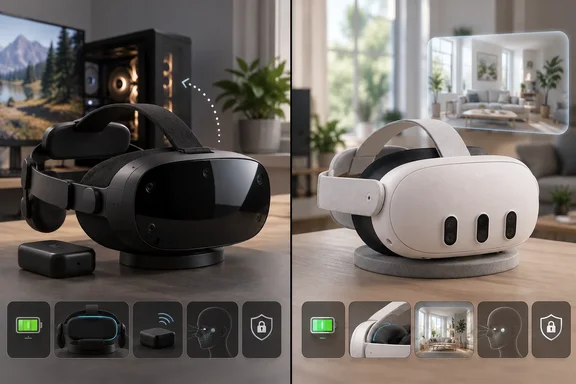
The Steam Frame can run games on its own Snapdragon-powered hardware or stream them from a gaming PC. It runs SteamOS on ARM, using an emulation layer for software built for another processor architecture. For PC-VR, its defining accessory is an included wireless adapter that connects the headset to the host PC; ordinary Wi-Fi is another option. GamersNexus conducted its streaming tests with an RTX 5090 and Ryzen 7 9800X3D host, so its results describe a well-equipped PC, not the performance every owner will see.
Valve also offers multi-link streaming, in which the Frame can use its Wi-Fi connection and dedicated adapter simultaneously. Valve told GamersNexus that the links compete on a per-packet basis for the lowest latency. The reviewer found the adapter most dependable in the same room as the PC: at roughly eight metres, turning away from the test bench caused signal dropouts that improved when facing it again. The included adapter is a useful answer to a weak home router, but it is not a promise of whole-house PC-VR coverage.
The Frame also uses eye tracking for foveated streaming: it prioritizes video quality around the area the wearer is looking at. That is a streaming feature, distinct from a guarantee that every standalone game will run well. At review time, GamersNexus said 130 titles had been confirmed under Valve’s Stand-Alone Verified program, surfaced through the “Great on Frame” library filter. Buyers interested in playing away from a PC should check their own games against that narrower standalone selection.
There is a practical configuration cost to this flexibility. While streaming, Steam and SteamVR settings exist on both the headset and host PC; GamersNexus encountered a headset-menu toggle between local and remote SteamVR settings. It also reported occasions when leaving a streamed game on the Frame failed to close it on the PC. Those are more pertinent warnings for a newcomer than the headset’s ability to display a familiar Steam interface.
Steam Frame’s latency lead depends on the connection
Latency is the time between an action and the visible response. A wireless headset adds a PC-to-headset video path to the work a game already does, making the test method especially important. GamersNexus first used a controlled, 1920×1080 software test with a mouse attached to the host PC. At 120Hz, it measured 46.1 milliseconds on the Frame’s adapter, 47.1ms on Frame Wi-Fi, and 72.5ms on Quest 3 Wi-Fi. Because the mouse supplied the input and the test streamed 2D content through a different pipeline, those numbers are not VR-controller-to-display scores.
Its more useful gaming comparison timed one visible action in Thumper. After attempts to wire into a controller proved impractical, the outlet used a microphone to detect a button click and an LDAT device to detect the display change. The Frame measured 56.5ms running locally at 120Hz, 65.7ms streaming over multi-link, and 68.4ms streaming over its adapter alone. In this game and setup, multi-link improved the result over the adapter by 2.7ms; streaming over multi-link added 9.2ms to the Frame’s local result.
The Quest 3 results show why connection choice matters more than a single winner’s label. Quest Wi-Fi streaming measured 83.5ms at 120Hz, while Frame Wi-Fi streaming measured a slightly slower 86.2ms. A Quest test using USB and the beta Steam Link app measured 82.9ms with the cable bundled with the headset; GamersNexus did not test Meta’s separately sold Link cable. For local play at 72Hz, it recorded 61.2ms on Frame and 75.2ms on Quest, though the latter ran a different, Meta-store build of Thumper.
Those results support a specific conclusion: the Frame’s included adapter and multi-link were strong routes to low-latency PC-VR in GamersNexus’ test environment. They do not establish that Frame Wi-Fi is always faster than Quest Wi-Fi, or that either headset will reproduce these figures with a different router, host PC, or game.
Steam Frame’s battery trade-off is clearer than its launch charging result
Battery life moved in the other direction. In GamersNexus’ 120Hz, high-performance Moss streaming test, the Frame lasted 84.1 minutes against 118 minutes for a streamed Quest 3 run. The Frame’s lower-power “Playtime” profile extended its streamed Moss run to 111 minutes. Locally, the Frame ranged from just 47 minutes under the reviewer’s high settings to 124.6 minutes in Playtime mode. These runs changed more than one variable, so the spread is chiefly a warning about the cost of performance settings.
A worn, streamed Half-Life: Alyx session offers the closer everyday comparison. With both headsets set to 72Hz and a 200Mbps bandwidth cap, GamersNexus measured 115.8 minutes on Frame and 139.2 minutes on Quest 3—about 20% more time on the Quest in that test. Someone planning long, unplugged PC-VR sessions should budget around the shorter observed Frame runtime, while remembering that a different workload can change it.
Charging requires a date stamp. GamersNexus’ Frame unit took 215 minutes to recharge with Valve’s 45W adapter, drawing only about 11–12W during much of its test; its Quest 3 took 146 minutes with the supplied 18W adapter. Valve told the outlet that its tests on four Frames had produced 90–120-minute full charges and suggested battery-capacity learning or a software regression as possible reasons for the discrepancy. Neither explanation was established for the reviewer’s unit.
SteamOS 0.3.0 subsequently added substantially faster charging while the Frame is off or sleeping. PC Gamer, which had independently encountered slow charging, reported a faster run from roughly 4% to 65% in 35 minutes and to full in 75 minutes under its test conditions. The published GamersNexus article says its text was unchanged from the September 14 video. Its 215-minute measurement remains an account of that tested unit, not a safe estimate for a Frame running the updated software.
Quest 3 wins at seeing the room; Frame is easier on the face
Several GamersNexus reviewers found the Frame more comfortable out of the box than the Quest 3. Its measured assembled weight was about 445 grams, with the battery positioned in the rear strap. An independent Ars Technica review likewise praised the rear battery’s counterbalancing effect, though fit remains personal: the Frame’s more open nose area admitted distracting light for one GamersNexus reviewer and posed no problem for another.
GamersNexus tried to put a number beside those impressions. After 30 minutes of local Moss play at matched settings, it quickly measured the wearer’s face with a thermal camera. The hottest browline reading was 33°C after Frame use versus 35°C after Quest 3 use; cheek and nose readings also favored the Frame. Skin temperature after removing a headset is an imperfect measure of comfort, but the method adds useful evidence to the team’s subjective fit reports.
Passthrough—the camera view that lets a wearer see the physical room—is a different story. GamersNexus found the Frame’s built-in monochrome view choppy and distorted, estimating that moving objects appeared at about 30 frames per second in its camera recording. Reviewers found the Quest 3’s color view much easier to use when looking around or at nearby objects. An optional $150 Arcturus color-camera module improved readability on the Frame in the outlet’s trial, but added cost and power draw. Buyers who routinely use mixed reality or glance at a phone while wearing a headset should treat the stock passthrough difference as significant.
Steam Frame and Quest 3 ask different things of your data
The privacy comparison is about stated practices and available features, not a laboratory audit of network traffic. Valve told GamersNexus that the Frame processes camera and eye-tracking data on-device and that Valve does not collect those data or their byproducts. It identified one narrower exception worth understanding: a system report that a user chooses to submit to Steam Support can include text logs containing some camera- and eye-tracking-system data. Valve also said it does not sell user data to third-party advertisers.
Steam itself still handles account, purchase, device, gameplay, and interaction information under its broader privacy policy. The relevant advantage for someone placing cameras and eye trackers in their home is Valve’s stated boundary around headset sensor data, not an absence of Steam account data.
GamersNexus counted two Valve agreements associated with buying the hardware, totaling 12,616 words, and nearly 83,000 words across the Quest checkout and Meta Horizon app setup flows it examined. Word counts convey how much material a buyer encounters, but the consequential differences lie in the disclosures: the review identifies Meta policies covering voice-service interactions, created audio and video, environmental information, and certain derived tracking data. Which data apply depends on the feature and its settings.
One scope boundary is particularly easy to miss. The natural-facial-expressions notice quoted in the review expressly describes the Meta Quest Pro. It says raw facial images for that feature are processed and deleted on-device, while derived expression data can be processed on-device or on Meta servers in specified circumstances. It should not be read as a finding that a Quest 3 has Quest Pro facial-expression cameras. For children aged 10–12, the Meta parent disclosure discussed by GamersNexus separately ties categories such as voice recordings, body tracking, location, and room dimensions to enabled services or parental approval.
Privacy is therefore a legitimate reason to prefer the Frame, provided the decision rests on the relevant sensor-data policies rather than a claim that every listed category is continuously gathered from every Quest 3 owner. GamersNexus’ suggestion that data collection explains Meta’s lower headset price is its interpretation; the review’s policy comparison does not measure how either company finances the hardware.
What this means for you
Choose the headset around your primary use: the Frame makes its strongest case for nearby, wireless PC-VR and for buyers who prefer Valve’s stated handling of headset sensor data; the Quest 3 makes a stronger case for longer sessions, usable stock passthrough, and a lower upfront price. GamersNexus listed the 256GB Frame at $1,049 and the 1TB model at $1,299, versus $600 for the Quest 3 in its comparison. The Frame includes a USB-C cable and wireless adapter, but no wall power adapter; Valve’s optional adapter was listed at $30. Its $60 ergonomic kit includes hand straps, a top strap, and an extended light blocker, whose usefulness varied among the reviewers.
- Check whether the VR games you want are verified for standalone Frame play or whether you intend to stream them from a PC.
- Plan to use the Frame’s included adapter near the gaming PC if low-latency wireless streaming is the reason you are buying it.
- Compare battery life using the workload closest to yours; the worn Half-Life: Alyx test ran 115.8 minutes on Frame and 139.2 minutes on Quest 3.
- Check the Frame’s SteamOS version before using an early review’s charging time as a purchasing or troubleshooting baseline; version 0.3.0 changed off-and-asleep charging.
- Account for fit-dependent accessories and stock passthrough before treating the Frame’s base price as the complete cost of the experience you want.
The Steam Frame gives PC-VR players a distinctive choice: an included low-latency wireless route, comfortable balance, and a narrower stated approach to camera and eye-tracking data, at a substantial price premium. The Quest 3 retains concrete advantages in the tested battery life and everyday visibility. SteamOS 0.3.0 has already made one launch-era charging result less representative; game compatibility and software updates are the next things a prospective Frame owner should check against their own plans.
References
- Valve Steam Frame VR Review vs. Meta Quest 3 | Privacy, Latency, & Benchmarks - GamersNexus GamersNexus · 2026-09-23T15:53:00+00:00
- Steam Frame's odd charging behaviour gets patched: cuts recharge times in half in some instances | PC Gamer pcgamer.com