

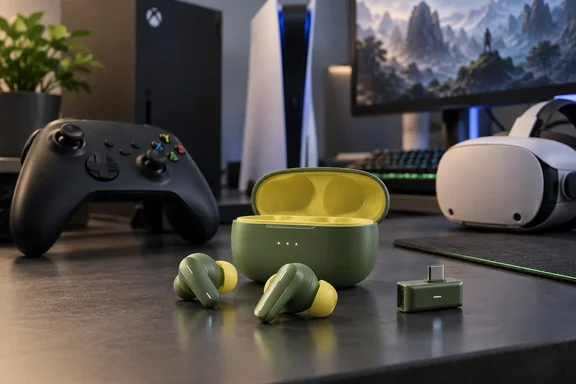
For Xbox and PC owners, which version you buy matters more than which colour you pick. Here's what's new, what BGR found, and what to check before spending $199.99.
What actually launched
This isn't a new earbud. SteelSeries announced the colours on September 1, 2026, calling them two new Matcha and Yuzu colors for its award-winning Arctis GameBuds™. Microsoft's Xbox Wire included them in the Designed for Xbox Cozy Collection on the same day, next to 8BitDo peripherals and KontrolFreek thumb grips.
Other reviewers agree that nothing changed inside. Wccftech, which tested the Matcha Xbox unit, said that aside from the new finish, these are functionally the same GameBuds that SteelSeries introduced previously.
SteelSeries lists these prices:
| Region | Price |
|---|---|
| North America | $199.99 |
| UK | £159.99 |
| EMEA | €179.99 |
The matching KontrolFreek thumb grips cost $12.99 in North America and are sold separately. SteelSeries' product pages label the colours Limited Edition Cozy Collection in Matcha or Yuzu, but no end date or stock level has been published.
The firmware update covers every pair
SteelSeries' 2026 firmware update gets less attention than the colours, but it matters more to existing owners. As 4Scarrs Gaming summarised it, SteelSeries says the firmware increases connection power and adds listen-before-talk, or LBT, for channel selection. LBT checks a wireless channel before transmitting. The update is not limited to the new colours: The 2026 firmware update applies to every Arctis GameBuds model. If you already own black or white GameBuds, you get the same wireless changes without buying anything.
BGR ran the latest 2026 firmware during testing. Keep in mind that the interference improvement is SteelSeries' own claim, not something an independent test has measured.
Summary: The launch is a colour change plus a firmware update for the whole line. The price and core hardware haven't changed.
Xbox vs. PlayStation: choose the right version
This is where buyers are most likely to go wrong. SteelSeries' support documentation describes the difference like this:
- PlayStation version: a single-mode dongle meant for PlayStation and PC.
- Xbox version: a dual-mode dongle with a physical switch. One mode is for Xbox, the other for PlayStation and PC.
Colour affects which version you can get. SteelSeries' support site lists five colours: Black, White, Glorange, Matcha and Yuzu. Only Black, Matcha and Yuzu come in an Xbox version. White and Glorange don't work with Xbox. So if you play on Xbox and don't want black, Matcha and Yuzu are your only choices.
Wccftech says the Xbox version is actually the most versatile model. It works with Xbox, PlayStation, PC, Nintendo Switch, compatible handheld systems, and mobile devices. The PlayStation version works fine on a PC, but it won't connect to an Xbox over 2.4GHz.
Also, don't expect multipoint Bluetooth. You switch between the 2.4GHz dongle and Bluetooth, but you can't use both at once. Earlier WindowsForum coverage of the Xbox model put it this way: the Xbox model's dual-mode dongle supports Xbox and PC, but Quick-Switch is not multipoint.
Updating the Xbox version from a Windows PC
SteelSeries support covers a common problem: the Xbox version doesn't show up for firmware updates on a PC. The fix:
- Set the physical switch on the wireless dongle to PC mode, not Xbox.
- Plug the dongle into your PC and open SteelSeries GG.
- Go to the Engine section, where the Arctis GameBuds should appear in your device list.
- Click the blue "Firmware Update Available" banner if you see one.
If the earbuds don't appear in GG, the dongle is almost certainly still in Xbox mode.
Summary: Xbox players need the Xbox version, which rules out White and Glorange. Windows users updating an Xbox unit must switch the dongle to PC mode first.
What BGR found in testing
BGR tested the PlayStation version on PS5, on a Mac over Bluetooth with Steam, and on a Meta Quest, for more than 20 hours in total. The main findings:
Battery life. SteelSeries rates the earbuds at up to 10 hours per charge and 40 hours in total with the case. Roston said the rating held up. After eight hours without ANC, moving from games to movies, she was still waiting for the low-battery warning. ANC shortens that, and there's no wired fallback. BGR says about 20 minutes in the case gets you a few more hours.
Comfort. This is the strongest part of the review. Roston says most earbuds don't fit her ears, but the GameBuds sealed well and felt comfortable enough that she forgot she was wearing them after an hour. The seal also blocks a good amount of noise with ANC off. The downside is that they stick out enough to make sleeping on your side uncomfortable.
Microphone. Teammates could hear her clearly, even with a box fan running for a three-hour session. They could hear the fan but didn't find it annoying. Their overall view was that the mic sounded worse than her usual over-ear headset but was easy enough to listen to.
Noise cancellation. With a fan on each side, ANC removed everything except the lowest part of the fan noise. BGR describes it as very good for earbuds but weaker than premium noise-cancelling headphones.
Audio and latency. BGR says the sound is clear, the tuning is sensible, and directional cues are easy to pick out. The only problems came over Bluetooth: three brief stutters of a couple of seconds each, all while connected to a Mac for Steam. None happened on the 2.4GHz dongle with the PS5. Latency was good on both connections.
Companion app. The Arctis Companion app for Android and iOS has game-specific EQ presets for more than 200 titles, and you can remap the earbud buttons for single, double and long presses. You can switch between dongle and Bluetooth from the app or with the dongle's button. BGR's example is taking a phone call over Bluetooth and then switching back to the console.
Meta Quest: an unexpected extra
BGR's most unusual test was VR. The GameBuds worked with Quest 2, 3 and 3S either over Bluetooth or with the dongle plugged into the headset's USB-C port. The dongle only carries audio on the Quest, not the mic. BGR reported the same sound quality and positional audio it got on PS5 and Steam.
The limitation is practical: the dongle uses the Quest's only USB-C port, so you have to switch to Bluetooth when the headset needs charging. Roston had no lag problems over Bluetooth on the Quest. Note that this was tested with the PlayStation version. SteelSeries' own Quest compatibility lists don't clearly cover every Cozy Collection version.
Analysis: who should buy them?
The BGR headline calls the earbuds an alternative to big headsets, not a replacement. The details support that.
Good fit for:
- Players who switch between console, PC, phone and VR and want one audio device.
- People who find over-ear headsets hot or tiring over long sessions, as long as the ear tips fit them.
- Anyone who goes straight from gaming to Netflix or YouTube. BGR argues earbuds are much nicer for relaxed viewing.
Poor fit for:
- Streamers or anyone who wants the best possible voice quality. BGR itself suggests SteelSeries' headsets instead.
- Players who rely on Bluetooth and dislike occasional dropouts. Use the dongle when you can.
- Anyone who needs wired audio when the battery runs out.
Some caveats. Fit is personal, and one reviewer's great seal won't match every ear. BGR's review page also carries an affiliate-commission disclosure. Even so, the review lists real faults (Bluetooth stutters, the mic, ANC that falls short of premium headphones), which makes the praise easier to trust. Wccftech's Xbox-focused review also found that the hardware hasn't changed, so earlier reviews of the original GameBuds still apply.
The bottom line
The Matcha and Yuzu GameBuds are the same hardware in new colours at the same $199.99 price. Existing owners get the most useful part, the 2026 wireless firmware, for free. BGR's testing shows the earbuds are comfortable and have long battery life. Positional audio holds up across PS5, Steam and Meta Quest. The main drawbacks are a mic that falls short of a good headset boom and occasional Bluetooth hiccups.
For Windows and Xbox players, the key decision is the version, not the colour. Buy the Xbox version if an Xbox is anywhere in your setup, and remember to set the dongle to PC mode before looking for firmware updates in SteelSeries GG.
References
- SteelSeries Arctis GameBuds 'Cozy Collection' Review: A Compelling Alternative To Big Headsets bgr.com · 2026-09-29T22:57:56+00:00
- Arctis Gamebuds for Xbox Review - SteelSeries’ Premium Gaming Earbuds Now Come in Matcha wccftech.com
- Arctis GameBuds™ for PlayStation Matcha - US steelseries.com