

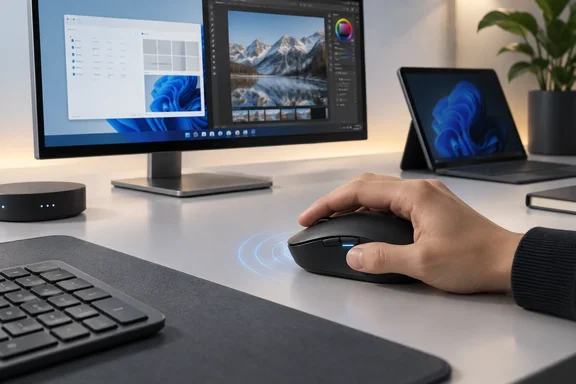
Microsoft sells two versions: the consumer Surface Mouse (2nd Edition) and the Surface Mouse for Business (2nd Edition). According to The Gadgeteer, it was announced on September 23, 2026, and Microsoft lists an October 13, 2026 release date at $79.99 in the United States. Gagadget, reporting separately, has the same date and price, in Black and Platinum, and notes that no UK sterling pricing or Amazon.co.uk listing has been confirmed yet. On the consumer store page, Microsoft also shows $71.99 special pricing for eligible students, parents, teachers and military.
Surface Mouse (2nd Edition) Keeps the Ambidextrous Shape and Changes the Inside
The design-press angle is the symmetrical body. Yanko Design presents it as a mouse built from the start for either hand, in a market that usually treats left-handed buyers as an afterthought. Microsoft's own description is more modest. The listing says the mouse features an updated shape for all-day comfort and advanced haptics that bring control to every movement, and adds that a premium silicone top cover provides a tactile, non-slip surface for optimized grip and comfort.
Reports differ on how new the shape really is. Microsoft says "updated shape". Gagadget, going by Microsoft's product imagery, says the design is unchanged from the original, but the internals are not, and that the exterior looks unchanged, but two new features set the second edition apart. What is clear is that the original Surface Mouse was already a symmetrical, both-hands design. Left-handed users have not just been given a shape they never had. They have been given the same haptics and programmable button as right-handed users, with no mirrored "lefty" model at a lower spec.
Microsoft says the contoured shape is meant to reduce hand fatigue. That is a design goal, and nobody has published ergonomic testing to back it up. Gizmodo's hands-on was cautious about the form. Its reviewer said that the new $80 Surface Mouse is the kind of ambidextrous mouse that strays a little too close to the worst ideas of the maligned Apple Magic Mouse, and also praised what he called the smoothest mouse click around. Gizmodo called it the first Microsoft-made mouse in close to 10 years. That fits with gagadget's report that Microsoft has updated the Surface Mouse for the first time since 2016.
Microsoft's published specs describe a small mouse: 112.5 × 63.2 × 36.4 mm, and 115 g with batteries fitted. It has four buttons (left, right, middle and the action button) and a mechanical scroll wheel that scrolls vertically only. There is no horizontal tilt.
Windows 11 Haptics Put a Second Confirmation Channel Under the Palm
The haptic motor is the real change. TechSpot describes it as an internal vibration motor to deliver subtle pulses and tactile responses to confirm clicks. According to The Gadgeteer, Microsoft says the mouse can provide tactile feedback for clicks, scrolling, window snapping and resizing, drag-and-drop actions, and adjustments in PowerPoint. The idea is that your hand feels a pulse when a window snaps to Snap Assist or a shape locks into alignment, so you don't have to look to check.
Microsoft's Surface IT Pro blog on Tech Community explains some of the engineering. It says a mouse is a harder place for haptics than a trackpad, because a mouse moves continually across a work surface, and its compact body must preserve comfort while accommodating a haptic actuator, wheel, buttons, battery, circuit boards, and other mechanical and electronic systems. Microsoft's answer is a chassis that uses a mechanical structure designed to direct haptic energy toward the hand while limiting vibration transferred through the base and into the work surface. In other words, the buzz should reach your palm without rattling the desk.
Yanko Design's list of supported third-party apps checks out. Beyond PowerPoint, TechSpot reports feedback for aligning objects and layouts in PowerPoint, Affinity, Concepts, Filmora, and other supported applications. Gagadget has the same four apps with broader Windows 11 integration promised, and says plainly that that's a fairly narrow app list for now. Microsoft's footnote sets the limit: advanced haptic feedback requires Windows 11 and supported apps. Feature availability and functionality vary by app. Microsoft also says vibration intensity can be adjusted.
The feature isn't unique to Microsoft. Gagadget points out that Logitech's MX Master 4 already offers similar feedback on the market. Gizmodo liked the idea but wanted stronger feedback; its headline called the haptics "truly unique" while asking for "even more rumble". Microsoft is also using the same haptics idea across the rest of its launch. Gizmodo notes that the new $1,200 Surface Laptop 13-inch and second-gen $1,150 Surface Pro 12-inch have similar haptic trackpads. The mouse brings that behavior to people who work at a desk with an external pointer.
The Copilot Action Button Is Customizable, but Only Through the Surface App
The second new feature is a thumb-reachable action button. Microsoft says a built-in action button launches Copilot or Copilot Voice, and that it can be set up to launch personalized shortcuts. TechSpot, quoting Microsoft, says the button can be used to launch any app or support any shortcut, but it can only be customized using the Microsoft Surface app. Gagadget's claim that it can be remapped to any function through Windows 11 settings doesn't match Microsoft's wording. Plan around the Surface app.
Yanko Design says press, hold and double-click can each be given a different action. Microsoft's materials don't say that. They describe one customizable button that launches Copilot, an app or a shortcut. Until Microsoft documents separate gestures, expect one assignable action.
IT departments should care about the Surface app requirement. Button customization is tied to the Surface app on Windows, and Microsoft says the action button and AI features need Windows 11. On a locked-down corporate image that blocks the Surface app, or restricts Copilot, the button may just act as a Copilot key or do nothing useful. Check this against your own policies before you buy in bulk.
Bluetooth 6.0 and Three-Device Switching Come With a Low Host Requirement
Microsoft's listing says you can switch among three devices with Bluetooth 6.0 and Swift Pair. Swift Pair works on Windows 11. On other operating systems, you pair and switch through ordinary Bluetooth. The Gadgeteer suggests who this suits: people who work across a company laptop, a personal computer, and perhaps a second Windows machine.
The mouse has Bluetooth 6.0, but your computer doesn't need it. Microsoft's specs ask for Bluetooth 4.0 or later on the host. Basic pointing works across compatible operating systems, and the extra features are Windows 11 only. A Mac or an older Windows 10 laptop will move the pointer and click, but you shouldn't count on haptics or button customization there. Microsoft lists range as up to 10 m in an open area and 5 m in an office, with BlueTrack tracking at 1,000 dpi by default, adjustable from 400 to 2,400 dpi.
Two AAA Batteries at $79.99 Is the Most Debated Choice
The mouse runs on two included AAA alkaline batteries, and Microsoft rates battery life at up to six months. Gizmodo objected, noting it uses two AAA batteries instead of a standard rechargeable battery that you'd find in most mice that cost $80 or more. The Gadgeteer listed it among the reasons to pass, saying to skip it if you need many programmable buttons, a highly adjustable ergonomic shape, a rechargeable battery, or complete advanced-feature support outside Windows 11.
Six months is Microsoft's upper figure. A haptic motor uses power, so heavy use of snapping and drag-and-drop will probably shorten it. That's our inference, and no one has measured it yet. The upside is that you can swap in batteries anywhere, and you never have to stop to recharge.
Yanko Design says the shell contains 30% recycled content. Microsoft gives different figures for each model. The Business edition is listed at 30.8% recycled content overall, and the consumer edition at 26.9%. Both listings say post-consumer recycled plastic varies from 9% to 50% depending on the component. So "30%" is close for the Business model, overstates the consumer model, and applies to the whole product, not the shell alone.
How It Sits Next to the Surface Arc Mouse and Surface Precision Mouse
Yanko Design describes the new mouse as a third option, not a replacement. The Surface Arc Mouse snaps flat to carry in a bag, and the Surface Precision Mouse offers extra thumb buttons for heavy productivity use. Microsoft hasn't said either one is being discontinued. With its four buttons and haptics, the 2nd Edition fits between them as an everyday desk mouse. It is more portable than the Precision, but it doesn't fold flat like the Arc.
It launched alongside new hardware. BigGo reports that the Surface Pro 12-inch Second Edition starts at $1,149.99, while the Surface Laptop 13-inch Second Edition begins at $1,199.99. The mouse's "complete your Surface experience" pitch clearly targets buyers of those devices. The haptics, however, work on any Windows 11 PC running supported apps, not only Surface hardware.
What this means for you
Buy on day one if you use Windows 11 and PowerPoint, Affinity, Concepts or Filmora, or if you're left-handed and want a fully featured mouse without paying for a separate model. If your main computer is a Mac, a Windows 10 PC, or a managed image without the Surface app, wait. On those systems you'd pay $79.99 for a well-built basic mouse and lose the features that justify the price.
- The Surface Mouse (2nd Edition) and Surface Mouse for Business (2nd Edition) are listed at $79.99 with an October 13, 2026 release date, with $71.99 education and military pricing on the consumer model.
- Haptic feedback needs Windows 11 and a supported app, and third-party support currently covers Affinity, Concepts and Filmora alongside PowerPoint and Windows window snapping.
- The action button launches Copilot by default and can be reassigned to an app or shortcut only through the Surface app on Windows. Separate press, hold and double-click actions have not been documented.
- Your computer needs Bluetooth 4.0 or later, not 6.0, and three-device switching works everywhere, with Swift Pair only on Windows 11.
- Power comes from two AAA batteries rated for up to six months. If you want a rechargeable haptic mouse, reviewers point to Logitech's MX Master 4 as the existing alternative.
- IT admins should check that the Surface app and Copilot are allowed on their Windows 11 images before standardizing on the Business edition.
The Surface Mouse (2nd Edition) gives everyone, left- or right-handed, the same haptics and button, and in return asks buyers to be on Windows 11 and to use apps that support the feature. Its long-term value depends on how many apps adopt the Windows 11 haptics support. Microsoft has promised broader integration. Until more apps sign on, this is a nicely made mouse that does its most interesting work in PowerPoint, three creative apps and Windows window snapping.