

The Product Behind the Engineering Story
Some context first. Microsoft announced the device the week before the engineering post. On the Windows Experience Blog, the company said Surface Pro 12-inch, Surface Laptop 13-inch and Surface Mouse will also be available to commercial customers through Surface for Business beginning October 13. The same announcement says the Pro 12-inch will also offer an optional 5G configuration — one of the most requested additions to this form factor — helping mobile teams stay connected without relying on public Wi-Fi.
That makes the 5G model an upcoming product, not one already shipping. As of this writing, Microsoft's Store listing for the business model still shows a pre-order option. It describes the machine as a Snapdragon X2 Plus 2-in-1 business PC with full Windows 11 Pro performance, all-day battery life, and optional 5G.
Notebookcheck reports that the fanless tablet comes with Wi-Fi 7 and Bluetooth 5.4 wireless communications and can be ordered with a 5G cellular module. It also has two USB-C 3.2 (60W PD charging, DP 1.4a, Thunderbolt 4) ports.
The 5G claims apply to the 12-inch 2nd Edition specifically. They don't carry over to the 13-inch Pro or the Surface Laptop, even though Microsoft's model lineup says 5G is also available on the new Surface Pro for Business, 12-inch (Snapdragon®); Surface Pro for Business, 13-inch (Intel®); Surface Pro, 13-inch (12th Ed) (Snapdragon®).
Section summary: The 5G option is for the 12-inch Surface Pro for Business (2nd Edition, Snapdragon X2 Plus). Commercial availability starts October 13. The engineering post explains how Microsoft fit the radios into it.
The Problem: A PC That Won't Sit Still
A laptop spends most of its life in one pose: base down, lid up. A Surface Pro doesn't. Microsoft's example is a field worker who holds the tablet at a customer site, lays it flat to mark up a document, then props it up with the kickstand and keyboard to write a report.
Each of those positions changes what surrounds the antennas: hands, the detachable keyboard, covers, the kickstand, and whatever surface the device rests on. In RF terms, every one of those is a possible source of interference.
Microsoft's answer has three parts.
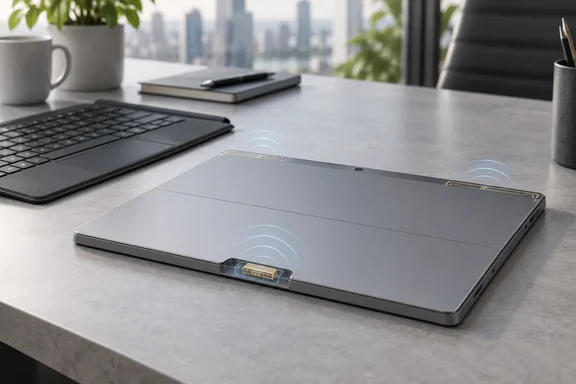
- Primary transmit antennas on the top edge. Engineers placed them away from the areas hands, the kickstand, keyboard and covers usually touch. The goal is steady 5G performance across the common 2-in-1 modes. Microsoft stresses that this layout suits this device's internal space and moving parts. It isn't a universal template.
- The closed-kickstand problem. Microsoft admits that with the kickstand fully shut and the device lying flat, signal performance can suffer. That's exactly the position you'd use for pen work on a desk.
- Antennas in the finger scoop. The fix was two extra antennas in the finger-scoop area, meant to boost reception when the kickstand is closed. From outside, the notch still opens the kickstand. Inside, it holds radio hardware.
This wasn't free. Microsoft says the notch still has to fit a fingertip, the kickstand still needs its full range of motion, and the antennas still have to work with the materials and dimensions of the finished chassis. Picture three engineering teams sharing a closet.
Microsoft's own wording is careful: the scoop antennas "supplement" reception and are "intended to help maintain" connectivity. That isn't a promise of perfect signal lying flat. The post also includes no measured signal figures, no test method and no before-and-after data. The design logic holds together, but the performance claims are Microsoft's account until independent testing appears.
Section summary: Main antennas on the top edge avoid your hands, and two antennas in the finger scoop cover the flat, kickstand-closed position. Microsoft hasn't published data showing how much difference they make.
One Module, Two Form Factors, One Motherboard
The less visible story is how much Microsoft reused. The company says:
- The 5G module is shared across form factors. The Surface RF team customized the RF front end (the circuitry between modem and antennas) around the Pro's antenna layout. They matched the 12-inch Pro's antenna architecture to the same RF front-end design used by the 5G module in another Surface form factor, so one module can serve both laptop and 2-in-1 designs. Microsoft doesn't name the other device.
- Each product still gets its own antenna tuning. Laptops and tablets have different room for antennas and are held differently, so the shared module sits inside a device-specific antenna system. On the 12-inch Pro, that means allowing for the kickstand's positions and for tablet-style handling.
- The Wi-Fi-only and 5G models share a motherboard. The cellular model has extra antenna requirements, so the two versions don't have identical antenna layouts. Engineers placed the Wi-Fi and NFC antennas in the same spots on both, which lets them use one motherboard design.
This is standard industry practice rather than anything unique to Microsoft. Shared modules and boards across SKUs mean fewer parts to validate, simpler supply chains, and often less firmware drift between models. IT shops that run mixed fleets usually benefit when a vendor limits hardware variation. Whether that shows up as fewer driver or firmware problems on these particular devices is something to watch in the field.
Section summary: Reuse happens at two levels: one 5G module across form factors and one motherboard across the Wi-Fi and 5G models. Antenna tuning is still done per device.
The Security Argument: Why Microsoft Links 5G to Hotel Wi-Fi
Microsoft's post ties built-in 5G to a real threat campaign. In a July 31, 2026 report on the Microsoft Security Blog, Microsoft Threat Intelligence described CaptiveCrunch. In that campaign, a group it tracks as Storm-2945, which it assesses as a sub-cluster of Midnight Blizzard, has been manipulating DNS and HTTP traffic on captive-portal networks since early May 2026. Traffic was sent through attacker-controlled infrastructure, which then served phishing pages and malware disguised as browser or operating system updates.
The report says hotels were hit, and cites ReliaQuest's finding that conference centers and other shared venues were affected too. Microsoft also said that some landing pages sent users into device code phishing flows aimed at Microsoft Entra ID.
That report's guidance is where 5G comes in. Microsoft advises travelers to treat hotel, conference, airport and other guest Wi-Fi as untrustworthy, and to prefer private connections, such as mobile hotspots, satellite, and eSIM-based cellular data, whenever practical. A tablet with its own cellular connection doesn't need the hotel's captive portal in the first place.
Built-in 5G gives you a different network path. It doesn't make the connection safe, for three reasons:
- Cellular traffic still depends on the carrier, the plan, and whatever the user does once connected.
- Phishing, token theft and fake "update" prompts don't care which network delivered them.
- Microsoft itself says connectivity choice is one part of a wider security approach that also includes endpoint protection, identity controls and network policy.
The CaptiveCrunch guidance also includes steps IT teams can use whether or not they buy 5G hardware:
- Block unmanaged Wi-Fi. On enterprise-managed Windows devices, organizations can prevent connections to Wi-Fi networks that weren't provisioned through MDM. Microsoft points to the AllowManualWiFiConfiguration setting in the Wi-Fi Policy CSP.
- Use managed travel routers or hotspots that set up encrypted tunnels back to corporate infrastructure before users touch sensitive resources.
- Never install updates, certificates or "security tools" offered by a captive portal. Check updates through the operating system's own update mechanisms instead.
- Don't reuse corporate credentials on guest-network registration pages.
- Tighten identity controls with passkeys, phishing-resistant MFA and Conditional Access. Train users to spot ClickFix-style "paste this command" prompts.
Section summary: Microsoft's threat research supports the case for skipping guest Wi-Fi, and 5G is one way to do that. It doesn't replace identity and endpoint controls.
What IT Teams Should Check Before Ordering
Microsoft's deployment advice is sensible and full of caveats. Start with where employees actually work and which networks exist there.
The device supports nano-SIM and eSIM for activating cellular service. Hotspot sharing for other devices depends on the carrier and plan. Microsoft notes that public 5G and compatible private 5G environments have different network, application and management requirements. It also says availability and performance vary by market, carrier, network, plan and configuration.
A practical pre-purchase checklist:
- Map coverage at real work sites, such as warehouses, clinics and customer premises, not just headquarters.
- Decide how you'll provision SIMs. eSIM makes remote activation easier. Nano-SIM may suit carriers or regions with limited eSIM support.
- Check hotspot terms before users start treating the tablet as the team's hotspot.
- Validate private 5G separately if you run a campus network, since the requirements differ from public carrier service.
- Buy the 5G model deliberately. Because both versions share a motherboard, the cellular antennas and module come from the 5G SKU. Don't expect to add them later.
Section summary: Coverage, SIM strategy and plan terms matter as much as the antennas. Check them site by site.
The Security Stack Around the Radio
Microsoft lists the security features that come with the connectivity: Windows 11 Secured-core PC protections, Microsoft Pluton with TPM 2.0, Surface UEFI with Patina and Rust-based firmware, Secure Boot, BitLocker, Windows Hello facial recognition with Enhanced Sign-in Security, and firmware and device policy management through DFCI and Microsoft Intune.
For admins, DFCI deserves the most attention. It lets Intune manage UEFI settings remotely. That matters more for a device that may spend weeks away from the office on its own cellular connection.
Is This Clever Engineering or Marketing?
Probably some of both, and the two aren't mutually exclusive. This is a vendor blog, part of a Microsoft series that has also covered Surface haptics and cameras, and it includes no independent measurements.
Still, the problem it describes is real. Putting antennas in a thin 2-in-1 that people grip, fold and lay flat is hard, and Microsoft's fix is a real design decision, not a marketing line. Microsoft says 5G was one of the most requested additions to this form factor. The finger-scoop antennas are a practical response to the one position where the design is weakest.
Two questions remain for early adopters: how well the 12-inch Pro holds a signal flat on a desk with the kickstand closed, and how carriers handle activation at scale. Those answers will come from field testing, not blog diagrams.
Bottom line: Microsoft's 12-inch Surface Pro for Business puts its main antennas on the top edge and backup antennas in the kickstand notch. It shares a 5G module with another Surface form factor and one motherboard across its own models. For mobile teams worried about compromised hotel Wi-Fi, it's a reasonable option once it reaches commercial customers on October 13, as long as IT treats it as another network path and not as a security control.
References
- Engineering for work in motion: How Surface designed 5G for a 12-inch Pro Surface IT Pro · 2026-09-30T20:07:33+00:00
- Microsoft Surface Pro 12” (2nd edition) 2-in-1 tablet PC arrives with fanless design and optional 5G cellular module - Notebookcheck News notebookcheck.net
- Introducing the next Surface Pro 12-inch and Surface Laptop 13-inch with Snapdragon X2 Plus: Greater performance that travels light blogs.windows.com