

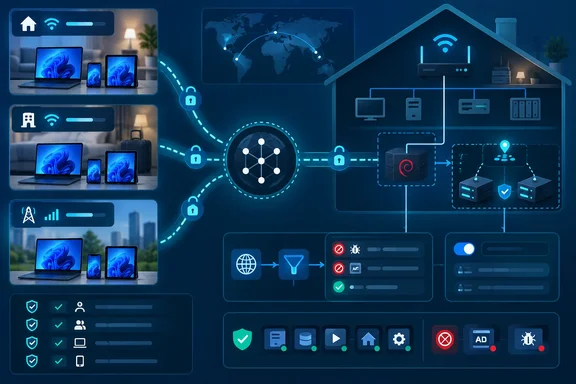
For a Windows user already running Technitium, Pi-hole, AdGuard Home, or another LAN-only filtering resolver, the design avoids publishing port 53 or a DNS-over-HTTPS endpoint to the internet. It also keeps local DNS records—such as names for a Caddy-hosted internal service—available remotely over the existing encrypted Tailscale connection. The catch is that this is not merely a toggle: the subnet router, routing policy, and DNS override determine whether the setup is secure, resilient, and actually filtering requests.
XDA’s account uses two clustered Technitium containers behind a Keepalived virtual IP address, but the approach applies just as well to one DNS server. Technitium’s own documentation confirms that it supports blocklist URLs, Docker deployments, clustering, and local recursive or authoritative DNS duties. Tailscale’s documentation separately confirms the missing link: a private nameserver that does not have a Tailscale IP normally needs subnet routing before remote tailnet devices can reach it.
The subnet router is the important architectural choice
Installing Tailscale directly on the DNS host is the most direct route. It gives the DNS service a Tailscale address and eliminates the intermediate router. For a single VM or bare-metal DNS server, that can be the better design, particularly when an administrator needs per-device DNS logs, client-specific policies, or distinct blocklists.
XDA instead retained the existing Technitium cluster and Keepalived virtual IP, placing Tailscale in a separate Debian LXC container that acts as a subnet router. Tailscale documents subnet routers as gateways for reaching devices that cannot—or should not—run the Tailscale client themselves. That makes the router an attractive fit for containers where adding a TUN device, a second network daemon, and a Tailscale package to every workload is unwelcome.
The practical benefit is that the remote device sends traffic to one stable LAN address: the Keepalived virtual IP. If Technitium node A fails, Keepalived can move the virtual IP to node B without requiring Tailscale DNS settings to change. The home-side DNS high-availability arrangement therefore stays intact.
There is a detail hidden in the phrase “advertise two IP addresses.” Tailscale route advertisements use CIDR prefixes, so advertising a lone IPv4 DNS virtual IP means advertising it as a host route, such as 192.168.1.53/32, rather than providing the address alone. The same applies to a single reverse-proxy host. Advertising only the necessary /32 routes is a sound least-privilege choice; advertising 192.168.1.0/24 would make every device on that LAN potentially reachable through the tailnet, subject to access rules.
That last qualification matters in a shared tailnet. A route tells clients where traffic can go, but Tailscale’s grants or ACLs decide whether the traffic is allowed. Route approval does not substitute for access policy. An administrator who exposes a home DNS virtual IP to a family tailnet may be comfortable with broad access; a small business or homelab with multiple users should explicitly limit which users and tagged devices may reach TCP and UDP port 53 on that address.
Override DNS changes behavior on every enrolled client
Tailscale’s DNS documentation is unusually direct about the default behavior: tailnet devices normally prefer their local DNS configuration. Adding a home DNS address in the admin console alone therefore does not guarantee that coffee-shop Wi-Fi or cellular DNS will stop being used for ordinary public lookups.
Enabling Override DNS servers changes that. Tailscale says clients will ignore local DNS settings and use the tailnet’s global nameserver configuration instead. This is what converts a remote-access arrangement into a mobile DNS-filtering arrangement. It is also why administrators should test the change before applying it across a broadly shared tailnet.
A global nameserver handles queries for every domain, so the configuration described by XDA routes both ordinary internet lookups and local DNS zones to Technitium. That is appropriate if the self-hosted resolver is intended to filter all DNS traffic and has reliable upstream resolvers. It also makes the home DNS service an availability dependency for every enrolled device whenever Tailscale is active.
There is a narrower option. Tailscale supports split DNS, called a restricted nameserver in its current documentation, where only a specific suffix such as home.example or internal.example.com goes to the private resolver. Split DNS preserves access to internal hostnames but does not force all public lookups through the home filter. For someone whose real requirement is remote access to local services—not uniform ad and tracker filtering—that smaller scope is safer and less disruptive.
Tailscale’s MagicDNS remains separate from a private DNS zone. MagicDNS automatically gives tailnet nodes names under the tailnet’s .ts.net domain, while Technitium can answer the local domain names created by the home administrator. The two can coexist, but MagicDNS is not a general replacement for the local records in Technitium. Tailscale’s documentation explicitly says arbitrary records cannot be added to MagicDNS.
The logging trade-off is real, not cosmetic
XDA correctly flags the operational compromise of the subnet-router model: Technitium sees the subnet router as the DNS client. Tailscale uses source NAT, or SNAT, by default for subnet-router traffic, so the DNS server records the router’s LAN IP address instead of the original Tailscale client.
That is fine for a personal blocklist deployment where the only question is whether a domain was blocked. It becomes a real limitation when an admin wants to know whether a particular Windows laptop, phone, or user account requested a domain, or when separate filtering policy must follow individual clients.
Tailscale supports disabling SNAT on Linux subnet routers, but it is not a free improvement. The LAN then needs a return route for Tailscale’s 100.64.0.0/10 address space through that router. Without it, the DNS server can receive a request carrying the client’s Tailscale address yet fail to send the reply back correctly. Adding Tailscale directly to each DNS host avoids the specific loss of log identity without changing LAN routing, although it moves more operational responsibility into those containers.
For many home setups, accepting the shared router identity is the sensible decision. The key is to recognize that a Technitium dashboard will no longer prove which client made a query. Tailscale’s own network flow logging or endpoint telemetry may offer separate visibility, but it does not restore a unique source address inside the DNS server’s logs.
High availability now has two layers
The submitted setup has DNS redundancy on the LAN, but it has only one path from remote devices into that LAN: the Tailscale subnet router. If that LXC container is offline, its Tailscale key expires, IP forwarding breaks, or its host is unavailable, remote clients cannot reach the Keepalived virtual IP even if both Technitium containers are healthy.
Tailscale documents the fix: deploy at least two subnet routers advertising the exact same route prefixes. Clients can select an available router and fail over when the active router disappears. Exact prefixes are important. One router advertising a DNS host as 192.168.1.53/32 and another advertising the broader 192.168.1.0/24 do not form the same high-availability set for that host route.
The route also has to remain authorized. XDA uses an autoApprovers policy so a rebuilt router can advertise its approved routes without a manual console intervention. Tailscale’s policy documentation confirms that auto-approval applies when a route is newly advertised; it does not retroactively approve an already pending route. Tags are usually the cleanest choice for an unattended subnet router, since route approval tied to an individual user can break when that account changes.
Disabling device-key expiry prevents a router from silently becoming unreachable after its key expires, but it reduces the protection offered by periodic reauthentication. Tailscale advises treating such routers as trusted infrastructure and revoking the device promptly if it is replaced or compromised. In a serious deployment, two tagged, tightly scoped routers are a better answer than treating a long-lived single container as permanent infrastructure.
DNS bypasses still defeat the filter
A home DNS filter only sees lookups that reach it. Windows users should check browsers that enable Secure DNS or DNS-over-HTTPS, because browser-managed encrypted DNS can bypass the operating system resolver and, therefore, the tailnet’s global nameserver. Android’s Private DNS setting can create the same outcome by sending requests directly to a configured DNS-over-TLS provider.
The appropriate troubleshooting order is simple:
- Confirm that the Tailscale client is connected and configured to accept Tailscale DNS settings.
- Confirm that the private DNS virtual IP is reachable through the approved subnet route.
- Confirm that the client’s application is using the operating system resolver rather than a separately configured DoH or DoT provider.
- Confirm that the DNS service’s blocklists are loaded and that the test domain is actually covered by them.
Linux deserves special attention because Tailscale does not accept subnet routes by default there. Tailscale’s current documentation says Linux clients require tailscale set --accept-routes, whereas Windows, macOS, Android, and iOS accept routes by default. Linux DNS can also fail when another network manager or a manually maintained resolv.conf overwrites the configuration Tailscale attempts to install.
The result is a genuinely useful pattern rather than a product announcement: self-hosted DNS filtering can leave the house without exposing a DNS service to the public internet. But the durable version of this configuration is not “one small container and one toggle.” It is a narrowly advertised DNS host route, a deliberately scoped tailnet policy, a second router for remote-path redundancy, and checks for browser or mobile DNS settings that would otherwise bypass the filter entirely.