

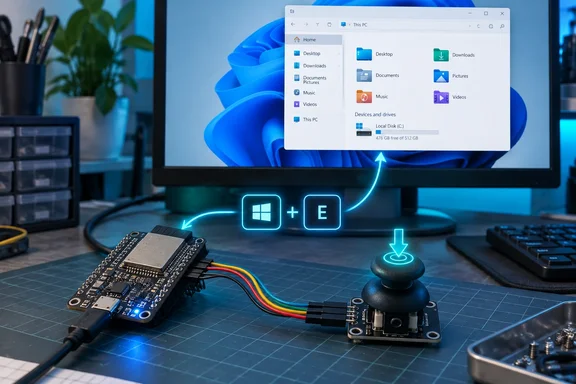
XDA writer Ayush Pande demonstrates the idea with a KY-023 joystick module and a Windows 11 PC. Pressing the joystick’s built-in switch sends Win+E, opening File Explorer. His reported experiment is simple, but it exposes an important distinction: uploading firmware to a development board and making that board behave as a USB accessory are not necessarily jobs for the same connector.
Native USB is the important ingredient
Espressif’s ESP32-S3 USB device stack is built around TinyUSB and supports HID, serial, MIDI, mass-storage and composite devices. Keyboard functionality is therefore a documented capability—not an improvised workaround. Each function still needs appropriate firmware; a keyboard sketch does not automatically become a joystick or storage drive.
There is also a hardware correction worth making. The ESP32-S3 chip does not guarantee that every development board has two USB connectors. Espressif describes two-port boards conditionally and identifies GPIO20 and GPIO19 as the native USB data connections. Check the particular board’s documentation rather than relying solely on a connector’s label.
The chip contains USB-OTG and USB-Serial-JTAG controllers, but they share one internal USB PHY—the circuitry handling the physical connection. They cannot both use that PHY simultaneously. An external USB-to-UART bridge is a different programming path, which helps explain the usefulness of a separate UART connector.
For this project, the PC is the host and the ESP32-S3 is the device. USB host examples, where the microcontroller controls an attached keyboard or mouse, address the opposite task.
What the joystick experiment actually uses
Pande’s wiring connects the joystick module’s switch output to GPIO6, with its analog outputs connected to GPIO4 and GPIO5. However, his sketch reads only GPIO6. Moving the stick sideways does nothing in this implementation; pressing it down triggers the shortcut.
The reported wiring is:
| KY-023 connection | ESP32-S3 connection | Purpose |
|---|---|---|
| GND | GND | Common ground |
| Supply terminal, labeled “5V” in the account | 3.3V | Reported module power connection |
| VRx | GPIO4 | Analog X output; unused by this sketch |
| VRy | GPIO5 | Analog Y output; unused by this sketch |
| SW | GPIO6 | Push-switch input |
Do not interpret the module’s “5V” label as permission to apply 5V to an ESP32-S3 GPIO. Espressif identifies its pins as 3.3V-tolerant. The reported supply arrangement is not a universal KY-023 compatibility guarantee: verify your module’s requirements and signal voltages before connecting it. Disconnect power while changing the wiring.
The source also does not identify the exact development-board model or Arduino-ESP32 core version used. Treat this as a board-dependent example, not a promise that every S3-branded board will work with identical settings.
The firmware: one button, one Windows shortcut
Espressif’s Arduino-ESP32 keyboard example confirms the essential ingredients: USB.h, USBHIDKeyboard.h, a USBHIDKeyboard object, and initialization through Keyboard.begin() followed by USB.begin(). Its example also warns when the sketch is built in the wrong USB mode.
Pande’s sketch uses that structure:
#include <Arduino.h>
#include "USB.h"
#include "USBHIDKeyboard.h"

USBHIDKeyboard Keyboard;

constexpr uint8_t JOY_SW_PIN = 6;
constexpr uint32_t debounceTimeMs = 60;

bool previousButtonState = HIGH;
uint32_t lastPressTime = 0;

void openFileExplorer() {
  Keyboard.press(KEY_LEFT_GUI);
  Keyboard.press('e');
  delay(50);
  Keyboard.release('e');
  Keyboard.release(KEY_LEFT_GUI);
}

void setup() {
  pinMode(JOY_SW_PIN, INPUT_PULLUP);
  Keyboard.begin();
  USB.begin();
  delay(1500);
}

void loop() {
  bool currentButtonState = digitalRead(JOY_SW_PIN);

  if (previousButtonState == HIGH &&
      currentButtonState == LOW &&
      millis() - lastPressTime >= debounceTimeMs) {
    lastPressTime = millis();
    openFileExplorer();
  }

  previousButtonState = currentButtonState;
  delay(5);
}
Microsoft documents Windows key+E as the File Explorer shortcut. The microcontroller sends those keys; Windows performs the action. There is no File Explorer API running on the board, and this sketch does not require a PC-side macro application.
One subtle point improves the explanation of the code: the HIGH-to-LOW transition test is what prevents a continuously held switch from repeatedly triggering the macro. The 60-millisecond condition rejects closely spaced press transitions.
That is basic debounce protection, not a full “wait until the input has remained stable” implementation. This distinction follows directly from the sketch: it checks elapsed time since the last accepted press, rather than measuring how long the current switch state has remained unchanged.
Uploading and testing on Windows 11
Start with Arduino IDE and Espressif’s Arduino-ESP32 board support already installed. You also need a data-capable USB cable, a board with an accessible native USB connection, and confirmation that GPIO6 is available for your switch.
For a two-connector board matching the reported setup:
- Select the correct board. Espressif documents board selection under Tools → Board → ESP32 Arduino. Match the actual hardware, including its memory configuration, rather than selecting another ESP32 family.
- Use USB-OTG mode for the keyboard firmware. Select USB-OTG (TinyUSB) where that option is exposed. Espressif’s keyboard example requires OTG mode.
- Keep the initial configuration simple. For this UART-upload, keyboard-only workflow, leave USB CDC On Boot disabled. Espressif documents that disabling CDC-on-boot with USB-OTG leaves
Serialon UART0; more elaborate USB configurations are unnecessary here. - Upload through the board’s documented UART connection. Pande reports selecting its port in Arduino IDE and flashing through that connector.
- Move the cable to native USB. After uploading, he disconnected the UART connection and attached the native USB connector to his PC.
- Test at the Windows desktop. Allow startup to finish, then press and release the stick. The expected result is File Explorer opening; holding the switch should not continuously retrigger it.
Pande reports that this sequence worked on his Windows 11 system. That is his test result, not an independent measurement of every board or software combination.
When the button does nothing
The most useful troubleshooting approach is to separate the firmware, USB connection and Windows shortcut:
- Compilation fails around USB keyboard support: Confirm the selected target is an ESP32-S3 and the sketch uses Espressif’s USB headers. Its official example explicitly checks native USB support and OTG mode.
- Uploading works, but keyboard behavior does not: Check the connector’s routing. Native USB uses the S3’s USB data pins; a programming connector is not automatically that connection.
- Windows receives the wrong action: First test Win+E on your ordinary keyboard. Microsoft notes that applications can alter some shortcut behavior.
- Moving the joystick does nothing: That is expected from this sketch. It never reads the analog axes.
- One press produces multiple actions: Inspect the switch wiring and reconsider the debounce logic. The example’s timing check does not establish a continuously stable input state.
Where the idea becomes useful
Pande suggests expanding the project with more buttons, axis-driven actions or a touchscreen. Those are proposed extensions, not features demonstrated by the example.
Changing the shortcut to Ctrl+Z is conceptually straightforward, but its effect depends on the active application. Microsoft identifies it as Undo and cautions that shortcut behavior can vary between applications. A programmable button knows which keys to send—not which document you intended to change.
The strongest takeaway is modest and practical: native USB lets an ESP32-S3 turn a physical input into a familiar PC input device. File Explorer is merely the first demonstration. Before building a desk full of custom controls, get one button working reliably—and remember that firmware capable of typing deserves the same trust scrutiny as anything else you connect to your keyboard input path.
References
- An ESP32-S3 can pretend to be a "normal" USB device, and it's one of the most useful tricks it can pull XDA · 2026-10-02T15:01:17+00:00
- USB Device Stack - ESP32-S3 - — ESP-USB Programming Guide latest documentation docs.espressif.com
- USB-OTG Peripheral Introduction - - — ESP-IoT-Solution latest documentation docs.espressif.com