

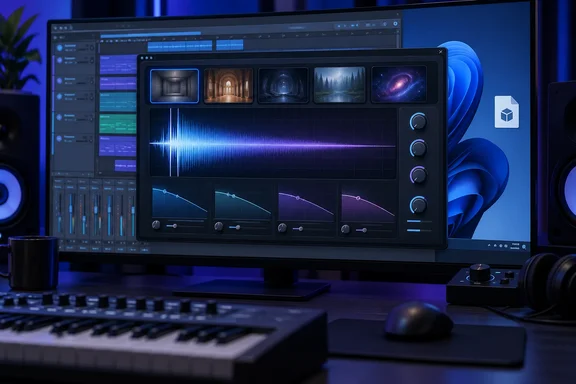
Here's what Ultiverb 1.1.0 does, what it needs, and what to check before you put an unsigned DLL-style plug-in on a production machine.
What Libelula Audio released
Bedroom Producers Blog reported that Libelula Audio has released Ultiverb, a free algorithmic reverb plugin for Windows. The blog admits that free reverb plugins are hardly rare these days. It covered this one anyway because it packs an unusually broad range of sound-shaping tools into a single reverb plugin.
The licensing is simple. Ultiverb is proprietary freeware and can be used for personal and commercial music production. KVR Audio's product database lists it as "free forever" and describes it as designed to combine flexible spatial processing with stereo movement and analog-inspired character.
Summary: Ultiverb 1.1.0 is a free, closed-source algorithmic reverb that you can use in commercial work. It's aimed at people who make music on Windows.
Platform boundaries: Windows x64, VST3, nothing else
This is the first thing to check. According to Bedroom Producers Blog, Version 1.1.0 is available exclusively as a 64-bit VST3 plugin for Windows; there are currently no macOS, Linux, AU, AAX, VST2, or standalone editions.
What that means for you:
- Pro Tools users are out of luck. There's no AAX build.
- Older 32-bit hosts and VST2-only hosts won't see it.
- There's no standalone app for quickly auditioning sounds outside a DAW.
- Mac and Linux users have to wait, and nobody has given a date.
KVR's listing doesn't agree with itself. One version of the page says Ultiverb is a Virtual Effect Audio Plugin for macOS, Windows and Linux, while the same page says Ultiverb is currently available for Windows 64-bit VST3 hosts. At least one KVR user noticed. A Linux reviewer asked why the listing claimed Linux support when the plug-in page states it is "Windows x64 VST3 only; no macOS or Linux build is included." Go with the Windows-only description for 1.1.0 and treat the other platform tags as a database error.
Summary: You need 64-bit Windows and a VST3 host. If you're not sure your DAW loads VST3, check before you sign up.
The reverb engine: five spaces and a wide decay range
At its core, Ultiverb is a traditional algorithmic reverb. The reverb engine provides five algorithms: Room, Hall, Plate, Spring, and Digital. The usual Decay, Size, Pre-delay, Diffusion, Early Reflections, Damping, Width, and Mix controls let you shape the basic space, with decay times ranging from 0.2 to 20 seconds.
That covers everything from a tight 200 ms room on a snare to a 20-second tail for ambient pads. The developer also named four "Flavor" modes after dragonflies, which fits a company whose name is Spanish for dragonfly:
| Flavor | Reported character |
|---|---|
| Odonata | Starts focused, then opens across the stereo field |
| Anisoptera | Emphasizes color and midrange presence |
| Meganeura | Wider upper-frequency halo, lows kept centered |
| Clean | Removes the additional coloring |
Bedroom Producers Blog's description: Odonata starts focused and opens out across the stereo field, Anisoptera emphasizes color and midrange presence, Meganeura creates a wider upper-frequency halo while keeping the lows centered, and Clean removes the additional coloring.
The mix-friendly extras
A lot of free reverbs give you a nice tail and then leave you to fix the mud afterwards. Ultiverb has several tools for keeping the reverb in check.
Multiband decay
Ultiverb also provides independent decay control across low, mid, and high frequency regions. In the blog's words, this keeps bass frequencies from lingering while allowing the upper part of a pad, vocal, or piano to continue ringing. Normally you'd get that result by putting an EQ after the reverb. Here it's built into the decay itself.
Memory and Bloom
The Memory function lets the input's recent tonal balance influence the reverb character. Bloom briefly holds back the wet signal after attacks, allowing the tail to swell in without covering the initial transient. Bloom should help most on vocals and plucked instruments, where a reverb that hits all at once can blur the attack.
Fluctuate and the LFO
Fluctuate adds evolving differences between the left and right channels. Its Drift, Wander, Tape, Components, and Supply Sag modes cover slow instability, pitch movement, tonal variation, and reactive dynamics. KVR adds that Speed and Inertia control the behaviour and movement of the stereo image. A separate LFO can modulate tail pitch, wet pan, wet level, damping, drive or stereo width, and it can run free or sync to the host tempo.
Ducking, EQ, and saturation
Ducking can follow the plug-in's own input or an external sidechain. You get attack, release, ratio, detector gain and detector filters. Two four-band EQs shape the signal before and after the reverb, and separate Dry and Wet saturation sections each offer Clean, Soft, Tape, Tube and Clip modes. KVR says two four-band EQ stages dedicated to the wet signal are part of the design.
Workflow features
Bedroom Producers Blog also lists A/B comparison, undo and redo, a delta listening mode, user presets, a dry/wet spectrum display, and up to 16x oversampling for the nonlinear processing. Version 1.1.0 comes with 21 presets plus a neutral INIT patch.
About the oversampling: nobody has published CPU figures. If you run lots of instances on a laptop, test the oversampling settings in your own sessions before you trust them on a heavy project.
Summary: This is a lot for a free plug-in. Multiband decay, ducking and separate dry and wet saturation would normally mean running several plug-ins in a chain.
Getting it: account, mailing list, manual install
According to Bedroom Producers Blog, you download Ultiverb like this:
- Enter your email address.
- Accept the mailing-list subscription. It's part of the deal, not an optional extra.
- Verify a free Libelula Audio account.
- Download the plug-in. The blog says no payment details are requested and the plug-in doesn't need activation after installation.
What you get isn't an installer. It's a single unsigned VST3 file that you copy by hand into the common Windows VST3 folder, then rescan plug-ins in your DAW.
The common folder is the shared location defined by Steinberg's VST3 conventions, normally C:\Program Files\Common Files\VST3. (That path comes from general industry practice, not from the Ultiverb documentation.) Writing to Program Files needs administrator rights, so expect a UAC prompt when you paste the file.
The unsigned-file problem
Bedroom Producers Blog warns that Windows security policies may block unsigned plug-ins. A VST3 is executable code that runs inside your DAW's process, so this deserves more thought than a shrug. Some sensible steps, based on general Windows administration practice rather than any vendor guidance:
- Only download from Libelula Audio's official site. Don't grab mirrored copies from forums or file lockers.
- Scan the file with Microsoft Defender or your usual antivirus before you copy it into the VST3 folder.
- Don't switch off system protections such as Smart App Control or your organization's application-control policies just to load a free reverb. If your managed studio PC blocks the file, that's a conversation with your IT admin, not something to work around.
- If the plug-in doesn't show up after a rescan, check that you copied the
.vst3file into the right folder, that your host scans that path, and that you're running a 64-bit host.
Summary: Plan for about five minutes of manual setup, plus some thought about whether your security policy allows unsigned code.
The verdict so far
Is Ultiverb worth a spot in your plug-in folder? The feature list is strong: multiband decay, transient-friendly Bloom, sidechain ducking and separate saturation are all things plenty of paid reverbs don't offer together. Early reactions are positive, but there's very little to go on. KVR's only user review for 1.1.0 on Windows gives it five stars, and there's no independent side-by-side testing with established reverbs yet.
There are real trade-offs too:
- Windows x64 VST3 only. That rules out Mac users, Pro Tools users and anyone still on VST2.
- Your email goes on a marketing list. "Free" here means you pay with your inbox.
- An unsigned binary could run into security tools on locked-down or corporate-managed machines.
- Version 1.1.0 is new. There's no track record yet on updates or long-term support.
If you produce music on Windows and you're happy doing a manual plug-in install, Ultiverb looks worth trying. Just keep your security settings as they are.
References
- Libelula Audio releases Ultiverb, a feature-packed FREE reverb for Windows - Bedroom Producers Blog Bedroom Producers Blog · 2026-09-27T14:04:39+00:00
- Ultiverb by Libelula Audio - Reverb Plugin VST3 kvraudio.com
- Ultiverb by Libelula Audio - Reviews kvraudio.com