

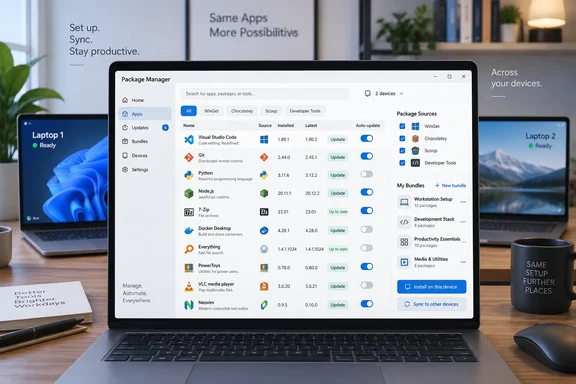
XDA’s João Carrasqueira describes using UniGetUI to consolidate application updates and reproduce an app setup across two laptops. That experience highlights two useful features: managing packages from different sources together and saving selected applications into reusable bundles. It does not establish that every Windows application can be updated through the tool.
What UniGetUI adds—and what WinGet already does
Microsoft’s Windows Package Manager is more capable than the phrase “basic app updater” suggests. Microsoft documents WinGet as supporting application discovery, installation, upgrades, removal, and configuration on Windows 10, Windows 11, and Windows Server 2025. It also provides export, import, and package-pinning commands.
UniGetUI’s distinction is the interface and breadth of integrations. Its Windows support includes WinGet, Chocolatey, Scoop, Windows PowerShell, PowerShell 7, npm, pip, and.NET tools, among others. Its project documentation also confirms macOS and Linux builds, although available managers differ by platform.
That makes it particularly interesting for people whose software extends beyond ordinary desktop applications. A developer or administrator may have applications in one ecosystem and command-line tools or PowerShell modules in another.
The practical conclusion is narrower than “manages all my apps”: UniGetUI centralizes supported package ecosystems. Coverage still depends on those ecosystems and the packages they contain. Its own documentation warns that packages come from third parties and recommends reviewing sources and publishers before installation.
Automation now offers more selective control
UniGetUI’s latest listed release, version 2026.3.0, was published on September 15, 2026. Its official release notes document scheduled maintenance for update checks, automatic update installation, and local or cloud backups, with separate schedules, retries, and timeouts. The release also adds the ability to select individual packages for automatic updating instead of applying automation indiscriminately.
That distinction matters. Detecting updates and authorizing installation are different decisions. Our practical recommendation is to start with notifications, then enable automatic installation selectively after confirming that the relevant applications tolerate unattended upgrades.
There are also useful reliability fixes. Version 2026.3.0 addresses WinGet detection and update checks on non-English Windows installations, detection when WinGet is absent from the system path, and updates being under-reported during the initial scan. These are documented fixes, not a promise that every installation problem has disappeared.
Bundles are installation recipes, not full backups
Carrasqueira reports successfully installing the same application selection on two laptops using bundles. He also describes exporting a PowerShell installation script. Those are his reported results; they should not be mistaken for independent WindowsForum testing.
The project’s command-line documentation provides firmer detail about bundle contents. Packages can be associated with a manager, source, version, and installation scope. UniGetUI documents bundle export, package addition and removal, and installation through its shared operation pipeline.
The meaningful benefit is a reusable, selected package list across supported managers. It is not equivalent to restoring an entire PC, application settings, documents, or licenses.
WinGet also deserves a fair comparison. Microsoft says winget export attempts to match installed applications against available sources—not merely applications originally installed through WinGet. Unmatched applications generate warnings. The resulting JSON can be edited to remove unwanted entries, and winget import supports batch installation. Export can also include installed versions.
The difference is cross-manager flexibility and graphical selection, not the existence of a migration feature.
Setup and troubleshooting still matter
XDA notes that some underlying managers require additional installation or configuration. UniGetUI’s CLI documentation likewise exposes manager enablement, executable overrides, source management, and capability information—evidence that those integrations remain distinct components rather than disappearing into one replacement engine.
A sensible approach is to enable only the ecosystems you actually use, verify one installation or update, and then expand your setup.
For WinGet failures, Microsoft identifies App Installer availability and command-path issues among troubleshooting considerations. It also warns that running installations from an administrator command prompt removes individual elevation prompts, making trusted package selection especially important.
There is a separate download precaution: UniGetUI’s repository explicitly warns about unofficial lookalike websites. Use the project’s recognized distribution channels rather than assuming that a familiar-looking name establishes authenticity.
Company backing is context, not a security guarantee
Devolutions announced its acquisition of UniGetUI on March 10, 2026, committing to keep it open source under the MIT license. The company reported more than 300,000 monthly active users and promised structured oversight and operational support. That audience figure is Devolutions’ own metric, not an independently audited count.
Its announcement also described centralized catalogs and policy-based enforcement as planned enterprise capabilities. A shared bundle should therefore not be confused with established fleet governance.
The September release documents hardening against command injection in PowerShell-based package operations and unsafe settings imports. Those are concrete improvements, but they do not certify every third-party installer.
UniGetUI’s strongest case is convenience with visible control: fewer separate workflows, selective automation, and reusable package selections. The sensible goal is not to replace every updater on a PC. It is to make the package-management tools you already need easier to operate—and harder to forget.
References
- I replaced Windows' app updater with one tool that actually lets me manage all my apps XDA · 2026-09-30T18:00:17+00:00
- Devolutions Acquires UniGetUI, Strengthening Security devolutions.net
- Use WinGet to install and manage applications | Microsoft Learn learn.microsoft.com