

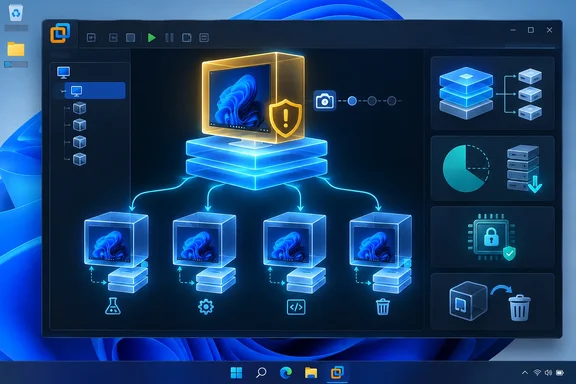
The important qualification is that this is a lab and testing workflow, not a replacement for independent backups or a general-purpose Windows deployment method. A linked clone remains dependent on its parent VM and the snapshot it was created from. If those backing files are deleted, moved incorrectly, or damaged, the child VM is no longer usable.
VMware’s Workstation documentation describes linked clones as ongoing disk-sharing relationships: the clone sees the parent’s disk state as it existed at snapshot time, while its later changes go into its own delta disk. Those changes do not flow back to the parent, and later changes to the parent do not update existing clones. A full clone, by comparison, is an independent copy that no longer needs its source VM.
Why the storage savings can be substantial
The MakeUseOf writer reported a roughly 23.6 GB parent Windows VM and five role-specific linked clones consuming about 32.3 GB in total. The early clones were tiny because they contained mostly configuration data and an initially small delta disk rather than another complete copy of Windows.
That is the real advantage of the approach. A single patched baseline can carry Windows itself, VMware Tools, and a modest set of common utilities; each child then stores only its own browser profile, application installs, updates, documents, and configuration changes.
The savings diminish over time. Delta disks grow whenever a clone changes blocks on its virtual disk, so installing large applications, applying cumulative updates, downloading test data, or using the VM extensively can make a linked clone much larger. But the clone still avoids duplicating the unchanged operating-system blocks held by the parent.
The same principle also explains why deletion is so useful for disposable workloads. A test VM infected with unwanted configuration changes, cluttered with files, or filled with experimental tools can be shut down and removed. Creating a replacement linked clone restores the snapshot baseline far more quickly than repairing the old guest or reinstalling Windows.
The parent snapshot is the asset that matters
Before creating linked clones, the parent should be treated as a controlled reference image rather than as an everyday personal Windows desktop. It needs current patches, the intended baseline applications, and no personal files, browser sessions, stored passwords, developer tokens, recovery material, or work documents.
A sensible parent can include:
- A fully patched Windows installation and current virtual hardware integrations.
- A limited set of broadly useful utilities that belong in every lab guest.
- The Windows settings that should be common across every clone.
- No test artifacts that would be inappropriate to reproduce repeatedly.
The snapshot is the dividing line. Every clone created from it starts with precisely that state. If the parent later receives Windows updates or a newer browser version, already-created clones do not inherit them. Administrators need to update the parent, create a new baseline snapshot, and build replacement clones where the revised state is needed.
VMware Workstation’s Template Mode is useful here. It is intended to protect a parent VM used for cloning by preventing accidental deletion of the VM and its snapshots. It does not make the clones nonpersistent: a linked clone keeps its own applications, settings, and files until it is deleted.
Encryption and virtual TPMs complicate the design
The most consequential limitation in the submitted report is VMware’s restriction on encrypted parents. Workstation documentation states that a linked clone cannot be created from an encrypted virtual machine. This commonly affects Windows 11 VMs because adding a virtual TPM can require VMware-level encryption or partial encryption of VM files.
Removing VMware encryption or a virtual TPM merely to enable linked cloning should not be treated as a routine housekeeping step. It can change the security model of the guest, particularly when Windows uses BitLocker or Device Encryption tied to TPM-based protectors.
Microsoft documents that manage-bde -status can show a volume’s encryption and protection status, while manage-bde -protectors -get C: lists the available protectors. A recovery password should be retained before altering TPM-related protections. Removing the wrong protector, or changing virtual TPM hardware without recovery information available, can result in a BitLocker recovery prompt at the next boot.
For a disposable, offline testing VM, accepting a non-encrypted parent may be a reasonable trade-off. For a VM containing confidential data, credentials, corporate material, or security-sensitive tools, that trade-off is much harder to justify. In those cases, full clones or separate encrypted VMs are the safer design.
Cloning a logged-in Windows installation also needs care
The MakeUseOf workflow renamed each child VM after its first boot, which avoids duplicate computer names. That is helpful, but it is not the entire preparation process for a Windows image intended for repeated deployment.
Microsoft’s supported image-deployment guidance says Windows should be generalized with Sysprep before it is copied to new computers. The /generalize option removes computer-specific information, including the machine security identifier, and the next boot proceeds through Windows’ specialize or Out-of-Box Experience stages. Microsoft specifically says copying an installation to a different computer without Sysprep /generalize is unsupported, even if the hardware is identical.
For a personal, isolated desktop-virtualization lab, many people clone a configured VM directly because all guests run on the same host and are not being used as managed endpoints. But the boundary should be clear:
- Direct linked cloning can be convenient for isolated and disposable personal labs.
- A Windows image used for organizational deployment, domain use, or wider reuse should be generalized and designed as a deployment image.
- A clone that carries an existing Microsoft account session, browser profile, SSH keys, VPN certificates, licensed software state, or cached credentials is not a clean test machine.
Sysprep also has workflow costs. It resets parts of the installation and may complicate an image that contains Store-app updates or a heavily personalized user profile. That makes it valuable to decide at the outset whether the VM is a private test baseline or a reusable deployment image. Trying to turn one into the other after months of personal use is usually where avoidable problems begin.
Linked clones do not solve licensing or resource limits
A VM appearing activated after it is cloned is not evidence that cloning creates new Windows rights. Windows activation and licensing depend on the edition, license channel, account or organization entitlements, and virtualization scenario. Microsoft documents inherited activation for defined Windows Enterprise subscription arrangements on Hyper-V, but that is not a blanket entitlement for VMware Workstation clones.
Each guest should have a valid licensing basis for its intended use. Activation can also change after hardware-identification checks, licensing-service refreshes, or changes to the VM configuration.
Disk space is only one resource. Five VMs may collectively occupy little storage while still requiring substantial RAM and CPU when active. Five guests configured with 6 GB of memory each cannot realistically run together on a 16 GB host without severe memory pressure. Linked clones share virtual-disk ancestry; they do not pool RAM, processor capacity, or GPU resources.
A good fit for short-lived Windows work
This model works best where rapid replacement is more valuable than preserving a machine indefinitely:
- Browser and web-application testing with clean profiles.
- Software evaluation without polluting a primary VM.
- Network-tool or packet-analysis labs separated from writing and productivity work.
- Training environments where students or administrators need repeatable starting states.
- Destructive testing that ends with deleting the guest rather than troubleshooting it.
It is a poor fit for a VM that must be portable, independently archived, long-lived, or secured with a TPM-backed encryption design. A linked clone can be fast and storage-efficient precisely because it is not self-contained.
The practical takeaway is simple: build the golden VM deliberately, protect its snapshot and backing files, keep sensitive data out of the baseline, and use linked clones for workloads that are genuinely disposable. With those boundaries in place, VMware Workstation linked clones can turn one well-maintained Windows installation into a compact collection of specialized test PCs.
References
- I made one perfect Windows install, and now I clone it whenever I need a fresh PC MakeUseOf · 2026-09-20T17:30:15+00:00