

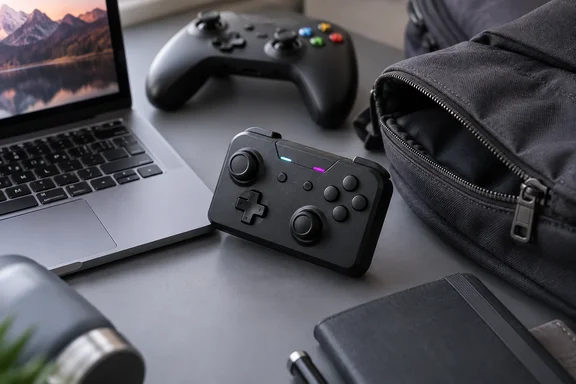
For Windows players the real question is narrower than "is it good?" It's whether a pocket pad can stand in for a proper PC controller, and what you give up if it does.
What the Skylark S1 Pro is
Voidjoy is a new controller-only sub-brand from JSAUX, the company best known for Steam Deck and handheld accessories. According to JSAUX's September 1 press release, the company officially launched two products from VOIDJOY, its controller-focused sub-brand: the VOIDJOY SkyLark S1 Pro Portable Controller and the VOIDJOY Elite Extender for Switch Pro Controller. The lineup was then showcased at IFA 2026 in Berlin from September 4 to 8. JSAUX's product page lists the S1 Pro (model GC-P01) at $49.99 and says shipping begins in late September.
Digital Foundry describes a boxy 133 x 75 x 24 mm body with two staggered low-profile sticks, triggers placed inline with the shoulder buttons, and mode controls along the front edge. The main hardware points:
- Sticks: TMR (tunnel magnetoresistance) sensors in recessed housings. Basic Tutorials notes this type of stick is said to be more drift-resistant and durable than potentiometer sticks.
- Triggers: optical linear triggers with a switch for about 4 mm of travel (full analog) or about 2 mm (quick actuation). JSAUX cites 1,280-step sampling.
- Buttons: membrane face buttons rather than clicky microswitches, which Digital Foundry points out. JSAUX's spec sheet lists the ABXY buttons as pressure-sensitive.
- Extras: six-axis motion, dual HD rumble, RGB indicators, and ML/MR back buttons for mapping and macros.
- Power: a 1,000 mAh battery. JSAUX estimates about 10 hours of play and about 3 hours to charge over USB-C. Those are the manufacturer's figures, not review measurements.
The reported weight doesn't agree across sources. JSAUX's spec sheet says 113 g. ROG Ally Life's launch coverage described a 104g portable controller, and Pocket Tactics quotes both 104 g and 105 g in the same review. Either way it's featherweight.
Section summary: a $49.99 pocket controller with TMR sticks, switchable optical triggers, gyro and back buttons. The weight is somewhere between 104 g and 113 g, depending on who you ask.
Windows PC support vs. Xbox console support
The Windows detail that matters most is simple. The S1 Pro works with Windows PCs, but it does not work with Xbox consoles. JSAUX's press materials say it supports Windows, Nintendo Switch, Nintendo Switch 2, SteamOS, Android, and Apple devices. The controller is not compatible with PlayStation 5 or Xbox consoles.
JSAUX's operation guide explains the PC side:
- Three connection types: Bluetooth, 2.4 GHz via the included USB-A receiver, and USB-C wired. JSAUX claims 1,000 Hz polling over both wired and 2.4 GHz.
- Bluetooth modes: X mode presents the pad as an Xbox-style (XInput) controller to PCs, Android and iOS. D mode uses generic DInput. S mode pairs with Switch hardware as a Pro Controller. T mode is touchscreen mapping for Android.
- Wired quirk: the guide says to connect the cable while the controller is switched off. The controller then auto-detects a compatible mode, or you can force one by holding the matching face button while plugging in. JSAUX recommends wired mode where interference is a problem or you want the highest polling rate.
- Receiver firmware: JSAUX tells owners to update the 2.4 GHz receiver's firmware by plugging it into a PC and running its update tool.
- Software: the KeyLinker app, which the guide says is available from the Microsoft Store as well as the Apple and Google stores, handles button mapping, stick dead zones and sensitivity, trigger sensitivity, vibration, macros, turbo, lighting, firmware and controller testing.
JSAUX adds that available features depend on the host device, OS, connection mode and game. Linear trigger behaviour in particular may not be available in every mode or game. If your triggers seem to behave digitally in a PC game, check the connection mode first.
Section summary: on Windows, use XInput (X mode) for the widest game support, and use wired or 2.4 GHz if polling rate matters. Don't buy it expecting it to work on an Xbox Series console.
How it plays, according to Digital Foundry
Reviewer William Judd spent a week with the controller. Most of that was on PC with Hades 2 and Tokyo Xtreme Racer, plus Switch 2 sessions of Fire Emblem Engage. He also tried Red Dead Redemption 2 but doesn't report a result.
Hades 2: the stubby sticks were surprisingly usable for clearing rooms and fighting bosses. The shape is far from ergonomic, but he reports no hand fatigue over several runs, about an hour of play before a break.
Tokyo Xtreme Racer: this exposed the biggest flaw. Holding the trigger down for minutes at a time became uncomfortable because the small, angular trigger dug into his fingertip. Travel is short, so feathering the throttle and brake is harder than on a full-size pad. It is still possible, though, which puts it ahead of the many Switch controllers with digital-only triggers, and it beats touch controls for racing.
Fire Emblem Engage: the d-pad and face buttons held up. The usual Switch label swap (A/B and X/Y reversed compared with Xbox) took some adjusting. He calls the d-pad fine but well short of premium pads like the Xbox Elite or SteelSeries Aeon Pro. Turbo made the repetitive training challenges easy.
His verdict: the best miniature controller he has tested and good value for the hardware at $50, but not something he'd pick over a full-size controller for home use.
A second opinion on comfort
Comfort is personal, and a second review shows that. Pocket Tactics' Sam Comrie reported that after around 30 minutes or so using the Skylark S1 Pro, my hands began to feel those familiar cramping signs. That's about half the fatigue-free time Digital Foundry reported. Pocket Tactics also found the plastic build sturdy but a little cheap-feeling, and concluded that the design makes it less comfortable for longer sessions, limiting its appeal as an everyday controller.
Hand size, grip style and genre probably explain the difference. Both reviewers agree on the shape of the trade-off: a pocket controller is built for short sessions, not marathon evenings.
It also has competition. Basic Tutorials points out that the market is already home to long-established specialists such as 8BitDo, GameSir, and GuliKit, and several outlets compare its block design to the 8BitDo Lite.
Switch 2 setup: wake support only works over Bluetooth
Digital Foundry confirmed the S1 Pro works docked and handheld on Switch 2. For handheld play without the dock you'll need a USB-A to USB-C adapter for the receiver. Wake-from-sleep also worked "after going through the specific setup procedure," but the review doesn't say which connection it used. JSAUX's guide fills that gap. Remote wake works only through a dedicated Bluetooth mode, not the 2.4 GHz receiver or USB, because the Switch 2's USB ports are unpowered while it sleeps.
The pairing procedure, per JSAUX's operation guide:
- On the Switch 2, open the controller search screen.
- Power on the S1 Pro in Bluetooth mode on channel D1, then switch it to S mode.
- Hold the Bluetooth pairing button until the dark blue indicator flashes quickly.
- When pairing completes, detach the Joy-Con 2 from the console within 20 seconds so the wake information can be copied.
- Put the console to sleep and try waking it with the S1 Pro.
If wake fails: go to Settings > Controllers & Accessories > Disconnect Controllers on the Switch 2, disconnect everything, and repeat the steps. JSAUX notes that wake setup only works on Bluetooth channel D1.
The co-op swap button
Digital Foundry mentions a button that lets you take over your co-op partner's controller but didn't test it. JSAUX says it works with two S1 Pros paired to one 2.4 GHz receiver. The host still sees two separate gamepads, and pressing Fn plus the 1P↔2P button swaps the player assignments without pausing or re-pairing. According to ROG Ally Life's reading of the guide, Only one receiver goes in the host; plugging in the second one can interfere with pairing. The feature doesn't work over Bluetooth.
Who should buy it?
Our view, based on both reviews and JSAUX's own specs:
| If you... | The S1 Pro makes sense? |
|---|---|
| Play PC games on a laptop or handheld while travelling | Yes. It's pocketable and supports XInput and 1,000 Hz polling |
| Want one pad for PC, phone and Switch 2 | Yes. Multi-platform support is its main selling point |
| Mostly play racing games with long throttle holds | Probably not. The trigger comfort problem is well documented |
| Play for hours at a desk | No. Both reviewers would pick a full-size controller |
| Want a controller for an Xbox console | No. JSAUX says Xbox consoles aren't supported |
Is the S1 Pro a revolution? No. It's a well-executed compromise, like the travel toothbrush of controllers: useful when you're away, but you won't swap your full-size pad for it at home. Digital Foundry found it good at being small. Pocket Tactics agrees on the specs but found the ergonomics cost more. If a controller that fits in your pocket is what you need, both reviews suggest the S1 Pro is worth considering. Everyone else can get a full-size controller for the same $50.
References
- Review: Voidjoy Skylark S1 Pro: This Tiny Switch 2, PC and Mobile Controller Packs a Punch - Digital Foundry Digital Foundry · 2026-09-26T18:00:00+00:00
- VOIDJOY SkyLark S1 Pro Portable Controller jsaux.com
- Voidjoy Skylark S1 Pro controller review - an impressive controller with one big problem - Pocket Tactics pockettactics.com