

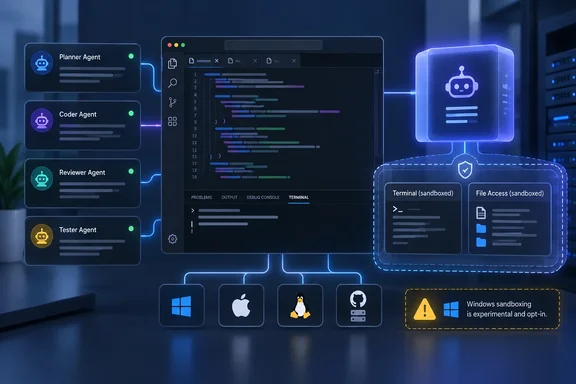
This release is mostly about AI agents. Microsoft lists four themes: managing agent sessions, protecting agent workflows, editing columnar text, and working across GitHub Enterprise instances. NT Compatible called it "a consolidating release that doubles down on VS Code's pivot from a code editor to a control center for code-writing agents." That's a fair description. One editing feature does stand out for people who never open the chat panel, and it's covered further down.
The Copilot harness and the Agent Host
Many of the 1.141 features depend on the Copilot harness. Microsoft says it is built on the Copilot SDK so it behaves the same way as the standalone GitHub Copilot app and the Copilot CLI. You choose it from the harness picker in the chat input, and in this release it may already be your default. It runs in a separate Agent Host process that uses the Agent Host Protocol (AHP), so more than one VS Code window can connect to the same agent session.
NT Compatible explains why that matters: the Agent Host decouples the session from the window that spawned it, so you can close the folder, close the window, and come back later without losing state.
Enterprise administrators should note what Microsoft says about rollout. The harness is gradually becoming the default for enterprise users who have VS Code experiments turned on. During the transition, VS Code converts supported legacy policies into unified managed settings at runtime where it can. That conversion only covers sessions on the same machine, and it doesn't change your policy configuration. Microsoft still wants organizations to move to unified managed settings so that one policy covers VS Code, the GitHub Copilot app and Copilot CLI.
Section summary: The harness runs agent sessions in a separate process, apart from the editor window. Enterprises should plan their policy migration now rather than rely on the runtime translation.
Sandboxing: useful, with caveats
Microsoft's release highlights describe "cross-platform sandboxing" that limits agent access to files and network resources on Windows, macOS and Linux. According to the notes, it reduces the damage from model mistakes, prompt injection, untrusted dependencies and locally launched tool servers. Microsoft also says plainly that it is an extra layer. It doesn't replace endpoint security and isn't a standalone security boundary.
The Agent Host sandboxing documentation, dated the same day, adds several details the highlights leave out:
- It's off by default.
chat.agent.sandbox.enabledacceptsofforonand defaults tooff. - Turning it on doesn't block the network.
chat.agent.sandbox.network.allowNetworkdefaults totrue, so outbound connections still go through unless you change that setting or use the domain allow and deny lists. Local-network access (allowLocalNetwork) defaults tofalse. - Windows support is Experimental. The docs label it that way and list required OS updates: KB5124008 for Windows 11 24H2 and 25H2, and KB5124012 for Windows 11 26H1, both from the September 8, 2026 security release. Some coverage describes the feature as generally available. NT Compatible's summary said 1.141 makes cross-platform sandboxing generally available in the Copilot agent host across Windows, macOS, and Linux. Microsoft's own documentation is the better guide, and on Windows it still says Experimental.
- Linux and WSL2 need packages. You need
bubblewrapandsocat. WSL 1 isn't supported. macOS needs nothing extra. - The execution host is the one that counts. For remote sessions, prerequisites, settings and file paths all apply on the remote host where Copilot runs commands, not on your laptop.
- The scope is limited. The sandbox covers terminal commands and their child processes, plus MCP and language servers that the Agent Host launches when sandboxing is on. Built-in tools that don't start OS processes use their own permission checks. A sandboxed process still runs under your user account.
- There's an escape hatch.
chat.agent.sandbox.allowUnsandboxedCommandsdefaults totrue, so the agent can ask to run a blocked command outside the sandbox. If you approve a bypass for the whole session, every later terminal command in that session runs unrestricted. - Some Windows network settings need local-network access. On Windows, a proxy, hostname restrictions or credential masking only work if
allowLocalNetworkistrue, because the sandbox reaches a local listener over host loopback.
Approvals and sandboxing are separate controls. Approvals decide whether an action runs automatically or waits for your confirmation. The sandbox limits what an action can reach once it runs. The docs say the sandbox keeps restricting processes even when you pick Allow all.
Turning it on for a local Windows machine
- Install the September 8, 2026 security update for your Windows 11 version (KB5124008 for 24H2/25H2, KB5124012 for 26H1).
- Set
"chat.agent.sandbox.enabled": "on"in settings.json. - If you want outbound traffic blocked, set
chat.agent.sandbox.network.allowNetworktofalse, or restrict destinations withallowedDomainsanddeniedDomains. - Start a new Agent Host session.
- Type
/sandbox policyin chat. It generates asandbox-policy.mdreport that shows the execution host, whether sandboxing is active, which OS sandbox implementation is in use, and the effective filesystem and network policy. The command doesn't start a model turn or change any settings.
For a single session, Permissions > Sandboxing for terminal switches the sandbox on or off without touching your User or Workspace settings.
The Insiders notes show how late this feature was still changing. The tracker recorded the addition of credential settings and a /sandbox policy report with capability checks for unsupported sandbox features on October 5. Another fix that week retires the legacy Agent Host sandbox policy enforcement and deprecates old settings, aligning sandbox requirements with native managed settings while keeping Local behavior. That timing is one more reason to run /sandbox policy and check the result before relying on the sandbox.
Admin controls
Microsoft published a unified managed-settings snippet, marked Preview, that requires sandboxing and blocks bypass: "sandbox": { "enabled": true, "allowBypass": false }. Legacy sandbox settings and device policies are deprecated for Agent Host. ChatAgentSandboxEnabled now only sets a default that users can override; it no longer enforces anything there. Local harness behavior hasn't changed. If you relied on ChatAgentSandboxEnabled to enforce sandboxing, it no longer does that in Agent Host.
Agent Host telemetry can now include identity attributes so admins can link sessions to people and machines: the OS username (process.user.name), the hostname (host.name), and the signed-in GitHub username where the bundled runtime supports it. You turn this on with telemetry.capture.identity: true in unified managed settings. It's off by default, it's separate from content capture, and the managed value overrides personal preferences. Microsoft notes that the host-side control doesn't govern exports the runtime sends directly. Privacy and works-council reviewers will want to read that line.
There's also a fix for organizations that use forceRemoteSettingsRefresh. Chat now keeps your selected agent during policy checks instead of dropping back to Ask or Edit. Startup, account changes and failed refreshes still block submissions until the policy check succeeds.
Section summary: The sandbox is a real control, but it starts disabled, leaves network access open, is Experimental on Windows, and has a bypass prompt. Check what's actually in effect with /sandbox policy.
Cleaning up worktree storage
Each agent session can create its own git worktree, and those take up disk space. Chat: Open Worktree Cleanup opens an editor that lists inactive session worktrees with their sizes. You can filter by how long they've been inactive and pick which ones to delete. The same editor can set up automatic cleanup for sessions whose pull requests have merged. With chat.agentSessions.sessionStorageCleanupSuggestion.enabled on, the Agents window tells you when the clutter is worth clearing.
Cleaning up marks a session as done and deletes its worktree. Restoring the session later recreates the worktree. Active, running, needs-input and pinned sessions are protected from cleanup.
Managing multiple sessions
- Session grid: The Agents window can split sessions horizontally or vertically. You drag sessions into place, resize panes, and maximize one to focus. NT Compatible said you can drag sessions into splits, resize panes, and maximize one when you need to focus, then snap back to the grid.
- Compact density: Compact mode shortens the title bar, removes gaps between workbench parts and tightens pane spacing. The Agents window follows
window.density.layoutby default. View > Layout Density sets a separate density for the Agents window only. - Filters: Filter Sessions now filters separately by Environment (local, cloud, remote host), Harness, and Created In (VS Code, Copilot CLI, Copilot app). The same menu also holds ordering, grouping, Show Done and Created Externally.
- Nested sessions: Each nested conversation has its own unread status and last-modified time. Both persist across reloads. Right-clicking the main session and choosing Mark as Read clears the whole session tree.
- Background Shells: In Copilot harness sessions, a pill above the chat input lists background commands that are still running, with how long each has run and a live output stream when output is available.
- send_message controls: Agents that hand work to other sessions can correct an active conversation, queue a follow-up, replace a queued message while keeping its place, or cancel it before processing starts. Once a message is being processed, it can't be changed. These controls arrived in the Insiders builds around October 2.
Experimental extras in the Agents window: a collapsible Session Options tray, an option to move the agent picker into Add Context, and customizable welcome phrases with a {name} placeholder.
Continuing sessions from other apps
New conversations from Copilot CLI and the GitHub Copilot app now show up as external sessions as soon as you send the first request, even if the Agents window is already open.
Codex support goes further. You can continue a chat started in the ChatGPT app or Codex CLI in the Agents window on the same machine, with full history, and go back to the original app later. Only one app can send messages to a chat at a time. If the chat is still open elsewhere, VS Code shows a "This chat is open in another app" banner. Fully quit ChatGPT or exit the Codex CLI session, then click Retry. Your draft and attachments stay put, and Retry only checks access; it doesn't send the message. Pick a Copilot model in the model picker and that chat runs on your Copilot subscription instead, which helps if you've hit your ChatGPT usage limit.
Other additions: More Actions > Download... saves an open remote file to your machine. Experimental Dev Container samples for Go, .NET, Node.js, PHP, Python and Rust need Docker running plus three settings: chat.agentHost.devContainer.samples.enabled, chat.agentHost.devContainer.enabled and chat.remoteAgentHostsEnabled.
Block pasting
This change affects anyone who edits text, AI or not. Copy a rectangular block, paste it at a single cursor, and VS Code spreads its rows across the following lines instead of inserting the whole block at that one spot. The behavior comes from editor.multiCursorPaste set to spread, which Microsoft describes as the default. Set it to full to get the old paste-the-whole-block behavior. If your pastes look different after updating, this setting is the reason.
Multiple GitHub Enterprise instances
Until now, github-enterprise.uri held only one instance. That was a problem for companies that use Copilot through GHE.com but keep their code on GitHub Enterprise Server. The new github-enterprise.uris setting takes a list:
"github-enterprise.uris": [
  "[Sign in as the enterprise admin ?? GitHub](https://octocat.ghe.com)",
  "[url]https://github.contoso.com[/url]"
]
Accounts appear in the Accounts menu labeled with their host. When several instances are configured, sign-in asks which one to use, and the order of the list doesn't set a default. Accounts: Manage Extension Account Preferences... controls which account each extension uses. Existing users stay signed in, because VS Code migrates stored credentials the first time it launches. If both settings are present, the new list wins. An empty list ([]) disables Enterprise sign-in entirely, so don't leave one in a settings template by accident.
Extension support varies:
| Extension | Multi-instance support |
|---|---|
| GitHub Copilot | Multiple GHE.com instances; adds new ones without removing existing entries |
| GitHub Pull Requests | Offers to add unknown hosts, but uses one Enterprise account at a time |
| GitHub Repositories | Multiple GHE.com instances side by side; no GHES |
Version 0.168.0 of GitHub Pull Requests also adds experimental stacked pull requests, enabled with githubPullRequests.experimental.stacks.
Everything else
- Persistent chat progress is rolling out to all users, with three icon options.
- The Agent Customizations editor now lists MCP servers that come from plugins, extensions and built-in integrations (Preview). Open it with Chat: Open Customizations.
- Menus in the desktop Agents window get frosted-glass backgrounds, and editor windows get them too with the modern UI enabled. The effect respects reduced-transparency and high-contrast settings. Turn off
workbench.modernUIFrostedGlassif you see rendering or performance problems. - With the modern UI on, there's an experimental choice between "connected" and "pill" tab styles.
- The chat pet now has a name, Blobby, and the
/blobbycommand lets you customize it. - Community pull requests fixed about twenty memory leaks, in areas ranging from the search editor to terminal scrollbars.
A note for Linux Insiders users: someone reported that an Insiders 1.141.0 .deb shipped with the setuid bit missing from chrome-sandbox, which crashes the app at launch on Ubuntu. The report notes that /usr/share/code-insiders/chrome-sandbox must be owned by root with mode 4755. Whether this affects the Stable package hasn't been confirmed, but check that file first if your Insiders build crashes on launch.
Bottom line
Most of 1.141 is aimed at people running several AI agents at once: a separate host process, storage cleanup, a session grid and controls for queued messages. The sandboxing work is the part Windows admins should act on. It's useful, but it's opt-in, Experimental on Windows, depends on specific September KBs, and leaves network access open by default. Install the KB, turn the sandbox on, set your network policy, and confirm it with /sandbox policy.
For everyone else, look at your paste behavior and your GitHub Enterprise settings.
References
- Visual Studio Code 1.141 (Insiders) Visual Studio Code · 2026-10-07T17:00:00Z
- Sandbox Copilot Agent Host sessions code.visualstudio.com
- Visual Studio Code 1.141 tracks how much disk space dead agent sessions waste Neowin · 2026-10-07T19:04:01+00:00