

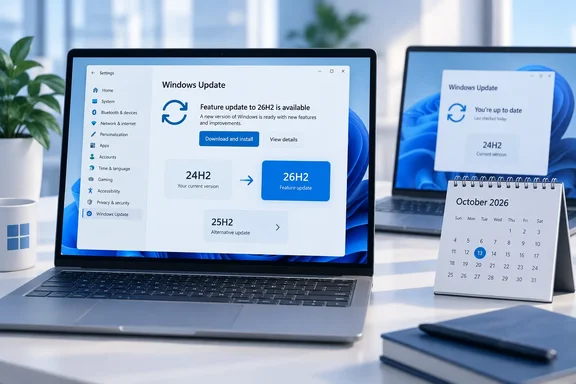
The question first came up in a Vietnamese report from Báo Văn Hóa, republished by Vietnam.vn. Its main points hold up against Microsoft's documentation, with one important caveat: the deadline does not apply to every copy of 24H2.
The date: October 13, for Home and Pro only
Microsoft's release-health page for 24H2 says Home and Pro reach end of updates on October 13, 2026. After that, Microsoft stops sending them:
- Monthly security updates
- Preview updates
- Fixes for known issues
- Time zone updates
- Technical support
Microsoft's lifecycle listing shows October 14 for the same editions. That looks like a difference in how the cutoff is displayed, not a different policy. Plan around October 13.
Cobalt points out that October 13 is also October's Patch Tuesday, the second Tuesday of the month when Microsoft ships its monthly security updates. In practice, 24H2 Home and Pro receive one last cumulative update that day, and then nothing.
Microsoft's release information covers more than the two headline editions: version 24H2 on Home, Pro, Pro Education and Pro for Workstations reaches end of updates on 13 October 2026.
Your PC will not stop working. Cobalt says it plainly: A PC that stays on 24H2 Pro will keep working after 13 October. It will stop receiving security fixes. Nothing visibly breaks. The risk grows each month as new vulnerabilities are found and your machine doesn't get the patches.
Who is not on the October deadline
This is where a headline like "24H2 support is ending" misleads people:
| Edition / channel | End of updates |
|---|---|
| 24H2 Home, Pro, Pro Education, Pro for Workstations | October 13, 2026 |
| 24H2 Enterprise, Education, IoT Enterprise, Enterprise multi-session | October 12, 2027 |
| Windows 11 Enterprise LTSC 2024 | October 9, 2029 |
| Windows 11 IoT Enterprise LTSC 2024 | October 10, 2034 (extended support) |
Microsoft's own Insider announcement for 26H2 confirms that Enterprise and Education editions remain supported until October 12, 2027. If your work laptop says 24H2 Enterprise, you have another year. Your IT team decides when it moves.
Microsoft has also said the September 2026 non-security preview update (KB5124010) was the last preview update for 24H2. Editions that are still supported keep getting monthly security updates only.
Section summary: Only the consumer and Pro-family editions of 24H2 lose updates on October 13. Enterprise, Education and LTSC each follow their own lifecycle.
How to check your version and edition
The Vietnamese report describes the quickest check, and it works on any Windows 11 PC:
- Press Windows + R.
- Type
winverand press Enter. - The window that opens shows your version (for example, 24H2) and OS build.
To see your edition as well, go to Settings → System → About and look under Windows specifications. Check both lines: "Pro, version 24H2" and "Enterprise, version 24H2" have deadlines a year apart.
What 26H2 is
Microsoft released Windows 11 version 26H2, also called the Windows 11 2026 Update, on September 29, 2026. Cobalt quotes John Cable, Microsoft's vice president of product management for Windows servicing and delivery, saying it "is now available for eligible devices running Windows 11, versions 25H2 and 24H2".
Moving to 26H2 is a small step for most PCs. Versions 24H2, 25H2 and 26H2 share the same servicing branch and codebase, so eligible devices get 26H2 as an enablement package. That is a small update that switches on features already delivered through earlier monthly updates. As Cobalt puts it, it is a small download and a single restart. Microsoft's IT pro documentation says a single restart applies "in most scenarios," not every one.
So don't expect a redesign. According to Thurrott, 26H2 includes various features that Microsoft started rolling out gradually to users still on 25H2 and 24H2. However, Windows settings backup, app-specific taskbar actions, and File Explorer improvements, which were previously locked behind temporary commercial control, are now enabled by default. Microsoft's IT pro notes add that settings backup still respects existing administrator policies.
What 26H2 does change is the support clock. gHacks summarizes it: Installing 26H2 resets the Windows 11 support lifecycle, which means 24 months of support for Home and Pro editions and 36 months for Enterprise and Education editions. For Home and Pro, that means updates until October 10, 2028.
One more date matters. Thurrott notes that Windows 11 version 26H2 will receive its first "Patch Tuesday" update next month on October 13, 2026. That is the same day 24H2 Home and Pro receive their last one.
Section summary: For eligible 24H2 PCs, 26H2 is a small, quick upgrade. Its main benefit is two more years of updates for Home and Pro.
How to get 26H2
Microsoft's steps for consumers:
- Open Settings → Windows Update.
- Turn on Get the latest updates as soon as they're available.
- Select Check for updates.
- If your device is eligible, a Download and install option for version 26H2 appears.
Before you install (the Vietnamese report's checklist, which is sensible advice):
- Back up anything you can't replace to a location off the PC.
- Check that you have enough free disk space, and keep laptops plugged in.
- If you rely on specialized software, unusual drivers, older peripherals or business apps, check that they're compatible first.
If the update doesn't appear: this is normal. Microsoft is using a controlled feature rollout, and availability is expected to widen over the next few months. Microsoft may also place a safeguard hold on devices with a known compatibility problem. tbreak puts it clearly: the opt-in toggle does not override them, so do not try to bypass a safeguard hold. Microsoft's safeguard documentation also says that turning safeguards off doesn't guarantee the update will install successfully. Microsoft suggests opting out of safeguards only in managed IT environments for validation.
Both the Vietnamese report and Microsoft advise against downloading ISOs from unknown sources or using third-party tools to force the upgrade. A hold usually means Microsoft has found a driver or app conflict on hardware like yours and is keeping the update back until it's fixed.
26H2 is not your only option
Many articles make it sound like 26H2 is the only way off 24H2. It isn't. Microsoft's own 30-, 60- and 90-day reminders recommend moving unmanaged 24H2 Home and Pro devices to version 25H2. Release-health notes say unmanaged 24H2 Home and Pro devices are being moved to 25H2 automatically, and you can choose when to restart or postpone.
Cobalt notes that Microsoft lists 25H2 on Home and Pro as supported until 12 October 2027 and 26H2 until 10 October 2028. Either version keeps you supported. 26H2 just gives you an extra year.
Known issues to watch
26H2 shares its code with 24H2 and 25H2, so recent update problems affect all three. Microsoft's 24H2 release-health page currently lists several:
- AC-3 (Dolby Digital) decoding. After the September 22 update (KB5124010) and later updates, some apps that use Windows' built-in AC-3 decoder may crash. Older apps are most likely to be affected.
- Credential Guard and Active Directory. After the September 8 security update (KB5124008), some machine accounts protected by Credential Guard may lose their secure channel with on-premises Active Directory, which causes "trust relationship" sign-in failures. This happens where Machine Identity Isolation was configured without Windows Server 2025 domain controllers.
- Azure Virtual Desktop with FSLogix. Some hosts have desktop loading problems, starting with the August preview update (KB5120998). Microsoft has published a Known Issue Rollback Group Policy that covers 26H2, 25H2 and 24H2.
- Remote Desktop Services and WSL Plan9 file shares. These September problems were fixed in an out-of-band update.
The Vietnamese report also mentions File History problems. Most of the issues above affect business setups rather than typical home PCs. They're also why safeguard holds exist.
Recommendations
- 24H2 Home/Pro, 26H2 offered with no warning: install it. You get support through October 2028, and the upgrade is about as quick as feature updates get.
- 24H2 Home/Pro, nothing offered: keep installing monthly updates and accept 25H2 if Windows Update offers it. Don't force the upgrade, and don't wait months after October 13.
- Already on 25H2: the October 13 deadline doesn't affect you, and tbreak confirms this: There is no 24H2 Home and Pro end-of-updates deadline for a PC already on 25H2. You can wait a few weeks for early problems to be found and fixed.
- 24H2 Enterprise/Education: you're supported until October 2027. Microsoft offers 26H2 through Windows Autopatch and the Microsoft 365 admin center and recommends targeted pilot deployments before a wider rollout.
The goal is to be on a supported version of Windows 11 before October 13. 26H2 is the best option if your PC is offered it, and 25H2 is a safe fallback if it isn't.
References
- Windows 11 24H2 support is ending: Should you upgrade to 26H2 now? - Vietnam.vn Vietnam.vn · 2026-10-05T01:18:01.467000+00:00
- Windows 11 24H2 end of updates 13 October 2026, and 26H2 cobalt.so
- Microsoft Releases the Windows 11 2026 Update, Version 26H2, as a Small Enablement Package - gHacks Tech News ghacks.net