

Here's what has been reported, what Microsoft has actually said, and how to check your own PC without fooling yourself.
What users are reporting
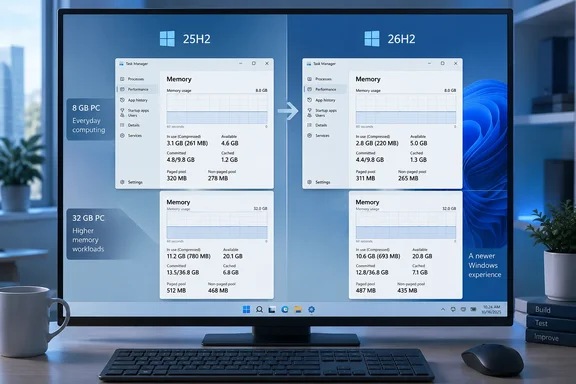
Most of the coverage traces back to a Reddit post in the Windows 11 community. The author said "Before the Update, the On Boot RAM utilization was around 6.9GB (nice!), and after the update it is around 4.8-5GB. I guess there is some RAM utilization improvement after all!" That's a drop of about 2GB. TechRadar, which reported the story after Wccftech, notes that other commenters in the thread described drops of about 3GB and about 1GB.
The second widely shared example came from X. @SoyITPro shared a screenshot showing Windows 11's memory usage dropping from 9.1GB on 25H2 to 7.5GB on 26H2, a reduction of around 1.6GB after installing the new version.
The machines involved are important context:
- Reddit poster (about 2GB saved): Wccftech reports this PC has 48GB of RAM.
- SoyITPro (1.6GB saved): the Task Manager screenshot shows 32GB of RAM.
- An 8GB laptop (no change): another Redditor, "HenryDaGodzilla," said RAM usage did not change after updating to 26H2. That system was using about 7.4GB, or roughly 96% of total memory, leaving only a few hundred megabytes for apps.
Windows Report summed it up fairly: "it's too early to say that Windows 11 26H2 universally reduces RAM consumption."
Section summary: Screenshots show savings of roughly 1–3GB on PCs with 32GB to 48GB of RAM and no change on at least one 8GB laptop. These are individual reports, not a representative sample.
What Microsoft has actually said about 26H2
Microsoft announced general availability of version 26H2, also called the Windows 11 2026 Update, on September 29, 2026. John Cable, who runs Windows servicing and delivery, wrote the announcement on the Windows Experience Blog. It covers the delivery model, the support reset and rollout safeguards. It does not mention lower memory use or promise any specific RAM savings.
The delivery model matters more than it might seem. Microsoft says 26H2 reaches PCs running versions 24H2 and 25H2 as an enablement package: a small update that switches on features already delivered through earlier monthly updates. All three versions share the same servicing branch and codebase. Microsoft also says that some features shipped turned off in 25H2 are turned on by default in 26H2.
That gives two plausible explanations for the reports:
- Something in 26H2 really changed memory behaviour. The enablement package may have switched on memory-related work that was already installed but inactive. TechRadar's Darren Allan leans toward this view, describing the update as a trigger for features that haven't reached every PC yet.
- The timing is a coincidence. Installing the update means a reboot. Reboots clear out memory build-up, reset startup apps and tidy the system cache. If your "before" reading came from a PC that had been running for days, almost any restart would look like an improvement.
The reports don't let us tell these apart. Readers should be wary of any headline that claims 26H2 "frees up 2GB."
The best evidence so far: a controlled test of the preview
One independent measurement predates the anecdotes. The end-user computing research group GO-EUC tested the 26H2 preview against 25H2 using the same simulated office-worker workload. They found a resource footprint that is effectively identical to 25H2 when running an identical knowledge worker workload. On memory specifically, average usage came in at 24.8% on the 26H2 preview versus 25.3% on 25H2.
That difference is about half a percentage point. Going in, GO-EUC expected no major architectural or kernel-level changes, since 26H2 is an enablement package on the same servicing branch as 25H2.
Some caveats apply. That test used a preview build, ran about two months before release, and measured a steady workload rather than memory right after boot. Features could have been switched on since then. Still, it is the only controlled comparison available, and it shows a small difference, not a dramatic one. Big savings on a 48GB desktop combined with almost nothing in a controlled office workload suggest that, where savings are real, they depend on the configuration.
Section summary: The only controlled test found 26H2 and 25H2 almost identical on memory. The larger savings may be real on some setups, but they are not yet a proven, release-wide improvement.
Why the 8GB result is the one to watch
Microsoft has publicly said it wants to shrink Windows 11's memory footprint. According to reporting on those comments, the plans include trimming idle usage, improving the WinUI framework, and reducing the overhead of Chromium and WebView2 components. TechRadar also points to Windows Latest's reporting on WinUI memory fixes. Those would help the Windows interface and any app built on WinUI. None of Microsoft's 26H2 materials say these optimisations shipped in this release.
The 8GB result also has a reasonable technical explanation. This part is general knowledge about how Windows manages memory, not something any source here measured:
- On large-memory PCs, Windows uses spare RAM freely. With 32GB or 48GB available, Windows can keep more data resident and cached. A small change in how a component behaves can then show up as a large drop in reported usage.
- On 8GB PCs, Windows is already squeezing memory. At 96% usage, Windows is compressing memory and pushing data to the page file. If a component releases memory, other processes quickly take that space, so the headline number barely moves even when things improve underneath.
- Your apps count too. As PBX Science noted, idle memory readings also vary with installed apps, drivers, startup programs, and how much RAM Windows chooses to use for caching.
So an unchanged reading on an 8GB laptop doesn't prove nothing improved, and a 2GB drop on a 48GB desktop doesn't prove 26H2 saves 2GB. That said, Wccftech's criticism of how the gains are distributed is fair. Its headline argues the update helps but the company should be laser-focused on ensuring that 8GB computers can run the operating system fluidly. Those are the PCs where saving a gigabyte would actually change how the machine feels.
How to test your own PC fairly
If you want real before-and-after numbers instead of a vague impression, compare like with like:
- Record a baseline on your current version. Restart, sign in and wait a few minutes without opening any apps. Open Task Manager with Ctrl+Shift+Esc, go to Performance > Memory, and note the "In use" and "Committed" figures.
- Note your startup apps. Check Task Manager's Startup apps page so you know what was loading at sign-in.
- Install 26H2. Go to Settings > Windows Update and turn on Get the latest updates as soon as they're available, which Microsoft says puts you near the front of the queue. Rollout is gradual, so the offer may not appear right away.
- Measure again the same way. Restart, wait the same amount of time, keep the same startup apps and read the same figures. Run
winverto confirm you're on 26H2. - Repeat a few times. A single reading is a snapshot. Three readings that agree tell you much more.
The commonly shared screenshots don't make clear whether these steps were followed, and that's the main reason to treat them carefully.
Should you install 26H2 now?
Decide based on normal update criteria, not on the memory claims. Microsoft recommends the update for its new features, quality fixes and security improvements. Installing it also resets support: 24 months for Home and Pro editions, and 36 months for Enterprise and Education. Rollout is phased, and Microsoft may block the update on devices with known compatibility problems.
Allan suggests waiting a little while for any bugs to surface, which is sensible. Microsoft's 26H2 release health page, as of September 29, lists three mitigated issues:
- USB Audio Class 1.0 devices may fail with a Code 10 error in Device Manager, produce no sound, or have unresponsive volume controls.
- Domain-joined PCs using Credential Guard may lose their trust relationship with the domain. This happens because 26H2 starts honouring existing Machine Identity Isolation settings, which require domain controllers at the Windows Server 2025 functional level. Microsoft's fix is to disable the feature using whatever method enabled it (Intune, Group Policy or the registry), restart, then repair the secure channel with
Test-ComputerSecureChannel -Repair. - Black screens after sign-in, mainly on Azure Virtual Desktop hosts using FSLogix. Users can work around it by starting
explorer.exefrom Task Manager's Run new task option. Administrators can deploy the Known Issue Rollback Group Policy, KB5124010, for 24H2, 25H2 and 26H2.
The list did not include any memory-related issue. It's a snapshot, though, and more issues could be added. Businesses should follow Microsoft's advice: start with targeted test deployments before rolling out widely.
Bottom line
The reports of 1–3GB savings after updating to Windows 11 26H2 are interesting, but they aren't proof yet. The largest savings come from PCs with 32GB to 48GB of RAM. At least one 8GB machine saw nothing. Microsoft's announcement promises no memory improvement, and the only controlled test, run on the preview, found memory use almost unchanged. Microsoft is clearly working on Windows 11's memory use, and 26H2 may be switching some of that work on. The useful test will be clean, repeated measurements on 8GB and 16GB PCs, where the savings would matter most.
Update: New laptop test reports lower memory usage under app load (October 5, 2026)
A new report extends the memory-saving claims beyond idle readings on high-RAM desktops. According to Windows Latest’s October 5 testing, highlighted by PCMag Australia, a three-year-old laptop with 16GB of RAM reportedly maintained lower memory usage after installing 26H2 even with multiple applications running.
Windows Latest reports that opening Edge, WhatsApp, Teams and Outlook while playing a 4K, 60fps YouTube video brought memory usage to around 87%. Adding several more applications pushed it to approximately 89%, or 14GB. The author said the same laptop previously reached about 95% under lighter workloads. These observations add a smaller-memory system and an active workload to the evidence, rather than another post-reboot screenshot alone.
However, this is still a single-machine observation, not a controlled comparison using identical workloads and software configurations. Windows Latest explicitly cautions that startup applications, caching, app versions and browser memory management could affect the results, and says the test does not establish that 26H2 itself caused the reduction.
For users with 16GB laptops, the report offers another reason to measure their own experience under everyday workloads. It does not establish equivalent savings on 8GB PCs or supersede the earlier controlled preview test that found little difference.
References
- Windows 11 26H2 update reportedly improves RAM usage for some users TechRadar · 2026-10-02T11:24:30+00:00
- Windows 11 26H2 Boosts App Launch Times, Reduces Memory Usage - PCMag Australia PCMag Australia · 2026-10-05T17:23:06+00:00
- Microsoft Has A Mountain To Climb To Address Windows 11 Optimizations, But Newest 26H2 Update Tackles Memory Usage; 8GB RAM Systems Left Out wccftech.com