

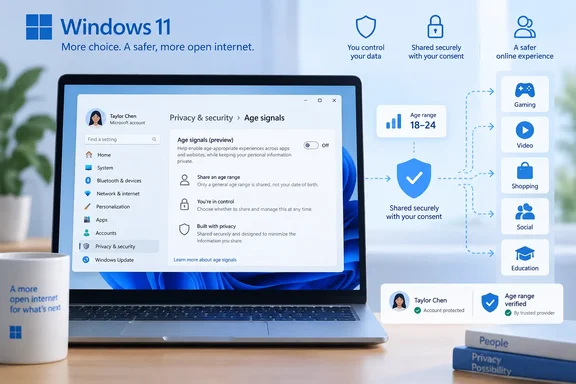
The Bangkok Post called this a coming rollout. Microsoft's own wording is more precise. The company announced the APIs on September 8, 2026, in a Windows Experience Blog post by Rob Mauceri, Distinguished Engineer for Windows Digital Safety. It said the APIs are already broadly available to Windows Insiders and will reach all Windows users "soon." Microsoft has not given a general release date or a specific Windows 11 build number.
What the Windows Age API actually does
The new capability sits in the Windows Runtime on Windows.System.User. It has three parts:
GetUserAgeRangeAsyncreturns one of five coarse bands. As BleepingComputer summarized it, the API uses information associated with a Microsoft account and can return age ranges such as under 10, 10-12, 13-15, 16-17, and 18+.GetAgeVerificationStatusAsynccan tell an app whether a user's age has actually been verified rather than simply self-reported.CheckAgeStatusAsyncis built to extend an older API, CheckUserAgeConsentGroupAsync, and is meant to classify a user as a child, minor, or adult under global and regional rules. This one has not shipped yet. Microsoft says only that it will come with a future update.
Microsoft's developer documentation, "Age signals overview," last updated September 24, 2026, gives the details the blog post leaves out. Age ranges come back as a UserAgeRange object with lower and upper bounds:
| Age group | Return value |
|---|---|
| Under 10 | {0, 9} |
| 10–12 | {10, 12} |
| 13–15 | {13, 15} |
| 16–17 | {16, 17} |
| 18+ | {18, INT32_MAX} |
| Unknown | null |
The verification status call has five possible results: Verified, Unverified, OptedOut, TemporarilyUnavailable and NotApplicable. The documentation says apps must handle every one of them. It also says the last two do not mean the user is either verified or unverified. If the age range comes back null, the app must fall back to a default experience and must not treat null as any particular age group.
Section summary: apps get an age band and a verification status, never a birth date. Two of the three APIs are available to Insiders now, and the third is still coming.
The fine print that changes the story
This is not an OS-wide age check that applies automatically to every account and every app. The documentation sets several conditions:
- Microsoft accounts only, for now. Age signals from an identity provider are currently retrieved only for Microsoft accounts. For any other account type with no admin default, the age-range call returns
nulland the verification call returnsNotApplicable. - Apps must declare a capability. The app package has to declare
userAccountInformation. - Users can say no. Access also depends on the user allowing the app to see account information in Windows privacy settings. If they haven't, the call can fail with
E_ACCESSDENIED. Bitdefender pointed out the same thing: apps need the appropriate account-information capability, and the user's Windows privacy settings can deny access. - Current user only. A call applies only to the user running the app's current process.
- Admins can set defaults. Through Group Policy or MDM, administrators can configure a default age group or verification status, and the APIs will return that value. Microsoft has not yet published step-by-step policy paths in the material reviewed here, so admins should check the developer documentation rather than guess at registry keys.
A local account, or a work or school account with no policy configured, gets nothing useful from these APIs. For enterprise IT that's mostly good news: nothing switches on by surprise. The flip side is that any age-aware behavior in a managed environment depends on how the organization sets its policy.
Section summary: the API is an optional signal that depends on account type, user permission and admin policy. It is not a mandatory gate.
Microsoft Age Verification: "verify once, use everywhere"
MAV is the stronger layer that sits behind the verification-status API. Microsoft describes it as a centralized system tied to the Microsoft account. Per BleepingComputer, "Verify once → use everywhere," Microsoft says, with apps able to check that verification status through the Windows Age APIs rather than repeatedly asking users to prove their age.
On availability, age verification is already available through Microsoft storefronts in Singapore, Brazil, and Australia, with more regions planned as regulatory requirements expand. Microsoft gave no timeline for other countries.
A caveat that is easy to miss: Microsoft's own framing is reuse across Microsoft experiences, with developers able to read the status through the APIs. Nothing published so far shows that every third-party Windows app will accept MAV, or that users will never hit another age check. Gadget Hacks made a similar point. It noted that what Microsoft hasn't described is broad consumer access, or named a single third-party app using it.
Why now? The regulatory backdrop
The Bangkok Post ties the move to tougher child-protection rules around the world. It cites two US developments: a court-approved $10 million settlement between Disney and the FTC over YouTube videos it says were misclassified, and February 2026 FTC guidance which, the Post says, signaled that the agency would not take enforcement action against data collected only for age verification, provided that data is deleted afterwards and not reused. We could not independently confirm those details against FTC or court records for this report, so treat them as the Post's account. Microsoft's announcement does not say either development prompted this feature.
What Microsoft does say is that it will add MAV support as more regions bring in age-verification requirements. The three launch storefront markets fit that explanation. Microsoft is also increasing the visibility of parental controls during Windows setup in regions including France.
What it means for developers
The documentation names three main use cases:
- Apps with user-generated content, social features or communication tools
- In-app purchases or virtual currencies where age limits matter
- Media with maturity ratings
Microsoft's blog also points to AI. Windows Report noted that developers could use a person's age range to change how AI features behave for younger users or apply additional protections where necessary.
The practical checklist from the documentation:
- Declare
userAccountInformationin the app manifest. - Check that the methods are available before calling them.
- Handle
E_ACCESSDENIEDwithout crashing. - Build a fallback experience for a
nullage range. - Handle all five verification states, and never treat
NotApplicableorTemporarilyUnavailableas "verified" or "adult." - Don't rely on
CheckAgeStatusAsyncuntil it actually ships.
The trap here is lazy defaults. If an app treats "no signal" as "adult," the system's protection disappears. If it treats "no signal" as "child," everyone on a local account gets locked out. Microsoft's guidance is to design a deliberate fallback rather than pick either extreme.
What it means for families and privacy-minded users
For parents, the appeal is that protections set once on a child's Microsoft account can carry over to apps that adopt the API, instead of being configured app by app. This ties into Family Safety, which Microsoft says it has improved with faster parental approvals and clearer activity reports.
The privacy design is real but limited. Apps get an age bracket and a verification status, and users control access through privacy settings. That is clearly better than every app collecting its own ID scan. Still, there is a trade-off. As All About Cookies put it, your age status becomes another piece of account-level information managed by the company behind your operating system. Bitdefender also noted that the system raises fair questions about which apps can ask, what users can control and whether the system is used responsibly.
Reasonable steps for now:
- Insiders: keep an eye on the account-information permission in Windows privacy settings, which controls whether apps can read these signals.
- Parents: make sure the child uses their own Microsoft account. Without one, these signals don't flow.
- Admins: decide whether a default age group or verification status makes sense for managed devices. Shared lab and school PCs are the obvious candidates.
The bottom line
Microsoft is turning age verification into a Windows platform service: one account-backed signal that apps can read, instead of a separate check in every app. The design is limited by account type, user consent and admin policy, and at launch it depends on Microsoft accounts. Two APIs are live for Insiders, the third is pending, and MAV is limited to storefronts in three countries. How much it matters will depend on whether third-party developers actually adopt it, and Microsoft hasn't shown any evidence of that yet.
References
- Microsoft to roll out age verification system on Windows 11 - Bangkok Post Bangkok Post · 2026-10-03T04:20:00+00:00
- Windows 11 to share users’ ages with installed apps bitdefender.com
- Microsoft adds age-awareness APIs that can tell if users are children, teens, or adults bleepingcomputer.com