

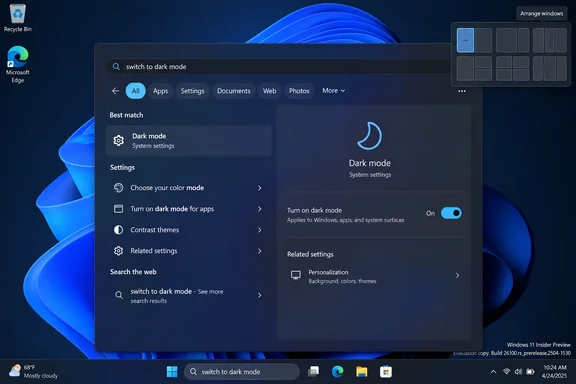
Here's what was announced, how Microsoft's on-stage pitch differs from what Insiders can install today, and how to try it.
What Microsoft showed on stage
Engadget's Igor Bonifacic reported from Microsoft's fall Surface event in San Francisco. There, Pavan Davuluri, executive vice president of Windows and Devices, showed the new Search turning settings such as dark mode and Do Not Disturb on and off. He also showed the redesigned box talking to the new Copilot app without opening the app itself.
Engadget reported these points from the demo:
- Speed and efficiency: Davuluri said the new interface is faster and lighter, and that it makes apps, settings and files easier to find.
- Context-aware controls: typing "increase mic volume" brings up a volume slider in the results.
- Phone tasks: with a phone paired to Windows, users can send text messages from the taskbar.
- Scale: Engadget says that "starting this fall," Search will handle "thousands of different actions" typed as short commands.
Davuluri described the bigger idea as a future where people can say what they want and their PC, "with their permission, can take action on their behalf." Notebookcheck's coverage says Microsoft described the new Search as an agentic interface, meaning one that works out what users want and carries out tasks for them.
Summary: On stage, Search looked like a command bar with Copilot built in. The build Insiders can install today is more modest.
What Microsoft's Insider blog actually commits to
On the same day, Microsoft's Anshul Rawat published a Windows Insider blog post titled "From searching to doing." It is more careful than the keynote. Microsoft says it is carrying those investments forward with a new Windows Search experience built on WinUI 3. It describes the release as an early preview meant to improve result relevance, identify stability issues across real-world hardware and workflows, and shape the UX before we expand the preview.
In the preview now
- WinUI 3 rebuild: Microsoft says early testing shows substantial improvements in performance and memory usage. It published no benchmark figures, so for now this is Microsoft's own claim.
- One results list: the large preview pane on the right is gone. Microsoft says its data shows nearly all clicks in the current design land on the results list on the left.
- Better matching: better matching for typos and synonyms, with more tuning planned over the coming weeks.
- Inline actions: commands such as "switch to dark mode," "turn on night light," "turn on Bluetooth," "dim my screen," "mute," "minimize all my windows," and "arrange windows on screen."
Promised for later
- Later in 2026: inline previews and richer file details will make it easier to differentiate similar results. Web previews will answer queries like "weather in San Diego," and filters will narrow results by category, such as files.
- "Coming soon": Phone Link actions, such as sending a text from a connected phone.
- 2027: bringing the new Search to the Start menu and adapting it to different taskbar positions and configurations. For now, searching from Start still opens the old experience.
Where Copilot fits
Microsoft's blog lists "thoughtful integrations with experiences like Copilot" as a goal, not as part of the current preview. BetaNews reports strong Copilot support. A feature description it quotes promises quick actions, inline Copilot, and local agent support. The Insider post, however, does not say inline Copilot conversation is in today's builds, and it does not say Copilot is needed for the listed actions.
Summary: Today's preview is a faster, simpler search box with a starter set of system commands. The chatbot-style Copilot experience is a stated plan, not something Insiders can use yet.
Is it really a chatbot?
Not by Microsoft's own description of the shipping preview. Notebookcheck put it well: The redesigned Search isn't abandoning its traditional purpose. You still type a query and get apps, files and settings back. Some queries now also show a toggle or slider instead of only a link to the Settings page.
That is a real change. Today, dimming the screen means opening Settings or Quick Settings and finding the slider. Now you type "dim my screen" and the control appears. Windows has been heading this way for a while. In December 2025, Canary build 28020.1362 added an "Agent in Settings" feature that showed more available results in the search fly out to discover what you're looking for and to allow you to quickly modify those settings.
The "fixed" part is unproven for now. Microsoft calls this an early rollout, says it is English-only for this release, and is openly asking for help finding stability problems. Most longtime complaints about Windows Search concern relevance and reliability, not a missing command line. Whether this rebuild fixes those is the real test.
The July groundwork
This is the second round of Search changes this year. On July 13, 2026, Microsoft's Jeff Petty and Anderson Aiziro announced changes for the Experimental channel, released gradually through Controlled Feature Rollout:
- A simpler Search home screen and clearer labels showing whether a result is an app, setting, file, web result or Store suggestion.
- Promotional content removed from web results.
- A new toggle under Settings > Privacy & Security > Search for showing or hiding web and Microsoft Store suggestions next to local results.
- Local apps, settings and files ranked ahead of web results when they're the better match. Misspellings are handled better too: "utlook" finds Outlook.
- Two-character file searches and better crash and loading reliability.
The order makes sense. Microsoft first cleaned up the results and handed control over web results back to users, then rebuilt the interface. People who want a purely local search box should keep an eye on that July toggle as the new interface spreads.
How to try it (Insiders only)
According to Microsoft's announcement for the day's builds, the new Search is limited to the Experimental, Experimental (26H1) channels. It is rolling out gradually. To turn it on yourself:
- Install a qualifying build: 26340.9616 (Experimental channel) or 28120.3181 (Experimental 26H1 channel). Pureinfotech identifies 26340.9616 as part of the Windows 11 version 26H2 track.
- Open Settings > Windows Update and click Check for updates.
- Restart the PC. Microsoft says the flag stays hidden until you do.
- Go to Settings > Windows Update > Windows Insider Program > Feature flags and turn on New Windows Search Experience.
- Click the taskbar search box (not Start) and try "switch to dark mode" or "arrange windows on screen."
Troubleshooting:
- Flag not showing? Check that you're on one of the two builds above, then repeat steps 2 and 3. Microsoft says both are required.
- Searching from Start looks the same? That's expected. Start still uses the old experience.
- A command didn't work? This release supports English only, and the list of actions is still small. Report misses in Feedback Hub (Win + F) > Desktop Environment > Search.
- New to the Insider program? Experimental builds are not for production machines. Use a spare PC or a virtual machine.
The rest of the event: Hybrid Intelligence
The Search news shared the stage with a bigger AI announcement, which Engadget also covered. Hybrid Intelligence is a set of tools for running AI models on the PC itself. With it turned on, the updated Copilot app can read local files and take actions across apps and settings. It still uses the cloud for the hardest tasks and can switch to local models when cost or privacy is a concern.
Engadget also reported:
- Microsoft Execution Containers (MXC), which keep local AI agents in a secure sandbox. Microsoft pitched this as making it easier and safer to write native Windows apps from Copilot.
- Autopilot, Microsoft's personal AI agent, which can now draw on local files. In a demo it found, renamed and zipped tax documents and drafted an email to an accountant, all using a local model, so nothing went to the cloud.
- Copilot features powered by Hybrid Intelligence roll out "over the coming months."
For IT admins, these agent features matter more than a dark-mode command. Software that acts "on your behalf" across files and settings will raise questions about policy, auditing and data handling well before it reaches managed fleets. None of that is documented yet.
The bottom line
Microsoft has rebuilt taskbar Search on WinUI 3, merged its results into one list, improved typo handling and added a starter set of system commands. All of it is in Experimental-channel Insider builds today. The bolder ideas from the keynote are announced plans without firm dates: inline Copilot conversation, phone texting, "thousands" of actions and Start menu support. If you're an Insider, the steps above will get you in.
References
- Microsoft May Have Finally Fixed Windows Search By Turning It Into A Chatbot AOL.com · 2026-10-07T17:47:14+00:00
- Windows 11 Search gets a big makeover — it can now control your PC with simple commands - Notebookcheck News notebookcheck.net
- Microsoft May Have Finally Fixed Windows Search By Turning It Into A Chatbot - Engadget Engadget · 2026-10-07T17:47:14+00:00