

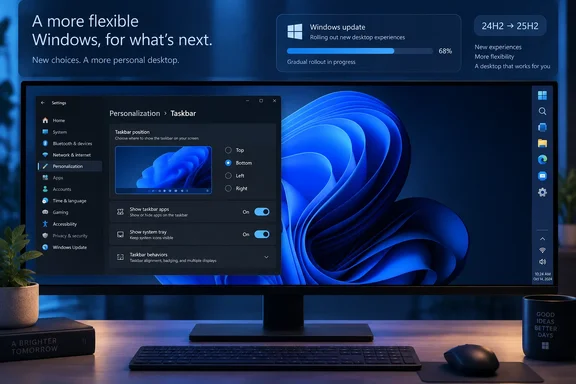
The important correction is that this is not a blanket restoration of every old taskbar behavior. Search boxes and the smaller taskbar remain supported only when the taskbar is at the top or bottom. Auto-hide, tablet optimization, and touch gestures were still absent from alternate positions during the Insider rollout, and Microsoft has not published a feature-by-feature statement confirming that each limitation has been removed for the wider release.
For users who held onto Windows 10 because a vertical taskbar made a wide monitor more usable, the practical result is straightforward: update a supported 24H2 or 25H2 installation, then look under Settings > Personalization > Taskbar > Taskbar behaviors > Taskbar position. Do not assume the setting will appear immediately, however. Microsoft has designated it a gradual rollout, which means the September package can be installed while the feature itself remains unavailable on a particular PC.
The original decision was both technical and deliberate
The taskbar’s absence from the top and sides was never simply an overlooked checkbox. In the 2022 Windows Insider question-and-answer session cited by Windows Latest, then-Windows product manager Tali Roth said Windows 11’s taskbar had been rebuilt from scratch. The team had to prioritize what to recreate rather than carry forward a long accumulation of legacy shell behavior.
That explanation holds up against Microsoft’s current implementation. A taskbar that can sit on all four display edges needs much more than a relocated strip of icons: Start, Search, jump lists, thumbnail previews, notifications, system controls, tooltips, taskbar labels, animations, DPI scaling, and multi-monitor behavior all have to anchor themselves correctly. Microsoft’s May announcement explicitly called out that flyouts and animations must originate from the new taskbar location, while the July Insider notes confirmed that “Never combine” taskbar buttons work at alternate locations.
But engineering cost does not fully explain the removal. Former Windows and Edge engineering executive Mikhail Parakhin said in February that he opposed dropping the movable taskbar and described the original Windows 11 vision as one of “symmetric panes”: notifications and system controls on the right, and weather, news, and widgets on the left. The Register independently reported Parakhin’s account.
That design logic explains why the centered Start menu, Widgets, and a bottom-locked taskbar arrived as a bundle. A vertical taskbar would have collided with the side-pane arrangement that Windows 11’s early shell design expected. Microsoft chose visual symmetry and a tightly controlled layout over the flexibility Windows users had treated as ordinary desktop behavior.
Microsoft’s current release notes confirm the feature is back
Microsoft’s August 27 KB5120998 documentation states plainly that Windows 11 users can select bottom, top, left, or right taskbar placement. The same notes say tooltips, flyouts, animations, and most customization settings should follow the taskbar, including ungrouped buttons. That is a much more complete implementation than the crude registry workarounds that briefly circulated after Windows 11’s launch and often left the Start menu or system tray unusable.
The setting was first disclosed to Insiders in May, then reached Beta testing in late July. The timeline matters because it shows Microsoft did not simply flip a dormant Windows 10 switch in September. The company ran the feature through multiple Insider channels, where it continued to list compatibility gaps around touch, auto-hide, taskbar search, and compact sizing.
Microsoft’s documentation also makes clear where the feature is landing. It applies to Windows 11 versions 24H2 and 25H2, whose September 8 security update is KB5124008 and whose builds are 26100.9445 and 26200.9445, respectively. Windows 11 23H2 received a separate September update, KB5122880, and there is no corresponding Microsoft documentation promising the movable taskbar for that branch.
That split will matter in managed environments. Windows 11 24H2 Home and Pro editions reach end of servicing on October 13, 2026, while Enterprise and Education editions have support through October 12, 2027. Organizations that are still standardizing on 23H2 should not tell users this option is available until they have verified their actual build and feature-rollout status.
Start menu resizing has returned only as presets
The companion Start menu work is more revealing than the taskbar restoration. Windows 10 permitted users to drag the Start menu’s borders into a custom size. Windows 11’s new controls instead provide Small, Large, and Automatic options. Microsoft also added independent switches to show or hide the Pinned, Recommended, and All sections; it renamed Recommended to Recent and added an option to hide the account name and picture.
Those controls are useful, especially on small screens and presentation PCs, but they are not freeform resizing. Microsoft has restored a choice of layouts, not the direct-manipulation behavior Windows 10 offered. Readers expecting a drag handle will not find one in the documented settings.
This is where Microsoft’s long-standing Start philosophy is more relevant than a single framework decision. In an August 2021 Windows Experience Blog post, Microsoft’s Christian Valencia said the company’s research pointed toward a cleaner, simpler Start centered on search, apps, and files. The same post described wider displays and smartphone interaction patterns as influences on the Windows 11 design.
The present Start settings preserve that philosophy. Microsoft is allowing users to suppress or resize sections of a curated layout, but it is still controlling the structure. The return of taskbar position does not mean the company has embraced Windows 10’s freeform Start model.
Windows Latest reports that Microsoft is moving Start components from React-based code to WinUI to improve responsiveness. That may become relevant to future Start behavior, but Microsoft’s published KB5120998 notes do not connect the WinUI work to either the size presets or the absence of drag resizing. Treating the current presets as proof of an architectural limitation would be speculation.
Gradual rollout is the part users will notice
Microsoft’s use of Controlled Feature Rollout is likely to cause the familiar “I installed the update but do not have the setting” confusion. The company separates its release notes into gradual and normal rollout sections, and taskbar placement sits in the gradual category. Installing KB5124008 updates the operating-system build; it does not guarantee that Microsoft has enabled every new interface feature on that device.
That makes verification more important than deployment assumptions. On an affected Windows 11 24H2 or 25H2 PC, administrators and support staff should check the Taskbar behaviors page after the update, rather than basing help-desk guidance solely on the presence of KB5124008 in update history. Microsoft’s documentation does not identify a Group Policy or Intune configuration service provider for choosing taskbar side or forcing the preference, so this currently appears to be a user-level personalization choice rather than a new centrally managed standard.
There are real operational limitations to record before encouraging broad changes. A side-mounted taskbar changes the available horizontal working area for line-of-business applications, remote desktop sessions, and virtual-desktop layouts. It can be valuable on ultrawide monitors, particularly with ungrouped labeled taskbar buttons, but it can also expose poorly responsive legacy applications that were designed around a bottom taskbar and minimum window widths.
The smaller-taskbar option deserves similar caution. Microsoft says it reduces both taskbar height and icon size while retaining Start, Search, and the system tray. Yet its own release notes limit small taskbars to top and bottom positions. A user selecting a left or right taskbar should expect the standard-width vertical layout, not a compact Windows 10-style strip.
Update reliability still matters more than personalization
The September update that carries these interface changes has already required out-of-band remediation. Microsoft released KB5129195 on September 14 for Windows 11 24H2 and 25H2, addressing Remote Desktop Services instability and failures involving host-folder shares in Hyper-V-based Linux virtual machines using Plan9. Microsoft specifically names Windows Subsystem for Linux and Claude Cowork among affected environments.
KB5129195 also resolves the multichannel and 3D-audio manifestations of a USB Audio Class 1.0 problem, but Microsoft says other symptoms—such as Code 10 failures and no audio output—remain under investigation. The latest update is therefore the sensible target for systems receiving September patches, but it is not a clean bill of health for every USB audio configuration.
Microsoft has finally restored a major taskbar capability it discarded when Windows 11’s shell was redesigned around a more rigid visual model. The return is welcome, especially for developers, multi-window users, and anyone with a wide display. The concrete reality is less dramatic: Windows 11 now offers four taskbar edges on supported current branches, with feature rollout still staged and several of the old taskbar’s edge-case behaviors still missing.