

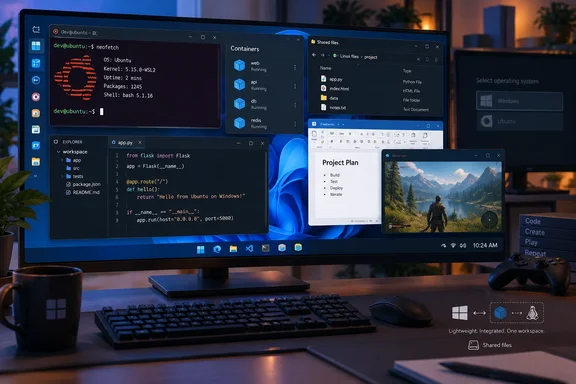
Ubuntu on WSL removes the reboot, not the Linux environment
The XDA Developers writer first used WSL as a backend for Docker containers during university projects, while ordinary Linux applications lived on a dedicated Ubuntu partition. They later tried conventional virtual machines and found them cumbersome for their work. Moving those Linux tasks into WSL meant they could open Ubuntu while remaining in Windows 11, then return to Windows applications without changing the machine’s booted operating system.
That convenience addresses the account’s strongest complaint about dual-booting: a task that needs one Linux application no longer requires saving work, restarting, selecting Ubuntu, and eventually restarting again to return to Windows. WSL lets a distribution run command-line tools and applications alongside the Windows desktop. Microsoft also supports calling Linux commands from PowerShell and Windows executables from a Linux shell, so the two environments can participate in one workflow.
The writer reports that a major Windows 11 update once left their Ubuntu installation inaccessible until they repaired the GRUB bootloader with a live USB. They do not identify the update or provide diagnostic details. It is a reason this particular user wanted less dependence on a dual-boot arrangement, not a documented general effect of Windows 11 updates.
Avoiding a second physical SSD was another consideration for the writer, who says they already had a 2TB primary drive. WSL avoids allocating a separate boot partition or buying another drive solely to try Ubuntu. It does not make Linux storage free: a WSL 2 distribution keeps its Linux filesystem in a virtual hard disk, an ext4.vhdx file that consumes space on the Windows host drive as its contents grow. Microsoft documents checking space from inside the distribution with df -h /.
WSL 2’s managed VM explains both its reach and its limits
WSL 2 runs a Linux kernel using virtualization inside a lightweight virtual machine managed by Windows. That design provides a Linux environment without asking the user to install and administer a conventional, separate full VM for routine development. Microsoft says WSL generally uses fewer CPU, memory and storage resources than a full virtual machine, while allowing Linux tools to run alongside Windows apps.
The XDA Developers writer says WSL felt more responsive than the virtual machines they had tried, and calls its performance near-native for their coding and DevOps work. Those are observations about their own setup; the account includes no timings, VM configurations or bare-metal comparison. Readers deciding between WSL, a conventional VM and a Linux boot installation should test the applications that matter to them, especially if performance is the deciding factor.
The managed-VM design also sets an administrative boundary. Microsoft describes WSL primarily as a development environment and notes that its VM lifecycle and Windows interoperability differ from a traditional production VM. A developer building or testing a Linux service locally can benefit from that convenience; an administrator choosing a persistent production host has different requirements.
Windows 11 and Ubuntu can share files, but project placement still matters
WSL makes crossing the Windows–Linux file boundary straightforward. Within Ubuntu, the Windows C: drive normally appears under /mnt/c; from Windows File Explorer, \\wsl$ exposes installed distributions’ Linux files. Those paths let a developer reach work on either side without maintaining a separate exchange drive.
Where the project lives affects performance. Microsoft recommends keeping files used mainly by Linux command-line tools in the distribution’s filesystem, such as /home/<user>/Project, instead of working on them through /mnt/c/Users/<user>/Project. For a project used mainly by Windows tools, it recommends the Windows filesystem. Sharing access is useful, but placing a Linux-heavy build tree on the Windows drive merely because both systems can see it may give up some of WSL’s speed advantage.
There is a practical distinction from the writer’s former partition here. An Ubuntu installation in WSL has its own Linux files and packages, while Windows remains the host operating system and stores the distribution’s virtual disk. Migrating to WSL therefore calls for checking that the files, tools and projects you need are present in the new distribution before retiring the old Ubuntu installation; installing WSL alone does not move a partition’s contents.
GUI apps and CUDA widen WSL’s usefulness without making it bare metal
The writer also uses Linux graphical applications and reports running GPU-accelerated work on an RTX 3080 Ti, including LLM training tasks. Microsoft supports Linux GUI applications through WSL 2 on Windows 11; supported apps can appear alongside Windows windows and participate in familiar desktop interactions such as Alt-Tab and copy-and-paste. Microsoft cautions that this is not a complete Linux desktop environment and that some desktop-oriented applications may not work as expected.
GPU compute is a supported path too, but the writer’s working setup should not be mistaken for an automatic result of installing Ubuntu. Microsoft documents NVIDIA CUDA and DirectML approaches for machine-learning workloads in WSL. For NVIDIA CUDA, the setup starts with a suitable Windows GPU driver; NVIDIA warns against installing a Linux NVIDIA display driver inside WSL or choosing CUDA packages that pull one in. The particular framework and application still have to support the intended WSL configuration.
Those capabilities make WSL a credible replacement for this writer’s mix of terminal work, selected GUI utilities and GPU projects. They leave a clear reason to retain a separate Linux installation when the required application depends on a full Linux desktop, hardware access or behavior that has not been checked in WSL. Microsoft documents WSL-specific arrangements for GPU access and other differences from a conventional Linux environment.
What this means for you
If your Linux partition mainly supports development work that you repeatedly interrupt to use Windows, try the same tasks in Ubuntu on WSL before changing the disk layout. Windows 11 supports Microsoft’s standard WSL installation path: from an administrator PowerShell session, run wsl --install, restart, then launch Ubuntu and create its Linux username and password. New installations use WSL 2 by default. If WSL is already installed, wsl --list --online shows available distributions and wsl --install -d <DistroName> installs a selected one.
A short trial should answer the decision more reliably than a general speed claim:
- Run
wsl --list --verbosein PowerShell to confirm that the Ubuntu distribution you intend to test is using WSL 2. - Put a Linux-heavy test project in Ubuntu’s filesystem, then check that its tools can build or run it there; use
/mnt/cwhen you need access to Windows files. - Try each GUI application or GPU framework you depend on before assuming that support for Linux GUI apps or CUDA covers your particular workload.
- Check storage needs on the Windows drive as well as inside Ubuntu; WSL’s virtual disk grows with the distribution’s data.
- Keep the existing Linux installation and your project backups until the WSL environment contains the files you need and has handled your normal work. Microsoft documents
wsl --exportfor backing up a distribution once it is in WSL.
For the XDA Developers writer, Ubuntu on WSL solved the daily problem that dual-booting could not: Linux work and Windows work now fit into the same session. The useful decision for another Windows 11 user is narrower and testable—whether their own projects, applications and hardware work well enough in WSL to make that second boot option unnecessary.