

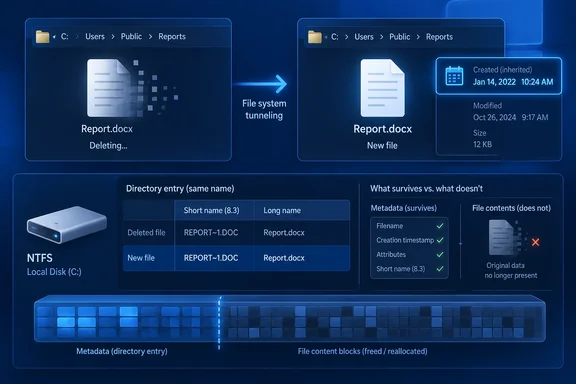
Windows Latest has revisited the behavior, which Microsoft engineer Raymond Chen explained on July 15, 2005, in The Old New Thing. His explanation identifies the underlying trade-off: preserving a document’s creation date through an application’s save operation can also make an unrelated replacement file look older than it is.
How a new file inherits an old creation date
Consider a file called articles.txt, created yesterday. You delete it, then quickly create another articles.txt in the same directory with completely different contents. Windows can assign yesterday’s creation timestamp to the replacement.
The matching name is important. Windows Latest’s opening example switches from articles.txt to article.txt, but the documented mechanism involves reusing the removed name, including its associated short or long filename—not merely choosing a similar-looking name.
Microsoft’s FltGetTunneledName driver documentation explains what happens underneath:
- When a name is removed from a directory by deletion or renaming, the filesystem saves its short-name/long-name association and creation time in a temporary tunnel cache.
- When a name is added through creation or renaming, the filesystem searches for matching cached information.
- If a suitable entry remains, that metadata can be restored to the replacement.
Microsoft describes the cache as per-volume, while specifying that its entries are effective per directory instance. Those descriptions are compatible: matching is scoped to the directory, rather than every similarly named file on the drive. Deleting the directory removes its associated cache information.
The timestamp can survive even though the replacement has different contents. Tunneling preserves particular metadata; it does not restore the deleted document’s text or other file data. Equally, it says nothing about whether deleted contents could be recovered by some separate mechanism.
The cache is short-lived. Although Windows Latest describes a 15-second default and references historical Windows documentation, the current Microsoft documentation discussed here does not establish that duration as an unconditional guarantee for every current configuration. The useful rule is that a rapid replacement can inherit metadata—not that a precise waiting period is a universally reliable workaround.
Why Windows preserves information from a deleted file
The rationale becomes clearer when “Save” is viewed from two perspectives: the person editing a document and the application performing filesystem operations.
From the user’s perspective, editing a document created yesterday should not change its creation date. But an application does not necessarily overwrite that document in place. It may instead use a safe-save sequence:
- Write the updated contents to a replacement file.
- Delete the original file.
- Rename the replacement to the original filename.
At the filesystem level, a replacement has taken the original’s place. At the document level, the user has simply saved an edit.
Chen explains that without tunneling, combinations of save, delete, and rename operations could make the creation time change even though the user had not created a new document. Preserving the timestamp maintains the expected continuity.
Windows applies that compatibility behavior based on filesystem operations and names. It cannot use that sequence alone to distinguish an application saving an existing document from a person deliberately creating unrelated content under the same name. The surprising timestamp is a consequence of that trade-off.
The older filename-compatibility reason
Tunneling also preserves the relationship between a long filename and its short, 8.3-format counterpart.
Chen’s example uses File with long name.txt, with a short name such as FILEWI~1.TXT. An older application that does not understand long filenames might open the short name, delete it during saving, and create a replacement using that same short name. Without the preserved association, the friendly long filename could be lost.
The two motivations therefore fit together: preserve the document’s apparent identity through a replacement, whether that identity is its creation time or its readable filename.
Which operations can trigger tunneling?
Microsoft’s driver documentation lists four paired sequences. Here, name is the filename being reused in the directory, while source is a replacement file.
| First operation | Subsequent operation |
|---|---|
Delete name. | Create a file called name. |
Delete name. | Rename source to name. |
Rename name to newname. | Create a file called name. |
Rename name to newname. | Rename source to name. |
Deletion is therefore not required. Renaming the original away and quickly putting another file under its former name can also trigger the behavior.
Microsoft separately warns filesystem minifilter developers that tunneling can affect normalized filename information during create, hard-link, and rename operations. That particular name-information issue does not affect ordinary read and write operations.
What users and developers should do with this information
For a Windows user investigating an unexpectedly old creation date, the useful first question is whether the filename was recently deleted, renamed, or replaced in that directory. An application’s save sequence can account for the result even when the user never manually deleted anything.
The practical implication is that a creation timestamp alone does not establish when the current contents were written. Tunneling provides a documented reason that a replacement’s contents and its displayed creation date can have different histories. It does not mean every unexpected timestamp is caused by tunneling.
For.NET developers, Microsoft’s FileSystemInfo.CreationTime documentation explicitly warns that NTFS may briefly cache creation metadata. Applications replacing or overwriting files may need to set the creation time explicitly if they require a particular value.
That documentation also identifies a separate issue: a FileSystemInfo object obtained through directory listing or enumeration methods can contain pre-cached property values. Calling Refresh() retrieves the latest information. Refreshing the object does not disable filesystem tunneling or force a fresh creation timestamp; it addresses the application’s cached view.
The appropriate application-level response is to define which creation time the replacement should have, set it explicitly when required, and retrieve fresh metadata when checking the result. For ordinary document editing, preserving the original creation date is usually the very behavior tunneling was designed to provide.
References
- The apocryphal history of file system tunnelling - The Old New Thing devblogs.microsoft.com
- FileSystemInfo.CreationTime Property (System.IO) | Microsoft Learn learn.microsoft.com