

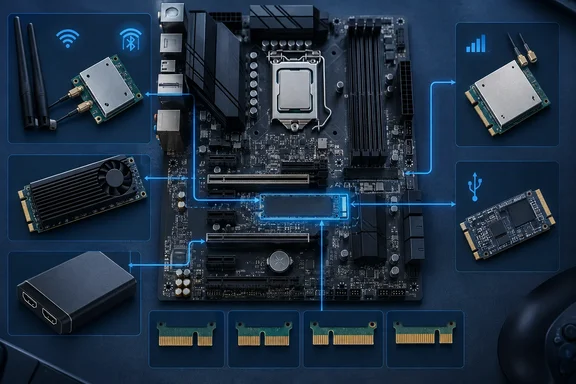
MakeUseOf’s September 21 feature highlights these five possibilities. XDA Developers has also covered non-storage M.2 expansion, including USB controllers, wireless cards and AI accelerators. The useful buying decision goes beyond finding a card with the right-looking connector: some of the proposed upgrades need a different socket from the one normally occupied by an SSD.
First establish what the socket supports
M.2 describes a family of module and connector formats. Physical fit and electrical compatibility are separate requirements, and the socket’s key—the position of its identifying notch—does not by itself establish everything a device can do.
MakeUseOf describes B-key as SATA, M-key as NVMe and B+M as supporting both. That is too categorical. Hailo’s own M.2 accelerator specifications provide a concrete counterexample: its B+M-key module uses PCIe, not SATA. Likewise, its M-key accelerator uses PCIe without being an NVMe storage device.
NVMe is a storage protocol. A non-storage expansion card can use the PCIe connection available in a suitable M.2 socket without using NVMe at all. Conversely, matching the notch cannot create an electrical connection that the motherboard does not provide.
Before purchasing an expansion device, establish the following:
- Identify the exact socket you intend to use, including its key and supported module dimensions. Intel’s AX210 wireless kit, for example, requires an M.2 2230 Key E connector.
- Match the device’s required interface to the socket’s documented connections. Do not assume that a physically compatible socket supplies PCIe, USB and SATA.
- Check the motherboard’s resource-sharing information for that specific socket. Whether using it affects another connection is board-specific; there is no universal lane-sharing rule.
- Confirm Windows driver and application support for the exact expansion card, rather than relying on the presence of a familiar connector.
- Account for the complete installation: mounting points, cable clearance, antennas, external connectors and any cooling or power requirements specified for the device.
No motherboard model is established here, so a particular socket cannot be declared compatible. The distinction to resolve is specific: what signals that socket provides, not simply whether the board has a spare M.2 position.
Wi-Fi and Bluetooth: the wireless socket matters
A wireless module is a practical upgrade when a PC has the appropriate connector and provision for antennas. Intel’s AX210 IOT Kit documentation makes the compatibility boundary unusually clear: it requires an available M.2 2230 Key E connector, and Intel explicitly says it cannot be installed directly in Socket 3 Key M or Socket 2 Key B.
That means a vacant SSD socket is not automatically a home for this wireless kit. An adapter would introduce another compatibility question; it should not be assumed to solve every electrical or mounting requirement.
Intel’s kit also illustrates why the module alone is only part of the purchase. It includes two external antennas, RF cables and mounting brackets. Those components allow the radio to connect to antennas outside the enclosure rather than leaving the buyer with a bare module and no complete antenna installation.
MakeUseOf recommends internal wireless cards over inexpensive USB adapters, citing latency and reception. Neither the supplied Intel documentation nor the independent reporting establishes a universal performance advantage. The defensible recommendation is narrower: choose a supported wireless device with a suitable antenna arrangement. M.2 mounting alone is not proof of better range or lower latency.
AI acceleration: choose the workload before the card
Hailo’s Hailo-8 M.2 module is a documented example of a non-storage device using this connector family. Hailo offers M-key, B+M-key and A+E-key versions and lists Windows and Linux support. Its specifications describe PCIe Gen 3 connectivity, with four lanes for the M-key module and two lanes for the other versions.
Hailo rates the processor at up to 26 trillion operations per second, or TOPS. That is a vendor specification, not a measurement of how much faster a particular Windows application will run.
The intended task is neural-network inference: executing a prepared model to produce results. Hailo describes a software workflow involving its Dataflow Compiler and support for AI frameworks. This is the mechanism that makes the hardware useful—the application’s workload must have a supported route onto the accelerator.
Installing the module therefore does not automatically accelerate every local AI application. MakeUseOf’s suggestion that an accelerator can help long-context workloads is not established by the Hailo-8 documentation supplied here. Nor does the module become extra system RAM or GPU VRAM.
For developers, the purchase order should be software first, hardware second: identify the model and application, establish support in the Hailo software workflow, and then select a module compatible with the host socket. Windows support at the device level does not establish support inside every Windows AI application.
Video capture: distinguish input hardware from the recording system
MakeUseOf identifies Magewell M.2 capture hardware as another expansion option. Its broader promises—better quality, no performance hit and continued recording after a PC crash—need a much narrower interpretation. The available evidence does not establish those outcomes for a particular Magewell model or recording configuration.
A capture device receives a video signal. Whether it also performs encoding, where the resulting recording is stored, and which computer runs the recording software are separate questions. Those distinctions determine how much work remains on the host.
For benchmarking, the practical implication is straightforward: receiving the gaming PC’s display output on separate recording hardware can separate the recording workload from the machine being measured. Installing a capture card inside the same PC does not, by itself, establish that separation.
Similarly, crash-resistant recording requires a recording path independent of the crashing system. The M.2 form factor says nothing about independent storage or continued operation after the host fails. Anyone considering this upgrade should establish the exact card’s input formats, encoding capabilities and host requirements before treating it as a benchmarking solution. There is also no verified price here supporting MakeUseOf’s description of capture hardware as costing only a handful of dollars.
USB expansion: more connections, with controller-level considerations
M.2 USB expansion is another documented use of the socket family, also identified in XDA Developers’ coverage. It can be useful when the goal is additional USB connections rather than more storage capacity.
The installation still needs a supported controller and a way to place or route the resulting USB connections where they are useful. An internal connector and an accessible external port solve different problems.
MakeUseOf suggests assigning an entire USB controller to a virtual machine. Treat that as a separate virtualization requirement, not an automatic benefit of the card. The hypervisor and platform must support the intended controller-assignment arrangement; ordinary USB-device forwarding through the host is a different workflow.
The proposed internal security-key installation also deserves care. Putting a key inside the enclosure may make casual removal harder, but it does not establish stronger authentication. Before choosing that arrangement, determine whether normal use of the particular key requires physical access. An inaccessible device can undermine the convenience the extra port was supposed to provide.
Cellular connectivity: Windows support is only one prerequisite
Windows has mobile-broadband management capabilities, but that does not substantiate MakeUseOf’s claim that any PC can take an M.2 cellular modem with little additional work. A compatible modem installation also needs a supported host interface, an antenna arrangement and working SIM or eSIM provisioning. A modem module should not be assumed to include an antenna or a physical SIM holder.
Microsoft documents mobile-broadband management through netsh mbn on both Windows 10 and Windows 11. For an installed modem, the following command lists the mobile-broadband interfaces Windows exposes:
netsh mbn show interfaces
This is a useful first check, not proof of an active cellular connection. Microsoft separately documents commands for connection status, radio state, signal information and profiles. It also states that the WWAN AutoConfig service must be running for certain commands and parameters to work.
If Windows exposes an interface, that gives an administrator a starting point for examining the connection. Carrier compatibility, provisioning and any required access point name configuration remain separate from hardware detection. If it exposes no interface, changing a cellular profile alone does not establish that the modem installation is supported.
The best M.2 upgrade starts with a defined need and a verified hardware-and-software path. Keep the socket available until those requirements are clear: an unused expansion opportunity is more useful than an incompatible card bought merely to fill it.
References
- That empty M.2 slot on your motherboard can do way more than storage MakeUseOf · 2026-09-21T15:00:14+00:00
- Intel® Wi-Fi 6E AX210 (Gig+) IOT Kit Content and Requirements intel.com
- Hailo-8 M.2 AI Acceleration Module | 26 TOPS AI Processor Card hailo.ai