

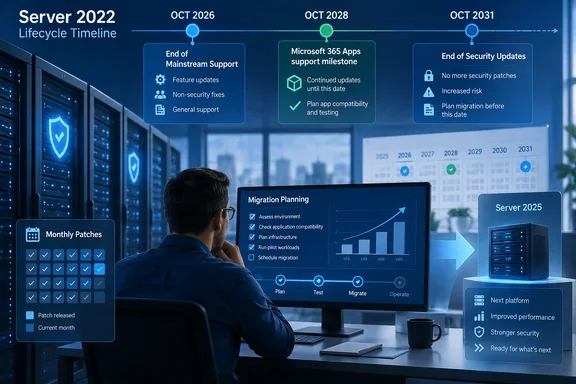
BleepingComputer reported Microsoft’s reminder that October’s security update will be the final mainstream release for Windows Server 2022. Microsoft’s Windows Server release-health page independently places the mainstream-support cutoff on October 13, 2026, the second Tuesday of the month. That means there are less than four weeks for teams that have deferred lifecycle review because their Server 2022 machines are still being patched.
The important finding is that Microsoft’s own lifecycle records do not present exactly the same calendar dates. Its release-health listing and Server 2022 status page use October 13, 2026 for the end of mainstream support and October 14, 2031 for the end of extended support. The product lifecycle page, meanwhile, displays October 14, 2026 and October 15, 2031, with times attached and a note that dates are shown in Pacific Time. For change-control purposes, organizations should plan around Microsoft’s explicit servicing message: deploy and validate the October 13 Patch Tuesday update as the last mainstream release, rather than assume a one-day grace period.
Extended support keeps security patches flowing
Windows Server 2022 is an LTSC release on build 20348, made available in August 2021. It follows Microsoft’s Fixed Lifecycle Policy: five years of mainstream support followed by five years of extended support. Unlike the paid Extended Security Updates programs associated with older Windows Server releases, Server 2022’s extended period is part of that fixed lifecycle.
That distinction is practical. A Server 2022 system does not become an unpatched liability on October 13. Microsoft will continue its normal monthly security servicing through October 2031, and the operating system remains within vendor support for security issues. Organizations running stable file servers, domain-adjacent infrastructure, line-of-business servers, and virtual-machine estates therefore do not need an emergency OS migration next month solely to retain vulnerability fixes.
They do lose access to mainstream servicing. Microsoft’s policy defines that period as the window for feature requests, design changes, and regular non-security updates. When a fault appears after the transition, the response will be bounded by security servicing and the terms of extended support, not by an expectation that Microsoft will improve the platform or ship a broad quality correction.
That can matter more than the lifecycle label suggests. September’s Windows Server cumulative updates, for example, were reported by BleepingComputer to have caused Remote Desktop Services failures across Server 2019, 2022, and 2025 installations. Microsoft said it was investigating. Events like that illustrate the operational difference: monthly patching continues, but the product is approaching a phase where customers should not expect fresh platform features or routine non-security remediation as part of the standard cadence.
Microsoft 365 Apps create an earlier planning constraint
The more immediate concern for some enterprises is not Windows Server itself but the software hosted on it. Microsoft’s current support guidance says Microsoft 365 Apps are supported on Windows Server 2022 only while the server OS remains in mainstream support. It states that devices hosting Microsoft 365 Apps will receive feature updates until Version 2608 arrives, then remain on that build and receive security updates only through October 10, 2028.
That is a separate date from the Windows Server 2022 extended-support deadline in 2031. An organization that uses Server 2022 as a Remote Desktop Services or virtual desktop host for Microsoft 365 Apps can retain OS security updates for three additional years after 2028, but its Office applications will no longer be fully supported in the normal feature-update sense.
Microsoft has framed that 2028 Office security-update window as a migration allowance. It is not a promise that Server 2022 will remain a long-term Microsoft 365 Apps host through the end of the server operating system’s lifecycle. For RDS teams, the October 2026 milestone should therefore trigger an inventory: identify session hosts with Microsoft 365 Apps, establish their expected Version 2608 state, and decide whether the service will move to Windows Server 2025, Azure Virtual Desktop, Windows 365, or another supported desktop-delivery model.
The gap is easy to overlook because both products are called “supported” in different ways. The server OS will be secure through 2031. A Microsoft 365 Apps deployment on that OS has a materially shorter practical runway.
Hotpatch coverage is real but narrowly scoped
Microsoft also extended hotpatch support for Windows Server 2022 through October 2027. This applies to Windows Server 2022 Datacenter: Azure Edition systems enrolled in hotpatch updates, not the ordinary Standard, Datacenter, or Essentials deployments that make up much of the on-premises estate.
Hotpatching lets eligible systems take many monthly security updates without rebooting, although baseline updates still require planned restarts. Microsoft’s July servicing documentation describes the extension as an extra year beyond the prior October 2026 endpoint. The company’s Server 2022 status page says enrolled Azure Edition devices can continue receiving monthly security updates without a restart through October 2027.
It is useful for high-availability workloads, but it does not extend the operating system’s lifecycle and does not alter the extended-support end date. More importantly, it should not be read as a broad no-reboot benefit for Server 2022. A conventional Server 2022 VM in a private virtualization cluster does not acquire hotpatch eligibility merely because it runs the Datacenter edition; the documented scope is Azure Edition and the supported Azure, Azure Local, or Azure Arc-connected management paths.
Administrators should also keep the servicing concepts separate. Hotpatch is a delivery mechanism for qualifying security updates. Extended support is a lifecycle phase. One can reduce maintenance interruptions for a limited set of machines; the other governs what support Microsoft will provide for the product as a whole.
Windows Server 2025 is the supported migration target
Microsoft now positions Windows Server 2025 as the current LTSC release. Its own release information lists build 26100 and sets mainstream support to end on November 13, 2029, with extended support ending November 14, 2034. Moving from Server 2022 to Server 2025 restores the full mainstream-support window, but it does not turn this month’s lifecycle notice into a mandatory lift-and-shift.
The sound approach is to distinguish workloads by risk and dependency. Servers that require Microsoft 365 Apps hosting, new Windows Server features, new vendor certifications, or a reliable route for non-security defect remediation should rise to the front of the 2025 migration queue. Stable servers with tested applications and no such dependency can remain on Server 2022 while they receive security updates through 2031—provided they remain in the normal patch-management program.
A useful first pass before October should include:
- Confirm every Windows Server 2022 machine’s edition, build, role, hosting model, and installed application stack.
- Identify Remote Desktop Session Hosts and other systems running Microsoft 365 Apps, because their meaningful support timeline reaches October 10, 2028 rather than October 2031.
- Test the October 13, 2026 cumulative update before broad deployment and preserve a documented rollback path for critical workloads.
- Verify whether Datacenter: Azure Edition machines are actually enrolled and eligible for hotpatching instead of assuming that an Azure-related deployment qualifies.
- Start Windows Server 2025 application and driver validation where a move is justified by support requirements, rather than waiting for 2031.
Microsoft offers a 180-day Windows Server 2025 evaluation for testing, but the value of this reminder is less about downloading a new ISO than correcting the calendar. October 13 ends mainstream support for Windows Server 2022; it does not end security updates. For many environments, the first hard migration deadline will be the October 10, 2028 Microsoft 365 Apps cutoff, while the final Server 2022 security-support deadline remains October 14, 2031.
References
- Windows Server 2022 reaches end of mainstream support next month - BleepingComputer BleepingComputer · 2026-09-16T09:10:20+00:00