
For Windows users, this is the kind of Chrome update that deserves immediate attention. It does not require an attacker to have an account on the target PC, nor does it depend on a vulnerable browser extension or downloaded executable. The published attack scenario begins with web content—meaning a booby-trapped site, a malicious advertisement, a compromised legitimate page, or a convincing phishing link could theoretically become the delivery mechanism.
Google classifies the issue as High severity. The vulnerability is identified as CWE-416: Use After Free, a memory-safety weakness category with a long history in browser exploitation because it can sometimes be turned into reliable control over program behavior. While the presently available public record does not confirm active exploitation, the safest response is uncomplicated: verify that Chrome on every Windows PC is updated to the fixed release.
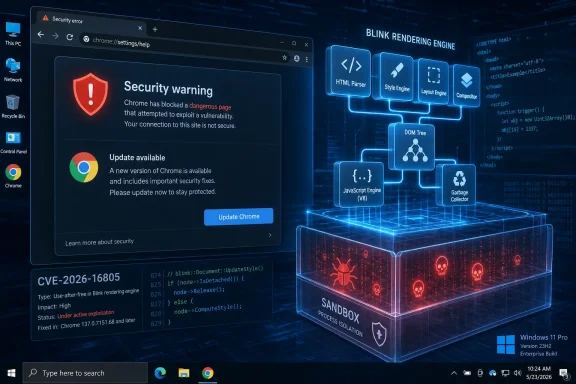 Overview of CVE-2026-16805
CVE-2026-16805 is a memory-management vulnerability in Blink, Chromium’s rendering engine. Blink is central to how Chrome processes HTML, CSS, JavaScript, layout, page interactions, embedded content, and numerous web-platform features. When it handles web content incorrectly, an attacker may be able to use a page as the initial entry point for an exploit.
The affected product is Google Chrome before version 150.0.7871.186. Google’s desktop stable-channel rollout delivers:
- Chrome 150.0.7871.186 or 150.0.7871.187 for Windows and macOS
- Chrome 150.0.7871.186 for Linux
The version split is normal for Chrome releases. Build numbering can differ across supported desktop platforms even when the security fix is part of the same stable-channel update. On Windows, the key practical threshold is clear: systems running a Chrome build older than 150.0.7871.186 should be considered exposed until the browser is updated.
The public vulnerability description says a remote attacker could execute arbitrary code “inside a sandbox” by using a crafted HTML page. That phrasing matters. It confirms a serious code-execution condition in a browser renderer process, but it does not by itself establish that an attacker can escape Chrome’s sandbox, take control of Windows, install software, or access data outside the browser’s security boundary.
Those broader outcomes may require additional vulnerabilities, elevated permissions, user cooperation, or a separate sandbox escape. Still, renderer-level code execution is a valuable foothold for attackers and should not be minimized.
Why a Use-After-Free Bug in Blink Is Serious
A use-after-free vulnerability occurs when software continues to use a reference to memory after that memory has been released or reassigned. In safe conditions, the application might crash. In worse conditions, an attacker may influence what later occupies the released memory and manipulate the software into treating attacker-controlled data as a legitimate object.
Modern browser engines process enormous amounts of untrusted input. Every web page can contain deeply nested document structures, scripts, animations, frames, dynamic style changes, embedded media, and web APIs that cause the rendering engine to create and destroy internal objects constantly. That complexity makes robust lifetime management essential.
The basic memory-lifetime problem
At a simplified level, a vulnerable sequence can look like this:
- Blink creates an internal object while processing a page.
- A page action causes that object to be destroyed.
- Another part of the engine still holds a pointer or reference to the now-invalid object.
- Carefully timed page activity causes the stale reference to be used.
- The browser may crash, corrupt memory, or behave according to attacker-controlled conditions.
Real browser exploitation is considerably more complicated than this outline. Attackers often need to make memory allocation behavior repeatable, bypass exploit mitigations, and account for the differences between operating systems, processors, browser builds, and runtime states. But the core weakness remains dangerous precisely because it occurs at the boundary where the browser accepts untrusted web content.
The CWE-416 classification is therefore more than a taxonomy label. It signals that the bug belongs to a category that security teams routinely prioritize, especially in software exposed directly to internet content.
Blink’s exposure to hostile web content
Blink is not a niche Chrome subsystem. It is deeply involved in ordinary browsing activity:
- Loading and parsing HTML documents
- Constructing and updating the document object model
- Rendering CSS-driven layouts
- Handling user events and page interactions
- Running browser-exposed web APIs
- Supporting modern application-style websites
- Managing frames, subframes, and cross-origin page behavior
That breadth creates a wide potential attack surface, even if the precise vulnerable code path has not been disclosed publicly. Google routinely limits access to browser bug details during and after a security rollout, particularly when broader disclosure could give attackers a practical roadmap before enough users have installed the fix.
For CVE-2026-16805, the public Chromium issue remains restricted. That is an appropriate precaution, but it also means organizations should avoid assuming the flaw is harmless simply because no proof-of-concept exploit has been published.
What “Code Execution Inside a Sandbox” Actually Means
The most important nuance in the vulnerability description is the reference to Chrome’s sandbox. A browser renderer is intentionally isolated from much of the operating system. Chrome uses a multi-process architecture so that code used to display and execute web content is generally separated from privileged browser components and from the broader Windows environment.
This design means an exploit that compromises a renderer process is constrained compared with a traditional application running freely with the user’s permissions.
The security benefit of Chrome’s sandbox
On Windows, Chrome’s sandbox is a crucial defensive layer. It aims to limit the renderer’s ability to:
- Directly alter arbitrary files
- Access sensitive operating-system resources
- Interact freely with other processes
- Invoke privileged system functions
- Break cross-site or cross-origin boundaries without further exploitation
- Persist beyond the browser session through ordinary system-level mechanisms
That containment is a major strength. It can turn a potentially catastrophic browser memory flaw into a more limited compromise, forcing an attacker to invest in additional vulnerabilities or techniques to achieve a full device takeover.
Why sandboxed execution remains high priority
A sandbox is not a reason to defer patching. A compromise inside the renderer may still expose sensitive browser-session information, enable manipulation of content within the affected tab, or create a starting point for a chained attack.
A sophisticated adversary may pair a renderer vulnerability with another weakness, such as:
- A sandbox escape
- A Windows privilege-escalation vulnerability
- A browser logic flaw affecting same-origin protections
- A vulnerable extension or locally installed helper component
- Social engineering that persuades the user to download, run, or approve something
Not every exploit chain reaches that level. But defenders should assess the issue according to what is known: the initial code-execution primitive is serious, it is remotely reachable through HTML, and it affects software that many users keep open throughout the working day.
The most accurate risk statement is therefore balanced: CVE-2026-16805 is not publicly described as a direct Windows takeover vulnerability, but it is a high-severity browser rendering flaw that can serve as a meaningful entry point in a larger attack chain.
Severity, CVSS, and the Current Exploitation Picture
The available vulnerability record assigns a CVSS 3.1 score of 8.8 out of 10, rated High. The associated vector is:
CVSS:3.1/AV:N/AC:L/PR:N/UI:R/S:U/C:H/I:H/A:H
For Windows administrators and security teams, that vector translates into several practical observations.
- Attack Vector: Network — the attack can originate remotely, rather than requiring local access to the PC.
- Attack Complexity: Low — the vulnerability is not currently characterized as requiring unusual environmental conditions to trigger.
- Privileges Required: None — the attacker does not need an account or elevated permissions on the victim’s system before the attack begins.
- User Interaction: Required — a user must visit or otherwise load attacker-controlled content.
- Confidentiality, Integrity, and Availability: High — the vulnerability’s potential impact on the compromised browser component is assessed as substantial.
The required user interaction is important, but it should not create false confidence. Browsing to a page is ordinary, expected behavior. Attackers have many ways to entice users to open a page, including impersonated services, shortened links, advertisements, search-result manipulation, social-media posts, email lures, and compromised sites that users already trust.
No confirmed exploitation is not an all-clear signal
The current SSVC data indicates no known active exploitation and assesses the issue as not automatable. That is useful intelligence, but it is a point-in-time assessment rather than a guarantee that attackers will not develop or deploy an exploit.
Browser vulnerabilities can become more attractive after patch releases because updates frequently help researchers and criminals compare vulnerable and fixed code. The risk can increase once attackers understand which behavioral change addresses the bug, even if full technical details are initially withheld.
The best defensive window is the period between the release of a fix and the point at which vulnerable systems become increasingly easy to identify. Prompt Chrome patching reduces the chance that a workstation remains in that window.
NVD enrichment remains incomplete
The vulnerability record is still undergoing enrichment. That means some information commonly expected in an established CVE entry—such as an independently finalized NVD severity assessment, detailed configuration mappings, or richer technical context—has not yet been completed.
This should be treated as an information gap, not as a reduction in urgency. Google’s own classification is High, the CVE explicitly identifies remote code execution within the sandbox, and the affected Chrome version boundary is already known.
The Chrome 150 Stable Update Includes More Than One High-Severity Fix
CVE-2026-16805 was released as part of a Chrome 150 stable-channel security update containing four High-severity fixes. Alongside the Blink use-after-free issue, the release addresses:
- An out-of-bounds write in Codecs
- A use-after-free issue in WebMCP
- A use-after-free issue in Input
- The Blink use-after-free tracked as CVE-2026-16805
This grouping reinforces the case for updating rather than attempting to assess a single CVE in isolation. Organizations occasionally treat a browser update as optional if one vulnerability appears constrained by user interaction or a sandbox. That approach misses the cumulative risk of multiple fixes landing in the same release.
A browser’s security posture is determined by its full attack surface, not by one CVE score viewed in a vacuum. Delaying the Chrome 150 update leaves a device exposed to the Blink issue and to the other corrected flaws in the release.
How Windows Users Should Update Chrome
For individual users, updating Chrome is fast and usually requires only a browser restart.
- Open Google Chrome.
- Select the three-dot menu in the upper-right corner.
- Choose Help.
- Select About Google Chrome.
- Allow Chrome to check for and download available updates.
- Select Relaunch when prompted.
- Confirm that the installed version is 150.0.7871.186 or later.
Chrome commonly downloads updates in the background, but a pending update is not fully applied until the browser restarts. A laptop that has been sleeping for days, or a desktop user who leaves dozens of tabs open indefinitely, may therefore still be running an outdated and vulnerable Chrome process.
Verify the version rather than trusting the update prompt
The About Google Chrome page is the simplest verification method. On Windows, users can also enter the following into Chrome’s address bar:
chrome://settings/help
The page should show a current version at or above the fixed threshold. If an update is blocked, failing, or unavailable, it may point to an enterprise policy, a broken updater service, restricted permissions, network controls, or an unsupported operating-system configuration.
In those circumstances, the appropriate response is not to ignore the alert. The device should be escalated to IT support or the organization’s endpoint-management team.
Enterprise Patch Management Considerations
For businesses, schools, and managed environments, this Chrome vulnerability is a reminder that browser updates need the same disciplined treatment as operating-system security patches. Browsers are internet-facing, routinely process untrusted code, and frequently carry active authentication sessions for email, cloud storage, business applications, and internal portals.
Prioritize endpoints that handle sensitive sessions
The first wave of remediation should focus on systems used for:
- Privileged administration
- Finance and payroll tasks
- Human resources platforms
- Customer-data access
- Software development and source-code management
- Healthcare, legal, or regulated workloads
- Remote access portals and identity administration
- Employees with elevated local or domain rights
A renderer compromise does not automatically grant access to every resource a user can reach. However, browser-based sessions are valuable targets. A device with active administrative web sessions, saved authentication state, enterprise SSO access, or sensitive tab content warrants accelerated attention.
Recommended enterprise response
A proportionate response to CVE-2026-16805 should include the following actions:
- Deploy Chrome 150.0.7871.186 or later through the organization’s normal update platform.
- Identify devices still running older Chrome builds, including laptops that have not checked in recently.
- Require browser relaunches where updates have downloaded but remain unapplied.
- Review update policies that intentionally defer stable-channel updates beyond an acceptable security window.
- Verify kiosk, shared-device, virtual desktop, and remote-worker coverage rather than focusing only on managed office PCs.
- Monitor security telemetry for suspicious browser crashes, unusual child-process behavior, or anomalous activity following web browsing.
- Ensure Windows and endpoint security tooling are current, reducing the chance that another weakness can be chained with a browser exploit.
Organizations using Chrome’s Extended Stable channel should confirm the precise release status and fixed build available to their deployment ring. Extended support schedules can differ from the ordinary stable channel, and a security exception should not be inferred from a slower feature-update cadence.
Do not overlook non-managed Chrome installations
A common blind spot is the unmanaged browser installed outside standard software deployment workflows. Contractors, bring-your-own-device users, lab systems, secondary Windows accounts, and developer workstations may all run Chrome without reliable enterprise visibility.
Asset inventory should include browser version reporting where possible. If an organization cannot identify versions below the fixed build, it cannot confidently state that exposure has been removed.
Chromium-Based Browsers: Avoid Unsupported Assumptions
Because Blink is part of the wider Chromium project, it is tempting to conclude that every Chromium-derived browser is automatically affected. That conclusion may be directionally plausible, but it should not be stated as fact without a vendor-specific advisory.
Different Chromium-based browsers can:
- Integrate Chromium changes on different schedules
- Apply downstream patches
- Disable or modify specific components
- Use distinct version mappings
- Release security updates under their own build numbers
- Carry additional browser-specific code and mitigations
For that reason, the confirmed affected product in the public record is Google Chrome. Windows users of Microsoft Edge, Brave, Vivaldi, Opera, or other Chromium-based browsers should apply their vendors’ current security updates promptly, but administrators should rely on the relevant vendor’s advisories to determine direct exposure to CVE-2026-16805.
This distinction is not merely procedural. Security teams lose credibility when they overstate scope, and accurate vulnerability management requires separating a confirmed product impact from a reasonable but unverified possibility.
The Broader Lesson: Browser Updates Are Security Updates
Chrome’s update process is often viewed as routine maintenance. In reality, it is one of the most important security controls on a Windows PC. A fully patched operating system does not protect a user who regularly runs an outdated browser against web-based memory corruption bugs.
The security model of a modern browser is deliberately layered:
- Site isolation helps separate content from different origins.
- Renderer processes constrain damage from untrusted pages.
- Sandboxing limits access to the operating system.
- Exploit mitigations raise the cost of memory corruption.
- Automatic updates close known holes quickly.
CVE-2026-16805 demonstrates why every layer matters. Blink’s flaw potentially defeats a portion of the renderer’s normal safety expectations. The sandbox is then expected to limit the blast radius. Windows defenses and endpoint protections may provide additional friction. But the strongest and most dependable control is still to remove the known vulnerable code by installing the update.
Security is not a single feature. It is the combined effect of patched software, least privilege, hardened browser settings, timely restarts, monitored endpoints, and careful handling of untrusted links.
Conclusion
CVE-2026-16805 is a high-severity Chrome vulnerability involving a use-after-free flaw in the Blink rendering engine. It affects Chrome releases earlier than 150.0.7871.186 and can be reached through specially crafted web content, making browser updating an immediate priority for Windows users and IT administrators.
The available technical description confines the documented code-execution impact to Chrome’s sandboxed environment, which is an important mitigation. Yet that should not dilute the seriousness of the issue: browser renderer compromise is a well-established starting point for broader attacks, particularly when paired with other vulnerabilities or persuasive social engineering.
The practical remediation is direct. Update Chrome to version 150.0.7871.186 or later, restart the browser to apply the patch, and ensure managed Windows fleets have not left devices behind on older builds. In a web-first computing environment, keeping Chrome current is not optional housekeeping—it is frontline endpoint security.
