

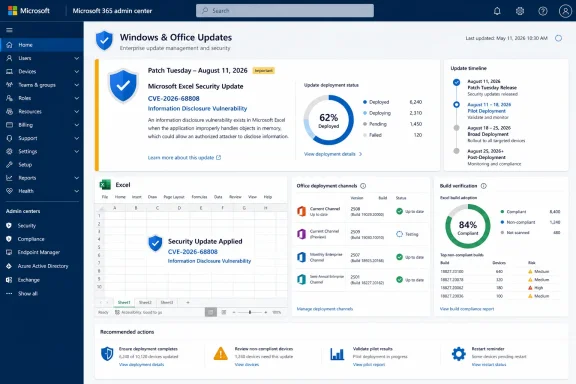
Microsoft’s Security Update Guide lists the vulnerability as published at 7:00 a.m. Pacific time on August 11, or 14:00 UTC, placing it in the regular Patch Tuesday release. The supplied advisory identifies the product and impact category, but does not provide a CVSS score, affected Excel versions, a vulnerable component, a documented attack path, or a clear statement of whether user interaction is required.
That absence changes how CVE-2026-68808 should be handled. It is a patch-compliance item for organizations running Excel, but the available evidence does not support presenting it as a zero-day, a remote-code-execution flaw, or a vulnerability that can be exploited merely by receiving a spreadsheet.
What “information disclosure” establishes — and what it does not
Microsoft’s classification means the reported security consequence is unauthorized exposure of information. In an Excel setting, that could potentially involve data in a workbook, data available to the signed-in user, or information Excel exposes while handling content. The advisory record presently does not establish which of those possibilities applies.
This is materially different from an Excel remote code execution advisory. An information disclosure issue, on its own, does not mean a malicious workbook can install malware, take control of Windows, or alter spreadsheet data. Attackers often chain lower-impact vulnerabilities with another weakness, but there is no public evidence that CVE-2026-68808 is part of such a chain.
The lack of technical detail is normal at the beginning of coordinated disclosure, particularly for Office document-handling bugs. Publishing a full reproduction path before a broad share of endpoints have updated can make patching harder for defenders. But limited disclosure also means organizations should resist filling the gaps with assumptions—especially when deciding whether to interrupt a staged Office deployment.
The exploitability text is explanatory, not a risk rating
The advisory material includes a description of a metric that measures confidence that a vulnerability exists and the credibility of known technical details. That language can look like an exploitability finding, but it is not itself an assigned value for CVE-2026-68808.
In practical terms, there is no disclosed statement here saying that functional exploit code exists, that exploitation is likely, or that exploitation has occurred. There is likewise no disclosed statement that a proof of concept does not exist. The text explains how such a metric is interpreted; it does not report the result for this Excel flaw.
As of August 12, searches of the National Vulnerability Database and CVE.org did not return an independently indexed public record for CVE-2026-68808, and the identifier was not found in CISA’s Known Exploited Vulnerabilities catalog. Those databases frequently lag a newly issued Microsoft advisory, especially on the day after Patch Tuesday, so this is not evidence the vulnerability is unimportant. It does mean there is no independent public scoring, enrichment, exploit notation, or affected-product mapping to use in place of Microsoft’s advisory.
The defensible conclusion is narrow: Microsoft has acknowledged and addressed an Excel information disclosure issue, while the public technical record remains immature.
Why Office update channels are the operational issue
Excel patching does not follow one universal Windows Update path. Microsoft 365 Apps receives Office servicing through its configured update channel, while perpetual Office editions and volume-licensed installations can have separate update packages, management workflows, and support lifecycles. A Windows endpoint reported as fully patched by a monthly operating-system compliance report may still be behind on Office security updates.
That distinction has been especially relevant for organizations that defer Microsoft 365 Apps builds through Monthly Enterprise Channel or Semi-Annual Enterprise Channel policies. Security fixes can be delivered through channel-specific builds, so the version listed in a desktop inventory is more useful than the Windows cumulative-update level when determining exposure to an Excel vulnerability.
Microsoft’s Office update-history documentation also shows why administrators should avoid treating an Office version number as self-explanatory. A version and build combination is tied to a channel, availability date, and end-of-service schedule. The same major Office release can therefore be current in one deployment ring and stale in another.
For Microsoft 365 Apps estates, administrators should check the installed Excel or Office build against the August 11 release information in Microsoft’s Office security-update documentation, then confirm that the relevant channel has actually completed deployment. For Configuration Manager, Intune, or other endpoint-management platforms, that means measuring installed build numbers rather than relying solely on a successful policy assignment or an update job marked complete.
Organizations with disconnected networks, long-lived virtual desktop images, shared kiosk machines, or application compatibility holdbacks deserve particular attention. Those environments commonly retain Office builds after mainstream clients have moved forward, and Excel is often installed even where users rarely launch it directly.
The advisory leaves important triage facts unconfirmed
Three questions remain unanswered in the information currently available for CVE-2026-68808:
- Microsoft has not publicly described the content or action required to trigger the disclosure, such as opening a workbook, previewing a file, using a particular feature, or interacting with externally sourced data.
- The available advisory data does not identify the affected Excel editions, build ranges, Windows versus macOS scope, or whether older perpetual editions are included.
- There is no disclosed exploitability assessment value, public proof of concept, or indication that Microsoft has observed exploitation.
These are not cosmetic omissions. They determine whether compensating controls—such as blocking externally received spreadsheets, restricting preview behavior, or changing attachment filtering—would meaningfully reduce risk while a deployment completes. Without the trigger condition, organizations should not claim that a particular mail gateway rule or macro policy mitigates CVE-2026-68808.
The right short-term control is ordinary Office security hygiene: ensure users receive Microsoft 365 Apps updates through a supported channel, prevent unsupported Office installations from becoming permanent exceptions, and keep externally supplied workbooks subject to the organization’s established scanning and trust controls. A macro policy may still reduce broader spreadsheet risk, but it is not a documented mitigation for this specific disclosure flaw.
Patch the confirmed issue, but do not overstate the threat
CVE-2026-68808 should enter the August Office patch cycle as a confirmed Microsoft security issue. It does not, on the currently available record, warrant the emergency language often reserved for actively exploited vulnerabilities, unauthenticated network attacks, or Excel remote code execution flaws.
The key reporting gap is not whether the CVE exists; Microsoft’s advisory settles that. The gap is whether the flaw affects the organization’s installed Excel builds and how a malicious document or other input could cause data exposure. Until Microsoft adds affected-product details or outside researchers publish validated technical analysis, administrators should use build-level update verification as the decision point—not speculation based on the vulnerability’s title alone.
For now, the concrete outcome is straightforward: confirm the August 11, 2026 Excel security update has reached every supported Office deployment ring, document any deferred or unsupported installations, and keep CVE-2026-68808 in the watch list for a revised Microsoft advisory or a delayed NVD record that supplies the missing scope and severity data.