
CISA’s advisory is the primary record for the disclosure and says it has received no reports of public exploitation specifically targeting these flaws. That is not a reason to defer the work. The LK100W is designed to put an otherwise local USB printer on a wired or Wi-Fi network, so an overlooked appliance can become a remotely reachable foothold inside the same network that carries print jobs and Windows workstation traffic.
Xiiaozet’s own support material confirms the LK100W is aimed directly at Windows environments. Its Windows Quick Installation Tool discovers print servers on the local network, retrieves matching printer drivers, installs them, and binds the printer to the appropriate device port. That convenience can also make the appliance easy to forget after deployment: it looks like a printer setup accessory, while it operates as a network-connected system with its own web management interface and firmware.
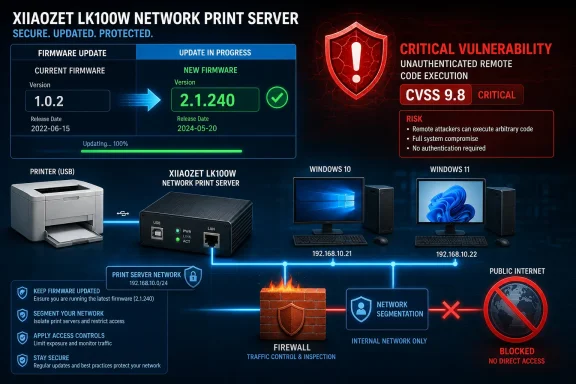 Three flaws, one critical device-control outcome
CISA lists three distinct weakness classes in the LK100W firmware: OS command injection, missing authentication for a critical function, and authentication bypass through an alternate path or channel. The advisory does not publish technical exploit steps, affected service paths, or the conditions needed to chain the bugs. It does, however, make the consequence unambiguous: successful exploitation could let an attacker take control of the device.
The combination is concerning for a modestly priced print appliance because it points to failures at several layers of basic access control. An authentication bypass can remove the normal gate to an administrative feature; missing authentication can leave a sensitive function unprotected even when the rest of a management interface appears locked down; command injection can turn an input-handling flaw into control of the underlying operating environment. CISA has not said that all three are required for compromise, so administrators should treat each CVE as independently important rather than assume an attacker must assemble a complicated chain.
The advisory identifies all LK100W releases below 2.1.240 as affected. For asset inventories, that version boundary matters more than the name printed on the enclosure. A device labelled LK100W that was installed months ago, configured once, and left to share a USB printer is in scope unless its running firmware is confirmed to be 2.1.240 or later.
No other outlet had published technical reporting on the vulnerabilities at the time of CISA’s initial release. That leaves several material details unresolved: whether exploitation requires access from the local network only, whether the vulnerable management service can be exposed beyond the LAN through a router rule or remote-management feature, and whether the vendor has changed default credentials or service behavior in the fixed firmware. Those omissions strengthen the case for containment while patching, rather than attempting to judge exposure from the advisory’s lack of a public exploit report.
Why this belongs on a Windows administrator’s patch list
The vulnerabilities are in the LK100W appliance, not in Windows Print Spooler or a Windows printer driver. Still, Windows administrators are often the people who installed it, or who inherited it as part of a small office’s printer configuration. Xiiaozet documents support for Windows 10 and Windows 11 through its installation utility, alongside manual installation by IP address or hostname.
The company’s documentation describes the LK100W as supporting standard TCP/IP printing through RAW and IPP protocols. In practical terms, Windows PCs may have a printer queue configured to send jobs directly to the print server’s IP address or hostname, with the appliance passing those jobs to the USB-connected printer. A compromise of that intermediary can affect printer availability and places an attacker on equipment that handles documents sent to the shared printer.
That last point deserves a careful reading. CISA has stated device takeover, not theft or alteration of printed documents, and there is no public evidence that these CVEs have been used to access print jobs. But a managed device positioned between workstations and a USB printer is worth treating as sensitive infrastructure—particularly where staff print invoices, HR records, customer information, legal documents, or credentials embedded in onboarding paperwork.
The issue also illustrates why network-attached “peripherals” cannot be excluded from normal asset and vulnerability management. The LK100W has a network identity, can use DHCP or a static address, presents a web management page, and receives firmware updates. Those are the characteristics of an endpoint, whether the device is counted in a traditional endpoint-management platform or not.
Update first, then verify the exposure
CISA’s prescribed action is to minimize network exposure, keep control-system and remote devices off the public internet, place them behind firewalls, and use properly maintained VPNs where remote access is necessary. The LK100W is a print server rather than a conventional industrial controller, but the defensive principle applies directly: do not expose its administrative surface beyond the network that actually needs printing.
Administrators should take the following steps now:
- Inventory every Xiiaozet LK100W by examining printer ports, DHCP leases, network-scanner results, and the physical devices attached to shared USB printers.
- Confirm the installed firmware in the device’s web management interface and update every unit running a version earlier than 2.1.240.
- Remove any router port forwards, public DNS records, cloud relay settings, or remote-access exceptions that could expose a print server outside the intended local network.
- Restrict access to the print-server management interface with network segmentation or firewall rules so ordinary user subnets cannot administer it.
- Review the Windows printer deployments that point to affected IP addresses or hostnames, so an offline update does not become an untracked printing outage.
- Replace devices that cannot be updated, cannot be isolated, or have unknown firmware status.
Xiiaozet’s support documentation says firmware upgrades are performed through the web management page and advises users to follow post-upgrade steps. The vendor also documents a manual Windows setup path using a device IP address or hostname. That is useful if its Quick Installation Tool becomes unavailable during remediation, but it is not a substitute for updating the appliance firmware: a Windows-side driver reinstall does not correct flaws in the print server itself.
The version check is the decisive control
The most useful operational detail in CISA’s notice is the explicit affected-version boundary. Administrators do not need to guess whether a Windows build, printer model, or USB driver is implicated. The immediate test is whether the network print server reports firmware 2.1.240 or later.
Where the firmware version cannot be verified promptly, isolate the device from untrusted networks until it can. If printing must continue, restrict communication to only the workstations and printer VLANs that require it, and block access from guest Wi-Fi, general user networks, and any remote-management path. A printer outage is inconvenient; an unpatched management appliance with critical authentication and command-execution flaws is a worse tradeoff.
CISA credits Byron Guernsey of Okachobi, LLC with reporting the vulnerabilities. The agency’s initial publication on August 27 provides the first clear public remediation threshold for LK100W owners. The concrete next step is simple: locate the appliance, confirm its firmware, and move every unit below 2.1.240 out of service or onto the fixed release.
