

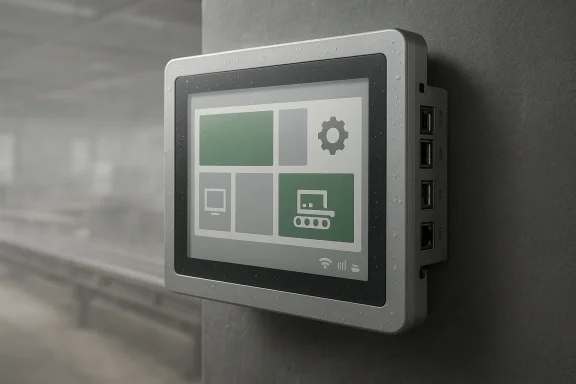
This 12.1-inch industrial panel PC is a reminder that the PC market is still full of specialized machines that matter far more for reliability than for bragging rights. While consumer laptops chase thinner bezels and AI accelerators, this system is aimed squarely at factory floors, kiosks, signage deployments, and other environments where downtime is expensive and dust, vibration, and moisture are part of the job. The headline features are straightforward: a fanless design, IP65 front protection, Windows 11 Pro, and a surprisingly rich I/O set for a compact all-in-one.
What makes the device interesting is not that it is fast by 2026 standards, but that it is deliberately not trying to be a mainstream PC. Its Intel Core i3-7100U processor dates back to Intel’s 7th generation era and was launched as a 15-watt mobile chip, so the value proposition here is endurance, serviceability, and industrial compatibility rather than raw compute performance. That tension between old-but-proven silicon and modern software is the real story behind machines like this. Intel’s own specifications show the processor is an end-of-lifetime part, while Microsoft’s Windows 11 requirements and security model have made hardware selection more consequential than ever.
Industrial panel PCs occupy a peculiar but important niche in the Windows ecosystem. They bridge embedded systems, touchscreen HMIs, and full desktop-class operating systems in a form factor that can be mounted into kiosks, cabinets, or production equipment. In many deployments, they are not simply “computers with touchscreens”; they are control surfaces, operator terminals, and data endpoints all at once.
The RuhrkanalNEWS listing describes a 12.1-inch touchscreen with 1024x768 resolution, 16GB of RAM, a 256GB SSD, and support for a wide range of industrial interfaces, including RS232, RS485, GPIO, USB, LAN, and HDMI. That combination signals an integration-first product, one designed to talk to older serial devices as easily as modern Ethernet-based systems. For factories, that matters because industrial environments rarely run on a clean slate.
There is also a deeper software angle. Microsoft’s Windows 11 platform brings stronger security expectations, including TPM 2.0, Secure Boot, and modern device-encryption assumptions. Microsoft’s documentation makes clear that Windows 11 has defined minimum hardware requirements and that supported devices must ship with UEFI Secure Boot and TPM-related capabilities, which is one reason industrial OEMs are selective about the platforms they certify.
The panel PC’s use of an older Kaby Lake processor is notable because it suggests the seller is balancing cost and compatibility rather than pursuing a fresh platform. That is common in industrial computing, where buyers often prefer a known bill of materials and a predictable thermal profile over the latest CPU generation. The result is a product that looks modest on paper but can still be very useful in the real world.
The rest of the configuration is more contemporary in spirit than the CPU. 16GB of RAM and a 256GB SSD are enough for modern Windows 11 Pro management tasks, kiosk applications, dashboards, and light edge-compute workloads. This is not a machine meant to compile code all day or run heavy AI inference locally. It is meant to remain responsive while connected to sensors, PLCs, HMIs, and backend systems.
At the same time, there are limits that buyers should recognize:
The storage question matters because Windows updates and application logs can add up over time. Microsoft notes that Windows 11 devices need enough free space to stay updated, and that actual update requirements vary based on system configuration and software footprint. In practice, that means operators should plan for storage discipline rather than assuming the factory UI will stay small forever.
That resolution is not high by modern office expectations. Yet in industrial HMI work, readability, not cinematic sharpness, is the point. UI designs for production and process control often use large buttons, status blocks, and clear typography, which fit 1024x768 quite well.
The practical implications are easy to understand:
There is also a legacy advantage. A huge amount of industrial software was designed around fixed-size interfaces, and changing the aspect ratio can introduce layout problems or force expensive UI redesigns. A familiar screen format reduces that risk, which is why industrial buyers often prefer boring when boring works.
This is where industrial systems differentiate themselves from consumer all-in-ones. In factories, serial communications still matter, PLCs still speak older protocols, and GPIO still has a role in control logic and simple signaling. The machine’s interface mix suggests it can sit between operators, machines, and local network infrastructure without requiring an external expansion box.
A sensible buyer will look at the port mix as a strategy, not a spec sheet trophy:
This is one reason fanless industrial systems often get deployed in places where consumer PCs would never be trusted. They are not chosen because they are beautiful, but because they are predictable.
That creates a natural tension when a system is built around an older CPU generation. The i3-7100U can absolutely be paired with Windows 11 in many cases, but buyers should not assume long-term support characteristics are identical to those of newer hardware. The smarter reading is that the OEM has judged this platform acceptable for the intended workload, not that it is future-proof for every Windows release.
The upside is clear:
Still, there are caveats. If the device ships with an older chipset generation, buyers should confirm TPM availability, BIOS support, driver coverage, and update behavior before treating it as a long-lived platform. The phrase Windows 11 pre-loaded is useful marketing, but it is not a substitute for lifecycle planning.
For factory control, the multiple serial ports and GPIO are the big attraction. For kiosks, the touchscreen, auto power-on, and compact form factor matter more. For digital signage, the silent fanless design and Windows-based software compatibility become especially valuable.
A fanless, aluminum-backed chassis is also an operational advantage because dust ingress and fan failure are common sources of downtime. Industrial buyers understand that every moving part is a maintenance liability, so a passive cooling design lowers the chance of surprise outages. That is one reason industrial panel PCs are often specified for 24/7 duty.
For public-facing use, the biggest practical question is not whether the system can run Windows 11, but whether the application stack is locked down properly. Kiosks need policies, not just hardware. A good panel PC can survive in a lobby, but it still needs software discipline to stay secure.
The limitations are mostly related to resolution and performance. A 1024x768 panel is perfectly fine for many industrial signage and status-display scenarios, but it is not a premium retail display by modern standards. Buyers expecting vivid, consumer-style media playback should calibrate expectations accordingly.
The interesting thing about this product is that it appears to be positioning itself through breadth of connectivity rather than through platform novelty. More recent industrial devices often use newer Intel processors, higher-resolution panels, and broader security features, but they also cost more. By contrast, an older CPU-based system can land in a more accessible price band while still solving the problem.
In that context, the RuhrkanalNEWS unit is not trying to outgun the newest systems. It is competing on value and practicality. That can work well if the buyer’s workload is stable and the application does not benefit from a newer CPU architecture.
This is also why the right machine at the right price often beats the newest machine on paper. An industrial buyer who needs ten durable operator terminals may prefer a known platform with more I/O and a smaller upfront cost over a newer but pricier device with features they will never use.
There is also a potential mismatch between Windows 11 Pro branding and the realities of industrial support. If the device relies on older platform components, buyers need to verify TPM, Secure Boot, and driver support themselves rather than assuming everything is aligned. Microsoft’s own Windows 11 documentation shows that the platform’s supported baseline is not trivial, particularly for secure and manageable deployments.
What will matter most is whether buyers continue to value integration density and operational certainty over performance inflation. If the application is a machine HMI or a data-entry kiosk, this kind of device can remain perfectly sensible. If the workload shifts toward analytics, AI-assisted monitoring, or richer visualization, then newer industrial platforms will become more attractive.
In the end, the machine’s value lies in restraint. It uses an older processor, but it packages that silicon inside a practical, rugged Windows 11 terminal with the kind of I/O and enclosure design that industrial buyers actually need. That is not glamorous, but it is often the difference between a device that looks good in a catalog and one that quietly keeps a production line, kiosk, or signage system running for years.
Source: RuhrkanalNEWS https://ruhrkanal.news/Industrial-Panel-PC-Windows-11-Touchscreen-Fanless-I3-1180741/
What makes the device interesting is not that it is fast by 2026 standards, but that it is deliberately not trying to be a mainstream PC. Its Intel Core i3-7100U processor dates back to Intel’s 7th generation era and was launched as a 15-watt mobile chip, so the value proposition here is endurance, serviceability, and industrial compatibility rather than raw compute performance. That tension between old-but-proven silicon and modern software is the real story behind machines like this. Intel’s own specifications show the processor is an end-of-lifetime part, while Microsoft’s Windows 11 requirements and security model have made hardware selection more consequential than ever.
 Overview
Industrial panel PCs occupy a peculiar but important niche in the Windows ecosystem. They bridge embedded systems, touchscreen HMIs, and full desktop-class operating systems in a form factor that can be mounted into kiosks, cabinets, or production equipment. In many deployments, they are not simply “computers with touchscreens”; they are control surfaces, operator terminals, and data endpoints all at once.The RuhrkanalNEWS listing describes a 12.1-inch touchscreen with 1024x768 resolution, 16GB of RAM, a 256GB SSD, and support for a wide range of industrial interfaces, including RS232, RS485, GPIO, USB, LAN, and HDMI. That combination signals an integration-first product, one designed to talk to older serial devices as easily as modern Ethernet-based systems. For factories, that matters because industrial environments rarely run on a clean slate.
There is also a deeper software angle. Microsoft’s Windows 11 platform brings stronger security expectations, including TPM 2.0, Secure Boot, and modern device-encryption assumptions. Microsoft’s documentation makes clear that Windows 11 has defined minimum hardware requirements and that supported devices must ship with UEFI Secure Boot and TPM-related capabilities, which is one reason industrial OEMs are selective about the platforms they certify.
The panel PC’s use of an older Kaby Lake processor is notable because it suggests the seller is balancing cost and compatibility rather than pursuing a fresh platform. That is common in industrial computing, where buyers often prefer a known bill of materials and a predictable thermal profile over the latest CPU generation. The result is a product that looks modest on paper but can still be very useful in the real world.
Why this product category still matters
Industrial PCs are not purchased the way consumer desktops are. They are chosen to survive environments where a retail tower would fail from dust, heat, or awkward placement, and where a reboot is a production event rather than an annoyance. A fanless aluminum-backed chassis is not a luxury in that context; it is a design requirement.- Fanless operation lowers maintenance and reduces failure points.
- IP65 front protection helps defend against dust and water jets.
- Serial ports keep legacy automation equipment connected.
- VESA and wall mounting make deployment more flexible.
- Windows 11 Pro keeps software compatibility broad for business use.
Hardware Architecture
The most revealing detail in this machine is the processor choice. The Core i3-7100U is a dual-core, four-thread chip with a 2.40 GHz base clock and a 15W TDP, and Intel lists it as having reached end of servicing updates in late 2024. That does not make it unusable, but it does mean the platform is mature rather than current. In industrial terms, maturity can be a strength because it often translates into stable drivers, known thermal behavior, and lower platform risk.The rest of the configuration is more contemporary in spirit than the CPU. 16GB of RAM and a 256GB SSD are enough for modern Windows 11 Pro management tasks, kiosk applications, dashboards, and light edge-compute workloads. This is not a machine meant to compile code all day or run heavy AI inference locally. It is meant to remain responsive while connected to sensors, PLCs, HMIs, and backend systems.
The CPU trade-off
Choosing a 2016-era processor for a 2026 purchase may sound odd at first, but the industrial market often values qualified longevity over newness. System integrators care about consistent behavior under load, not benchmark headlines. A lower-power processor also helps a fanless design keep temperatures manageable without resorting to noisy or failure-prone cooling.At the same time, there are limits that buyers should recognize:
- Older CPUs may lack newer efficiency and security features.
- Integrated graphics are adequate, but not exciting.
- Headroom for heavier multitasking is modest.
- Long-term support becomes more dependent on the OEM than on Intel.
Memory and storage implications
With 16GB RAM, the machine can handle Windows 11 Pro comfortably for industrial HMI use, browser-based dashboards, and typical remote management tools. The 256GB SSD is more modest, but in a kiosk or panel role that may be entirely sufficient if the workload is carefully scoped. Industrial buyers often prioritize endurance and replaceability over sheer capacity.The storage question matters because Windows updates and application logs can add up over time. Microsoft notes that Windows 11 devices need enough free space to stay updated, and that actual update requirements vary based on system configuration and software footprint. In practice, that means operators should plan for storage discipline rather than assuming the factory UI will stay small forever.
Display and Touch Experience
The display is a 12.1-inch touchscreen with a 1024x768 panel resolution, which immediately tells you this is an industrial-format device rather than a consumer tablet replacement. The 4:3 aspect ratio is old-fashioned by consumer standards, but it remains common in control rooms and machine interfaces because it is practical for line diagrams, machine status panels, and dense control layouts.That resolution is not high by modern office expectations. Yet in industrial HMI work, readability, not cinematic sharpness, is the point. UI designs for production and process control often use large buttons, status blocks, and clear typography, which fit 1024x768 quite well.
Touch in harsh environments
Touchscreens in industrial settings live a harder life than consumer touch displays. Gloves, dust, periodic cleaning, and moisture all complicate usability, and that is why vendors emphasize rugged front-panel protection and durable glass. An IP65 front is specifically attractive in spaces where operators may need to wipe the screen down or where airborne particles are a daily reality. IEC’s IP ratings framework defines the first digit as protection against solid objects and the second as protection against water ingress, which is why IP65 is shorthand for a “dust-tight” and water-jet-resistant front face.The practical implications are easy to understand:
- Touch input must remain accurate in dirty conditions.
- Surface cleaning should not jeopardize the electronics.
- Visibility must remain acceptable under industrial lighting.
- The panel should tolerate repeated operator interaction.
Why 4:3 still has a place
The 4:3 ratio looks dated on paper, but in industrial workflows it is often ideal. It gives operators a taller canvas for control stacks, form entry, and machine-state visualization. That is one reason many panel PC product lines still ship in this format even as mainstream consumer screens have gone wide.There is also a legacy advantage. A huge amount of industrial software was designed around fixed-size interfaces, and changing the aspect ratio can introduce layout problems or force expensive UI redesigns. A familiar screen format reduces that risk, which is why industrial buyers often prefer boring when boring works.
Connectivity and Integration
The port selection is arguably the most compelling part of the configuration. A machine with 6x USB, 2x LAN, 4x RS232, 2x RS485, 8x GPIO, and HDMI is not just a panel PC; it is a small integration hub. That level of connectivity allows it to bridge old and new equipment without an array of converters and adapters.This is where industrial systems differentiate themselves from consumer all-in-ones. In factories, serial communications still matter, PLCs still speak older protocols, and GPIO still has a role in control logic and simple signaling. The machine’s interface mix suggests it can sit between operators, machines, and local network infrastructure without requiring an external expansion box.
Legacy devices meet modern networks
RS232 and RS485 are especially important because they support equipment that was installed years ago and may remain in service for years more. Ethernet is common, but it does not eliminate the need for legacy comms. An industrial panel PC that includes multiple serial channels can be much easier to deploy because it avoids the need for external serial servers or USB dongles.A sensible buyer will look at the port mix as a strategy, not a spec sheet trophy:
- Multiple LAN ports allow network segmentation or backup connectivity.
- GPIO lines can be mapped to sensors, relays, and alarms.
- RS232 supports classic device control and diagnostics.
- RS485 is useful for multi-drop industrial field buses.
- USB keeps barcode scanners, storage, and peripherals simple.
Deployment flexibility
The device also supports VESA, wall, and desktop mounting, and it includes auto-power-on behavior. Those details matter because industrial devices are often expected to recover automatically after power interruptions. In environments where uptime is measured in lost output, a panel PC that restarts itself without intervention reduces operational friction.This is one reason fanless industrial systems often get deployed in places where consumer PCs would never be trusted. They are not chosen because they are beautiful, but because they are predictable.
Windows 11 Pro on Aging Hardware
The software story here is more nuanced than the hardware story. Windows 11 Pro is a modern enterprise-capable operating system with current management, security, and compatibility advantages. However, it is also a platform with stricter expectations than older Windows releases, and Microsoft’s published requirements make TPM 2.0 and Secure Boot central to supported configurations.That creates a natural tension when a system is built around an older CPU generation. The i3-7100U can absolutely be paired with Windows 11 in many cases, but buyers should not assume long-term support characteristics are identical to those of newer hardware. The smarter reading is that the OEM has judged this platform acceptable for the intended workload, not that it is future-proof for every Windows release.
Security and manageability
Windows 11 Pro provides features that matter to industrial and business users, especially when paired with proper device management and endpoint protection. Microsoft emphasizes modern security primitives such as TPM 2.0, Secure Boot, and baseline encryption capabilities in its Windows 11 and device-security documentation. That makes the operating system a better fit for connected industrial environments than a bare embedded OS in many cases.The upside is clear:
- Easier integration into enterprise management stacks.
- Better security posture than older consumer editions.
- Broader software compatibility for business applications.
- Familiarity for IT departments already supporting Windows fleets.
The compatibility question
Older industrial hardware often lingers because industrial software is slow to change. A line-of-business application built around a specific driver or protocol may have no easy replacement, so the operating system must fit the workflow rather than the other way around. Windows 11 Pro can help here because it remains broadly compatible with modern software while preserving a Windows desktop model that many operators already understand.Still, there are caveats. If the device ships with an older chipset generation, buyers should confirm TPM availability, BIOS support, driver coverage, and update behavior before treating it as a long-lived platform. The phrase Windows 11 pre-loaded is useful marketing, but it is not a substitute for lifecycle planning.
Industrial Use Cases
The RuhrkanalNEWS description points to three main use cases: factory control systems, kiosks, and digital signage. Those categories sound broad, but each has different technical requirements, and this panel PC seems designed to sit comfortably across them. The common denominator is continuous operation with minimal maintenance.For factory control, the multiple serial ports and GPIO are the big attraction. For kiosks, the touchscreen, auto power-on, and compact form factor matter more. For digital signage, the silent fanless design and Windows-based software compatibility become especially valuable.
Factory floor and HMI deployment
In manufacturing, a panel PC often becomes the operator’s primary interface to a machine or process. It may display alarms, production counts, recipes, or live sensor data, and it may need to interface with legacy equipment that speaks older protocols. In that setting, the inclusion of RS232 and RS485 is not decorative; it is fundamental.A fanless, aluminum-backed chassis is also an operational advantage because dust ingress and fan failure are common sources of downtime. Industrial buyers understand that every moving part is a maintenance liability, so a passive cooling design lowers the chance of surprise outages. That is one reason industrial panel PCs are often specified for 24/7 duty.
Kiosk and public-facing roles
Kiosk deployments are usually judged by physical durability, responsiveness, and ease of mounting. In those environments, the IP65 front helps protect the device from cleaning and incidental exposure, while the touchscreen interface simplifies user interaction. The panel’s compact 12.1-inch footprint is also useful when space is at a premium.For public-facing use, the biggest practical question is not whether the system can run Windows 11, but whether the application stack is locked down properly. Kiosks need policies, not just hardware. A good panel PC can survive in a lobby, but it still needs software discipline to stay secure.
Signage and always-on displays
Digital signage usually demands quiet operation, visual stability, and low maintenance. Fan noise can be a problem in quiet environments, so a fanless unit has an immediate advantage. The machine’s ability to auto-start after power loss is also essential for unattended signage systems that must recover without staff intervention.The limitations are mostly related to resolution and performance. A 1024x768 panel is perfectly fine for many industrial signage and status-display scenarios, but it is not a premium retail display by modern standards. Buyers expecting vivid, consumer-style media playback should calibrate expectations accordingly.
Market Positioning and Competitive Context
This device sits in a market where the most important competitors are not mainstream desktop PCs but other industrial panel PCs from vendors that specialize in rugged HMI hardware. Intel’s own ecosystem showcases a growing number of panel PC and rugged fanless systems aimed at manufacturing, process automation, and kiosk use, with many vendors emphasizing IP65, fanless cooling, and Windows 10/11 support.The interesting thing about this product is that it appears to be positioning itself through breadth of connectivity rather than through platform novelty. More recent industrial devices often use newer Intel processors, higher-resolution panels, and broader security features, but they also cost more. By contrast, an older CPU-based system can land in a more accessible price band while still solving the problem.
How it compares with newer industrial systems
Newer industrial panel PCs often advertise more advanced chipsets, brighter displays, and wider operating temperature ranges. Intel partner listings show many current industrial offerings built around 12th-, 13th-, or even Meteor Lake-class platforms, with fanless construction, IP65 front protection, and support for modern Windows or Linux deployments. That means the bar for a “current” industrial panel PC is now relatively high.In that context, the RuhrkanalNEWS unit is not trying to outgun the newest systems. It is competing on value and practicality. That can work well if the buyer’s workload is stable and the application does not benefit from a newer CPU architecture.
The legacy-value equation
The real market logic is simple: if the application is static, the hardware can be static too. Industrial buyers often care more about whether the device runs reliably for years than whether it can render modern desktop effects. A lower-cost, older-platform panel PC can therefore be a rational purchase, especially for OEMs or system integrators deploying multiple units.This is also why the right machine at the right price often beats the newest machine on paper. An industrial buyer who needs ten durable operator terminals may prefer a known platform with more I/O and a smaller upfront cost over a newer but pricier device with features they will never use.
Strengths and Opportunities
The strongest appeal of this panel PC is that it solves a very specific class of problems with very little drama. It is not trying to be a fashionable consumer hybrid. It is trying to be a dependable industrial endpoint, and that clarity is an asset.- Fanless design reduces maintenance and noise.
- IP65 front protection improves survivability in harsh environments.
- Rich I/O makes integration easier.
- Windows 11 Pro supports familiar business tooling.
- Auto-power-on helps with unattended recovery.
- Compact 12.1-inch size suits kiosks and control stations.
- Aluminum back housing supports passive heat dissipation.
Risks and Concerns
The biggest risk is obvious: the i3-7100U is an older processor, and its end-of-servicing status means buyers should think carefully about lifecycle planning. A machine that is fine for today’s workload can become awkward if software expectations rise or vendor support shifts. That is especially relevant when a device is expected to remain in service for many years.There is also a potential mismatch between Windows 11 Pro branding and the realities of industrial support. If the device relies on older platform components, buyers need to verify TPM, Secure Boot, and driver support themselves rather than assuming everything is aligned. Microsoft’s own Windows 11 documentation shows that the platform’s supported baseline is not trivial, particularly for secure and manageable deployments.
- Older CPU platform may limit long-term upgrade confidence.
- 1024x768 resolution may feel cramped for some modern applications.
- 256GB SSD may be tight for heavier logging or image-heavy workloads.
- Compatibility assumptions should be verified before purchase.
- Industrial deployments may require vendor-specific support and imaging.
- Security posture depends on implementation, not just OS edition.
- Performance headroom is modest for compute-heavy tasks.
Looking Ahead
The industrial PC market is clearly moving toward newer processors, more integrated security, and broader edge-compute capability. Yet older-platform panel PCs will remain relevant as long as factories, kiosks, and automation systems keep relying on stable interfaces and legacy serial protocols. That is unlikely to change quickly, because industrial change cycles are measured in equipment lifespans, not annual refreshes.What will matter most is whether buyers continue to value integration density and operational certainty over performance inflation. If the application is a machine HMI or a data-entry kiosk, this kind of device can remain perfectly sensible. If the workload shifts toward analytics, AI-assisted monitoring, or richer visualization, then newer industrial platforms will become more attractive.
What to watch next
- Whether the OEM provides a clear lifecycle and support policy
- How well Windows 11 updates behave on the shipped image
- Whether the unit ships with TPM and Secure Boot properly enabled
- Whether the I/O mix is enough for real industrial integration
- Whether buyers shift toward newer CPUs for edge applications
In the end, the machine’s value lies in restraint. It uses an older processor, but it packages that silicon inside a practical, rugged Windows 11 terminal with the kind of I/O and enclosure design that industrial buyers actually need. That is not glamorous, but it is often the difference between a device that looks good in a catalog and one that quietly keeps a production line, kiosk, or signage system running for years.
Source: RuhrkanalNEWS https://ruhrkanal.news/Industrial-Panel-PC-Windows-11-Touchscreen-Fanless-I3-1180741/
