

1Password for Claude, announced July 16, lets Anthropic’s browser agent sign in to websites and complete authenticated chores without placing the underlying password or one-time code in Claude’s context. The practical catch for Windows users is significant: the feature is currently Mac-only, requiring the 1Password desktop app and browser extension alongside the Claude desktop app and its browser extension.
The Independent framed the release as Claude using users’ passwords to shop and manage accounts. That describes the outcome, but not the security model. According to 1Password’s launch material and technical documentation, Claude requests access to a selected login; the user approves it through 1Password; and 1Password itself injects the credential into the matching website, submits the form, and returns Claude to the page only after the secret should no longer be visible.
That distinction matters. This is not a mechanism for exporting a vault to an AI model, nor does it give Claude a reusable plaintext password. It is an attempt to build a credential broker for browser agents: the AI can use an identity for a narrowly approved task without being handed the secret that proves that identity.
1Password calls the arrangement a “zero-exposure” framework. In the intended workflow, Claude says it needs to sign in to a site, 1Password presents the matching saved item or items, and the user explicitly approves the release. The password manager then fills the password and, where supported, the time-based one-time passcode directly into the page.
The company says every credential release is tied to a particular Claude agent session and that approvals do not persist into later sessions. The data is held only in memory, with a stated hard cap of nine hours, and is removed when the agent signals that the task has ended or the browser closes. 1Password also says it records every grant in an item’s usage history.
That is a more defensible design than pasting a password into an AI chat, an automation script, or a prompt. Claude can receive basic item metadata — such as a title, username or email address, and the associated website — plus success or failure information. It should not receive the password, MFA code, or a hidden copy of the secret in its working memory.
But authenticated access remains powerful even when passwords are perfectly protected. Once 1Password has signed Claude into an account, Claude can act within the resulting browser session. Its ability to change settings, read data, place an order, cancel a subscription, or otherwise cause damage is governed by Anthropic’s browser-agent safeguards and the website’s own controls — not by 1Password’s autofill protections.
That is the key limit administrators and cautious users should keep in view: credential secrecy is not the same thing as safe delegation.
1Password’s documentation describes several other controls around the flow. It uses the operating system’s code-signing facilities to verify the Claude desktop app during initial pairing, then assigns cryptographic credentials to individual agent sessions. The password manager fills a login only on a page matching the website saved with that item. If the login submission fails, it says it clears the fields before returning control to Claude.
Those are meaningful layers, especially compared with agents that have broad access to a user’s desktop, clipboard, browser profile, or an unlocked password-manager extension. The integration is also designed so the credential-bearing communication remains on the local Mac rather than passing through 1Password’s or Anthropic’s servers.
Still, the phrase “the AI cannot see your password” should not become shorthand for “the AI cannot be manipulated.” A malicious website, a poisoned product listing, or text embedded in a legitimate page can attempt prompt injection — instructions crafted to redirect an agent from the user’s intent. The password manager can limit which login gets filled; it cannot inherently decide whether an already authenticated agent is making a wise purchase, exporting sensitive account data, or following misleading page instructions.
1Password itself acknowledges the boundary in its security documentation. It notes that, after a successful sign-in, what the agent does within the account is outside the password manager’s guarantees. Likewise, a compromised Mac or compromised partner application is beyond the protection a local credential-brokering design can fully provide.
Neither 1Password nor Anthropic has publicly attached a Windows release date to 1Password for Claude. That absence matters because the Windows ecosystem has a different set of deployment, endpoint-security, browser-extension, application-control, and credential-isolation considerations. A feature that relies on a trusted local chain between two desktop applications and two extensions must be implemented and audited carefully on each platform, not simply ported as a UI feature.
For IT teams, the business controls are more relevant than the consumer shopping demo. 1Password says its Business customers can control availability through a policy named “Allow AI agents to autofill for users.” That makes the integration easier to prohibit during evaluation, but it does not resolve the policy questions that follow approval: which sites may agents access, which vault items are eligible, whether agents can conduct transactions, and how actions are logged and reviewed.
A sensible early enterprise posture would be restrictive rather than experimental:
That approach resembles a least-privilege access system more than a conversational AI add-on. It replaces a long-lived credential handoff with a short-lived, session-specific grant, and it puts the password manager between the agent and the secret. If browser agents become routine tools for booking, reconciling, purchasing, managing SaaS accounts, and completing support workflows, that intermediary role may become essential.
For now, however, Windows users should not mistake a broadly available password-agent integration for a cross-platform launch. The initial release is a Mac preview of a new security model, not a reason to give an AI unrestricted control over high-value accounts. The next milestone is a Windows rollout — and, more importantly, clearer evidence that per-task credential approval can contain the risks that begin only after the login succeeds.
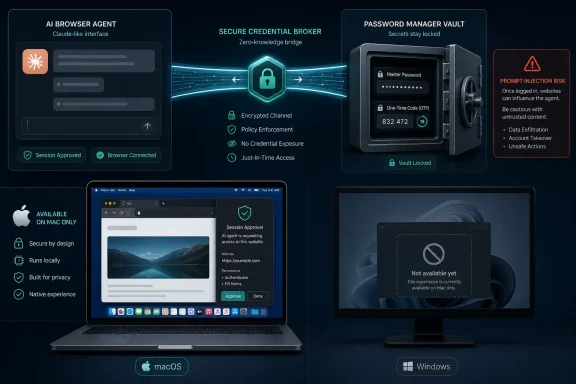
The Independent framed the release as Claude using users’ passwords to shop and manage accounts. That describes the outcome, but not the security model. According to 1Password’s launch material and technical documentation, Claude requests access to a selected login; the user approves it through 1Password; and 1Password itself injects the credential into the matching website, submits the form, and returns Claude to the page only after the secret should no longer be visible.
That distinction matters. This is not a mechanism for exporting a vault to an AI model, nor does it give Claude a reusable plaintext password. It is an attempt to build a credential broker for browser agents: the AI can use an identity for a narrowly approved task without being handed the secret that proves that identity.
 The Password Never Reaches Claude — But the Session Does
1Password calls the arrangement a “zero-exposure” framework. In the intended workflow, Claude says it needs to sign in to a site, 1Password presents the matching saved item or items, and the user explicitly approves the release. The password manager then fills the password and, where supported, the time-based one-time passcode directly into the page.The company says every credential release is tied to a particular Claude agent session and that approvals do not persist into later sessions. The data is held only in memory, with a stated hard cap of nine hours, and is removed when the agent signals that the task has ended or the browser closes. 1Password also says it records every grant in an item’s usage history.
That is a more defensible design than pasting a password into an AI chat, an automation script, or a prompt. Claude can receive basic item metadata — such as a title, username or email address, and the associated website — plus success or failure information. It should not receive the password, MFA code, or a hidden copy of the secret in its working memory.
But authenticated access remains powerful even when passwords are perfectly protected. Once 1Password has signed Claude into an account, Claude can act within the resulting browser session. Its ability to change settings, read data, place an order, cancel a subscription, or otherwise cause damage is governed by Anthropic’s browser-agent safeguards and the website’s own controls — not by 1Password’s autofill protections.
That is the key limit administrators and cautious users should keep in view: credential secrecy is not the same thing as safe delegation.
Agentic Mode Locks the Vault, Not the Website
The release also introduces “Agentic Mode” in the 1Password browser extension. When a supported agent controls a browser tab, 1Password says its normal inline suggestions, save prompts, and notifications disappear from that tab. Claude should therefore be unable to click through normal 1Password interface elements and discover credentials that were never approved.1Password’s documentation describes several other controls around the flow. It uses the operating system’s code-signing facilities to verify the Claude desktop app during initial pairing, then assigns cryptographic credentials to individual agent sessions. The password manager fills a login only on a page matching the website saved with that item. If the login submission fails, it says it clears the fields before returning control to Claude.
Those are meaningful layers, especially compared with agents that have broad access to a user’s desktop, clipboard, browser profile, or an unlocked password-manager extension. The integration is also designed so the credential-bearing communication remains on the local Mac rather than passing through 1Password’s or Anthropic’s servers.
Still, the phrase “the AI cannot see your password” should not become shorthand for “the AI cannot be manipulated.” A malicious website, a poisoned product listing, or text embedded in a legitimate page can attempt prompt injection — instructions crafted to redirect an agent from the user’s intent. The password manager can limit which login gets filled; it cannot inherently decide whether an already authenticated agent is making a wise purchase, exporting sensitive account data, or following misleading page instructions.
1Password itself acknowledges the boundary in its security documentation. It notes that, after a successful sign-in, what the agent does within the account is outside the password manager’s guarantees. Likewise, a compromised Mac or compromised partner application is beyond the protection a local credential-brokering design can fully provide.
Windows Is Not in the First Wave
For a Windows-focused audience, the immediate news is less about enabling a new Claude feature than understanding that there is nothing to enable yet. 1Password’s July 16 announcement explicitly limits the launch to Mac users across individual, family, and business plans. Its security documentation is equally Mac-specific, including its discussion of code-signing verification and local communications among the Claude app, 1Password app, and browser extensions.Neither 1Password nor Anthropic has publicly attached a Windows release date to 1Password for Claude. That absence matters because the Windows ecosystem has a different set of deployment, endpoint-security, browser-extension, application-control, and credential-isolation considerations. A feature that relies on a trusted local chain between two desktop applications and two extensions must be implemented and audited carefully on each platform, not simply ported as a UI feature.
For IT teams, the business controls are more relevant than the consumer shopping demo. 1Password says its Business customers can control availability through a policy named “Allow AI agents to autofill for users.” That makes the integration easier to prohibit during evaluation, but it does not resolve the policy questions that follow approval: which sites may agents access, which vault items are eligible, whether agents can conduct transactions, and how actions are logged and reviewed.
A sensible early enterprise posture would be restrictive rather than experimental:
- Permit agent authentication only for low-risk, non-financial test accounts with no access to production data.
- Create dedicated accounts and narrowly scoped roles instead of delegating a user’s primary administrative or purchasing identity.
- Require human confirmation at business-impacting steps such as purchases, account changes, exports, or deletions.
- Treat browser-agent activity as a new identity-governance category, with monitoring and incident-response procedures rather than as ordinary browser automation.
The Real Product Is Delegated Identity
The important development is not that Claude can fill in a login form. Password managers have done that for years. The new proposition is that users can authorize a machine agent to use an identity while keeping the credential itself unavailable to the model.That approach resembles a least-privilege access system more than a conversational AI add-on. It replaces a long-lived credential handoff with a short-lived, session-specific grant, and it puts the password manager between the agent and the secret. If browser agents become routine tools for booking, reconciling, purchasing, managing SaaS accounts, and completing support workflows, that intermediary role may become essential.
For now, however, Windows users should not mistake a broadly available password-agent integration for a cross-platform launch. The initial release is a Mac preview of a new security model, not a reason to give an AI unrestricted control over high-value accounts. The next milestone is a Windows rollout — and, more importantly, clearer evidence that per-task credential approval can contain the risks that begin only after the login succeeds.
References
- Primary source: The Independent
Published: 2026-07-17T12:48:42+00:00
Loading…
www.independent.co.uk - Related coverage: itpro.com
Loading…
www.itpro.com - Related coverage: tomsguide.com
Loading…
www.tomsguide.com - Related coverage: 9to5mac.com
Loading…
9to5mac.com - Related coverage: androidauthority.com
Loading…
www.androidauthority.com