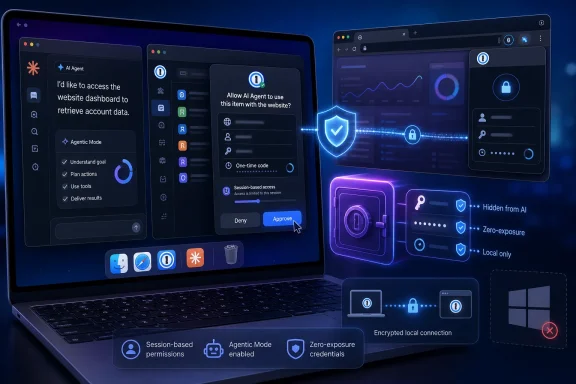
1Password for Claude, launched on July 16, 2026, gives Anthropic’s browser-based AI assistant a way to sign in to websites on a Mac without putting passwords, one-time codes, or MFA codes into Claude’s model context, memory, or Anthropic’s systems. That is a materially different proposition from asking an agent to read a password from a prompt—or pausing every workflow for a human to complete a login manually. The practical payoff is not that Claude has become trustworthy with secrets; it is that 1Password is attempting to make the secret unnecessary for Claude to see.
The integration matters because browser agents have reached the uncomfortable part of automation. An assistant can research a trip, reconcile an account, or walk through a subscription change, but the useful work often stops at a sign-in screen. Until now, users were left with an unattractive choice: disclose the credential to the agent, or take control back at every authentication barrier. 1Password’s answer is to interpose itself as a permission broker between the agent and the website.
That is why the company is pitching this not as smarter autofill, but as a new identity model. “We need a new security model that is purpose-built for agents, not just humans,” 1Password CTO Nancy Wang said in the launch announcement. The central claim is delegated use without delegated knowledge: Claude can cause a login to happen, but does not receive the underlying password or one-time code.
As first reported by Thurrott, the framework behind 1Password for Claude is described by 1Password authors Mitchell Cohen and Horia Culea as a “zero-exposure architecture.” That phrase is marketing language, but it identifies a real design distinction. In the intended flow, the credential remains in 1Password, is approved at runtime, and is inserted into the destination webpage through a channel controlled by 1Password.
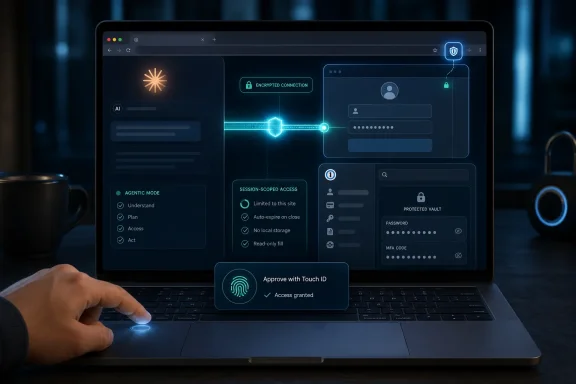
Claude asks for the credential it needs, and the user sees the request and approves or denies it through a biometric prompt. The authorization can use Touch ID, Face ID, or a fingerprint scan, according to International Business Times UK and finance.biggo.com. The permission is scoped to approved items for the current session, then expires rather than becoming a durable entitlement for the agent.
This is not the same as supplying an AI assistant with a password manager export, placing a password in the chat window, or granting broad vault access. The model is meant to learn that a login was used and whether the operation succeeded, not the secret value that made it possible. Per 1Password’s framing, Claude “knows it used your login; it does not need the password or one-time code in its context.”
The distinction becomes more consequential in multi-site tasks. A travel workflow, for example, can touch airline, hotel, rewards, and payment-related pages. SecurityBrief Asia and SiliconANGLE report that 1Password can broker access across multiple sites during one task without requiring a new credential request at every step. That reduces friction, but it also makes the initial authorization more important: the user is approving a bounded workflow, not merely an isolated autofill event.
The company is therefore betting that its real product is no longer just a vault. It wants to be the control plane that decides which identity an agent may use, on which service, for what task, and for how long.
1Password also says it scans the page after every autofill. If a form submission fails before the agent gets control back, it clears the filled values. This is an unusually important detail. Browser automation failures are not theoretical; forms can reject data, pages can redirect, extensions can misfire, and interfaces can change mid-flow. A tool that fills a secret but leaves it stranded in a failed form is not meaningfully protecting the credential just because the model never read it.
Still, the phrase “zero exposure” should be read precisely rather than treated as a universal guarantee. Once a credential has been entered and a website accepts it, the relevant security question changes from can Claude see the password? to what can an authenticated browser session do? 1Password’s protection covers storage, approval, delivery, and autofill; it does not turn Claude’s subsequent actions inside a signed-in account into harmless operations.
That is the boundary users and administrators need to understand. The system may sharply reduce the danger of a password leaking into an AI model or agent-provider infrastructure. It does not erase the risk of directing an agent to make a mistake, act on a malicious instruction embedded in a webpage, choose the wrong account action, or continue operating in a session that is already authenticated.
finance.biggo.com identifies another practical caveat: a persistent login cookie can keep the browser session alive unless the user explicitly tells Claude to log out. The password permission may end when the task ends, but a successfully established website session can have its own lifespan. That is not a flaw unique to 1Password; it is how web sessions work. But it means “session-scoped credential access” and “the agent is no longer signed in” are not interchangeable statements.
This is a better security model than hoping a browser extension correctly guesses an agent’s intentions. A conventional password-manager extension is built around a human who can see the page, select an item, and notice when something is wrong. An agent may navigate through many pages quickly, potentially responding to web content that the user never reviews. Restricting the extension’s accessible surface area is therefore more valuable than simply adding another confirmation dialog.
SecurityBrief Asia reports that users can see when Agentic Mode is active in the 1Password browser extension and can cancel or turn it off. Visibility matters. If the feature were invisible, users would have little chance to distinguish a normal browser session from an agent-controlled one. A clear operational state makes it possible to treat agent browsing as a special mode of computing rather than merely a faster version of ordinary browsing.
The limitation is equally clear: Agentic Mode constrains what is reachable in the vault, not what a legitimately authorized agent can do after a site grants access. This is why the feature should be evaluated as a least-privilege control, not an all-purpose AI safety layer. It lowers the blast radius of credential access. It does not validate every business action an agent takes.
That framing also explains why 1Password says the architecture starts with Claude but is designed for other browser-based agents. SiliconANGLE reports that Agentic Mode is intended to extend beyond this first integration. The vendor is positioning itself to be the identity intermediary for an emerging class of software actors—agents that need enough authority to perform useful work, but not enough visibility or permanence to become a new secret-management liability.
July 16, 2026 — 1Password for Claude launched for Mac, alongside Agentic Mode and the zero-exposure browser workflow.
July 17, 2026 — SecurityBrief Asia, International Business Times UK, and finance.biggo.com detailed the Mac-only availability, biometric approval flow, and session-scoped model.
At launch, the feature is limited to login-oriented vault items, including passwords and one-time codes. Support for payment cards and identity details is planned for a future update. That sequencing is sensible: authentication is already high-risk, but payment instruments and identity data introduce additional abuse paths, including purchases, address changes, account recovery, and identity verification workflows.
For businesses, the immediate question is not whether the design sounds elegant. It is whether the existing operating environment can absorb an agent that is capable of moving through authenticated web applications. Organizations should begin with low-impact, reversible workflows, limit the accounts available to the pilot group, and define which actions still require human review.
That is a meaningful advance over the unsafe alternative of pasting secrets into agent prompts. It is also an important corrective to the misconception that good browser automation must mean unattended browser automation. The biometric approval, task scoping, vault lockdown, post-autofill clearing, and cancellation control all preserve moments where the user remains accountable for granting authority.
The integration matters because browser agents have reached the uncomfortable part of automation. An assistant can research a trip, reconcile an account, or walk through a subscription change, but the useful work often stops at a sign-in screen. Until now, users were left with an unattractive choice: disclose the credential to the agent, or take control back at every authentication barrier. 1Password’s answer is to interpose itself as a permission broker between the agent and the website.
That is why the company is pitching this not as smarter autofill, but as a new identity model. “We need a new security model that is purpose-built for agents, not just humans,” 1Password CTO Nancy Wang said in the launch announcement. The central claim is delegated use without delegated knowledge: Claude can cause a login to happen, but does not receive the underlying password or one-time code.
 1Password Is Trying to Turn Login Into a Capability, Not a Secret
As first reported by Thurrott, the framework behind 1Password for Claude is described by 1Password authors Mitchell Cohen and Horia Culea as a “zero-exposure architecture.” That phrase is marketing language, but it identifies a real design distinction. In the intended flow, the credential remains in 1Password, is approved at runtime, and is inserted into the destination webpage through a channel controlled by 1Password.Claude asks for the credential it needs, and the user sees the request and approves or denies it through a biometric prompt. The authorization can use Touch ID, Face ID, or a fingerprint scan, according to International Business Times UK and finance.biggo.com. The permission is scoped to approved items for the current session, then expires rather than becoming a durable entitlement for the agent.
This is not the same as supplying an AI assistant with a password manager export, placing a password in the chat window, or granting broad vault access. The model is meant to learn that a login was used and whether the operation succeeded, not the secret value that made it possible. Per 1Password’s framing, Claude “knows it used your login; it does not need the password or one-time code in its context.”
| Browser-agent authentication model | What the agent receives | User involvement | Standing credential exposure |
|---|---|---|---|
| Direct credential sharing | Passwords or codes in its working context | User supplies the secret | Potentially high |
| Manual sign-in at each obstacle | No secret, but the human takes over | Repeated intervention | None to the agent |
| 1Password for Claude | Approved login use, not the password or one-time code | Biometric approval for the request | Scoped to the current session |
The company is therefore betting that its real product is no longer just a vault. It wants to be the control plane that decides which identity an agent may use, on which service, for what task, and for how long.
The Security Boundary Is Better Than “Never Shared,” but Narrower Than “Safe Everywhere”
The strongest element of 1Password for Claude is its attempt to contain credential exposure at the moment browsers are most vulnerable: form filling. Techzine Global reports that the secure channel is based on the Noise Framework, described as an end-to-end encrypted connection between the authorizing device and the browser extension. The purpose is straightforward: deliver the password or MFA code to the correct webpage without detouring through Claude’s context.1Password also says it scans the page after every autofill. If a form submission fails before the agent gets control back, it clears the filled values. This is an unusually important detail. Browser automation failures are not theoretical; forms can reject data, pages can redirect, extensions can misfire, and interfaces can change mid-flow. A tool that fills a secret but leaves it stranded in a failed form is not meaningfully protecting the credential just because the model never read it.
Still, the phrase “zero exposure” should be read precisely rather than treated as a universal guarantee. Once a credential has been entered and a website accepts it, the relevant security question changes from can Claude see the password? to what can an authenticated browser session do? 1Password’s protection covers storage, approval, delivery, and autofill; it does not turn Claude’s subsequent actions inside a signed-in account into harmless operations.
That is the boundary users and administrators need to understand. The system may sharply reduce the danger of a password leaking into an AI model or agent-provider infrastructure. It does not erase the risk of directing an agent to make a mistake, act on a malicious instruction embedded in a webpage, choose the wrong account action, or continue operating in a session that is already authenticated.
finance.biggo.com identifies another practical caveat: a persistent login cookie can keep the browser session alive unless the user explicitly tells Claude to log out. The password permission may end when the task ends, but a successfully established website session can have its own lifespan. That is not a flaw unique to 1Password; it is how web sessions work. But it means “session-scoped credential access” and “the agent is no longer signed in” are not interchangeable statements.
Agentic Mode Is the More Important Product Than the Claude Partnership
The Claude integration is the headline, but the more durable feature may be Agentic Mode, which 1Password is making available to all users. Thurrott refers to it as “Agent Mode,” while 1Password and other reports use Agentic Mode; the underlying idea is the same. When a compatible AI agent takes control of the browser, 1Password automatically locks down the vault interface so that only the credentials approved for the current task remain reachable.This is a better security model than hoping a browser extension correctly guesses an agent’s intentions. A conventional password-manager extension is built around a human who can see the page, select an item, and notice when something is wrong. An agent may navigate through many pages quickly, potentially responding to web content that the user never reviews. Restricting the extension’s accessible surface area is therefore more valuable than simply adding another confirmation dialog.
SecurityBrief Asia reports that users can see when Agentic Mode is active in the 1Password browser extension and can cancel or turn it off. Visibility matters. If the feature were invisible, users would have little chance to distinguish a normal browser session from an agent-controlled one. A clear operational state makes it possible to treat agent browsing as a special mode of computing rather than merely a faster version of ordinary browsing.
The limitation is equally clear: Agentic Mode constrains what is reachable in the vault, not what a legitimately authorized agent can do after a site grants access. This is why the feature should be evaluated as a least-privilege control, not an all-purpose AI safety layer. It lowers the blast radius of credential access. It does not validate every business action an agent takes.
That framing also explains why 1Password says the architecture starts with Claude but is designed for other browser-based agents. SiliconANGLE reports that Agentic Mode is intended to extend beyond this first integration. The vendor is positioning itself to be the identity intermediary for an emerging class of software actors—agents that need enough authority to perform useful work, but not enough visibility or permanence to become a new secret-management liability.
Timeline
March 2026 — 1Password previewed its plan to give AI assistants permission-based access to vault credentials.July 16, 2026 — 1Password for Claude launched for Mac, alongside Agentic Mode and the zero-exposure browser workflow.
July 17, 2026 — SecurityBrief Asia, International Business Times UK, and finance.biggo.com detailed the Mac-only availability, biometric approval flow, and session-scoped model.
Mac Users Can Try It Now; Enterprises Should Treat It as a Controlled Pilot
1Password for Claude is available now on Mac to business, family, and individual-plan customers. The deployment requirements are more involved than installing a single plug-in: users need the 1Password desktop application and browser extension, plus the Claude desktop application and browser extension. finance.biggo.com specifically identifies a Claude Chrome extension requirement.At launch, the feature is limited to login-oriented vault items, including passwords and one-time codes. Support for payment cards and identity details is planned for a future update. That sequencing is sensible: authentication is already high-risk, but payment instruments and identity data introduce additional abuse paths, including purchases, address changes, account recovery, and identity verification workflows.
For businesses, the immediate question is not whether the design sounds elegant. It is whether the existing operating environment can absorb an agent that is capable of moving through authenticated web applications. Organizations should begin with low-impact, reversible workflows, limit the accounts available to the pilot group, and define which actions still require human review.
Action checklist for admins
- Restrict early testing to Mac users with approved business-plan accounts and a narrowly defined set of browser workflows.
- Require the 1Password and Claude desktop apps and their browser extensions to be installed from managed, approved sources.
- Start with low-risk tasks such as account lookup or travel research; exclude financial transfers, account recovery, permission changes, and destructive administration.
- Review what each permitted website can do after sign-in, not merely whether its password is protected.
- Train users to recognize Agentic Mode, cancel it when a workflow diverges, and explicitly instruct Claude to log out where persistent sessions matter.
- Delay use of future payment-card and identity-detail support until governance and approval rules are established.
The First Release Solves the Password Problem, Not the Delegation Problem
The useful way to judge 1Password for Claude is not to ask whether an AI can now “use your passwords.” Technically, it is designed so that Claude does not use passwords in the ordinary sense of receiving and handling them. It requests a login capability; 1Password performs the secret-bearing portion of the task; the website receives the submitted values.That is a meaningful advance over the unsafe alternative of pasting secrets into agent prompts. It is also an important corrective to the misconception that good browser automation must mean unattended browser automation. The biometric approval, task scoping, vault lockdown, post-autofill clearing, and cancellation control all preserve moments where the user remains accountable for granting authority.
What this launch actually changes
1Password for Claude does not eliminate agentic risk; it reallocates and reduces one particularly dangerous category of it.- Claude can complete browser logins without receiving passwords, one-time codes, or MFA codes.
- Access is approved with biometrics, scoped to designated items, and limited to the current session.
- Agentic Mode blocks access to the rest of the vault while a compatible agent controls the browser.
- Failed submissions trigger an attempt to clear autofilled values from the page.
- Multi-site workflows can proceed without repeated credential prompts, increasing usefulness and the importance of careful task approval.
- A persistent website login can remain active unless the user tells Claude to log out.
References
- Primary source: securitybrief.asia
Published: 2026-07-17T15:30:00+00:00
1Password launches Claude browser login for AI agents
The update lets AI agents sign in without seeing passwords, easing a major security hurdle for firms automating browser tasks. securitybrief.asia
- Independent coverage: finance.biggo.com
Published: 2026-07-17T07:25:30+00:00
1Password Lets Claude Log Into Your Accounts Without Ever Seeing Your Passwords — BigGo Finance
1Password has launched a Mac integration that lets Anthropic’s Claude agent log into websites without ever seeing the user’s passwords or two-factor…finance.biggo.com - Independent coverage: International Business Times UK
Published: 2026-07-17T05:42:28+00:00
1Password Lets Claude AI Log In to Your Accounts Without Ever Seeing Your Password | IBTimes UK
1Password and Anthropic's Claude AI now enable Mac users to securely automate website logins without exposing passwords, enhancing online security and efficiency through innovative AI integration.www.ibtimes.co.uk - Independent coverage: thurrott.com
Published: 2026-07-16T14:26:36+00:00
1Password Partners with Anthropic - Thurrott.com
1Password announced today that it has partnered with Anthropic on secure credential and AI agent integration.www.thurrott.com - Independent coverage: Techzine Global
Published: 2026-07-16T13:17:58+00:00
- Independent coverage: SiliconANGLE
Published: 2026-07-16T13:00:30+00:00
1Password brings secure credential access to Anthropic's Claude - SiliconANGLE
1Password brings secure credential access to Anthropic's Claude - SiliconANGLE siliconangle.com