

The holiday season is fast approaching, and if you’re hunting for the right laptop to gift (or keep), this year’s market is richer and more complicated than ever—spanning ARM-powered ultraportables with extraordinary battery life, beefy gaming desktop‑replacements, repairable modular machines, and a tidy ecosystem of docks, SSDs and power banks to complete the set. The roundup below synthesizes a popular consumer guide’s picks with independent verification, hands‑on reviews, and vendor specs to give a clear, critical view of what to buy and — just as important — what to avoid.
The 2025 laptop landscape is defined by three converging trends: on‑device AI acceleration (NPUs and Copilot+ features), wider adoption of OLED/AMOLED displays in thin systems, and a bifurcation between battery‑first ARM designs and performance‑first x86 desktop‑replacement laptops. These shifts mean buyers must match form factor, workload, and software compatibility more carefully than in previous years. Forum roundups and editorial reviews from multiple outlets reflect the same priorities: battery life and AI support for ultraportables, raw CPU/GPU and thermal design for gaming rigs, and repairability or modularity for long‑term ownership.
Key buyer takeaways up front:
Why consider it:
Shopping for the holidays should be joyful, not fraught. Focus on the recipient’s daily workflows rather than chasing the headline spec, and your gift will be both thoughtful and genuinely useful—now and into the year ahead.
Source: Phandroid 2025 Laptop Gift Guide: Spread Holiday Cheer with these Top Picks! - Phandroid
 Background and overview
The 2025 laptop landscape is defined by three converging trends: on‑device AI acceleration (NPUs and Copilot+ features), wider adoption of OLED/AMOLED displays in thin systems, and a bifurcation between battery‑first ARM designs and performance‑first x86 desktop‑replacement laptops. These shifts mean buyers must match form factor, workload, and software compatibility more carefully than in previous years. Forum roundups and editorial reviews from multiple outlets reflect the same priorities: battery life and AI support for ultraportables, raw CPU/GPU and thermal design for gaming rigs, and repairability or modularity for long‑term ownership.Key buyer takeaways up front:
- For mobility and multi‑day battery life, ARM/Snapdragon X series and some Intel Core Ultra SKUs shine.
- For gaming and heavy content creation, expect heavier chassis, shorter unplugged runtimes, but class‑leading discrete GPU performance (RTX 50‑series and high‑end RTX 40 variants).
- Accessories matter: modern docks, high‑speed portable SSDs, and high‑wattage power banks dramatically change the real‑world usability of premium laptops.
Best picks for work and everyday use
What the mainstream guides highlighted
Popular consumer roundups in late 2025 emphasize versatile, long‑lasting machines for most users: the Microsoft Surface Laptop 7, MacBook Air M4, a range of well‑rounded ASUS and Acer models, plus Chromebooks and budget options for students. The coverage stresses that the right model depends less on a single “best” brand and more on matching battery, OS, and app compatibility to the recipient’s needs.Microsoft Surface Laptop 7 — the endurance headliner
The Surface Laptop 7 stands out for exceptional battery performance in ARM‑based consumer SKUs and for tight Copilot AI integration on devices with NPUs. Multiple review aggregators and labs measured very long mixed‑use runtimes on Snapdragon X‑based SKUs, which is why this family is often recommended for users who prioritize unplugged endurance. That said, ARM Windows still demands app compatibility checks: some legacy x86 applications and drivers can behave differently under emulation.Why consider it:
- Outstanding battery life for productivity and media.
- On‑device AI features (Copilot/Copilot+ abilities) that perform locally thanks to integrated NPUs.
- Premium build, good portability.
- Verify mission‑critical app compatibility on ARM SKUs before purchase.
- Some business/enterprise features (Thunderbolt, certain manageability options) may be limited depending on the SKU.
MacBook Air M4 — polished performance with Apple silicon
Apple’s MacBook Air with the M4 SoC remains one of the best values in thin‑and‑light laptops when macOS is acceptable for the recipient. Official Apple tech specs confirm the base 13‑inch Air ships with a capable M4 configuration and offers fast storage, excellent battery life, and class‑leading power efficiency for many creative and productivity workloads. If your recipient lives in Apple’s ecosystem, the M4 Air combines ease of use with strong real‑world performance. Why consider it:- Excellent battery life and a mature software ecosystem.
- Great media and creative performance for everyday editing tasks.
- Tight hardware/OS integration and long platform support.
- macOS limits some Windows‑only apps and games; choose Windows laptops for those needs.
- Upgradability is sealed; consider storage and memory requirements upfront.
ASUS Chromebook Plus CX34 and budget options
Chromebooks continue to be very compelling for students and casual users who rely mainly on web apps and Android apps. The ASUS Chromebook Plus CX34 is a strong example of how Chromebooks now offer premium builds, higher RAM options, and improved local performance. For strict budgets, models like the Acer Aspire 3 remain practical workhorses for office tasks and education, but expect conservative storage and display choices at those price points.Best gaming laptops — power where it matters
Gaming laptops in 2025 are larger, hotter, and more capable than ever. If the recipient is a gamer (or a creator who needs GPU horsepower), prioritize the GPU/TDP configuration, thermal headroom, display panel (refresh rate + resolution), and SSD capacities.Lenovo Legion Pro 7i Gen 10 — top pick for gamers
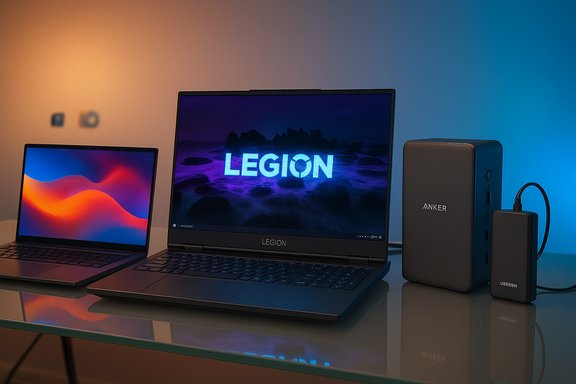
The Legion Pro 7i Gen 10 is widely cited across reviews as one of the strongest gaming laptops of the year, pairing Intel Core Ultra HX‑class processors with NVIDIA’s RTX 50‑series laptop GPUs (configurable up to RTX 5080) and a 16‑inch 240Hz OLED WQXGA display. Independent reviews highlight excellent gaming performance and a premium 240Hz OLED panel that balances high refresh rate with vivid color and contrast. Expect a heavy chassis, a large power brick, and limited battery life compared with ultrabooks. Why consider it:- Desktop‑class gaming performance with RTX 50‑series GPUs.
- High‑quality 240Hz OLED display suitable for both gaming and creative work.
- Robust thermal and I/O design with Wi‑Fi 7 and Thunderbolt.
- Large weight and short battery life under load.
- Some early owner reports indicate driver or thermal quirks on specific units—always check latest firmware and driver updates before purchase.
MSI Titan 18 HX / Raider 18 class — desktop replacement power
If you want the top possible on‑the‑go GPU power, machines like the MSI Titan 18 HX (and related Raider models) deliver near‑desktop RTX 4090/4090‑class performance with 18‑inch 4K Mini‑LED panels and 120Hz refresh rates in certain configurations. Reviews of comparable 18‑inch Raider/Titan models show blistering performance but very large size, loud cooling, and thermal trade‑offs. These are for users who prioritize performance over portability. Why consider it:- Highest‑end GPU and CPU configurations for gaming and heavy content creation.
- Large, high‑quality displays for immersive gameplay or timeline editing.
- Very heavy, short mobile battery life, and usually priced at a premium.
- Can be loud under load; thermal behavior varies across SKUs.
Value picks: Acer Nitro V 15 and ASUS ROG Zephyrus G14
For budget‑conscious gamers, the Acer Nitro V 15 offers solid 1080p gaming with mid‑range discrete GPUs (e.g., RTX 4050), a 144Hz panel, and balanced thermals at a lower price point. The ASUS ROG Zephyrus G14 remains a compact performer — light and portable with Ryzen 9 + RTX 4070 options and a crisp 14‑inch 3K OLED at 120Hz for a smaller gaming package. Both make excellent gifts for gamers who also need some mobility. (Vendor and review pages confirm typical GPU pairings and target markets.Accessories that matter (and why)
A laptop is only as useful as its ecosystem. The right dock, SSD, sleeve, and power bank convert a good laptop into a truly portable workstation.- Anker Prime TB5 (Thunderbolt 5 dock): Anker’s Prime TB5 is one of the first compact docks integrating Thunderbolt 5, offering extremely high upstream bandwidth and—importantly—significant charging power from the dock’s upstream port. The vendor’s product listing and hands‑on reviews confirm TB5 performance and high upstream charging caps that support modern high‑wattage laptops. If the recipient uses multiple external displays or wants a single‑cable desk‑to‑laptop setup, a TB5 dock is future‑proof.
- UGREEN 145W 25,000mAh power bank: High‑capacity PD3.1 power banks (25,000mAh / ~90 Wh) capable of up to ~140–145W on a single USB‑C port are now common and can provide a crucial charge boost for thin laptops away from the wall. The product page shows realistic charging specs and compatibility with modern MacBooks and many Windows ultrabooks—an excellent accessory for travelers. Note that power banks larger than 100 Wh may face airline restrictions; check travel rules before packing.
- Samsung T7 Shield (portable SSD): The T7 Shield delivers ruggedized portability with IP65 dust/water resistance and sequential read/write speeds up to ~1,050/1,000 MB/s over USB 3.2 Gen 2, making it a practical external scratch disk for video editors and photographers on the move. Confirmed vendor specs note thermal protection features and the condition that host support and cables are required to reach peak speeds.
- Branded sleeves and commuter packs: Protective sleeves and backpacks (e.g., Incase A.R.C., Spigen sleeves) vary by sizing and organization; choose based on laptop dimensions and how much additional gear (chargers, mouse, SSD) the recipient will carry.
How to choose the right laptop — practical checklist
- Define the primary use case: productivity/office, media creation, gaming, or education.
- Match the OS to the recipient’s workflow: Windows for wide compatibility and gaming, macOS for Apple ecosystem users, ChromeOS for students and lightweight usage.
- Check the exact SKU and configuration: model names can hide multiple CPU/GPU/panel options—verify CPU family, GPU model (not just “RTX”), RAM type and capacity, storage size and type.
- For ultraportables, treat warranty and battery tests as critical: reviewer mixed‑use battery numbers can differ from vendor claims depending on test methodology.
- For gamers, prioritize GPU TGP (wattage), cooling architecture, and display panel specs (resolution + refresh rate).
- Don’t forget ports and docking: If the recipient uses external monitors, check Thunderbolt/USB4 support or buy a modern TB5/TB4 dock.
- Verify upgradeability if longevity matters: Some models (Framework, certain Lenovo/ThinkPad lines) are easier to repair/upgrade than sealed consumer ultrabooks.
Critical analysis — strengths and warnings
Strengths across the 2025 lineup
- Battery and AI acceleration have meaningfully improved. Many Snapdragon X series and Intel Core Ultra devices now include NPUs that enable local Copilot/Copilot+ experiences without cloud latency. That creates tangible productivity gains for note summarization, quick image edits, and meeting recall. However, on‑device capabilities vary by OEM and NPU TOPS rating.
- Displays have matured. OLED/AMOLED panels are widespread, offering high contrast, wide color gamuts, and high refresh rates, which benefits both creators and gamers.
- Higher base RAM and SSD baselines. For mainstream productivity and AI features, 16 GB of RAM and 256–512 GB SSDs are increasingly the practical minimum in 2025 device lineups.
Risks and friction points
- ARM Windows compatibility still requires diligence. Many excellent ARM‑based devices (Surface Laptop 7, Zenbook A14 SKUs) deliver extraordinary battery life, but legacy Windows apps or niche enterprise utilities may fail or run slowly under emulation. Buyers should test mission‑critical apps before committing.
- SKU fragmentation leads to buyer confusion. The same model name can hide wildly different components (e.g., OLED vs LCD, Core Ultra vs Snapdragon variants); retailers sometimes list only the model family, not the exact SKU. Always confirm the CPU/GPU, RAM, and panel.
- Thermals and sustained workloads matter for creators. Thin chassis with high clocked CPUs can thermal‑throttle under long video encodes or batch renders. If sustained compute is essential, choose larger chassis with HX‑class CPUs and test thermal behavior in reviews.
- Accessories add cost but change the experience. A TB5 dock, high‑wattage PD power bank, and a fast portable SSD significantly improve flexibility but add to the total gift price—budget accordingly.
Price, availability, and holiday shopping tips
- Expect holiday discounts, especially on last‑year SKUs and across major retailers. Black Friday/Cyber Monday remain prime times to spot meaningful price drops on both gaming laptops and ultraportables.
- If gifting, consider extended return or exchange windows and purchase protective add‑ons (cases, warranties) at checkout. Many retailers offer gift‑friendly policies for holiday purchases.
- For high‑demand models (e.g., popular Legion and Titan SKUs), allow extra lead time for shipping and avoid cancelled orders that pricers or scalpers sometimes create.
Quick recommendations by recipient type
- For the mobile knowledge worker: Microsoft Surface Laptop 7 (ARM SKU for battery; Intel SKU for legacy app compatibility)—verify apps and choose the correct platform.
- For an Apple‑centric creative: MacBook Air M4 — excellent blend of portability and performance backed by Apple’s platform and long‑term support.
- For the gamer who wants the best balance of price and performance: Lenovo Legion Pro 7i Gen 10 — RTX 50‑series and high‑quality 240Hz OLED display.
- For the desktop‑replacement enthusiast: MSI Titan/M18 HX family — 18‑inch displays and flagship GPUs for heavy workloads and ultra‑high settings.
- For students/values buyers: ASUS Chromebook Plus CX34 or Acer Aspire 3 for basic work, strong battery life, and an approachable price point.
Final verdict — how to make a holiday‑proof choice
The best laptop gift in 2025 balances use case, software needs, and long‑term value. Ultraportables with NPUs and Snapdragon/Intel Ultra silicon deliver class‑leading battery life and compelling AI features, but they require careful compatibility checks. High‑end gaming and content‑creation laptops give enormous performance but at the cost of portability and battery. For most holiday gifting situations, a pragmatic approach wins: verify the exact SKU, choose a reliable retailer with gift returns, and add a well‑matched accessory (dock, SSD, or power bank) to make the laptop instantly more useful.Shopping for the holidays should be joyful, not fraught. Focus on the recipient’s daily workflows rather than chasing the headline spec, and your gift will be both thoughtful and genuinely useful—now and into the year ahead.
Source: Phandroid 2025 Laptop Gift Guide: Spread Holiday Cheer with these Top Picks! - Phandroid
