

In 2026, the major consumer and workplace AI chatbots split into distinct roles: ChatGPT leads as the broad generalist, Gemini and Copilot dominate their parent productivity ecosystems, Claude excels at long documents and prose, Perplexity owns citation-first research, and Grok, DeepSeek, Meta AI, and smaller tools serve narrower use cases. The useful comparison is no longer “which bot is smartest?” It is “which assistant is allowed into the workflow where your real work already lives?” That shift matters for Windows users and IT teams because AI choice now affects data exposure, licensing, browser habits, document pipelines, and even endpoint policy.
The first wave of chatbot comparisons treated every assistant as if it were a slightly different text box. That made sense when the question was whether a model could write a poem, summarize an article, or debug a few lines of Python. It makes less sense now that AI assistants are becoming operating layers across email, documents, search, browsers, social feeds, and developer tools.
The better mental model is hiring. ChatGPT is the versatile contractor who can jump between writing, coding, research, image work, and project planning. Microsoft Copilot is the internal employee with a badge, calendar access, and a seat inside Word, Excel, PowerPoint, Outlook, Teams, and Windows. Google Gemini is the Workspace-native colleague who lives in Gmail, Docs, Sheets, Drive, Android, and Search.
That distinction changes the buying decision. The “best” chatbot may be worse than a second-best chatbot that can see the right files, respect the right permissions, and operate inside the software stack an organization already pays for. AI performance still matters, but placement now matters almost as much.
For enthusiasts, this is exciting. For administrators, it is a headache with a familiar shape: another powerful layer of software that users will adopt before governance catches up.
That breadth is why ChatGPT remains the safest recommendation for users who do not yet know what they need. A student may begin with essay help, move into data analysis, then ask for a study plan. A developer may start with a regular expression and end up prototyping an app. A manager may ask for a meeting summary and wind up building a project tracker.
The trade-off is that generalists can be seductively plausible. ChatGPT is at its best when the user treats it as a collaborator that needs direction, verification, and constraints. It is less reliable when treated as an oracle, especially in niche subjects where confidence can outrun sourcing.
OpenAI’s ecosystem strategy also differs from Microsoft’s and Google’s. ChatGPT does not need to be embedded in one office suite to be useful, which makes it attractive across mixed environments. But that same independence can create policy friction for organizations that want AI activity contained inside managed identity, retention, and compliance systems.
For Windows power users, ChatGPT is still the Swiss Army knife. For IT departments, it is the tool most likely to arrive through the side door unless policy, licensing, and approved alternatives are clear.
That can be enormously useful. Gemini can summarize email threads, help draft documents, reason over files in Drive, assist with spreadsheets, answer questions through Google Search, and operate in the places where many users already spend their time. The friction is low because the assistant is not asking users to build a new habit from scratch.
The value proposition is especially strong for small businesses, schools, and teams standardized on Google Workspace. In those environments, Gemini’s usefulness is less about winning a benchmark shootout and more about eliminating copy-and-paste between apps. It can sit where the context is.
The same integration that makes Gemini convenient also makes it sensitive. Users and administrators need to understand what data Gemini can access, what is used for grounding, what remains within organizational controls, and which features are enabled by default. AI that can summarize a Drive folder is powerful precisely because it can see a Drive folder.
Gemini’s challenge is flexibility outside Google’s ecosystem. If your life is Gmail, Docs, Sheets, Android, and Search, it feels native. If your work is Windows, Office, Slack, GitHub, and local files, it can feel like a strong assistant peering in from the wrong window.
Copilot’s pitch is straightforward: instead of asking users to leave their workflow for AI, Microsoft puts AI into the workflow. Draft the document in Word. Query the spreadsheet in Excel. Summarize the meeting in Teams. Build the deck in PowerPoint. Search organizational content through Microsoft Graph. The chatbot becomes an interface to the tenant.
That makes Copilot both more practical and more dangerous than a standalone assistant. When permissions are clean, labels are correct, and file hygiene is good, Copilot can surface information faster than a human can navigate folders and inboxes. When permissions are sloppy, oversharing becomes searchable in natural language.
This is why Copilot readiness is really information governance readiness wearing a futuristic hat. Before AI, a badly permissioned SharePoint site was a latent problem. After AI, it becomes a prompt away from discovery. The assistant does not invent the access problem; it accelerates the consequences.
Copilot also exposes a familiar Microsoft tension. The product is most compelling when bundled into the full Microsoft 365 vision, but licensing, feature availability, and administrative controls can feel like a moving target. For enterprises, Copilot is not just a chatbot comparison. It is a procurement, compliance, identity, training, and change-management project.
Its strongest use case is research triage. Ask a question, get a synthesized answer, and inspect the sources. That does not eliminate the need for verification, but it changes the interaction from “trust me” to “here is where this came from.” For journalists, analysts, students, and IT pros chasing current documentation or product changes, that difference matters.
Perplexity also benefits from model choice. The ability to route queries through different underlying models turns the service into a kind of research console. One model may explain better, another may reason better, and another may produce a cleaner summary. The interface matters because it encourages comparison rather than blind faith.
The downside is that Perplexity is not as natural as ChatGPT for long creative work or as embedded as Copilot and Gemini for office productivity. It is not trying to be the place where all work happens. It is trying to be the place where claims get checked.
That makes it a good companion tool rather than a complete assistant. If ChatGPT is a generalist and Copilot is an office worker, Perplexity is the colleague who says, “Let’s look that up before we repeat it.”
Anthropic’s emphasis on safety and “constitutional” behavior has sometimes been reduced to branding, but it does shape the product’s feel. Claude tends to be cautious, explanatory, and polished. In enterprise and professional contexts, those traits can be more valuable than raw verbal fireworks.
The large context window is central to Claude’s appeal. Users working with legal materials, research packets, technical documentation, books, contracts, or codebases need an assistant that can keep a large body of text in view. Claude’s Artifacts feature also makes it feel less like a chat log and more like a workspace, especially for code, documents, and interactive drafts.
The weakness is ecosystem gravity. Claude is not Microsoft 365. It is not Google Workspace. It does not have the same default presence across the apps where many workers spend their day. That makes it a premium tool for people with specific high-value needs rather than the inevitable assistant for every office worker.
Still, for writers, analysts, lawyers, researchers, and developers who live in dense documents, Claude may be the most persuasive reminder that “best AI” is not a single category. Sometimes the winner is the one that can read the whole file and not lose the plot.
That lane is narrower than the hype sometimes suggests. Social velocity is not the same as truth. A tool that sees the feed early can be useful for detecting attention, but attention is often noisy, gamed, emotional, and wrong. Grok is strongest when used as a radar, not a judge.
Its looser tone and moderation style also distinguish it from more buttoned-up assistants. Some users find that refreshing. Others will see it as a liability in professional settings. Enterprise IT usually prefers predictable behavior over personality.
For journalists, marketers, creators, and analysts who care about social movement, Grok can provide a useful angle. For regulated industries, document-heavy work, and formal research, it is harder to recommend as a primary assistant.
The broader lesson is that real-time access is not a universal trump card. The live feed is valuable when the feed is the subject. It is less valuable when the user needs durable knowledge, compliant workflows, or carefully sourced conclusions.
The attraction is obvious. Open-weight or permissively available models can be run locally, hosted privately, customized, and integrated into products without sending every prompt to a dominant U.S. platform. For coding, mathematics, and logic-heavy work, DeepSeek’s reputation has been strong enough to make it part of the serious comparison set.
But DeepSeek also forces a distinction many casual users blur: using a model locally is not the same as using a hosted chatbot service. A self-hosted model can offer more control over data. A hosted platform governed by another jurisdiction raises different privacy, policy, and censorship concerns. Those are not footnotes; they are part of the product.
For Windows enthusiasts, DeepSeek is also part of the larger local-AI story. As NPUs, GPUs, and optimized runtimes improve, more users will want assistants that run on their own machines or inside their own infrastructure. Not every task needs a cloud round trip, and not every organization wants one.
DeepSeek’s role in the market is therefore bigger than its chatbot interface. It is a reminder that AI is also a supply-chain decision. Who made the model, where it runs, what license governs it, what data it sees, and what topics it refuses to handle are now practical IT questions.
Accessibility is the point. Meta does not need to convince hundreds of millions of people to visit a new AI destination if the assistant is already inside the apps they use to message family, follow creators, share images, and browse feeds. That makes Meta AI one of the clearest examples of AI becoming ambient.
Its creative tools matter too. Image generation, remixing, voice interaction, and short-form visual experimentation fit naturally into social platforms. The assistant is not just answering questions; it is helping produce the raw material of posts, captions, jokes, stickers, and casual media.
The limitation is depth. Meta AI is not the obvious first choice for long legal analysis, enterprise data work, software architecture, or citation-heavy research. It is fast, accessible, and socially embedded, but not designed to replace the specialized tools higher up the professional stack.
That does not make it unimportant. Consumer AI adoption often follows convenience, not capability. The assistant people actually use may be the one sitting next to the send button.
Duck.ai’s appeal is privacy-conscious access to major models through an intermediary layer. The exact protections and limitations matter, but the demand is real. Users want help from frontier models without feeling that every query becomes another permanent entry in a corporate dossier.
Zapier Agents represents a different direction: AI as an operator, not just a writer. The promise is that an assistant can move information across apps, trigger workflows, update records, and perform repetitive digital labor. That is where AI becomes less like a chatbot and more like a junior automation engineer.
Poe’s aggregation model speaks to fatigue. Users do not necessarily want separate subscriptions, interfaces, and histories for every model family. A single place to compare GPT, Claude, Gemini, Llama, and others has obvious appeal, especially for power users who understand that different models have different temperaments.
Pi sits almost outside the productivity race. Its focus on supportive conversation and emotional intelligence is a reminder that many people use chatbots for companionship, reflection, and low-stakes conversation. That use case can be meaningful, but it also deserves careful boundaries, especially when users become vulnerable.
The long-term lesson is that the AI assistant market will not collapse into one winner. It will stratify by trust, workflow, cost, data access, latency, and personality.
Developers have even more variables. They need to think about code privacy, repository access, context windows, IDE integration, local model support, and whether generated code can be audited. A cheap model that can run privately may be preferable to a stronger hosted model for sensitive codebases.
Administrators should be especially wary of accidental sprawl. Users will bring AI tools into the workplace if official options are confusing, expensive, or blocked without explanation. Shadow AI is the new shadow IT, and it carries a sharper edge because prompts can contain source code, customer data, credentials, strategy, or regulated information.
The right policy is not simply “ban everything” or “turn everything on.” It is classification. Low-risk public research is not the same as confidential legal review. Marketing brainstorming is not the same as customer-data analysis. Local model experimentation is not the same as uploading proprietary files to an unmanaged chatbot.
AI governance also needs user education. People must understand that a polished answer is not a verified answer, that an assistant’s memory can be both useful and risky, and that permission boundaries in connected systems matter. The technology feels conversational, but the consequences are infrastructural.
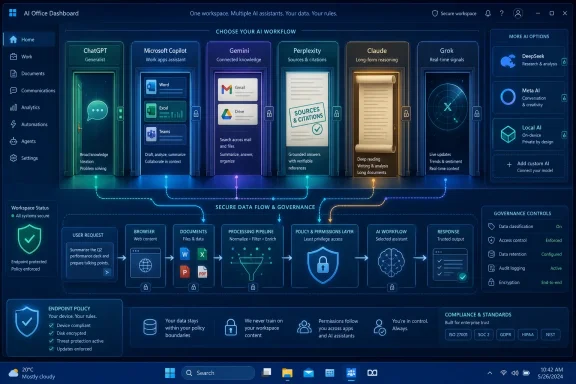 The Chatbot Market Has Stopped Being One Market
The first wave of chatbot comparisons treated every assistant as if it were a slightly different text box. That made sense when the question was whether a model could write a poem, summarize an article, or debug a few lines of Python. It makes less sense now that AI assistants are becoming operating layers across email, documents, search, browsers, social feeds, and developer tools.The better mental model is hiring. ChatGPT is the versatile contractor who can jump between writing, coding, research, image work, and project planning. Microsoft Copilot is the internal employee with a badge, calendar access, and a seat inside Word, Excel, PowerPoint, Outlook, Teams, and Windows. Google Gemini is the Workspace-native colleague who lives in Gmail, Docs, Sheets, Drive, Android, and Search.
That distinction changes the buying decision. The “best” chatbot may be worse than a second-best chatbot that can see the right files, respect the right permissions, and operate inside the software stack an organization already pays for. AI performance still matters, but placement now matters almost as much.
For enthusiasts, this is exciting. For administrators, it is a headache with a familiar shape: another powerful layer of software that users will adopt before governance catches up.
ChatGPT Remains the Default Because It Refuses to Stay in One Lane
ChatGPT’s biggest advantage is not merely that it arrived first in the modern AI boom. Its advantage is that it became the default mental image of an AI assistant while continuing to expand sideways. It can draft, code, analyze files, search the web, generate images, hold long conversations, work inside projects, and serve as a semi-persistent collaborator rather than a disposable prompt box.That breadth is why ChatGPT remains the safest recommendation for users who do not yet know what they need. A student may begin with essay help, move into data analysis, then ask for a study plan. A developer may start with a regular expression and end up prototyping an app. A manager may ask for a meeting summary and wind up building a project tracker.
The trade-off is that generalists can be seductively plausible. ChatGPT is at its best when the user treats it as a collaborator that needs direction, verification, and constraints. It is less reliable when treated as an oracle, especially in niche subjects where confidence can outrun sourcing.
OpenAI’s ecosystem strategy also differs from Microsoft’s and Google’s. ChatGPT does not need to be embedded in one office suite to be useful, which makes it attractive across mixed environments. But that same independence can create policy friction for organizations that want AI activity contained inside managed identity, retention, and compliance systems.
For Windows power users, ChatGPT is still the Swiss Army knife. For IT departments, it is the tool most likely to arrive through the side door unless policy, licensing, and approved alternatives are clear.
Gemini Is Google’s Bet That the Best Chatbot Is the One Already Reading Your Work
Google Gemini is not trying to win solely by being the most charming conversationalist. Its strategic advantage is proximity. If your email, documents, spreadsheets, meetings, photos, phone, search history, and cloud storage already live in Google’s world, Gemini becomes less of a chatbot and more of a fabric stretched across the workday.That can be enormously useful. Gemini can summarize email threads, help draft documents, reason over files in Drive, assist with spreadsheets, answer questions through Google Search, and operate in the places where many users already spend their time. The friction is low because the assistant is not asking users to build a new habit from scratch.
The value proposition is especially strong for small businesses, schools, and teams standardized on Google Workspace. In those environments, Gemini’s usefulness is less about winning a benchmark shootout and more about eliminating copy-and-paste between apps. It can sit where the context is.
The same integration that makes Gemini convenient also makes it sensitive. Users and administrators need to understand what data Gemini can access, what is used for grounding, what remains within organizational controls, and which features are enabled by default. AI that can summarize a Drive folder is powerful precisely because it can see a Drive folder.
Gemini’s challenge is flexibility outside Google’s ecosystem. If your life is Gmail, Docs, Sheets, Android, and Search, it feels native. If your work is Windows, Office, Slack, GitHub, and local files, it can feel like a strong assistant peering in from the wrong window.
Copilot Turns Microsoft 365 Into the Real Interface
Microsoft Copilot is the most important AI assistant for many WindowsForum readers not because it is always the most impressive demo, but because it is attached to the software estate they already manage. Word, Excel, PowerPoint, Outlook, Teams, SharePoint, OneDrive, Entra ID, Intune, and Windows are not side quests in enterprise IT. They are the terrain.Copilot’s pitch is straightforward: instead of asking users to leave their workflow for AI, Microsoft puts AI into the workflow. Draft the document in Word. Query the spreadsheet in Excel. Summarize the meeting in Teams. Build the deck in PowerPoint. Search organizational content through Microsoft Graph. The chatbot becomes an interface to the tenant.
That makes Copilot both more practical and more dangerous than a standalone assistant. When permissions are clean, labels are correct, and file hygiene is good, Copilot can surface information faster than a human can navigate folders and inboxes. When permissions are sloppy, oversharing becomes searchable in natural language.
This is why Copilot readiness is really information governance readiness wearing a futuristic hat. Before AI, a badly permissioned SharePoint site was a latent problem. After AI, it becomes a prompt away from discovery. The assistant does not invent the access problem; it accelerates the consequences.
Copilot also exposes a familiar Microsoft tension. The product is most compelling when bundled into the full Microsoft 365 vision, but licensing, feature availability, and administrative controls can feel like a moving target. For enterprises, Copilot is not just a chatbot comparison. It is a procurement, compliance, identity, training, and change-management project.
Perplexity Wins When the Answer Needs Receipts
Perplexity’s identity is refreshingly narrow. It is less interested in being your therapist, novelist, or spreadsheet copilot than in becoming the answer engine for people who want sources. In a market full of fluent machines, that is a useful corrective.Its strongest use case is research triage. Ask a question, get a synthesized answer, and inspect the sources. That does not eliminate the need for verification, but it changes the interaction from “trust me” to “here is where this came from.” For journalists, analysts, students, and IT pros chasing current documentation or product changes, that difference matters.
Perplexity also benefits from model choice. The ability to route queries through different underlying models turns the service into a kind of research console. One model may explain better, another may reason better, and another may produce a cleaner summary. The interface matters because it encourages comparison rather than blind faith.
The downside is that Perplexity is not as natural as ChatGPT for long creative work or as embedded as Copilot and Gemini for office productivity. It is not trying to be the place where all work happens. It is trying to be the place where claims get checked.
That makes it a good companion tool rather than a complete assistant. If ChatGPT is a generalist and Copilot is an office worker, Perplexity is the colleague who says, “Let’s look that up before we repeat it.”
Claude Is the Writer’s Room and the Document Furnace
Claude has carved out a reputation for the things that are hardest to show in a 30-second demo: tone, patience, and long-context comprehension. It is often preferred by users who care less about flashy integration and more about whether the output sounds like something a careful human might have written. For long-form writing, document review, and structured analysis, that reputation is deserved.Anthropic’s emphasis on safety and “constitutional” behavior has sometimes been reduced to branding, but it does shape the product’s feel. Claude tends to be cautious, explanatory, and polished. In enterprise and professional contexts, those traits can be more valuable than raw verbal fireworks.
The large context window is central to Claude’s appeal. Users working with legal materials, research packets, technical documentation, books, contracts, or codebases need an assistant that can keep a large body of text in view. Claude’s Artifacts feature also makes it feel less like a chat log and more like a workspace, especially for code, documents, and interactive drafts.
The weakness is ecosystem gravity. Claude is not Microsoft 365. It is not Google Workspace. It does not have the same default presence across the apps where many workers spend their day. That makes it a premium tool for people with specific high-value needs rather than the inevitable assistant for every office worker.
Still, for writers, analysts, lawyers, researchers, and developers who live in dense documents, Claude may be the most persuasive reminder that “best AI” is not a single category. Sometimes the winner is the one that can read the whole file and not lose the plot.
Grok Is Built for the Feed, Not the Filing Cabinet
Grok’s defining advantage is its relationship with X. That gives it a real-time social-media lens that other assistants do not replicate in the same way. If the task is tracking discourse, watching memes mutate, monitoring public reaction, or understanding what a platform-native audience is saying right now, Grok has a clear lane.That lane is narrower than the hype sometimes suggests. Social velocity is not the same as truth. A tool that sees the feed early can be useful for detecting attention, but attention is often noisy, gamed, emotional, and wrong. Grok is strongest when used as a radar, not a judge.
Its looser tone and moderation style also distinguish it from more buttoned-up assistants. Some users find that refreshing. Others will see it as a liability in professional settings. Enterprise IT usually prefers predictable behavior over personality.
For journalists, marketers, creators, and analysts who care about social movement, Grok can provide a useful angle. For regulated industries, document-heavy work, and formal research, it is harder to recommend as a primary assistant.
The broader lesson is that real-time access is not a universal trump card. The live feed is valuable when the feed is the subject. It is less valuable when the user needs durable knowledge, compliant workflows, or carefully sourced conclusions.
DeepSeek Proved Cost and Control Could Be the Product
DeepSeek changed the AI conversation by making the economics impossible to ignore. Its reasoning models showed that strong technical performance did not have to come only from the largest Western labs with the most expensive consumer subscriptions. For developers, researchers, and organizations watching inference costs, that was a serious shock.The attraction is obvious. Open-weight or permissively available models can be run locally, hosted privately, customized, and integrated into products without sending every prompt to a dominant U.S. platform. For coding, mathematics, and logic-heavy work, DeepSeek’s reputation has been strong enough to make it part of the serious comparison set.
But DeepSeek also forces a distinction many casual users blur: using a model locally is not the same as using a hosted chatbot service. A self-hosted model can offer more control over data. A hosted platform governed by another jurisdiction raises different privacy, policy, and censorship concerns. Those are not footnotes; they are part of the product.
For Windows enthusiasts, DeepSeek is also part of the larger local-AI story. As NPUs, GPUs, and optimized runtimes improve, more users will want assistants that run on their own machines or inside their own infrastructure. Not every task needs a cloud round trip, and not every organization wants one.
DeepSeek’s role in the market is therefore bigger than its chatbot interface. It is a reminder that AI is also a supply-chain decision. Who made the model, where it runs, what license governs it, what data it sees, and what topics it refuses to handle are now practical IT questions.
Meta AI Makes the Chatbot Disappear Into the Social App
Meta AI is not built like an enterprise assistant. Its natural home is WhatsApp, Instagram, Facebook, and Meta’s broader social ecosystem. That makes it less compelling for a spreadsheet-heavy analyst but highly relevant for ordinary users who may never open a standalone AI application.Accessibility is the point. Meta does not need to convince hundreds of millions of people to visit a new AI destination if the assistant is already inside the apps they use to message family, follow creators, share images, and browse feeds. That makes Meta AI one of the clearest examples of AI becoming ambient.
Its creative tools matter too. Image generation, remixing, voice interaction, and short-form visual experimentation fit naturally into social platforms. The assistant is not just answering questions; it is helping produce the raw material of posts, captions, jokes, stickers, and casual media.
The limitation is depth. Meta AI is not the obvious first choice for long legal analysis, enterprise data work, software architecture, or citation-heavy research. It is fast, accessible, and socially embedded, but not designed to replace the specialized tools higher up the professional stack.
That does not make it unimportant. Consumer AI adoption often follows convenience, not capability. The assistant people actually use may be the one sitting next to the send button.
The Smaller Tools Reveal the Jobs the Giants Still Do Badly
The chatbot market’s most interesting edges are not always the household names. Duck.ai, Zapier Agents, Poe, Pi, and similar tools exist because the giants still leave gaps. Some users want privacy. Some want automation. Some want model aggregation. Some want emotional support instead of productivity theater.Duck.ai’s appeal is privacy-conscious access to major models through an intermediary layer. The exact protections and limitations matter, but the demand is real. Users want help from frontier models without feeling that every query becomes another permanent entry in a corporate dossier.
Zapier Agents represents a different direction: AI as an operator, not just a writer. The promise is that an assistant can move information across apps, trigger workflows, update records, and perform repetitive digital labor. That is where AI becomes less like a chatbot and more like a junior automation engineer.
Poe’s aggregation model speaks to fatigue. Users do not necessarily want separate subscriptions, interfaces, and histories for every model family. A single place to compare GPT, Claude, Gemini, Llama, and others has obvious appeal, especially for power users who understand that different models have different temperaments.
Pi sits almost outside the productivity race. Its focus on supportive conversation and emotional intelligence is a reminder that many people use chatbots for companionship, reflection, and low-stakes conversation. That use case can be meaningful, but it also deserves careful boundaries, especially when users become vulnerable.
The long-term lesson is that the AI assistant market will not collapse into one winner. It will stratify by trust, workflow, cost, data access, latency, and personality.
Windows Users Should Choose by Workflow Before Model Score
For Windows users, the best chatbot is often determined before the benchmark chart loads. A Microsoft 365-heavy office should evaluate Copilot first because it meets users inside the tools they already use. A mixed-platform freelancer may get more value from ChatGPT or Claude. A researcher may keep Perplexity open alongside everything else.Developers have even more variables. They need to think about code privacy, repository access, context windows, IDE integration, local model support, and whether generated code can be audited. A cheap model that can run privately may be preferable to a stronger hosted model for sensitive codebases.
Administrators should be especially wary of accidental sprawl. Users will bring AI tools into the workplace if official options are confusing, expensive, or blocked without explanation. Shadow AI is the new shadow IT, and it carries a sharper edge because prompts can contain source code, customer data, credentials, strategy, or regulated information.
The right policy is not simply “ban everything” or “turn everything on.” It is classification. Low-risk public research is not the same as confidential legal review. Marketing brainstorming is not the same as customer-data analysis. Local model experimentation is not the same as uploading proprietary files to an unmanaged chatbot.
AI governance also needs user education. People must understand that a polished answer is not a verified answer, that an assistant’s memory can be both useful and risky, and that permission boundaries in connected systems matter. The technology feels conversational, but the consequences are infrastructural.
The Cheat Sheet Only Works If It Starts With the Job
The simplest way to compare the major assistants is to stop asking which one is universally best and start asking which job is actually being assigned. A bot that excels at social trend analysis may be the wrong place for a legal memo. A brilliant document assistant may be a poor automation tool. A deeply integrated workplace AI may be overkill for a student who mainly needs tutoring and quick explanations.- ChatGPT is the strongest default choice for users who need one flexible assistant across writing, coding, brainstorming, analysis, image work, and general problem-solving.
- Gemini is most compelling for users and organizations already committed to Google Workspace, Android, Drive, Gmail, Docs, Sheets, and Search.
- Microsoft Copilot is the obvious enterprise contender where Microsoft 365, Teams, SharePoint, OneDrive, Windows, and Entra ID define the daily workflow.
- Perplexity is the better first stop when current information, source checking, and research transparency matter more than conversational warmth.
- Claude is the premium choice for long-form writing, large-document analysis, careful prose, and sustained reasoning over dense material.
- Grok, DeepSeek, Meta AI, and specialist tools make the most sense when the task is social monitoring, local or low-cost technical reasoning, social media creation, automation, aggregation, privacy, or emotionally supportive conversation.
References
- Primary source: TechRepublic
Published: 2026-06-11T20:50:07.781622
AI Chatbot Cheat Sheet: Comparing ChatGPT, Gemini, Copilot, and More
Compare ChatGPT, Gemini, Copilot, Claude, Perplexity, Grok, DeepSeek, and Meta AI by strengths, use cases, integrations, and limits.www.techrepublic.com
- Related coverage: androidcentral.com
Google Gemini AI: Gemini 3.5 Flash, Nano Banana, Live, best features, linked apps, and more | Android Central
From Gemini 3.5 Flash to all the Google apps that use Gemini, this guide will break down every key AI feature and whether you need to pay for it.www.androidcentral.com - Official source: microsoft.com
Get More Done with Copilot in Microsoft 365 Apps | Microsoft Windows
Boost productivity on Windows 11 with Copilot in Word, Excel, PowerPoint, and Outlook—draft, summarize, and analyze faster.www.microsoft.com
- Related coverage: techcrunch.com
ChatGPT reaches 900M weekly active users | TechCrunch
OpenAI shared the new numbers as part of its announcement that it has raised $110 billion in private funding.techcrunch.com - Official source: support.microsoft.com
How Copilot Chat works in Microsoft 365 apps | Microsoft Support
How Copilot Chat works in Microsoft 365 appssupport.microsoft.com - Related coverage: presenc.ai
ChatGPT Usage Statistics 2026 | Presenc AI
Comprehensive ChatGPT usage statistics for 2026: 900M+ weekly active users, session data, enterprise vs consumer split, geographic breakdown, and growth...presenc.ai
- Official source: learn.microsoft.com
Microsoft 365 Copilot - Service Descriptions | Microsoft Learn
Learn about Microsoft 365 Copilot and its feature availability across plans.learn.microsoft.com - Related coverage: searchengineland.com
- Related coverage: windowscentral.com
Microsoft 365 is paywalling most of Copilot in its Office apps | Windows Central
Commercial customers will soon need a Microsoft 365 Copilot license to use Copilot Chat in Word, Excel, PowerPoint, and OneNote.www.windowscentral.com - Related coverage: techradar.com
Google's AI-powered conversational Search Live tool is going global — with real-time answers now available in more languages | TechRadar
The feature initially rolled out in the US in September 2025www.techradar.com - Related coverage: insights.sei.cmu.edu
