

Claude is one of 2026’s strongest mainstream AI assistants, but the better Claude alternative depends less on raw model quality than on whether a user needs multimodal breadth, workplace integration, live web research, low-cost APIs, privacy controls, or autonomous background automation. That is the real story behind the crowded “Claude alternatives” market: the category has stopped being a simple chatbot race. The winning tool is increasingly the one that already lives where your work happens — in Office, Google Workspace, GitHub, a browser, a private server, or a compliance review.
The temptation is to rank these products like graphics cards: one benchmark table, one winner, one clean upgrade path. But AI assistants in 2026 are messier than that. Claude’s appeal has always been its combination of long-form writing, careful tone, and big-context reasoning, yet those strengths do not automatically make it the right system for a developer shipping code, a sysadmin automating repetitive work, or a finance team asking whether customer data can leave the EU.
That is why the most useful way to read the alternatives is not as a beauty contest, but as a map of where AI is going. ChatGPT is trying to be the universal interface. Gemini wants to be the intelligence layer for Google’s office suite. Copilot is Microsoft’s bet that AI becomes part of the productivity license. Perplexity is turning search into a conversational source trail. DeepSeek and Mistral are pressure-testing the economics and sovereignty of frontier AI. And MyClaw, riding the OpenClaw agent wave, points toward something more consequential: AI that does not wait politely in a browser tab.
Claude remains a benchmark for a reason. Anthropic’s assistant is widely liked for writing, summarization, coding help, and long-context analysis, and it has cultivated a reputation for being less hyperactive and more editorially restrained than some competitors. For people who spend their day drafting strategy memos, editing legal-ish prose, or reasoning through large documents, that restraint can feel less like a feature and more like taste.
But the market around Claude has changed. A few years ago, choosing an AI assistant meant asking which model produced the best paragraph or solved the hardest puzzle. In 2026, the more practical question is whether the assistant can see the file you are working on, call the service you already use, respect your organization’s data rules, and remain available after you close the tab.
That shift weakens the idea of a single “best Claude alternative.” A researcher may be better served by Perplexity because it shows its work. A Microsoft 365 shop may get more value from Copilot because it can operate across Word, Excel, Teams, Outlook, and SharePoint. A developer watching token costs may look at DeepSeek because price becomes the product when API volume gets serious.
The result is a market that looks fragmented from the outside but rational from the inside. Each major Claude rival is not merely copying Claude; it is making a different argument about where AI should live. The strategic fight is not just model against model. It is interface against interface.
The submitted list describes ChatGPT through GPT-4o, which was the right reference point for much of the multimodal boom, but the chronology has moved on. OpenAI has since pushed ChatGPT further into the GPT-5 era, and GPT-4o has been retired from ChatGPT itself. That does not invalidate the broader point; it sharpens it. ChatGPT’s advantage is not one model name but OpenAI’s willingness to keep turning the product into a moving platform.
That platform quality is what makes ChatGPT hard to dislodge. When users say they want an assistant for “everything,” they usually mean a grab bag of small jobs: explain this error, summarize this PDF, rewrite this email, generate this image, compare these options, draft this script, and maybe talk through a plan out loud. ChatGPT’s strength is that it usually has a mode for the task before the user has fully defined the task.
For WindowsForum readers, the real consideration is whether ChatGPT sits close enough to the operating environment. It is excellent as a standalone AI workbench, and it is often the first platform third-party services support. But in a locked-down enterprise, an assistant that lives outside the document store, ticketing system, or identity regime can feel like a clever intern who needs everything pasted into a chat window.
That is the line ChatGPT keeps trying to cross. Its success depends on whether it can remain the friendly all-purpose interface while also satisfying administrators who care about governance, retention, access boundaries, and auditability. Claude may win many writing duels, but ChatGPT still wins many days by being available for almost every kind of work.
That distinction matters. Users do not actually want to copy text out of an email thread, paste it into a chatbot, ask for a summary, copy the result back, and then manually draft a reply. They want the assistant to understand the thread where it sits, respect the permissions already attached to it, and produce something useful without forcing them into a separate workflow.
Gemini’s pitch is therefore strongest for organizations that already live in Google’s ecosystem. If a company’s documents, calendars, video meetings, and mailboxes are already in Google Workspace, Gemini can become ambient in a way a standalone assistant cannot. It does not have to win every model benchmark to be the most practical choice for those teams.
The risk is the familiar Google risk: product clarity. Google has moved quickly through Gemini model names, tiers, app surfaces, and Workspace packaging. That speed can be good for capability and bad for buyers who want stable procurement language, predictable features, and a clean training story for employees.
Still, Gemini is one of the clearest examples of where AI assistants are heading. The chatbot is becoming less important than the permissioned context around it. Claude is excellent when you bring the work to Claude; Gemini is strongest when the work is already sitting inside Google.
That difference changes the mental model. Claude, ChatGPT, and Gemini are usually session-based experiences: ask, answer, refine, close. MyClaw’s promise is that an agent can remain online on private infrastructure, reachable through messaging services, able to monitor workflows, and ready to act when conditions change.
For non-technical users, the appeal is obvious. Self-hosted automation has historically required a dreary pile of prerequisites: a server, security updates, domain configuration, secrets management, logs, permissions, and enough Linux confidence to recover when something breaks at 2 a.m. A managed OpenClaw host tries to sell the power of self-hosting without the setup pain.
That is also where the caution starts. An always-on agent with access to email, messaging platforms, files, and automation skills is not just a smarter chatbot. It is a standing delegation of authority. If configured carelessly, it can misread intent, leak information, overstep permissions, or become another internet-facing surface that administrators have to defend.
The smart way to evaluate MyClaw is not to ask whether it writes better than Claude. It is to ask whether your use case genuinely benefits from persistence. If the job is drafting a blog post, Claude may be better. If the job is watching an inbox, triaging requests, posting updates to a team channel, and running scheduled routines without human babysitting, a persistent agent begins to make sense.
For sysadmins and power users, MyClaw also raises the old hosted-versus-self-hosted trade-off in a new disguise. Managed hosting reduces friction, but it also requires trust in the provider’s isolation, patching, access controls, and operational discipline. The more useful the agent becomes, the more important those guarantees become.
A conventional chatbot can sound right while being stale. Perplexity’s answer-engine approach tries to reduce that risk by showing where the information came from and encouraging users to inspect the source trail. That does not make it infallible, but it changes the user’s posture from passive trust to active verification.
This is particularly useful for IT work. If you are checking whether a patch has a known issue, whether a vendor changed pricing, whether a model was retired, or whether a product page still says what it said last quarter, the answer needs to be traceable. A beautifully phrased hallucination is still an outage waiting to happen.
Perplexity’s weakness is the flip side of its strength. Source-backed answers are only as good as the sources selected, the freshness of the index, and the model’s ability to represent them faithfully. It can still miss context, flatten disagreement, or cite pages that support only part of the answer.
Even so, Perplexity has carved out a durable role. It is less a replacement for Claude than a replacement for the first 20 minutes of search-engine tab chaos. For researchers, journalists, analysts, and administrators, that may be more valuable than another polished prose engine.
The Microsoft 365 version is the most important for office workers. It can draft documents, summarize meetings, help with presentations, reason over files, and work inside the applications where enterprise users already spend their day. That matters because enterprise AI adoption often fails not because the model is weak, but because the assistant is one more destination employees must remember to visit.
GitHub Copilot is a different case. It is the developer-facing member of the family, and its pricing and usage model should not be casually conflated with Microsoft 365 Copilot. The submitted text’s reference to “$10/month through GitHub Copilot for developers” captures one entry point into the developer product, but it does not describe Microsoft 365 Copilot licensing, which is a separate procurement story and, for many organizations, a much larger budget conversation.
For WindowsForum’s audience, this distinction matters. Microsoft’s AI naming makes it easy to say “Copilot” and accidentally blur consumer chat, enterprise productivity automation, coding assistance, and security workflows. An administrator evaluating Copilot needs to pin down which Copilot, which license, which data boundary, which tenant controls, and which app surface.
The upside is enormous if those pieces line up. Copilot can inherit Microsoft’s identity model, compliance tooling, admin controls, and document graph in ways that standalone assistants struggle to match. The downside is lock-in by convenience. Once AI becomes entangled with Office files, Teams meetings, Outlook threads, and SharePoint permissions, switching away becomes more than a model preference.
That is Microsoft’s bet. It does not need every user to believe Copilot is the most charming chatbot. It needs CIOs to conclude that the safest and most productive AI assistant is the one already wired into the Microsoft estate.
Cost becomes decisive at scale. A casual user may not care whether a million tokens cost a little more or less. A startup routing customer support, code analysis, document processing, or internal analytics through an API cares very much. At high volume, model quality and unit economics are inseparable.
DeepSeek’s appeal is therefore strongest for builders who can evaluate models pragmatically. If a model is good enough for the workload and materially cheaper, it expands what can be automated. It also gives teams leverage when negotiating with other providers or designing fallback systems.
The caveat is that model adoption is not just a benchmark decision. Organizations must consider hosting options, data handling, jurisdiction, security review, ecosystem maturity, rate limits, and the risk of depending on infrastructure or providers they do not fully understand. A cheap model that creates compliance uncertainty may not be cheap in the end.
Still, DeepSeek’s presence is healthy for the market. It pressures incumbent providers to justify premium pricing and reminds buyers that “frontier AI” is not a synonym for “whatever the biggest brand is selling this month.” Claude alternatives are not only about interface and tone; they are also about the economics of intelligence.
That matters because AI adoption increasingly collides with regulation. The EU AI Act, GDPR, sector-specific rules, and internal data policies all push companies to ask where data goes, who processes it, how long it is retained, and whether the provider can support the controls promised in the sales deck. For some buyers, the best Claude alternative is simply the one that survives legal review.
Mistral is not only a compliance story, and it would be unfair to reduce it to geography. Its models have been competitive across developer and enterprise use cases, and the company has moved aggressively into tools that make its systems usable rather than merely impressive in release notes. But its European identity gives it a sharper enterprise wedge than many rivals.
The real question is whether Mistral can keep pace with the largest AI labs while maintaining that differentiation. Buyers want sovereignty, but they do not want a museum piece. If the capability gap gets too wide, compliance teams may approve the tool that users then avoid. If the gap remains narrow, Mistral becomes a powerful default for regulated European deployments.
For Windows and Microsoft-heavy organizations, Mistral also represents an architectural option rather than just a chat product. It can be part of a model portfolio, used where data rules or deployment preferences make the biggest U.S. consumer AI platforms less attractive. In 2026, that kind of optionality is not a luxury. It is risk management.
A writer may accept that tax because Claude’s prose quality is worth it. A Google Workspace team may not, because Gemini can operate closer to the documents and messages. A Microsoft shop may prefer Copilot because the permissions, meetings, spreadsheets, and presentations are already in the Microsoft graph. A developer may choose DeepSeek for API economics, while a researcher may keep Perplexity open because citations beat confidence.
The same logic applies to MyClaw and OpenClaw-style agents. If your work is episodic, a chatbot is enough. If your work is persistent, recurring, event-driven, and spread across messaging systems, an always-on agent may be more useful than any model locked inside a chat session.
That is the real market segmentation. Some assistants answer. Some retrieve. Some draft. Some automate. Some embed. Some run continuously. “Claude alternative” is a convenient search phrase, but it hides the fact that these products are drifting into different categories.
These questions are boring only until something goes wrong. An AI assistant that summarizes a public web page is low risk. An AI agent that can read email, post to Slack, modify files, submit code, or message customers is a different class of system. The more agentic the product, the more it resembles an employee, a script, and a security principal at the same time.
That is why Windows administrators should watch the MyClaw and OpenClaw category closely even if they never deploy it. It previews the governance problem that every major platform will face. Once AI stops waiting for prompts and starts running workflows, the old mental model of “chatbot usage policy” becomes inadequate.
Microsoft, Google, OpenAI, Anthropic, Mistral, Perplexity, and agent-hosting providers are all converging on the same uncomfortable destination. Users want AI to do more. Administrators need AI to do less unless explicitly permitted. The winners will be the companies that make permissioning, auditing, rollback, and containment feel like native features rather than afterthoughts.
That sounds untidy, but it is how serious software markets usually evolve. The spreadsheet did not kill the database, the browser did not kill the IDE, and Teams did not kill email. AI assistants will specialize because work is specialized.
The next year will reward users who stop asking which chatbot is “smartest” and start asking which system has the right context, permissions, price, and operating model for the job. Claude will remain a strong default for many people, especially those who value writing quality and thoughtful long-context work. But the future belongs to assistants that meet users where the work is, prove what they know, respect the boundaries around sensitive data, and — when appropriate — keep working after the chat window closes.
The temptation is to rank these products like graphics cards: one benchmark table, one winner, one clean upgrade path. But AI assistants in 2026 are messier than that. Claude’s appeal has always been its combination of long-form writing, careful tone, and big-context reasoning, yet those strengths do not automatically make it the right system for a developer shipping code, a sysadmin automating repetitive work, or a finance team asking whether customer data can leave the EU.
That is why the most useful way to read the alternatives is not as a beauty contest, but as a map of where AI is going. ChatGPT is trying to be the universal interface. Gemini wants to be the intelligence layer for Google’s office suite. Copilot is Microsoft’s bet that AI becomes part of the productivity license. Perplexity is turning search into a conversational source trail. DeepSeek and Mistral are pressure-testing the economics and sovereignty of frontier AI. And MyClaw, riding the OpenClaw agent wave, points toward something more consequential: AI that does not wait politely in a browser tab.
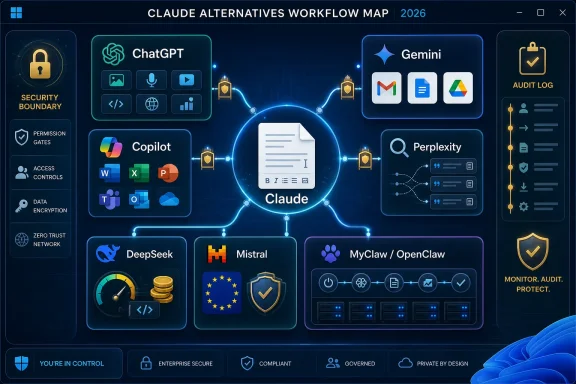 The Claude Comparison Is Really a Workflow Test
Claude remains a benchmark for a reason. Anthropic’s assistant is widely liked for writing, summarization, coding help, and long-context analysis, and it has cultivated a reputation for being less hyperactive and more editorially restrained than some competitors. For people who spend their day drafting strategy memos, editing legal-ish prose, or reasoning through large documents, that restraint can feel less like a feature and more like taste.But the market around Claude has changed. A few years ago, choosing an AI assistant meant asking which model produced the best paragraph or solved the hardest puzzle. In 2026, the more practical question is whether the assistant can see the file you are working on, call the service you already use, respect your organization’s data rules, and remain available after you close the tab.
That shift weakens the idea of a single “best Claude alternative.” A researcher may be better served by Perplexity because it shows its work. A Microsoft 365 shop may get more value from Copilot because it can operate across Word, Excel, Teams, Outlook, and SharePoint. A developer watching token costs may look at DeepSeek because price becomes the product when API volume gets serious.
The result is a market that looks fragmented from the outside but rational from the inside. Each major Claude rival is not merely copying Claude; it is making a different argument about where AI should live. The strategic fight is not just model against model. It is interface against interface.
ChatGPT Still Owns the General-Purpose Center
ChatGPT remains the obvious first stop for many users because it has become less a chatbot than a Swiss Army knife for consumer and professional AI. It handles writing, code, images, files, voice, data analysis, custom assistants, and third-party integrations in a single product surface. That breadth matters because most people do not want a specialized tool until the general one fails them.The submitted list describes ChatGPT through GPT-4o, which was the right reference point for much of the multimodal boom, but the chronology has moved on. OpenAI has since pushed ChatGPT further into the GPT-5 era, and GPT-4o has been retired from ChatGPT itself. That does not invalidate the broader point; it sharpens it. ChatGPT’s advantage is not one model name but OpenAI’s willingness to keep turning the product into a moving platform.
That platform quality is what makes ChatGPT hard to dislodge. When users say they want an assistant for “everything,” they usually mean a grab bag of small jobs: explain this error, summarize this PDF, rewrite this email, generate this image, compare these options, draft this script, and maybe talk through a plan out loud. ChatGPT’s strength is that it usually has a mode for the task before the user has fully defined the task.
For WindowsForum readers, the real consideration is whether ChatGPT sits close enough to the operating environment. It is excellent as a standalone AI workbench, and it is often the first platform third-party services support. But in a locked-down enterprise, an assistant that lives outside the document store, ticketing system, or identity regime can feel like a clever intern who needs everything pasted into a chat window.
That is the line ChatGPT keeps trying to cross. Its success depends on whether it can remain the friendly all-purpose interface while also satisfying administrators who care about governance, retention, access boundaries, and auditability. Claude may win many writing duels, but ChatGPT still wins many days by being available for almost every kind of work.
Gemini’s Best Feature Is Not the Model, It Is the Address Book
Google Gemini is easiest to underrate if you judge it as a blank chat window. Its strategic value appears when it is embedded in Gmail, Docs, Drive, Sheets, Meet, and the rest of Google Workspace. In that setting, Gemini is less a Claude clone and more a layer of assistance over an organization’s daily memory.That distinction matters. Users do not actually want to copy text out of an email thread, paste it into a chatbot, ask for a summary, copy the result back, and then manually draft a reply. They want the assistant to understand the thread where it sits, respect the permissions already attached to it, and produce something useful without forcing them into a separate workflow.
Gemini’s pitch is therefore strongest for organizations that already live in Google’s ecosystem. If a company’s documents, calendars, video meetings, and mailboxes are already in Google Workspace, Gemini can become ambient in a way a standalone assistant cannot. It does not have to win every model benchmark to be the most practical choice for those teams.
The risk is the familiar Google risk: product clarity. Google has moved quickly through Gemini model names, tiers, app surfaces, and Workspace packaging. That speed can be good for capability and bad for buyers who want stable procurement language, predictable features, and a clean training story for employees.
Still, Gemini is one of the clearest examples of where AI assistants are heading. The chatbot is becoming less important than the permissioned context around it. Claude is excellent when you bring the work to Claude; Gemini is strongest when the work is already sitting inside Google.
MyClaw Points Beyond the Chatbot Era
MyClaw is the oddest entry in the list, and for that reason it may be the most interesting. It is not best understood as another text assistant competing sentence by sentence with Claude. It is managed hosting for OpenClaw, an open-source AI agent framework designed to keep running, connect to services, and perform tasks persistently rather than simply answer prompts on demand.That difference changes the mental model. Claude, ChatGPT, and Gemini are usually session-based experiences: ask, answer, refine, close. MyClaw’s promise is that an agent can remain online on private infrastructure, reachable through messaging services, able to monitor workflows, and ready to act when conditions change.
For non-technical users, the appeal is obvious. Self-hosted automation has historically required a dreary pile of prerequisites: a server, security updates, domain configuration, secrets management, logs, permissions, and enough Linux confidence to recover when something breaks at 2 a.m. A managed OpenClaw host tries to sell the power of self-hosting without the setup pain.
That is also where the caution starts. An always-on agent with access to email, messaging platforms, files, and automation skills is not just a smarter chatbot. It is a standing delegation of authority. If configured carelessly, it can misread intent, leak information, overstep permissions, or become another internet-facing surface that administrators have to defend.
The smart way to evaluate MyClaw is not to ask whether it writes better than Claude. It is to ask whether your use case genuinely benefits from persistence. If the job is drafting a blog post, Claude may be better. If the job is watching an inbox, triaging requests, posting updates to a team channel, and running scheduled routines without human babysitting, a persistent agent begins to make sense.
For sysadmins and power users, MyClaw also raises the old hosted-versus-self-hosted trade-off in a new disguise. Managed hosting reduces friction, but it also requires trust in the provider’s isolation, patching, access controls, and operational discipline. The more useful the agent becomes, the more important those guarantees become.
Perplexity Wins When the Source Trail Matters
Perplexity’s strongest argument against Claude is not that it is more eloquent. It is that it is built around retrieval, citations, and live web synthesis. For users asking about fast-moving topics, recent product changes, laws, prices, vulnerabilities, or current events, that difference is not cosmetic.A conventional chatbot can sound right while being stale. Perplexity’s answer-engine approach tries to reduce that risk by showing where the information came from and encouraging users to inspect the source trail. That does not make it infallible, but it changes the user’s posture from passive trust to active verification.
This is particularly useful for IT work. If you are checking whether a patch has a known issue, whether a vendor changed pricing, whether a model was retired, or whether a product page still says what it said last quarter, the answer needs to be traceable. A beautifully phrased hallucination is still an outage waiting to happen.
Perplexity’s weakness is the flip side of its strength. Source-backed answers are only as good as the sources selected, the freshness of the index, and the model’s ability to represent them faithfully. It can still miss context, flatten disagreement, or cite pages that support only part of the answer.
Even so, Perplexity has carved out a durable role. It is less a replacement for Claude than a replacement for the first 20 minutes of search-engine tab chaos. For researchers, journalists, analysts, and administrators, that may be more valuable than another polished prose engine.
Copilot Is Microsoft’s Distribution Advantage in AI Form
Microsoft Copilot is not one product so much as a brand stretched across Windows, Microsoft 365, GitHub, Edge, Security, Dynamics, and developer tooling. That can make it confusing, but the strategy is coherent: Microsoft wants AI to become the connective tissue of the Microsoft stack. If your work already happens in Word, Excel, PowerPoint, Outlook, Teams, SharePoint, Windows, and Azure, Copilot’s advantage is proximity.The Microsoft 365 version is the most important for office workers. It can draft documents, summarize meetings, help with presentations, reason over files, and work inside the applications where enterprise users already spend their day. That matters because enterprise AI adoption often fails not because the model is weak, but because the assistant is one more destination employees must remember to visit.
GitHub Copilot is a different case. It is the developer-facing member of the family, and its pricing and usage model should not be casually conflated with Microsoft 365 Copilot. The submitted text’s reference to “$10/month through GitHub Copilot for developers” captures one entry point into the developer product, but it does not describe Microsoft 365 Copilot licensing, which is a separate procurement story and, for many organizations, a much larger budget conversation.
For WindowsForum’s audience, this distinction matters. Microsoft’s AI naming makes it easy to say “Copilot” and accidentally blur consumer chat, enterprise productivity automation, coding assistance, and security workflows. An administrator evaluating Copilot needs to pin down which Copilot, which license, which data boundary, which tenant controls, and which app surface.
The upside is enormous if those pieces line up. Copilot can inherit Microsoft’s identity model, compliance tooling, admin controls, and document graph in ways that standalone assistants struggle to match. The downside is lock-in by convenience. Once AI becomes entangled with Office files, Teams meetings, Outlook threads, and SharePoint permissions, switching away becomes more than a model preference.
That is Microsoft’s bet. It does not need every user to believe Copilot is the most charming chatbot. It needs CIOs to conclude that the safest and most productive AI assistant is the one already wired into the Microsoft estate.
DeepSeek Turns Price Into a Feature
DeepSeek’s rise changed the AI conversation because it attacked the assumption that top-tier reasoning had to be expensive, closed, and concentrated among a few Western labs. Its models drew attention for strong performance at far lower apparent cost, especially in coding, math, and structured reasoning. For developers, that was not an abstract achievement; it was a line item.Cost becomes decisive at scale. A casual user may not care whether a million tokens cost a little more or less. A startup routing customer support, code analysis, document processing, or internal analytics through an API cares very much. At high volume, model quality and unit economics are inseparable.
DeepSeek’s appeal is therefore strongest for builders who can evaluate models pragmatically. If a model is good enough for the workload and materially cheaper, it expands what can be automated. It also gives teams leverage when negotiating with other providers or designing fallback systems.
The caveat is that model adoption is not just a benchmark decision. Organizations must consider hosting options, data handling, jurisdiction, security review, ecosystem maturity, rate limits, and the risk of depending on infrastructure or providers they do not fully understand. A cheap model that creates compliance uncertainty may not be cheap in the end.
Still, DeepSeek’s presence is healthy for the market. It pressures incumbent providers to justify premium pricing and reminds buyers that “frontier AI” is not a synonym for “whatever the biggest brand is selling this month.” Claude alternatives are not only about interface and tone; they are also about the economics of intelligence.
Mistral Makes Sovereignty a Product Feature
Mistral’s position is different again. The French AI company has become a serious option for organizations that care about European data residency, GDPR alignment, open and commercial model options, and a procurement story that security teams can discuss without immediately reaching for the red pen. Its Le Chat product gives consumers and teams a familiar assistant interface, but the deeper play is infrastructure and trust.That matters because AI adoption increasingly collides with regulation. The EU AI Act, GDPR, sector-specific rules, and internal data policies all push companies to ask where data goes, who processes it, how long it is retained, and whether the provider can support the controls promised in the sales deck. For some buyers, the best Claude alternative is simply the one that survives legal review.
Mistral is not only a compliance story, and it would be unfair to reduce it to geography. Its models have been competitive across developer and enterprise use cases, and the company has moved aggressively into tools that make its systems usable rather than merely impressive in release notes. But its European identity gives it a sharper enterprise wedge than many rivals.
The real question is whether Mistral can keep pace with the largest AI labs while maintaining that differentiation. Buyers want sovereignty, but they do not want a museum piece. If the capability gap gets too wide, compliance teams may approve the tool that users then avoid. If the gap remains narrow, Mistral becomes a powerful default for regulated European deployments.
For Windows and Microsoft-heavy organizations, Mistral also represents an architectural option rather than just a chat product. It can be part of a model portfolio, used where data rules or deployment preferences make the biggest U.S. consumer AI platforms less attractive. In 2026, that kind of optionality is not a luxury. It is risk management.
The Best Choice Is the One That Reduces Copy-Paste
The least useful AI buying advice is “try them all.” The better advice is to study where your work already lives and choose the assistant that removes the most friction without creating unacceptable risk. Copy-paste is the tax users pay when an AI tool is powerful but poorly placed.A writer may accept that tax because Claude’s prose quality is worth it. A Google Workspace team may not, because Gemini can operate closer to the documents and messages. A Microsoft shop may prefer Copilot because the permissions, meetings, spreadsheets, and presentations are already in the Microsoft graph. A developer may choose DeepSeek for API economics, while a researcher may keep Perplexity open because citations beat confidence.
The same logic applies to MyClaw and OpenClaw-style agents. If your work is episodic, a chatbot is enough. If your work is persistent, recurring, event-driven, and spread across messaging systems, an always-on agent may be more useful than any model locked inside a chat session.
That is the real market segmentation. Some assistants answer. Some retrieve. Some draft. Some automate. Some embed. Some run continuously. “Claude alternative” is a convenient search phrase, but it hides the fact that these products are drifting into different categories.
IT Will Care Less About Magic and More About Boundaries
The next phase of AI adoption will be less impressed by demos and more obsessed with boundaries. Which files can the assistant read? Which actions can it take? Which logs exist after it acts? Which data leaves the tenant? Which model is used for which task? Which employee can override it?These questions are boring only until something goes wrong. An AI assistant that summarizes a public web page is low risk. An AI agent that can read email, post to Slack, modify files, submit code, or message customers is a different class of system. The more agentic the product, the more it resembles an employee, a script, and a security principal at the same time.
That is why Windows administrators should watch the MyClaw and OpenClaw category closely even if they never deploy it. It previews the governance problem that every major platform will face. Once AI stops waiting for prompts and starts running workflows, the old mental model of “chatbot usage policy” becomes inadequate.
Microsoft, Google, OpenAI, Anthropic, Mistral, Perplexity, and agent-hosting providers are all converging on the same uncomfortable destination. Users want AI to do more. Administrators need AI to do less unless explicitly permitted. The winners will be the companies that make permissioning, auditing, rollback, and containment feel like native features rather than afterthoughts.
The 2026 Shortlist Has No Universal Winner
The practical answer is not to crown a single Claude replacement, but to match each tool to the job it is structurally best positioned to do. The market is mature enough that brand loyalty is now less useful than workload fit.- ChatGPT is the strongest general-purpose alternative when you want one assistant for writing, coding, multimodal work, file analysis, images, voice, and broad third-party ecosystem support.
- Gemini is the most natural fit for people and teams whose work already lives inside Gmail, Docs, Drive, Sheets, Meet, and Google Workspace.
- MyClaw is worth watching for users who want an always-on OpenClaw agent that can run persistently on managed infrastructure rather than waiting inside a browser session.
- Perplexity is the better choice when current information, source trails, and fast research matter more than polished long-form drafting.
- Microsoft Copilot is the logical enterprise option when Microsoft 365, Teams, Outlook, SharePoint, Excel, and GitHub are already central to the workflow.
- DeepSeek and Mistral are the alternatives to study when cost, model deployment strategy, data residency, and regulatory comfort are as important as the assistant interface.
That sounds untidy, but it is how serious software markets usually evolve. The spreadsheet did not kill the database, the browser did not kill the IDE, and Teams did not kill email. AI assistants will specialize because work is specialized.
The next year will reward users who stop asking which chatbot is “smartest” and start asking which system has the right context, permissions, price, and operating model for the job. Claude will remain a strong default for many people, especially those who value writing quality and thoughtful long-context work. But the future belongs to assistants that meet users where the work is, prove what they know, respect the boundaries around sensitive data, and — when appropriate — keep working after the chat window closes.
References
- Primary source: Geek Vibes Nation
Published: 2026-06-05T05:50:10.026800
Top Claude Alternatives You Should Know About In 2026 - Geek Vibes Nation
The top Claude alternatives in 2026, including AI chat tools offering strong reasoning, creativity, and productivity features. Learn more inside!geekvibesnation.com - Related coverage: flowith.io
10 Best Claude Alternatives for Enterprise AI (2026 Ranked) - Flowith Blog
A practical ranking of the 10 best Claude alternatives for enterprise AI in 2026, covering capabilities, pricing, safety, and deployment options.flowith.io
- Related coverage: amplifilabs.com
Best Claude Alternatives in 2026: GPT-5, Gemini 3, Llama 4 & More Compared - Amplifi Labs
- Feb 27, 2026www.amplifilabs.com
