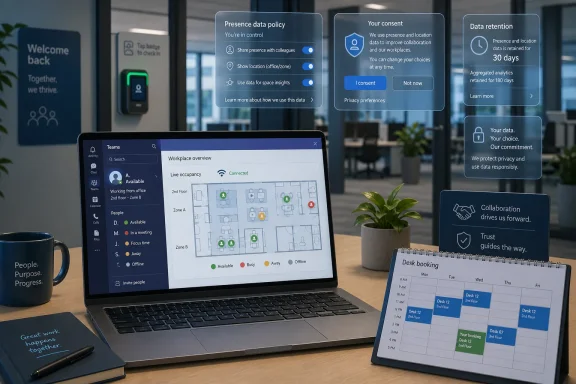
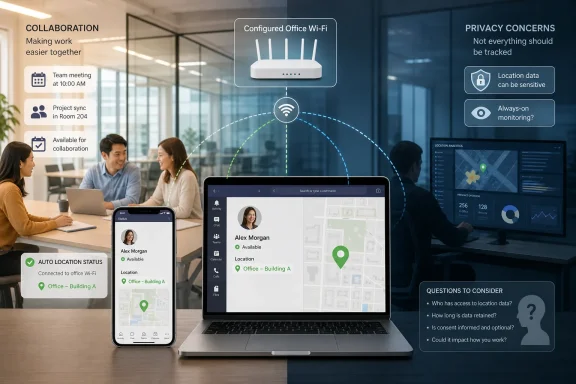
Microsoft Teams is scheduled to roll out Wi-Fi-based automatic work-location updates worldwide in June 2026, letting organizations configure Teams and Microsoft 365 Places to infer a user’s office building or floor from corporate network access points on Windows and macOS. The feature is not a secret keylogger, and Microsoft has wrapped it in admin controls, user sharing settings, and working-hours limits. But it arrives at exactly the wrong cultural moment: when hybrid work has become a measurement problem, AI has made “productivity” feel newly slippery, and every innocuous presence signal can be repurposed into a compliance dashboard.
The fight over this feature is not really about whether Teams can detect an office Wi-Fi network. It is about whether Microsoft’s collaboration stack is quietly becoming the operating system for workplace legitimacy. A green dot used to mean “available.” A work location badge used to mean “I’m in today.” Now, with Microsoft 365 Places, Copilot, Scout, and the broader agentic AI push all converging, the workplace graph is being asked to answer a more loaded question: who is really working, where, and how can management know?
Microsoft’s official pitch is straightforward: Teams should reduce the friction of hybrid work. If a worker connects to corporate Wi-Fi, Teams can automatically update that person’s work location so colleagues know whether it is worth booking an in-person meeting, finding a nearby desk, or walking over for a conversation. In the most generous reading, this is the digital equivalent of noticing who is in the office kitchen.
That is why Microsoft has positioned the capability inside Microsoft 365 Places, its workplace coordination layer for hybrid offices. Places is supposed to help employees plan office days, find rooms, coordinate with teammates, and make better use of expensive real estate. If hybrid work is now normal, the argument goes, software needs to understand buildings as well as calendars.
Technically, the feature relies on Wi-Fi identifiers rather than GPS. Administrators can map corporate SSIDs and BSSIDs — identifiers associated with wireless access points — to a workplace location model. When a managed Teams desktop client on Windows or macOS sees the configured network environment, the user’s work location can update automatically.
That distinction matters, but it does not end the privacy debate. A BSSID is not a satellite coordinate, but in a dense corporate Wi-Fi deployment it can still imply a building, floor, zone, or even a room-like area depending on how precisely the organization maps its access points. In an office, location does not need to be accurate to the centimeter to become socially or administratively meaningful.
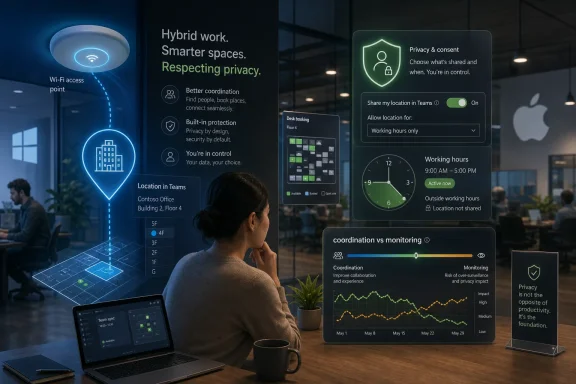
Microsoft has added guardrails. The feature is off by default. Tenant administrators must configure it. Users can manually set or clear work location information, and Microsoft says location entries outside working hours are cleared or not retained in the same way. The company has also stressed that this is meant for collaboration rather than attendance enforcement.
That last sentence is doing a lot of work. Microsoft can define the product’s intention, but it cannot fully define how a manager, HR department, compliance team, or irritated executive will interpret the signal once it exists inside the tenant.
If Teams asks whether a user wants to share their location, some employees will reasonably wonder who can see that refusal. Others will ask whether declining the feature will make them look uncooperative in a company trying to reassert office attendance. In a healthy organization, those fears may be overblown. In a tense one, they may be rational.
This is the core weakness in treating workplace privacy as a settings problem. An employee can toggle a control, but the meaning of the toggle is determined by culture, policy, and management behavior. Microsoft can provide a switch; it cannot provide trust.
The issue is especially sharp in countries with stronger employee representation. In Germany and Austria, workplace monitoring tools often trigger works council scrutiny, and the introduction of location-derived status data is unlikely to be treated as a mere convenience feature if it can influence attendance expectations or employee evaluation. Even where formal approval is not required, privacy teams will need to document purpose, retention, access, proportionality, and employee notice.
The GDPR adds another layer: location-related workplace data is personal data, and processing it requires a lawful basis and clear purpose limitation. A company that enables automatic location updates to help workers find colleagues should not quietly reuse the same signal to discipline employees for badge-swipe discrepancies or insufficient office time. That would be the moment a collaboration feature starts looking like surveillance infrastructure.
The uncomfortable truth is that Microsoft has built a feature with legitimate utility and obvious misuse potential. That is not unusual in enterprise software. What is unusual is how directly this one touches the most contested boundary in post-pandemic office life.
The missing ingredient has been reliable evidence that satisfies everyone. Badge data is crude. VPN logs are misleading. Calendar presence is performative. Desk-booking systems only show intent. Teams status is notoriously ambiguous, because “available” can mean focused, distracted, away from keyboard, or just lucky enough to have a meeting-free hour.
Microsoft 365 Places tries to make the hybrid office more legible. That is a business opportunity because companies are paying for office space they no longer understand. Facilities teams want occupancy trends. Managers want coordination. Employees want to know whether the commute is worth it. In that narrow sense, automatic check-in is a rational feature.
But every system that makes work more legible also makes workers more measurable. Once a location signal becomes part of the productivity environment, it can be combined with calendar density, meeting attendance, message volume, Copilot usage, document edits, ticket closure, and security logs. No single metric has to be sinister for the aggregate picture to become invasive.
Microsoft has spent years embedding itself deeper into the daily flow of work. Teams is no longer just chat and meetings; it is a front end for files, calls, calendars, workflows, apps, approvals, webinars, communities, and now workplace presence. The more Teams becomes the interface for office life, the more any new data point inside it feels consequential.
The office badge used to live in the facilities system. The chat status used to live in the collaboration system. The calendar lived in Exchange. The analytics lived somewhere else. Microsoft’s strategic advantage is that those boundaries are dissolving inside Microsoft 365.
At the same time, managers are under pressure to justify AI spending. Companies have poured money into Copilot-style tools, agent platforms, internal assistants, and automation pilots. Yet many organizations are still trying to prove where productivity gains actually appear. That gap between executive expectation and measurable impact breeds suspicion.
If AI can write the status update, generate the spreadsheet explanation, summarize the meeting, and draft the project plan, then old proxies for effort become less reliable. The worker who produces more text may not be doing more work. The worker who attends more meetings may not be contributing more value. The worker who is physically present may still be checked out.
This is where location data becomes tempting. It is concrete. It feels hard to fake. It gives managers a seemingly objective answer to at least one question: was the person in the office? In a low-trust workplace, that can become a substitute for the harder task of evaluating outcomes.
Microsoft’s own AI ambitions complicate the message. At Build 2026, the company introduced Scout, a personal agent designed to act across files, browser sessions, commands, and Microsoft 365 data. The company’s direction is clear: software should not merely help workers communicate; it should perform tasks on their behalf.
That future makes presence more ambiguous, not less. If an agent can plan travel, generate expenses, summarize threads, prepare documents, and coordinate workflows while a worker is elsewhere, what does it mean to be “at work”? A Wi-Fi-based location badge answers the easiest version of the question and leaves the hardest version untouched.
Those facts matter because sloppy criticism helps vendors dismiss legitimate concerns. A feature that updates a Teams work-location field is not the same thing as spyware installed to record keystrokes or screenshots. IT professionals should be precise about the difference.
But precision should not become complacency. Enterprise surveillance does not usually arrive as a cartoon villain product called “Employee Monitoring 9000.” It arrives as a scheduling improvement, a security enhancement, a workplace analytics feature, a compliance control, or a collaboration aid. Then it gets integrated, normalized, and quietly repurposed.
Microsoft’s argument is that automatic location updates reduce friction. That is true. The privacy argument is that friction sometimes serves a purpose. Manually setting a work location is annoying, but it also creates an intentional act. Automation removes that act and turns environmental presence into a default signal.
That shift is subtle but important. When users manually announce “I’m in the office,” they are communicating. When software infers it from infrastructure, the office is communicating about them. The data may look the same on a profile card, but the power relationship has changed.
Those are not abstract policy questions. They determine whether this becomes a coordination tool or a shadow attendance system.
IT departments will also need to think about data quality. Wi-Fi environments are messy. Access point mappings can be stale. Office renovations change floor layouts. Shared SSIDs can span buildings. Devices sleep, wake, roam, dock, disconnect, and fall back to Ethernet. A signal that is “good enough” for finding colleagues may be dangerously imprecise if used for discipline.
That distinction should be written into policy. If the organization wants occupancy analytics, use aggregated and anonymized facilities reporting where possible. If it wants team coordination, show only the minimum useful granularity. If it wants attendance enforcement, it should say so plainly, negotiate it where required, and use a system designed and governed for that purpose rather than backdooring enforcement through Teams presence.
There is also a security dimension. Mapping BSSIDs and workplace topology into Microsoft 365 creates another layer of environmental metadata. For most companies, the risk is manageable. For sensitive environments — defense contractors, newsrooms, labs, legal teams, political organizations, and critical infrastructure operators — location visibility can reveal patterns that matter.
The feature may be configured by Exchange and Teams administrators, but the decision should involve privacy, HR, legal, security, facilities, and employee representatives. That may sound bureaucratic. It is also the difference between a rollout and an incident.
Europe starts from a different premise. The workplace is not a privacy-free zone, and employee consent is often considered problematic because of the imbalance of power between employer and worker. A company rolling out automatic location detection in the EU will need to think carefully about lawful basis, transparency, minimization, retention, access controls, and proportionality.
Germany and Austria add works council dynamics that can materially slow or reshape deployments. If a tool can monitor behavior or performance, employee representatives may demand consultation or approval. Even if Microsoft frames the feature as collaboration, a works council may look at what it can do, not merely what the vendor says it is for.
The EU AI Act also hovers over the broader workplace technology stack. The Teams location feature itself is not necessarily an AI system, and administrators should avoid lazy claims that every digital workplace feature is suddenly high-risk AI. But when location signals are combined with AI-driven productivity scoring, performance assessment, scheduling recommendations, workforce planning, or automated HR decisions, the regulatory picture changes.
Employment and worker-management AI is one of the areas European regulators have singled out for heightened scrutiny. That means the dangerous version of this story is not “Teams sees Wi-Fi.” It is “Teams sees Wi-Fi, Microsoft 365 sees activity, Copilot summarizes output, and an AI system ranks employee reliability.” The first step may be mundane; the assembled system may not be.
This is where Microsoft’s ecosystem power becomes relevant. The company can credibly say each component has controls. But regulators and worker advocates will increasingly ask about the combined effect of the suite.
Microsoft 365 Places is a reasonable answer to that problem. It tells employees when colleagues plan to come in, helps them choose office days, and connects physical spaces to digital workflows. The office becomes another resource that can be searched, booked, and optimized.
But the enterprise software market has a long history of turning optimization into oversight. Viva Insights can help employees manage focus time, but it also raised concerns about workplace analytics. Teams activity can help admins understand adoption, but it can also be mistaken for productivity. Security logs can protect accounts, but they can also expose behavior patterns.
The vendor’s story and the buyer’s motive do not always match. Microsoft may sell collaboration. Some executives will buy attendance confidence. Microsoft may describe a work-location signal. Some managers will read it as commitment.
This mismatch is why product design matters. Defaults matter. Granularity matters. Export controls matter. Audit logs matter. User-facing explanations matter. A privacy promise in a support document is less powerful than an architecture that makes misuse difficult.
If Microsoft wants to persuade skeptics, it should do more than say the feature is not for attendance. It should make that boundary technically and administratively visible. It should give tenants clear ways to limit precision, prevent historical reporting, document user consent, and separate coordination views from management analytics.
That competition cuts two ways. On one side, Microsoft’s deep integration with Windows, Office, Teams, Exchange, SharePoint, Entra ID, and the Microsoft Graph gives it a distribution advantage that rivals envy. If the future of work is agentic, Microsoft can wire agents into the systems where work already lives.
On the other side, that same integration makes every new Microsoft signal feel more sensitive. A local-first or model-agnostic agent can market itself as user-controlled, even if the reality is more complicated. Microsoft’s cloud-centric enterprise model is built on centralized identity, compliance, telemetry, and manageability. Those are strengths for CIOs and red flags for privacy advocates.
The Teams location feature is therefore a small preview of a larger contest. The next generation of workplace software will need context: where you are, what you are doing, which files matter, who you work with, what meetings mean, which tasks can be automated, and which decisions require approval. Context is what makes AI useful. Context is also what makes surveillance scalable.
The companies that win this market will not be the ones that collect the most signals by default. They will be the ones that convince workers, administrators, regulators, and executives that the signals are bounded, explainable, and worth the trade.
Microsoft has the enterprise trust reservoir to make that argument. It also has enough past privacy bruises that it should know trust is not self-replenishing.
That conspicuousness can be subtle. A manager may not punish anyone directly but may prefer employees whose office presence is visible. A team may treat blank location fields as unhelpful. HR may later decide that location sharing improves workforce planning and quietly encourage adoption. A policy that begins as optional can become informally mandatory without anyone changing the checkbox.
This is why transparency has to include consequences. Organizations should tell employees not only what the feature does, but also what it will not be used for. They should state whether opting out affects performance evaluation, attendance compliance, desk booking, facilities access, or team expectations. If the honest answer is that opting out may affect those things, then the feature is not truly optional in the ordinary sense.
Managers also need training. A Teams work location is not a productivity metric. It is not proof of hours worked. It is not proof of engagement. It is not proof of compliance unless the company has built a lawful, accurate, and disclosed attendance process around it. Treating inferred Wi-Fi presence as a managerial shortcut is an invitation to conflict.
Employees, meanwhile, should assume that workplace systems generate workplace data. That does not mean surrendering privacy expectations. It means asking specific questions: who sees this, for how long, at what precision, for what purpose, and with what appeal process if the data is wrong?
The best deployments will be boring. They will show building-level presence to coworkers, clear it after working hours, avoid historical reports, prevent disciplinary reuse, and give users a meaningful way to control visibility. The worst deployments will be marketed as collaboration while functioning as attendance theater.
Microsoft is betting that hybrid work needs more ambient intelligence: smarter calendars, smarter rooms, smarter agents, smarter presence. It is probably right. But the office of 2026 is already saturated with measurement, suspicion, and AI-driven ambiguity, and every new signal has to earn its place. If Teams is going to know where workers sit, the next question cannot be how managers exploit that knowledge; it has to be how organizations prove they can be trusted with it.
The fight over this feature is not really about whether Teams can detect an office Wi-Fi network. It is about whether Microsoft’s collaboration stack is quietly becoming the operating system for workplace legitimacy. A green dot used to mean “available.” A work location badge used to mean “I’m in today.” Now, with Microsoft 365 Places, Copilot, Scout, and the broader agentic AI push all converging, the workplace graph is being asked to answer a more loaded question: who is really working, where, and how can management know?
 Microsoft Turns Presence Into Proof
Microsoft’s official pitch is straightforward: Teams should reduce the friction of hybrid work. If a worker connects to corporate Wi-Fi, Teams can automatically update that person’s work location so colleagues know whether it is worth booking an in-person meeting, finding a nearby desk, or walking over for a conversation. In the most generous reading, this is the digital equivalent of noticing who is in the office kitchen.That is why Microsoft has positioned the capability inside Microsoft 365 Places, its workplace coordination layer for hybrid offices. Places is supposed to help employees plan office days, find rooms, coordinate with teammates, and make better use of expensive real estate. If hybrid work is now normal, the argument goes, software needs to understand buildings as well as calendars.
Technically, the feature relies on Wi-Fi identifiers rather than GPS. Administrators can map corporate SSIDs and BSSIDs — identifiers associated with wireless access points — to a workplace location model. When a managed Teams desktop client on Windows or macOS sees the configured network environment, the user’s work location can update automatically.
That distinction matters, but it does not end the privacy debate. A BSSID is not a satellite coordinate, but in a dense corporate Wi-Fi deployment it can still imply a building, floor, zone, or even a room-like area depending on how precisely the organization maps its access points. In an office, location does not need to be accurate to the centimeter to become socially or administratively meaningful.
Microsoft has added guardrails. The feature is off by default. Tenant administrators must configure it. Users can manually set or clear work location information, and Microsoft says location entries outside working hours are cleared or not retained in the same way. The company has also stressed that this is meant for collaboration rather than attendance enforcement.
That last sentence is doing a lot of work. Microsoft can define the product’s intention, but it cannot fully define how a manager, HR department, compliance team, or irritated executive will interpret the signal once it exists inside the tenant.
The Opt-In Label Does Not Settle the Power Question
The phrase “opt in” sounds reassuring in consumer software. It sounds less conclusive at work. In an employment setting, consent is rarely as clean as a privacy settings dialog suggests, because workers often make choices inside hierarchies where refusal has consequences even when those consequences are informal.If Teams asks whether a user wants to share their location, some employees will reasonably wonder who can see that refusal. Others will ask whether declining the feature will make them look uncooperative in a company trying to reassert office attendance. In a healthy organization, those fears may be overblown. In a tense one, they may be rational.
This is the core weakness in treating workplace privacy as a settings problem. An employee can toggle a control, but the meaning of the toggle is determined by culture, policy, and management behavior. Microsoft can provide a switch; it cannot provide trust.
The issue is especially sharp in countries with stronger employee representation. In Germany and Austria, workplace monitoring tools often trigger works council scrutiny, and the introduction of location-derived status data is unlikely to be treated as a mere convenience feature if it can influence attendance expectations or employee evaluation. Even where formal approval is not required, privacy teams will need to document purpose, retention, access, proportionality, and employee notice.
The GDPR adds another layer: location-related workplace data is personal data, and processing it requires a lawful basis and clear purpose limitation. A company that enables automatic location updates to help workers find colleagues should not quietly reuse the same signal to discipline employees for badge-swipe discrepancies or insufficient office time. That would be the moment a collaboration feature starts looking like surveillance infrastructure.
The uncomfortable truth is that Microsoft has built a feature with legitimate utility and obvious misuse potential. That is not unusual in enterprise software. What is unusual is how directly this one touches the most contested boundary in post-pandemic office life.
Hybrid Work Created a Data Vacuum, and Vendors Are Filling It
The return-to-office fight has been messy because both sides can tell plausible stories. Executives argue that in-person work improves coordination, mentorship, onboarding, and culture. Employees argue that remote work saves time, reduces distractions, expands hiring pools, and forces companies to judge output rather than chair occupancy.The missing ingredient has been reliable evidence that satisfies everyone. Badge data is crude. VPN logs are misleading. Calendar presence is performative. Desk-booking systems only show intent. Teams status is notoriously ambiguous, because “available” can mean focused, distracted, away from keyboard, or just lucky enough to have a meeting-free hour.
Microsoft 365 Places tries to make the hybrid office more legible. That is a business opportunity because companies are paying for office space they no longer understand. Facilities teams want occupancy trends. Managers want coordination. Employees want to know whether the commute is worth it. In that narrow sense, automatic check-in is a rational feature.
But every system that makes work more legible also makes workers more measurable. Once a location signal becomes part of the productivity environment, it can be combined with calendar density, meeting attendance, message volume, Copilot usage, document edits, ticket closure, and security logs. No single metric has to be sinister for the aggregate picture to become invasive.
Microsoft has spent years embedding itself deeper into the daily flow of work. Teams is no longer just chat and meetings; it is a front end for files, calls, calendars, workflows, apps, approvals, webinars, communities, and now workplace presence. The more Teams becomes the interface for office life, the more any new data point inside it feels consequential.
The office badge used to live in the facilities system. The chat status used to live in the collaboration system. The calendar lived in Exchange. The analytics lived somewhere else. Microsoft’s strategic advantage is that those boundaries are dissolving inside Microsoft 365.
AI Productivity Anxiety Makes the Timing Worse
The AD HOC News framing links the Teams feature to a broader anxiety: managers fear workers may use AI to fake productivity. That concern is not imaginary. Generative AI makes it easier to produce plausible artifacts — emails, summaries, code snippets, slide drafts, status updates — at a speed that can blur the line between meaningful output and high-volume simulation.At the same time, managers are under pressure to justify AI spending. Companies have poured money into Copilot-style tools, agent platforms, internal assistants, and automation pilots. Yet many organizations are still trying to prove where productivity gains actually appear. That gap between executive expectation and measurable impact breeds suspicion.
If AI can write the status update, generate the spreadsheet explanation, summarize the meeting, and draft the project plan, then old proxies for effort become less reliable. The worker who produces more text may not be doing more work. The worker who attends more meetings may not be contributing more value. The worker who is physically present may still be checked out.
This is where location data becomes tempting. It is concrete. It feels hard to fake. It gives managers a seemingly objective answer to at least one question: was the person in the office? In a low-trust workplace, that can become a substitute for the harder task of evaluating outcomes.
Microsoft’s own AI ambitions complicate the message. At Build 2026, the company introduced Scout, a personal agent designed to act across files, browser sessions, commands, and Microsoft 365 data. The company’s direction is clear: software should not merely help workers communicate; it should perform tasks on their behalf.
That future makes presence more ambiguous, not less. If an agent can plan travel, generate expenses, summarize threads, prepare documents, and coordinate workflows while a worker is elsewhere, what does it mean to be “at work”? A Wi-Fi-based location badge answers the easiest version of the question and leaves the hardest version untouched.
The Feature Is Less Orwellian Than Critics Say, and More Important Than Microsoft Implies
Some of the backlash has overstated the mechanics. This is not a universal live-tracking beacon activated on every Teams user worldwide. It does not automatically give every boss a GPS trail. It requires tenant configuration, supported clients, corporate network mapping, and organizational rollout decisions. Microsoft has also said users retain control over their work location visibility.Those facts matter because sloppy criticism helps vendors dismiss legitimate concerns. A feature that updates a Teams work-location field is not the same thing as spyware installed to record keystrokes or screenshots. IT professionals should be precise about the difference.
But precision should not become complacency. Enterprise surveillance does not usually arrive as a cartoon villain product called “Employee Monitoring 9000.” It arrives as a scheduling improvement, a security enhancement, a workplace analytics feature, a compliance control, or a collaboration aid. Then it gets integrated, normalized, and quietly repurposed.
Microsoft’s argument is that automatic location updates reduce friction. That is true. The privacy argument is that friction sometimes serves a purpose. Manually setting a work location is annoying, but it also creates an intentional act. Automation removes that act and turns environmental presence into a default signal.
That shift is subtle but important. When users manually announce “I’m in the office,” they are communicating. When software infers it from infrastructure, the office is communicating about them. The data may look the same on a profile card, but the power relationship has changed.
Sysadmins Are Being Handed a Governance Problem, Not Just a Cmdlet
For administrators, the technical rollout is the easy part. The harder question is whether the organization has answered basic governance questions before enabling the feature. Who can see the location? How granular should the location be? Is floor-level mapping necessary, or is building-level enough? Can managers export or aggregate it? How long is it retained? Is it used in performance reviews? What happens if a user opts out?Those are not abstract policy questions. They determine whether this becomes a coordination tool or a shadow attendance system.
IT departments will also need to think about data quality. Wi-Fi environments are messy. Access point mappings can be stale. Office renovations change floor layouts. Shared SSIDs can span buildings. Devices sleep, wake, roam, dock, disconnect, and fall back to Ethernet. A signal that is “good enough” for finding colleagues may be dangerously imprecise if used for discipline.
That distinction should be written into policy. If the organization wants occupancy analytics, use aggregated and anonymized facilities reporting where possible. If it wants team coordination, show only the minimum useful granularity. If it wants attendance enforcement, it should say so plainly, negotiate it where required, and use a system designed and governed for that purpose rather than backdooring enforcement through Teams presence.
There is also a security dimension. Mapping BSSIDs and workplace topology into Microsoft 365 creates another layer of environmental metadata. For most companies, the risk is manageable. For sensitive environments — defense contractors, newsrooms, labs, legal teams, political organizations, and critical infrastructure operators — location visibility can reveal patterns that matter.
The feature may be configured by Exchange and Teams administrators, but the decision should involve privacy, HR, legal, security, facilities, and employee representatives. That may sound bureaucratic. It is also the difference between a rollout and an incident.
Europe Will Treat This as a Workplace Rights Issue
In the United States, this debate will often be framed as a company policy question. Employers have broad latitude to monitor work systems, especially when employees use corporate devices and networks. There are still state laws, notice requirements, union considerations, and sector-specific constraints, but the baseline cultural assumption tends to favor employer control.Europe starts from a different premise. The workplace is not a privacy-free zone, and employee consent is often considered problematic because of the imbalance of power between employer and worker. A company rolling out automatic location detection in the EU will need to think carefully about lawful basis, transparency, minimization, retention, access controls, and proportionality.
Germany and Austria add works council dynamics that can materially slow or reshape deployments. If a tool can monitor behavior or performance, employee representatives may demand consultation or approval. Even if Microsoft frames the feature as collaboration, a works council may look at what it can do, not merely what the vendor says it is for.
The EU AI Act also hovers over the broader workplace technology stack. The Teams location feature itself is not necessarily an AI system, and administrators should avoid lazy claims that every digital workplace feature is suddenly high-risk AI. But when location signals are combined with AI-driven productivity scoring, performance assessment, scheduling recommendations, workforce planning, or automated HR decisions, the regulatory picture changes.
Employment and worker-management AI is one of the areas European regulators have singled out for heightened scrutiny. That means the dangerous version of this story is not “Teams sees Wi-Fi.” It is “Teams sees Wi-Fi, Microsoft 365 sees activity, Copilot summarizes output, and an AI system ranks employee reliability.” The first step may be mundane; the assembled system may not be.
This is where Microsoft’s ecosystem power becomes relevant. The company can credibly say each component has controls. But regulators and worker advocates will increasingly ask about the combined effect of the suite.
Microsoft Is Selling Coordination While the Market Buys Control
The charitable explanation for Microsoft’s move is that hybrid work remains operationally awkward. Anyone who has commuted into an empty office understands the problem. Anyone who has tried to schedule an in-person whiteboard session across a team with inconsistent office days understands it better.Microsoft 365 Places is a reasonable answer to that problem. It tells employees when colleagues plan to come in, helps them choose office days, and connects physical spaces to digital workflows. The office becomes another resource that can be searched, booked, and optimized.
But the enterprise software market has a long history of turning optimization into oversight. Viva Insights can help employees manage focus time, but it also raised concerns about workplace analytics. Teams activity can help admins understand adoption, but it can also be mistaken for productivity. Security logs can protect accounts, but they can also expose behavior patterns.
The vendor’s story and the buyer’s motive do not always match. Microsoft may sell collaboration. Some executives will buy attendance confidence. Microsoft may describe a work-location signal. Some managers will read it as commitment.
This mismatch is why product design matters. Defaults matter. Granularity matters. Export controls matter. Audit logs matter. User-facing explanations matter. A privacy promise in a support document is less powerful than an architecture that makes misuse difficult.
If Microsoft wants to persuade skeptics, it should do more than say the feature is not for attendance. It should make that boundary technically and administratively visible. It should give tenants clear ways to limit precision, prevent historical reporting, document user consent, and separate coordination views from management analytics.
The Competition Is Pushing the Same Boundary From the Other Side
Microsoft is not operating in a vacuum. The AI productivity market is racing toward agents that can plan, execute, and coordinate work across applications. Perplexity, OpenAI, Anthropic, Google, and a growing list of smaller vendors are all experimenting with systems that do not merely answer questions but operate tools.That competition cuts two ways. On one side, Microsoft’s deep integration with Windows, Office, Teams, Exchange, SharePoint, Entra ID, and the Microsoft Graph gives it a distribution advantage that rivals envy. If the future of work is agentic, Microsoft can wire agents into the systems where work already lives.
On the other side, that same integration makes every new Microsoft signal feel more sensitive. A local-first or model-agnostic agent can market itself as user-controlled, even if the reality is more complicated. Microsoft’s cloud-centric enterprise model is built on centralized identity, compliance, telemetry, and manageability. Those are strengths for CIOs and red flags for privacy advocates.
The Teams location feature is therefore a small preview of a larger contest. The next generation of workplace software will need context: where you are, what you are doing, which files matter, who you work with, what meetings mean, which tasks can be automated, and which decisions require approval. Context is what makes AI useful. Context is also what makes surveillance scalable.
The companies that win this market will not be the ones that collect the most signals by default. They will be the ones that convince workers, administrators, regulators, and executives that the signals are bounded, explainable, and worth the trade.
Microsoft has the enterprise trust reservoir to make that argument. It also has enough past privacy bruises that it should know trust is not self-replenishing.
The Real Test Is Whether Refusal Has a Cost
The unresolved question is not whether an employee can opt out on paper. It is whether opting out remains socially and professionally neutral. If a company enables automatic work-location updates and most employees accept, the people who decline may become conspicuous.That conspicuousness can be subtle. A manager may not punish anyone directly but may prefer employees whose office presence is visible. A team may treat blank location fields as unhelpful. HR may later decide that location sharing improves workforce planning and quietly encourage adoption. A policy that begins as optional can become informally mandatory without anyone changing the checkbox.
This is why transparency has to include consequences. Organizations should tell employees not only what the feature does, but also what it will not be used for. They should state whether opting out affects performance evaluation, attendance compliance, desk booking, facilities access, or team expectations. If the honest answer is that opting out may affect those things, then the feature is not truly optional in the ordinary sense.
Managers also need training. A Teams work location is not a productivity metric. It is not proof of hours worked. It is not proof of engagement. It is not proof of compliance unless the company has built a lawful, accurate, and disclosed attendance process around it. Treating inferred Wi-Fi presence as a managerial shortcut is an invitation to conflict.
Employees, meanwhile, should assume that workplace systems generate workplace data. That does not mean surrendering privacy expectations. It means asking specific questions: who sees this, for how long, at what precision, for what purpose, and with what appeal process if the data is wrong?
The best deployments will be boring. They will show building-level presence to coworkers, clear it after working hours, avoid historical reports, prevent disciplinary reuse, and give users a meaningful way to control visibility. The worst deployments will be marketed as collaboration while functioning as attendance theater.
The Commute Is Now a Data Point
For WindowsForum readers, the practical implications are less about panic and more about preparation. This is a Microsoft 365 governance issue arriving in the shape of a Teams feature, and it deserves to be handled before executives start asking why the dashboard cannot show who “really came in.”- Organizations should decide the business purpose of automatic work-location updates before enabling the feature, and that purpose should be written in plain language employees can understand.
- Administrators should configure the least precise location level that still supports coordination, because room-level or floor-level visibility is harder to justify than building-level presence.
- Employees should be told whether location sharing is optional, who can see it, when it is cleared, and whether refusal has any workplace consequence.
- Companies operating in Germany, Austria, or other jurisdictions with strong worker consultation rights should involve employee representatives before technical rollout rather than after complaints begin.
- Managers should be explicitly barred from treating Teams work location as a productivity score unless the organization has created a separate, lawful, disclosed attendance process.
- Security and privacy teams should review whether location metadata can be exported, aggregated, queried through APIs, or combined with AI-based workforce analytics.
Microsoft is betting that hybrid work needs more ambient intelligence: smarter calendars, smarter rooms, smarter agents, smarter presence. It is probably right. But the office of 2026 is already saturated with measurement, suspicion, and AI-driven ambiguity, and every new signal has to earn its place. If Teams is going to know where workers sit, the next question cannot be how managers exploit that knowledge; it has to be how organizations prove they can be trusted with it.
References
- Primary source: AD HOC NEWS
Published: Sat, 06 Jun 2026 23:22:54 GMT

Microsoft Teams Will Soon Automatically Log Your Office Hours, but Privacy Hawks Warn of a New Surve
Starting June 2026, Microsoft Teams will automatically log office entry and seating using Wi-Fi, fuewww.ad-hoc-news.de
- Official source: learn.microsoft.com

Configure workplace check-in - Microsoft Places | Microsoft Learn
Configure workplace check-in in a Places environment.learn.microsoft.com - Related coverage: windowscentral.com

Microsoft Teams clarifies automatic work location tracking | Windows Central
Microsoft says Teams' "Automatic Update of work location" feature isn't for employee surveillance but rather collaboration.www.windowscentral.com - Official source: microsoft.com
Microsoft 365 Roadmap | Microsoft 365
The Microsoft 365 Roadmap lists updates that are currently planned for applicable subscribers. Check here for more information on the status of new features and updates.www.microsoft.com
- Related coverage: blog-en.topedia.com

Configure work location auto-detection via WLAN in Microsoft Places and Teams | Topedia Blog
Microsoft Places and Teams now support work location auto-detection via WLAN signals, allowing Teams to automatically check users in at the connected building. blog-en.topedia.com
- Related coverage: makeuseof.com

Microsoft has changed a controversial Teams Wi-Fi location feature — but won't say why
Microsoft has seemingly updated a controversial feature to its Teams collaboration and messaging service, but won’t say what was updated or why. www.makeuseof.com
- Related coverage: fdaytalk.com

Microsoft Teams Automatic Work Location Delayed Again, Now Rolling Out in March 2026
Microsoft plans to roll out a new Microsoft Teams feature in March 2026 that automatically updates a user’s work location when they connect to their www.fdaytalk.com
- Related coverage: fortune.com

Microsoft Teams can now track what room you're in. 'Do these companies ever put these ideas through a creepy assessment?' | Fortune
Microsoft says it's about collaboration. Privacy researchers say it's about control.fortune.com
- Related coverage: heise.de

Microsoft postpones introduction of Teams location and office time tracking
Microsoft Teams is to automatically record office presence in the future. Microsoft has now presented an updated schedule.www.heise.de
- Related coverage: itpro.com

Microsoft Teams is getting a new location tracking feature that lets bosses snoop on staff – research shows it could cause workforce pushback | IT Pro
The new Microsoft Teams location tracking feature aims to improve office coordination by monitoring employee activities based on Wi-FI.www.itpro.com - Related coverage: techradar.com
Watch out - Microsoft Teams might be telling your bosses when you're in the office or not
Teams will automatically update your work locationwww.techradar.com
- Official source: support.microsoft.com

Get started with Microsoft Places | Microsoft Support
Get started with Microsoft Places
support.microsoft.com
- Related coverage: axios.com

Microsoft debuts Scout agent, homegrown reasoning model
Microsoft is seeking to show it is a serious player in AI.www.axios.com
- Related coverage: techcrunch.com

Microsoft launches Scout, an OpenClaw-inspired personal assistant | TechCrunch
Launched at Build, Microsoft Scout is a new AI assistant meant to bring the power and flexibility of OpenClaw into the Microsoft 365 system.techcrunch.com - Official source: blogs.microsoft.com

Microsoft Build 2026: Be yourself at work - The Official Microsoft Blog
Platforms shift when developers build. We explore, choose tools, dream, create. This platform shift comes with more information than ever, ready at your fingertips. This shift, it’s about building fast AND THEN: it’s about building, operating, optimizing and observing. Securing your...blogs.microsoft.com