

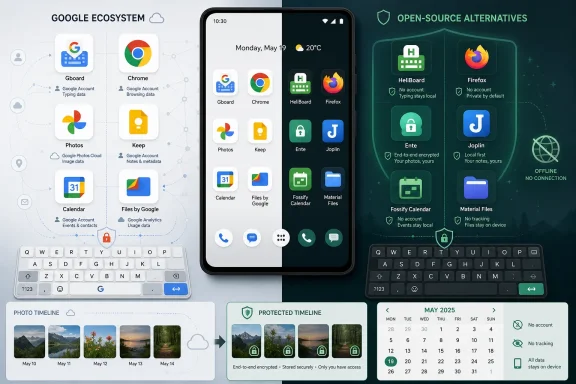
A MakeUseOf writer recently replaced six default Android apps—Gboard, Chrome, Google Photos, Google Keep, Google Calendar, and Files by Google—with open-source alternatives including HeliBoard, Firefox, Ente, Joplin, Fossify Calendar, and Material Files, arguing that each swap made Android feel less demanding without breaking daily use. The interesting part is not that open source won a purity contest. It is that the official apps lost a product-design argument. Android’s defaults have become less like utilities and more like recruitment surfaces for accounts, clouds, assistants, subscriptions, and behavioral data.
The modern smartphone app no longer has to be bad to become exhausting. Google’s Android apps are polished, fast, and deeply integrated, which is precisely why replacing them once felt like a hobbyist stunt. But polish can conceal a bargain: the app works beautifully because it is also an intake valve for a wider ecosystem.
That bargain is not automatically sinister. Sync, search, personalization, autofill, spam protection, and AI organization all require some kind of data flow. The problem is that the default app rarely pauses to ask whether the user wanted the whole machine attached to the simple task.
That is why the MakeUseOf experiment lands. It is not a de-Googling manifesto; it is a user saying, in effect, “I still want Android, just with fewer hooks.” That distinction matters because most people are not going to flash custom ROMs, self-host every service, or treat their phone as a political statement.
Open-source Android apps are winning ground not because they always have more features, but because they often have a narrower idea of the job. A keyboard should type. A file manager should manage files. A calendar should show time. That sounds almost quaint now, which is exactly the point.
Gboard is genuinely excellent. Its glide typing, multilingual support, prediction, and voice dictation are hard to match, and for many users those features are not luxuries. They are the reason typing on glass is tolerable.
HeliBoard does not beat Gboard by becoming a better Google keyboard. It wins by refusing the premise. Based on AOSP and OpenBoard, it emphasizes local typing, customization, and the absence of internet permission, which turns privacy from a policy promise into a technical boundary.
That boundary has psychological value. Most users cannot audit a privacy policy, inspect telemetry, or evaluate every server interaction. They can understand that a keyboard without network permission has less room to surprise them.
The trade-off is real. Voice typing, GIF search, and some of Google’s prediction intelligence are weaker or missing. But that is the hidden argument of this whole category: sometimes the “smarter” app is only better if you agree that the app should be ambitious in the first place.
That convenience is formidable. Chrome on Android is fast, compatible, and frictionless if the rest of your life is already inside a Google account. It also turns the browser into another layer of Google’s account-aware computing environment.
Firefox’s counterargument is practical. Its Android extension support, especially for uBlock Origin, gives users a kind of control that Chrome on Android still does not match in the same way. That single feature changes the browsing experience more than most interface redesigns.
This is where the Android browser market becomes a WindowsForum story, not merely a phone story. Power users understand the difference between a browser that lets them shape the web and a browser that mostly asks them to accept the vendor’s deal. The same fight that played out over Manifest V3 on desktop browsers is visible on phones, only with fewer escape hatches.
Firefox is not perfect. Some sites still assume Chromium-like behavior, and Chrome’s device-to-device integration can feel smoother. But Firefox’s case on Android is no longer “support the underdog.” It is “use the browser that still lets a mobile browser behave like user-controlled software.”
That is also why it is the most unsettling. A photo library is not a folder of JPEGs. It is a timeline of homes, children, receipts, documents, trips, medical snapshots, meals, locations, friendships, workplaces, and habits.
Ente’s appeal is that it keeps the part of Google Photos people actually need—backup, albums, sharing, cross-device access—while changing the trust model. End-to-end encryption does not make every concern vanish, but it changes who can see the library by design rather than by corporate promise.
This is a crucial distinction as AI features move from novelty to infrastructure. Photo services increasingly want to identify people, infer scenes, summarize memories, and help users search by meaning rather than filename. Those capabilities are convenient, but they also turn the camera roll into a training-shaped asset unless strict technical and business boundaries exist.
Ente is less magical than Google Photos. Search and editing are not as uncanny, large migrations are tedious, and paid storage becomes part of the equation. But for users who think their photo library is closer to a private archive than a content feed, less magic can feel like the point.
The weakness appears when notes become knowledge. Keep’s card grid is charming until it becomes a junk drawer. Labels and search can only do so much when the material starts to look like project notes, research snippets, documentation, drafts, receipts, and long-term reference material.
Joplin represents a different philosophy. It is not trying to be a digital sticky note; it is trying to be a notebook system. Markdown, notebooks, tags, attachments, desktop apps, sync options, and optional end-to-end encryption make it feel less disposable.
That added structure brings friction. Joplin asks for setup decisions, and shared household notes are often easier inside Google’s world. The interface is also denser in the way powerful tools tend to be denser.
But this is the kind of density many advanced users want. Notes are not only things you capture; they are things you may need to move, export, back up, search, and preserve. Keep feels effortless because it hides those questions. Joplin feels serious because it lets you answer them.
The MakeUseOf swap to Fossify Calendar is interesting because it does not dispute that strength. It simply says the strength is unnecessary for a personal calendar on a personal phone. Not every date needs to be part of a productivity graph.
Fossify Calendar brings the calendar back down to earth: local events, reminders, recurring entries, widgets, colors, and a clean view of the month. It does not try to become the front end for a corporate workflow or the scheduling surface for a broader account system.
That sounds modest, but modesty is a feature in personal software. A calendar can be the difference between remembering a dentist appointment and missing it. It does not also need to be an inbox parser, conferencing assistant, task broker, and data source.
For administrators and power users, the lesson is not that Fossify should replace enterprise calendaring. It is that consumer defaults increasingly blur personal and institutional models of computing. A phone owned by a user should not always behave as though it is managed by an ecosystem.
But approachability can become condescension. Users who know what a folder is may not want cards, categories, nudges, and cleanup prompts standing between them and the file system. They may want to inspect directories, move items, work with archives, connect to a server, or treat Android storage as a real workspace.
Material Files answers that demand with a more traditional file-manager model wrapped in a modern Android interface. Breadcrumbs, archive support, root support for devices that need it, and network protocols such as FTP, SFTP, SMB, and WebDAV make it more useful to people who know what they are doing.
This is another Windows-adjacent point. Desktop users have spent decades arguing about whether file systems should be hidden or exposed. Android’s default file experience often leans toward hiding complexity, while open-source file managers remind us that abstraction is not the same as empowerment.
The best software can serve both groups. But when one app cannot, the power user should not be treated as a regression case. Sometimes the advanced interface is not clutter; it is respect.
What open-source alternatives are increasingly good at is the utility layer. They are good at being the thing they claim to be without becoming a funnel into something else. That is why these swaps feel less like downgrades than they would have five years ago.
This is an important maturity signal. Open-source mobile software used to carry an apology: it was privacy-respecting, yes, but ugly, brittle, underpowered, or hostile to ordinary users. That caricature is less true now.
HeliBoard, Firefox, Ente, Joplin, Fossify Calendar, and Material Files are not all equivalent projects, and they do not all target the same kind of user. But together they show a healthier ecosystem than Android skeptics may remember. They are credible enough that a stock-phone user can adopt them one at a time without turning the device into a weekend maintenance project.
That incrementalism is what makes the experiment persuasive. It does not ask users to choose between total Google dependence and total Google rejection. It offers a third path: keep Android, keep the Play Store if you want, keep the services that genuinely help, and replace the defaults that feel too expensive in attention or trust.
Open-source alternatives often have messier funding and smaller teams, but their incentives are narrower. They can make money through donations, paid sync, app-store purchases, subscriptions, support, or not at all. They do not need every interaction to strengthen a giant cross-product profile.
That does not make them automatically virtuous. Open source can be abandoned, insecure, poorly governed, or confusing. A public repository is not a guarantee of good maintenance, and “privacy-focused” is now a marketing phrase as much as a technical claim.
Still, the incentive difference matters. A tool built to solve a task and a tool built to deepen platform engagement may look similar on day one. Over years, they drift apart.
That drift is what many Android users are feeling. It is not one pop-up, one permission, or one settings page. It is the cumulative sense that every official app has a second job.
But selective substitution is still a useful idea. Organizations already make these judgments on Windows: which default tools are good enough, which should be replaced, which create support risk, and which introduce vendor lock-in. Android deserves the same analysis rather than a blanket assumption that the bundled app is the safest choice.
The evaluation should be concrete. Does the app have active maintenance? Is it distributed through a trustworthy channel? Does it request fewer permissions? Does it support export? Does it work offline? Does it fit the organization’s identity, backup, and retention requirements?
For personal devices used by IT pros, the calculation is freer but not careless. Replacing a keyboard, browser, notes app, photo backup, calendar, or file manager changes where sensitive data flows. That is exactly why the exercise is worth doing deliberately.
The enterprise world often frames user choice as risk. Sometimes it is. But default dependence is also a risk, especially when the default is designed around a vendor’s strategic interests rather than a user’s minimum necessary function.
 The Best Android App Is Increasingly the One That Asks for Less
The modern smartphone app no longer has to be bad to become exhausting. Google’s Android apps are polished, fast, and deeply integrated, which is precisely why replacing them once felt like a hobbyist stunt. But polish can conceal a bargain: the app works beautifully because it is also an intake valve for a wider ecosystem.That bargain is not automatically sinister. Sync, search, personalization, autofill, spam protection, and AI organization all require some kind of data flow. The problem is that the default app rarely pauses to ask whether the user wanted the whole machine attached to the simple task.
That is why the MakeUseOf experiment lands. It is not a de-Googling manifesto; it is a user saying, in effect, “I still want Android, just with fewer hooks.” That distinction matters because most people are not going to flash custom ROMs, self-host every service, or treat their phone as a political statement.
Open-source Android apps are winning ground not because they always have more features, but because they often have a narrower idea of the job. A keyboard should type. A file manager should manage files. A calendar should show time. That sounds almost quaint now, which is exactly the point.
The Keyboard Is Where Trust Stops Being Abstract
The Gboard-to-HeliBoard swap is the most symbolically powerful because a keyboard is not merely another app on the device. It sits beneath passwords, searches, private messages, drafts, notes, and the half-sentences users delete before anyone else sees them. If there is one place where “trust us” starts to feel thin, it is the rectangle through which nearly every thought passes.Gboard is genuinely excellent. Its glide typing, multilingual support, prediction, and voice dictation are hard to match, and for many users those features are not luxuries. They are the reason typing on glass is tolerable.
HeliBoard does not beat Gboard by becoming a better Google keyboard. It wins by refusing the premise. Based on AOSP and OpenBoard, it emphasizes local typing, customization, and the absence of internet permission, which turns privacy from a policy promise into a technical boundary.
That boundary has psychological value. Most users cannot audit a privacy policy, inspect telemetry, or evaluate every server interaction. They can understand that a keyboard without network permission has less room to surprise them.
The trade-off is real. Voice typing, GIF search, and some of Google’s prediction intelligence are weaker or missing. But that is the hidden argument of this whole category: sometimes the “smarter” app is only better if you agree that the app should be ambitious in the first place.
Firefox’s Android Case Is No Longer Nostalgia
The Chrome-to-Firefox swap is less about open source as identity and more about power on mobile. On the desktop, browser choice has long been treated as a policy fight about rendering engines, extension APIs, and advertising economics. On Android, it often gets reduced to convenience: Chrome is there, Chrome syncs, Chrome works.That convenience is formidable. Chrome on Android is fast, compatible, and frictionless if the rest of your life is already inside a Google account. It also turns the browser into another layer of Google’s account-aware computing environment.
Firefox’s counterargument is practical. Its Android extension support, especially for uBlock Origin, gives users a kind of control that Chrome on Android still does not match in the same way. That single feature changes the browsing experience more than most interface redesigns.
This is where the Android browser market becomes a WindowsForum story, not merely a phone story. Power users understand the difference between a browser that lets them shape the web and a browser that mostly asks them to accept the vendor’s deal. The same fight that played out over Manifest V3 on desktop browsers is visible on phones, only with fewer escape hatches.
Firefox is not perfect. Some sites still assume Chromium-like behavior, and Chrome’s device-to-device integration can feel smoother. But Firefox’s case on Android is no longer “support the underdog.” It is “use the browser that still lets a mobile browser behave like user-controlled software.”
Photos Are the Data Set Users Forget They Created
Replacing Google Photos is the hardest swap because Google Photos is not just good; it is emotionally effective. It finds old pictures, groups faces, surfaces memories, cleans up libraries, edits images, and turns years of casual snapshots into something searchable. The app has earned its place on many phones.That is also why it is the most unsettling. A photo library is not a folder of JPEGs. It is a timeline of homes, children, receipts, documents, trips, medical snapshots, meals, locations, friendships, workplaces, and habits.
Ente’s appeal is that it keeps the part of Google Photos people actually need—backup, albums, sharing, cross-device access—while changing the trust model. End-to-end encryption does not make every concern vanish, but it changes who can see the library by design rather than by corporate promise.
This is a crucial distinction as AI features move from novelty to infrastructure. Photo services increasingly want to identify people, infer scenes, summarize memories, and help users search by meaning rather than filename. Those capabilities are convenient, but they also turn the camera roll into a training-shaped asset unless strict technical and business boundaries exist.
Ente is less magical than Google Photos. Search and editing are not as uncanny, large migrations are tedious, and paid storage becomes part of the equation. But for users who think their photo library is closer to a private archive than a content feed, less magic can feel like the point.
Joplin Exposes Keep’s Ceiling
Google Keep is one of Google’s most successful small apps because it understands the quick note. Open it, type, pin, color, remind, and move on. For a shopping list or a throwaway thought, it is hard to beat.The weakness appears when notes become knowledge. Keep’s card grid is charming until it becomes a junk drawer. Labels and search can only do so much when the material starts to look like project notes, research snippets, documentation, drafts, receipts, and long-term reference material.
Joplin represents a different philosophy. It is not trying to be a digital sticky note; it is trying to be a notebook system. Markdown, notebooks, tags, attachments, desktop apps, sync options, and optional end-to-end encryption make it feel less disposable.
That added structure brings friction. Joplin asks for setup decisions, and shared household notes are often easier inside Google’s world. The interface is also denser in the way powerful tools tend to be denser.
But this is the kind of density many advanced users want. Notes are not only things you capture; they are things you may need to move, export, back up, search, and preserve. Keep feels effortless because it hides those questions. Joplin feels serious because it lets you answer them.
The Calendar Became a Command Center Without Asking
Google Calendar is a superb product for people whose lives run through Gmail, Meet, Tasks, shared calendars, and workplace Google accounts. It can parse travel, surface invitations, coordinate meetings, and act as the time layer for an entire productivity stack. In many organizations, abandoning it would be an act of self-harm.The MakeUseOf swap to Fossify Calendar is interesting because it does not dispute that strength. It simply says the strength is unnecessary for a personal calendar on a personal phone. Not every date needs to be part of a productivity graph.
Fossify Calendar brings the calendar back down to earth: local events, reminders, recurring entries, widgets, colors, and a clean view of the month. It does not try to become the front end for a corporate workflow or the scheduling surface for a broader account system.
That sounds modest, but modesty is a feature in personal software. A calendar can be the difference between remembering a dentist appointment and missing it. It does not also need to be an inbox parser, conferencing assistant, task broker, and data source.
For administrators and power users, the lesson is not that Fossify should replace enterprise calendaring. It is that consumer defaults increasingly blur personal and institutional models of computing. A phone owned by a user should not always behave as though it is managed by an ecosystem.
Files by Google Solved the Beginner Problem and Created a Power-User Irritation
Files by Google is built for the user who does not want to think about folders. It highlights downloads, suggests cleanup actions, identifies large files, and makes storage management approachable. That is valuable on devices where “my phone is full” remains a common support scenario.But approachability can become condescension. Users who know what a folder is may not want cards, categories, nudges, and cleanup prompts standing between them and the file system. They may want to inspect directories, move items, work with archives, connect to a server, or treat Android storage as a real workspace.
Material Files answers that demand with a more traditional file-manager model wrapped in a modern Android interface. Breadcrumbs, archive support, root support for devices that need it, and network protocols such as FTP, SFTP, SMB, and WebDAV make it more useful to people who know what they are doing.
This is another Windows-adjacent point. Desktop users have spent decades arguing about whether file systems should be hidden or exposed. Android’s default file experience often leans toward hiding complexity, while open-source file managers remind us that abstraction is not the same as empowerment.
The best software can serve both groups. But when one app cannot, the power user should not be treated as a regression case. Sometimes the advanced interface is not clutter; it is respect.
Open Source Is Winning the Utility Layer, Not the Whole Phone
The broader pattern is not that open-source Android apps are universally better than official apps. They are often worse at the expensive parts: voice dictation, AI search, effortless account sync, collaborative workflows, and mass-market polish. Those features require money, infrastructure, data, and relentless product management.What open-source alternatives are increasingly good at is the utility layer. They are good at being the thing they claim to be without becoming a funnel into something else. That is why these swaps feel less like downgrades than they would have five years ago.
This is an important maturity signal. Open-source mobile software used to carry an apology: it was privacy-respecting, yes, but ugly, brittle, underpowered, or hostile to ordinary users. That caricature is less true now.
HeliBoard, Firefox, Ente, Joplin, Fossify Calendar, and Material Files are not all equivalent projects, and they do not all target the same kind of user. But together they show a healthier ecosystem than Android skeptics may remember. They are credible enough that a stock-phone user can adopt them one at a time without turning the device into a weekend maintenance project.
That incrementalism is what makes the experiment persuasive. It does not ask users to choose between total Google dependence and total Google rejection. It offers a third path: keep Android, keep the Play Store if you want, keep the services that genuinely help, and replace the defaults that feel too expensive in attention or trust.
The Real Competition Is Between Business Models
Calling these apps “better” can sound like a feature comparison, but the deeper distinction is business model. Google’s official apps are not merely utilities; they are components in a vertically integrated advertising, cloud, identity, and AI company. Their design incentives naturally point toward more account use, more sync, more intelligence, and more ecosystem gravity.Open-source alternatives often have messier funding and smaller teams, but their incentives are narrower. They can make money through donations, paid sync, app-store purchases, subscriptions, support, or not at all. They do not need every interaction to strengthen a giant cross-product profile.
That does not make them automatically virtuous. Open source can be abandoned, insecure, poorly governed, or confusing. A public repository is not a guarantee of good maintenance, and “privacy-focused” is now a marketing phrase as much as a technical claim.
Still, the incentive difference matters. A tool built to solve a task and a tool built to deepen platform engagement may look similar on day one. Over years, they drift apart.
That drift is what many Android users are feeling. It is not one pop-up, one permission, or one settings page. It is the cumulative sense that every official app has a second job.
The Enterprise Lesson Is Selective Substitution
For sysadmins, the obvious response is caution. A personal experiment on a consumer phone does not translate neatly into managed Android fleets, compliance requirements, support policies, or regulated data environments. Nobody should read a lifestyle app swap and immediately rewrite a mobile device management baseline.But selective substitution is still a useful idea. Organizations already make these judgments on Windows: which default tools are good enough, which should be replaced, which create support risk, and which introduce vendor lock-in. Android deserves the same analysis rather than a blanket assumption that the bundled app is the safest choice.
The evaluation should be concrete. Does the app have active maintenance? Is it distributed through a trustworthy channel? Does it request fewer permissions? Does it support export? Does it work offline? Does it fit the organization’s identity, backup, and retention requirements?
For personal devices used by IT pros, the calculation is freer but not careless. Replacing a keyboard, browser, notes app, photo backup, calendar, or file manager changes where sensitive data flows. That is exactly why the exercise is worth doing deliberately.
The enterprise world often frames user choice as risk. Sometimes it is. But default dependence is also a risk, especially when the default is designed around a vendor’s strategic interests rather than a user’s minimum necessary function.
Six Small Swaps Reveal Android’s Bigger Bargain
The practical lesson from the MakeUseOf experiment is not to replace everything today. It is to notice where the official app is doing more than the job you hired it for. Once you see that, the Android home screen looks different.- HeliBoard is the clearest privacy win because a keyboard without internet permission reduces the trust users must place in the app.
- Firefox is the most consequential browser swap because Android extension support, especially content blocking, gives users control Chrome does not provide in the same way.
- Ente is the most sensitive migration because photo libraries contain years of personal context, not just media files.
- Joplin is the strongest upgrade for users whose notes have outgrown sticky-card organization and need exportable structure.
- Fossify Calendar makes the most sense for personal scheduling where Google’s broader productivity integration is unnecessary.
- Material Files is the power-user correction to a default file manager optimized for cleanup suggestions and simplified categories.
References
- Primary source: MakeUseOf
Published: Fri, 12 Jun 2026 22:00:19 GMT
I replaced 6 official Android apps with open-source alternatives — they're all much better
Bigger budgets don't always translate into better software. www.makeuseof.com
- Official source: addons.mozilla.org

uBlock Origin – Get this Extension for 🦊 Firefox Android (en-US)
Download uBlock Origin for Firefox. Finally, an efficient wide-spectrum content blocker. Easy on CPU and memory.addons.mozilla.org - Official source: blog.mozilla.org

uBlock Origin available soon in new Firefox for Android Nightly – Mozilla Add-ons Community Blog
Last fall, we announced our intention to support add-ons in Mozilla’s reinvented Firefox for Android browser. This new, high-performance browser for Android has been rebuilt from the ground up using ... blog.mozilla.org
- Related coverage: flathub.org
- Related coverage: androidpolice.com

How to install any add-on extension in Firefox on Android
Firefox for Android still doesn't officially support all extensions, but there is a neat workaround www.androidpolice.com
- Related coverage: windowscentral.com

Why uBlock Origin stopped working on Microsoft Edge | Windows Central
A mistake made me worry that uBlock Origin was gone for good, but it is back in the Microsoft Store.www.windowscentral.com
- Related coverage: assets.mozilla.net
