

Google disclosed CVE-2026-12018 on June 11, 2026, as a high-severity Mojo flaw in Chrome for Windows before version 149.0.7827.115 that could let a local attacker escalate to OS-level privileges using a malicious file. The vulnerability is not just another line item in a busy Chrome advisory; it is a reminder that browser security on Windows is now inseparable from desktop hardening. Chrome’s sandbox is often discussed as if it were a wall, but bugs like this show that the wall has doors, hinges, brokers, and file handlers. For administrators, the practical lesson is blunt: treat browser patching as endpoint security, not user convenience.
The striking phrase in the CVE description is not “Mojo,” nor even “high severity.” It is “OS-level privilege escalation.” That wording moves the bug from the familiar territory of browser compromise into the more uncomfortable space where Chrome becomes part of a larger Windows attack chain.
CVE-2026-12018 affects Google Chrome on Windows prior to 149.0.7827.115. Google’s June 11 Stable Channel update moved Windows and Mac to 149.0.7827.114/.115 and Linux to 149.0.7827.114, with the usual staged rollout over days or weeks. The same advisory listed 28 security fixes, including a run of critical and high-severity issues across Core, DigitalCredentials, Accessibility, GPU, WebMIDI, Network, Media, Cast, Extensions, Mojo, Views, Passwords, Video, and other components.
That breadth matters. Chrome is no longer a simple HTML renderer that occasionally needs a security patch. It is a sprawling operating environment with IPC plumbing, GPU access, credential flows, extension surfaces, autofill, media pipelines, safe browsing logic, developer tooling, and deep integration with the host OS.
Mojo sits near the heart of that architecture. It is Chromium’s inter-process communication system, the framework that lets separate browser processes talk to one another without collapsing the security model into one giant privileged blob. If the renderer is the part attackers often first reach, Mojo is part of the machinery that decides what that renderer can ask for, how those requests are brokered, and where the browser’s privilege boundaries actually live.
That makes a Mojo privilege escalation especially interesting to Windows admins. A bug in a media parser may be terrifying because it can be triggered by content. A bug in an IPC boundary is terrifying because it may define what happens after an attacker has a foothold.
That can look odd next to the CVE description, which says a local attacker could perform OS-level privilege escalation via a malicious file. The mismatch is not necessarily a contradiction; it is a window into how modern browser bugs are categorized before all enrichment work settles. A malicious file may arrive through the network, email, chat, cloud sync, a download prompt, or another application, and the user interaction requirement captures the human click that turns a file into an exploit path.
The important point is that defenders should not read “local attacker” and relax. In browser land, local often means “the payload must land on the machine,” not “the attacker must already be sitting at the keyboard.” If the exploit path involves a file that a user opens after it arrives through ordinary internet channels, then the operational risk still belongs in the same conversation as phishing, drive-by downloads, malvertising, and compromised collaboration platforms.
There is also no public indication in the supplied material that CVE-2026-12018 is being exploited in the wild. That distinction matters because Chrome has also seen recent zero-day attention around other vulnerabilities, and the security news cycle tends to flatten every Chrome CVE into the same red alert. This one should be patched quickly because it crosses a privilege boundary, not because we can currently say it is under active exploitation.
The difference is not academic. Emergency response is finite. Security teams need to separate “patch immediately in the normal accelerated browser window” from “drop everything because adversaries are already using this.” CVE-2026-12018 belongs in the former bucket unless new evidence changes the picture.
The problem with security plumbing is that users never see it, and most admins only think about it when it breaks. Mojo is not a brand name on the desktop, not a checkbox in Group Policy, and not a feature that users complain about after Patch Tuesday. Yet it is exactly the kind of boundary layer where a small “inappropriate implementation” can become a large security consequence.
The phrase “inappropriate implementation” is frustratingly broad, but in Chromium advisories it often signals that the bug is not a simple memory corruption label like use-after-free or heap buffer overflow. It may involve a logic flaw, bad assumptions about trust, incomplete validation, incorrect privilege handling, or a boundary that works as designed until a malformed request or file nudges it into the wrong state.
That is why the CWE assignment is useful. CISA-ADP associated the issue with CWE-269, improper privilege management. In plain English, the system may have failed to enforce the privilege separation it intended to enforce. For a browser that depends on privilege separation as a core security promise, that is not a minor implementation detail.
The browser industry has spent years making renderer compromise less catastrophic. Site isolation, sandboxing, process separation, brokered access, exploit mitigations, and hardened memory allocators all exist because attackers will eventually find a way to execute code in a less-trusted part of the browser. The nightmare scenario is a chain: compromise the renderer, escape the sandbox, gain more rights, and then move from browser compromise to user or system compromise.
CVE-2026-12018 is not described as a renderer remote-code-execution bug. But its stated effect — OS-level privilege escalation via a malicious file — lands uncomfortably close to the same strategic problem. The more powerful the browser becomes, the more its internal plumbing resembles an operating system inside the operating system.
That specificity should get attention in enterprise environments. Windows is where Chrome is often deployed at enormous scale, often beside Microsoft Edge, often with legacy applications, document workflows, endpoint agents, shell integrations, cloud drives, and user profiles that have accumulated years of permissions and exceptions. A browser privilege problem on Windows is rarely just a browser problem.
Chrome’s Windows footprint includes file associations, download handling, profile storage, credential and cookie databases, policy management, enterprise connectors, native messaging, extensions, and interaction with the Windows brokered security model. Not every one of those is implicated here, and the restricted Chromium issue tracker prevents a public technical teardown. But the operating environment explains why a malicious file plus browser logic can become a privilege story rather than only a parsing story.
For WindowsForum readers, the key distinction is between the patched application and the vulnerable endpoint. Updating Chrome fixes the vulnerable Chrome component. It does not automatically answer whether unmanaged Chrome installations exist, whether portable builds are floating around, whether Chromium-derived browsers are lagging, or whether Edge and other downstream products have related exposure through shared Chromium code.
Microsoft Edge uses Chromium, but this CVE is described as Google Chrome on Windows, and the public data provided here should not be stretched beyond that. The correct admin posture is to verify Edge and other Chromium-based browsers through their own vendor advisories rather than assuming either safety or exposure by association. Shared code creates shared suspicion, not automatic proof.
That is exactly the sort of off-by-one-looking detail that creates confusion in asset reports. A scanner may flag versions below .114, a CVE text may imply .115 is the safe target, and an admin console may show a staged rollout with machines on .114 and .115 depending on platform, channel, or update timing. The safest operational reading for Windows is simple: target 149.0.7827.115 or later for Chrome unless your vendor tooling explicitly states otherwise.
This is not pedantry. Browser patch compliance is often measured by dashboards that compress version nuance into green and red. If the CVE says before .115, then a Windows machine sitting on .114 deserves scrutiny, not a shrug.
The rollout language also matters. Google says Stable Channel updates roll out over the coming days or weeks. That is fine for consumer convenience and global reliability, but it is not a patch-management strategy for enterprises with known exposure. Managed environments should force the update, verify completion, and restart the browser where necessary.
Chrome has improved its ability to update in the background, but no browser patch is fully real until the vulnerable process is gone. A user with 47 tabs, a week-old browser session, and an update waiting behind a relaunch button is not patched in the way a security team cares about.
Modern malicious files do not always arrive as obvious executable attachments from strangers. They can appear inside shared drives, ticketing systems, collaboration chats, support portals, browser downloads, archives, or documents that link out to additional payloads. They can be renamed, compressed, staged behind legitimate cloud storage, or delivered in contexts where the user reasonably believes opening the file is part of the job.
The lesson is not that users are careless. It is that files are now part of the browser threat model. Chrome is often the place where files are acquired, previewed, classified by reputation, passed to helper applications, or stored into synced folders. If the browser’s implementation around one of those flows mishandles privilege, user discipline alone cannot compensate.
That is why defense-in-depth still earns its keep. SmartScreen, Defender, application control, controlled folder access, least-privilege user accounts, EDR telemetry, file reputation, sandboxed document handling, and download restrictions all matter because no single layer should decide the fate of the endpoint. Browser patching is the immediate fix, but layered controls determine whether a missed patch becomes a compromise.
There is also a quiet policy question here. Many organizations allow Chrome updates but tolerate delayed relaunches because forced restarts are unpopular. CVE-2026-12018 is the sort of bug that argues for a stricter restart policy, at least for security updates above a chosen severity. The browser is now critical infrastructure on the endpoint; treating its restart as optional theater is increasingly hard to defend.
Security teams often ingest CVEs as if they arrive fully formed. In reality, the first public entry is frequently the beginning of a refinement process. Scores change, affected configurations are clarified, CPE strings are corrected, vendor references are tagged, and sometimes the most important practical detail appears only after the first round of scanner noise.
That is why the CPE question in the record is worth noticing. NVD’s page includes the familiar “Are we missing a CPE?” prompt, and the change history shows CPE configuration work added after the initial CVE publication. Asset-matching accuracy depends on that metadata, and metadata is not magic.
For administrators, this creates a two-phase response. First, patch based on the vendor advisory and version threshold. Second, revisit scanner results after NVD enrichment stabilizes, because early false negatives and false positives are both possible. The worst outcome is to wait for perfect metadata before applying a browser update that already exists.
For vulnerability-management vendors, this is where credibility is earned. A good product should distinguish “Chrome for Windows below 149.0.7827.115” from broad Chromium noise, explain whether .114 is treated as vulnerable, and update detections as NVD and vendor data settle. A dashboard that simply screams “8.8 high” without version nuance is not intelligence; it is a siren.
Researchers want technical detail. Attackers want technical detail. Defenders also want technical detail, but for different reasons: to hunt, to write detections, to assess exposure, and to determine whether a vulnerability can be meaningfully mitigated short of patching. When the details are locked down, most defenders are left with version checks and generic suspicious-file monitoring.
That asymmetry is unavoidable in browser security. Publishing a reliable exploit path before automatic updates have reached most users would be irresponsible. But the lack of detail also means the public cannot yet evaluate how narrow or broad the exploit conditions are, which file types matter, whether enterprise policies reduce exposure, or whether specific Windows configurations alter risk.
In that vacuum, speculation thrives. The disciplined response is to avoid inventing a technical mechanism and focus on what is known: Chrome on Windows before the fixed version is affected; Mojo is the implicated component; the impact is privilege escalation; the path involves a malicious file; the severity is high; and the patch is available.
That may feel unsatisfying, but it is enough to act. Security operations frequently demands decisions before complete information exists. The answer here is not to wait for a write-up; it is to close the version gap.
Admins should verify managed Chrome versions through their endpoint management platform, Chrome Browser Cloud Management, software inventory, or EDR asset views. They should pay special attention to stale laptops, VDI images, kiosks, shared workstations, developer machines, and systems where users lack restart discipline. Those are the places where browser auto-update assumptions go to die.
The browser sprawl problem has also become more serious. A Windows endpoint may have Chrome, Edge, Brave, Opera, Vivaldi, Electron-based applications, embedded WebView runtimes, and internal tools that depend on Chromium components. CVE-2026-12018 should not be lazily applied to every one of those, but it should trigger a broader inventory reflex: which Chromium-derived surfaces exist, who patches them, and how quickly?
Electron apps are a separate headache. They often bundle browser engines and update on their own schedules. Again, this particular CVE is described for Google Chrome on Windows, not every Chromium consumer. But the larger pattern is unavoidable: Chromium vulnerabilities often expose the gap between “we patched the browser” and “we patched all browser-like code executing on endpoints.”
The operational goal should be modest and measurable. Confirm Chrome for Windows is at 149.0.7827.115 or newer, force relaunches where needed, track exceptions, and re-scan after NVD enrichment stabilizes. If a machine cannot be updated promptly, restrict risky file acquisition paths and treat the endpoint as carrying elevated browser risk.
The vulnerabilities touch many Chrome subsystems. Some are classic memory-safety bugs, including use-after-free and heap buffer overflow issues. Others involve validation, policy enforcement, races, inappropriate implementation, and component-specific flaws. This is the profile of a platform, not an application.
That scale creates an uncomfortable reality for Windows environments. Chrome is often updated faster than almost anything else on the endpoint, yet it is also one of the most attacked and most complex pieces of software users run all day. Its update velocity is both a triumph and an indictment: the machinery works because the bug supply never stops.
There is a tendency to treat frequent Chrome patches as background noise. That is understandable; Chrome updates constantly, most advisories are terse, and the same component names recur until they blur together. But the correct lesson is the opposite. The browser update channel is one of the most important security control planes in modern Windows computing.
When a Chrome advisory includes a Windows-only privilege escalation in Mojo, it is not noise. It is a signal that the browser’s internal trust boundaries remain a central battlefield.
CPEs matter because they decide what counts as affected software. If the CPE logic is incomplete or ambiguous, organizations may see missing detections, duplicate detections, or flags on systems that are not actually vulnerable. Early NVD enrichment can lag vendor publication, and the result is a temporary fog between the advisory and the dashboard.
That fog should not paralyze action. Vendor version guidance is the better short-term authority for patching. NVD metadata is essential for ecosystem coordination, but it is not the only truth a security team should wait on.
The best-run teams handle this with a simple hierarchy. Vendor advisory first for immediate remediation, internal asset inventory second for scope, NVD and scanner enrichment third for compliance reporting. Reverse that order and you end up managing the database instead of the vulnerability.
There is also a communications challenge. Executives see CVSS 8.8 and ask whether the company is exposed. Desktop teams see Chrome updating automatically and ask why there is a ticket. Vulnerability teams see NVD reanalysis and ask whether the scanner is right. The answer is to translate the issue into concrete facts: Windows Chrome below 149.0.7827.115 is the target, patching is available, exploitation is file-assisted, and public technical details are restricted.
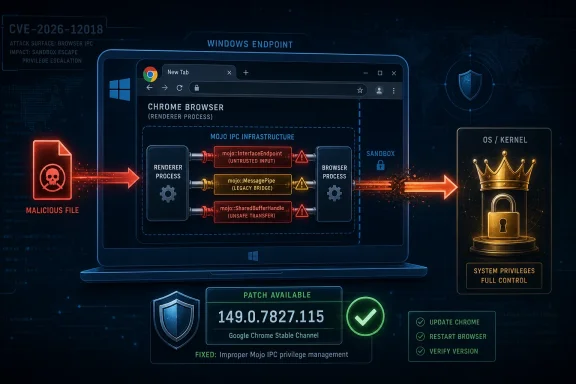 A Browser Bug Crosses the Boundary Into Windows
The striking phrase in the CVE description is not “Mojo,” nor even “high severity.” It is “OS-level privilege escalation.” That wording moves the bug from the familiar territory of browser compromise into the more uncomfortable space where Chrome becomes part of a larger Windows attack chain.CVE-2026-12018 affects Google Chrome on Windows prior to 149.0.7827.115. Google’s June 11 Stable Channel update moved Windows and Mac to 149.0.7827.114/.115 and Linux to 149.0.7827.114, with the usual staged rollout over days or weeks. The same advisory listed 28 security fixes, including a run of critical and high-severity issues across Core, DigitalCredentials, Accessibility, GPU, WebMIDI, Network, Media, Cast, Extensions, Mojo, Views, Passwords, Video, and other components.
That breadth matters. Chrome is no longer a simple HTML renderer that occasionally needs a security patch. It is a sprawling operating environment with IPC plumbing, GPU access, credential flows, extension surfaces, autofill, media pipelines, safe browsing logic, developer tooling, and deep integration with the host OS.
Mojo sits near the heart of that architecture. It is Chromium’s inter-process communication system, the framework that lets separate browser processes talk to one another without collapsing the security model into one giant privileged blob. If the renderer is the part attackers often first reach, Mojo is part of the machinery that decides what that renderer can ask for, how those requests are brokered, and where the browser’s privilege boundaries actually live.
That makes a Mojo privilege escalation especially interesting to Windows admins. A bug in a media parser may be terrifying because it can be triggered by content. A bug in an IPC boundary is terrifying because it may define what happens after an attacker has a foothold.
The CVSS Score Tells One Story, the Attack Chain Tells Another
NVD had the entry under reanalysis after publication, with NIST’s own CVSS assessment not yet provided at the time the record was visible. CISA-ADP, however, attached a CVSS 3.1 score of 8.8 with a vector that reads like a remote, user-assisted, high-impact vulnerability: network attack vector, low complexity, no privileges required, user interaction required, unchanged scope, and high confidentiality, integrity, and availability impact.That can look odd next to the CVE description, which says a local attacker could perform OS-level privilege escalation via a malicious file. The mismatch is not necessarily a contradiction; it is a window into how modern browser bugs are categorized before all enrichment work settles. A malicious file may arrive through the network, email, chat, cloud sync, a download prompt, or another application, and the user interaction requirement captures the human click that turns a file into an exploit path.
The important point is that defenders should not read “local attacker” and relax. In browser land, local often means “the payload must land on the machine,” not “the attacker must already be sitting at the keyboard.” If the exploit path involves a file that a user opens after it arrives through ordinary internet channels, then the operational risk still belongs in the same conversation as phishing, drive-by downloads, malvertising, and compromised collaboration platforms.
There is also no public indication in the supplied material that CVE-2026-12018 is being exploited in the wild. That distinction matters because Chrome has also seen recent zero-day attention around other vulnerabilities, and the security news cycle tends to flatten every Chrome CVE into the same red alert. This one should be patched quickly because it crosses a privilege boundary, not because we can currently say it is under active exploitation.
The difference is not academic. Emergency response is finite. Security teams need to separate “patch immediately in the normal accelerated browser window” from “drop everything because adversaries are already using this.” CVE-2026-12018 belongs in the former bucket unless new evidence changes the picture.
Mojo Is the Plumbing Attackers Hope You Ignore
Chrome’s security model relies on isolation. Renderers are constrained, higher-privilege browser processes broker sensitive operations, and components communicate through carefully defined interfaces. Mojo is one of the systems that makes this division possible.The problem with security plumbing is that users never see it, and most admins only think about it when it breaks. Mojo is not a brand name on the desktop, not a checkbox in Group Policy, and not a feature that users complain about after Patch Tuesday. Yet it is exactly the kind of boundary layer where a small “inappropriate implementation” can become a large security consequence.
The phrase “inappropriate implementation” is frustratingly broad, but in Chromium advisories it often signals that the bug is not a simple memory corruption label like use-after-free or heap buffer overflow. It may involve a logic flaw, bad assumptions about trust, incomplete validation, incorrect privilege handling, or a boundary that works as designed until a malformed request or file nudges it into the wrong state.
That is why the CWE assignment is useful. CISA-ADP associated the issue with CWE-269, improper privilege management. In plain English, the system may have failed to enforce the privilege separation it intended to enforce. For a browser that depends on privilege separation as a core security promise, that is not a minor implementation detail.
The browser industry has spent years making renderer compromise less catastrophic. Site isolation, sandboxing, process separation, brokered access, exploit mitigations, and hardened memory allocators all exist because attackers will eventually find a way to execute code in a less-trusted part of the browser. The nightmare scenario is a chain: compromise the renderer, escape the sandbox, gain more rights, and then move from browser compromise to user or system compromise.
CVE-2026-12018 is not described as a renderer remote-code-execution bug. But its stated effect — OS-level privilege escalation via a malicious file — lands uncomfortably close to the same strategic problem. The more powerful the browser becomes, the more its internal plumbing resembles an operating system inside the operating system.
The Windows-Only Scope Is the Story, Not a Footnote
The CVE description specifically names Google Chrome on Windows. NVD’s configuration history also shows Chrome combined with Microsoft Windows in the affected platform logic. That is not a generic cross-platform Chromium bug in the way many V8 or Blink issues are; at least as described publicly, this one is Windows-specific.That specificity should get attention in enterprise environments. Windows is where Chrome is often deployed at enormous scale, often beside Microsoft Edge, often with legacy applications, document workflows, endpoint agents, shell integrations, cloud drives, and user profiles that have accumulated years of permissions and exceptions. A browser privilege problem on Windows is rarely just a browser problem.
Chrome’s Windows footprint includes file associations, download handling, profile storage, credential and cookie databases, policy management, enterprise connectors, native messaging, extensions, and interaction with the Windows brokered security model. Not every one of those is implicated here, and the restricted Chromium issue tracker prevents a public technical teardown. But the operating environment explains why a malicious file plus browser logic can become a privilege story rather than only a parsing story.
For WindowsForum readers, the key distinction is between the patched application and the vulnerable endpoint. Updating Chrome fixes the vulnerable Chrome component. It does not automatically answer whether unmanaged Chrome installations exist, whether portable builds are floating around, whether Chromium-derived browsers are lagging, or whether Edge and other downstream products have related exposure through shared Chromium code.
Microsoft Edge uses Chromium, but this CVE is described as Google Chrome on Windows, and the public data provided here should not be stretched beyond that. The correct admin posture is to verify Edge and other Chromium-based browsers through their own vendor advisories rather than assuming either safety or exposure by association. Shared code creates shared suspicion, not automatic proof.
The Version Number Trap Will Catch Some Fleets
The fixed threshold in the CVE description is Chrome on Windows prior to 149.0.7827.115. Google’s advisory says the Stable channel was updated to 149.0.7827.114/.115 for Windows and Mac. NVD’s configuration history, however, shows an exclusion up to 149.0.7827.114, while the description says prior to 149.0.7827.115.That is exactly the sort of off-by-one-looking detail that creates confusion in asset reports. A scanner may flag versions below .114, a CVE text may imply .115 is the safe target, and an admin console may show a staged rollout with machines on .114 and .115 depending on platform, channel, or update timing. The safest operational reading for Windows is simple: target 149.0.7827.115 or later for Chrome unless your vendor tooling explicitly states otherwise.
This is not pedantry. Browser patch compliance is often measured by dashboards that compress version nuance into green and red. If the CVE says before .115, then a Windows machine sitting on .114 deserves scrutiny, not a shrug.
The rollout language also matters. Google says Stable Channel updates roll out over the coming days or weeks. That is fine for consumer convenience and global reliability, but it is not a patch-management strategy for enterprises with known exposure. Managed environments should force the update, verify completion, and restart the browser where necessary.
Chrome has improved its ability to update in the background, but no browser patch is fully real until the vulnerable process is gone. A user with 47 tabs, a week-old browser session, and an update waiting behind a relaunch button is not patched in the way a security team cares about.
The Malicious File Angle Makes User Training Necessary but Insufficient
The CVE says exploitation can occur via a malicious file. That immediately tempts organizations to reach for user awareness: do not open suspicious attachments, do not trust random downloads, report strange files. Those messages are useful, but they are not a defense plan.Modern malicious files do not always arrive as obvious executable attachments from strangers. They can appear inside shared drives, ticketing systems, collaboration chats, support portals, browser downloads, archives, or documents that link out to additional payloads. They can be renamed, compressed, staged behind legitimate cloud storage, or delivered in contexts where the user reasonably believes opening the file is part of the job.
The lesson is not that users are careless. It is that files are now part of the browser threat model. Chrome is often the place where files are acquired, previewed, classified by reputation, passed to helper applications, or stored into synced folders. If the browser’s implementation around one of those flows mishandles privilege, user discipline alone cannot compensate.
That is why defense-in-depth still earns its keep. SmartScreen, Defender, application control, controlled folder access, least-privilege user accounts, EDR telemetry, file reputation, sandboxed document handling, and download restrictions all matter because no single layer should decide the fate of the endpoint. Browser patching is the immediate fix, but layered controls determine whether a missed patch becomes a compromise.
There is also a quiet policy question here. Many organizations allow Chrome updates but tolerate delayed relaunches because forced restarts are unpopular. CVE-2026-12018 is the sort of bug that argues for a stricter restart policy, at least for security updates above a chosen severity. The browser is now critical infrastructure on the endpoint; treating its restart as optional theater is increasingly hard to defend.
NVD’s Reanalysis Status Is a Warning About Early Certainty
NVD marked the CVE as undergoing reanalysis, meaning enrichment around references, CVSS, CWE, and CPE applicability was still in motion. That does not mean the vulnerability is speculative. It means the public metadata is still settling.Security teams often ingest CVEs as if they arrive fully formed. In reality, the first public entry is frequently the beginning of a refinement process. Scores change, affected configurations are clarified, CPE strings are corrected, vendor references are tagged, and sometimes the most important practical detail appears only after the first round of scanner noise.
That is why the CPE question in the record is worth noticing. NVD’s page includes the familiar “Are we missing a CPE?” prompt, and the change history shows CPE configuration work added after the initial CVE publication. Asset-matching accuracy depends on that metadata, and metadata is not magic.
For administrators, this creates a two-phase response. First, patch based on the vendor advisory and version threshold. Second, revisit scanner results after NVD enrichment stabilizes, because early false negatives and false positives are both possible. The worst outcome is to wait for perfect metadata before applying a browser update that already exists.
For vulnerability-management vendors, this is where credibility is earned. A good product should distinguish “Chrome for Windows below 149.0.7827.115” from broad Chromium noise, explain whether .114 is treated as vulnerable, and update detections as NVD and vendor data settle. A dashboard that simply screams “8.8 high” without version nuance is not intelligence; it is a siren.
Google’s Restricted Bug Details Are Sensible and Frustrating
The Chromium issue for CVE-2026-12018 is permission-restricted. Google also repeats its standard policy that bug details and links may remain restricted until a majority of users are updated, and longer if the flaw exists in a third-party library used by other projects. That policy is defensible, but it leaves defenders in an awkward place.Researchers want technical detail. Attackers want technical detail. Defenders also want technical detail, but for different reasons: to hunt, to write detections, to assess exposure, and to determine whether a vulnerability can be meaningfully mitigated short of patching. When the details are locked down, most defenders are left with version checks and generic suspicious-file monitoring.
That asymmetry is unavoidable in browser security. Publishing a reliable exploit path before automatic updates have reached most users would be irresponsible. But the lack of detail also means the public cannot yet evaluate how narrow or broad the exploit conditions are, which file types matter, whether enterprise policies reduce exposure, or whether specific Windows configurations alter risk.
In that vacuum, speculation thrives. The disciplined response is to avoid inventing a technical mechanism and focus on what is known: Chrome on Windows before the fixed version is affected; Mojo is the implicated component; the impact is privilege escalation; the path involves a malicious file; the severity is high; and the patch is available.
That may feel unsatisfying, but it is enough to act. Security operations frequently demands decisions before complete information exists. The answer here is not to wait for a write-up; it is to close the version gap.
The Patch Is Simple; Proving It Is Not
For individual users, the mitigation path is familiar: open Chrome’s About page, let it check for updates, and relaunch. For enterprises, the task is more complicated because “Chrome is updated” is not a fact until it is measured across the fleet.Admins should verify managed Chrome versions through their endpoint management platform, Chrome Browser Cloud Management, software inventory, or EDR asset views. They should pay special attention to stale laptops, VDI images, kiosks, shared workstations, developer machines, and systems where users lack restart discipline. Those are the places where browser auto-update assumptions go to die.
The browser sprawl problem has also become more serious. A Windows endpoint may have Chrome, Edge, Brave, Opera, Vivaldi, Electron-based applications, embedded WebView runtimes, and internal tools that depend on Chromium components. CVE-2026-12018 should not be lazily applied to every one of those, but it should trigger a broader inventory reflex: which Chromium-derived surfaces exist, who patches them, and how quickly?
Electron apps are a separate headache. They often bundle browser engines and update on their own schedules. Again, this particular CVE is described for Google Chrome on Windows, not every Chromium consumer. But the larger pattern is unavoidable: Chromium vulnerabilities often expose the gap between “we patched the browser” and “we patched all browser-like code executing on endpoints.”
The operational goal should be modest and measurable. Confirm Chrome for Windows is at 149.0.7827.115 or newer, force relaunches where needed, track exceptions, and re-scan after NVD enrichment stabilizes. If a machine cannot be updated promptly, restrict risky file acquisition paths and treat the endpoint as carrying elevated browser risk.
The June Chrome Advisory Shows the Scale of the Problem
CVE-2026-12018 did not arrive alone. Google’s June 11 Stable Channel update listed 28 security fixes, including multiple critical issues and a long set of high-severity bugs. Even without public exploit details, the shape of the advisory is revealing.The vulnerabilities touch many Chrome subsystems. Some are classic memory-safety bugs, including use-after-free and heap buffer overflow issues. Others involve validation, policy enforcement, races, inappropriate implementation, and component-specific flaws. This is the profile of a platform, not an application.
That scale creates an uncomfortable reality for Windows environments. Chrome is often updated faster than almost anything else on the endpoint, yet it is also one of the most attacked and most complex pieces of software users run all day. Its update velocity is both a triumph and an indictment: the machinery works because the bug supply never stops.
There is a tendency to treat frequent Chrome patches as background noise. That is understandable; Chrome updates constantly, most advisories are terse, and the same component names recur until they blur together. But the correct lesson is the opposite. The browser update channel is one of the most important security control planes in modern Windows computing.
When a Chrome advisory includes a Windows-only privilege escalation in Mojo, it is not noise. It is a signal that the browser’s internal trust boundaries remain a central battlefield.
The Scanner Discrepancy Is Where Risk Becomes Bureaucracy
The user-facing question embedded in the NVD record — whether a CPE is missing — captures a problem every vulnerability manager knows too well. Security risk becomes bureaucratic risk the moment it enters a scanner. The flaw itself may be straightforward to patch, but the reporting pipeline can turn it into a week of exception tickets.CPEs matter because they decide what counts as affected software. If the CPE logic is incomplete or ambiguous, organizations may see missing detections, duplicate detections, or flags on systems that are not actually vulnerable. Early NVD enrichment can lag vendor publication, and the result is a temporary fog between the advisory and the dashboard.
That fog should not paralyze action. Vendor version guidance is the better short-term authority for patching. NVD metadata is essential for ecosystem coordination, but it is not the only truth a security team should wait on.
The best-run teams handle this with a simple hierarchy. Vendor advisory first for immediate remediation, internal asset inventory second for scope, NVD and scanner enrichment third for compliance reporting. Reverse that order and you end up managing the database instead of the vulnerability.
There is also a communications challenge. Executives see CVSS 8.8 and ask whether the company is exposed. Desktop teams see Chrome updating automatically and ask why there is a ticket. Vulnerability teams see NVD reanalysis and ask whether the scanner is right. The answer is to translate the issue into concrete facts: Windows Chrome below 149.0.7827.115 is the target, patching is available, exploitation is file-assisted, and public technical details are restricted.
The Chrome Patch That Windows Shops Should Not Overthink
This vulnerability does not require a grand architectural rethink before action. It requires a boring, disciplined patch push and a slightly less boring conversation about why browsers deserve first-class treatment in endpoint security.- Chrome for Windows installations should be brought to 149.0.7827.115 or later, rather than relying on ambiguous interpretations of adjacent build numbers.
- Organizations should verify that Chrome has actually relaunched after updating, because a downloaded browser update does not fully protect a still-running vulnerable process.
- Security teams should treat the malicious-file condition as a realistic delivery path, not as a reason to downgrade urgency.
- Vulnerability managers should expect NVD and scanner metadata to evolve because the CVE was still undergoing enrichment after publication.
- Administrators should avoid assuming that every Chromium-based product is automatically affected, but they should use the event to inventory Chromium-derived software across Windows endpoints.
- User training can reduce exposure to malicious files, but it cannot replace patching a privilege-management flaw in the browser’s own IPC infrastructure.
References
- Primary source: NVD / Chromium
Published: 2026-06-15T07:00:38-07:00

NVD - CVE-2026-12018
 nvd.nist.gov
- Security advisory: MSRC
Published: 2026-06-15T07:00:38-07:00
Original feed URL

Security Update Guide - Microsoft Security Response Center
 msrc.microsoft.com
- Related coverage: cvefeed.io

CVE-2026-12018 - Google Chrome Mojo Privilege Escalation
Inappropriate implementation in Mojo in Google Chrome on Windows prior to 149.0.7827.115 allowed a local attacker to perform OS-level privilege escalation via a malicious file. (Chromium security severity: High)cvefeed.io - Related coverage: radar.offseq.com
CVE-2026-12018: Inappropriate implementation in Google Chrome - Live Threat Intelligence - Threat Radar | OffSeq.com
Detailed information about CVE-2026-12018: Inappropriate implementation in Google Chrome affecting Google Chrome. Get real-time updates, technical details, andradar.offseq.com
