CVE-2026-11270 is a Google Chrome for Android vulnerability published on June 4, 2026, affecting versions before 149.0.7827.53 and allowing a remote attacker to leak cross-origin data through a crafted HTML page. The flaw is classified by Chromium as low severity, while CISA’s ADP scoring gives it a medium CVSS 3.1 score of 6.5 because the confidentiality impact is potentially high. That split tells the real story: this is not a browser-takeover bug, but it is exactly the kind of privacy boundary failure that administrators and mobile-heavy organizations should not ignore. The patch is straightforward; the risk model is less so.
Chrome security advisories often arrive as dense release-note bundles: dozens or hundreds of CVEs, a handful of scary memory-safety flaws, and many small-looking bugs that disappear into the churn of weekly patching. CVE-2026-11270 belongs to the latter category on paper. It is not described as remote code execution, it does not promise sandbox escape, and it requires user interaction.
But the phrase “leak cross-origin data” should make web administrators and browser engineers sit up. The web’s security model is built around the idea that one origin cannot casually read another origin’s data. If a crafted page can break that expectation through a UI implementation flaw, the exploit may look mundane while the consequence is still sensitive.
The discrepancy between Chromium’s “Low” label and the CISA-ADP medium score is not necessarily a contradiction. Browser vendors often rate bugs according to exploitability, reach, mitigations, and internal component context. CVSS, by contrast, is a structured scoring system that can heavily weight confidentiality exposure even when exploitation requires a click, tap, or crafted page visit.
That is why this CVE should be read less as a five-alarm incident and more as a reminder of how much security now lives in mobile browser interface code. On Android, Chrome is not just a renderer wrapped in tabs. It is an app shell, an identity surface, a link handler, a custom tab host, a credential broker, and a gateway into other apps’ web flows.
That matters because users tend to treat browser UI as the trustworthy part of the web experience. The address bar, permission prompts, preview surfaces, tab switchers, custom tab headers, and navigation affordances are supposed to tell users where they are and what they are doing. When those surfaces are implemented incorrectly, attackers may not need to defeat cryptography or exploit memory corruption. They may need only to make the browser show, route, or expose the wrong thing at the wrong moment.
The NVD record associates the issue with CWE-352, cross-site request forgery. That classification may be an imperfect fit, as many CVE weakness mappings are coarse. Still, it points in the right conceptual direction: an attacker can induce browser-mediated behavior that crosses a trust boundary the user or application did not intend to cross.
For WindowsForum readers, the Android-specific nature of the bug may seem peripheral at first glance. It is not. Most Microsoft 365, Entra ID, Google Workspace, GitHub, banking, and SaaS sessions now live across both desktop and mobile browsers. A cross-origin leak on a phone can expose the same business identity and session-adjacent data that administrators work hard to protect on managed Windows endpoints.
The wrinkle is that Chrome’s public release machinery can make that look messier than it is. The referenced Chrome release advisory is for the stable desktop channel, yet the CVE text itself says Android. That mismatch is not unusual in vulnerability databases, where one release blog can be used as a general vendor advisory reference even when a specific CVE applies only to a particular platform or component.
This is where CPEs matter. A missing or overly broad CPE can cause scanners to light up Linux desktops, Windows workstations, Debian Chromium packages, and unrelated Chrome-derived browsers even when the CVE is scoped to Android. A too-narrow CPE can do the opposite, hiding exposure from mobile device inventories that are already less visible than laptop fleets.
The NVD entry appears to have moved toward the correct platform expression by adding Chrome versions before 149.0.7827.53 in combination with Android. That is the important detail for vulnerability managers. If your scanner reports this CVE against a Windows Chrome install solely because it sees “Chrome before 149.0.7827.53,” it may be overmatching. If it fails to flag Android Chrome in a managed mobile fleet, it may be undermatching.
For CVE-2026-11270, the useful configuration is not merely “Google Chrome before 149.0.7827.53.” It is Chrome on Android before 149.0.7827.53. That means the operating system CPE matters because it constrains the affected environment. Without that platform relationship, enterprises risk treating an Android UI vulnerability like a desktop browser emergency, wasting time while still possibly missing the mobile population that actually matters.
There is another subtlety: Android browser exposure is not always neatly represented by one package name. Chrome may be installed from Google Play, bundled by OEMs, managed through Android Enterprise, or paralleled by WebView-dependent app flows. CVE-2026-11270 specifically names Google Chrome on Android, not Android System WebView. Administrators should resist the temptation to generalize beyond the advisory, but they should also verify how their MDM and EMM tools distinguish Chrome, WebView, custom tabs, and embedded browser surfaces.
That distinction will matter more as browser components continue to blend into app experiences. A user may believe they are inside a native app when they are actually looking at a Chrome Custom Tab. They may authenticate through a browser-mediated flow that looks like the app’s own login page. If the vulnerability is in Chrome UI handling, asset inventory needs to understand not only installed apps but also which browser surfaces those apps rely on.
Modern phishing and malvertising campaigns are built around user interaction. “Requires user interaction” often means “requires the user to do what users do all day”: tap a link, open a message, follow a redirect, or browse a compromised page. On mobile, the line between a deliberate browser visit and an app-triggered web flow can be even thinner.
The confidentiality rating is the more interesting part. CISA-ADP marks confidentiality impact as high, with no integrity or availability impact. That implies the bug is about reading or exposing information, not changing data or crashing systems. For a browser, that can still be serious. Cross-origin data may include page contents, tokens rendered in pages, account-specific state, or information that helps an attacker escalate a social-engineering campaign.
Google’s low severity label suggests constraints. The leak may require a precise UI sequence, apply only to certain surfaces, expose limited data, or be mitigated by browser architecture in most cases. Without public bug details, defenders should not invent a worst-case exploit chain. But the right posture is to patch promptly and avoid dismissing the issue purely because it lacks the drama of code execution.
Cross-origin data leaks are often less spectacular than remote code execution bugs because they do not hand the attacker a shell. They are also harder to explain. The compromise is not “the browser runs malware.” It is “the browser lets one web context learn something it should not know about another.” That sounds abstract until the leaked data is an account identifier, an internal hostname, a CSRF-relevant token, a document title, or a fragment of a sensitive response.
On mobile, the stakes are amplified by session density. Users stay signed in. Password managers and passkeys smooth over authentication prompts. Corporate identity providers increasingly assume that a managed phone is a trusted access point. If a crafted page can pierce origin boundaries in a narrow but repeatable way, the phone becomes a reconnaissance tool for the attacker.
This is why security teams should treat browser privacy boundaries as part of identity security, not merely web compatibility. Conditional Access, phishing-resistant MFA, and device compliance policies all help, but they do not replace browser isolation. If the browser leaks across origins, some assumptions above it weaken.
That chronology matters because vulnerability tools ingest these changes at different speeds. One scanner may have picked up the CVE description before the CPE was refined. Another may have imported the CISA score but not the NVD configuration. A third may rely on its own package ecosystem mapping and report the bug against Chromium builds that share a version lineage but not the affected Android UI implementation.
For administrators, the practical answer is to validate the detection logic before creating noise. If your tool says Windows Chrome is affected by CVE-2026-11270, check whether it is keying only on the version. If your Android fleet dashboard shows no exposure, check whether Chrome versions are actually being collected and compared against 149.0.7827.53.
There is also a release-channel trap. Chrome version numbers differ across platforms and rollout waves. A desktop stable update may be visible before an Android update reaches every device through Google Play. Managed environments may delay updates intentionally. Consumer-owned phones in bring-your-own-device programs may be outside direct patch control, even when they access corporate resources.
A Windows administrator may have no direct control over an employee’s personal Android phone, but that phone may still sign into Outlook on the web, Teams, SharePoint, OneDrive, Salesforce, ServiceNow, GitHub, Jira, or a VPN enrollment portal. If Chrome on that phone is behind, browser-origin bugs become part of the organization’s attack surface.
This is where policy meets reality. Companies that allow unmanaged mobile browser access should have a clear answer for browser patch compliance. Companies using Android Enterprise should verify that Chrome update policies are active and not blocked by staged rollouts or OEM constraints. Companies relying on conditional access should understand whether “compliant device” includes current browser versions or merely OS-level patch state.
The desktop Chrome update still matters, of course, but for this CVE the meaningful exposure is Android. That difference is precisely why security teams need vulnerability triage instead of blind ticket generation. The right question is not “Do we have Chrome?” It is “Do we have affected Chrome on Android where sensitive sessions are allowed?”
Linux distribution trackers may list the CVE against Chromium packages because the upstream project is Chromium. Third-party scanners may flag any Chromium-derived package below the patched version. Endpoint tools may report desktop Chrome as affected until their detection logic catches up. Meanwhile, mobile inventories may lack the version granularity needed to prove remediation.
This is not just an annoyance. False positives consume patch teams’ time and erode trust in vulnerability dashboards. False negatives are worse, especially when mobile devices are treated as “out of scope” until an incident proves otherwise. Security teams should document their interpretation of the CVE now: affected product, affected platform, fixed version, and whether their environment permits sensitive access from that platform.
The strongest operational move is to tie the CVE to browser update compliance rather than one-off remediation. Chrome is a continuously updated product. If your controls can confirm Android Chrome is at or above 149.0.7827.53, they will also help with the next browser CVE that arrives a few days later. If they cannot, this CVE is a useful test case for fixing that blind spot.
That makes Android Chrome part of the enterprise endpoint estate even when the organization does not own the device. A user tapping a malicious link on a personal phone can still expose corporate web state if the phone is allowed to access corporate services. The security boundary follows the session.
Browser vendors have tried to reduce the blast radius with site isolation, sandboxing, origin policy enforcement, stricter cookies, permission prompts, and safer UI. CVE-2026-11270 is a reminder that the UI itself is part of that security model. A flawed prompt, preview, tab surface, or navigation view can become the weak point even when the renderer and network stack behave as designed.
This should push administrators toward a more mature mobile browser policy. Not every environment needs locked-down corporate phones. But every environment that allows mobile browser access to sensitive SaaS should know which browsers are allowed, how quickly they update, and what happens when they fall behind.
Google’s low severity rating likely reflects exploit constraints and internal risk assessment. It should be respected. The company has far more context about the bug than public CVE consumers do. But a low browser UI bug that leaks cross-origin data is different from a low bug that merely causes a cosmetic spoof or minor crash.
The better triage question is exposure. If an organization has no managed Android Chrome footprint and blocks unmanaged mobile browser access to sensitive resources, the urgency is modest. If employees routinely access privileged SaaS portals from Android Chrome, the same CVE deserves faster attention. If executives, administrators, developers, or finance staff use Android phones for cloud consoles and approval workflows, the confidentiality angle becomes more important.
Severity labels are inputs, not verdicts. CVE-2026-11270 is a case where context can move the practical priority up or down. The patch is available; the argument is over how quickly organizations can prove it landed.
There is no public indication from the supplied CVE record that this bug is being exploited in the wild. There is also no reason to wait for exploit chatter. Browser privacy bugs are often patched quietly because public technical detail would make them easier to weaponize. The absence of proof-of-concept code is not a reason to defer a routine browser update.
Administrators should also avoid overcorrecting. This CVE does not justify panic, browser bans, or broad claims that Chrome on Android is unsafe. It justifies patch verification, scanner tuning, and a closer look at whether mobile browsers are included in the same security discipline as desktop browsers.
That discipline should include user communication. Mobile users are often less aware of browser versioning than desktop users. They may assume apps update automatically, while battery settings, Play Store preferences, enterprise controls, or regional rollouts delay installation. A short nudge to update Chrome can close the gap faster than waiting for the next compliance report.
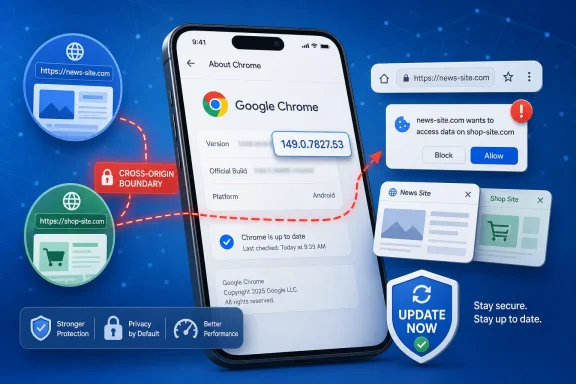 A Low-Severity Chrome Bug With a Medium-Sized Shadow
Chrome security advisories often arrive as dense release-note bundles: dozens or hundreds of CVEs, a handful of scary memory-safety flaws, and many small-looking bugs that disappear into the churn of weekly patching. CVE-2026-11270 belongs to the latter category on paper. It is not described as remote code execution, it does not promise sandbox escape, and it requires user interaction.But the phrase “leak cross-origin data” should make web administrators and browser engineers sit up. The web’s security model is built around the idea that one origin cannot casually read another origin’s data. If a crafted page can break that expectation through a UI implementation flaw, the exploit may look mundane while the consequence is still sensitive.
The discrepancy between Chromium’s “Low” label and the CISA-ADP medium score is not necessarily a contradiction. Browser vendors often rate bugs according to exploitability, reach, mitigations, and internal component context. CVSS, by contrast, is a structured scoring system that can heavily weight confidentiality exposure even when exploitation requires a click, tap, or crafted page visit.
That is why this CVE should be read less as a five-alarm incident and more as a reminder of how much security now lives in mobile browser interface code. On Android, Chrome is not just a renderer wrapped in tabs. It is an app shell, an identity surface, a link handler, a custom tab host, a credential broker, and a gateway into other apps’ web flows.
The Vulnerability Lives Where Users Think Security Is Visible
The description is short: “inappropriate implementation in UI.” That brevity is typical for Chrome CVEs, especially while bug details remain restricted. Yet the component name matters. This is not a generic JavaScript engine flaw or a classic use-after-free buried in a graphics pipeline. It is a UI-layer problem that somehow intersects with cross-origin data handling.That matters because users tend to treat browser UI as the trustworthy part of the web experience. The address bar, permission prompts, preview surfaces, tab switchers, custom tab headers, and navigation affordances are supposed to tell users where they are and what they are doing. When those surfaces are implemented incorrectly, attackers may not need to defeat cryptography or exploit memory corruption. They may need only to make the browser show, route, or expose the wrong thing at the wrong moment.
The NVD record associates the issue with CWE-352, cross-site request forgery. That classification may be an imperfect fit, as many CVE weakness mappings are coarse. Still, it points in the right conceptual direction: an attacker can induce browser-mediated behavior that crosses a trust boundary the user or application did not intend to cross.
For WindowsForum readers, the Android-specific nature of the bug may seem peripheral at first glance. It is not. Most Microsoft 365, Entra ID, Google Workspace, GitHub, banking, and SaaS sessions now live across both desktop and mobile browsers. A cross-origin leak on a phone can expose the same business identity and session-adjacent data that administrators work hard to protect on managed Windows endpoints.
Android Chrome Is Not Just “Chrome, But Smaller”
The affected software configuration is narrow in one sense and broad in another. The CVE description names Google Chrome on Android before 149.0.7827.53. NVD’s change history also shows a CPE configuration tying Google Chrome versions before that build to Android. That is the right shape of the affected platform: this is a Chrome-on-Android problem, not a general indictment of every Chromium build on every operating system.The wrinkle is that Chrome’s public release machinery can make that look messier than it is. The referenced Chrome release advisory is for the stable desktop channel, yet the CVE text itself says Android. That mismatch is not unusual in vulnerability databases, where one release blog can be used as a general vendor advisory reference even when a specific CVE applies only to a particular platform or component.
This is where CPEs matter. A missing or overly broad CPE can cause scanners to light up Linux desktops, Windows workstations, Debian Chromium packages, and unrelated Chrome-derived browsers even when the CVE is scoped to Android. A too-narrow CPE can do the opposite, hiding exposure from mobile device inventories that are already less visible than laptop fleets.
The NVD entry appears to have moved toward the correct platform expression by adding Chrome versions before 149.0.7827.53 in combination with Android. That is the important detail for vulnerability managers. If your scanner reports this CVE against a Windows Chrome install solely because it sees “Chrome before 149.0.7827.53,” it may be overmatching. If it fails to flag Android Chrome in a managed mobile fleet, it may be undermatching.
The CPE Question Is Not Bureaucratic Trivia
The user-facing question — “Are we missing a CPE here?” — is more than database housekeeping. CPEs are how vulnerability data becomes operational reality. They decide what shows up in dashboards, what gets included in patch SLAs, what triggers a ticket, and what auditors later ask you to explain.For CVE-2026-11270, the useful configuration is not merely “Google Chrome before 149.0.7827.53.” It is Chrome on Android before 149.0.7827.53. That means the operating system CPE matters because it constrains the affected environment. Without that platform relationship, enterprises risk treating an Android UI vulnerability like a desktop browser emergency, wasting time while still possibly missing the mobile population that actually matters.
There is another subtlety: Android browser exposure is not always neatly represented by one package name. Chrome may be installed from Google Play, bundled by OEMs, managed through Android Enterprise, or paralleled by WebView-dependent app flows. CVE-2026-11270 specifically names Google Chrome on Android, not Android System WebView. Administrators should resist the temptation to generalize beyond the advisory, but they should also verify how their MDM and EMM tools distinguish Chrome, WebView, custom tabs, and embedded browser surfaces.
That distinction will matter more as browser components continue to blend into app experiences. A user may believe they are inside a native app when they are actually looking at a Chrome Custom Tab. They may authenticate through a browser-mediated flow that looks like the app’s own login page. If the vulnerability is in Chrome UI handling, asset inventory needs to understand not only installed apps but also which browser surfaces those apps rely on.
The Attack Requires a User, Which Is Not Much Comfort
CISA’s ADP vector lists network attack vector, low attack complexity, no privileges required, and user interaction required. In plain English, the attacker does not need an account or local access, but the victim likely has to visit or interact with a crafted page. That keeps the bug out of worm territory. It does not make it harmless.Modern phishing and malvertising campaigns are built around user interaction. “Requires user interaction” often means “requires the user to do what users do all day”: tap a link, open a message, follow a redirect, or browse a compromised page. On mobile, the line between a deliberate browser visit and an app-triggered web flow can be even thinner.
The confidentiality rating is the more interesting part. CISA-ADP marks confidentiality impact as high, with no integrity or availability impact. That implies the bug is about reading or exposing information, not changing data or crashing systems. For a browser, that can still be serious. Cross-origin data may include page contents, tokens rendered in pages, account-specific state, or information that helps an attacker escalate a social-engineering campaign.
Google’s low severity label suggests constraints. The leak may require a precise UI sequence, apply only to certain surfaces, expose limited data, or be mitigated by browser architecture in most cases. Without public bug details, defenders should not invent a worst-case exploit chain. But the right posture is to patch promptly and avoid dismissing the issue purely because it lacks the drama of code execution.
Cross-Origin Leaks Are the Quiet Failures of the Web
The same-origin policy is one of those technologies users never see and administrators rarely discuss until it breaks. It prevents a page from one site from reading sensitive content from another site. Without it, a malicious page could try to read webmail, intranet portals, admin dashboards, or cloud consoles where the user is already authenticated.Cross-origin data leaks are often less spectacular than remote code execution bugs because they do not hand the attacker a shell. They are also harder to explain. The compromise is not “the browser runs malware.” It is “the browser lets one web context learn something it should not know about another.” That sounds abstract until the leaked data is an account identifier, an internal hostname, a CSRF-relevant token, a document title, or a fragment of a sensitive response.
On mobile, the stakes are amplified by session density. Users stay signed in. Password managers and passkeys smooth over authentication prompts. Corporate identity providers increasingly assume that a managed phone is a trusted access point. If a crafted page can pierce origin boundaries in a narrow but repeatable way, the phone becomes a reconnaissance tool for the attacker.
This is why security teams should treat browser privacy boundaries as part of identity security, not merely web compatibility. Conditional Access, phishing-resistant MFA, and device compliance policies all help, but they do not replace browser isolation. If the browser leaks across origins, some assumptions above it weaken.
The Release Note Trail Is Messier Than the Patch
The record around CVE-2026-11270 shows the usual choreography. Chrome published the CVE on June 4, 2026. CISA-ADP added CVSS and CWE enrichment on June 5. NVD added its initial analysis and CPE configuration on June 8. The referenced vendor advisory points to a June stable channel update associated with Chrome 149.0.7827.53.That chronology matters because vulnerability tools ingest these changes at different speeds. One scanner may have picked up the CVE description before the CPE was refined. Another may have imported the CISA score but not the NVD configuration. A third may rely on its own package ecosystem mapping and report the bug against Chromium builds that share a version lineage but not the affected Android UI implementation.
For administrators, the practical answer is to validate the detection logic before creating noise. If your tool says Windows Chrome is affected by CVE-2026-11270, check whether it is keying only on the version. If your Android fleet dashboard shows no exposure, check whether Chrome versions are actually being collected and compared against 149.0.7827.53.
There is also a release-channel trap. Chrome version numbers differ across platforms and rollout waves. A desktop stable update may be visible before an Android update reaches every device through Google Play. Managed environments may delay updates intentionally. Consumer-owned phones in bring-your-own-device programs may be outside direct patch control, even when they access corporate resources.
Windows Shops Still Have to Care About Android Browser Bugs
A Windows-centric organization might be tempted to file this under “mobile team problem.” That would be a mistake. The most common enterprise security boundary is no longer the office LAN or the Windows domain. It is identity, and identity is accessed from every browser users carry.A Windows administrator may have no direct control over an employee’s personal Android phone, but that phone may still sign into Outlook on the web, Teams, SharePoint, OneDrive, Salesforce, ServiceNow, GitHub, Jira, or a VPN enrollment portal. If Chrome on that phone is behind, browser-origin bugs become part of the organization’s attack surface.
This is where policy meets reality. Companies that allow unmanaged mobile browser access should have a clear answer for browser patch compliance. Companies using Android Enterprise should verify that Chrome update policies are active and not blocked by staged rollouts or OEM constraints. Companies relying on conditional access should understand whether “compliant device” includes current browser versions or merely OS-level patch state.
The desktop Chrome update still matters, of course, but for this CVE the meaningful exposure is Android. That difference is precisely why security teams need vulnerability triage instead of blind ticket generation. The right question is not “Do we have Chrome?” It is “Do we have affected Chrome on Android where sensitive sessions are allowed?”
Scanner Noise Will Be the First Operational Problem
The initial pain from CVE-2026-11270 may not be exploitation. It may be vulnerability-management noise. A Chrome CVE with a medium score, an Android-specific description, a desktop release advisory reference, and evolving CPE data is almost designed to produce inconsistent scanner output.Linux distribution trackers may list the CVE against Chromium packages because the upstream project is Chromium. Third-party scanners may flag any Chromium-derived package below the patched version. Endpoint tools may report desktop Chrome as affected until their detection logic catches up. Meanwhile, mobile inventories may lack the version granularity needed to prove remediation.
This is not just an annoyance. False positives consume patch teams’ time and erode trust in vulnerability dashboards. False negatives are worse, especially when mobile devices are treated as “out of scope” until an incident proves otherwise. Security teams should document their interpretation of the CVE now: affected product, affected platform, fixed version, and whether their environment permits sensitive access from that platform.
The strongest operational move is to tie the CVE to browser update compliance rather than one-off remediation. Chrome is a continuously updated product. If your controls can confirm Android Chrome is at or above 149.0.7827.53, they will also help with the next browser CVE that arrives a few days later. If they cannot, this CVE is a useful test case for fixing that blind spot.
The Mobile Browser Has Become an Enterprise Endpoint
For years, enterprise endpoint security meant Windows laptops first, servers second, and phones somewhere in the policy appendix. That ordering no longer reflects how work happens. Mobile browsers are now used for approvals, document access, password resets, chat links, identity verification, and emergency administration.That makes Android Chrome part of the enterprise endpoint estate even when the organization does not own the device. A user tapping a malicious link on a personal phone can still expose corporate web state if the phone is allowed to access corporate services. The security boundary follows the session.
Browser vendors have tried to reduce the blast radius with site isolation, sandboxing, origin policy enforcement, stricter cookies, permission prompts, and safer UI. CVE-2026-11270 is a reminder that the UI itself is part of that security model. A flawed prompt, preview, tab surface, or navigation view can become the weak point even when the renderer and network stack behave as designed.
This should push administrators toward a more mature mobile browser policy. Not every environment needs locked-down corporate phones. But every environment that allows mobile browser access to sensitive SaaS should know which browsers are allowed, how quickly they update, and what happens when they fall behind.
Google’s Low Rating Should Not Become an Excuse
There is a tendency in patch management to equate vendor severity with action priority. Critical means emergency, high means this week, medium means next cycle, low means maybe never. That approach is understandable, but browser vulnerabilities do not always fit neatly into it.Google’s low severity rating likely reflects exploit constraints and internal risk assessment. It should be respected. The company has far more context about the bug than public CVE consumers do. But a low browser UI bug that leaks cross-origin data is different from a low bug that merely causes a cosmetic spoof or minor crash.
The better triage question is exposure. If an organization has no managed Android Chrome footprint and blocks unmanaged mobile browser access to sensitive resources, the urgency is modest. If employees routinely access privileged SaaS portals from Android Chrome, the same CVE deserves faster attention. If executives, administrators, developers, or finance staff use Android phones for cloud consoles and approval workflows, the confidentiality angle becomes more important.
Severity labels are inputs, not verdicts. CVE-2026-11270 is a case where context can move the practical priority up or down. The patch is available; the argument is over how quickly organizations can prove it landed.
The Real Fix Is Boring, Which Is Good
The direct remediation is simple: update Google Chrome on Android to 149.0.7827.53 or later. For individual users, that means updating through Google Play and confirming the installed Chrome version. For managed fleets, it means verifying Android Enterprise policy, Play app update settings, and inventory reporting.There is no public indication from the supplied CVE record that this bug is being exploited in the wild. There is also no reason to wait for exploit chatter. Browser privacy bugs are often patched quietly because public technical detail would make them easier to weaponize. The absence of proof-of-concept code is not a reason to defer a routine browser update.
Administrators should also avoid overcorrecting. This CVE does not justify panic, browser bans, or broad claims that Chrome on Android is unsafe. It justifies patch verification, scanner tuning, and a closer look at whether mobile browsers are included in the same security discipline as desktop browsers.
That discipline should include user communication. Mobile users are often less aware of browser versioning than desktop users. They may assume apps update automatically, while battery settings, Play Store preferences, enterprise controls, or regional rollouts delay installation. A short nudge to update Chrome can close the gap faster than waiting for the next compliance report.
The Patch Lesson Hidden in One Android-Only CVE
CVE-2026-11270 is a small entry in a large browser-security machine, but it leaves several concrete lessons for teams that manage real users rather than ideal inventories.- Organizations should treat Chrome on Android before 149.0.7827.53 as the affected target unless later vendor guidance broadens the scope.
- Vulnerability teams should check whether scanners are incorrectly flagging desktop Chrome or Chromium packages solely because the version is below 149.0.7827.53.
- Mobile device management inventories should confirm installed Chrome versions, not merely Android OS patch levels.
- Conditional access policies should account for browser update status where sensitive web sessions are allowed from Android devices.
- Security teams should treat cross-origin data leaks as confidentiality issues even when the vendor severity label is low.
- Administrators should document the CPE interpretation so audit, patch, and mobile teams do not work from conflicting assumptions.
References
- Primary source: NVD / Chromium
Published: 2026-06-09T07:00:16-07:00
NVD - CVE-2026-11270
 nvd.nist.gov
- Security advisory: MSRC
Published: 2026-06-09T07:00:16-07:00
Original feed URL
Security Update Guide - Microsoft Security Response Center
 msrc.microsoft.com
- Related coverage: stack.watch
- Related coverage: security.snyk.io
CVE-2026-11270 in chromium | CVE-2026-11270 | Snyk
CVE-2026-11270 in chromium | CVE-2026-11270security.snyk.io