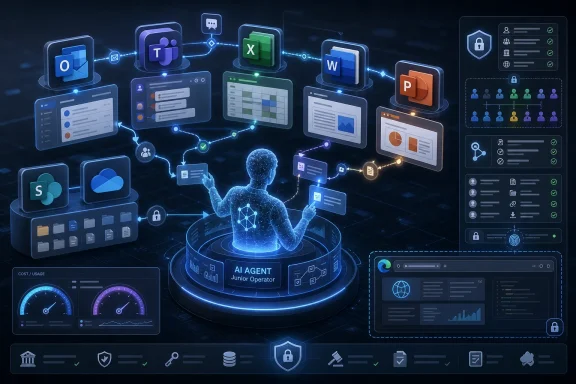
Microsoft’s Copilot Cowork is being positioned in June 2026 as an AI task-automation layer for Microsoft 365 that can plan and execute multi-step work across apps, files, meetings, messages, and enterprise data under administrator-controlled access. That makes it more than another Copilot chat surface. It is Microsoft’s attempt to turn the Office productivity suite into a managed execution environment for AI agents. The promise is seductive; the operational burden lands squarely on IT.
For most of the Copilot era, Microsoft’s pitch has been assistance. Copilot could summarize a Teams meeting, draft an email, generate a PowerPoint outline, or help a user make sense of a spreadsheet. Those features were useful, but they mostly left the user in charge of the last mile.
Copilot Cowork changes the center of gravity. The feature is designed to take a described outcome, break it into steps, gather context from Microsoft 365, invoke tools, and produce a completed deliverable. In plain terms, Microsoft wants users to stop asking Copilot for suggestions and start delegating work to it.
That is a much bigger claim than “AI in Office.” A chatbot can be wrong and irritating. An agent that sends the wrong message, pulls the wrong file, updates the wrong plan, or exposes the wrong context can create a business incident. The difference between a draft and an action is the difference between a clever demo and an enterprise risk register.
This is why Cowork matters even if a particular tenant does not enable it immediately. Microsoft is showing the direction of travel for Microsoft 365: applications are no longer just places where humans work. They are becoming substrates where AI agents operate on behalf of users, constrained by identity, permissions, policy, budget, and audit.
That is a striking development for a company whose AI narrative has been tightly associated with OpenAI. Microsoft has spent years integrating OpenAI models into Bing, Azure, GitHub, Windows, and Microsoft 365. Cowork signals that the enterprise Copilot stack is becoming more explicitly multi-model, with Microsoft acting less like a single-model reseller and more like an orchestration layer.
This is not just vendor diversification for its own sake. Agentic work is different from conversational work. Long-running tasks require planning, tool use, memory, recovery from partial failure, and the ability to operate across changing context. Microsoft appears to have concluded that no single model family should be treated as the permanent default for every category of work.
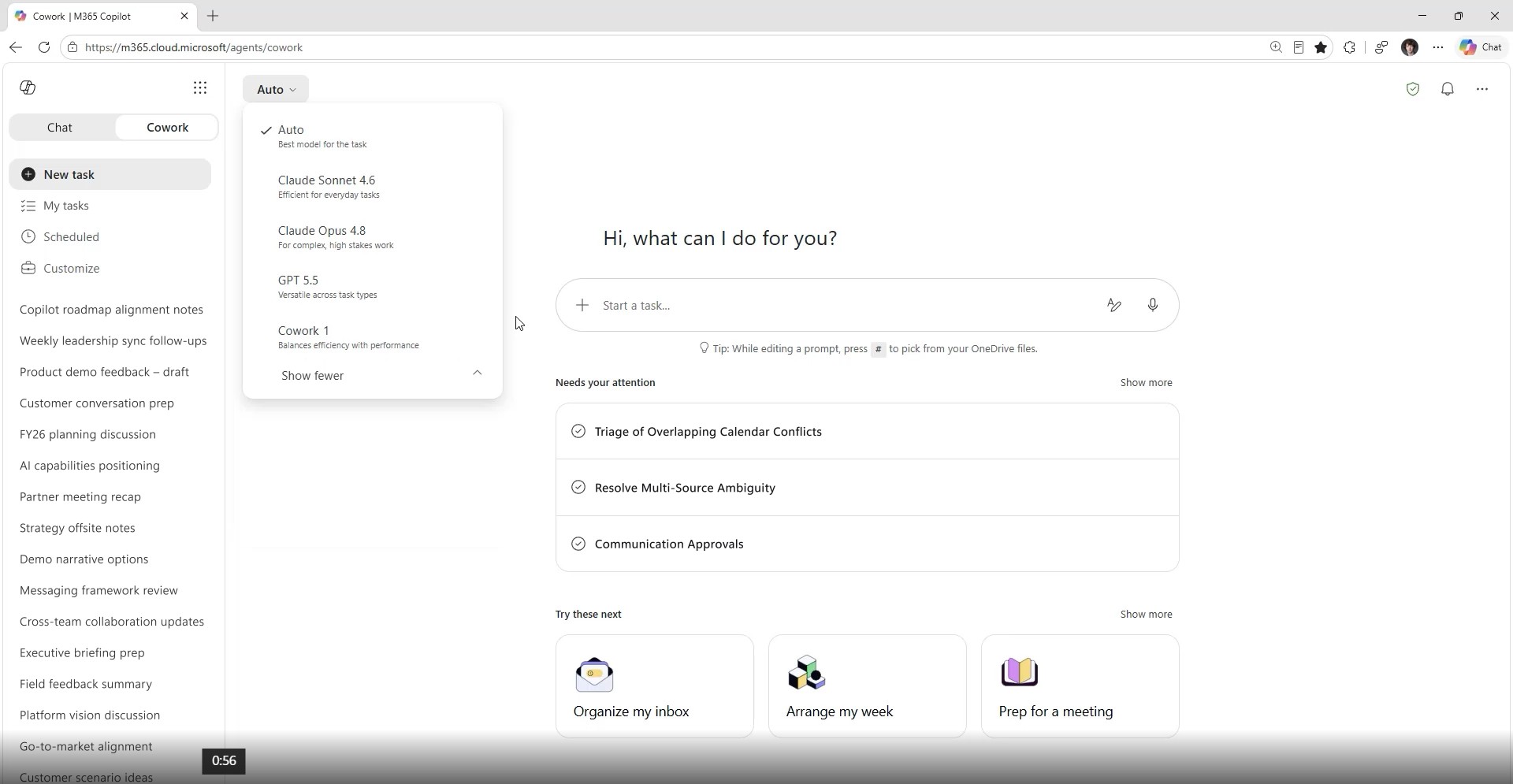
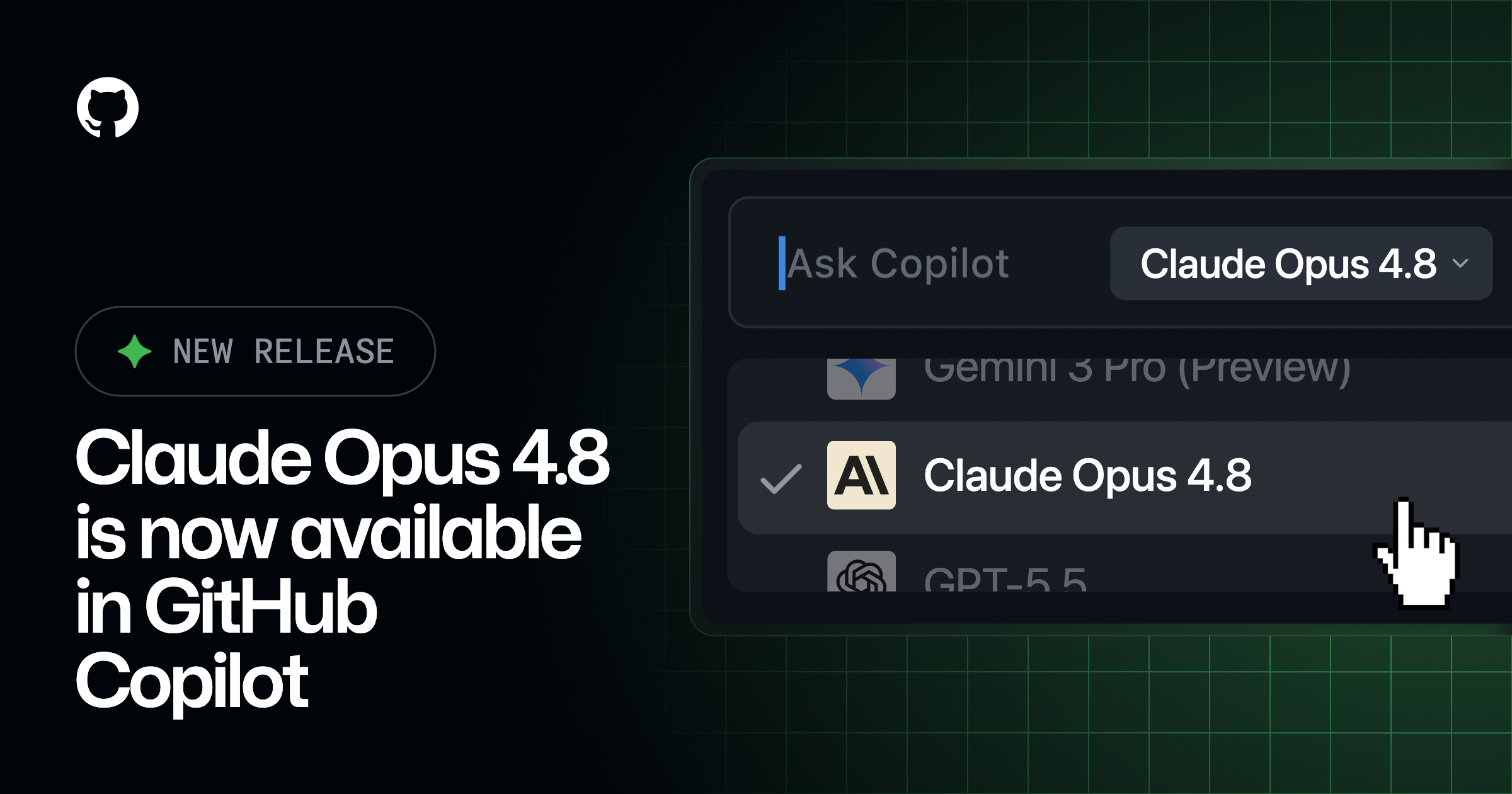
The Petri report says Cowork uses Anthropic models such as Opus 4.8 and Sonnet 4.6 at launch, while Frontier customers can also access GPT-5.5. Microsoft is also reportedly preparing a lower-cost Cowork 1 model tuned for business tasks. If that model ships as described, it would reinforce the obvious economics: frontier models may be useful for hard reasoning, but they are expensive hammers for routine enterprise nails.
This is the model strategy most large customers should have expected all along. The future of Copilot is not “which AI model wins?” It is “which model is cheap enough, reliable enough, and policy-compliant enough for this specific job?”
That might mean preparing a project update from email threads, meeting transcripts, and SharePoint documents. It might mean drafting stakeholder communications, building a PowerPoint from current project artifacts, scheduling follow-ups, or creating recurring reports. The value is not that AI can write a passable sentence. The value is that it can traverse the messy connective tissue of modern office work.
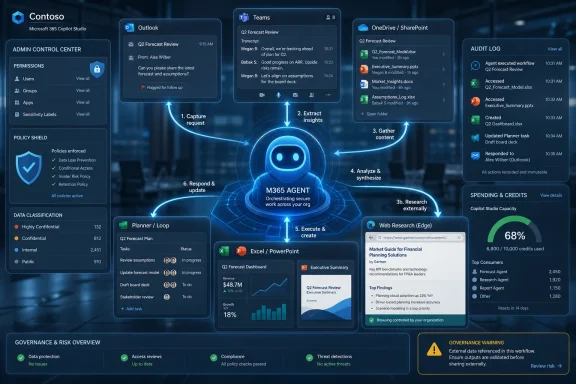
Microsoft 365 is well suited to this because so much enterprise knowledge already lives there. Outlook contains commitments. Teams contains decisions. SharePoint and OneDrive contain documents. Planner, Loop, Excel, and PowerPoint contain operational artifacts. The hard part has never been generating text; it has been assembling enough context to produce something useful without making the user manually spoon-feed every detail.
Cowork attempts to collapse that overhead. It can search across organizational context, use approved tools, and produce an output that reflects the user’s working environment. That is precisely why admins will need to treat it less like a writing assistant and more like an automation platform.
In the classic Microsoft world, “general availability” implied a certain readiness posture. Customers could reasonably expect stable documentation, support boundaries, licensing clarity, administrative controls, and deployment patterns. In the AI product cycle, those boundaries are blurrier. Features move from research preview to Frontier to broader commercial access while still changing quickly underneath.
For IT departments, the practical question is not whether Microsoft marketing calls Cowork GA. The practical question is whether the feature is ready for a specific workflow, in a specific tenant, under a specific governance model. That is a more demanding test.
A multi-step AI agent can be available and still not be appropriate for every department. Legal, finance, HR, security operations, executive communications, and customer-facing teams will all have different tolerance for automation errors. The first serious Cowork deployments should be scoped, logged, reviewed, and measured like any other business process automation project.
This is useful, but it also changes the threat model. A Copilot agent that can only summarize files inside Microsoft 365 is one class of risk. A Copilot agent that can draw on external systems, browse the web, invoke third-party services, and coordinate across multiple business apps is another.
Plugins create reach. Reach creates blast radius. The same connective tissue that makes Cowork valuable also makes it harder to reason about what the agent can see, where data is going, which permissions apply, and what action was taken on whose behalf.
Microsoft’s answer is enterprise controls: admin enablement, identity integration, permissions, reporting, and spending limits. Those are necessary, but they do not remove the need for local governance. Admins will still need to decide which plugins belong in production, which should be limited to pilot groups, and which are too sensitive for autonomous or semi-autonomous use.
The lesson from previous SaaS waves applies here. The dangerous configuration is rarely the obviously reckless one. It is the well-intentioned integration that becomes business-critical before anyone has mapped its dependencies.
Employees routinely consult public websites, vendor documentation, market information, customer pages, standards bodies, news, and regulatory material. If Cowork is supposed to complete business tasks, it needs some sanctioned way to retrieve external information. Without that, it becomes a well-informed intranet assistant that still needs a human to do the outside research.
But web access introduces familiar problems. External pages can be stale, misleading, malicious, or optimized to influence AI systems. Prompt injection is not an academic concern when an agent is reading arbitrary web content and also has access to enterprise tools. A malicious page that attempts to override instructions or exfiltrate context is not science fiction; it is an obvious failure mode of tool-using AI.
The governance question is therefore not “can Cowork browse?” It is “what can Cowork do after it browses?” Enterprises should want clear separation between reading external content, synthesizing it, and taking action based on it. Approval gates, audit logs, and policy-scoped permissions become the difference between useful research automation and an uncontrolled bridge between the public web and the corporate tenant.
It is also going to be uncomfortable.
Traditional Microsoft 365 licensing is predictable. Finance teams may dislike the size of the bill, but they understand per-user subscriptions. Agentic AI behaves more like cloud compute: the expensive part is not access, but usage. A short prompt that invokes a powerful model, searches large data sets, calls plugins, and runs for a long time can cost more than a quick chat completion.
That will change how organizations roll out Cowork. Departments will need budgets. Admins will need dashboards. Managers will need to understand why one user’s automation habit costs more than another’s. Microsoft will need to provide enough reporting to distinguish valuable automation from expensive experimentation.
The risk is not merely overspending. The risk is that organizations set crude caps that punish legitimate productivity gains because they cannot measure value. If Cowork saves three hours of analyst time but consumes a visible pile of credits, the bill may look worse than the invisible salary waste it replaced.
A runaway automation can burn money. More importantly, a runaway automation can indicate a broken loop, a misunderstood instruction, a bad plugin, or a workflow design that should never have reached production. Spending limits give admins a way to contain failure even when the failure is not strictly a security incident.
This is a familiar pattern from public cloud. Budget alerts started as finance tools and became part of operational risk management. Sudden cost spikes can reveal compromised credentials, misconfigured workloads, or unexpected demand. AI agents will need the same discipline.
The best Cowork deployments will not simply allocate credits and hope for the best. They will baseline normal usage, identify high-cost workflows, compare model choices, and treat anomalous spending as a signal. In that world, FinOps and SecOps start to overlap inside the Microsoft 365 admin center.
Large enterprises often test Microsoft features early because they have strategic account relationships, dedicated support, and teams assigned to evaluate emerging technology. Adoption in that context does not necessarily mean broad production deployment. It may mean pilots, controlled programs, or executive-sponsored experiments.
Still, the signal is meaningful. Big companies are looking for a way to automate the drudgery of knowledge work without letting employees paste sensitive data into unmanaged consumer AI tools. Microsoft’s advantage is not that it has the best chatbot interface. Its advantage is that it already owns the identity layer, the productivity data, the compliance story, and the admin surface.
That is why Cowork may succeed even if it is imperfect. Enterprises do not only buy capability. They buy governability. A slightly less magical agent inside Microsoft 365 may be more attractive than a more capable external agent that creates procurement, compliance, and data-boundary headaches.
A user who can let Cowork generate a weekly project report may save real time. But if that report requires manual verification, legal review, stakeholder approval, and correction of hallucinated assumptions, the savings shrink. If Cowork lacks access to the right project system, the user may spend more time filling gaps than they would have spent writing the report.
The most successful scenarios will be repetitive, bounded, and reviewable. Recurring status updates, internal briefings, document preparation, meeting follow-ups, and structured research are better early candidates than autonomous customer communications or financial decisions. Cowork’s value will be highest where the task is tedious, context-heavy, and low enough risk that a human can review the output quickly.
This is the paradox of enterprise AI agents. The easiest demos involve bold autonomy. The best production deployments often begin with constrained delegation.
Existing permissions are often messy. SharePoint sites accumulate stale access. Teams channels outlive projects. OneDrive links circulate. Distribution lists become de facto security groups. If Cowork can reason across what a user can access, then over-permissioned users become over-informed agents.
This is not a new problem, but AI makes it more visible. A human employee might technically have access to thousands of files but only ever open a few. An agent can search, summarize, and synthesize across that permission set at machine speed. The difference is not permission; it is scale.
Before enabling Cowork broadly, organizations should revisit information architecture. Data classification, sensitivity labels, least-privilege access, retention policies, and external sharing controls are no longer compliance chores sitting off to the side. They become prerequisites for safe AI automation.
Does it send the email or prepare a draft? Does it update the record or recommend an update? Does it create a document in the right location with the right sharing settings? Does it ask for confirmation before using a plugin? Does it leave an audit trail that an admin can understand after the fact?
Those details determine whether Cowork is a productivity tool, an automation platform, or a liability generator. They will also vary by tenant configuration, plugin, data source, and workflow. No generic launch blog can answer them for every organization.
This is where IT pros should resist the executive demo effect. A controlled demo with clean data and a cooperative task is useful marketing. A pilot with real permissions, real calendars, real file sprawl, and real users is the only meaningful test.
If a tenant already has strong identity hygiene, rational group structures, sensitivity labeling, lifecycle management, and usable audit practices, Cowork becomes easier to evaluate. If the tenant is a decade-old permission swamp, Cowork may simply accelerate existing problems. AI does not fix bad governance; it operationalizes it.
This is especially true for regulated industries. Financial services, healthcare, legal, public sector, and critical infrastructure organizations will need to examine model subprocessors, data residency, auditability, and retention before treating Cowork as a general-purpose teammate. The fact that Cowork is inside the Microsoft ecosystem will help, but it will not erase contractual and regulatory obligations.
There is also a human factor. Employees need to understand what they are delegating. A worker who treats Cowork like an omniscient intern may overtrust it. A worker who treats it like a useless chatbot may never learn where it saves time. Training should focus less on clever prompts and more on workflow judgment: when to delegate, when to review, and when not to use an agent at all.
That may sound conservative, but it is how useful automation survives. The history of enterprise IT is full of tools that failed because they were rolled out as transformations instead of systems. Cowork will be no different.
The best pilots will ask practical questions. Which tasks did Cowork complete without extra prompting? Which outputs required heavy correction? Which model was good enough? Which plugins created risk? Which users consumed the most credits, and did that spending map to real business value?
Those answers will matter more than Microsoft’s adoption numbers. They will tell each organization whether Cowork is ready to become part of daily work or should remain an experimental capability for power users.
 Microsoft Is Moving Copilot From Advice to Action
For most of the Copilot era, Microsoft’s pitch has been assistance. Copilot could summarize a Teams meeting, draft an email, generate a PowerPoint outline, or help a user make sense of a spreadsheet. Those features were useful, but they mostly left the user in charge of the last mile.Copilot Cowork changes the center of gravity. The feature is designed to take a described outcome, break it into steps, gather context from Microsoft 365, invoke tools, and produce a completed deliverable. In plain terms, Microsoft wants users to stop asking Copilot for suggestions and start delegating work to it.
That is a much bigger claim than “AI in Office.” A chatbot can be wrong and irritating. An agent that sends the wrong message, pulls the wrong file, updates the wrong plan, or exposes the wrong context can create a business incident. The difference between a draft and an action is the difference between a clever demo and an enterprise risk register.
This is why Cowork matters even if a particular tenant does not enable it immediately. Microsoft is showing the direction of travel for Microsoft 365: applications are no longer just places where humans work. They are becoming substrates where AI agents operate on behalf of users, constrained by identity, permissions, policy, budget, and audit.
The Anthropic Deal Quietly Rewrites the Copilot Story
The most interesting part of Cowork is not that Microsoft built another Copilot feature. It is that Microsoft built it in close collaboration with Anthropic.That is a striking development for a company whose AI narrative has been tightly associated with OpenAI. Microsoft has spent years integrating OpenAI models into Bing, Azure, GitHub, Windows, and Microsoft 365. Cowork signals that the enterprise Copilot stack is becoming more explicitly multi-model, with Microsoft acting less like a single-model reseller and more like an orchestration layer.
This is not just vendor diversification for its own sake. Agentic work is different from conversational work. Long-running tasks require planning, tool use, memory, recovery from partial failure, and the ability to operate across changing context. Microsoft appears to have concluded that no single model family should be treated as the permanent default for every category of work.
The Petri report says Cowork uses Anthropic models such as Opus 4.8 and Sonnet 4.6 at launch, while Frontier customers can also access GPT-5.5. Microsoft is also reportedly preparing a lower-cost Cowork 1 model tuned for business tasks. If that model ships as described, it would reinforce the obvious economics: frontier models may be useful for hard reasoning, but they are expensive hammers for routine enterprise nails.
This is the model strategy most large customers should have expected all along. The future of Copilot is not “which AI model wins?” It is “which model is cheap enough, reliable enough, and policy-compliant enough for this specific job?”
The Feature Microsoft Is Selling Is Actually Delegation
The phrase digital teammate is overused, but Cowork is one of the cases where the metaphor is at least directionally accurate. Users are not merely prompting for a paragraph or a table. They are describing an objective and asking the system to carry it through.That might mean preparing a project update from email threads, meeting transcripts, and SharePoint documents. It might mean drafting stakeholder communications, building a PowerPoint from current project artifacts, scheduling follow-ups, or creating recurring reports. The value is not that AI can write a passable sentence. The value is that it can traverse the messy connective tissue of modern office work.
Microsoft 365 is well suited to this because so much enterprise knowledge already lives there. Outlook contains commitments. Teams contains decisions. SharePoint and OneDrive contain documents. Planner, Loop, Excel, and PowerPoint contain operational artifacts. The hard part has never been generating text; it has been assembling enough context to produce something useful without making the user manually spoon-feed every detail.
Cowork attempts to collapse that overhead. It can search across organizational context, use approved tools, and produce an output that reflects the user’s working environment. That is precisely why admins will need to treat it less like a writing assistant and more like an automation platform.
General Availability Does Not Mean Operational Maturity
Petri describes Copilot Cowork as generally available after preview, while Microsoft’s own publicly visible support and Learn materials around Cowork have continued to emphasize Frontier access and preview-style onboarding in several places. That discrepancy matters less as a gotcha than as a warning about the speed of Microsoft’s AI rollout vocabulary.In the classic Microsoft world, “general availability” implied a certain readiness posture. Customers could reasonably expect stable documentation, support boundaries, licensing clarity, administrative controls, and deployment patterns. In the AI product cycle, those boundaries are blurrier. Features move from research preview to Frontier to broader commercial access while still changing quickly underneath.
For IT departments, the practical question is not whether Microsoft marketing calls Cowork GA. The practical question is whether the feature is ready for a specific workflow, in a specific tenant, under a specific governance model. That is a more demanding test.
A multi-step AI agent can be available and still not be appropriate for every department. Legal, finance, HR, security operations, executive communications, and customer-facing teams will all have different tolerance for automation errors. The first serious Cowork deployments should be scoped, logged, reviewed, and measured like any other business process automation project.
Plugins Turn Cowork Into an Integration Problem
The new plugin support is one of the most consequential additions. Petri reports integrations with tools such as Miro, Monday.com, and financial data platforms, alongside enterprise web browsing through Microsoft Edge controls. That expands Cowork beyond Microsoft 365 data and into the broader SaaS sprawl where much enterprise work actually happens.This is useful, but it also changes the threat model. A Copilot agent that can only summarize files inside Microsoft 365 is one class of risk. A Copilot agent that can draw on external systems, browse the web, invoke third-party services, and coordinate across multiple business apps is another.
Plugins create reach. Reach creates blast radius. The same connective tissue that makes Cowork valuable also makes it harder to reason about what the agent can see, where data is going, which permissions apply, and what action was taken on whose behalf.
Microsoft’s answer is enterprise controls: admin enablement, identity integration, permissions, reporting, and spending limits. Those are necessary, but they do not remove the need for local governance. Admins will still need to decide which plugins belong in production, which should be limited to pilot groups, and which are too sensitive for autonomous or semi-autonomous use.
The lesson from previous SaaS waves applies here. The dangerous configuration is rarely the obviously reckless one. It is the well-intentioned integration that becomes business-critical before anyone has mapped its dependencies.
Enterprise Web Browsing Is a Governance Feature, Not a Convenience
Cowork’s ability to browse the web through Microsoft Edge under enterprise controls sounds like a natural extension of research and workflow automation. It is also a subtle acknowledgment that modern knowledge work does not stop at the tenant boundary.Employees routinely consult public websites, vendor documentation, market information, customer pages, standards bodies, news, and regulatory material. If Cowork is supposed to complete business tasks, it needs some sanctioned way to retrieve external information. Without that, it becomes a well-informed intranet assistant that still needs a human to do the outside research.
But web access introduces familiar problems. External pages can be stale, misleading, malicious, or optimized to influence AI systems. Prompt injection is not an academic concern when an agent is reading arbitrary web content and also has access to enterprise tools. A malicious page that attempts to override instructions or exfiltrate context is not science fiction; it is an obvious failure mode of tool-using AI.
The governance question is therefore not “can Cowork browse?” It is “what can Cowork do after it browses?” Enterprises should want clear separation between reading external content, synthesizing it, and taking action based on it. Approval gates, audit logs, and policy-scoped permissions become the difference between useful research automation and an uncontrolled bridge between the public web and the corporate tenant.
The Credit Meter Will Shape Behavior More Than the Demo
The shift to usage-based pricing may be the most honest part of the Cowork model. Petri reports that tasks consume Copilot Credits, with cost affected by the selected model, amount of data retrieved, tools used, and duration of the task. That is a more realistic pricing structure for agents than a flat per-seat fee pretending every user costs the same to serve.It is also going to be uncomfortable.
Traditional Microsoft 365 licensing is predictable. Finance teams may dislike the size of the bill, but they understand per-user subscriptions. Agentic AI behaves more like cloud compute: the expensive part is not access, but usage. A short prompt that invokes a powerful model, searches large data sets, calls plugins, and runs for a long time can cost more than a quick chat completion.
That will change how organizations roll out Cowork. Departments will need budgets. Admins will need dashboards. Managers will need to understand why one user’s automation habit costs more than another’s. Microsoft will need to provide enough reporting to distinguish valuable automation from expensive experimentation.
The risk is not merely overspending. The risk is that organizations set crude caps that punish legitimate productivity gains because they cannot measure value. If Cowork saves three hours of analyst time but consumes a visible pile of credits, the bill may look worse than the invisible salary waste it replaced.
Cost Controls Are Now a Core Security Control
Petri notes that admins can decide when Cowork is enabled, who gets access, and how much can be spent through budgets and limits. That sounds like financial hygiene, but in agentic systems, cost controls are also operational controls.A runaway automation can burn money. More importantly, a runaway automation can indicate a broken loop, a misunderstood instruction, a bad plugin, or a workflow design that should never have reached production. Spending limits give admins a way to contain failure even when the failure is not strictly a security incident.
This is a familiar pattern from public cloud. Budget alerts started as finance tools and became part of operational risk management. Sudden cost spikes can reveal compromised credentials, misconfigured workloads, or unexpected demand. AI agents will need the same discipline.
The best Cowork deployments will not simply allocate credits and hope for the best. They will baseline normal usage, identify high-cost workflows, compare model choices, and treat anomalous spending as a signal. In that world, FinOps and SecOps start to overlap inside the Microsoft 365 admin center.
Fortune 500 Adoption Is a Signal, Not a Verdict
Microsoft reportedly says Cowork has been adopted by more than half of the Fortune 500 through its early programs, with named examples including Accenture, Avanade, Advance Local, and Commonwealth Bank of Australia. That is impressive, but it should be interpreted carefully.Large enterprises often test Microsoft features early because they have strategic account relationships, dedicated support, and teams assigned to evaluate emerging technology. Adoption in that context does not necessarily mean broad production deployment. It may mean pilots, controlled programs, or executive-sponsored experiments.
Still, the signal is meaningful. Big companies are looking for a way to automate the drudgery of knowledge work without letting employees paste sensitive data into unmanaged consumer AI tools. Microsoft’s advantage is not that it has the best chatbot interface. Its advantage is that it already owns the identity layer, the productivity data, the compliance story, and the admin surface.
That is why Cowork may succeed even if it is imperfect. Enterprises do not only buy capability. They buy governability. A slightly less magical agent inside Microsoft 365 may be more attractive than a more capable external agent that creates procurement, compliance, and data-boundary headaches.
The Productivity Story Depends on Boring Administrative Details
Microsoft’s public framing leans on productivity gains, and understandably so. Automating complex tasks that previously required manual coordination is exactly the kind of AI use case executives want to believe in. The harder question is whether those gains survive contact with normal enterprise constraints.A user who can let Cowork generate a weekly project report may save real time. But if that report requires manual verification, legal review, stakeholder approval, and correction of hallucinated assumptions, the savings shrink. If Cowork lacks access to the right project system, the user may spend more time filling gaps than they would have spent writing the report.
The most successful scenarios will be repetitive, bounded, and reviewable. Recurring status updates, internal briefings, document preparation, meeting follow-ups, and structured research are better early candidates than autonomous customer communications or financial decisions. Cowork’s value will be highest where the task is tedious, context-heavy, and low enough risk that a human can review the output quickly.
This is the paradox of enterprise AI agents. The easiest demos involve bold autonomy. The best production deployments often begin with constrained delegation.
The Permission Model Is the Product
Microsoft will almost certainly emphasize that Cowork respects existing Microsoft 365 permissions. That is necessary, but it is not sufficient.Existing permissions are often messy. SharePoint sites accumulate stale access. Teams channels outlive projects. OneDrive links circulate. Distribution lists become de facto security groups. If Cowork can reason across what a user can access, then over-permissioned users become over-informed agents.
This is not a new problem, but AI makes it more visible. A human employee might technically have access to thousands of files but only ever open a few. An agent can search, summarize, and synthesize across that permission set at machine speed. The difference is not permission; it is scale.
Before enabling Cowork broadly, organizations should revisit information architecture. Data classification, sensitivity labels, least-privilege access, retention policies, and external sharing controls are no longer compliance chores sitting off to the side. They become prerequisites for safe AI automation.
Admins Need to Test the Moment of Action
The most important Cowork test is not whether it can produce a polished summary. It is what happens at the moment it is allowed to act.Does it send the email or prepare a draft? Does it update the record or recommend an update? Does it create a document in the right location with the right sharing settings? Does it ask for confirmation before using a plugin? Does it leave an audit trail that an admin can understand after the fact?
Those details determine whether Cowork is a productivity tool, an automation platform, or a liability generator. They will also vary by tenant configuration, plugin, data source, and workflow. No generic launch blog can answer them for every organization.
This is where IT pros should resist the executive demo effect. A controlled demo with clean data and a cooperative task is useful marketing. A pilot with real permissions, real calendars, real file sprawl, and real users is the only meaningful test.
The Cowork Rollout Rewards the Tenants That Already Did Their Homework
The organizations best positioned to benefit from Cowork are not necessarily the ones most enthusiastic about AI. They are the ones with disciplined Microsoft 365 governance.If a tenant already has strong identity hygiene, rational group structures, sensitivity labeling, lifecycle management, and usable audit practices, Cowork becomes easier to evaluate. If the tenant is a decade-old permission swamp, Cowork may simply accelerate existing problems. AI does not fix bad governance; it operationalizes it.
This is especially true for regulated industries. Financial services, healthcare, legal, public sector, and critical infrastructure organizations will need to examine model subprocessors, data residency, auditability, and retention before treating Cowork as a general-purpose teammate. The fact that Cowork is inside the Microsoft ecosystem will help, but it will not erase contractual and regulatory obligations.
There is also a human factor. Employees need to understand what they are delegating. A worker who treats Cowork like an omniscient intern may overtrust it. A worker who treats it like a useless chatbot may never learn where it saves time. Training should focus less on clever prompts and more on workflow judgment: when to delegate, when to review, and when not to use an agent at all.
The Near-Term Playbook Is Smaller Than the Vision
For all the futuristic language around AI teammates, the first serious Cowork deployments should look mundane. Pick narrow workflows. Assign pilot groups. Enable only necessary plugins. Track cost. Review outputs. Collect failure cases. Expand slowly.That may sound conservative, but it is how useful automation survives. The history of enterprise IT is full of tools that failed because they were rolled out as transformations instead of systems. Cowork will be no different.
The best pilots will ask practical questions. Which tasks did Cowork complete without extra prompting? Which outputs required heavy correction? Which model was good enough? Which plugins created risk? Which users consumed the most credits, and did that spending map to real business value?
Those answers will matter more than Microsoft’s adoption numbers. They will tell each organization whether Cowork is ready to become part of daily work or should remain an experimental capability for power users.
The Real Cowork Checklist Fits on One Admin Screen
Before Cowork becomes another tenant-wide toggle, IT leaders should reduce the excitement to concrete deployment decisions. The point is not to slow adoption for its own sake. The point is to make sure the first rollout creates evidence instead of mythology.- Organizations should start with bounded workflows where a human can quickly verify the result before Cowork is allowed to affect customers, records, or regulated communications.
- Administrators should limit early access to pilot groups with clear budgets, visible reporting, and agreed criteria for expanding or pausing usage.
- Security teams should review plugin permissions and enterprise web browsing behavior as carefully as they would review any other integration that bridges internal data and external services.
- Microsoft 365 owners should clean up oversharing, stale groups, and sensitive repositories before assuming existing permissions are safe enough for agentic search and synthesis.
- Finance and IT should evaluate Copilot Credits against measurable time savings, not against the misleading comfort of flat per-seat licensing.
- Business owners should document where Cowork is allowed to act directly, where it must draft for approval, and where it should not be used at all.
References
- Primary source: Petri IT Knowledgebase
Published: Tue, 16 Jun 2026 15:01:28 GMT

Copilot Cowork Brings AI Task Automation to Microsoft 365
Microsoft releases Copilot Cowork for Microsoft 365, enabling AI-driven task automation with plugins, web access, and usage-based pricing. petri.com
- Official source: microsoft.com

Copilot Cowork: A new way of getting work done | Microsoft 365 Blog
Copilot Cowork turns intent into action across Microsoft 365—automating tasks, coordinating workflows, and keeping you in control. See how.www.microsoft.com - Official source: support.microsoft.com

- Official source: news.microsoft.com

Copilot Cowork Now Available in the Frontier Program - Source EMEA
 news.microsoft.com
- Official source: learn.microsoft.com

Copilot Cowork common questions | Microsoft Learn
Frequently asked questions about Cowork in Microsoft 365 Copilot.learn.microsoft.com - Related coverage: windowscentral.com

This is Microsoft's new "Copilot Cowork": An experiment with Anthropic's Claude AI models that plans and delegates your work | Windows Central
Microsoft ships Copilot Cowork to its Frontier program.www.windowscentral.com
- Related coverage: business-standard.com
- Related coverage: techradar.com

'The era of Copilot execution is here': Microsoft's Copilot Cowork is here with Anthropic AI to conquer all your biggest work tasks | TechRadar
Microsoft wants Copilot to 'take action' with your workwww.techradar.com - Related coverage: itpro.com

Anthropic's Cowork tool is coming to Microsoft Copilot | IT Pro
The new Copilot Cowork tool will be made available through a new Microsoft 365 tier at the end of March.www.itpro.com - Related coverage: axios.com

Microsoft launches AI tool that competes with Anthropic
Anthropic's product threatened to kill Microsoft's software business, then Microsoft took the name and made it a Copilot feature.www.axios.com
- Official source: adoption.microsoft.com
- Related coverage: ai-automation-engineers.de
GPT-5.5 und Codex: Agentenbasiertes Coding auf NVIDIA-Infrastruktur | AI-Automation-Engineers.de
GPT-5.5 und Codex: Agentenbasiertes Coding auf NVIDIA-Infrastrukturai-automation-engineers.de - Related coverage: aitechconnect.in

Microsoft Copilot Wave 3: Claude, Gemini, and Agentic Cowork Arrive
Microsoft 365 Copilot Wave 3 brings multi-model intelligence (Claude, Gemini alongside GPT), Copilot Cowork for agentic task execution, and usage-based billing to enterprise builders.aitechconnect.in - Related coverage: teamcopilot.nl

Copilot Cowork all you need to know | Team Copilot
 teamcopilot.nl
- Related coverage: windowsblogitalia.com

Microsoft aggiorna Microsoft 365 Copilot
Microsoft ha appena ufficializzato l'arrivo del Copilota di Microsoft 365 con l'integrazione dell'intelligenza artificiale. www.windowsblogitalia.com
- Related coverage: linkedin.com
Microsoft Copilot Cowork vs Claude Cowork: Harness vs Model | Bob Smart posted on the topic | LinkedIn
I’d choose Claude Sonnet 4.6 in Copilot Cowork over Opus 4.8 in standard Microsoft Copilot. That comparison has me questioning whether the real differentiation is no longer the models themselves, but the harness around them. Running an AI Innovation Lab purely on Copilot initially felt like a...www.linkedin.com
- Related coverage: blog.cloudnative.co.jp
Microsoft 365 Copilotの新機能:Copilot CoworkでClaude Fable 5(プレビュー)を利用する方法と注意点 | CloudNative BLOGs
Microsoft 365 Copilotの新機能であるCopilot CoworkでClaude Fable 5を利用するための設定と留意事項を解説します。blog.cloudnative.co.jp - Related coverage: apac.crayonchannel.com

Microsoft Cloud and Modern Work Updates – Crayon Channel APAC
Microsoft Cloud and Modern Work: Updates for partners, curated each month by Crayon. All the latest info, all in one place. Learn Moreapac.crayonchannel.com