
Microsoft is rolling out a Microsoft Authenticator change that replaces multiple-choice push approvals with manual two-digit number entry for personal Microsoft accounts after bringing number matching to work and school environments, making sign-ins harder to approve accidentally or through prompt-spam attacks. The change looks small because it is small: two digits, one phone, one extra gesture. But it is also a useful reminder that modern account security is increasingly about interrupting bad habits, not merely adding more cryptography. Microsoft is trying to make the lazy approval impossible, or at least awkward enough that users notice what they are doing.
The old Authenticator prompt for many consumer Microsoft account sign-ins was built for speed. A login screen showed a number, the phone displayed several choices, and the user tapped the matching one. It was a cleaner alternative to SMS codes and a less annoying version of the “Approve” button that defined early push-based multi-factor authentication.
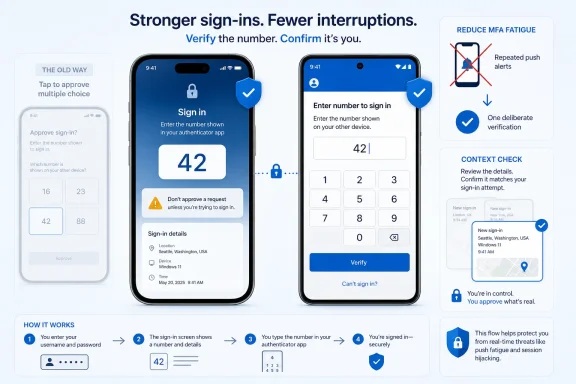
The new flow changes the psychology of the moment. Instead of selecting from a small menu, the user must type the number shown on the sign-in screen into the Authenticator app. That does not make the account magically immune to compromise, but it does force the person holding the phone to compare two contexts: the device requesting access and the app approving it.
That distinction matters because many real-world MFA failures are not brute-force guessing contests. Attackers do not usually sit there hoping to pick the right number from three choices. They steal or guess a password, trigger a storm of login prompts, and wait for a tired, distracted, or confused user to make the problem go away.
Manual entry is not glamorous security. It is not the kind of feature that sells a keynote or makes a consumer feel protected by artificial intelligence. It is closer to a speed bump in a parking lot: deliberately mundane, intentionally irritating, and valuable because it changes behavior at the exact moment when behavior is the vulnerability.
That math is not irrelevant, but it is not the real security story. Attackers generally do not need to guess an Authenticator prompt if they can convince the user to approve it. The more serious risk is MFA fatigue, the practice of repeatedly pushing authentication requests until the victim accepts one out of annoyance, confusion, or habit.
This is where number matching earns its keep. If the user sees a prompt on the phone but is not actively signing in on another device, there is no visible number to type. The prompt becomes suspicious by design. A malicious login attempt can still create noise, but the noise no longer comes with a giant “make it stop” button.
The move also addresses accidental approvals. A three-choice prompt can be tapped while unlocking a phone, clearing notifications, or fumbling through a pocket. A typed number requires more intent. It is still possible to make a mistake, but the interface is no longer optimized for the fastest possible yes.
Security design often fails when it assumes users are calm, focused, and aware of the threat model. Microsoft’s newer Authenticator flow assumes the opposite: users are busy, prompts arrive at bad times, and attackers exploit that friction. The fix is not to lecture people about vigilance; it is to build a prompt that cannot be completed quite so casually.
That enterprise rollout mattered because it turned number matching from an optional hardening measure into a default expectation. Admins could no longer treat “push notification MFA” as a single category. A yes-or-no prompt, a multiple-choice prompt, and a typed number prompt all sit under the broad MFA umbrella, but they do not carry the same practical resistance to social engineering.
For sysadmins, the consumer rollout may feel overdue rather than surprising. Work and school accounts have been moving toward stronger Authenticator prompts for years, while personal Microsoft accounts often retained flows designed around convenience and adoption. That split made sense when Microsoft was trying to get hundreds of millions of people off passwords alone. It makes less sense in a world where consumer Microsoft accounts unlock Windows devices, Xbox purchases, OneDrive data, Outlook mail, browser sync, family safety settings, and passkeys.
The consumer account is no longer a casual web login. For many Windows users it is the root of a personal computing identity. If that account falls, the attacker is not just reading email; they may be resetting passwords elsewhere, accessing cloud backups, tampering with security settings, and probing every connected Microsoft service.
That is why the Authenticator change is more than interface housekeeping. Microsoft is gradually collapsing the security distinction between “enterprise identity” and “personal account.” The personal account may not have a compliance team behind it, but it now deserves some of the same protection patterns.
Microsoft’s argument is straightforward: SMS is too easy to intercept, redirect, socially engineer, or abuse through SIM-swap fraud. Text-message codes also train users to treat authentication as a portable secret, something that can be read aloud, typed into a phishing page, or forwarded under pressure. That model is incompatible with the passwordless future Microsoft keeps promising.
The tension is that SMS is bad security and excellent accessibility. It works on cheap phones, old phones, borrowed phones, and phones whose owners have never heard of FIDO2. It is understandable to ordinary people in a way that passkeys still are not. When a company removes SMS, it removes a weak link—but it also removes a familiar recovery path.
That trade-off is where Microsoft must be careful. Stronger authentication can become account lockout by another name if users do not understand how to prepare. A person who relies on a single phone, a single Authenticator install, and no backup method may be more secure against attackers and more vulnerable to their own broken screen.
The right lesson is not “never use Authenticator.” It is that Authenticator is now part of a broader identity plan. Users should know which devices hold their passkeys, which email addresses are verified for recovery, and what happens if a phone is lost while traveling. Microsoft can improve the default prompt, but users and admins still need to think through failure.
That future is cleaner than today’s mix of passwords, codes, push prompts, recovery emails, backup phone numbers, app passwords, and confused users. But transitions are where security products become messy. Microsoft cannot simply declare passwords dead when so much of the ecosystem still depends on them, including legacy apps, older devices, and human support processes.
Authenticator sits in the middle of that transition. It can approve sign-ins, store or manage certain credentials, support passwordless flows, and help users adopt stronger methods without forcing them to understand the plumbing. That makes it powerful, but it also makes every Authenticator design decision unusually consequential.
The manual number-entry prompt is a bridge technology. It is stronger than a tap-to-approve notification but less phishing-resistant than a properly implemented passkey. It reduces accidental and fatigue-based approvals, but it does not eliminate attacks in which a victim is tricked into reading or typing a displayed number for someone else.
That limitation should not be ignored. Number matching can stop a user from approving a random prompt they did not initiate. It cannot save a user who is on the phone with a scammer claiming to be from support, or who is typing credentials into a convincing adversary-in-the-middle phishing site that relays the session in real time. Better prompts help, but they do not turn push MFA into a universal shield.
That is why MFA fatigue attacks work. They exploit the same human reflexes that make cookie banners, update pop-ups, and permission prompts so ineffective. When systems ask users to approve things constantly, users learn that approval is part of using the system.
A manual number breaks that pattern by requiring context. It asks, implicitly, “What sign-in are you approving?” If the user cannot answer, the prompt cannot be completed. The extra step is minor during legitimate sign-in and major during malicious prompt spam.
There is a lesson here for Windows itself. Microsoft’s security stack has often leaned on prompts, warnings, and consent dialogs, from User Account Control to SmartScreen to browser password checks. Some of those prompts are useful, but all of them compete for attention in an operating system already full of notifications.
Good security prompts are not just warnings. They are workflows that make the safe action easier and the dangerous action harder. Authenticator’s manual number entry is effective because it changes the workflow, not because it adds another paragraph of warning text nobody reads.
That matters for bring-your-own-device environments and small businesses that blur the line between personal and organizational accounts. Many users maintain a personal Microsoft account on the same phone as their work Authenticator profile. When the personal side changes, help desks may still get the questions.
Admins should be ready for users who describe the new prompt as “Authenticator asking me to type a code instead of picking one.” That is not necessarily a sign of compromise; it may simply be the new flow. But unsolicited prompts remain suspicious, especially if they arrive when the user is not signing in.
The policy implication is boring but important: training materials need to distinguish between expected number matching and unexpected number matching. Users should be told that a prompt they did not initiate is not a puzzle to solve. It is evidence that someone may have the password or is attempting to authenticate as them.
Organizations should also revisit legacy MFA exceptions. If some users still rely on SMS, voice calls, or weaker push approvals because “that is how we set it up years ago,” the Authenticator consumer rollout is another reminder that defaults have moved. Attackers do not care whether a weak method remains because of convenience, a VIP exception, or an old conditional access policy.
The same applies to recovery. An organization can harden the front door and still lose the account through a neglected side door. Verified recovery methods, break-glass accounts, hardware security keys, and documented offboarding processes matter more as Microsoft tightens ordinary sign-in paths.
That confusion is the price of silent security improvements. Microsoft often rolls changes gradually, which means one family member may see the new prompt while another still sees the old flow. A user may encounter manual entry on one device, a passkey prompt on another, and an email recovery challenge somewhere else.
The worst response would be to disable stronger authentication out of frustration. The better response is to treat this as a prompt to audit the account. If Authenticator is installed only on a phone that has never been backed up, if the recovery email is obsolete, or if the account still depends on a phone number the user no longer controls, the new prompt is the least of the problem.
Consumers should also understand what the prompt does not mean. It does not mean Microsoft is asking for the phone’s unlock PIN. It does not mean the user should type a code given over a phone call. It does not mean an unsolicited approval request is safe because it has a number.
The safest habit is blunt: only complete the Authenticator prompt when you just initiated the sign-in yourself, on a device or app you recognize. If the phone asks for a number and you are not signing in, deny the request and change the password from a trusted device. If the prompts keep coming, assume the password is known or being actively attacked.
The company is under pressure from the scale of identity attacks. Microsoft accounts are valuable targets precisely because they are everywhere: Windows setup, Office, Outlook, Xbox, OneDrive, Edge, Microsoft Store purchases, developer services, and family devices. An authentication weakness on the consumer side is not a niche problem.
At the same time, Microsoft has spent years nudging users toward device-based trust. Windows Hello made biometrics and PINs ordinary. Edge and Windows have been absorbing more credential-management duties. Authenticator has shifted away from being a general password convenience app and toward being an identity security app.
The manual number prompt fits that pattern. Microsoft is choosing a small amount of friction at a high-risk moment rather than preserving a faster but weaker approval habit. The company is also betting that users will accept this friction because the alternative—account theft—is now familiar enough to be credible.
Still, Microsoft should not confuse better defaults with completed work. Security changes are only as good as the explanations around them. If users do not understand why the prompt changed, they may develop workarounds, ignore warnings, or flood support channels. A two-digit code can be safer than a tap, but only if the user knows when not to type it.
For Windows enthusiasts, the interesting part is how consumer and enterprise security are converging. Features once treated as admin-configurable hardening are becoming ordinary account behavior. That will continue as passkeys mature, SMS disappears, and Windows Hello becomes less of a convenience feature and more of the default trust anchor.
For IT pros, the message is practical. If Microsoft is willing to add friction to personal accounts, organizations should not hesitate to retire weaker MFA methods internally. The cultural argument that users will not tolerate stronger prompts is losing force because the consumer ecosystem is beginning to train them.
For security-minded users, the lesson is equally clear. Authenticator is not merely an app that says yes. It is becoming the place where Microsoft asks users to prove that a sign-in is intentional, local, and understood. That makes the phone more important, and it makes recovery planning more important too.
The change will not stop every phishing attack, and Microsoft should not market it as though it will. But it meaningfully reduces two common failure modes: accidental approval and fatigue-driven approval. In the messy world of consumer identity, that is a real improvement.
 Microsoft Turns a Tap Into a Deliberate Act
The old Authenticator prompt for many consumer Microsoft account sign-ins was built for speed. A login screen showed a number, the phone displayed several choices, and the user tapped the matching one. It was a cleaner alternative to SMS codes and a less annoying version of the “Approve” button that defined early push-based multi-factor authentication.The new flow changes the psychology of the moment. Instead of selecting from a small menu, the user must type the number shown on the sign-in screen into the Authenticator app. That does not make the account magically immune to compromise, but it does force the person holding the phone to compare two contexts: the device requesting access and the app approving it.
That distinction matters because many real-world MFA failures are not brute-force guessing contests. Attackers do not usually sit there hoping to pick the right number from three choices. They steal or guess a password, trigger a storm of login prompts, and wait for a tired, distracted, or confused user to make the problem go away.
Manual entry is not glamorous security. It is not the kind of feature that sells a keynote or makes a consumer feel protected by artificial intelligence. It is closer to a speed bump in a parking lot: deliberately mundane, intentionally irritating, and valuable because it changes behavior at the exact moment when behavior is the vulnerability.
The 33 Percent Math Was Always the Wrong Story
It is tempting to frame the change as a simple odds problem. Three on-screen choices gives a blind guess a one-in-three chance; a two-digit manual prompt has one hundred possible combinations. On paper, that sounds like Microsoft just moved from a 33 percent guessing surface to a 1 percent one.That math is not irrelevant, but it is not the real security story. Attackers generally do not need to guess an Authenticator prompt if they can convince the user to approve it. The more serious risk is MFA fatigue, the practice of repeatedly pushing authentication requests until the victim accepts one out of annoyance, confusion, or habit.
This is where number matching earns its keep. If the user sees a prompt on the phone but is not actively signing in on another device, there is no visible number to type. The prompt becomes suspicious by design. A malicious login attempt can still create noise, but the noise no longer comes with a giant “make it stop” button.
The move also addresses accidental approvals. A three-choice prompt can be tapped while unlocking a phone, clearing notifications, or fumbling through a pocket. A typed number requires more intent. It is still possible to make a mistake, but the interface is no longer optimized for the fastest possible yes.
Security design often fails when it assumes users are calm, focused, and aware of the threat model. Microsoft’s newer Authenticator flow assumes the opposite: users are busy, prompts arrive at bad times, and attackers exploit that friction. The fix is not to lecture people about vigilance; it is to build a prompt that cannot be completed quite so casually.
Enterprise Got the Pain First, as Usual
Microsoft has already lived through this transition with enterprise and education customers. Number matching became a prominent part of the Microsoft Entra ID authentication story after high-profile MFA fatigue attacks showed that push approvals were a weak link in otherwise well-defended organizations. Microsoft began enforcing number matching for many Authenticator push scenarios in 2023, after warning administrators that old approval patterns were no longer good enough.That enterprise rollout mattered because it turned number matching from an optional hardening measure into a default expectation. Admins could no longer treat “push notification MFA” as a single category. A yes-or-no prompt, a multiple-choice prompt, and a typed number prompt all sit under the broad MFA umbrella, but they do not carry the same practical resistance to social engineering.
For sysadmins, the consumer rollout may feel overdue rather than surprising. Work and school accounts have been moving toward stronger Authenticator prompts for years, while personal Microsoft accounts often retained flows designed around convenience and adoption. That split made sense when Microsoft was trying to get hundreds of millions of people off passwords alone. It makes less sense in a world where consumer Microsoft accounts unlock Windows devices, Xbox purchases, OneDrive data, Outlook mail, browser sync, family safety settings, and passkeys.
The consumer account is no longer a casual web login. For many Windows users it is the root of a personal computing identity. If that account falls, the attacker is not just reading email; they may be resetting passwords elsewhere, accessing cloud backups, tampering with security settings, and probing every connected Microsoft service.
That is why the Authenticator change is more than interface housekeeping. Microsoft is gradually collapsing the security distinction between “enterprise identity” and “personal account.” The personal account may not have a compliance team behind it, but it now deserves some of the same protection patterns.
SMS Is Being Pushed Out of the Escape Hatch
The Authenticator change lands alongside a larger Microsoft campaign against SMS-based authentication for personal accounts. Microsoft has said it is phasing out SMS as a method for sign-in and account recovery, steering users toward passkeys, authenticator apps, and verified email instead. That move is more disruptive than changing a prompt, because SMS has long been the universal fallback for people who lose devices, forget passwords, or do not want to learn a new sign-in method.Microsoft’s argument is straightforward: SMS is too easy to intercept, redirect, socially engineer, or abuse through SIM-swap fraud. Text-message codes also train users to treat authentication as a portable secret, something that can be read aloud, typed into a phishing page, or forwarded under pressure. That model is incompatible with the passwordless future Microsoft keeps promising.
The tension is that SMS is bad security and excellent accessibility. It works on cheap phones, old phones, borrowed phones, and phones whose owners have never heard of FIDO2. It is understandable to ordinary people in a way that passkeys still are not. When a company removes SMS, it removes a weak link—but it also removes a familiar recovery path.
That trade-off is where Microsoft must be careful. Stronger authentication can become account lockout by another name if users do not understand how to prepare. A person who relies on a single phone, a single Authenticator install, and no backup method may be more secure against attackers and more vulnerable to their own broken screen.
The right lesson is not “never use Authenticator.” It is that Authenticator is now part of a broader identity plan. Users should know which devices hold their passkeys, which email addresses are verified for recovery, and what happens if a phone is lost while traveling. Microsoft can improve the default prompt, but users and admins still need to think through failure.
Passkeys Are the Destination, but Authenticator Is the Bridge
Microsoft’s endgame is not a better two-digit prompt. The company has been moving steadily toward passkeys, Windows Hello, device-bound credentials, and passwordless sign-in. In that world, the user proves identity with a device and a biometric or PIN, while the service verifies a cryptographic credential that is far harder to phish than a password or text code.That future is cleaner than today’s mix of passwords, codes, push prompts, recovery emails, backup phone numbers, app passwords, and confused users. But transitions are where security products become messy. Microsoft cannot simply declare passwords dead when so much of the ecosystem still depends on them, including legacy apps, older devices, and human support processes.
Authenticator sits in the middle of that transition. It can approve sign-ins, store or manage certain credentials, support passwordless flows, and help users adopt stronger methods without forcing them to understand the plumbing. That makes it powerful, but it also makes every Authenticator design decision unusually consequential.
The manual number-entry prompt is a bridge technology. It is stronger than a tap-to-approve notification but less phishing-resistant than a properly implemented passkey. It reduces accidental and fatigue-based approvals, but it does not eliminate attacks in which a victim is tricked into reading or typing a displayed number for someone else.
That limitation should not be ignored. Number matching can stop a user from approving a random prompt they did not initiate. It cannot save a user who is on the phone with a scammer claiming to be from support, or who is typing credentials into a convincing adversary-in-the-middle phishing site that relays the session in real time. Better prompts help, but they do not turn push MFA into a universal shield.
The Security Win Is Real Because the Old Pattern Was Too Human
The old approval model suffered from a problem every IT pro recognizes: people normalize interruptions. The first unexpected MFA prompt is alarming. The fifth is annoying. The tenth is a task to be dismissed.That is why MFA fatigue attacks work. They exploit the same human reflexes that make cookie banners, update pop-ups, and permission prompts so ineffective. When systems ask users to approve things constantly, users learn that approval is part of using the system.
A manual number breaks that pattern by requiring context. It asks, implicitly, “What sign-in are you approving?” If the user cannot answer, the prompt cannot be completed. The extra step is minor during legitimate sign-in and major during malicious prompt spam.
There is a lesson here for Windows itself. Microsoft’s security stack has often leaned on prompts, warnings, and consent dialogs, from User Account Control to SmartScreen to browser password checks. Some of those prompts are useful, but all of them compete for attention in an operating system already full of notifications.
Good security prompts are not just warnings. They are workflows that make the safe action easier and the dangerous action harder. Authenticator’s manual number entry is effective because it changes the workflow, not because it adds another paragraph of warning text nobody reads.
Where Administrators Should Pay Attention
For enterprise admins, the consumer rollout is a useful signal about Microsoft’s direction of travel. The company is not softening its identity posture after the initial Entra number-matching push. It is extending the same design logic into the consumer ecosystem, where resistance to friction is usually higher and central management is mostly absent.That matters for bring-your-own-device environments and small businesses that blur the line between personal and organizational accounts. Many users maintain a personal Microsoft account on the same phone as their work Authenticator profile. When the personal side changes, help desks may still get the questions.
Admins should be ready for users who describe the new prompt as “Authenticator asking me to type a code instead of picking one.” That is not necessarily a sign of compromise; it may simply be the new flow. But unsolicited prompts remain suspicious, especially if they arrive when the user is not signing in.
The policy implication is boring but important: training materials need to distinguish between expected number matching and unexpected number matching. Users should be told that a prompt they did not initiate is not a puzzle to solve. It is evidence that someone may have the password or is attempting to authenticate as them.
Organizations should also revisit legacy MFA exceptions. If some users still rely on SMS, voice calls, or weaker push approvals because “that is how we set it up years ago,” the Authenticator consumer rollout is another reminder that defaults have moved. Attackers do not care whether a weak method remains because of convenience, a VIP exception, or an old conditional access policy.
The same applies to recovery. An organization can harden the front door and still lose the account through a neglected side door. Verified recovery methods, break-glass accounts, hardware security keys, and documented offboarding processes matter more as Microsoft tightens ordinary sign-in paths.
Consumers Will Feel Friction Before They Feel Safer
For home users, the immediate experience is simple: the next Microsoft sign-in may require typing a two-digit number into Authenticator instead of tapping a matching tile. Some will barely notice. Others will assume something is broken because the interface changed without a ceremony.That confusion is the price of silent security improvements. Microsoft often rolls changes gradually, which means one family member may see the new prompt while another still sees the old flow. A user may encounter manual entry on one device, a passkey prompt on another, and an email recovery challenge somewhere else.
The worst response would be to disable stronger authentication out of frustration. The better response is to treat this as a prompt to audit the account. If Authenticator is installed only on a phone that has never been backed up, if the recovery email is obsolete, or if the account still depends on a phone number the user no longer controls, the new prompt is the least of the problem.
Consumers should also understand what the prompt does not mean. It does not mean Microsoft is asking for the phone’s unlock PIN. It does not mean the user should type a code given over a phone call. It does not mean an unsolicited approval request is safe because it has a number.
The safest habit is blunt: only complete the Authenticator prompt when you just initiated the sign-in yourself, on a device or app you recognize. If the phone asks for a number and you are not signing in, deny the request and change the password from a trusted device. If the prompts keep coming, assume the password is known or being actively attacked.
Microsoft’s Convenience Bargain Is Getting Rewritten
For years, the consumer security bargain was convenience first, security second, with stronger protections available for people willing to hunt through settings. Microsoft helped normalize passwordless sign-in, but it also preserved old fallbacks because removing them would create support pain. That bargain is now being rewritten.The company is under pressure from the scale of identity attacks. Microsoft accounts are valuable targets precisely because they are everywhere: Windows setup, Office, Outlook, Xbox, OneDrive, Edge, Microsoft Store purchases, developer services, and family devices. An authentication weakness on the consumer side is not a niche problem.
At the same time, Microsoft has spent years nudging users toward device-based trust. Windows Hello made biometrics and PINs ordinary. Edge and Windows have been absorbing more credential-management duties. Authenticator has shifted away from being a general password convenience app and toward being an identity security app.
The manual number prompt fits that pattern. Microsoft is choosing a small amount of friction at a high-risk moment rather than preserving a faster but weaker approval habit. The company is also betting that users will accept this friction because the alternative—account theft—is now familiar enough to be credible.
Still, Microsoft should not confuse better defaults with completed work. Security changes are only as good as the explanations around them. If users do not understand why the prompt changed, they may develop workarounds, ignore warnings, or flood support channels. A two-digit code can be safer than a tap, but only if the user knows when not to type it.
The Two Digits Reveal Microsoft’s Real Authentication Strategy
This Authenticator update is less a standalone upgrade than a preview of Microsoft’s identity roadmap. The company is moving away from authentication that depends on shared secrets and user judgment, and toward authentication bound to devices, context, and deliberate action. The typed number is a modest example of that philosophy.For Windows enthusiasts, the interesting part is how consumer and enterprise security are converging. Features once treated as admin-configurable hardening are becoming ordinary account behavior. That will continue as passkeys mature, SMS disappears, and Windows Hello becomes less of a convenience feature and more of the default trust anchor.
For IT pros, the message is practical. If Microsoft is willing to add friction to personal accounts, organizations should not hesitate to retire weaker MFA methods internally. The cultural argument that users will not tolerate stronger prompts is losing force because the consumer ecosystem is beginning to train them.
For security-minded users, the lesson is equally clear. Authenticator is not merely an app that says yes. It is becoming the place where Microsoft asks users to prove that a sign-in is intentional, local, and understood. That makes the phone more important, and it makes recovery planning more important too.
The change will not stop every phishing attack, and Microsoft should not market it as though it will. But it meaningfully reduces two common failure modes: accidental approval and fatigue-driven approval. In the messy world of consumer identity, that is a real improvement.
The Code Is Small, but the Habit Change Is the Product
The practical meaning of the rollout is easy to miss because the interface change is so minor. That is exactly why it matters. Microsoft is not asking users to adopt an entirely new security model in one jump; it is training them to stop treating authentication prompts as disposable notifications.- Microsoft Authenticator is moving personal Microsoft account approvals toward manual number entry instead of multiple-choice taps.
- The change is designed mainly to reduce accidental approvals and MFA fatigue attacks, not merely to improve guessing odds.
- Work and school accounts have already been pushed in this direction through Microsoft’s Entra ID number-matching policies.
- SMS-based authentication is being phased out for personal Microsoft accounts because Microsoft considers it too vulnerable to fraud and account takeover.
- Users should only complete an Authenticator prompt when they personally initiated the sign-in on a recognized device.
- Anyone relying on Authenticator should verify recovery email, passkey, and backup-device options before a lost phone turns security into lockout.
References
- Primary source: Windows Central
Published: Thu, 18 Jun 2026 11:25:46 GMT
Why Microsoft Authenticator ditched multiple-choice logins | Windows Central
Slashed guessing odds are a nice bonus, but changing the app from multiple-choice to manual typing is really about stopping accidental approvals and spam attacks.www.windowscentral.com - Official source: learn.microsoft.com
How number matching works in MFA push notifications for Authenticator - Microsoft Entra ID | Microsoft Learn
Learn how to use number matching in multifactor authentication notifications for Microsoft Authenticator.learn.microsoft.com - Official source: support.microsoft.com
About Microsoft Authenticator | Microsoft Support
Learn how you can use the free Microsoft Authenticator app to sign in to all your accounts without using a password.support.microsoft.com - Related coverage: pcworld.com
Microsoft is officially killing SMS verification for personal accounts | PCWorld
Microsoft is phasing out SMS login codes for personal accounts. Passkeys are the future, even if they don't work everywhere yet.www.pcworld.com - Related coverage: windowslatest.com
Microsoft is killing SMS codes for Microsoft account sign-in, aggressively pushes passkeys on Windows 11
Microsoft is ending SMS login codes for personal accounts and replacing them with passkeys, authenticator apps, and backup email on Windows. www.windowslatest.com
- Related coverage: techradar.com
Microsoft finally stops using SMS codes for account sign-in
Microsoft believes that the future of authentication is passwordless, secure, and user-friendly.www.techradar.com
- Related coverage: winbuzzer.com
Microsoft Drops SMS Codes in Personal Account Passkey Push
Microsoft has begun phasing out SMS codes for personal accounts, replacing them with passkeys and verified email while older apps may still need passwords. winbuzzer.com
- Related coverage: techspot.com
Microsoft is pulling the plug on SMS codes, wants you to switch to passkeys | TechSpot
Microsoft has confirmed that SMS-based authentication and account recovery for personal accounts is on its way out. The company argues that plaintext SMS codes are no longer...www.techspot.com - Related coverage: windowsforum.com
Microsoft Phases Out SMS Codes (2026): Passkeys, Authenticator, and Recovery
Microsoft has confirmed in May 2026 that it will phase out SMS codes for personal Microsoft accounts, replacing text-message sign-in and recovery with passkeys, authenticator apps, and verified secondary email addresses across the Windows account ecosystem. The move is not a cosmetic cleanup of... windowsforum.com
- Related coverage: pcgamer.com
You can no longer login to or recover your personal Microsoft account using SMS codes
Bad news for forgetful folks like me.www.pcgamer.com
- Related coverage: stetson.edu
</rdf:Alt> </dc:title> <dc:description> <rdf:Alt> <rdf:li xml:lang="x-default"/> </rdf:Alt> </dc:description> <dc:creator> <rdf:Seq> <rdf:li>Benjami
</rdf:Alt> </dc:description> <dc:creator> <rdf:Seq> <rdf:li>Benjamin Brownwww.stetson.edu
- Official source: cdn-dynmedia-1.microsoft.com
- Related coverage: techxplore.com
