

Microsoft is moving personal Microsoft accounts away from SMS codes in May 2026, replacing text-message sign-in and recovery with passkeys, authenticator apps, and verified email addresses across the account system that underpins Windows 11, Xbox, Edge, OneDrive, Outlook, and consumer Microsoft 365 services. That does not mean tomorrow’s Windows 11 PC will boot into a world without passwords. It does mean Microsoft has decided the phone number is no longer a trustworthy safety net. The passwordless future is arriving not as a grand Windows feature, but as the quiet removal of the fallback everyone assumed would always be there.
The headline version of the story is simple: Microsoft is phasing out SMS codes for personal accounts. The deeper version is more consequential. For years, text messages have been treated as the democratic form of two-factor authentication: not elegant, not especially secure, but available to almost everyone with a phone number.
That bargain has collapsed. SMS is now too easy to intercept, too easy to socially engineer, and too dependent on mobile carriers whose customer-service workflows were never designed to guard the keys to an entire digital life. Microsoft’s language is unusually blunt: SMS-based authentication is a leading source of fraud.
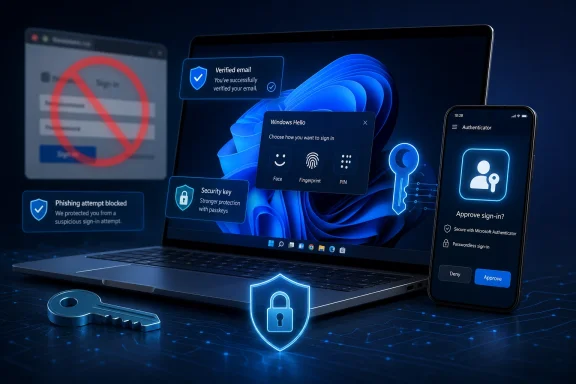
The company’s replacement stack is familiar by now. Passkeys use cryptographic credentials bound to a device or synced through a trusted provider. Microsoft Authenticator can approve sign-ins without a password. Verified email remains as an account-recovery rail. Windows Hello supplies the local gesture — face, fingerprint, or PIN — that makes the whole thing feel less like security plumbing and more like unlocking a laptop.
The important shift is not that Microsoft believes passkeys are better. The whole industry believes that. The important shift is that Microsoft is beginning to withdraw the older method rather than merely recommend the newer one. Security advice becomes product policy when the less secure option disappears from the menu.
Numbers get recycled. Phones get stolen. SIMs get swapped. Carrier accounts get socially engineered. Malware can read messages on compromised devices. Attackers can also abuse the verification flow itself, triggering waves of unsolicited one-time codes that condition users to treat account alerts as noise rather than warnings.
That last point matters because Microsoft accounts sit at the intersection of consumer convenience and high-value targets. A personal Microsoft account may unlock a Windows 11 device, an Outlook inbox, OneDrive files, Xbox purchases, browser sync data, saved credentials, family subscriptions, and recovery options for other services. Compromise one account and the attacker may inherit years of trusted connections.
SMS also creates a psychological problem. Users tend to think of a code as proof that they are doing the right thing. Phishing kits exploit exactly that instinct. If a fake sign-in page asks for a password and then a six-digit code, the user may experience the second step as reassurance rather than suspicion.
Passkeys change that exchange. A passkey is tied to the legitimate service domain and does not simply hand the user a reusable secret to type into whatever box appears on screen. That does not make authentication magic, but it changes the attacker’s job from “trick the user into reading a code” to “defeat a cryptographic ceremony bound to a device and origin.” That is a much harder business.
This is where Windows Hello matters. A local PIN is not just a shorter password. In Microsoft’s model, it is a device-bound gesture backed by hardware security and account credentials that are not typed into websites. Face and fingerprint recognition make the pitch easier: look at the camera, touch the sensor, approve the sign-in.
That design lets Microsoft sell passwordless authentication as convenience rather than medicine. Nobody wants a lecture about SIM-swap fraud when they are trying to open Outlook. But “sign in faster with your face, fingerprint, or PIN” is the kind of prompt that can move hundreds of millions of users without requiring them to understand public-key cryptography.
The catch is that Windows is also where account policy becomes personal. A cloud service changing an authentication method is one thing. A PC asking a user to reconfigure how they recover the account tied to their desktop, files, subscriptions, and browser profile feels more invasive. Microsoft’s challenge is not just to make passkeys work, but to make the transition feel less like a forced migration into another Microsoft dependency.
Microsoft says users will still be able to recover accounts using verified email and passkeys even if a phone is lost or stolen. That is reassuring, but it also shifts risk. The secondary email account now matters more. If that inbox is old, weakly protected, abandoned, shared, or itself dependent on the Microsoft account being recovered, the user has merely moved the weakest link.
This is the paradox of passwordless security. The sign-in becomes cleaner, but the account graph becomes more important. Users need to know which device stores which passkey, whether credentials sync, what happens after a factory reset, and how recovery works before disaster strikes.
Administrators have long understood this problem in enterprise identity. Consumer accounts are messier because there is no help desk, no formal offboarding process, and no inventory of authentication methods. There is just a person, a phone, a laptop, an inbox, and a vague memory of setting something up during a prompt they wanted to dismiss.
That is why Microsoft’s SMS phase-out should not be read as “passkeys solve everything.” It is more accurate to say that passkeys solve one of the most exploited parts of the authentication chain while making the remaining weak links more visible.
The enterprise lesson is clear: passwords are expensive. They generate help-desk tickets, reset loops, phishing incidents, credential stuffing, and breach investigations. SMS MFA was once a tolerable bridge away from password-only security, but it has become a liability in mature identity programs.
The consumer Microsoft account is now being pulled into that same maturity curve. The company is no longer treating home users as a separate species with permanently lower expectations. It is trying to bring the baseline up, even if that means some users grumble when a familiar code stops arriving.
There is also a platform strategy underneath the security story. If passkeys become routine through Windows Hello, Edge, Microsoft Password Manager, and Microsoft accounts, Microsoft gains a stronger claim on the identity layer of everyday computing. That does not make the security argument false. It does mean the security argument and the platform argument are traveling in the same direction.
For Windows enthusiasts, that dual motive is familiar. Microsoft often improves the security model while also deepening the gravitational pull of its ecosystem. Secure Boot, TPM requirements, Microsoft account nudges, OneDrive backup prompts, and now passkey flows all live somewhere between user protection and platform consolidation.
That interconnectedness raises the stakes of authentication changes. A broken sign-in flow is no longer a minor website inconvenience. It can interrupt access to files, apps, subscriptions, and device setup.
Recent Windows account glitches have also reminded users that identity infrastructure is not abstract. When a cumulative update, network state, or app bug interferes with Microsoft account sign-in, the user experiences it as Windows being broken. That perception matters even when the underlying security architecture is sound.
So Microsoft has to execute the SMS retirement with care. If the prompts are clear, recovery options are sane, and passkey setup is reversible enough to inspire confidence, most users will adapt. If the experience produces lockouts, circular recovery flows, or opaque “try another way” screens, the company will turn a good security move into another grievance about Windows deciding what is best for the user.
The company has the advantage of scale and telemetry. It can see which flows fail, which prompts are ignored, which recovery paths work, and which regions or demographics remain dependent on SMS. The risk is that Microsoft optimizes the average path while the edge cases become support nightmares for the very users least equipped to troubleshoot identity systems.
Passkeys can support many of those scenarios, especially when synced across devices or backed by multiple authenticators. But the user experience is still uneven across platforms, browsers, password managers, and operating systems. A passkey created in one ecosystem may not feel as portable as a password stored in a human brain or a notebook, even if the password is objectively less secure.
This is where Microsoft must resist the temptation to declare victory too early. A passwordless system that works beautifully for a Windows 11 laptop plus Edge plus Microsoft Authenticator user is not automatically a universal solution. Real households contain iPhones, Android phones, Chromebooks, shared PCs, old Outlook addresses, and family members who do not know what a passkey is.
The best version of Microsoft’s plan is not coercion. It is progressive hardening: make the safest method the easiest method, make weak fallbacks disappear only after better fallbacks are established, and explain recovery before users need it. The worst version is the familiar dark pattern: nag until users accept, then leave them to discover the consequences when something breaks.
For now, Microsoft appears to be steering toward migration rather than instant prohibition. That distinction matters. Retiring SMS codes is defensible. Doing it without a humane recovery model would be reckless.
Both reactions are fair. SMS is a weak authenticator, and replacing it is overdue. At the same time, Microsoft has spent the Windows 11 era making the local account feel like an exception rather than a first-class path. Any authentication change that leans on Microsoft accounts inherits that broader suspicion.
The company could reduce that suspicion with transparency. It should state exactly when SMS codes will stop being available for sign-in and recovery, which regions are affected, what happens to accounts without verified email, and how users can audit their recovery methods. It should also make passkey management visible enough that users can understand what exists, where it lives, and how to remove or replace it.
Power users do not object to stronger security. They object to black boxes. A well-documented passkey transition would turn enthusiasts into explainers for friends, family, and small offices. A vague one will turn them into skeptics with screenshots.
The irony is that Microsoft needs those skeptics. Consumer identity migrations succeed not only because prompts appear in products, but because technically literate users translate them for everyone else. If Microsoft wants passwordless Windows to feel inevitable rather than imposed, it should treat the Windows community as a deployment partner, not a compliance obstacle.
That is not best practice, but it is common practice. Microsoft’s consumer account changes therefore become operational changes for businesses too small to have an identity architect. The person who “knows the password” may also be the person whose phone number used to be the recovery method.
For managed environments, the lesson is straightforward: audit authentication methods before Microsoft’s deadlines force the issue. For unmanaged or semi-managed environments, the lesson is cultural: stop treating phone numbers as durable account infrastructure.
Small offices should verify secondary emails, add more than one recovery path where possible, document which accounts own which assets, and avoid concentrating every recovery option on one device. None of that is glamorous. All of it becomes urgent when the old SMS fallback disappears.
This is also a moment for IT consultants and managed service providers. The pitch practically writes itself: identity hygiene is no longer an enterprise luxury. If a personal Microsoft account can interrupt access to files, billing, email, or device setup, then recovery planning belongs in even the smallest office.
Microsoft’s challenge is that those ideas are boring until the day they are terrifying. Nobody wants to review security info when everything works. Everyone wants perfect recovery when nothing does.
The company’s messaging should therefore be practical, not triumphalist. “SMS is insecure” is true, but incomplete. Users need to know what to do before they trade an imperfect method they understand for a better method they do not.
That means prompts should explain consequences in plain language. If a user creates a passkey on a Windows PC, the interface should say whether it is stored only on that device or synced. If a verified email becomes the recovery path, Microsoft should encourage users to secure that email with its own strong authentication. If a user has only one viable method, the account page should make that fragility obvious.
The more Microsoft can make account resilience visible, the less the transition will feel like another arbitrary platform mandate. Security that users can see and reason about is more durable than security that arrives as a surprise dialog.
 Microsoft Is Not Killing the Password So Much as Killing the Escape Hatch
The headline version of the story is simple: Microsoft is phasing out SMS codes for personal accounts. The deeper version is more consequential. For years, text messages have been treated as the democratic form of two-factor authentication: not elegant, not especially secure, but available to almost everyone with a phone number.That bargain has collapsed. SMS is now too easy to intercept, too easy to socially engineer, and too dependent on mobile carriers whose customer-service workflows were never designed to guard the keys to an entire digital life. Microsoft’s language is unusually blunt: SMS-based authentication is a leading source of fraud.
The company’s replacement stack is familiar by now. Passkeys use cryptographic credentials bound to a device or synced through a trusted provider. Microsoft Authenticator can approve sign-ins without a password. Verified email remains as an account-recovery rail. Windows Hello supplies the local gesture — face, fingerprint, or PIN — that makes the whole thing feel less like security plumbing and more like unlocking a laptop.
The important shift is not that Microsoft believes passkeys are better. The whole industry believes that. The important shift is that Microsoft is beginning to withdraw the older method rather than merely recommend the newer one. Security advice becomes product policy when the less secure option disappears from the menu.
The Phone Number Was Always a Weak Identity Document
SMS authentication became popular because it solved a usability problem, not because it solved a security problem. A phone number felt personal, portable, and persistent. In practice, it is often none of those things.Numbers get recycled. Phones get stolen. SIMs get swapped. Carrier accounts get socially engineered. Malware can read messages on compromised devices. Attackers can also abuse the verification flow itself, triggering waves of unsolicited one-time codes that condition users to treat account alerts as noise rather than warnings.
That last point matters because Microsoft accounts sit at the intersection of consumer convenience and high-value targets. A personal Microsoft account may unlock a Windows 11 device, an Outlook inbox, OneDrive files, Xbox purchases, browser sync data, saved credentials, family subscriptions, and recovery options for other services. Compromise one account and the attacker may inherit years of trusted connections.
SMS also creates a psychological problem. Users tend to think of a code as proof that they are doing the right thing. Phishing kits exploit exactly that instinct. If a fake sign-in page asks for a password and then a six-digit code, the user may experience the second step as reassurance rather than suspicion.
Passkeys change that exchange. A passkey is tied to the legitimate service domain and does not simply hand the user a reusable secret to type into whatever box appears on screen. That does not make authentication magic, but it changes the attacker’s job from “trick the user into reading a code” to “defeat a cryptographic ceremony bound to a device and origin.” That is a much harder business.
Windows 11 Becomes the Front Door for Account Security
The Gamereactor framing asks whether passwordless Windows 11 is in Microsoft’s future. The answer is yes, but not in the simplistic sense of a switch that removes passwords from Windows overnight. Windows 11 is becoming the most visible surface through which Microsoft normalizes passwordless sign-in for the consumer account ecosystem.This is where Windows Hello matters. A local PIN is not just a shorter password. In Microsoft’s model, it is a device-bound gesture backed by hardware security and account credentials that are not typed into websites. Face and fingerprint recognition make the pitch easier: look at the camera, touch the sensor, approve the sign-in.
That design lets Microsoft sell passwordless authentication as convenience rather than medicine. Nobody wants a lecture about SIM-swap fraud when they are trying to open Outlook. But “sign in faster with your face, fingerprint, or PIN” is the kind of prompt that can move hundreds of millions of users without requiring them to understand public-key cryptography.
The catch is that Windows is also where account policy becomes personal. A cloud service changing an authentication method is one thing. A PC asking a user to reconfigure how they recover the account tied to their desktop, files, subscriptions, and browser profile feels more invasive. Microsoft’s challenge is not just to make passkeys work, but to make the transition feel less like a forced migration into another Microsoft dependency.
Passkeys Fix Phishing, But Recovery Remains the Hard Part
Passkeys are strongest at the moment of sign-in. They are weaker as a story about what happens when a user loses a phone, replaces a laptop, forgets which account holds which credential, or dies and leaves a family member with a locked digital estate. Authentication systems are judged by their recovery flows because recovery is where security and human messiness collide.Microsoft says users will still be able to recover accounts using verified email and passkeys even if a phone is lost or stolen. That is reassuring, but it also shifts risk. The secondary email account now matters more. If that inbox is old, weakly protected, abandoned, shared, or itself dependent on the Microsoft account being recovered, the user has merely moved the weakest link.
This is the paradox of passwordless security. The sign-in becomes cleaner, but the account graph becomes more important. Users need to know which device stores which passkey, whether credentials sync, what happens after a factory reset, and how recovery works before disaster strikes.
Administrators have long understood this problem in enterprise identity. Consumer accounts are messier because there is no help desk, no formal offboarding process, and no inventory of authentication methods. There is just a person, a phone, a laptop, an inbox, and a vague memory of setting something up during a prompt they wanted to dismiss.
That is why Microsoft’s SMS phase-out should not be read as “passkeys solve everything.” It is more accurate to say that passkeys solve one of the most exploited parts of the authentication chain while making the remaining weak links more visible.
Microsoft’s Consumer Push Follows the Enterprise Playbook
Microsoft has spent years pushing enterprise customers toward passwordless sign-in through Entra ID, Windows Hello for Business, FIDO2 security keys, Authenticator, conditional access, and risk-based identity protection. The consumer move is the same philosophy translated into household language.The enterprise lesson is clear: passwords are expensive. They generate help-desk tickets, reset loops, phishing incidents, credential stuffing, and breach investigations. SMS MFA was once a tolerable bridge away from password-only security, but it has become a liability in mature identity programs.
The consumer Microsoft account is now being pulled into that same maturity curve. The company is no longer treating home users as a separate species with permanently lower expectations. It is trying to bring the baseline up, even if that means some users grumble when a familiar code stops arriving.
There is also a platform strategy underneath the security story. If passkeys become routine through Windows Hello, Edge, Microsoft Password Manager, and Microsoft accounts, Microsoft gains a stronger claim on the identity layer of everyday computing. That does not make the security argument false. It does mean the security argument and the platform argument are traveling in the same direction.
For Windows enthusiasts, that dual motive is familiar. Microsoft often improves the security model while also deepening the gravitational pull of its ecosystem. Secure Boot, TPM requirements, Microsoft account nudges, OneDrive backup prompts, and now passkey flows all live somewhere between user protection and platform consolidation.
The Timing Is Awkward Because Trust in Account Plumbing Is Fragile
Microsoft is making this shift after years of asking users to connect more of their Windows experience to online identity. Windows 11 setup leans heavily toward Microsoft accounts. Edge sync, Store apps, Game Pass, Copilot features, OneDrive backup, and Microsoft 365 all assume an account that follows the user from device to device.That interconnectedness raises the stakes of authentication changes. A broken sign-in flow is no longer a minor website inconvenience. It can interrupt access to files, apps, subscriptions, and device setup.
Recent Windows account glitches have also reminded users that identity infrastructure is not abstract. When a cumulative update, network state, or app bug interferes with Microsoft account sign-in, the user experiences it as Windows being broken. That perception matters even when the underlying security architecture is sound.
So Microsoft has to execute the SMS retirement with care. If the prompts are clear, recovery options are sane, and passkey setup is reversible enough to inspire confidence, most users will adapt. If the experience produces lockouts, circular recovery flows, or opaque “try another way” screens, the company will turn a good security move into another grievance about Windows deciding what is best for the user.
The company has the advantage of scale and telemetry. It can see which flows fail, which prompts are ignored, which recovery paths work, and which regions or demographics remain dependent on SMS. The risk is that Microsoft optimizes the average path while the edge cases become support nightmares for the very users least equipped to troubleshoot identity systems.
Passwordless Does Not Mean Choice-Free
The phrase passwordless future sounds clean in a keynote and messy in real life. Users do not merely need a secure way to sign in. They need a secure way to sign in from a borrowed machine, after losing luggage, while traveling, after changing phones, or when helping an elderly parent regain access to an account created fifteen years ago.Passkeys can support many of those scenarios, especially when synced across devices or backed by multiple authenticators. But the user experience is still uneven across platforms, browsers, password managers, and operating systems. A passkey created in one ecosystem may not feel as portable as a password stored in a human brain or a notebook, even if the password is objectively less secure.
This is where Microsoft must resist the temptation to declare victory too early. A passwordless system that works beautifully for a Windows 11 laptop plus Edge plus Microsoft Authenticator user is not automatically a universal solution. Real households contain iPhones, Android phones, Chromebooks, shared PCs, old Outlook addresses, and family members who do not know what a passkey is.
The best version of Microsoft’s plan is not coercion. It is progressive hardening: make the safest method the easiest method, make weak fallbacks disappear only after better fallbacks are established, and explain recovery before users need it. The worst version is the familiar dark pattern: nag until users accept, then leave them to discover the consequences when something breaks.
For now, Microsoft appears to be steering toward migration rather than instant prohibition. That distinction matters. Retiring SMS codes is defensible. Doing it without a humane recovery model would be reckless.
The Windows Crowd Will See Both the Security Win and the Lock-In
WindowsForum readers are likely to split in a predictable but useful way. The security-minded will applaud the end of SMS because the technical case is overwhelming. The Windows-power-user contingent will ask whether every improvement in account security has to arrive bundled with another Microsoft account prompt.Both reactions are fair. SMS is a weak authenticator, and replacing it is overdue. At the same time, Microsoft has spent the Windows 11 era making the local account feel like an exception rather than a first-class path. Any authentication change that leans on Microsoft accounts inherits that broader suspicion.
The company could reduce that suspicion with transparency. It should state exactly when SMS codes will stop being available for sign-in and recovery, which regions are affected, what happens to accounts without verified email, and how users can audit their recovery methods. It should also make passkey management visible enough that users can understand what exists, where it lives, and how to remove or replace it.
Power users do not object to stronger security. They object to black boxes. A well-documented passkey transition would turn enthusiasts into explainers for friends, family, and small offices. A vague one will turn them into skeptics with screenshots.
The irony is that Microsoft needs those skeptics. Consumer identity migrations succeed not only because prompts appear in products, but because technically literate users translate them for everyone else. If Microsoft wants passwordless Windows to feel inevitable rather than imposed, it should treat the Windows community as a deployment partner, not a compliance obstacle.
Small Offices Will Feel the Consumer-Enterprise Collision
The SMS phase-out is formally about personal Microsoft accounts, but the practical effects will spill into small business life. Many small shops blur the line between personal and professional Microsoft identities. A founder’s Outlook.com address may own licenses, recovery emails, files, Xbox developer assets, domain registrations, or access to shared documents.That is not best practice, but it is common practice. Microsoft’s consumer account changes therefore become operational changes for businesses too small to have an identity architect. The person who “knows the password” may also be the person whose phone number used to be the recovery method.
For managed environments, the lesson is straightforward: audit authentication methods before Microsoft’s deadlines force the issue. For unmanaged or semi-managed environments, the lesson is cultural: stop treating phone numbers as durable account infrastructure.
Small offices should verify secondary emails, add more than one recovery path where possible, document which accounts own which assets, and avoid concentrating every recovery option on one device. None of that is glamorous. All of it becomes urgent when the old SMS fallback disappears.
This is also a moment for IT consultants and managed service providers. The pitch practically writes itself: identity hygiene is no longer an enterprise luxury. If a personal Microsoft account can interrupt access to files, billing, email, or device setup, then recovery planning belongs in even the smallest office.
The Consumer Burden Is Education, Not Cryptography
Most users do not need to understand the mathematics of passkeys. They do need to understand three basic ideas: a passkey is not a password, it usually depends on access to a trusted device or synced credential store, and recovery information must be kept current.Microsoft’s challenge is that those ideas are boring until the day they are terrifying. Nobody wants to review security info when everything works. Everyone wants perfect recovery when nothing does.
The company’s messaging should therefore be practical, not triumphalist. “SMS is insecure” is true, but incomplete. Users need to know what to do before they trade an imperfect method they understand for a better method they do not.
That means prompts should explain consequences in plain language. If a user creates a passkey on a Windows PC, the interface should say whether it is stored only on that device or synced. If a verified email becomes the recovery path, Microsoft should encourage users to secure that email with its own strong authentication. If a user has only one viable method, the account page should make that fragility obvious.
The more Microsoft can make account resilience visible, the less the transition will feel like another arbitrary platform mandate. Security that users can see and reason about is more durable than security that arrives as a surprise dialog.
The SMS Code Is Leaving, but the Real Test Is the Recovery Page
This is the practical shape of Microsoft’s move: the company is using the retirement of SMS codes to force a more secure account baseline, while leaving the success of that migration dependent on how well ordinary users can set up and maintain alternatives.- Microsoft is phasing out SMS codes for personal Microsoft account sign-in and recovery, but it has not turned Windows 11 into a fully passwordless operating system overnight.
- Passkeys are the preferred direction because they resist phishing better than passwords and one-time codes typed into a browser.
- Verified email becomes more important as a recovery method, which means users should secure that inbox rather than treating it as a forgotten backup.
- Windows Hello is the consumer-friendly face of the transition because it turns passkey use into a face, fingerprint, or PIN gesture.
- The biggest risk is not the loss of SMS itself, but account lockout caused by poorly understood recovery paths.
- Small offices and family tech helpers should audit Microsoft account security information now instead of waiting for a forced prompt.
References
- Primary source: Gamereactor UK
Published: Wed, 20 May 2026 14:02:19 GMT
Is passwordless Windows 11 in Microsoft\'s future?
Microsoft plans to end SMS two-factor authentication.www.gamereactor.eu
- Related coverage: pcgamer.com
Microsoft continues to build towards a passwordless future by phasing out an authentication method that's become 'a leading source of fraud' | PC Gamer
Bad news for forgetful folks like me.www.pcgamer.com - Official source: support.microsoft.com
Microsoft to stop sending SMS codes for personal accounts | Microsoft Support
Microsoft to stop sending SMS codes for personal accountssupport.microsoft.com - Related coverage: windowslatest.com
Microsoft is killing SMS codes for Microsoft account sign-in, aggressively pushes passkeys on Windows 11
Microsoft is ending SMS login codes for personal accounts and replacing them with passkeys, authenticator apps, and backup email on Windows. www.windowslatest.com
- Official source: microsoft.com
World Passkey Day: Advancing passwordless authentication | Microsoft Security Blog
This World Passkey Day, read how Microsoft is advancing passkey adoption to replace passwords, cut phishing risk, and deliver simpler, more secure sign-ins.www.microsoft.com - Related coverage: techgeer.com
Microsoft Users Receive Unsolicited One-Time Passcodes in Suspected Large-Scale Account Probing - TechGeer
Microsoft users are reporting unsolicited one-time passcodes, suggesting large-scale account probing and possible credential-stuffing attempts against Microsoft accounts.techgeer.com
- Related coverage: windowsforum.com
Microsoft Phases Out SMS Codes (2026): Passkeys, Authenticator, and Recovery | Windows Forum
Microsoft has confirmed in May 2026 that it will phase out SMS codes for personal Microsoft accounts, replacing text-message sign-in and recovery with...windowsforum.com - Official source: techcommunity.microsoft.com
Passkeys aren’t the finish line: Eliminating fallbacks and fixing recovery | Microsoft Community Hub
Passkeys stop phishing—but weak fallbacks and recovery still get exploited. Close the gaps with credential removal and verified recovery. techcommunity.microsoft.com
- Related coverage: windowscentral.com
Windows 11’s March update is breaking sign-in, here's the fix | Windows Central
Microsoft breaks sign-ins on Windows 11, but this quick fix gets you back in instantly.www.windowscentral.com - Related coverage: dir.md

Protect Yourself from Phishing – Spot Fake Emails, Avoid Scams & Secure Your Microsoft Account
Learn how to recognize phishing attacks, avoid fake emails and websites, protect your Microsoft account, identify scam messages, report suspicious activity, and strengthen online security using proven anti-phishing practices.
dir.md
- Related coverage: techradar.com
Microsoft is introducing Entra passkeys to Windows – so tough luck if your device is jailbroken, as your credentials will soon be gone forever | TechRadar
Microsoft is making signing in easier and more securewww.techradar.com - Official source: cdn-dynmedia-1.microsoft.com
