

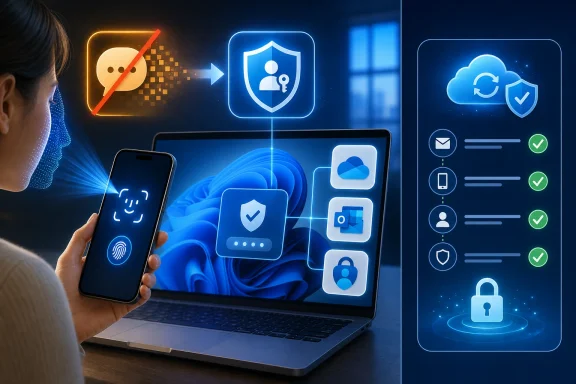
The move lands at an awkward but revealing moment for Windows. Microsoft has spent years binding Windows setup, OneDrive, Outlook, Xbox, Edge, Microsoft Store purchases, BitLocker recovery keys, and Microsoft 365 subscriptions to the same consumer identity system. Now it is admitting that one of the most familiar fallback paths for that identity — “send me a code” — is too dangerous to keep treating as normal.
Microsoft Finally Says the Quiet Part About SMS Out Loud
For more than a decade, SMS occupied the strange middle ground of consumer security. It was better than a password alone, easy enough for non-technical users, and widely supported by banks, email providers, game platforms, and government portals. It was also built on telecom plumbing that was never designed to be a vault.
Microsoft’s new position is not subtle. SMS is being removed as an authentication and recovery method for personal Microsoft accounts because it is now too closely associated with fraud, phishing, SIM-swap attacks, and account takeover. The company is pushing users toward passkeys, passwordless sign-in, Microsoft Authenticator, and verified email as the new safety net.
That framing matters because it moves SMS from the category of “less ideal but acceptable” to “legacy risk.” Microsoft is not saying users should merely prefer passkeys where convenient. It is saying the old fallback is part of the problem.
The security industry has been saying versions of this for years. SMS codes can be intercepted, socially engineered, redirected through carrier fraud, stolen by malware, or simply tricked out of a user in a convincing phishing flow. The six-digit code felt reassuring because it arrived on a physical device, but the phone number itself has always been a surprisingly weak identity anchor.
What is different now is that Microsoft is applying that security judgment to the mass consumer account system that sits underneath Windows itself. This is no longer an enterprise admin turning off SMS for a managed tenant. It is Redmond telling ordinary users that the code sent to their phone is no longer good enough for the account that may unlock their PC, their files, their email, their subscriptions, and their game library.
The Passwordless Future Has Become a Windows Policy
Microsoft has been preparing this shift for years, but the latest change makes the strategy much harder to ignore. Passkeys are no longer a nice extra for enthusiasts who enjoy testing FIDO credentials and biometric sign-in. They are becoming the default answer to a basic consumer question: how do I prove I am me?
A passkey works by replacing shared secrets with cryptographic proof. Instead of typing a password or relaying a one-time code, the user unlocks a private credential stored on a device or in a trusted credential manager. The service sees proof that the credential is present, but the secret itself is not typed into a website, sent over SMS, or exposed to a fake login page in the same way.
That is why Microsoft can credibly call passkeys phishing-resistant. A conventional password can be entered into the wrong page. An SMS code can be read aloud to a scammer or pasted into a cloned sign-in prompt. A passkey is tied to the legitimate service and normally requires local user verification through Windows Hello, Face ID, Touch ID, a device PIN, or a hardware security key.
For Windows users, the pitch is almost too clean. You sign in with your face, fingerprint, or PIN. You avoid waiting for a text message. You reduce the blast radius of a stolen password. You also reduce Microsoft’s dependence on phone carriers, international SMS delivery, and support flows that attackers have learned to exploit.
But the word normally is doing a lot of work. Passkeys are excellent when the device ecosystem is healthy, synchronized, backed up, and understood by the person using it. They are far less comforting when someone loses a phone, replaces a motherboard, wipes a laptop, changes ecosystems, or discovers that the one device holding the credential was the device they can no longer access.
That is the trade Microsoft now has to manage. Killing SMS improves security against a huge class of remote fraud. It also makes account recovery more dependent on whether the user planned ahead.
The Real Fight Is Over Recovery, Not Sign-In
Most coverage of passwordless authentication focuses on sign-in speed. That is understandable because the daily experience is visible: a face scan instead of a code, a fingerprint instead of a password, a PIN prompt instead of an SMS delay. But the decisive issue is not the ordinary Tuesday login. It is the catastrophic Thursday night recovery attempt.
Account recovery is where security and usability become enemies. Make recovery too easy, and attackers use it as the front door. Make it too strict, and legitimate users lose years of email, photos, purchases, and cloud files because they replaced a phone without exporting anything.
SMS survived for so long because it was the recovery method people understood. It was not elegant, but it was legible. A user could lose a password, click a recovery prompt, receive a code, and regain access with the same phone number they used everywhere else.
That simplicity is exactly what attackers abused. Phone numbers can be ported. Carrier support desks can be manipulated. Users can be tricked into sharing codes. Malware can read messages. Even without advanced compromise, the habit of treating any received code as a portable proof of identity has become a gift to phishing crews.
Microsoft’s answer is to push verified email and passkeys as recovery anchors. That is more secure in theory, but it creates a new hierarchy of preparedness. Users who maintain multiple verified recovery options, keep an authenticator backed up, store passkeys in a cross-device manager, and understand recovery codes will be fine. Users who treat their Microsoft account as something Windows made them create during setup may be in for a rougher education.
This is where Microsoft’s product strategy and security strategy collide. The company has made Microsoft accounts harder to avoid in Windows 11, especially during consumer setup. If an account is optional, the user bears more responsibility for understanding it. If the account is effectively the default path into the operating system, Microsoft inherits a broader duty to make its failure modes obvious.
Windows 11 Makes the Stakes Feel Bigger Than a Web Login
A personal Microsoft account is not just a login for Outlook.com anymore. For many people, it is the connective tissue across Windows 11, OneDrive backup, Edge sync, Microsoft Store licenses, Xbox identity, Microsoft 365, Copilot features, and device recovery. That makes authentication policy feel less like a website preference and more like platform governance.
This is why the end of SMS will irritate some Windows power users even if they agree with the security rationale. Enthusiasts routinely install Windows in virtual machines, test Insider builds, rebuild PCs, swap hardware, and sign into throwaway or secondary devices. In those scenarios, SMS was often the dumb fallback that worked when biometric hardware, credential sync, or app-based approval did not.
Microsoft wants the Windows experience to be passwordless, biometric, and cloud-backed. The messy reality is that Windows is also an operating system for labs, repair benches, offline installs, family hand-me-downs, local accounts, and machines that are constantly being wiped and rebuilt. A sign-in model optimized for a stable laptop and phone pair can feel brittle in those edge cases.
The company has already been under pressure for its Microsoft account requirements during Windows 11 setup. Any change that removes a familiar recovery option will be read through that lens. Users who dislike mandatory cloud identity will see the SMS phaseout not as an isolated security improvement but as another step toward a Windows that assumes Microsoft’s account infrastructure is the center of the PC.
That reaction is not entirely fair, but it is predictable. Security teams evaluate authentication methods by exploitability. Users evaluate them by whether they can get back into their account at 11 p.m. after a phone replacement. Microsoft has to satisfy both groups, and the groups are not arguing from the same lived experience.
SMS Was Bad Security, But It Was Good Theater
The reason SMS lasted so long is not because experts loved it. It lasted because it gave users a visible ritual. The phone buzzed. A code appeared. The user typed it. The account opened. Security felt like an event.
Passkeys are better security, but they are often less narratively satisfying. A prompt appears, a biometric check succeeds, and the user is in. The strongest part of the process — cryptographic origin binding — is invisible. The weakest part — what happens if the device is gone — is deferred until crisis.
That creates a communication problem. Microsoft can say passkeys are phishing-resistant, and it is right. But many users hear “my face unlocks my account,” which is not quite the same thing. The biometric normally unlocks a local credential; it is not sent to Microsoft as a magic face password. That distinction matters, especially for users who distrust biometrics or misunderstand how Windows Hello works.
The company also has to avoid overselling passkeys as invincible. They are a major improvement over passwords and SMS, but they do not eliminate every account risk. A compromised endpoint, malicious browser extension, coerced user, poorly designed recovery flow, or insecure fallback method can still undermine an otherwise strong authentication system.
The security value of passkeys depends on the whole chain. If Microsoft removes SMS but leaves weak email recovery on an account whose email provider lacks strong MFA, the risk may simply move. If a user stores every credential in one cloud-synced ecosystem without recovery planning, the single point of failure changes shape rather than disappearing.
That is why the phrase passwordless can be misleading. Passwordless sign-in does not mean consequence-free identity. It means the burden shifts from remembering secrets to managing trusted devices, recovery paths, and credential stores. For many users, that is a better burden. For some, it is a new one they have not been taught to carry.
The Fraud Case Is Stronger Than the Nostalgia
It is tempting to frame this as Microsoft being heavy-handed, because Microsoft often is. The company has a long habit of turning sensible security goals into coercive user experiences. But on the narrow question of whether SMS deserves to remain a primary authentication and recovery method, the answer is increasingly no.
SIM swapping is no longer exotic. Criminals have used carrier account takeovers, bribed insiders, social engineering, and port-out fraud to seize numbers and intercept codes. Even when carriers improve controls, phone numbers remain portable identifiers governed by a sprawling telecom ecosystem far outside Microsoft’s control.
Phishing has also evolved around one-time codes. Attackers do not need to break encryption if they can persuade users to enter a code into a fake page in real time. Adversary-in-the-middle kits can capture credentials and relay sessions quickly enough to defeat traditional MFA flows that depend on user-entered codes.
SMS also teaches a dangerous habit: that identity proof is something you can copy from one context into another. A passkey is designed to resist that portability. It is not supposed to be a magic number that works wherever it is pasted. That single design difference is the heart of the security improvement.
So yes, Microsoft is right to retire SMS. The uncomfortable part is not the conclusion. It is the implementation burden the company is placing on a user base that ranges from security engineers to grandparents who only created a Microsoft account because Windows asked them to.
The Authenticator App Is Both Bridge and Bottleneck
Microsoft Authenticator sits in the middle of this transition. For many users, it will be the practical bridge from SMS to stronger sign-in. It can provide push approvals, verification codes, passwordless Microsoft account sign-in, and passkey support depending on the scenario.
That makes it useful, but also powerful in a way users need to respect. If Authenticator becomes the only practical way into an account, then phone migration is no longer a casual chore. Cloud backup, recovery setup, secondary email verification, and alternative sign-in methods become part of basic account hygiene.
This is where Microsoft should be far more explicit inside Windows. A vague “sign in faster” prompt is not enough. Users need plain-language warnings before they decommission an old phone, wipe a device, change phone numbers, or remove recovery email access. The system should treat account recovery readiness as seriously as it treats OneDrive backup nags or Microsoft 365 upsells.
There is a broader support issue here as well. Consumer account recovery at Microsoft scale is notoriously difficult because the company cannot simply hand accounts back to anyone who sounds convincing. Automated recovery exists precisely because human support would be a fraud magnet. Removing SMS may reduce one class of fraud while increasing the number of users who discover they cannot satisfy the remaining recovery checks.
That is not an argument for keeping SMS forever. It is an argument for making the replacement experience boring, redundant, and aggressively clear. Strong authentication fails as consumer infrastructure if it only works for people who already understand strong authentication.
Verified Email Is the Weakest Link Microsoft Must Explain
Microsoft’s inclusion of verified email as a recovery option is practical, but it deserves scrutiny. Email is still the root of identity for much of the internet. It is also frequently protected by the same weak passwords, reused credentials, and recovery flows that passkeys are meant to improve.
If a Microsoft account drops SMS but relies on a secondary email account with no MFA, the overall security gain may be uneven. Attackers follow the path of least resistance. If the phone number is no longer useful, the recovery inbox becomes more attractive.
This is particularly important for users who use old ISP email addresses, abandoned Gmail accounts, school accounts they may eventually lose, or mailboxes they rarely check. A verified email address is not automatically a secure recovery method. It is only as good as the security and continuity of that mailbox.
Microsoft should therefore treat recovery email verification as more than a checkbox. The account dashboard should nudge users to secure the recovery email itself, confirm it remains accessible, and avoid relying on addresses tied to employers, schools, or providers they may leave. That advice sounds mundane, but mundane is where account recovery succeeds or fails.
The company’s strongest version of this transition would make users build a recovery portfolio: at least one passkey, at least one authenticator path, at least one verified and secured email, and ideally a printed or stored recovery code where available. The weakest version simply removes SMS and assumes users will figure out the rest when something breaks.
Enterprise IT Has Already Seen This Movie
For sysadmins, Microsoft’s SMS retreat will feel familiar. Enterprise identity teams have spent years moving users away from SMS and voice call MFA toward stronger methods in Microsoft Entra ID. Conditional Access, authentication strength policies, FIDO2 keys, certificate-based authentication, and number matching all emerged from the same hard lesson: attackers adapt to whatever the default allows.
The consumer Microsoft account change is not identical to enterprise MFA policy, but the direction is the same. Microsoft wants phishing-resistant authentication to become ordinary. That means the tools once reserved for security-conscious organizations are being pushed into consumer workflows.
There is a lesson from enterprise rollouts: the technical switch is the easy part. The hard part is enrollment, exception handling, lost devices, executive resistance, help desk load, accessibility, travel scenarios, and users who ignore every prompt until the old method disappears. Consumer Microsoft accounts have all of those problems, minus a help desk that knows the user personally.
IT pros supporting families, small businesses, or community organizations should assume they will become the informal help desk for this change. The advice should be simple: do not wait for Microsoft to force the issue. Add passkeys now, verify recovery email, configure Authenticator backup where appropriate, and document recovery options before replacing devices.
Small businesses using personal Microsoft accounts in places where they should probably use managed work accounts have even more reason to pay attention. If a shared personal account still depends on someone’s phone number, the SMS phaseout is a warning shot. Shared credentials were always a bad idea; stronger authentication often makes them operationally painful as well as insecure.
The Windows Account Debate Just Got a Security Upgrade
Microsoft’s critics will connect this change to the larger fight over Windows 11 account requirements, and they will not be entirely wrong. The more Windows depends on a Microsoft account, the more every authentication change becomes part of the operating system experience. A cloud identity problem can become a PC setup problem. A recovery failure can become a device access problem.
At the same time, local-account nostalgia should not obscure the security reality. A modern Windows user often expects cloud file backup, password sync, device finding, Store licensing, Xbox services, and cross-device settings. Those features need identity. Identity needs protection. Protection needs stronger authentication than SMS.
The better critique is not that Microsoft is wrong to kill SMS. It is that Microsoft must stop treating account changes as quiet support-page events. If authentication policy affects the Windows out-of-box experience, Microsoft should communicate it like a platform change, not a footnote.
There is also an accessibility and inclusion angle. Not every user has a modern smartphone, reliable biometric hardware, stable broadband, or comfort with QR-code handoffs. Some users rely on assistive technologies. Others travel internationally and switch SIMs, share devices, or live in environments where device loss is common. A secure system that assumes affluent device stability can accidentally punish the people least able to recover smoothly.
Microsoft can solve much of this with better onboarding. It can show users which recovery paths are active, which are weak, and which will still work if a phone is lost. It can simulate recovery readiness before disaster. It can make passkey management visible rather than mystical. Above all, it can stop presenting security setup as an annoying interruption and start presenting it as part of owning the account.
The Practical Work Starts Before the Prompt Appears
The right response for users is not panic. It is preparation. If your Microsoft account still has a phone number attached for verification or recovery, assume that method is living on borrowed time. The safer path is to build redundancy now, while you still have access to everything.
Start by checking the security information on your personal Microsoft account. Confirm that your recovery email is current, accessible, and itself protected by strong authentication. If the recovery address is an old account you barely use, replace it with one you actually maintain.
Then add a passkey from a device you trust. If you live across ecosystems, think carefully about where that passkey is stored. A Windows Hello-bound credential, a hardware security key, an iCloud Keychain passkey, and a Google Password Manager passkey do not all behave identically when you replace devices or switch platforms.
Authenticator users should review backup and recovery settings before upgrading phones. The most painful MFA stories often begin with someone wiping an old handset before confirming the new one can approve sign-ins. That mistake is recoverable in some setups and disastrous in others.
Finally, treat your Microsoft account as infrastructure, not as a disposable login. If it protects BitLocker recovery keys, OneDrive files, Outlook mail, Xbox purchases, or Microsoft 365 billing, then its recovery plan deserves the same attention you give to backups.
Microsoft’s SMS Funeral Comes With Homework
The headline version of this story is simple: Microsoft is removing SMS because SMS is unsafe. The user-facing reality is more practical and more demanding. The new security model is better, but only if people set it up before they need it.
- Microsoft is phasing out SMS codes for personal Microsoft account authentication and recovery, replacing them with passkeys, authenticator-based methods, and verified email.
- The security rationale is sound because SMS codes are vulnerable to SIM swapping, phishing, interception, and social engineering.
- Passkeys reduce phishing risk by using cryptographic credentials tied to legitimate services and unlocked locally with biometrics, PINs, or hardware-backed authentication.
- The biggest risk for ordinary users is not daily sign-in but account recovery after a lost phone, wiped PC, changed number, or inaccessible email account.
- Windows users should verify recovery email, add at least one passkey, review Microsoft Authenticator backup options, and avoid relying on a single device as the only route back into the account.
- Microsoft needs to communicate this as a Windows identity transition, not merely a security advisory, because personal Microsoft accounts now sit at the center of the consumer PC experience.
Microsoft is right that SMS authentication has become too compromised to remain a trusted pillar of account security, but the company’s success will be measured less by how quickly it can remove the old option than by how few legitimate users it strands in the process. The passwordless future is arriving not as a flashy Windows feature but as a slow redefinition of account ownership: your identity will be safer when it is harder to steal, but only if it is not also harder for you to recover.
References
- Microsoft admits SMS login is trash and leading source of fraud - Windows Central Windows Central · Tue, 19 May 2026 19:39:23 GMT
- support.microsoft.com support.microsoft.com