
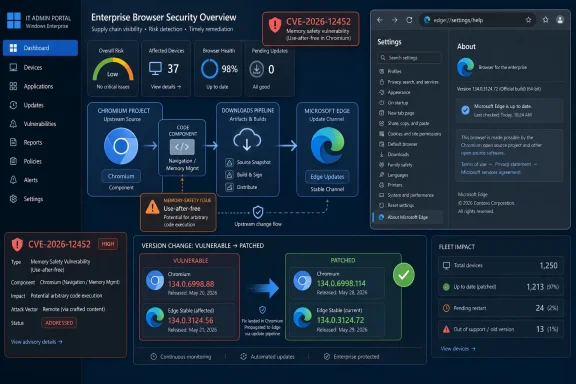
Microsoft documents CVE-2026-12452 in the Security Update Guide because Microsoft Edge is built on Chromium, and the vulnerable Chromium Downloads code was consumed by Edge before Microsoft shipped an Edge update that removed the exposure. This is not Microsoft claiming the original bug was born in Redmond. It is Microsoft telling Windows administrators that a browser component in Microsoft’s supported product line inherited a Chrome-family flaw and now has a patched build.
That distinction matters because modern browser security no longer follows old vendor borders. Edge, Chrome, Brave, Vivaldi, Opera, and many embedded browser runtimes all ride on Chromium to varying degrees. When a memory-safety bug lands in Chromium’s shared plumbing, the security question for enterprises is not “whose logo is on the browser?” but “which downstream builds shipped the vulnerable code, and which version proves we are past it?”
The Security Update Guide used to feel like a map of Microsoft’s own codebase: Windows kernel bugs, Office parsing flaws, Exchange remote code execution, .NET issues, and the occasional driver problem. Edge changed that model. Once Microsoft abandoned the old EdgeHTML engine and rebuilt Edge on Chromium, the browser became both a Microsoft product and a downstream consumer of a massive open-source project largely stewarded by Google.
That is why a Chrome CVE can appear in Microsoft’s database without being a contradiction. The vulnerable component may be Chromium OSS, but the product exposed to Microsoft customers is Microsoft Edge. If the same code path exists in Edge, Microsoft has to treat the issue as part of its patch responsibility.
CVE-2026-12452 is described as a use-after-free vulnerability in Downloads. In practical terms, a use-after-free bug means software continues to reference memory after it has been released, creating a path to memory corruption. In browser land, that kind of flaw is especially sensitive because attacker-controlled web content can sometimes steer memory behavior in ways that turn a crash into code execution or sandbox-adjacent exploitation.
The user-facing wording on Microsoft’s page gets straight to the point: the CVE is in Chromium Open Source Software consumed by Microsoft Edge, and the Security Update Guide entry exists to announce that the latest Edge build is no longer vulnerable. That is the whole story in one sentence — but the implications are larger.
Microsoft Edge is one of the most important Chromium downstreams because it is installed by default on modern Windows systems and integrated into many Microsoft workflows. It is also tied to enterprise policy, Microsoft 365 identity experiences, WebView2 applications, and Windows management tooling. A vulnerability in a Chromium subsystem can therefore become a Microsoft security issue as soon as the affected code ships in Edge.
That does not mean every Chromium CVE maps perfectly across every Chromium-based browser. Downstream vendors may disable features, carry patches, lag behind, or ship different platform-specific code. But the burden is on the vendor to say whether its product is affected and which version fixes it. Microsoft’s Security Update Guide entry is that declaration.
For administrators, this is more useful than purist taxonomy. The point of a CVE entry is not to settle authorship; it is to drive remediation. If Edge before a given version includes vulnerable Downloads code and Edge after that version does not, then Microsoft’s database is exactly where many Windows shops expect to see the notice.
A memory bug there is not automatically catastrophic, but it deserves attention because downloads are one of the places where the web crosses into the local machine. Browsers must parse filenames, MIME types, redirects, file paths, temporary states, quarantine markers, and policy decisions. They must do this while hostile web pages try to trick the user, evade warnings, or exploit differences among platforms.
Use-after-free issues are particularly unwelcome in these high-churn components. A browser is constantly allocating and releasing objects as tabs open, downloads start and cancel, pages navigate, and security checks complete. If an attacker can influence that sequence, a stale memory reference may become more than a stability bug.
That is why browser vendors often withhold exploit details until most users are patched. Even terse CVE language can provide enough signal for vulnerability researchers and attackers to begin hunting nearby code paths. The public record has to balance transparency with the reality that browser bugs are highly weaponizable.
The exact Edge version matters because browsers are updated outside the classic Windows Patch Tuesday rhythm. Edge has its own release train, its own updater, and its own stable, beta, dev, and canary channels. On managed Windows systems, update timing can also depend on enterprise policy.
To see the Microsoft Edge version, open Edge, choose the three-dot menu, go to Help and feedback, and select About Microsoft Edge. You can also type
For Google Chrome, the comparable page is available through the three-dot menu under Help, then About Google Chrome, or by typing
The important operational detail is that downloading an update is not always the same as running the patched code. Browsers often need a restart to complete replacement of the executable and related components. If the About page says an update is pending relaunch, the browser is still in the gray zone until that restart happens.
For enterprise administrators, the same mechanism creates a different kind of tension. Browsers are now mission-critical application platforms, and rapid updates can break extensions, line-of-business web apps, authentication flows, or kiosk deployments. The security team wants the fix immediately; the desktop engineering team wants validation; the help desk wants fewer surprises.
Edge’s Chromium base intensifies that tension because Microsoft is not the only party driving the cadence. Chromium fixes move quickly, and downstream browser vendors must absorb them quickly to avoid leaving users exposed. That is good for security, but it narrows the window for traditional change control.
The right answer is not to freeze browser updates indefinitely. A frozen browser is not a stable platform; it is an accumulating liability. The better answer is to build a browser update process that treats stable-channel security releases as routine, tests business-critical workflows continuously, and uses rollback only as an exception rather than a strategy.
That matters for asset inventory. A Windows fleet may contain Chrome, Edge, WebView2 Runtime, Electron apps, and other Chromium-derived components. Patching Chrome alone does not prove Edge is patched. Patching Windows alone does not prove Edge is current. Patching Edge alone does not prove embedded runtimes are safe.
Edge also exists across platforms. While WindowsForum readers naturally focus on Windows, Edge runs on macOS, Linux, iOS, and Android, and the platform-specific exposure of a Chromium bug can vary. A vulnerability described in Chrome on Android may still cause Microsoft to document Edge status if relevant code or security posture intersects with Edge’s supported builds.
The Security Update Guide is therefore doing more than announcing a fix. It is telling vulnerability management systems, auditors, and administrators that this Chromium-origin issue belongs in the Microsoft product risk ledger. That is not noise; it is supply-chain hygiene.
That makes browser-engine patching relevant even for users who rarely launch Edge as a standalone browser. If an application uses the Evergreen WebView2 Runtime, its security posture depends on that runtime staying current. If an application ships or pins a fixed runtime, administrators need to understand who is responsible for updating it.
CVE-2026-12452 is framed around Downloads, so the immediate WebView2 relevance depends on whether an app exposes affected download behavior. But the larger lesson stands: Chromium vulnerabilities are no longer confined to browser icons on the taskbar. They can ride inside desktop applications, authentication surfaces, admin consoles, and productivity tools.
This is where many vulnerability scans underperform. They find Chrome and Edge versions but miss embedded Chromium runtimes or applications that bundle old frameworks. Security teams that treat Chromium as a single product will keep being surprised by Chromium as an ecosystem.
There is also a diplomacy layer. Chromium vulnerabilities are frequently discovered, triaged, and patched through processes involving Google, external researchers, and downstream vendors. Microsoft must acknowledge the issue without implying it owns the original code or duplicating every detail from the upstream advisory.
That leaves administrators with a familiar frustration: the CVE page tells them enough to patch, but not always enough to model exploitability in their environment. Was the bug reachable on desktop Edge? Was it Android-only upstream? Was exploitation observed? Was the vulnerable path disabled in some downstream builds? Public advisories often answer only part of that.
The practical response is to resist overfitting the available prose. If Microsoft says the latest Edge is no longer vulnerable, the safe reading is that Microsoft has identified a relevant exposure or dependency and wants Edge customers on the fixed build. In vulnerability management, that is enough to prioritize verification.
A patch dashboard may report success while browsers remain open for days. A laptop may be off VPN and miss management policy. A kiosk may run an old Edge build because its image is stale. A developer workstation may have multiple channels installed, with one current and another forgotten.
The manual check is simple: open the browser’s About page and read the version. The administrative equivalent is to query installed versions across the fleet and compare them against the fixed release. The security equivalent is to ensure that stale browser processes are actually restarted and that update services are not blocked by policy, network filtering, or broken installers.
This is not glamorous security work. It is the plumbing that decides whether a CVE is a closed ticket or a latent foothold.
That chain is the modern desktop. The operating system still matters, but the browser is the most exposed application runtime on most machines. It processes hostile content all day, mediates identity, handles files, and increasingly hosts business applications that used to be native software.
Microsoft’s presence in the Chromium ecosystem makes Windows safer in some ways because Edge benefits from the enormous security investment behind Chromium. It also means Microsoft inherits the velocity and blast radius of that ecosystem. When Chromium moves, Edge must move.
For IT pros, the conclusion is uncomfortable but useful: browser patching is not a side task. It is endpoint security.
That distinction matters because modern browser security no longer follows old vendor borders. Edge, Chrome, Brave, Vivaldi, Opera, and many embedded browser runtimes all ride on Chromium to varying degrees. When a memory-safety bug lands in Chromium’s shared plumbing, the security question for enterprises is not “whose logo is on the browser?” but “which downstream builds shipped the vulnerable code, and which version proves we are past it?”
 Microsoft’s Security Guide Is Now a Supply-Chain Ledger
The Security Update Guide used to feel like a map of Microsoft’s own codebase: Windows kernel bugs, Office parsing flaws, Exchange remote code execution, .NET issues, and the occasional driver problem. Edge changed that model. Once Microsoft abandoned the old EdgeHTML engine and rebuilt Edge on Chromium, the browser became both a Microsoft product and a downstream consumer of a massive open-source project largely stewarded by Google.That is why a Chrome CVE can appear in Microsoft’s database without being a contradiction. The vulnerable component may be Chromium OSS, but the product exposed to Microsoft customers is Microsoft Edge. If the same code path exists in Edge, Microsoft has to treat the issue as part of its patch responsibility.
CVE-2026-12452 is described as a use-after-free vulnerability in Downloads. In practical terms, a use-after-free bug means software continues to reference memory after it has been released, creating a path to memory corruption. In browser land, that kind of flaw is especially sensitive because attacker-controlled web content can sometimes steer memory behavior in ways that turn a crash into code execution or sandbox-adjacent exploitation.
The user-facing wording on Microsoft’s page gets straight to the point: the CVE is in Chromium Open Source Software consumed by Microsoft Edge, and the Security Update Guide entry exists to announce that the latest Edge build is no longer vulnerable. That is the whole story in one sentence — but the implications are larger.
Edge Is Microsoft’s Product Even When the Bug Is Chromium’s
There is a common trap in browser vulnerability tracking: assuming “Chrome CVE” means “Chrome-only CVE.” That was never a safe assumption, and it is increasingly misleading. Chromium is not merely the Chrome browser with a different icon; it is the engine room for a family of browsers and browser-adjacent runtimes.Microsoft Edge is one of the most important Chromium downstreams because it is installed by default on modern Windows systems and integrated into many Microsoft workflows. It is also tied to enterprise policy, Microsoft 365 identity experiences, WebView2 applications, and Windows management tooling. A vulnerability in a Chromium subsystem can therefore become a Microsoft security issue as soon as the affected code ships in Edge.
That does not mean every Chromium CVE maps perfectly across every Chromium-based browser. Downstream vendors may disable features, carry patches, lag behind, or ship different platform-specific code. But the burden is on the vendor to say whether its product is affected and which version fixes it. Microsoft’s Security Update Guide entry is that declaration.
For administrators, this is more useful than purist taxonomy. The point of a CVE entry is not to settle authorship; it is to drive remediation. If Edge before a given version includes vulnerable Downloads code and Edge after that version does not, then Microsoft’s database is exactly where many Windows shops expect to see the notice.
The Downloads Component Is a Bigger Attack Surface Than It Sounds
“Downloads” sounds mundane, almost boring. Users click a file, the browser saves it, maybe SmartScreen or another protection layer scans it, and life goes on. But browser download handling sits at a messy intersection of web content, file metadata, permissions, origin policy, operating system integration, user prompts, and security warnings.A memory bug there is not automatically catastrophic, but it deserves attention because downloads are one of the places where the web crosses into the local machine. Browsers must parse filenames, MIME types, redirects, file paths, temporary states, quarantine markers, and policy decisions. They must do this while hostile web pages try to trick the user, evade warnings, or exploit differences among platforms.
Use-after-free issues are particularly unwelcome in these high-churn components. A browser is constantly allocating and releasing objects as tabs open, downloads start and cancel, pages navigate, and security checks complete. If an attacker can influence that sequence, a stale memory reference may become more than a stability bug.
That is why browser vendors often withhold exploit details until most users are patched. Even terse CVE language can provide enough signal for vulnerability researchers and attackers to begin hunting nearby code paths. The public record has to balance transparency with the reality that browser bugs are highly weaponizable.
The Version Number Is the Real Patch
For everyday users, the answer to “am I safe?” is deceptively simple: check the browser version. For CVE-2026-12452, third-party vulnerability records describe Google Chrome on Android before version 149.0.7827.155 as affected. Microsoft’s message is broader for its own ecosystem: the latest Microsoft Edge Chromium-based release is no longer vulnerable.The exact Edge version matters because browsers are updated outside the classic Windows Patch Tuesday rhythm. Edge has its own release train, its own updater, and its own stable, beta, dev, and canary channels. On managed Windows systems, update timing can also depend on enterprise policy.
To see the Microsoft Edge version, open Edge, choose the three-dot menu, go to Help and feedback, and select About Microsoft Edge. You can also type
edge://settings/help into the address bar. That page shows the installed version and normally triggers an update check.For Google Chrome, the comparable page is available through the three-dot menu under Help, then About Google Chrome, or by typing
chrome://settings/help. On Android, the version can also be checked through the app’s settings page or the Play Store listing, depending on the device and management state.The important operational detail is that downloading an update is not always the same as running the patched code. Browsers often need a restart to complete replacement of the executable and related components. If the About page says an update is pending relaunch, the browser is still in the gray zone until that restart happens.
Auto-Update Solves the Consumer Problem and Complicates the Enterprise One
For home users, browser security has largely become an auto-update success story. Most people do not read CVE pages. They receive a browser update, restart eventually, and move on. That is not perfect, but it is far better than the old world of manually downloading patched installers.For enterprise administrators, the same mechanism creates a different kind of tension. Browsers are now mission-critical application platforms, and rapid updates can break extensions, line-of-business web apps, authentication flows, or kiosk deployments. The security team wants the fix immediately; the desktop engineering team wants validation; the help desk wants fewer surprises.
Edge’s Chromium base intensifies that tension because Microsoft is not the only party driving the cadence. Chromium fixes move quickly, and downstream browser vendors must absorb them quickly to avoid leaving users exposed. That is good for security, but it narrows the window for traditional change control.
The right answer is not to freeze browser updates indefinitely. A frozen browser is not a stable platform; it is an accumulating liability. The better answer is to build a browser update process that treats stable-channel security releases as routine, tests business-critical workflows continuously, and uses rollback only as an exception rather than a strategy.
Security Update Guide Entries Are Also Inventory Signals
Microsoft’s inclusion of this CVE is useful because it gives defenders a Microsoft-native object to track. Many organizations do not ingest every Google Chrome advisory into their Windows vulnerability dashboards, but they do ingest Microsoft’s Security Update Guide. When Edge is affected, a Microsoft CVE entry helps close that visibility gap.That matters for asset inventory. A Windows fleet may contain Chrome, Edge, WebView2 Runtime, Electron apps, and other Chromium-derived components. Patching Chrome alone does not prove Edge is patched. Patching Windows alone does not prove Edge is current. Patching Edge alone does not prove embedded runtimes are safe.
Edge also exists across platforms. While WindowsForum readers naturally focus on Windows, Edge runs on macOS, Linux, iOS, and Android, and the platform-specific exposure of a Chromium bug can vary. A vulnerability described in Chrome on Android may still cause Microsoft to document Edge status if relevant code or security posture intersects with Edge’s supported builds.
The Security Update Guide is therefore doing more than announcing a fix. It is telling vulnerability management systems, auditors, and administrators that this Chromium-origin issue belongs in the Microsoft product risk ledger. That is not noise; it is supply-chain hygiene.
WebView2 Is the Quiet Reason Admins Should Pay Attention
The Edge browser is the visible part of Microsoft’s Chromium bet. WebView2 is the quieter part. It allows Windows applications to embed web content using the Edge Chromium engine, and it has become a common way for developers to modernize interfaces without building a full browser stack.That makes browser-engine patching relevant even for users who rarely launch Edge as a standalone browser. If an application uses the Evergreen WebView2 Runtime, its security posture depends on that runtime staying current. If an application ships or pins a fixed runtime, administrators need to understand who is responsible for updating it.
CVE-2026-12452 is framed around Downloads, so the immediate WebView2 relevance depends on whether an app exposes affected download behavior. But the larger lesson stands: Chromium vulnerabilities are no longer confined to browser icons on the taskbar. They can ride inside desktop applications, authentication surfaces, admin consoles, and productivity tools.
This is where many vulnerability scans underperform. They find Chrome and Edge versions but miss embedded Chromium runtimes or applications that bundle old frameworks. Security teams that treat Chromium as a single product will keep being surprised by Chromium as an ecosystem.
Microsoft’s Wording Is Dry Because the Patch Message Is the Product
Microsoft’s short answer — Chromium OSS consumed by Edge, latest Edge no longer vulnerable — can feel unsatisfying to readers who want a full technical breakdown. But that terse language reflects how browser CVEs are often coordinated. The vendor’s first job is to identify affected products and ship fixed versions, not to publish exploit recipes.There is also a diplomacy layer. Chromium vulnerabilities are frequently discovered, triaged, and patched through processes involving Google, external researchers, and downstream vendors. Microsoft must acknowledge the issue without implying it owns the original code or duplicating every detail from the upstream advisory.
That leaves administrators with a familiar frustration: the CVE page tells them enough to patch, but not always enough to model exploitability in their environment. Was the bug reachable on desktop Edge? Was it Android-only upstream? Was exploitation observed? Was the vulnerable path disabled in some downstream builds? Public advisories often answer only part of that.
The practical response is to resist overfitting the available prose. If Microsoft says the latest Edge is no longer vulnerable, the safe reading is that Microsoft has identified a relevant exposure or dependency and wants Edge customers on the fixed build. In vulnerability management, that is enough to prioritize verification.
Checking the Browser Version Is a Small Act of Incident Prevention
The user question at the end of the Microsoft entry — “How can I see the version of the browser?” — looks almost too basic for a CVE page. It is not. Version verification is where many security programs quietly fail.A patch dashboard may report success while browsers remain open for days. A laptop may be off VPN and miss management policy. A kiosk may run an old Edge build because its image is stale. A developer workstation may have multiple channels installed, with one current and another forgotten.
The manual check is simple: open the browser’s About page and read the version. The administrative equivalent is to query installed versions across the fleet and compare them against the fixed release. The security equivalent is to ensure that stale browser processes are actually restarted and that update services are not blocked by policy, network filtering, or broken installers.
This is not glamorous security work. It is the plumbing that decides whether a CVE is a closed ticket or a latent foothold.
The Lesson Hidden in CVE-2026-12452’s Boring Label
CVE-2026-12452 will not be remembered as a landmark vulnerability unless exploitation details emerge or it becomes part of a larger campaign. Its value, for Windows administrators, is as a clean example of how browser risk now propagates. A bug in Chromium becomes a Chrome advisory, then an Edge advisory, then an enterprise patching question.That chain is the modern desktop. The operating system still matters, but the browser is the most exposed application runtime on most machines. It processes hostile content all day, mediates identity, handles files, and increasingly hosts business applications that used to be native software.
Microsoft’s presence in the Chromium ecosystem makes Windows safer in some ways because Edge benefits from the enormous security investment behind Chromium. It also means Microsoft inherits the velocity and blast radius of that ecosystem. When Chromium moves, Edge must move.
For IT pros, the conclusion is uncomfortable but useful: browser patching is not a side task. It is endpoint security.
The Fix Is Simple, but the Discipline Is Not
The concrete advice from this CVE is narrow, and that is what makes it useful. Confirm that Microsoft Edge is on the current stable build, restart the browser if an update is pending, and do not assume Windows Update alone has settled the matter. In managed environments, verify policy, telemetry, and actual installed versions rather than relying on intent.- Microsoft documented CVE-2026-12452 because Microsoft Edge consumes Chromium code, and the vulnerable Chromium component affected Edge’s security posture.
- The bug is described as a use-after-free issue in Downloads, a class of memory-safety flaw that browser vendors treat seriously because web content can influence complex browser state.
- Users can check Edge by opening
edge://settings/help, where the browser shows its version and normally checks for updates. - A browser update may not fully take effect until the browser is restarted, so “update downloaded” is not the same as “patched process running.”
- Administrators should track Edge, Chrome, WebView2 Runtime, and other Chromium-based components separately instead of treating Chromium patching as one completed action.
References
- Primary source: MSRC
Published: 2026-06-19T13:52:31-07:00
Security Update Guide - Microsoft Security Response Center
 msrc.microsoft.com
- Official source: support.microsoft.com
Update to the new Microsoft Edge | Microsoft Support
Update to the new Microsoft Edgesupport.microsoft.com - Official source: learn.microsoft.com
Release notes for Microsoft Edge Security Updates | Microsoft Learn
Release notes for Microsoft Edge Security Updateslearn.microsoft.com - Related coverage: datacomm.com
- Related coverage: www2.gov.bc.ca
- Related coverage: aha.org
h isac tlp white microsoft edge addresses exploited zero day vulnerability cve 2024 7971 8 23 2024
PDF documentwww.aha.org
