

Microsoft documents CVE-2026-12464 in the Security Update Guide because the use-after-free flaw is in Chromium open-source browser code consumed by Microsoft Edge, and the June 2026 Edge update notice tells Windows administrators which Edge builds are no longer vulnerable. The short version is that this is not “a Chrome-only problem” once the affected code ships inside Edge. It is a supply-chain vulnerability wearing a browser badge, and Microsoft’s decision to list it is less about branding than about patch accountability. To check whether you are protected, open Edge’s menu, go to Settings, then About Microsoft Edge, or type
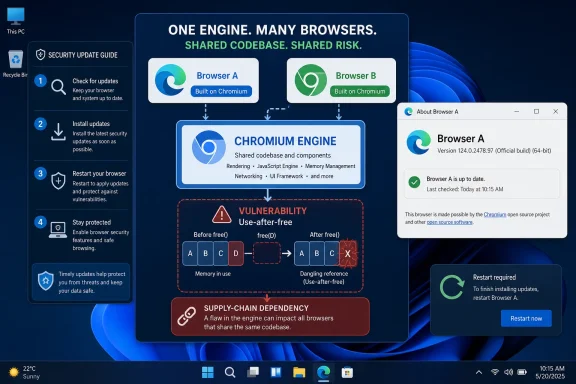
The confusion around CVE-2026-12464 is understandable because the vulnerability description points at “Browser” and Google Chrome, while the entry appears in Microsoft’s Security Update Guide. For many Windows users, Chrome and Edge still feel like competing applications, not two downstream products drawing from the same engine room. But the modern Edge security story begins with a simple fact: Microsoft Edge is Chromium-based, and Chromium vulnerabilities can become Edge vulnerabilities when the affected code is present in Microsoft’s build.
That is why Microsoft’s wording matters. The company is not claiming that Google Chrome itself is a Microsoft product. It is saying that the vulnerable Chromium open-source software is consumed by Edge, and that Microsoft is using its own security catalog to tell customers when Edge is no longer exposed.
This distinction is not bureaucratic trivia. In enterprise patching, a CVE is not merely a headline about a bug; it is an object that scanners, dashboards, compliance reports, change windows, and exception processes all have to interpret. If Microsoft left Chromium-originated Edge fixes outside the Security Update Guide, Windows shops would be forced to stitch together Google advisories, Microsoft release notes, browser version inventories, and endpoint management data on their own.
The guide entry is therefore a translation layer. It turns a Chromium security fix into something Microsoft customers can track inside the same vulnerability workflow they already use for Windows, Office, Exchange, SharePoint, SQL Server, .NET, and the rest of the Microsoft estate.
That is the point many admins miss when they see a Chrome CVE attached to Microsoft Edge. Chromium is not just “the thing Chrome uses.” It is a large open-source browser project that supplies substantial parts of the rendering, networking, JavaScript, process isolation, and browser-platform machinery used by multiple browsers and embedded runtimes.
Microsoft’s Edge team adds its own services, enterprise policies, identity integration, management hooks, security features, and release process on top of that foundation. But when the vulnerable layer sits in Chromium itself, Microsoft cannot reasonably tell customers to ignore the issue just because Google’s browser was the first place they saw the CVE.
This is also why the Security Update Guide often contains Edge entries that look different from classic Windows bulletins. A Windows kernel vulnerability usually maps cleanly to a Windows cumulative update. A Chromium vulnerability maps to a browser build, and the remediation question becomes whether the installed Edge channel has incorporated the fixed upstream code.
In other words, the inclusion of CVE-2026-12464 in Microsoft’s guide is not an admission that Chrome is bundled with Windows. It is an acknowledgement that Edge depends on the same vulnerable open-source browser substrate and that Microsoft has a duty to publish the fixed Edge version for its customers.
In a browser, that matters because the browser is exposed to hostile input by design. Every web page is untrusted code and content arriving from somewhere else. The browser’s job is to parse it, render it, isolate it, and execute carefully constrained scripts without letting the page break out into the user’s system.
That is also why many Chromium CVE descriptions sound similar. A remote attacker may be able to trigger memory corruption using a crafted HTML page. Sometimes the consequence is a crash. Sometimes it is code execution inside a renderer sandbox. Sometimes, when combined with another vulnerability, it becomes part of a full exploit chain that crosses process boundaries or escapes the sandbox entirely.
CVE-2026-12464 is described as a use-after-free issue in the browser. That wording is deliberately terse, and security vendors often avoid publishing detailed exploit mechanics until enough users have updated. The absence of a dramatic public exploit write-up should not lull administrators into treating the fix as optional. Memory-safety bugs in browsers are attractive precisely because the attack surface is universal and the delivery mechanism can be as mundane as a link, a redirect, an ad slot, or compromised web content.
The practical lesson is that Edge and Chrome security updates are not cosmetic version churn. They are the patch stream for one of the most exposed application platforms on the desktop.
Edge is the obvious example because Chromium’s public identity is tied so closely to Google Chrome. But the broader pattern is everywhere. Windows includes open-source components. Developer tools package third-party libraries. Cloud services depend on open-source projects. Applications bundle web runtimes. The vendor whose logo appears on the product is still the vendor the customer expects to answer the question: am I vulnerable, and what version fixes it?
That is why the Security Update Guide has to function less like a purity test and more like a risk ledger. If a supported Microsoft product consumes vulnerable code, Microsoft needs a place to document the impact, the affected product family, and the remediation state. Otherwise, every organization would have to reconstruct dependency exposure from raw upstream advisories.
For administrators, this means a CVE’s original ecosystem is only the first clue. A Chrome-originated vulnerability may matter to Edge. A library vulnerability may matter to an application that quietly embeds that library. A browser engine bug may matter to WebView2 even when nobody launches a full browser window. The product boundary that matters operationally is not where the bug was born; it is where the vulnerable code runs.
The Security Update Guide entry for CVE-2026-12464 is a small but useful example of that dependency-era reality. Microsoft is not merely echoing Google. It is asserting that a Microsoft-distributed browser has incorporated the upstream fix and that customers should use the fixed Edge version as their remediation target.
That page does more than display a number. It normally triggers Edge to check for updates, download an available update, and prompt for a restart when needed. Until the browser restarts, the new code may not actually be running, which is why “update pending” states are so common in browser fleets.
The version string matters because Edge’s security release notes and MSRC entries are tied to builds, not vibes. If Microsoft says the latest Edge build is no longer vulnerable, the installed version is the evidence. A machine with Edge open for weeks may have downloaded an update but still be running the older process until the user closes and relaunches the browser.
For enterprise administrators, the manual path is only the troubleshooting baseline. Fleet confidence comes from inventory. Microsoft Intune, Configuration Manager, Defender Vulnerability Management, third-party endpoint tools, and software asset platforms should be able to report the installed Edge version across devices. The operational question is not whether one test machine updated; it is how many endpoints remain on vulnerable builds after the release.
There is an uncomfortable gap here that browser vendors rarely emphasize. Automatic updating is excellent for consumer safety, but enterprises often introduce delay through maintenance windows, proxy controls, update policies, golden images, nonpersistent desktops, kiosk modes, and user behavior. A browser can be “self-updating” and still remain stale in exactly the environments where administrators believe they have central control.
That restart detail deserves more attention. Browsers are long-lived processes now. Users keep tabs, profiles, PWAs, office sessions, line-of-business dashboards, and identity workflows open for days. In some organizations, Edge is not a tool people occasionally launch; it is the shell where much of the workday happens.
A downloaded browser patch does not neutralize a running vulnerable process merely by existing on disk. The process has to be replaced. That is why browser vendors keep adding prompts, relaunch buttons, colored update indicators, and administrative controls for restart behavior.
For CVE-2026-12464, the version-check advice should therefore be read as two steps. First, confirm that Edge has received the fixed build. Second, confirm that the browser has relaunched into that build. Anything less is a partial answer.
Chromium security fixes can land whenever the risk justifies release. Microsoft then has to integrate, validate, and ship an Edge update through its own channels. The result is a security rhythm that is faster and more irregular than traditional Windows servicing.
For home users, this usually works in the background. Edge updates itself, and the main remaining task is restarting the browser. For enterprises, the release velocity is a governance problem. Security teams want urgent deployment, desktop teams want stability, application owners fear browser regressions, and compliance tools want a neat answer about whether the CVE is remediated.
The answer is rarely neat. Stable Channel, Extended Stable Channel, Beta, Dev, and Canary builds may all sit at different version numbers. WebView2 Runtime may need separate attention. Managed update policies may suppress or defer updates. Some devices may be offline, some may be sealed in VDI images, and some may be running Edge in environments where users lack permission to repair the updater.
That is why Microsoft placing Chromium-originated Edge CVEs into the Security Update Guide is helpful but not sufficient. The guide tells you what has been fixed. Your management plane tells you whether the fix has actually landed.
The scanner may be right. It may be detecting the vulnerable Edge build, the Chromium version embedded in Edge, or another Chromium-based component. But the scanner’s wording can lag behind the product reality, especially when advisories, CPE mappings, vendor pages, and installed software evidence do not line up perfectly.
CVE metadata was never designed to explain modern software supply chains elegantly. It can identify a vulnerability, affected products, severity, and references. It does not always communicate, in plain administrator language, that “this Chrome-looking bug matters because Edge ships the vulnerable Chromium code.”
That leaves IT teams to adjudicate. If the endpoint has Microsoft Edge Chromium-based installed and its version is older than the fixed Microsoft build, the relevant remediation is an Edge update, not a Chrome deployment. If Chrome is not present, the organization still may have a browser exposure through Edge. Conversely, if Edge is already updated but the scanner relies on stale detection logic, the right response may be a scanner content update or a suppression with evidence.
The danger is not false positives alone. The bigger danger is dismissal. Once teams see enough confusing browser CVE mappings, they become tempted to write them off as scanner noise. CVE-2026-12464 is a reminder that the branding mismatch may be annoying, but the underlying exposure can be real.
An organization might think of Edge as a user-facing browser and WebView2 as an invisible runtime. Attackers do not have to respect that mental model. If vulnerable browser-engine code is reachable through an embedded web experience, the patching question may extend beyond whether users actively browse with Edge.
This does not mean every Chromium CVE automatically becomes a practical WebView2 exploit in every application. Attackability depends on how the vulnerable code is exposed, what content the app loads, what sandboxing and process boundaries apply, and whether the runtime has the fixed build. But it does mean Edge servicing belongs in the same risk conversation as line-of-business applications that depend on web content.
For IT pros, the operational takeaway is to inventory both Microsoft Edge and the WebView2 Runtime where relevant. Many applications install or rely on WebView2 silently because it is now a standard part of the Windows application ecosystem. If vulnerability management treats only visible browsers as browser risk, it may miss a meaningful part of the attack surface.
This is another reason Microsoft’s own documentation matters. When the vendor that ships the runtime documents Chromium fixes in its security ecosystem, administrators get a firmer basis for deciding what must be updated and how urgently.
The recurring confusion is a documentation design problem. Security advisories are written for precision, but administrators often need translation. A better advisory experience would make the dependency chain obvious at a glance: upstream project, Microsoft product consuming it, affected channels, fixed versions, restart requirement, and whether WebView2 is implicated.
Microsoft has improved its Edge security release notes over the years, but the ecosystem is still fragmented. MSRC entries, Microsoft Learn release notes, browser About pages, enterprise update policies, scanner detections, and Google’s Chromium disclosures all describe overlapping pieces of the same event. No single page gives every stakeholder the exact view they need.
That fragmentation is not unique to Microsoft. It is the price of a browser monoculture built on a shared open-source base, distributed through competing vendors with their own release trains. The benefit is that security fixes can propagate quickly across the ecosystem. The cost is that administrators must understand which vendor is responsible for which build on which device.
For WindowsForum readers, the key is to resist brand shorthand. “Chrome CVE” is often a useful search phrase, but it is not a reliable scoping conclusion. The correct question is whether the vulnerable Chromium code exists in the software you run.
That makes Edge patching a baseline security responsibility even in Chrome-first shops. If users can launch Edge, if applications rely on WebView2, or if Edge remains present for compatibility and administrative tasks, then Edge’s update state matters. An unpatched secondary browser is still an unpatched browser.
The challenge is that browser updates sit awkwardly between endpoint patching and application lifecycle management. Security teams may expect Edge to auto-update. Desktop teams may assume Windows Update covers it. Application teams may pin versions for compatibility. Users may postpone relaunches because they do not want to lose tab state. Each assumption creates a place where a fixed CVE can remain unfixed in practice.
The better model is to treat Edge as a continuously serviced security component. That means monitoring installed versions, alerting on update failures, enforcing reasonable relaunch windows, and understanding which policies intentionally delay updates. It also means documenting exceptions, because rolling back or pinning Edge versions may solve a compatibility issue while reopening known security holes.
CVE-2026-12464 is not extraordinary in that regard. It is the kind of browser memory-safety issue administrators will keep seeing. The extraordinary thing would be an organization that can prove, quickly and across its fleet, that every relevant Edge instance has moved to a non-vulnerable build.
On that page, Edge displays the installed version and checks for updates. If an update is available, let it download and then relaunch the browser when prompted. After relaunch, return to the same page and verify that the version remains current.
On managed systems, administrators should avoid relying solely on users to self-report this number. The installed Edge version should be collected through endpoint management and compared against Microsoft’s fixed release information. Machines that have not checked in, have update failures, or are waiting on restart deserve separate attention.
The same logic applies to troubleshooting scanner findings. If a vulnerability tool flags CVE-2026-12464 against Edge, the first question is the installed Edge version. If the installed version is older than Microsoft’s fixed build, update Edge. If the installed version is at or beyond the fixed build and the scanner still reports exposure, gather evidence from the About page or management inventory and investigate whether the scanner’s detection content is stale or whether another Chromium-based component is being flagged.
This is basic hygiene, but it is also the heart of the matter. The CVE tells you what went wrong in the shared code. The Edge version tells you whether Microsoft’s copy of that code has been replaced.
edge://settings/help in the address bar and verify the installed version after the browser finishes checking for updates.
 Microsoft’s Browser Is Chromium With a Microsoft Release Obligation
The confusion around CVE-2026-12464 is understandable because the vulnerability description points at “Browser” and Google Chrome, while the entry appears in Microsoft’s Security Update Guide. For many Windows users, Chrome and Edge still feel like competing applications, not two downstream products drawing from the same engine room. But the modern Edge security story begins with a simple fact: Microsoft Edge is Chromium-based, and Chromium vulnerabilities can become Edge vulnerabilities when the affected code is present in Microsoft’s build.That is why Microsoft’s wording matters. The company is not claiming that Google Chrome itself is a Microsoft product. It is saying that the vulnerable Chromium open-source software is consumed by Edge, and that Microsoft is using its own security catalog to tell customers when Edge is no longer exposed.
This distinction is not bureaucratic trivia. In enterprise patching, a CVE is not merely a headline about a bug; it is an object that scanners, dashboards, compliance reports, change windows, and exception processes all have to interpret. If Microsoft left Chromium-originated Edge fixes outside the Security Update Guide, Windows shops would be forced to stitch together Google advisories, Microsoft release notes, browser version inventories, and endpoint management data on their own.
The guide entry is therefore a translation layer. It turns a Chromium security fix into something Microsoft customers can track inside the same vulnerability workflow they already use for Windows, Office, Exchange, SharePoint, SQL Server, .NET, and the rest of the Microsoft estate.
The CVE Is About Code Ownership, Not Browser Loyalty
CVE names do not care about marketing boundaries. A memory-safety flaw in shared browser code does not become safer because it is viewed through a blue-green Edge icon instead of a multicolor Chrome icon. If the vulnerable Chromium component is present in both products, both vendors have to care, even if one discovered the bug, another issued the original advisory, and a third-party scanner later surfaces the CVE on a Windows endpoint.That is the point many admins miss when they see a Chrome CVE attached to Microsoft Edge. Chromium is not just “the thing Chrome uses.” It is a large open-source browser project that supplies substantial parts of the rendering, networking, JavaScript, process isolation, and browser-platform machinery used by multiple browsers and embedded runtimes.
Microsoft’s Edge team adds its own services, enterprise policies, identity integration, management hooks, security features, and release process on top of that foundation. But when the vulnerable layer sits in Chromium itself, Microsoft cannot reasonably tell customers to ignore the issue just because Google’s browser was the first place they saw the CVE.
This is also why the Security Update Guide often contains Edge entries that look different from classic Windows bulletins. A Windows kernel vulnerability usually maps cleanly to a Windows cumulative update. A Chromium vulnerability maps to a browser build, and the remediation question becomes whether the installed Edge channel has incorporated the fixed upstream code.
In other words, the inclusion of CVE-2026-12464 in Microsoft’s guide is not an admission that Chrome is bundled with Windows. It is an acknowledgement that Edge depends on the same vulnerable open-source browser substrate and that Microsoft has a duty to publish the fixed Edge version for its customers.
Use-After-Free Bugs Are Small Mistakes With Large Blast Radius
The phrase use after free sounds obscure, but the class of bug is one of the oldest and most consequential forms of memory corruption. A program allocates memory, releases it when it thinks the memory is no longer needed, and later mistakenly uses the released memory again. If an attacker can influence what occupies that memory after it has been freed, the program may behave in ways its developers never intended.In a browser, that matters because the browser is exposed to hostile input by design. Every web page is untrusted code and content arriving from somewhere else. The browser’s job is to parse it, render it, isolate it, and execute carefully constrained scripts without letting the page break out into the user’s system.
That is also why many Chromium CVE descriptions sound similar. A remote attacker may be able to trigger memory corruption using a crafted HTML page. Sometimes the consequence is a crash. Sometimes it is code execution inside a renderer sandbox. Sometimes, when combined with another vulnerability, it becomes part of a full exploit chain that crosses process boundaries or escapes the sandbox entirely.
CVE-2026-12464 is described as a use-after-free issue in the browser. That wording is deliberately terse, and security vendors often avoid publishing detailed exploit mechanics until enough users have updated. The absence of a dramatic public exploit write-up should not lull administrators into treating the fix as optional. Memory-safety bugs in browsers are attractive precisely because the attack surface is universal and the delivery mechanism can be as mundane as a link, a redirect, an ad slot, or compromised web content.
The practical lesson is that Edge and Chrome security updates are not cosmetic version churn. They are the patch stream for one of the most exposed application platforms on the desktop.
The Security Update Guide Is Becoming a Map of Dependencies
Microsoft’s Security Update Guide used to feel more like a catalog of Microsoft-authored flaws. That world is gone. Modern software is a stack of first-party code, open-source components, third-party libraries, cloud services, update agents, embedded runtimes, and shared frameworks. A vulnerability may originate outside Redmond and still become a Microsoft customer problem the moment it ships inside a Microsoft-supported product.Edge is the obvious example because Chromium’s public identity is tied so closely to Google Chrome. But the broader pattern is everywhere. Windows includes open-source components. Developer tools package third-party libraries. Cloud services depend on open-source projects. Applications bundle web runtimes. The vendor whose logo appears on the product is still the vendor the customer expects to answer the question: am I vulnerable, and what version fixes it?
That is why the Security Update Guide has to function less like a purity test and more like a risk ledger. If a supported Microsoft product consumes vulnerable code, Microsoft needs a place to document the impact, the affected product family, and the remediation state. Otherwise, every organization would have to reconstruct dependency exposure from raw upstream advisories.
For administrators, this means a CVE’s original ecosystem is only the first clue. A Chrome-originated vulnerability may matter to Edge. A library vulnerability may matter to an application that quietly embeds that library. A browser engine bug may matter to WebView2 even when nobody launches a full browser window. The product boundary that matters operationally is not where the bug was born; it is where the vulnerable code runs.
The Security Update Guide entry for CVE-2026-12464 is a small but useful example of that dependency-era reality. Microsoft is not merely echoing Google. It is asserting that a Microsoft-distributed browser has incorporated the upstream fix and that customers should use the fixed Edge version as their remediation target.
Edge Version Checking Is a Security Control, Not a Help-Menu Ritual
For an individual user, checking the Edge version is straightforward. Click the three-dot menu in the upper-right corner, choose Settings, then choose About Microsoft Edge. The same page is reachable directly by typingedge://settings/help into the address bar.That page does more than display a number. It normally triggers Edge to check for updates, download an available update, and prompt for a restart when needed. Until the browser restarts, the new code may not actually be running, which is why “update pending” states are so common in browser fleets.
The version string matters because Edge’s security release notes and MSRC entries are tied to builds, not vibes. If Microsoft says the latest Edge build is no longer vulnerable, the installed version is the evidence. A machine with Edge open for weeks may have downloaded an update but still be running the older process until the user closes and relaunches the browser.
For enterprise administrators, the manual path is only the troubleshooting baseline. Fleet confidence comes from inventory. Microsoft Intune, Configuration Manager, Defender Vulnerability Management, third-party endpoint tools, and software asset platforms should be able to report the installed Edge version across devices. The operational question is not whether one test machine updated; it is how many endpoints remain on vulnerable builds after the release.
There is an uncomfortable gap here that browser vendors rarely emphasize. Automatic updating is excellent for consumer safety, but enterprises often introduce delay through maintenance windows, proxy controls, update policies, golden images, nonpersistent desktops, kiosk modes, and user behavior. A browser can be “self-updating” and still remain stale in exactly the environments where administrators believe they have central control.
The About Page Is Also a Restart Detector
The most useful part ofedge://settings/help is not the version number alone; it is the update state. If Edge says it is up to date, the browser has checked its update channel and believes the installed build is current. If it says a restart is required, the security story is unfinished.That restart detail deserves more attention. Browsers are long-lived processes now. Users keep tabs, profiles, PWAs, office sessions, line-of-business dashboards, and identity workflows open for days. In some organizations, Edge is not a tool people occasionally launch; it is the shell where much of the workday happens.
A downloaded browser patch does not neutralize a running vulnerable process merely by existing on disk. The process has to be replaced. That is why browser vendors keep adding prompts, relaunch buttons, colored update indicators, and administrative controls for restart behavior.
For CVE-2026-12464, the version-check advice should therefore be read as two steps. First, confirm that Edge has received the fixed build. Second, confirm that the browser has relaunched into that build. Anything less is a partial answer.
Patch Tuesday Habits Do Not Fit Browser Release Velocity
One reason Edge-related Chromium CVEs create confusion is that Microsoft’s broader patch culture still revolves around Patch Tuesday. Windows cumulative updates arrive on a familiar monthly cadence. Browser security updates do not always wait politely for that calendar.Chromium security fixes can land whenever the risk justifies release. Microsoft then has to integrate, validate, and ship an Edge update through its own channels. The result is a security rhythm that is faster and more irregular than traditional Windows servicing.
For home users, this usually works in the background. Edge updates itself, and the main remaining task is restarting the browser. For enterprises, the release velocity is a governance problem. Security teams want urgent deployment, desktop teams want stability, application owners fear browser regressions, and compliance tools want a neat answer about whether the CVE is remediated.
The answer is rarely neat. Stable Channel, Extended Stable Channel, Beta, Dev, and Canary builds may all sit at different version numbers. WebView2 Runtime may need separate attention. Managed update policies may suppress or defer updates. Some devices may be offline, some may be sealed in VDI images, and some may be running Edge in environments where users lack permission to repair the updater.
That is why Microsoft placing Chromium-originated Edge CVEs into the Security Update Guide is helpful but not sufficient. The guide tells you what has been fixed. Your management plane tells you whether the fix has actually landed.
Security Scanners Often Expose the Naming Problem First
Many administrators first encounter this issue not in Microsoft’s documentation but in a vulnerability scanner. A dashboard flags a Chrome CVE on a Windows machine that does not have Chrome installed, or it reports Microsoft Edge as affected by a CVE that public write-ups describe as a Google Chrome flaw. The apparent mismatch triggers a familiar cycle of ticket churn.The scanner may be right. It may be detecting the vulnerable Edge build, the Chromium version embedded in Edge, or another Chromium-based component. But the scanner’s wording can lag behind the product reality, especially when advisories, CPE mappings, vendor pages, and installed software evidence do not line up perfectly.
CVE metadata was never designed to explain modern software supply chains elegantly. It can identify a vulnerability, affected products, severity, and references. It does not always communicate, in plain administrator language, that “this Chrome-looking bug matters because Edge ships the vulnerable Chromium code.”
That leaves IT teams to adjudicate. If the endpoint has Microsoft Edge Chromium-based installed and its version is older than the fixed Microsoft build, the relevant remediation is an Edge update, not a Chrome deployment. If Chrome is not present, the organization still may have a browser exposure through Edge. Conversely, if Edge is already updated but the scanner relies on stale detection logic, the right response may be a scanner content update or a suppression with evidence.
The danger is not false positives alone. The bigger danger is dismissal. Once teams see enough confusing browser CVE mappings, they become tempted to write them off as scanner noise. CVE-2026-12464 is a reminder that the branding mismatch may be annoying, but the underlying exposure can be real.
WebView2 Keeps the Browser Risk Alive Outside the Browser Window
Edge’s Chromium dependency also matters because browser code is no longer confined to the browser. Microsoft Edge WebView2 lets Windows applications embed web content using the Edge Chromium rendering platform. That has been a major improvement over older embedded web controls, but it also means browser-engine security is application-platform security.An organization might think of Edge as a user-facing browser and WebView2 as an invisible runtime. Attackers do not have to respect that mental model. If vulnerable browser-engine code is reachable through an embedded web experience, the patching question may extend beyond whether users actively browse with Edge.
This does not mean every Chromium CVE automatically becomes a practical WebView2 exploit in every application. Attackability depends on how the vulnerable code is exposed, what content the app loads, what sandboxing and process boundaries apply, and whether the runtime has the fixed build. But it does mean Edge servicing belongs in the same risk conversation as line-of-business applications that depend on web content.
For IT pros, the operational takeaway is to inventory both Microsoft Edge and the WebView2 Runtime where relevant. Many applications install or rely on WebView2 silently because it is now a standard part of the Windows application ecosystem. If vulnerability management treats only visible browsers as browser risk, it may miss a meaningful part of the attack surface.
This is another reason Microsoft’s own documentation matters. When the vendor that ships the runtime documents Chromium fixes in its security ecosystem, administrators get a firmer basis for deciding what must be updated and how urgently.
Microsoft’s Answer Is Correct, But It Is Too Small for the Problem
Microsoft’s explanation for CVE-2026-12464 is technically right: the vulnerability is in Chromium OSS, Edge consumes Chromium OSS, and the Security Update Guide entry announces that the latest Edge version is no longer vulnerable. That answers the narrow “why is this here?” question. It does not fully address the operational confusion that keeps recurring around browser CVEs.The recurring confusion is a documentation design problem. Security advisories are written for precision, but administrators often need translation. A better advisory experience would make the dependency chain obvious at a glance: upstream project, Microsoft product consuming it, affected channels, fixed versions, restart requirement, and whether WebView2 is implicated.
Microsoft has improved its Edge security release notes over the years, but the ecosystem is still fragmented. MSRC entries, Microsoft Learn release notes, browser About pages, enterprise update policies, scanner detections, and Google’s Chromium disclosures all describe overlapping pieces of the same event. No single page gives every stakeholder the exact view they need.
That fragmentation is not unique to Microsoft. It is the price of a browser monoculture built on a shared open-source base, distributed through competing vendors with their own release trains. The benefit is that security fixes can propagate quickly across the ecosystem. The cost is that administrators must understand which vendor is responsible for which build on which device.
For WindowsForum readers, the key is to resist brand shorthand. “Chrome CVE” is often a useful search phrase, but it is not a reliable scoping conclusion. The correct question is whether the vulnerable Chromium code exists in the software you run.
Enterprise Edge Management Is Now Part of Vulnerability Management
Edge is sometimes treated as an application convenience, especially in organizations where Chrome is the officially preferred browser. That view is increasingly outdated. Edge is installed by default on modern Windows systems, deeply integrated into Microsoft’s management stack, used by Microsoft 365 workflows, and relied upon by WebView2-backed applications.That makes Edge patching a baseline security responsibility even in Chrome-first shops. If users can launch Edge, if applications rely on WebView2, or if Edge remains present for compatibility and administrative tasks, then Edge’s update state matters. An unpatched secondary browser is still an unpatched browser.
The challenge is that browser updates sit awkwardly between endpoint patching and application lifecycle management. Security teams may expect Edge to auto-update. Desktop teams may assume Windows Update covers it. Application teams may pin versions for compatibility. Users may postpone relaunches because they do not want to lose tab state. Each assumption creates a place where a fixed CVE can remain unfixed in practice.
The better model is to treat Edge as a continuously serviced security component. That means monitoring installed versions, alerting on update failures, enforcing reasonable relaunch windows, and understanding which policies intentionally delay updates. It also means documenting exceptions, because rolling back or pinning Edge versions may solve a compatibility issue while reopening known security holes.
CVE-2026-12464 is not extraordinary in that regard. It is the kind of browser memory-safety issue administrators will keep seeing. The extraordinary thing would be an organization that can prove, quickly and across its fleet, that every relevant Edge instance has moved to a non-vulnerable build.
The Version Number Is the Evidence Microsoft Leaves Behind
For a single PC, the remediation check is simple enough to explain to any user. Open Microsoft Edge, select the three-dot menu, choose Settings, and then select About Microsoft Edge. If you prefer the direct route, enteredge://settings/help in the address bar.On that page, Edge displays the installed version and checks for updates. If an update is available, let it download and then relaunch the browser when prompted. After relaunch, return to the same page and verify that the version remains current.
On managed systems, administrators should avoid relying solely on users to self-report this number. The installed Edge version should be collected through endpoint management and compared against Microsoft’s fixed release information. Machines that have not checked in, have update failures, or are waiting on restart deserve separate attention.
The same logic applies to troubleshooting scanner findings. If a vulnerability tool flags CVE-2026-12464 against Edge, the first question is the installed Edge version. If the installed version is older than Microsoft’s fixed build, update Edge. If the installed version is at or beyond the fixed build and the scanner still reports exposure, gather evidence from the About page or management inventory and investigate whether the scanner’s detection content is stale or whether another Chromium-based component is being flagged.
This is basic hygiene, but it is also the heart of the matter. The CVE tells you what went wrong in the shared code. The Edge version tells you whether Microsoft’s copy of that code has been replaced.
The Browser Patch Trail for CVE-2026-12464 Is the Real Lesson
The concrete actions around this CVE are not complicated, but they point to a broader discipline Windows administrators increasingly need. Browser vulnerabilities now cross vendor boundaries, product names, and runtime surfaces faster than many patch processes can comfortably handle.- Microsoft lists CVE-2026-12464 because Microsoft Edge consumes the Chromium open-source code where the vulnerability exists.
- A Chrome-oriented CVE description does not prove that the issue is irrelevant to Edge.
- The practical fix is to run the Microsoft Edge build that incorporates the Chromium security update.
- Users can check Edge by opening Settings and then About Microsoft Edge, or by visiting
edge://settings/help. - An update is not complete until Edge has relaunched into the fixed build.
- Enterprise teams should verify Edge and, where applicable, WebView2 versions through fleet inventory rather than relying on assumptions about automatic updates.
References
- Primary source: MSRC
Published: 2026-06-19T13:52:44-07:00
Security Update Guide - Microsoft Security Response Center
 msrc.microsoft.com
- Official source: microsoft.com
MSRC - Microsoft Security Response Center
The Microsoft Security Response Center is part of the defender community and on the front line of security response evolution. For over twenty years, we have been engaged with security researchers working to protect customers and the broader ecosystem.www.microsoft.com
- Official source: learn.microsoft.com
Notas de la versión para las actualizaciones de seguridad de Microsoft Edge | Microsoft Learn
Notas de la versión para las actualizaciones de seguridad de Microsoft Edgelearn.microsoft.com - Related coverage: stack.watch
- Related coverage: threats.kaspersky.com
Kaspersky Threats — KLA90965
threats.kaspersky.com
- Related coverage: sra.io

- Related coverage: tomsguide.com
Google issues critical Chrome update to patch zero-day vulnerability | Tom's Guide
A brand new Chrome vulnerability has been patched by Google, which means its time to update your browser again.www.tomsguide.com - Related coverage: www2.gov.bc.ca
