

Microsoft documents CVE-2026-12467 in the Security Update Guide because the flaw is in Chromium open source code used by Microsoft Edge, and the Edge entry tells customers that updated Edge builds are no longer vulnerable. That answer is simple, but it points to a larger truth about modern browser security: the browser on your Windows PC is no longer a single-vendor product. It is a supply chain. When Chromium breaks, Edge has to prove it has caught up.
The practical check is equally plain. In Microsoft Edge, open the three-dot menu, choose Help and feedback, then About Microsoft Edge, or type
CVE-2026-12467 is described as a use-after-free vulnerability in Chrome’s Extensions component, affecting Google Chrome prior to version 149.0.7827.155. In security language, use after free means software continues to use memory after it has been released, a class of bug that can lead to memory corruption and, in the right conditions, code execution or sandbox escape.
The awkward part for Windows users is that the word “Chrome” in the CVE title does not mean “Google users only.” Microsoft Edge is Chromium-based, which means it consumes a large body of the same browser engine code that powers Chrome, Brave, Opera, Vivaldi, and a long list of embedded web runtimes. Microsoft adds its own services, enterprise controls, account integration, update pipeline, and security hardening, but the foundation is still Chromium.
That is why the Microsoft Security Update Guide sometimes looks like it has wandered into Google’s lane. It has not. Microsoft is not claiming ownership of the Chrome bug; it is telling Edge customers whether the Chromium-derived code inside Edge has been patched.
This distinction matters because enterprises do not patch “brands.” They patch deployed software. If Edge includes vulnerable Chromium code, it is in scope for Windows fleet management whether or not the original advisory came from Google’s Chrome team.
Microsoft now ships products that incorporate large open source components, and those components have their own vulnerability lifecycles. Chromium is the most visible example because browsers are high-value attack targets and update constantly, but the same logic applies across software supply chains. A vulnerability can be discovered upstream, assigned a CVE in one ecosystem, and then remediated downstream by multiple vendors on slightly different schedules.
That is why the wording on entries like CVE-2026-12467 matters. Microsoft’s explanation says the flaw is in Chromium OSS consumed by Microsoft Edge and that the Security Update Guide entry exists to announce that the latest Edge version is no longer vulnerable. In other words, the guide is not only a list of Microsoft-authored bugs. It is also a notification channel for Microsoft-shipped exposure.
For IT teams, this is a useful evolution. The question they need answered is not “who wrote the vulnerable line of code?” It is “which installed products in my environment contain it, and what version removes the risk?”
A use-after-free in Extensions does not automatically mean every extension is malicious or every user is exposed in the same way. The reported attack path for this CVE involves a crafted HTML page and a compromised renderer process, with potential sandbox escape. That phrasing is important: browser exploitation often works as a chain, not a single magic bullet.
The browser sandbox is designed to contain damage when web content goes bad. A renderer compromise may get an attacker into a restricted process; a sandbox escape is the step that makes the compromise more dangerous. Bugs in components with privileged interactions, such as extensions, can become part of that second stage.
This is why browser CVEs can sound abstract until they are suddenly urgent. The vulnerability may live in memory management, but the exposure lives in daily behavior: opening links, using web apps, authenticating to SaaS platforms, installing extensions, and leaving browsers open for days without restart.
On an individual Windows PC, Edge’s About page is the fastest source of truth. It displays the version number, checks Microsoft’s update service, and tells the user whether a relaunch is required. If Edge says it is up to date after checking, that is the normal consumer-grade confirmation.
In a managed environment, the About page is only a starting point. Microsoft Edge may be controlled by Group Policy, Intune, Configuration Manager, third-party patch tools, VDI image management, or firewall rules that affect update checks. A browser can be configured to auto-update and still remain exposed if users never close it, if update services are blocked, or if a golden image is refreshed too slowly.
The version threshold also matters. The public Chrome description says Google Chrome before 149.0.7827.155 was vulnerable. Edge’s versioning does not always map one-to-one by every trailing build number, because Microsoft ships Edge through its own release process. The important question is whether Microsoft’s latest Edge Stable or Extended Stable release includes the Chromium fix Microsoft is documenting.
When a vulnerability lands in the shared Chromium codebase, security teams should assume Chromium-based browsers need review until each vendor says otherwise. Chrome may patch first, Edge may follow quickly, and other Chromium browsers may have their own cadence. The CVE’s original wording may remain Google-centric even when the vulnerable code travels further.
Microsoft’s Security Update Guide entry is therefore doing an important translation job. It turns an upstream Chromium vulnerability into a Microsoft product statement. That lets Windows administrators keep using Microsoft’s normal advisory channel instead of guessing whether a Chrome advisory applies to Edge.
There is also a communications benefit. Help desks and security teams can point users to one concrete action: check Edge’s About page and relaunch if prompted. That is far better than asking users to interpret CVE language about renderers, extensions, and sandbox escapes.
That restart gap is where many browser vulnerabilities linger. A machine can have the update staged, the About page can know a newer build exists, and the user can still be running old code in open browser windows. On laptops that sleep instead of shutting down, that gap can last days.
For consumers, the advice is simple: open
This is particularly true for high-risk users: executives, developers, administrators, finance teams, legal teams, and anyone routinely handling sensitive documents or identity workflows in the browser. The browser is now the front end for the company, and delayed browser restarts are delayed security updates.
Extensions can request powerful permissions, inspect pages, modify content, interact with identity flows, and connect to external services. Even benign extensions expand the complexity of the browser. Vulnerabilities in the Extensions component remind us that the platform supporting those add-ons is security-critical infrastructure.
Enterprises should already be using allow lists, block lists, permission controls, and extension installation policies. The goal is not to ban every extension; it is to reduce uncontrolled code running inside the most important application on the desktop. If a user can install any extension from anywhere, the browser fleet is not truly managed.
There is a second-order point as well. When a Chromium extension-related CVE appears, administrators should review both the browser version and extension inventory. The vulnerability may be fixed by updating Edge, but the incident is a useful prompt to ask whether the environment has accumulated abandoned, unnecessary, or overprivileged extensions.
That transparency is good. The alternative would be worse: administrators would have to track Chromium advisories, infer Edge exposure, and wait for release notes to make the connection clear. Microsoft’s entry gives the Windows ecosystem a canonical place to confirm that the Edge build line has absorbed the upstream fix.
The nuance is that “latest version” remains doing a lot of work. A user who has not restarted Edge is not necessarily protected. A managed device pinned to an older Extended Stable build may require a different update path. A server image with WebView2 dependencies may need separate attention if browser components are bundled or serviced differently.
Security advisories increasingly answer only the first question. They tell us a fix exists. The operational question is whether that fix is actually running on the endpoints that matter.
That page is useful because it does three things at once. It shows the installed version, triggers an update check, and exposes whether the browser is waiting for a restart. It is the fastest way to move from “I assume I am patched” to “I have evidence this browser checked in.”
Administrators should turn that same logic into policy. Endpoint inventory should report Edge versions, update rings should be monitored, and users should not be allowed to defer browser restarts indefinitely after high-severity security updates. A CVE like this is not just a patch event; it is a test of whether browser servicing is visible.
The upside is enormous. Chromium receives constant security scrutiny from Google, Microsoft, researchers, and the broader browser community. Bugs are found and fixed at a pace few proprietary browser engines could match alone.
The downside is that Windows administrators can no longer think in monthly Patch Tuesday rhythms for everything that matters. Browser security moves faster. A serious Chromium bug may require action outside the normal Windows update cycle, especially when exploit details are limited or when attackers are known to chain browser flaws.
Edge’s inclusion in the Security Update Guide is Microsoft trying to bridge those worlds. It gives Windows shops a Microsoft-native signal for a web platform that is no longer Microsoft-native from top to bottom.
The loop closes when the installed, running browser version is known to include the fix. For a single user, that means checking About Microsoft Edge and restarting. For an enterprise, it means inventory, policy, telemetry, and enforcement.
There is a reason attackers keep returning to browsers. They are always open, always parsing untrusted content, and increasingly connected to identity, documents, messaging, administration portals, and line-of-business apps. A memory safety bug in a browser component is not an isolated engineering defect; it is a possible doorway into the modern workplace.
The practical check is equally plain. In Microsoft Edge, open the three-dot menu, choose Help and feedback, then About Microsoft Edge, or type
edge://settings/help in the address bar. That page shows the installed version, checks for updates, and usually prompts for a restart if Edge has downloaded a newer build.
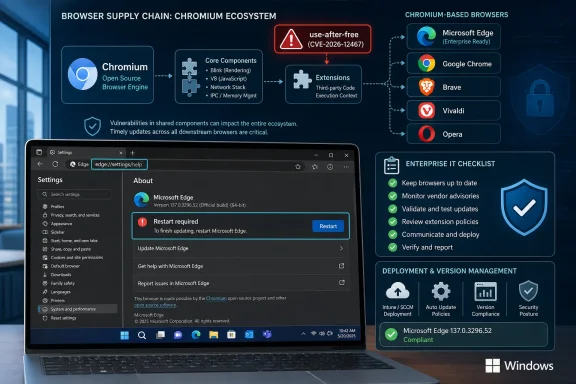 Edge Is Microsoft’s Browser, but Chromium Is Everyone’s Attack Surface
CVE-2026-12467 is described as a use-after-free vulnerability in Chrome’s Extensions component, affecting Google Chrome prior to version 149.0.7827.155. In security language, use after free means software continues to use memory after it has been released, a class of bug that can lead to memory corruption and, in the right conditions, code execution or sandbox escape.The awkward part for Windows users is that the word “Chrome” in the CVE title does not mean “Google users only.” Microsoft Edge is Chromium-based, which means it consumes a large body of the same browser engine code that powers Chrome, Brave, Opera, Vivaldi, and a long list of embedded web runtimes. Microsoft adds its own services, enterprise controls, account integration, update pipeline, and security hardening, but the foundation is still Chromium.
That is why the Microsoft Security Update Guide sometimes looks like it has wandered into Google’s lane. It has not. Microsoft is not claiming ownership of the Chrome bug; it is telling Edge customers whether the Chromium-derived code inside Edge has been patched.
This distinction matters because enterprises do not patch “brands.” They patch deployed software. If Edge includes vulnerable Chromium code, it is in scope for Windows fleet management whether or not the original advisory came from Google’s Chrome team.
The Security Update Guide Is Becoming a Supply-Chain Ledger
The Microsoft Security Update Guide used to feel more straightforward. Windows had a vulnerability, Office had a vulnerability, Exchange had a vulnerability, and administrators mapped the CVE to a Microsoft patch. The Chromium era has complicated that mental model.Microsoft now ships products that incorporate large open source components, and those components have their own vulnerability lifecycles. Chromium is the most visible example because browsers are high-value attack targets and update constantly, but the same logic applies across software supply chains. A vulnerability can be discovered upstream, assigned a CVE in one ecosystem, and then remediated downstream by multiple vendors on slightly different schedules.
That is why the wording on entries like CVE-2026-12467 matters. Microsoft’s explanation says the flaw is in Chromium OSS consumed by Microsoft Edge and that the Security Update Guide entry exists to announce that the latest Edge version is no longer vulnerable. In other words, the guide is not only a list of Microsoft-authored bugs. It is also a notification channel for Microsoft-shipped exposure.
For IT teams, this is a useful evolution. The question they need answered is not “who wrote the vulnerable line of code?” It is “which installed products in my environment contain it, and what version removes the risk?”
Extensions Keep Turning Browser Bugs into Enterprise Problems
The Extensions component is not a decorative corner of Chromium. Extensions sit at a strange intersection of user customization, enterprise productivity, identity, web content, permissions, and browser internals. That makes them unusually attractive to attackers and unusually difficult for administrators to reason about.A use-after-free in Extensions does not automatically mean every extension is malicious or every user is exposed in the same way. The reported attack path for this CVE involves a crafted HTML page and a compromised renderer process, with potential sandbox escape. That phrasing is important: browser exploitation often works as a chain, not a single magic bullet.
The browser sandbox is designed to contain damage when web content goes bad. A renderer compromise may get an attacker into a restricted process; a sandbox escape is the step that makes the compromise more dangerous. Bugs in components with privileged interactions, such as extensions, can become part of that second stage.
This is why browser CVEs can sound abstract until they are suddenly urgent. The vulnerability may live in memory management, but the exposure lives in daily behavior: opening links, using web apps, authenticating to SaaS platforms, installing extensions, and leaving browsers open for days without restart.
Version Numbers Are the Only Answer That Scales
The user-facing answer to “How can I see the version of the browser?” is easy: go toedge://settings/help. The administrator-facing answer is more demanding: inventory the version everywhere, confirm update policy behavior, and make sure stale sessions actually restart.On an individual Windows PC, Edge’s About page is the fastest source of truth. It displays the version number, checks Microsoft’s update service, and tells the user whether a relaunch is required. If Edge says it is up to date after checking, that is the normal consumer-grade confirmation.
In a managed environment, the About page is only a starting point. Microsoft Edge may be controlled by Group Policy, Intune, Configuration Manager, third-party patch tools, VDI image management, or firewall rules that affect update checks. A browser can be configured to auto-update and still remain exposed if users never close it, if update services are blocked, or if a golden image is refreshed too slowly.
The version threshold also matters. The public Chrome description says Google Chrome before 149.0.7827.155 was vulnerable. Edge’s versioning does not always map one-to-one by every trailing build number, because Microsoft ships Edge through its own release process. The important question is whether Microsoft’s latest Edge Stable or Extended Stable release includes the Chromium fix Microsoft is documenting.
The Chrome Name Can Mislead Windows Shops
There is a familiar mistake in Windows environments: assuming Chrome CVEs are only relevant to Chrome installations. That mistake made more sense before Microsoft rebuilt Edge on Chromium. It is now a liability.When a vulnerability lands in the shared Chromium codebase, security teams should assume Chromium-based browsers need review until each vendor says otherwise. Chrome may patch first, Edge may follow quickly, and other Chromium browsers may have their own cadence. The CVE’s original wording may remain Google-centric even when the vulnerable code travels further.
Microsoft’s Security Update Guide entry is therefore doing an important translation job. It turns an upstream Chromium vulnerability into a Microsoft product statement. That lets Windows administrators keep using Microsoft’s normal advisory channel instead of guessing whether a Chrome advisory applies to Edge.
There is also a communications benefit. Help desks and security teams can point users to one concrete action: check Edge’s About page and relaunch if prompted. That is far better than asking users to interpret CVE language about renderers, extensions, and sandbox escapes.
Automatic Updates Do Not Eliminate the Restart Gap
Modern browsers are good at downloading updates silently. They are less magical at forcing those updates into the running process without disruption. Edge, like Chrome, often needs a restart to complete an update.That restart gap is where many browser vulnerabilities linger. A machine can have the update staged, the About page can know a newer build exists, and the user can still be running old code in open browser windows. On laptops that sleep instead of shutting down, that gap can last days.
For consumers, the advice is simple: open
edge://settings/help, let Edge check, then relaunch if asked. For organizations, the advice is cultural as much as technical. Browser restarts need to be treated like security maintenance, not like an optional nuisance.This is particularly true for high-risk users: executives, developers, administrators, finance teams, legal teams, and anyone routinely handling sensitive documents or identity workflows in the browser. The browser is now the front end for the company, and delayed browser restarts are delayed security updates.
Extension Policy Is No Longer a Nice-to-Have
CVE-2026-12467 does not mean administrators should panic-uninstall extensions. It does mean extension governance belongs in the same conversation as browser patching.Extensions can request powerful permissions, inspect pages, modify content, interact with identity flows, and connect to external services. Even benign extensions expand the complexity of the browser. Vulnerabilities in the Extensions component remind us that the platform supporting those add-ons is security-critical infrastructure.
Enterprises should already be using allow lists, block lists, permission controls, and extension installation policies. The goal is not to ban every extension; it is to reduce uncontrolled code running inside the most important application on the desktop. If a user can install any extension from anywhere, the browser fleet is not truly managed.
There is a second-order point as well. When a Chromium extension-related CVE appears, administrators should review both the browser version and extension inventory. The vulnerability may be fixed by updating Edge, but the incident is a useful prompt to ask whether the environment has accumulated abandoned, unnecessary, or overprivileged extensions.
The Edge Entry Is a Reassurance, Not a Separate Microsoft Crisis
The Security Update Guide entry for CVE-2026-12467 can look alarming because it places a Chrome-origin vulnerability inside Microsoft’s security machinery. That does not necessarily mean Edge has a separate Microsoft-specific flaw. It means Microsoft is acknowledging Edge’s dependency on Chromium and documenting the state of its own patched release.That transparency is good. The alternative would be worse: administrators would have to track Chromium advisories, infer Edge exposure, and wait for release notes to make the connection clear. Microsoft’s entry gives the Windows ecosystem a canonical place to confirm that the Edge build line has absorbed the upstream fix.
The nuance is that “latest version” remains doing a lot of work. A user who has not restarted Edge is not necessarily protected. A managed device pinned to an older Extended Stable build may require a different update path. A server image with WebView2 dependencies may need separate attention if browser components are bundled or serviced differently.
Security advisories increasingly answer only the first question. They tell us a fix exists. The operational question is whether that fix is actually running on the endpoints that matter.
The Fast Check Windows Users Should Actually Perform
For most Windows users, this advisory boils down to a short verification ritual, not a forensic investigation. Open Edge, go toedge://settings/help, and look at the version line. If Edge downloads an update, relaunch the browser when prompted.That page is useful because it does three things at once. It shows the installed version, triggers an update check, and exposes whether the browser is waiting for a restart. It is the fastest way to move from “I assume I am patched” to “I have evidence this browser checked in.”
Administrators should turn that same logic into policy. Endpoint inventory should report Edge versions, update rings should be monitored, and users should not be allowed to defer browser restarts indefinitely after high-severity security updates. A CVE like this is not just a patch event; it is a test of whether browser servicing is visible.
Microsoft’s Chromium Bet Comes With Chromium’s Patch Clock
Microsoft’s move to Chromium made Edge more compatible, more relevant, and easier for web developers to target. It also tied Edge’s security story to Chromium’s velocity. That trade was always part of the bargain.The upside is enormous. Chromium receives constant security scrutiny from Google, Microsoft, researchers, and the broader browser community. Bugs are found and fixed at a pace few proprietary browser engines could match alone.
The downside is that Windows administrators can no longer think in monthly Patch Tuesday rhythms for everything that matters. Browser security moves faster. A serious Chromium bug may require action outside the normal Windows update cycle, especially when exploit details are limited or when attackers are known to chain browser flaws.
Edge’s inclusion in the Security Update Guide is Microsoft trying to bridge those worlds. It gives Windows shops a Microsoft-native signal for a web platform that is no longer Microsoft-native from top to bottom.
The Patch Is Only Real When the Running Browser Has Changed
The most concrete lesson of CVE-2026-12467 is that browser security is verified at runtime, not by brand loyalty. It is not enough to say “I use Edge, not Chrome.” It is not enough to say “Windows Update ran.” It is not enough to assume automatic updates closed the loop.The loop closes when the installed, running browser version is known to include the fix. For a single user, that means checking About Microsoft Edge and restarting. For an enterprise, it means inventory, policy, telemetry, and enforcement.
There is a reason attackers keep returning to browsers. They are always open, always parsing untrusted content, and increasingly connected to identity, documents, messaging, administration portals, and line-of-business apps. A memory safety bug in a browser component is not an isolated engineering defect; it is a possible doorway into the modern workplace.
The Version Box Is the New Patch Tuesday Dashboard
The immediate action is small, but the pattern is large. CVE-2026-12467 is one more reminder that the Windows security perimeter now includes shared open source code, rapid browser release channels, extension ecosystems, and user restart behavior. The Security Update Guide entry exists because Microsoft Edge inherits both Chromium’s strengths and Chromium’s vulnerabilities.- Microsoft listed CVE-2026-12467 because Microsoft Edge consumes Chromium code and needed to document that updated Edge builds are no longer vulnerable.
- Users can check Edge by opening the three-dot menu, selecting Help and feedback, choosing About Microsoft Edge, or going directly to
edge://settings/help. - The About page is not merely informational; it also triggers an update check and shows whether a relaunch is needed.
- A Chrome CVE can matter to Edge even when the original vulnerability text names Google Chrome.
- Enterprises should verify deployed Edge versions centrally rather than relying on user assumptions or automatic update settings.
- Extension governance should be part of browser security because extension-related components remain a recurring attack surface.
References
- Primary source: MSRC
Published: 2026-06-19T13:52:48-07:00
Security Update Guide - Microsoft Security Response Center
 msrc.microsoft.com
- Official source: learn.microsoft.com
Microsoft Edge release notes for Stable Channel | Microsoft Learn
Microsoft Edge release note for the Stable Channellearn.microsoft.com - Related coverage: vulnerability.circl.lu
Vulnerability-Lookup
Vulnerability-Lookup - Fast vulnerability lookup correlation from different sources.vulnerability.circl.lu - Related coverage: thehackerwire.com
Chrome Extension Use-After-Free Leads to RCE on Mac – TheHackerWire
Summary CVE-2026-8587 details a high-severity use-after-free (UAF) vulnerability in the Extensions component of Google Chrome on Mac. Published on May 14, 20...www.thehackerwire.com
- Related coverage: bleepingcomputer.com
- Related coverage: windowsforum.com
CVE-2026-5904 Chrome V8 Use-After-Free: Patch 147.0.7727.55 and Lock Extensions | Windows Forum
Chromium’s CVE-2026-5904 is a reminder that even “low-severity” browser bugs can become meaningful security issues when they sit inside a component as...windowsforum.com
- Related coverage: sentinelone.com
CVE-2026-5904: Google Chrome Use After Free Vulnerability
CVE-2026-5904 is a use after free vulnerability in Google Chrome V8 engine. Learn about its impact, affected versions, and mitigation methods.www.sentinelone.com
- Related coverage: www2.gov.bc.ca
- Related coverage: aha.org
h isac tlp white microsoft edge addresses exploited zero day vulnerability cve 2024 7971 8 23 2024
PDF documentwww.aha.org
- Official source: support.microsoft.com
Microsoft Edge update settings | Microsoft Support
Microsoft Edge update settingssupport.microsoft.com - Related coverage: howtogeek.com
How to Update Microsoft Edge
Here's how to update Microsoft Edge, whether you're using the new Chromium-based Edge or the original version that came with Windows 10. www.howtogeek.com
- Related coverage: windowscentral.com
Major Microsoft Edge versions will now ship every two weeks: Microsoft confirms plans to ship new Edge features and changes twice a month | Windows Central
Microsoft has announced that Edge will be moving to a two-week release cycle for major versions of the browser, matching Chrome.www.windowscentral.com - Related coverage: techradar.com
Microsoft Edge gets a major security upgrade which should ease concerns for many users | TechRadar
Edge will check for malicious extensions going forwardwww.techradar.com - Related coverage: yoakumhospital.org
- Related coverage: psni.police.uk
- Related coverage: 44438071.fs1.hubspotusercontent-na1.net
Microsoft Word - Microsoft Edge Browser Settings 092120.docx
PDF document44438071.fs1.hubspotusercontent-na1.net
