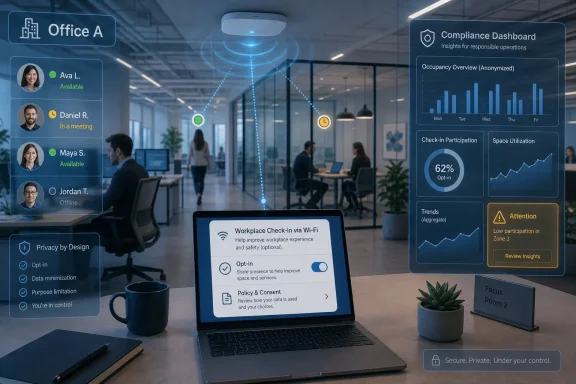
Microsoft is beginning the June 2026 rollout of Teams workplace check-in, a Microsoft Places feature that can update a user’s office location when the Teams desktop app detects a configured corporate Wi-Fi network or workplace peripheral. The company insists this is not an attendance tool, and the revised design adds consent prompts, admin modes, no historical location view, and user overrides. But the controversy was never only about whether Microsoft stores a breadcrumb trail. It is about whether Teams, already the default interface for work in many organizations, is becoming the place where collaboration quietly turns into presence enforcement.
The charitable reading of workplace check-in is simple: hybrid work is messy, and employees waste time guessing who is in the office. If Teams can show that a colleague is in Building 3 rather than at home, that could make ad hoc meetings, desk booking, and in-person collaboration easier. Microsoft Places was built around precisely that promise: offices as dynamic resources, not fixed destinations.
The less charitable reading is just as simple: the same signal that helps a teammate find you can help a manager infer whether you showed up. In 2026, that distinction matters because hybrid work has become less a perk than a contested operating model. Return-to-office policies are now enforced through badge swipes, VPN logs, desk reservations, and calendar patterns; Teams location status merely gives that machinery a friendlier face.
Microsoft’s revised approach is clearly a response to backlash. Earlier descriptions of the feature sounded too automatic, too managerial, and too indifferent to how employees experience workplace software. The new documentation leans hard on consent, transparency, and limits: workplace check-in is off by default, must be enabled by tenant administrators, and requires users to grant Teams access to the operating system’s location API.
That is meaningful, but it is not a magic privacy wand. The question is not only what Teams technically records. The question is what organizations will do with a visible “in office” signal once it appears beside the same names, calendars, chats, and meeting icons that already define the workday.
That matters because some early commentary blurred Wi-Fi-based workplace presence with continuous location surveillance. Teams is not supposed to follow an employee through the city, report the coffee shop, or build a minute-by-minute path through the office. The feature is tied to corporate networks and supported devices, and Microsoft says actual work location is cleared at the end of working hours rather than preserved as a history view.
But the narrower implementation still produces a powerful workplace signal. If a user connects at 8:47 a.m. and Teams reflects an in-office location shortly afterward, a manager does not need a historical report to draw conclusions. Real-time visibility, screenshots, status checks, and patterns observed over time can produce a shadow attendance system even when the product does not ship an attendance dashboard.
This is where Microsoft’s “not a tracking tool” framing becomes too tidy. A feature can be designed for collaboration and still be repurposed for oversight. The history of enterprise software is full of telemetry that began as operational data and ended as performance evidence.
On paper, that is a serious concession. It means administrators cannot simply flip on invisible Wi-Fi location detection for every employee without any user-facing moment. It also means users have a setting they can change rather than a silent background process they must discover through rumor or operating-system prompts.
In practice, however, workplace consent lives inside hierarchy. If a company announces that hybrid compliance depends on Teams workplace presence, the choice becomes theoretical. If a manager asks why someone disabled location sharing, the setting may still exist, but the social cost of using it changes.
That is the uncomfortable gap between privacy architecture and workplace power. Microsoft can design a control, but it cannot guarantee that an employee will feel free to use it. The company’s documentation can say users may opt out; the organization’s culture determines whether opting out looks like a normal privacy preference or a red flag.
The operational details matter. Wi-Fi-based check-in depends on accurate SSID and BSSID mapping, and bad data can produce wrong office signals. A campus with overlapping networks, renamed access points, guest Wi-Fi confusion, or inconsistent building metadata could easily turn a convenience feature into a support ticket generator.
There is also a policy-design problem. Microsoft allows tenant-wide deployment or targeted policies for specific users or groups. That flexibility is useful, but it also opens the door to uneven treatment: one region gets Ask mode, another gets Inform mode, executives are exempt, contractors are included, and frontline managers improvise expectations before HR has written a sentence.
The responsible deployment path is obvious but not always followed. IT should not enable workplace check-in until HR, legal, employee representatives where applicable, security, and works councils in regulated jurisdictions have reviewed the policy. If the goal is collaboration, the organization should say so in writing and forbid use of the signal for discipline, attendance scoring, or return-to-office enforcement unless local law and employee notice explicitly support that use.
That has benefits. A single presence model across Outlook, Teams, and Places can reduce friction. If an employee says they are working from a particular office, coworkers should not have to check three apps or a spreadsheet to know whether an in-person conversation is possible.
It also concentrates power. The more Teams becomes the interface through which work is seen, the more every visible signal feels managerial. Status dots already create anxiety. Calendar transparency already creates performative availability. Adding location to that mix changes Teams from “are you free?” to “where are you?”
This is the trap of enterprise convenience. Every additional signal is justifiable in isolation. Together, they create a workplace panopticon that does not need a villainous administrator to feel invasive; it only needs enough defaults, dashboards, and expectations to make employees believe they are always being interpreted.
Those protections reduce the risk of explicit surveillance. They make the feature less dangerous than an always-on GPS feed, a badge-swipe analytics product, or an endpoint agent logging every network transition. They also give IT departments language to push back when managers ask for “the report” that Microsoft says does not exist.
Still, absence of a built-in report is not the same as absence of monitoring. In organizations with strict return-to-office policies, managers may simply observe presence in real time, compare status with meeting attendance, or ask employees to keep location sharing enabled. Even if Teams clears the actual location at the end of working hours, human memory and managerial notes can supply their own history.
The deeper risk is normalization. Once employees accept that collaboration software can publish their office presence automatically, the next feature becomes easier to justify. Today it is Wi-Fi check-in; tomorrow it may be richer occupancy analytics, smarter Copilot suggestions about who should meet in person, or automated nudges when a team’s office overlap falls below a target.
That context makes the feature politically charged regardless of intent. A product manager may see a building-level presence signal. An employee under a three-day office mandate may see a digital time clock. A manager under pressure to improve office attendance may see a convenient compliance shortcut.
This is why the controversy has persisted even after Microsoft softened the rollout. Critics are not merely asking whether Teams stores historical movement profiles. They are asking why a collaboration app needs to mediate physical presence at all, and why that mediation arrives at the same moment employers are seeking firmer proof that hybrid workers are complying.
The answer is partly that hybrid work genuinely needs coordination tools. Empty offices on Tuesday and crowded ones on Wednesday are inefficient. Teams that never overlap in person may lose some of the informal communication that offices are good at. But solving coordination with a visible employee-location signal is a choice, not an inevitability.
That means clear employee notice before rollout, plain-language documentation of what is visible, and a visible explanation of how to opt in or out. It also means training managers not to treat location sharing as a loyalty test. A privacy setting that exists only for people brave enough to anger their supervisor is not much of a privacy setting.
There should also be a data-minimization review. Does the organization need building-level visibility, or is “in office” enough? Does every employee need the feature, or only teams that actively coordinate shared space? Is Inform mode truly justified, or would Ask mode better match the company’s stated culture?
Security teams should also be involved, because location signals are sensitive even when they are coarse. Knowing which building an employee is in can reveal travel, client meetings, medical accommodations, union activity, or executive movement patterns. Internal-only visibility is not the same as harmless visibility.
If you do not want Teams to update your location automatically, use the available controls. If the operating system asks whether Teams can access location, remember that granting permission may be required for workplace check-in to function. If you work in a regulated or unionized environment, ask whether the employer has issued a formal policy governing the signal’s use.
The socially difficult part is that privacy settings can become visible by implication. If everyone else is marked in the office and you are not, the absence of a signal may become a signal. Microsoft cannot solve that with UI design, because the issue is not the button; it is the workplace around the button.
That is why employees should not have to negotiate this one by one. A good rollout makes the norms explicit before the feature appears. A bad rollout lets managers, team leads, and office gossip define the policy after the fact.
 Microsoft Reframes Surveillance as Coordination
The charitable reading of workplace check-in is simple: hybrid work is messy, and employees waste time guessing who is in the office. If Teams can show that a colleague is in Building 3 rather than at home, that could make ad hoc meetings, desk booking, and in-person collaboration easier. Microsoft Places was built around precisely that promise: offices as dynamic resources, not fixed destinations.The less charitable reading is just as simple: the same signal that helps a teammate find you can help a manager infer whether you showed up. In 2026, that distinction matters because hybrid work has become less a perk than a contested operating model. Return-to-office policies are now enforced through badge swipes, VPN logs, desk reservations, and calendar patterns; Teams location status merely gives that machinery a friendlier face.
Microsoft’s revised approach is clearly a response to backlash. Earlier descriptions of the feature sounded too automatic, too managerial, and too indifferent to how employees experience workplace software. The new documentation leans hard on consent, transparency, and limits: workplace check-in is off by default, must be enabled by tenant administrators, and requires users to grant Teams access to the operating system’s location API.
That is meaningful, but it is not a magic privacy wand. The question is not only what Teams technically records. The question is what organizations will do with a visible “in office” signal once it appears beside the same names, calendars, chats, and meeting icons that already define the workday.
The Feature Is Narrower Than the Panic, but Broader Than Microsoft’s Pitch
Technically, workplace check-in is not GPS tracking. Microsoft says the Wi-Fi version relies on organization-configured wireless identifiers, with SSID configuration for office-level detection and BSSID mapping for building-level location. If the organization does not configure buildings, the signal may only distinguish in-office from remote rather than naming a specific location.That matters because some early commentary blurred Wi-Fi-based workplace presence with continuous location surveillance. Teams is not supposed to follow an employee through the city, report the coffee shop, or build a minute-by-minute path through the office. The feature is tied to corporate networks and supported devices, and Microsoft says actual work location is cleared at the end of working hours rather than preserved as a history view.
But the narrower implementation still produces a powerful workplace signal. If a user connects at 8:47 a.m. and Teams reflects an in-office location shortly afterward, a manager does not need a historical report to draw conclusions. Real-time visibility, screenshots, status checks, and patterns observed over time can produce a shadow attendance system even when the product does not ship an attendance dashboard.
This is where Microsoft’s “not a tracking tool” framing becomes too tidy. A feature can be designed for collaboration and still be repurposed for oversight. The history of enterprise software is full of telemetry that began as operational data and ended as performance evidence.
Consent Is Real, but Workplace Consent Is Complicated
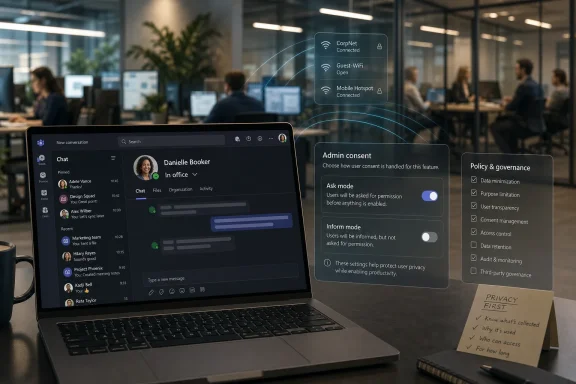
The strongest improvement in the revised model is user control. Microsoft describes two Wi-Fi modes: an opt-in-style “Ask mode,” where the user must choose to enable the feature, and an opt-out-style “Inform mode,” where the user is told the feature is active and can disable it. Users can also manually set, override, or clear their work location.On paper, that is a serious concession. It means administrators cannot simply flip on invisible Wi-Fi location detection for every employee without any user-facing moment. It also means users have a setting they can change rather than a silent background process they must discover through rumor or operating-system prompts.
In practice, however, workplace consent lives inside hierarchy. If a company announces that hybrid compliance depends on Teams workplace presence, the choice becomes theoretical. If a manager asks why someone disabled location sharing, the setting may still exist, but the social cost of using it changes.
That is the uncomfortable gap between privacy architecture and workplace power. Microsoft can design a control, but it cannot guarantee that an employee will feel free to use it. The company’s documentation can say users may opt out; the organization’s culture determines whether opting out looks like a normal privacy preference or a red flag.
Admins Now Own the Blast Radius
For IT administrators, this feature is not just a toggle. It requires Microsoft Places configuration, building data, network identifiers, Teams policies, Exchange-side wireless settings, and user communication. That makes it a governance project disguised as a collaboration feature.The operational details matter. Wi-Fi-based check-in depends on accurate SSID and BSSID mapping, and bad data can produce wrong office signals. A campus with overlapping networks, renamed access points, guest Wi-Fi confusion, or inconsistent building metadata could easily turn a convenience feature into a support ticket generator.
There is also a policy-design problem. Microsoft allows tenant-wide deployment or targeted policies for specific users or groups. That flexibility is useful, but it also opens the door to uneven treatment: one region gets Ask mode, another gets Inform mode, executives are exempt, contractors are included, and frontline managers improvise expectations before HR has written a sentence.
The responsible deployment path is obvious but not always followed. IT should not enable workplace check-in until HR, legal, employee representatives where applicable, security, and works councils in regulated jurisdictions have reviewed the policy. If the goal is collaboration, the organization should say so in writing and forbid use of the signal for discipline, attendance scoring, or return-to-office enforcement unless local law and employee notice explicitly support that use.
Teams Keeps Becoming the Operating System of Work
The reason this small feature feels so large is that Teams is no longer merely a chat app. It is the meeting room, the phone system, the document surface, the calendar entry point, the Copilot shell, the webinar platform, the desk-booking companion, and now a workplace-presence signal. Microsoft has spent years moving the gravitational center of office work into Teams, and workplace check-in is another orbiting service pulled into that center.That has benefits. A single presence model across Outlook, Teams, and Places can reduce friction. If an employee says they are working from a particular office, coworkers should not have to check three apps or a spreadsheet to know whether an in-person conversation is possible.
It also concentrates power. The more Teams becomes the interface through which work is seen, the more every visible signal feels managerial. Status dots already create anxiety. Calendar transparency already creates performative availability. Adding location to that mix changes Teams from “are you free?” to “where are you?”
This is the trap of enterprise convenience. Every additional signal is justifiable in isolation. Together, they create a workplace panopticon that does not need a villainous administrator to feel invasive; it only needs enough defaults, dashboards, and expectations to make employees believe they are always being interpreted.
Microsoft’s Privacy Limits Are Useful, Not Sufficient
Microsoft’s documented limits are not trivial. The company says workplace check-in does not provide admins with monitoring or reporting views, does not expose historical actual-location data, does not update outside configured working hours, and does not work through unrelated external networks. It also says users can manually clear or override their location.Those protections reduce the risk of explicit surveillance. They make the feature less dangerous than an always-on GPS feed, a badge-swipe analytics product, or an endpoint agent logging every network transition. They also give IT departments language to push back when managers ask for “the report” that Microsoft says does not exist.
Still, absence of a built-in report is not the same as absence of monitoring. In organizations with strict return-to-office policies, managers may simply observe presence in real time, compare status with meeting attendance, or ask employees to keep location sharing enabled. Even if Teams clears the actual location at the end of working hours, human memory and managerial notes can supply their own history.
The deeper risk is normalization. Once employees accept that collaboration software can publish their office presence automatically, the next feature becomes easier to justify. Today it is Wi-Fi check-in; tomorrow it may be richer occupancy analytics, smarter Copilot suggestions about who should meet in person, or automated nudges when a team’s office overlap falls below a target.
The Return-to-Office Context Makes Neutrality Impossible
Microsoft may be right that workplace check-in was designed for coordination rather than compliance. But enterprise software does not ship into a vacuum. It ships into a labor market where many companies are tightening hybrid arrangements, and where the office has become a proxy battle over trust, control, real estate, and productivity.That context makes the feature politically charged regardless of intent. A product manager may see a building-level presence signal. An employee under a three-day office mandate may see a digital time clock. A manager under pressure to improve office attendance may see a convenient compliance shortcut.
This is why the controversy has persisted even after Microsoft softened the rollout. Critics are not merely asking whether Teams stores historical movement profiles. They are asking why a collaboration app needs to mediate physical presence at all, and why that mediation arrives at the same moment employers are seeking firmer proof that hybrid workers are complying.
The answer is partly that hybrid work genuinely needs coordination tools. Empty offices on Tuesday and crowded ones on Wednesday are inefficient. Teams that never overlap in person may lose some of the informal communication that offices are good at. But solving coordination with a visible employee-location signal is a choice, not an inevitability.
The Real Test Is Policy, Not PowerShell
For sysadmins, the technical implementation will be the easy part. The harder question is whether the organization can state a principled boundary and live by it. If workplace check-in is for collaboration, then the policy should protect collaboration and reject attendance policing.That means clear employee notice before rollout, plain-language documentation of what is visible, and a visible explanation of how to opt in or out. It also means training managers not to treat location sharing as a loyalty test. A privacy setting that exists only for people brave enough to anger their supervisor is not much of a privacy setting.
There should also be a data-minimization review. Does the organization need building-level visibility, or is “in office” enough? Does every employee need the feature, or only teams that actively coordinate shared space? Is Inform mode truly justified, or would Ask mode better match the company’s stated culture?
Security teams should also be involved, because location signals are sensitive even when they are coarse. Knowing which building an employee is in can reveal travel, client meetings, medical accommodations, union activity, or executive movement patterns. Internal-only visibility is not the same as harmless visibility.
Employees Should Treat the Toggle as a Workplace Signal of Its Own
For individual users, the practical advice is less dramatic than the headlines. Check the Teams and Outlook work-location settings. Watch for the banner that explains workplace check-in. Understand whether your organization is using Ask mode, Inform mode, or leaving the feature off.If you do not want Teams to update your location automatically, use the available controls. If the operating system asks whether Teams can access location, remember that granting permission may be required for workplace check-in to function. If you work in a regulated or unionized environment, ask whether the employer has issued a formal policy governing the signal’s use.
The socially difficult part is that privacy settings can become visible by implication. If everyone else is marked in the office and you are not, the absence of a signal may become a signal. Microsoft cannot solve that with UI design, because the issue is not the button; it is the workplace around the button.
That is why employees should not have to negotiate this one by one. A good rollout makes the norms explicit before the feature appears. A bad rollout lets managers, team leads, and office gossip define the policy after the fact.
The Wi-Fi Check-In Fight Leaves a Trail Microsoft Cannot Clear
The concrete facts are less sensational than the fear, but they are still consequential. Microsoft has narrowed the feature, added controls, and documented limits; organizations now decide whether this becomes a coordination aid or a trust-eroding surveillance proxy.- Teams workplace check-in can update a user’s actual work location when the desktop app detects configured corporate Wi-Fi or workplace peripherals.
- The feature is off by default at the tenant level, but administrators can choose user experiences that resemble either opt-in or opt-out for Wi-Fi-based updates.
- Microsoft says actual work-location history is not available through the feature and that the signal clears at the end of working hours.
- Users can manually set, clear, or override their work location, but workplace culture will determine whether those controls feel genuinely usable.
- IT departments should treat deployment as a governance decision involving HR, legal, security, and employee communication, not merely as a Teams configuration task.
- The most important choice for organizations is whether they can credibly prohibit use of the signal for attendance enforcement while still asking employees to trust it.
References
- Primary source: Research Snipers
Published: 2026-06-19T08:16:20.123579
Microsoft Teams: The controversial WLAN location tracking starts – Research Snipers
After massive criticism of planned location tracking in Teams, Microsoft is making a new attempt....researchsnipers.com - Related coverage: techradar.com
I can't believe Microsoft Teams is still releasing this new feature which might rat you out to your boss | TechRadar
Microsoft Teams will use Wi-Fi connectivity to automatically update your work locationwww.techradar.com - Related coverage: windowslatest.com
Microsoft Teams will auto-detect when you're at the office via Wi-Fi, roll out confirmed, but you can opt-out
Microsoft Teams is moving ahead with the rollout of a controversial feature that lets organizations track when you're at the office via Wi-Fi. www.windowslatest.com
- Official source: learn.microsoft.com
Microsoft Places overview - Microsoft Places | Microsoft Learn
Learn more about managing a hybrid workspace with Microsoft Places.learn.microsoft.com - Related coverage: pcworld.com
Microsoft Teams introduces office attendance tracking via Wi-Fi | PCWorld
Microsoft plans to launch a new Teams feature as early as June 2026 that will allow managers and colleagues to see whether an employee is in the office.www.pcworld.com - Related coverage: windowscentral.com
Microsoft’s controversial Wi‑Fi tracking in Teams is back — but this time with better privacy controls | Windows Central
After multiple delays, Microsoft finally launched its controversial Teams Wi‑Fi tracking feature, promising more transparency and better user control.www.windowscentral.com
- Official source: microsoft.com
Microsoft 365 Roadmap | Microsoft 365
The Microsoft 365 Roadmap lists updates that are currently planned for applicable subscribers. Check here for more information on the status of new features and updates.www.microsoft.com
- Related coverage: windowsforum.com
Microsoft Teams Wi‑Fi Work Location Updates (June 2026): Privacy vs Hybrid Tracking | Windows Forum
Microsoft Teams is scheduled to roll out Wi-Fi-based automatic work-location updates worldwide in June 2026, letting organizations configure Teams and...windowsforum.com - Related coverage: helpnetsecurity.com
Microsoft's workplace check-in via Wi-Fi tracks who's in the office, and not everyone's happy - Help Net Security
Microsoft Teams workplace presence uses Wi-Fi check-in to update work location, helping employees coordinate office attendance.www.helpnetsecurity.com - Official source: techcommunity.microsoft.com
Microsoft Teams Licensing Updates April 2026 Customer FAQ 1
PDF documenttechcommunity.microsoft.com
- Official source: adoption.microsoft.com