

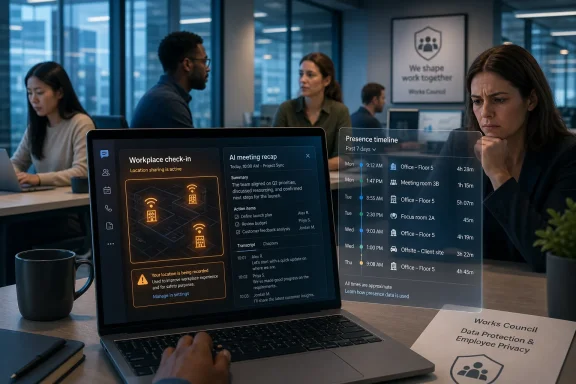
Microsoft is preparing Teams and Microsoft Places features in 2026 that can automatically update a worker’s office location from corporate Wi‑Fi or desk peripherals while expanding AI-generated meeting recaps across Teams. The company frames the changes as hybrid-work coordination, not employee monitoring. That distinction may be technically true in Microsoft’s architecture, but it is not enough to settle the workplace politics. Once presence, place, calendars, transcripts, and AI summaries converge inside the same daily work app, the question stops being whether Teams is “tracking” people and becomes whether employers can be trusted with the new ambient record of work.
The German reaction captured by AD HOC NEWS is therefore not a local panic over a niche toggle. It is an early warning from one of the world’s most privacy-sensitive labor markets about where collaboration software is headed. Teams is no longer merely the place where meetings happen; it is becoming the layer that describes where workers are, what they said, what they missed, and what the system thinks mattered.
The controversial feature is formally known in Microsoft documentation as workplace check-in or automatic work-location detection. In plain English, Teams can infer that a user is in the office, or in a particular configured building, when the Teams desktop app on Windows or macOS sees a matching corporate Wi‑Fi network or an administrator-configured desk peripheral such as a monitor.
That sounds innocuous if you read it from the perspective of a large company trying to make hybrid work less awkward. Anyone who has tried to schedule an in-person conversation in a half-empty office knows the problem. Calendars say people are “working,” Teams presence says they are “available,” but nobody knows whether that means three floors away, across town, or at home with a headset.
Microsoft’s product answer is to turn location into another presence signal. Teams already tells colleagues whether you are busy, away, presenting, or available. Places extends that grammar to the physical office: not just can I reach you?, but where are you working from today?
The problem is that the workplace has changed faster than the trust model around workplace software. Since the pandemic normalized remote and hybrid work, many employers have grown more aggressive about return-to-office mandates, occupancy metrics, and productivity analytics. A feature sold as “find nearby coworkers” arrives in a market already primed to suspect “prove you were at your desk.”
Microsoft appears to understand that danger. Its official language repeatedly emphasizes that workplace check-in is not designed as an attendance-monitoring tool, that it is off by default, that users retain control, and that historical actual-location data is not made available to administrators through the feature. But enterprise software is judged not only by what it was designed to do. It is judged by what it enables inside real organizations with power imbalances, impatient managers, and compliance departments looking for clean dashboards.
That distinction matters. It means IT departments cannot simply wake up one morning to find every Teams client broadcasting building-level presence because Microsoft flipped a cloud switch. It also means the feature depends on organizational configuration, including Microsoft Places buildings and Wi‑Fi identifiers, rather than raw GPS-style tracking.
But opt-in is not magic in the workplace. A banner in Teams is not the same thing as free consent when the employer controls the device, the network, the policy, and the social consequences. If the department norm becomes “everyone shares location so we can coordinate,” the worker who opts out may be marked as difficult before any formal surveillance system exists.
German employee representatives and works councils are especially likely to focus on that distinction. In Germany, workplace technology is not assessed only through the narrow lens of whether it has a privacy toggle. Tools that can affect behavior, performance monitoring, attendance expectations, or workplace autonomy often trigger co-determination and data-protection scrutiny. A feature can be technically optional and still be socially coercive.
This is where Microsoft’s phrasing runs into the sociology of work. “Users can opt out” is a product-control statement. “Employees can opt out without penalty, pressure, or inference” is a governance statement. Microsoft can design for the former, but only employers, regulators, and labor representatives can enforce the latter.
For busy teams, that is genuinely useful. Meeting overload is real. A good recap can save half an hour of replaying a recording or scrolling through a transcript. A worker who missed a call can catch the decisions, action items, and relevant mentions without begging colleagues for a summary.
But the same feature that helps the absent worker can also harden casual conversation into a durable workplace record. When an AI recap decides what was important, when a transcript preserves who said what, and when a location signal describes who was in the building that day, collaboration software starts to produce a secondary version of work: not the messy human activity itself, but a machine-readable map of it.
That is the strategic arc. Microsoft is stitching together presence, place, calendar, meeting content, and Copilot-style interpretation. Each component can be defended as helpful. Together, they form an ambient operating system for office life.
The question for IT professionals is not whether any single piece is sinister. It is whether the resulting system is governed with the seriousness normally reserved for HR systems, identity platforms, and security telemetry. Teams used to be a chat-and-meeting app. Increasingly, it behaves like infrastructure.
That does not mean German companies cannot use the feature. It means deployment is likely to require explanation, documentation, purpose limitation, and agreement about who can see what. The difference is not merely bureaucratic. It changes the product’s meaning.
If a company deploys workplace check-in after negotiating that it cannot be used for attendance discipline, cannot feed performance reviews, and must remain voluntary, the feature looks more like a coordination aid. If it appears overnight inside a return-to-office crackdown, it looks like bossware wearing a Teams badge.
The same applies to meeting recaps. In a mature governance model, AI recaps are productivity aids with retention rules, access controls, and meeting policies. In a sloppy model, they become unofficial minutes that employees did not knowingly create, may not be able to correct, and may later be treated as authoritative evidence of decisions or commitments.
Germany’s sensitivity is not an obstacle to innovation. It is a reminder that enterprise collaboration features are not neutral once they enter a hierarchy.
Those are meaningful safeguards. Building-level detection is not the same as continuous indoor positioning. A Teams feature that updates a presence field is not the same as a dedicated employee-surveillance platform with productivity scoring and keystroke analytics. Critics should not flatten those differences.
Yet Microsoft’s denial answers the product-design accusation more than the workplace-power accusation. A manager does not need a historical location dashboard if the organization normalizes checking Teams location during core hours. A company does not need minute-by-minute trails if the relevant dispute is whether someone was “really” in the office on Tuesdays. A colleague does not need admin privileges to infer patterns from visible presence over time.
There is also the problem of combination. Even if Teams location history is not exposed, other enterprise systems may already hold network logs, badge swipes, device compliance records, VPN sessions, room bookings, and endpoint telemetry. Teams does not have to be the surveillance system to become the most visible and socially actionable layer of a broader monitoring environment.
That is why the “not a tracking tool” line, while technically important, will not end the debate. Workers are not only asking what Microsoft stores. They are asking what employers will infer.
The default temptation will be to treat workplace check-in as another tenant setting. Configure Places, map SSIDs and BSSIDs, assign the Teams work-location detection policy, pilot with a group, and move on. That is the wrong level of abstraction.
This feature should be treated more like a workplace-policy change than a convenience toggle. Before enabling it, organizations should decide whether the purpose is hot-desking, colleague discovery, emergency coordination, office occupancy planning, or return-to-office enforcement. Those are not interchangeable uses, and employees will quickly notice if the stated purpose and the practical use diverge.
The access model also deserves scrutiny. If work location is visible to coworkers, that may be fine for a team that genuinely collaborates in person. It may be inappropriate for employees in sensitive roles, union activity, health-related accommodations, domestic-violence risk situations, or teams where office presence has become politically charged. A global organization may also need different defaults by country, which Microsoft’s policy model appears to contemplate through targeted user groups.
Admins should also resist the urge to oversell precision. Wi‑Fi-based check-in depends on configured networks and building mappings. Desk-peripheral detection depends on properly associated desks and devices. The feature can support coordination, but it should not be treated as a forensic attendance instrument even if someone in management wants it to be one.
This is Microsoft’s strongest argument for embedding AI into Teams. Work is full of verbal sprawl. Meetings generate obligations, but the obligations often disappear into memory, chat threads, or someone’s private notes. Recaps promise to convert messy conversation into shared continuity.
But corporate memory is not neutral either. A transcript is not the same as understanding. A recap is not the same as consensus. An AI-generated action item may sound official even when the room never agreed to it. Once a summary is attached to a meeting, forwarded to absentees, indexed for search, or referenced weeks later, it can acquire authority beyond its accuracy.
That creates governance questions that are less dramatic than location tracking but just as important. Who can access a recap? Does the organizer control it, or do all invitees? Are external participants included? Are transcripts required? Can sensitive meetings disable recaps by default? How long are recordings, transcripts, and AI outputs retained? Can employees correct a recap that mischaracterizes their position?
These are not edge cases. They are the normal frictions of knowledge work, now mediated by a probabilistic system.
In that environment, a location feature cannot be just a location feature. It becomes a symbol of who gets to define work. If the employee thinks productivity is measured by output and the employer keeps measuring chair time, Teams becomes another battlefield.
Microsoft is not responsible for every bad return-to-office policy. But Microsoft sells the infrastructure through which those policies become practical. That gives the company influence over defaults, language, permissions, auditability, and friction. Design choices can either make coercive deployment harder or make it administratively convenient.
The current design includes some friction. The feature is off by default, needs admin configuration, requires Teams desktop, uses configured corporate resources, and allows user control. But the existence of “Inform mode,” where Wi‑Fi check-in can be enabled by default with an opt-out path, will remain controversial in any workplace where opting out is not socially safe.
If Microsoft wants the collaboration framing to stick, it should continue pushing customers toward explicit consent, clear employee notices, and purpose-bound deployments. Otherwise, the market will supply its own name for the feature, and it will not be “workplace check-in.”
That matters because many users instinctively blame Windows for anything involving device location. In this case, the operating system’s location permission is part of the flow, but the business logic sits in Teams, Places, Exchange, and Microsoft 365 policy. A personal Windows PC outside a managed tenant is not the target scenario.
The supported clients also matter. Microsoft’s documentation points to the Teams desktop app on Windows and macOS, not web or mobile Teams. That makes sense because the relevant signals involve local network changes and device connections. It also means admins should expect uneven behavior across devices, especially in mixed fleets where some users live in browser-based Teams or mobile-first workflows.
The practical user advice is simple: learn where Teams exposes work-location sharing settings, understand whether your organization has enabled workplace check-in, and pay attention to operating-system permission prompts. But the broader advice is collective, not individual. If the workplace expects location sharing, one employee’s settings screen is a weak shield.
That means HR, legal, security, works councils, data-protection officers, and employee representatives need to be in the room before the PowerShell commands run. It also means the policy should be written in plain language, not just buried in an internal privacy notice. If location data is for collaboration, say that. If it will not be used for attendance discipline, say that too, and make sure managers are bound by it.
For meeting recaps, the same principle applies. Employees should know when meetings are recorded, transcribed, summarized, and retained. Sensitive meeting types should have stricter defaults. External meetings should be handled deliberately. The convenience of AI notes should not become a backdoor around consent and records-management policy.
The best deployments will probably be boring. They will start with limited pilots, obvious use cases such as hot-desking or campus coordination, opt-in defaults where labor trust is fragile, and visible controls for users. The worst deployments will be theatrical: a return-to-office memo on Monday, Teams location sharing on Tuesday, and a management dashboard request by Friday.
The German reaction captured by AD HOC NEWS is therefore not a local panic over a niche toggle. It is an early warning from one of the world’s most privacy-sensitive labor markets about where collaboration software is headed. Teams is no longer merely the place where meetings happen; it is becoming the layer that describes where workers are, what they said, what they missed, and what the system thinks mattered.
 Microsoft’s Hybrid-Work Fix Lands in a Surveillance-Shaped Market
The controversial feature is formally known in Microsoft documentation as workplace check-in or automatic work-location detection. In plain English, Teams can infer that a user is in the office, or in a particular configured building, when the Teams desktop app on Windows or macOS sees a matching corporate Wi‑Fi network or an administrator-configured desk peripheral such as a monitor.That sounds innocuous if you read it from the perspective of a large company trying to make hybrid work less awkward. Anyone who has tried to schedule an in-person conversation in a half-empty office knows the problem. Calendars say people are “working,” Teams presence says they are “available,” but nobody knows whether that means three floors away, across town, or at home with a headset.
Microsoft’s product answer is to turn location into another presence signal. Teams already tells colleagues whether you are busy, away, presenting, or available. Places extends that grammar to the physical office: not just can I reach you?, but where are you working from today?
The problem is that the workplace has changed faster than the trust model around workplace software. Since the pandemic normalized remote and hybrid work, many employers have grown more aggressive about return-to-office mandates, occupancy metrics, and productivity analytics. A feature sold as “find nearby coworkers” arrives in a market already primed to suspect “prove you were at your desk.”
Microsoft appears to understand that danger. Its official language repeatedly emphasizes that workplace check-in is not designed as an attendance-monitoring tool, that it is off by default, that users retain control, and that historical actual-location data is not made available to administrators through the feature. But enterprise software is judged not only by what it was designed to do. It is judged by what it enables inside real organizations with power imbalances, impatient managers, and compliance departments looking for clean dashboards.
The Opt-In Detail Is Important, but It Is Not a Moral Escape Hatch
The most important practical correction to the loudest “Teams will snitch on you” framing is that Microsoft’s current documentation does not describe a consumer-style location tracker silently following workers around an office. Workplace check-in is off by default at the tenant level. Administrators must enable and configure it. For Wi‑Fi-based detection, users may be placed in an “Ask” mode where they opt in, or an “Inform” mode where the feature is on by default but can be disabled by the user.That distinction matters. It means IT departments cannot simply wake up one morning to find every Teams client broadcasting building-level presence because Microsoft flipped a cloud switch. It also means the feature depends on organizational configuration, including Microsoft Places buildings and Wi‑Fi identifiers, rather than raw GPS-style tracking.
But opt-in is not magic in the workplace. A banner in Teams is not the same thing as free consent when the employer controls the device, the network, the policy, and the social consequences. If the department norm becomes “everyone shares location so we can coordinate,” the worker who opts out may be marked as difficult before any formal surveillance system exists.
German employee representatives and works councils are especially likely to focus on that distinction. In Germany, workplace technology is not assessed only through the narrow lens of whether it has a privacy toggle. Tools that can affect behavior, performance monitoring, attendance expectations, or workplace autonomy often trigger co-determination and data-protection scrutiny. A feature can be technically optional and still be socially coercive.
This is where Microsoft’s phrasing runs into the sociology of work. “Users can opt out” is a product-control statement. “Employees can opt out without penalty, pressure, or inference” is a governance statement. Microsoft can design for the former, but only employers, regulators, and labor representatives can enforce the latter.
Teams Is Becoming the Office’s Sensor Layer
The unease around automatic location detection is sharper because it is not happening in isolation. Teams is also becoming more automated in the way it records and summarizes meetings. Intelligent meeting recaps, transcript-driven summaries, AI-generated action items, chapters, mentions, and video recap capabilities all push Teams toward a world where the meeting is not merely experienced live; it is processed afterward into a searchable, digestible artifact.For busy teams, that is genuinely useful. Meeting overload is real. A good recap can save half an hour of replaying a recording or scrolling through a transcript. A worker who missed a call can catch the decisions, action items, and relevant mentions without begging colleagues for a summary.
But the same feature that helps the absent worker can also harden casual conversation into a durable workplace record. When an AI recap decides what was important, when a transcript preserves who said what, and when a location signal describes who was in the building that day, collaboration software starts to produce a secondary version of work: not the messy human activity itself, but a machine-readable map of it.
That is the strategic arc. Microsoft is stitching together presence, place, calendar, meeting content, and Copilot-style interpretation. Each component can be defended as helpful. Together, they form an ambient operating system for office life.
The question for IT professionals is not whether any single piece is sinister. It is whether the resulting system is governed with the seriousness normally reserved for HR systems, identity platforms, and security telemetry. Teams used to be a chat-and-meeting app. Increasingly, it behaves like infrastructure.
Germany Sees the Labor Problem Before the Product Demo Ends
The German angle matters because Germany is a preview of the argument many other countries will have later. German workplaces have a stronger tradition of employee representation, tighter privacy expectations, and a sharper legal distinction between legitimate operational data and behavioral monitoring. A feature that might be waved through in a U.S. office as “just collaboration” can become a formal works-council issue in Germany.That does not mean German companies cannot use the feature. It means deployment is likely to require explanation, documentation, purpose limitation, and agreement about who can see what. The difference is not merely bureaucratic. It changes the product’s meaning.
If a company deploys workplace check-in after negotiating that it cannot be used for attendance discipline, cannot feed performance reviews, and must remain voluntary, the feature looks more like a coordination aid. If it appears overnight inside a return-to-office crackdown, it looks like bossware wearing a Teams badge.
The same applies to meeting recaps. In a mature governance model, AI recaps are productivity aids with retention rules, access controls, and meeting policies. In a sloppy model, they become unofficial minutes that employees did not knowingly create, may not be able to correct, and may later be treated as authoritative evidence of decisions or commitments.
Germany’s sensitivity is not an obstacle to innovation. It is a reminder that enterprise collaboration features are not neutral once they enter a hierarchy.
Microsoft’s Denial Is Narrower Than the Fear
Microsoft’s defense is more careful than many headlines suggest. The company says workplace check-in is not a tracking tool, does not provide administrator monitoring or reporting views, and does not preserve historical actual-location data through the feature. It also says users can manually set, override, or clear their work location and that actual location is cleared at the end of working hours.Those are meaningful safeguards. Building-level detection is not the same as continuous indoor positioning. A Teams feature that updates a presence field is not the same as a dedicated employee-surveillance platform with productivity scoring and keystroke analytics. Critics should not flatten those differences.
Yet Microsoft’s denial answers the product-design accusation more than the workplace-power accusation. A manager does not need a historical location dashboard if the organization normalizes checking Teams location during core hours. A company does not need minute-by-minute trails if the relevant dispute is whether someone was “really” in the office on Tuesdays. A colleague does not need admin privileges to infer patterns from visible presence over time.
There is also the problem of combination. Even if Teams location history is not exposed, other enterprise systems may already hold network logs, badge swipes, device compliance records, VPN sessions, room bookings, and endpoint telemetry. Teams does not have to be the surveillance system to become the most visible and socially actionable layer of a broader monitoring environment.
That is why the “not a tracking tool” line, while technically important, will not end the debate. Workers are not only asking what Microsoft stores. They are asking what employers will infer.
IT Departments Are Now the Trust Brokers
For sysadmins, Teams administrators, and Microsoft 365 architects, this update creates a familiar but uncomfortable role. IT is no longer just deploying a feature; it is mediating between product capability, management appetite, legal obligations, and employee trust.The default temptation will be to treat workplace check-in as another tenant setting. Configure Places, map SSIDs and BSSIDs, assign the Teams work-location detection policy, pilot with a group, and move on. That is the wrong level of abstraction.
This feature should be treated more like a workplace-policy change than a convenience toggle. Before enabling it, organizations should decide whether the purpose is hot-desking, colleague discovery, emergency coordination, office occupancy planning, or return-to-office enforcement. Those are not interchangeable uses, and employees will quickly notice if the stated purpose and the practical use diverge.
The access model also deserves scrutiny. If work location is visible to coworkers, that may be fine for a team that genuinely collaborates in person. It may be inappropriate for employees in sensitive roles, union activity, health-related accommodations, domestic-violence risk situations, or teams where office presence has become politically charged. A global organization may also need different defaults by country, which Microsoft’s policy model appears to contemplate through targeted user groups.
Admins should also resist the urge to oversell precision. Wi‑Fi-based check-in depends on configured networks and building mappings. Desk-peripheral detection depends on properly associated desks and devices. The feature can support coordination, but it should not be treated as a forensic attendance instrument even if someone in management wants it to be one.
Meeting Recaps Turn Convenience Into Corporate Memory
The second half of the 2026 Teams story is less emotionally explosive but potentially more transformative. AI meeting recaps are the feature many employees will actually ask for. Nobody wants to watch a 58-minute recording to find the three minutes that mattered. Nobody wants to write minutes after a routine status call if the software can produce chapters, decisions, and action items.This is Microsoft’s strongest argument for embedding AI into Teams. Work is full of verbal sprawl. Meetings generate obligations, but the obligations often disappear into memory, chat threads, or someone’s private notes. Recaps promise to convert messy conversation into shared continuity.
But corporate memory is not neutral either. A transcript is not the same as understanding. A recap is not the same as consensus. An AI-generated action item may sound official even when the room never agreed to it. Once a summary is attached to a meeting, forwarded to absentees, indexed for search, or referenced weeks later, it can acquire authority beyond its accuracy.
That creates governance questions that are less dramatic than location tracking but just as important. Who can access a recap? Does the organizer control it, or do all invitees? Are external participants included? Are transcripts required? Can sensitive meetings disable recaps by default? How long are recordings, transcripts, and AI outputs retained? Can employees correct a recap that mischaracterizes their position?
These are not edge cases. They are the normal frictions of knowledge work, now mediated by a probabilistic system.
The Return-to-Office War Gives Every Feature a Political Meaning
The reason this Teams update is combustible is that it lands during a continuing tug-of-war over hybrid work. Employers want predictability, collaboration, culture, and expensive office space to look useful. Employees want flexibility, autonomy, and protection from performative attendance rituals.In that environment, a location feature cannot be just a location feature. It becomes a symbol of who gets to define work. If the employee thinks productivity is measured by output and the employer keeps measuring chair time, Teams becomes another battlefield.
Microsoft is not responsible for every bad return-to-office policy. But Microsoft sells the infrastructure through which those policies become practical. That gives the company influence over defaults, language, permissions, auditability, and friction. Design choices can either make coercive deployment harder or make it administratively convenient.
The current design includes some friction. The feature is off by default, needs admin configuration, requires Teams desktop, uses configured corporate resources, and allows user control. But the existence of “Inform mode,” where Wi‑Fi check-in can be enabled by default with an opt-out path, will remain controversial in any workplace where opting out is not socially safe.
If Microsoft wants the collaboration framing to stick, it should continue pushing customers toward explicit consent, clear employee notices, and purpose-bound deployments. Otherwise, the market will supply its own name for the feature, and it will not be “workplace check-in.”
Windows Users Will Feel This Through Teams, Not the OS
For WindowsForum readers, the platform detail is worth separating from the rhetoric. This is not Windows itself suddenly publishing your location to your boss. Microsoft’s workplace check-in feature depends on Teams and Microsoft 365 configuration, and it uses organization-managed signals such as Wi‑Fi identifiers and desk peripherals. It is a cloud-workplace feature surfaced through the Teams desktop app.That matters because many users instinctively blame Windows for anything involving device location. In this case, the operating system’s location permission is part of the flow, but the business logic sits in Teams, Places, Exchange, and Microsoft 365 policy. A personal Windows PC outside a managed tenant is not the target scenario.
The supported clients also matter. Microsoft’s documentation points to the Teams desktop app on Windows and macOS, not web or mobile Teams. That makes sense because the relevant signals involve local network changes and device connections. It also means admins should expect uneven behavior across devices, especially in mixed fleets where some users live in browser-based Teams or mobile-first workflows.
The practical user advice is simple: learn where Teams exposes work-location sharing settings, understand whether your organization has enabled workplace check-in, and pay attention to operating-system permission prompts. But the broader advice is collective, not individual. If the workplace expects location sharing, one employee’s settings screen is a weak shield.
The Real Deployment Checklist Is Political, Not Technical
A technically clean rollout may still be a failed rollout if employees believe Teams has become a quiet attendance monitor. Microsoft 365 administrators are used to change management, but this category demands a different tone. The message cannot be “new feature available.” It has to be “here is what we are doing, here is what we are not doing, here is who approved it, and here is how misuse will be prevented.”That means HR, legal, security, works councils, data-protection officers, and employee representatives need to be in the room before the PowerShell commands run. It also means the policy should be written in plain language, not just buried in an internal privacy notice. If location data is for collaboration, say that. If it will not be used for attendance discipline, say that too, and make sure managers are bound by it.
For meeting recaps, the same principle applies. Employees should know when meetings are recorded, transcribed, summarized, and retained. Sensitive meeting types should have stricter defaults. External meetings should be handled deliberately. The convenience of AI notes should not become a backdoor around consent and records-management policy.
The best deployments will probably be boring. They will start with limited pilots, obvious use cases such as hot-desking or campus coordination, opt-in defaults where labor trust is fragile, and visible controls for users. The worst deployments will be theatrical: a return-to-office memo on Monday, Teams location sharing on Tuesday, and a management dashboard request by Friday.
The Signal Microsoft Sends in 2026
The concrete lesson from the Teams controversy is not that every new Microsoft 365 feature is surveillance. It is that every new Microsoft 365 feature now arrives in a workplace where surveillance is already a live suspicion.- Teams workplace check-in is designed to update a user’s current work location from configured corporate Wi‑Fi or desk peripherals, not from continuous GPS-style tracking.
- Microsoft’s current design leaves the feature off by default at the tenant level, but administrators can choose different consent experiences for Wi‑Fi-based check-in.
- The feature’s stated collaboration purpose will only be credible if employers separate it from attendance enforcement and performance management.
- AI meeting recaps solve a real productivity problem, but they also create durable summaries that need access controls, retention rules, and correction norms.
- German workplace scrutiny is a useful preview for global IT departments because it forces the governance conversation before the deployment becomes a trust crisis.
- Windows users should understand that this is primarily a Teams and Microsoft 365 workplace feature, not a standalone Windows location-tracking change.
References
- Primary source: AD HOC NEWS
Published: Sun, 07 Jun 2026 22:23:54 GMT
Microsoft Teams’ 2026 Update Brings Automatic Location Tracking and Meeting Recaps – German Empl
Microsoft's new Teams location detection and meeting recap tools (2026) require works council consent under EU GDPR; legal risks for firms without proper employee approval.www.ad-hoc-news.de - Official source: learn.microsoft.com
Configure workplace check-in - Microsoft Places | Microsoft Learn
Configure workplace check-in in a Places environment.learn.microsoft.com - Related coverage: pcworld.com
Microsoft says new Teams location feature isn't for 'employee tracking' | PCWorld
When this new feature rolls out, your bosses and colleagues will always know where you are.www.pcworld.com - Official source: microsoft.com
Microsoft 365 Roadmap | Microsoft 365
The Microsoft 365 Roadmap lists updates that are currently planned for applicable subscribers. Check here for more information on the status of new features and updates.www.microsoft.com
- Related coverage: windowscentral.com
4 new Microsoft Teams features coming in April 2026 | Windows Central
Four new features are headed to Teams next month, including AI-powered video recaps and a UI tweak that finally lets you hide the meeting toolbar.www.windowscentral.com - Related coverage: fortune.com
Microsoft Teams can now track what room you're in | Fortune
Microsoft says it's about collaboration. Privacy researchers say it's about control.fortune.com
- Related coverage: makeuseof.com
Microsoft has changed a controversial Teams Wi-Fi location feature — but won't say why
Microsoft has seemingly updated a controversial feature to its Teams collaboration and messaging service, but won’t say what was updated or why. www.makeuseof.com
- Related coverage: fdaytalk.com
Microsoft Teams Automatic Work Location Delayed Again, Now Rolling Out in March 2026
Microsoft plans to roll out a new Microsoft Teams feature in March 2026 that automatically updates a user’s work location when they connect to theirwww.fdaytalk.com - Related coverage: techradar.com
Watch out - Microsoft Teams might be telling your bosses when you're in the office or not | TechRadar
Teams will automatically update your work locationwww.techradar.com - Official source: techcommunity.microsoft.com
- Related coverage: itpro.com
Microsoft Teams is getting a new location tracking feature that lets bosses snoop on staff – research shows it could cause workforce pushback | IT Pro
The new Microsoft Teams location tracking feature aims to improve office coordination by monitoring employee activities based on Wi-FI.www.itpro.com - Related coverage: tomsguide.com
Microsoft Teams will start snitching to your boss when you’re not in the office — and this update is coming in December | Tom's Guide
Microsoft Teams is getting a new update in December that will track whether a worker is in the office or not using Wi-Fi networks.www.tomsguide.com - Related coverage: as.com
- Official source: cdn-dynmedia-1.microsoft.com
- Official source: adoption.microsoft.com
