
AI creativity tools in 2026 span writing, image generation, design, video, audio, and photography, with free tiers from Canva, Grammarly, Adobe Firefly, Claude, ChatGPT, Runway, Suno, and others sitting beside paid professional suites from Adobe, Topaz, iZotope, and Figma. The useful answer is no longer whether creative AI is “ready,” but where it belongs in a real workflow. The winners are not the tools that promise to replace designers, writers, editors, or photographers. They are the tools that make the dull middle of creative work faster without pretending the machine has taste.
The market has matured past the demo-reel phase. A few years ago, generative AI was sold with a carnival barker’s vocabulary: magic, instant, effortless, limitless. Today, the better question is more prosaic and more important: which tools can be trusted with a deadline, a brand system, a client revision, a noisy interview, a messy draft, or a photograph that has to print well?
That is where the field starts to separate. Free AI tools are excellent for ideation, prototyping, and casual content. Paid tools increasingly matter when rights, consistency, speed, collaboration, and export quality become part of the job. The best creative stack is not a single subscription but a set of judgment calls.
The first wave of consumer-facing generative AI made creativity look like prompting. Type a sentence, receive an image. Ask for a poem, receive a draft. Describe a video, receive a clip. That framing was useful because it showed ordinary users what statistical generation could do, but it was also misleading. Most creative work is not a single act of conjuring; it is revision, selection, cleanup, formatting, matching, retouching, versioning, and delivery.
That is why many of the most useful AI creativity tools now live inside existing creative software rather than beside it. Adobe has pushed Firefly across Photoshop, Illustrator, Premiere Pro, Lightroom, Express, and its web-based Firefly environment. Canva has expanded Magic Studio into a broader campaign and design assistant. Figma has moved AI closer to collaborative product design and prototyping. These integrations matter because creative professionals rarely want a beautiful artifact trapped in a toy interface. They want editable layers, brand controls, masks, vectors, transcripts, timelines, and export settings.
For Windows users and IT teams, this shift matters too. The AI creativity market is no longer just a web-app playground. It is becoming part of desktop software, browser-based collaboration suites, enterprise identity systems, and cloud billing. That means procurement, compliance, storage, GPU acceleration, network policy, and data-handling rules are now part of the creative conversation.
The mythology of AI as a replacement for human creativity has also aged badly. The machine can generate options, but it cannot know whether the options are appropriate. It can imitate a genre, but it cannot carry accountability for taste, meaning, accuracy, or ethics. In practice, AI is most valuable when treated as a tireless assistant: fast, suggestive, occasionally brilliant, often wrong, and always in need of direction.
That accessibility is a genuine change in creative culture. Students, freelancers, hobbyists, small businesses, and community groups now have access to capabilities that previously required specialized training or expensive software. A local event organizer can produce posters and social clips. A blogger can polish a newsletter. A podcaster can clean up rough audio. A solo developer can mock up game music or placeholder voice lines before hiring specialists.
But free tiers are not neutral gifts. They are funnels. They limit credits, resolution, commercial rights, model access, export options, storage, collaboration, or processing speed. The constraint is often invisible until a user moves from experimentation to production. A tool that feels free during brainstorming may become expensive once it is used daily, across a team, or in commercial work.
The more serious limitation is not always money. It is continuity. A free tool may change its model, pricing, safety filters, export rules, or availability with little warning. OpenAI’s Sora arc is the warning label for the category: a dazzling video system can move from highly anticipated breakthrough to restricted product to discontinued experience faster than a production department can build a stable pipeline around it. Creative teams should use free AI services enthusiastically, but they should not confuse availability with permanence.
Canva’s appeal is scale. It has always been strongest where speed and accessibility matter more than pixel-perfect authorship: social posts, presentations, posters, marketing assets, classroom materials, and internal communications. Its AI features extend that logic. Magic Studio and related tools can generate copy, resize designs, animate elements, suggest layouts, and help non-designers produce competent visual work faster. For small teams, that can be transformative.
The trade-off is sameness. Canva’s greatest strength is that it helps millions of people make things that look “designed.” Its greatest weakness is that those things can converge toward a familiar platform aesthetic. AI may sharpen that problem if users accept the first plausible output. The human designer’s job becomes more important, not less: to reject the obvious, enforce the brand, and introduce specificity.
Figma’s AI direction is more interesting for product teams because it sits inside collaborative design rather than general-purpose content creation. AI-generated mockup text, prototyping suggestions, design-to-code assistance, and prompt-driven interface experiments can reduce the blank-canvas problem in UI work. At its best, this turns Figma into a faster conversation space between designers, product managers, and developers.
But AI in product design also creates risks. A convincing interface mockup can hide shallow thinking about accessibility, user research, edge cases, localization, performance, and data states. The faster a team can generate screens, the easier it is to mistake screen volume for product progress. AI can accelerate design, but it cannot replace design discipline.
That boring utility is Adobe’s strongest argument. Generative Fill and Generative Expand in Photoshop are not just parlor tricks; they are practical tools for reframing images, removing distractions, and producing layout-safe variations. Illustrator’s AI-assisted vector and color features matter because designers need editable results, not flattened hallucinations. Premiere Pro’s text-based editing and silence-removal workflows can save editors hours on interviews, podcasts, and social cuts.
Firefly’s other major pitch is commercial safety. Adobe has repeatedly positioned its models as more suitable for professional and enterprise use than tools trained with murkier data practices. That claim is not the end of the copyright debate, but it is a meaningful product distinction. For companies that care about licensing exposure, vendor indemnity, and brand risk, “good enough and contractually safer” may beat “more impressive but legally ambiguous.”
The cost is lock-in. Adobe’s AI features are increasingly tied to Creative Cloud subscriptions, generative credits, and plan tiers. For independent creators, that can feel like yet another meter running inside software they already pay for. For enterprises, it may be acceptable if it consolidates procurement and governance. Either way, Adobe’s advantage is not that it has the flashiest AI model. It is that it can put AI into the places where professional creative work already happens.
Grammarly’s value is persistence. It follows users across email, documents, browsers, and collaboration tools, making small interventions that improve clarity, grammar, tone, and concision. For professionals who write constantly but do not think of themselves as writers, that matters. The best use case is not “write my message for me,” but “help me avoid sounding sloppy, defensive, vague, or accidentally rude.”
ChatGPT and Claude operate at a different altitude. They can draft articles, create outlines, summarize research, rewrite copy for different audiences, generate names, critique arguments, and simulate editorial feedback. Claude’s long-context strengths have made it popular for working with lengthy documents, while ChatGPT remains a general-purpose creative and analytical workhorse with broad tool support. Both are useful precisely because they can move between ideation and execution.
The danger is fluency. Large language models are very good at producing text that feels complete. That makes them useful for breaking inertia and dangerous for publishing without review. They can flatten a voice, invent facts, miss context, and produce plausible nonsense with confidence. Writers who use AI well tend to use it as an editor, sparring partner, summarizer, or first-draft generator — not as an authority.
There is also a privacy dimension that creative teams still underestimate. Drafts can contain client strategy, unpublished financial data, legal language, personal information, or embargoed product details. Before pasting material into any AI writing assistant, users should know whether their organization has an approved plan, whether data is used for training, and whether retention controls exist. The cheaper the workflow, the more likely those questions have been skipped.
It is also where the gaps become most obvious. Temporal consistency is hard. Character identity drifts. Hands, physics, text, continuity, and camera logic still fail in ways that are difficult to predict. A still image can be fixed in Photoshop; a generated video clip with subtle motion problems may be unusable. That makes AI video better for ideation and stylized inserts than for narrative production that demands continuity.
Runway’s Gen-3-era tools pushed the category toward more control, including motion brushes, improved prompt adherence, and stronger stylization. That matters because video creators do not merely want “a cool clip.” They want to direct movement, preserve a character, match shots, and iterate. The less control a tool provides, the more it behaves like a slot machine.
Adobe’s approach is more conservative but potentially more durable. By tying generative video to Creative Cloud workflows, Adobe can make AI useful for extensions, b-roll, background plates, short generated elements, and editing assistance. Premiere Pro’s transcript-based editing, silence removal, and AI color tools may save more real-world hours than a spectacular text-to-video demo. The future of AI video may be less about generating entire films and more about removing friction from the thousand small tasks that make video production expensive.
Sora’s public story illustrates the volatility. It became a shorthand for high-fidelity AI video, then moved through limited access, social-app experimentation, safety concerns, rights questions, and discontinuation of certain experiences. The lesson is not that AI video is dead. It is that creative teams should be careful about building client promises around tools whose access, pricing, and product direction can change abruptly.
iZotope RX remains the classic example of AI as professional craft assistance. Dialogue isolation, de-clicking, de-noising, rebalancing, and repair tools do not replace an audio engineer’s ear, but they can rescue recordings that would otherwise be compromised. A documentary interview recorded in a café, a podcast with mouth noise, or a wedding video with rumble and hiss can all benefit from machine-assisted cleanup.
Music generation tools such as Suno occupy a more contentious space. They are impressive for ideation, temporary tracks, social content, and quick mood exploration. A game developer can generate a loopable ambient track for a prototype. A marketer can test musical directions before commissioning a composer. A YouTuber can create rough background material without digging through stock libraries.
The rights and originality questions are harder. AI music raises concerns about training data, artist imitation, commercial licensing, and market pressure on working musicians. Even when a tool offers commercial-use terms, creators should treat AI-generated music as a licensing decision, not just a creative one. The output may sound effortless, but the legal and ethical context is not.
Voice generation is even more sensitive. Tools promising emotive synthetic voices for games, audiobooks, narration, and animation could reduce production barriers dramatically. They also raise obvious concerns about consent, impersonation, actor compensation, and disclosure. The right model for professional use is consent-based voice creation, clear contracts, and explicit labeling where appropriate. Anything less invites trouble.
Adobe Lightroom’s AI masking, lens blur, denoise, and generative features have pushed photo editing toward faster local control. Instead of manually painting masks around hair, skies, subjects, and backgrounds, photographers can let the software make a first pass and then refine it. That saves time without necessarily changing the photographer’s intent. It is automation applied to craft.
Luminar Neo appeals to a different instinct: dramatic transformation with minimal friction. Sky replacement, relighting, atmosphere effects, and portrait enhancement can produce striking results quickly. Used tastefully, those tools can help a photographer realize an image closer to what they imagined. Used carelessly, they produce the familiar hyperreal look that screams “AI edit” before the viewer notices the subject.
Topaz Labs occupies the rescue-and-enhancement lane. Noise reduction, sharpening, upscaling, and face recovery can make technically flawed images more usable. For wildlife, events, sports, low-light work, and archival restoration, that can be enormously helpful. The question is not whether AI enhancement is legitimate; photographers have always used tools to overcome technical limits. The question is whether the edit misrepresents the scene or merely improves the file.
Professional photographers should also think about disclosure and context. A commercial portrait with retouched skin is one thing. A news image with generated elements is another. AI photo tools are not ethically identical across use cases. The same feature can be harmless in a wedding album and unacceptable in a court filing.
A business paying for Adobe, Canva Teams, Figma, Grammarly Business, ChatGPT Team or Enterprise, Claude Team or Enterprise, iZotope, or Topaz is not merely buying features. It is buying some combination of support, predictable access, admin controls, privacy commitments, billing records, licensing terms, and institutional legitimacy. Those are not glamorous, but they matter when a campaign launches Monday or a client asks where an asset came from.
Free tools are often enough for exploration. Paid tools become necessary when creative output enters a professional chain. If a designer is making assets for a brand, a writer is handling confidential strategy, a video editor is delivering client work, or a photographer is preparing commercial files, the tool’s terms matter as much as the tool’s output.
This is also where IT departments become part of creative decision-making. Shadow AI is already common: employees use personal accounts because official tools are slow, blocked, or nonexistent. That creates data leakage, inconsistent licensing, and messy ownership questions. Organizations that simply ban AI may push it underground. Organizations that approve a few governed tools and teach practical rules are more likely to reduce risk.
For Windows-heavy environments, desktop integration remains important. Creative teams may rely on GPU acceleration, local file systems, NAS storage, color-managed displays, plugins, codecs, and Office or Teams workflows. Browser-based AI tools are convenient, but they do not erase the old infrastructure. The future creative workstation is likely to be hybrid: local horsepower, cloud models, identity-managed subscriptions, and AI features embedded across the software stack.
Copyright remains unsettled across much of the generative AI ecosystem. Some vendors make strong claims about commercially safe training data or indemnification. Others are less clear. Users should not assume that a paid subscription automatically resolves every rights issue. Terms differ, laws differ, and client expectations differ.
Originality is another problem. AI tools are pattern machines. They are excellent at producing work that resembles the average of what they have seen. That can be useful for genre fluency but dangerous for differentiation. A brand that relies too heavily on generated defaults may end up with visual and verbal assets that look polished and forgettable.
Bias and representation also matter. AI systems can reproduce stereotypes in images, voices, names, accents, and narratives. They can default to narrow assumptions about professionalism, beauty, gender, race, age, and culture. Creative review is not just about aesthetics; it is about catching the machine’s lazy assumptions before they become published work.
The practical rule is simple: use AI to expand the field of options, not to abdicate responsibility. Keep drafts, document edits, check facts, read terms, avoid uploading sensitive material to unapproved systems, and treat generated output as raw material. The human creator remains the author of the decision.
The better way to think about AI creative tools is by workflow pressure. Where do you lose time? Where do you need more options? Where do you repeat yourself? Where do you need cleaner input before the real work begins? Those are the places AI earns its keep.
Designers should look for tools that preserve editability and brand control. Writers should look for tools that improve structure and clarity without flattening voice. Video creators should demand control, consistency, and timeline integration. Audio professionals should prioritize repair quality and rights clarity. Photographers should separate enhancement from manipulation and decide what the image is allowed to become.
That framing also helps avoid subscription sprawl. It is easy to accumulate AI tools because each one seems inexpensive in isolation. A few credits here, a Pro plan there, a plugin upgrade, a team account, a music generator, a voice tool — suddenly the “free” AI revolution has become another software budget. The cure is boring but effective: pick tools that solve recurring problems, not tools that merely impress in demos.
Creative professionals should not dismiss these tools as gimmicks. Many are already useful, and some are becoming indispensable. But neither should they accept the vendor fantasy that creativity is being automated end to end. The hard parts remain stubbornly human: knowing what matters, what feels false, what is legally safe, what serves the audience, what fits the brand, and what deserves to exist.
For WindowsForum readers, the practical takeaway is familiar from every major software transition: experiment early, standardize carefully, and do not confuse novelty with infrastructure. The best AI creativity tools are worth using today, but the best creative work will still come from people who know when to prompt, when to edit, when to verify, and when to close the tab and make the decision themselves.
The market has matured past the demo-reel phase. A few years ago, generative AI was sold with a carnival barker’s vocabulary: magic, instant, effortless, limitless. Today, the better question is more prosaic and more important: which tools can be trusted with a deadline, a brand system, a client revision, a noisy interview, a messy draft, or a photograph that has to print well?
That is where the field starts to separate. Free AI tools are excellent for ideation, prototyping, and casual content. Paid tools increasingly matter when rights, consistency, speed, collaboration, and export quality become part of the job. The best creative stack is not a single subscription but a set of judgment calls.
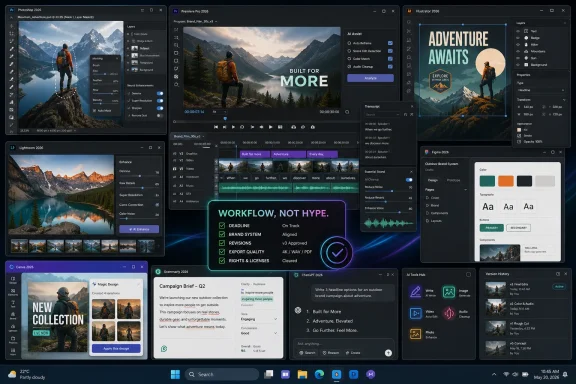 The AI Creative Boom Has Become a Workflow Story
The first wave of consumer-facing generative AI made creativity look like prompting. Type a sentence, receive an image. Ask for a poem, receive a draft. Describe a video, receive a clip. That framing was useful because it showed ordinary users what statistical generation could do, but it was also misleading. Most creative work is not a single act of conjuring; it is revision, selection, cleanup, formatting, matching, retouching, versioning, and delivery.That is why many of the most useful AI creativity tools now live inside existing creative software rather than beside it. Adobe has pushed Firefly across Photoshop, Illustrator, Premiere Pro, Lightroom, Express, and its web-based Firefly environment. Canva has expanded Magic Studio into a broader campaign and design assistant. Figma has moved AI closer to collaborative product design and prototyping. These integrations matter because creative professionals rarely want a beautiful artifact trapped in a toy interface. They want editable layers, brand controls, masks, vectors, transcripts, timelines, and export settings.
For Windows users and IT teams, this shift matters too. The AI creativity market is no longer just a web-app playground. It is becoming part of desktop software, browser-based collaboration suites, enterprise identity systems, and cloud billing. That means procurement, compliance, storage, GPU acceleration, network policy, and data-handling rules are now part of the creative conversation.
The mythology of AI as a replacement for human creativity has also aged badly. The machine can generate options, but it cannot know whether the options are appropriate. It can imitate a genre, but it cannot carry accountability for taste, meaning, accuracy, or ethics. In practice, AI is most valuable when treated as a tireless assistant: fast, suggestive, occasionally brilliant, often wrong, and always in need of direction.
Free Tiers Are the New Sketchbook, Not the New Studio
Free AI creativity tools are better than they have any right to be. A designer can open Canva and generate layouts, graphics, and copy suggestions without paying upfront. A writer can use Grammarly’s free tier for grammar and clarity checks, or turn to ChatGPT and Claude for brainstorming, outlines, and structural feedback. A musician or video creator can test tools like Suno or Runway with limited credits. A photographer can trial AI-powered editing apps before committing to a paid plan.That accessibility is a genuine change in creative culture. Students, freelancers, hobbyists, small businesses, and community groups now have access to capabilities that previously required specialized training or expensive software. A local event organizer can produce posters and social clips. A blogger can polish a newsletter. A podcaster can clean up rough audio. A solo developer can mock up game music or placeholder voice lines before hiring specialists.
But free tiers are not neutral gifts. They are funnels. They limit credits, resolution, commercial rights, model access, export options, storage, collaboration, or processing speed. The constraint is often invisible until a user moves from experimentation to production. A tool that feels free during brainstorming may become expensive once it is used daily, across a team, or in commercial work.
The more serious limitation is not always money. It is continuity. A free tool may change its model, pricing, safety filters, export rules, or availability with little warning. OpenAI’s Sora arc is the warning label for the category: a dazzling video system can move from highly anticipated breakthrough to restricted product to discontinued experience faster than a production department can build a stable pipeline around it. Creative teams should use free AI services enthusiastically, but they should not confuse availability with permanence.
Canva and Figma Show Why Design AI Is Moving Toward Systems
For designers, the most important AI tools are not necessarily the most spectacular image generators. The real prize is systems-level assistance: taking a campaign brief, a brand guide, a UI pattern, or a wireframe and helping transform it into multiple usable outputs. Canva and Figma represent two sides of that shift.Canva’s appeal is scale. It has always been strongest where speed and accessibility matter more than pixel-perfect authorship: social posts, presentations, posters, marketing assets, classroom materials, and internal communications. Its AI features extend that logic. Magic Studio and related tools can generate copy, resize designs, animate elements, suggest layouts, and help non-designers produce competent visual work faster. For small teams, that can be transformative.
The trade-off is sameness. Canva’s greatest strength is that it helps millions of people make things that look “designed.” Its greatest weakness is that those things can converge toward a familiar platform aesthetic. AI may sharpen that problem if users accept the first plausible output. The human designer’s job becomes more important, not less: to reject the obvious, enforce the brand, and introduce specificity.
Figma’s AI direction is more interesting for product teams because it sits inside collaborative design rather than general-purpose content creation. AI-generated mockup text, prototyping suggestions, design-to-code assistance, and prompt-driven interface experiments can reduce the blank-canvas problem in UI work. At its best, this turns Figma into a faster conversation space between designers, product managers, and developers.
But AI in product design also creates risks. A convincing interface mockup can hide shallow thinking about accessibility, user research, edge cases, localization, performance, and data states. The faster a team can generate screens, the easier it is to mistake screen volume for product progress. AI can accelerate design, but it cannot replace design discipline.
Adobe Is Betting That Creative AI Must Be Editable, Licensed, and Boringly Useful
Adobe’s Firefly strategy is best understood as a defensive and offensive move at the same time. Defensively, Adobe has to prevent creators from leaving Photoshop, Illustrator, Premiere Pro, Lightroom, and After Effects for cheaper AI-native tools. Offensively, it wants to make generative AI feel like a normal part of professional production: generate, mask, expand, recolor, isolate, remove, animate, and export inside the software people already use.That boring utility is Adobe’s strongest argument. Generative Fill and Generative Expand in Photoshop are not just parlor tricks; they are practical tools for reframing images, removing distractions, and producing layout-safe variations. Illustrator’s AI-assisted vector and color features matter because designers need editable results, not flattened hallucinations. Premiere Pro’s text-based editing and silence-removal workflows can save editors hours on interviews, podcasts, and social cuts.
Firefly’s other major pitch is commercial safety. Adobe has repeatedly positioned its models as more suitable for professional and enterprise use than tools trained with murkier data practices. That claim is not the end of the copyright debate, but it is a meaningful product distinction. For companies that care about licensing exposure, vendor indemnity, and brand risk, “good enough and contractually safer” may beat “more impressive but legally ambiguous.”
The cost is lock-in. Adobe’s AI features are increasingly tied to Creative Cloud subscriptions, generative credits, and plan tiers. For independent creators, that can feel like yet another meter running inside software they already pay for. For enterprises, it may be acceptable if it consolidates procurement and governance. Either way, Adobe’s advantage is not that it has the flashiest AI model. It is that it can put AI into the places where professional creative work already happens.
Writing Assistants Are Splitting Between Polish and Thinking
AI writing tools now fall into two broad categories. One polishes what you already wrote. The other helps you think, structure, summarize, and generate. Grammarly is the clearest example of the first category, while ChatGPT and Claude dominate the second.Grammarly’s value is persistence. It follows users across email, documents, browsers, and collaboration tools, making small interventions that improve clarity, grammar, tone, and concision. For professionals who write constantly but do not think of themselves as writers, that matters. The best use case is not “write my message for me,” but “help me avoid sounding sloppy, defensive, vague, or accidentally rude.”
ChatGPT and Claude operate at a different altitude. They can draft articles, create outlines, summarize research, rewrite copy for different audiences, generate names, critique arguments, and simulate editorial feedback. Claude’s long-context strengths have made it popular for working with lengthy documents, while ChatGPT remains a general-purpose creative and analytical workhorse with broad tool support. Both are useful precisely because they can move between ideation and execution.
The danger is fluency. Large language models are very good at producing text that feels complete. That makes them useful for breaking inertia and dangerous for publishing without review. They can flatten a voice, invent facts, miss context, and produce plausible nonsense with confidence. Writers who use AI well tend to use it as an editor, sparring partner, summarizer, or first-draft generator — not as an authority.
There is also a privacy dimension that creative teams still underestimate. Drafts can contain client strategy, unpublished financial data, legal language, personal information, or embargoed product details. Before pasting material into any AI writing assistant, users should know whether their organization has an approved plan, whether data is used for training, and whether retention controls exist. The cheaper the workflow, the more likely those questions have been skipped.
AI Video Is Powerful, Unstable, and Still Hard to Operationalize
Video is the most exciting and least settled category in AI creativity. Runway, Adobe Firefly Video, Sora, Pika, Luma, and other systems have shown that text-to-video and image-to-video generation can produce striking short clips. They can help with mood boards, storyboards, concept art, background motion, speculative advertising, music videos, and social-first experimentation. For creators used to static image generation, video feels like the next obvious leap.It is also where the gaps become most obvious. Temporal consistency is hard. Character identity drifts. Hands, physics, text, continuity, and camera logic still fail in ways that are difficult to predict. A still image can be fixed in Photoshop; a generated video clip with subtle motion problems may be unusable. That makes AI video better for ideation and stylized inserts than for narrative production that demands continuity.
Runway’s Gen-3-era tools pushed the category toward more control, including motion brushes, improved prompt adherence, and stronger stylization. That matters because video creators do not merely want “a cool clip.” They want to direct movement, preserve a character, match shots, and iterate. The less control a tool provides, the more it behaves like a slot machine.
Adobe’s approach is more conservative but potentially more durable. By tying generative video to Creative Cloud workflows, Adobe can make AI useful for extensions, b-roll, background plates, short generated elements, and editing assistance. Premiere Pro’s transcript-based editing, silence removal, and AI color tools may save more real-world hours than a spectacular text-to-video demo. The future of AI video may be less about generating entire films and more about removing friction from the thousand small tasks that make video production expensive.
Sora’s public story illustrates the volatility. It became a shorthand for high-fidelity AI video, then moved through limited access, social-app experimentation, safety concerns, rights questions, and discontinuation of certain experiences. The lesson is not that AI video is dead. It is that creative teams should be careful about building client promises around tools whose access, pricing, and product direction can change abruptly.
AI Audio Has Quietly Become One of the Most Practical Categories
Compared with image and video generation, AI audio receives less mainstream attention. That is a mistake. For podcasters, filmmakers, educators, game developers, and content teams, audio AI can solve immediate problems that used to require specialist labor or expensive studio time.iZotope RX remains the classic example of AI as professional craft assistance. Dialogue isolation, de-clicking, de-noising, rebalancing, and repair tools do not replace an audio engineer’s ear, but they can rescue recordings that would otherwise be compromised. A documentary interview recorded in a café, a podcast with mouth noise, or a wedding video with rumble and hiss can all benefit from machine-assisted cleanup.
Music generation tools such as Suno occupy a more contentious space. They are impressive for ideation, temporary tracks, social content, and quick mood exploration. A game developer can generate a loopable ambient track for a prototype. A marketer can test musical directions before commissioning a composer. A YouTuber can create rough background material without digging through stock libraries.
The rights and originality questions are harder. AI music raises concerns about training data, artist imitation, commercial licensing, and market pressure on working musicians. Even when a tool offers commercial-use terms, creators should treat AI-generated music as a licensing decision, not just a creative one. The output may sound effortless, but the legal and ethical context is not.
Voice generation is even more sensitive. Tools promising emotive synthetic voices for games, audiobooks, narration, and animation could reduce production barriers dramatically. They also raise obvious concerns about consent, impersonation, actor compensation, and disclosure. The right model for professional use is consent-based voice creation, clear contracts, and explicit labeling where appropriate. Anything less invites trouble.
AI Photography Is Less About Fake Images Than About Rescue Work
Photography is often discussed in AI debates as if the only issue is fakery. That issue is real, especially in journalism, documentary work, and evidentiary contexts. But for many photographers, the daily value of AI is less about inventing scenes than repairing, selecting, masking, sharpening, denoising, relighting, and extending images.Adobe Lightroom’s AI masking, lens blur, denoise, and generative features have pushed photo editing toward faster local control. Instead of manually painting masks around hair, skies, subjects, and backgrounds, photographers can let the software make a first pass and then refine it. That saves time without necessarily changing the photographer’s intent. It is automation applied to craft.
Luminar Neo appeals to a different instinct: dramatic transformation with minimal friction. Sky replacement, relighting, atmosphere effects, and portrait enhancement can produce striking results quickly. Used tastefully, those tools can help a photographer realize an image closer to what they imagined. Used carelessly, they produce the familiar hyperreal look that screams “AI edit” before the viewer notices the subject.
Topaz Labs occupies the rescue-and-enhancement lane. Noise reduction, sharpening, upscaling, and face recovery can make technically flawed images more usable. For wildlife, events, sports, low-light work, and archival restoration, that can be enormously helpful. The question is not whether AI enhancement is legitimate; photographers have always used tools to overcome technical limits. The question is whether the edit misrepresents the scene or merely improves the file.
Professional photographers should also think about disclosure and context. A commercial portrait with retouched skin is one thing. A news image with generated elements is another. AI photo tools are not ethically identical across use cases. The same feature can be harmless in a wedding album and unacceptable in a court filing.
The Paid Tools Win When Accountability Enters the Room
The difference between free and paid AI tools is often framed around capability. Paid plans offer better models, more credits, higher resolution, faster processing, commercial rights, and team features. That is true, but incomplete. The deeper difference is accountability.A business paying for Adobe, Canva Teams, Figma, Grammarly Business, ChatGPT Team or Enterprise, Claude Team or Enterprise, iZotope, or Topaz is not merely buying features. It is buying some combination of support, predictable access, admin controls, privacy commitments, billing records, licensing terms, and institutional legitimacy. Those are not glamorous, but they matter when a campaign launches Monday or a client asks where an asset came from.
Free tools are often enough for exploration. Paid tools become necessary when creative output enters a professional chain. If a designer is making assets for a brand, a writer is handling confidential strategy, a video editor is delivering client work, or a photographer is preparing commercial files, the tool’s terms matter as much as the tool’s output.
This is also where IT departments become part of creative decision-making. Shadow AI is already common: employees use personal accounts because official tools are slow, blocked, or nonexistent. That creates data leakage, inconsistent licensing, and messy ownership questions. Organizations that simply ban AI may push it underground. Organizations that approve a few governed tools and teach practical rules are more likely to reduce risk.
For Windows-heavy environments, desktop integration remains important. Creative teams may rely on GPU acceleration, local file systems, NAS storage, color-managed displays, plugins, codecs, and Office or Teams workflows. Browser-based AI tools are convenient, but they do not erase the old infrastructure. The future creative workstation is likely to be hybrid: local horsepower, cloud models, identity-managed subscriptions, and AI features embedded across the software stack.
Responsible AI Use Is Now a Creative Skill
The responsible-use section of any AI guide used to feel like a legal disclaimer. Now it is a core part of professional competence. A creator who cannot explain how an AI-generated asset was made, what rights attach to it, and whether sensitive data was uploaded is not merely being careless. They are introducing business risk.Copyright remains unsettled across much of the generative AI ecosystem. Some vendors make strong claims about commercially safe training data or indemnification. Others are less clear. Users should not assume that a paid subscription automatically resolves every rights issue. Terms differ, laws differ, and client expectations differ.
Originality is another problem. AI tools are pattern machines. They are excellent at producing work that resembles the average of what they have seen. That can be useful for genre fluency but dangerous for differentiation. A brand that relies too heavily on generated defaults may end up with visual and verbal assets that look polished and forgettable.
Bias and representation also matter. AI systems can reproduce stereotypes in images, voices, names, accents, and narratives. They can default to narrow assumptions about professionalism, beauty, gender, race, age, and culture. Creative review is not just about aesthetics; it is about catching the machine’s lazy assumptions before they become published work.
The practical rule is simple: use AI to expand the field of options, not to abdicate responsibility. Keep drafts, document edits, check facts, read terms, avoid uploading sensitive material to unapproved systems, and treat generated output as raw material. The human creator remains the author of the decision.
The Useful Stack Depends on the Job, Not the Hype Cycle
There is no universal “best AI creativity tool.” The best choice depends on the medium, the user’s skill level, the required rights, and the production environment. A freelance social media designer may get enormous value from Canva Pro and a writing assistant. A professional video editor may care more about Premiere Pro’s AI transcript workflow than any text-to-video generator. A novelist may prefer Claude for manuscript analysis. A photographer may live inside Lightroom and Topaz.The better way to think about AI creative tools is by workflow pressure. Where do you lose time? Where do you need more options? Where do you repeat yourself? Where do you need cleaner input before the real work begins? Those are the places AI earns its keep.
Designers should look for tools that preserve editability and brand control. Writers should look for tools that improve structure and clarity without flattening voice. Video creators should demand control, consistency, and timeline integration. Audio professionals should prioritize repair quality and rights clarity. Photographers should separate enhancement from manipulation and decide what the image is allowed to become.
That framing also helps avoid subscription sprawl. It is easy to accumulate AI tools because each one seems inexpensive in isolation. A few credits here, a Pro plan there, a plugin upgrade, a team account, a music generator, a voice tool — suddenly the “free” AI revolution has become another software budget. The cure is boring but effective: pick tools that solve recurring problems, not tools that merely impress in demos.
The Shortlist That Survives Contact With Real Work
The most useful AI creativity tools in 2026 are not necessarily the loudest ones. They are the ones that fit into production without making the user surrender control. A practical shortlist looks less like a ranking and more like a map of where AI is already dependable.- Canva AI is strongest for fast visual communication, campaign variations, and non-designers who need competent branded assets without opening a professional design suite.
- Figma AI is most promising for product teams that want faster prototyping, placeholder content, and design-to-development handoff without leaving the collaborative workspace.
- Adobe Firefly and Creative Cloud AI features are the safest bet for professional designers, editors, and photographers who need editable outputs, integrated workflows, and clearer commercial positioning.
- Grammarly, ChatGPT, and Claude are best treated as writing partners with different strengths: polish, ideation, long-document reasoning, and structural critique.
- Runway and Adobe’s video tools are more practical for controlled clips, storyboards, editing acceleration, and visual experimentation than for replacing full production crews.
- Suno, iZotope RX, Lightroom, Luminar Neo, and Topaz show that some of AI’s most valuable creative work is not generation at all, but cleanup, repair, enhancement, and iteration.
The Creative Advantage Belongs to People Who Can Say No
The next phase of AI creativity will be less about access and more about discernment. Nearly everyone will be able to generate passable copy, plausible images, synthetic music, mock interfaces, and short video clips. That abundance will make taste more valuable, not less. When output is cheap, selection becomes the scarce skill.Creative professionals should not dismiss these tools as gimmicks. Many are already useful, and some are becoming indispensable. But neither should they accept the vendor fantasy that creativity is being automated end to end. The hard parts remain stubbornly human: knowing what matters, what feels false, what is legally safe, what serves the audience, what fits the brand, and what deserves to exist.
For WindowsForum readers, the practical takeaway is familiar from every major software transition: experiment early, standardize carefully, and do not confuse novelty with infrastructure. The best AI creativity tools are worth using today, but the best creative work will still come from people who know when to prompt, when to edit, when to verify, and when to close the tab and make the decision themselves.
References
- Primary source: HP
Published: 2026-06-19T23:10:09.949140
Best AI Creativity Tools: Free & Paid Options < Tech Takes - HP.com India
Discover the best AI creativity tools for designers, writers, and content creators. Compare free options and premium solutions available today.www.hp.com - Related coverage: digitalcameraworld.com
It’s a kind of magic: Canva launches Magic Layers, which turns a flat image into a fully editable, multi-layer document | Digital Camera World
Canva’s new AI-powered tool can intelligently detect and split up elements of a flat image – could this revolutionize layer-based editing?www.digitalcameraworld.com - Related coverage: adobe.com
