
xAI has launched Grok as Microsoft 365 add-ins for Word, Excel, and PowerPoint in 2026, putting Elon Musk’s AI assistant inside Office documents through a sidebar panel while positioning its X-connected, real-time data pitch against Microsoft’s native Copilot experience. The move is less an Office feature story than a platform story. Microsoft’s productivity suite is becoming the next contested surface for AI distribution, and Grok’s arrival shows how quickly the old “which chatbot is better?” race is turning into a fight over who gets to sit beside the spreadsheet.
The important wrinkle is that Grok is not replacing Office, nor is it replacing Copilot. It is entering through the sanctioned machinery of Office add-ins: the same enterprise-friendly, admin-deployable lane that has long allowed third-party tools to live inside Word, Excel, and PowerPoint. That makes the competitive threat subtler. Microsoft still owns the room, but xAI is trying to own a chair at the table.
The first temptation is to frame this as Musk versus Microsoft, with Grok barging into Redmond’s house and picking a fight with Copilot. That is too theatrical. The more interesting reality is that Microsoft’s own extensibility model makes this sort of incursion possible.
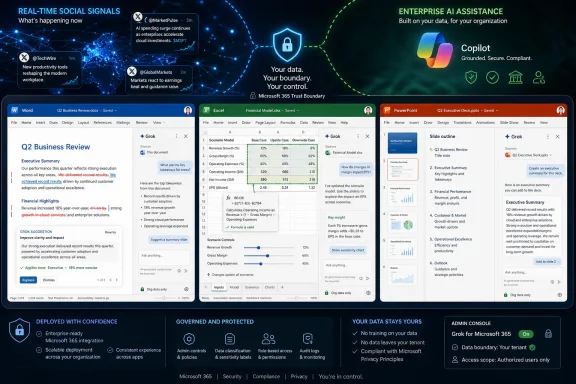
Grok for Office appears as a panel inside the application rather than as a replacement ribbon, shell, or alternate productivity suite. In Excel, xAI describes it as a Microsoft 365 add-in docked beside the workbook, able to answer questions about selected ranges, write formulas, run scenarios, and make normal workbook edits. The same pattern extends to Word and PowerPoint: a conversational assistant living next to the work product, not outside it.
That distinction matters because add-ins occupy a liminal space in Microsoft 365 governance. They are not first-party features, but they are not rogue browser tabs either. Admins can deploy them centrally, users can install them from Microsoft’s marketplace, and the host app provides the frame in which they operate.
For xAI, this is the fastest route into the productivity layer without asking users to abandon Office. For Microsoft, it is an awkward validation of the ecosystem it built. The more open Office becomes to third-party AI assistants, the harder it is to insist that Copilot is the only rational AI layer for Microsoft 365.
That is why Copilot’s most serious advantage is invisible when users compare prompt outputs side by side. The sales pitch to CIOs is not “our paragraph sounds nicer.” It is that Copilot lives inside the same security, privacy, audit, and governance assumptions as Microsoft 365 itself.
Grok enters with a different strength. Its public identity is built around freshness, bluntness, and access to the X data stream. If Copilot is optimized for the enterprise memory palace, Grok is optimized for the live wire: trending narratives, breaking news, social chatter, and the cultural velocity of the platform formerly known as Twitter.
That makes the competition asymmetric. Copilot wants to know what is in your organization. Grok wants to know what the world is talking about right now. In a Word memo, that can mean sharper context for public-facing analysis. In PowerPoint, it can mean a faster read on market narratives. In Excel, it can mean scenario work that pulls from a more volatile external signal set.
But the same asymmetry cuts both ways. The more Grok leans on X as a differentiator, the more enterprise buyers will ask whether social immediacy is a feature or a liability. In regulated industries, “what is trending” is not the same as “what is reliable.”
The difference is that AI sidebars are not passive utilities. They read, infer, rewrite, summarize, classify, and sometimes modify the user’s actual work. That turns a once-modest interface surface into a high-value control point.
The assistant that sits beside a spreadsheet can influence how a forecast is interpreted. The assistant beside a Word document can reshape tone, emphasis, and argument. The assistant beside a PowerPoint deck can decide which narrative becomes the executive summary.
That is why Grok’s Office debut is strategically larger than its initial feature list. Drafting, editing, grammar checks, formula help, slide generation, and document analysis are now table stakes. The real fight is over which assistant becomes the user’s default second brain inside the file.
Microsoft understands this, which is why Copilot has been pushed so aggressively across Windows, Edge, Teams, Outlook, and the Office apps. xAI understands it too. The assistant that waits in a standalone chatbot tab is useful; the assistant that appears at the moment of work is habit-forming.
For journalists, traders, marketers, comms teams, and analysts, that live-data angle is attractive. A product manager building a competitive brief could ask Grok for the latest public reaction to a launch. A comms team could draft a response informed by fast-moving sentiment. A financial analyst could combine workbook assumptions with current public narratives.
That is the upside. The downside is that X is also a noisy, adversarial, and often manipulated information environment. Trending topics can be shaped by coordinated campaigns, bots, outrage cycles, and incomplete reporting. If Grok imports that energy into Office without disciplined source handling, the same feature that makes it feel current can make it dangerous.
This is where Microsoft’s more conservative positioning may still appeal to IT. Copilot’s corporate tone can feel bland, but blandness is not always a defect in enterprise software. In many organizations, the assistant that refuses to be interesting is preferable to the assistant that occasionally mistakes velocity for truth.
The best version of Grok in Office would not merely retrieve what is current. It would separate live signal from social noise, identify uncertainty, and make provenance obvious to the user. Without that, “real time” risks becoming a productivity-themed version of refreshing a feed.
Copilot’s voice is recognizably corporate. It tends to sand down edges, organize ideas into polite structures, and produce language that would not look out of place in an internal memo. For many business users, that is exactly the point.
Grok’s brand is different. It has been marketed as more direct, less sanitized, and more willing to answer in a style that feels closer to internet-native commentary than HR-approved prose. In a blank document, that can be refreshing. In a legal memo, government briefing, or customer apology, it can be a problem.
The practical consequence is that Word may become the place where organizations discover how much they care about AI tone governance. Style is not just aesthetics. It encodes risk tolerance, brand posture, and professional norms.
A user asking for a sharper executive summary may love Grok. A compliance officer reviewing customer-facing language may not. Microsoft’s advantage is that Copilot’s restraint maps well to enterprise anxiety. xAI’s opportunity is that many users are tired of AI writing that sounds like it passed through three committees before reaching the page.
xAI’s Excel pitch emphasizes plain-English questions, formula writing, selected-range analysis, scenario testing, charts, and edits that remain normal workbook edits. That is the right framing. Excel users do not want an AI toy; they want something that respects the grid, formulas, dependencies, and the auditability of changes.
The promise is obvious. A finance team could ask for variance explanations without manually rebuilding pivot tables. A small business owner could create a cash-flow scenario without knowing every function. A sysadmin tracking licensing costs could ask Grok to spot anomalies across usage exports.
But Excel also exposes the limits of conversational confidence. If Grok writes a formula, the user still needs to know whether the formula is right. If it identifies an outlier, the user needs to know whether that outlier reflects data quality, seasonality, or a mistaken assumption. If it runs a downside scenario, the workbook needs to preserve what changed and why.
This is one place where xAI’s claim that edits are ordinary Excel edits is important. AI changes should not become magical transformations outside the workbook’s normal review model. The more Grok behaves like a traceable assistant rather than an invisible agent, the easier it will be for serious Excel users to accept it.
Still, enterprise spreadsheet culture is conservative for a reason. The people who live in Excel have seen enough broken models to distrust anything that makes the work look too easy. Grok will win credibility in Excel not by sounding smart, but by being inspectable.
That could be valuable for sales teams, investor relations, product marketing, and crisis communications. A deck prepared on Monday morning can feel stale by Monday afternoon when the news cycle is moving quickly. Grok’s access to live public data gives it a plausible edge in that environment.
But PowerPoint also amplifies the risk of overconfident synthesis. Slides compress nuance. They turn contested evidence into bullet points, narratives, and charts. An AI assistant that pulls from fast-moving public sources can make a weak signal look like consensus if it is not careful.
Copilot’s native advantage in PowerPoint is again integration. It can build from existing documents, emails, meetings, and organizational material. Grok’s advantage is exteriority: it can bring the outside conversation into the deck.
The winning workflow may not be one assistant replacing the other. It may be Copilot assembling the internal story while Grok stress-tests it against public reality. That is less tidy as a product narrative, but probably closer to how power users will actually work.
If Microsoft clamps down too hard on third-party AI assistants, it risks looking anti-competitive and making Office feel less open. If it leaves the door wide open, Copilot becomes one assistant among many inside Microsoft’s own flagship applications.
That is the platform owner’s dilemma. Microsoft wants Office to be the indispensable work surface, but Copilot to be the privileged intelligence layer. xAI’s Office add-ins test whether those ambitions can coexist.
The likely answer is yes, but not comfortably. Microsoft can still advantage Copilot through deeper integration, licensing bundles, admin defaults, Graph access, Purview controls, and first-party placement. Grok can still compete through model personality, X integration, faster iteration, and appeal to users who distrust Microsoft’s all-in-one stack.
For WindowsForum readers, the key point is that the AI assistant market is not going to be decided only by model benchmarks. Distribution matters. Default placement matters. Admin policy matters. The most capable assistant is not always the one users see when they open a file.
Any assistant that can read selected document content, analyze workbook ranges, and produce edits inside Office raises the usual questions. What content leaves the tenant? What is stored? What is logged? What can admins restrict? Which users can install it? Which compliance commitments apply? Which subprocessors are involved?
Microsoft has spent years telling commercial customers that Copilot inherits Microsoft 365’s security and compliance posture. Whether every customer finds that reassuring is another matter, especially given recent AI-related bugs and disclosure concerns across the industry. But at least the framework is familiar.
With Grok, organizations will need to examine xAI’s enterprise terms, data protection commitments, marketplace permissions, and add-in behavior. The fact that the add-in runs inside Office does not automatically make it governed like Copilot. The host application and the assistant provider are not the same trust boundary.
That distinction will be lost on many end users. They will see a button in Word or Excel and assume Microsoft has blessed the full experience. Admins cannot afford that assumption. If Grok becomes popular with executives or analysts, IT will need a policy before shadow AI becomes embedded in board decks and budget models.
The irony is that Microsoft’s add-in infrastructure gives admins tools to manage this. Centralized deployment, marketplace controls, and tenant policies can prevent a free-for-all. But tools are not the same as decisions. Organizations need to decide whether Grok is approved, blocked, piloted, or restricted to low-risk workflows.
That may be deliberate. xAI does not need every Office user on day one. It needs influential users who will show colleagues that Grok can do something Copilot cannot. In enterprise software, the beachhead is often a workflow, not a department.
The danger is that a high-end subscription model can limit organizational standardization. Microsoft can bundle Copilot into procurement conversations that already include Microsoft 365 licensing, security, Teams, Windows, and Azure. xAI has to justify itself as an additional vendor with an additional bill.
For individual professionals, that calculus may still work. If Grok saves hours on market research, financial modeling, competitive analysis, or communications work, a premium subscription can be rational. For a 20,000-seat enterprise, the math becomes more brutal.
That is why Grok’s Office strategy may initially look less like a Copilot replacement and more like a specialist tool. The question is whether xAI can move from specialist enthusiasm to enterprise trust before Microsoft closes the perceived feature gap.
The workplace AI stack is becoming plural. One model may be better for coding. Another may be better for long-context document analysis. Another may be faster, cheaper, more creative, or more willing to work with live public data. The old dream of one assistant to rule them all is giving way to a more pragmatic model router mentality.
That creates a new burden for users and administrators. Choosing an AI assistant will resemble choosing a cloud service, not choosing a font. It will involve performance, privacy, cost, latency, legal terms, auditability, data residency, and vendor risk.
Grok’s arrival inside Office accelerates that shift because it brings model choice into the applications where nontechnical users spend their day. AI pluralism is easy to discuss in developer tooling. It is messier when the finance team, communications team, and HR team each want a different assistant inside the same Microsoft 365 tenant.
Microsoft’s best defense may be to make Copilot boringly sufficient for most users. If Copilot is good enough, governed enough, and already paid for, many organizations will standardize on it. xAI’s best attack is to make Grok meaningfully different, not just marginally better at the same office tricks.
Copilot’s permission model is grounded in Microsoft 365 identity and Graph access. That gives it enormous institutional leverage. Grok’s Office add-ins will have to earn permissions more narrowly, through add-in scopes, user action, and whatever enterprise controls xAI offers.
This may actually help xAI in some environments. A narrower assistant that reads only selected ranges or the open document can be easier to approve than a deeply integrated assistant with access to a broad organizational graph. Microsoft’s strength can look like overreach to cautious admins.
But narrow access also limits magic. Copilot’s best demos depend on finding the relevant meeting, email, file, and chat without the user manually assembling context. Grok’s best demos will likely depend on blending document context with current external data. These are different permission philosophies.
The risk for Microsoft is that some users do not want the all-knowing corporate assistant. They want a sharp, task-specific AI that helps with the file in front of them and brings in the outside world when asked. Grok’s sidebar model speaks directly to that preference.
Defaults matter enormously in productivity software. Most users do not comparison-shop assistants in the middle of a workday. They click the button that is already there, especially if their employer has paid for it and IT has approved it.
That makes Grok’s challenge steep. It has to be sufficiently differentiated that users seek it out despite Copilot’s proximity. Live X data may be enough for some roles, but not for everyone. Tone may be enough for some writers, but not for everyone. Formula and scenario assistance may be enough for some Excel users, but Copilot is hardly standing still.
Yet Microsoft should not be complacent. The history of Office add-ins, browser extensions, and SaaS integrations shows that niche tools can become indispensable when they solve a specific pain better than the platform owner. If Grok becomes the preferred assistant for real-time external intelligence inside Office, it does not need to beat Copilot everywhere.
It only needs to become the button certain users trust when the work depends on what is happening outside the tenant.
The important wrinkle is that Grok is not replacing Office, nor is it replacing Copilot. It is entering through the sanctioned machinery of Office add-ins: the same enterprise-friendly, admin-deployable lane that has long allowed third-party tools to live inside Word, Excel, and PowerPoint. That makes the competitive threat subtler. Microsoft still owns the room, but xAI is trying to own a chair at the table.
 Grok Walks Through the Add-In Door Microsoft Left Open
The first temptation is to frame this as Musk versus Microsoft, with Grok barging into Redmond’s house and picking a fight with Copilot. That is too theatrical. The more interesting reality is that Microsoft’s own extensibility model makes this sort of incursion possible.Grok for Office appears as a panel inside the application rather than as a replacement ribbon, shell, or alternate productivity suite. In Excel, xAI describes it as a Microsoft 365 add-in docked beside the workbook, able to answer questions about selected ranges, write formulas, run scenarios, and make normal workbook edits. The same pattern extends to Word and PowerPoint: a conversational assistant living next to the work product, not outside it.
That distinction matters because add-ins occupy a liminal space in Microsoft 365 governance. They are not first-party features, but they are not rogue browser tabs either. Admins can deploy them centrally, users can install them from Microsoft’s marketplace, and the host app provides the frame in which they operate.
For xAI, this is the fastest route into the productivity layer without asking users to abandon Office. For Microsoft, it is an awkward validation of the ecosystem it built. The more open Office becomes to third-party AI assistants, the harder it is to insist that Copilot is the only rational AI layer for Microsoft 365.
Copilot’s Advantage Is Integration, Not Merely Intelligence
Microsoft 365 Copilot’s core proposition has never been just that it can summarize a document or generate a slide. Any competent frontier assistant can do some version of that. Copilot’s moat is supposed to be context: Microsoft Graph, tenant data, identity, permissions, meetings, email, files, chats, and the compliance architecture wrapped around all of it.That is why Copilot’s most serious advantage is invisible when users compare prompt outputs side by side. The sales pitch to CIOs is not “our paragraph sounds nicer.” It is that Copilot lives inside the same security, privacy, audit, and governance assumptions as Microsoft 365 itself.
Grok enters with a different strength. Its public identity is built around freshness, bluntness, and access to the X data stream. If Copilot is optimized for the enterprise memory palace, Grok is optimized for the live wire: trending narratives, breaking news, social chatter, and the cultural velocity of the platform formerly known as Twitter.
That makes the competition asymmetric. Copilot wants to know what is in your organization. Grok wants to know what the world is talking about right now. In a Word memo, that can mean sharper context for public-facing analysis. In PowerPoint, it can mean a faster read on market narratives. In Excel, it can mean scenario work that pulls from a more volatile external signal set.
But the same asymmetry cuts both ways. The more Grok leans on X as a differentiator, the more enterprise buyers will ask whether social immediacy is a feature or a liability. In regulated industries, “what is trending” is not the same as “what is reliable.”
The Sidebar Is the New Browser Toolbar
For veteran Windows users, the Office sidebar has a familiar feel. Every era of computing has a place where vendors try to attach themselves to the user’s daily workflow: browser toolbars, Outlook plug-ins, shell extensions, Teams apps, Edge sidebars, and now AI panels.The difference is that AI sidebars are not passive utilities. They read, infer, rewrite, summarize, classify, and sometimes modify the user’s actual work. That turns a once-modest interface surface into a high-value control point.
The assistant that sits beside a spreadsheet can influence how a forecast is interpreted. The assistant beside a Word document can reshape tone, emphasis, and argument. The assistant beside a PowerPoint deck can decide which narrative becomes the executive summary.
That is why Grok’s Office debut is strategically larger than its initial feature list. Drafting, editing, grammar checks, formula help, slide generation, and document analysis are now table stakes. The real fight is over which assistant becomes the user’s default second brain inside the file.
Microsoft understands this, which is why Copilot has been pushed so aggressively across Windows, Edge, Teams, Outlook, and the Office apps. xAI understands it too. The assistant that waits in a standalone chatbot tab is useful; the assistant that appears at the moment of work is habit-forming.
Real-Time Data Is Grok’s Hook, and Its Governance Problem
Grok’s most obvious differentiator is its connection to X. That gives it a story Microsoft cannot easily copy inside Copilot without changing the nature of the product. Copilot can use web grounding and enterprise connectors, but it is not culturally or technically branded around the firehose of real-time social data.For journalists, traders, marketers, comms teams, and analysts, that live-data angle is attractive. A product manager building a competitive brief could ask Grok for the latest public reaction to a launch. A comms team could draft a response informed by fast-moving sentiment. A financial analyst could combine workbook assumptions with current public narratives.
That is the upside. The downside is that X is also a noisy, adversarial, and often manipulated information environment. Trending topics can be shaped by coordinated campaigns, bots, outrage cycles, and incomplete reporting. If Grok imports that energy into Office without disciplined source handling, the same feature that makes it feel current can make it dangerous.
This is where Microsoft’s more conservative positioning may still appeal to IT. Copilot’s corporate tone can feel bland, but blandness is not always a defect in enterprise software. In many organizations, the assistant that refuses to be interesting is preferable to the assistant that occasionally mistakes velocity for truth.
The best version of Grok in Office would not merely retrieve what is current. It would separate live signal from social noise, identify uncertainty, and make provenance obvious to the user. Without that, “real time” risks becoming a productivity-themed version of refreshing a feed.
Word Shows the Cultural Split Most Clearly
In Word, Grok’s challenge to Copilot is partly functional and partly tonal. Drafting, rewriting, summarizing, adjusting formality, and catching grammar problems are familiar AI writing features. The question is not whether Grok can perform them; the question is whether users prefer its editorial personality.Copilot’s voice is recognizably corporate. It tends to sand down edges, organize ideas into polite structures, and produce language that would not look out of place in an internal memo. For many business users, that is exactly the point.
Grok’s brand is different. It has been marketed as more direct, less sanitized, and more willing to answer in a style that feels closer to internet-native commentary than HR-approved prose. In a blank document, that can be refreshing. In a legal memo, government briefing, or customer apology, it can be a problem.
The practical consequence is that Word may become the place where organizations discover how much they care about AI tone governance. Style is not just aesthetics. It encodes risk tolerance, brand posture, and professional norms.
A user asking for a sharper executive summary may love Grok. A compliance officer reviewing customer-facing language may not. Microsoft’s advantage is that Copilot’s restraint maps well to enterprise anxiety. xAI’s opportunity is that many users are tired of AI writing that sounds like it passed through three committees before reaching the page.
Excel Is Where the Trust Test Gets Harder
Excel is the most consequential Office battleground because spreadsheet errors have a long half-life. A bad paragraph can be rewritten. A bad formula can propagate through a workbook, alter a forecast, and survive unnoticed until a decision has already been made.xAI’s Excel pitch emphasizes plain-English questions, formula writing, selected-range analysis, scenario testing, charts, and edits that remain normal workbook edits. That is the right framing. Excel users do not want an AI toy; they want something that respects the grid, formulas, dependencies, and the auditability of changes.
The promise is obvious. A finance team could ask for variance explanations without manually rebuilding pivot tables. A small business owner could create a cash-flow scenario without knowing every function. A sysadmin tracking licensing costs could ask Grok to spot anomalies across usage exports.
But Excel also exposes the limits of conversational confidence. If Grok writes a formula, the user still needs to know whether the formula is right. If it identifies an outlier, the user needs to know whether that outlier reflects data quality, seasonality, or a mistaken assumption. If it runs a downside scenario, the workbook needs to preserve what changed and why.
This is one place where xAI’s claim that edits are ordinary Excel edits is important. AI changes should not become magical transformations outside the workbook’s normal review model. The more Grok behaves like a traceable assistant rather than an invisible agent, the easier it will be for serious Excel users to accept it.
Still, enterprise spreadsheet culture is conservative for a reason. The people who live in Excel have seen enough broken models to distrust anything that makes the work look too easy. Grok will win credibility in Excel not by sounding smart, but by being inspectable.
PowerPoint Turns AI Into Narrative Machinery
PowerPoint is where Grok’s live-data angle may feel most seductive. Decks are not merely containers for information; they are persuasion engines. If an assistant can combine a company’s argument with current market chatter, public sentiment, and breaking news, it can help shape a presentation that feels unusually timely.That could be valuable for sales teams, investor relations, product marketing, and crisis communications. A deck prepared on Monday morning can feel stale by Monday afternoon when the news cycle is moving quickly. Grok’s access to live public data gives it a plausible edge in that environment.
But PowerPoint also amplifies the risk of overconfident synthesis. Slides compress nuance. They turn contested evidence into bullet points, narratives, and charts. An AI assistant that pulls from fast-moving public sources can make a weak signal look like consensus if it is not careful.
Copilot’s native advantage in PowerPoint is again integration. It can build from existing documents, emails, meetings, and organizational material. Grok’s advantage is exteriority: it can bring the outside conversation into the deck.
The winning workflow may not be one assistant replacing the other. It may be Copilot assembling the internal story while Grok stress-tests it against public reality. That is less tidy as a product narrative, but probably closer to how power users will actually work.
Microsoft’s Platform Problem Is Also Its Platform Power
Microsoft has lived this tension before. Windows became dominant partly because developers could build on it, but that openness also allowed competitors to ride on top of Microsoft’s platform. Office add-ins create a similar bargain.If Microsoft clamps down too hard on third-party AI assistants, it risks looking anti-competitive and making Office feel less open. If it leaves the door wide open, Copilot becomes one assistant among many inside Microsoft’s own flagship applications.
That is the platform owner’s dilemma. Microsoft wants Office to be the indispensable work surface, but Copilot to be the privileged intelligence layer. xAI’s Office add-ins test whether those ambitions can coexist.
The likely answer is yes, but not comfortably. Microsoft can still advantage Copilot through deeper integration, licensing bundles, admin defaults, Graph access, Purview controls, and first-party placement. Grok can still compete through model personality, X integration, faster iteration, and appeal to users who distrust Microsoft’s all-in-one stack.
For WindowsForum readers, the key point is that the AI assistant market is not going to be decided only by model benchmarks. Distribution matters. Default placement matters. Admin policy matters. The most capable assistant is not always the one users see when they open a file.
IT Departments Will Treat Grok Like a Data Boundary Event
For home users, installing Grok in Office may feel like adding a smarter spellchecker. For enterprise IT, it is something else entirely: a new data path.Any assistant that can read selected document content, analyze workbook ranges, and produce edits inside Office raises the usual questions. What content leaves the tenant? What is stored? What is logged? What can admins restrict? Which users can install it? Which compliance commitments apply? Which subprocessors are involved?
Microsoft has spent years telling commercial customers that Copilot inherits Microsoft 365’s security and compliance posture. Whether every customer finds that reassuring is another matter, especially given recent AI-related bugs and disclosure concerns across the industry. But at least the framework is familiar.
With Grok, organizations will need to examine xAI’s enterprise terms, data protection commitments, marketplace permissions, and add-in behavior. The fact that the add-in runs inside Office does not automatically make it governed like Copilot. The host application and the assistant provider are not the same trust boundary.
That distinction will be lost on many end users. They will see a button in Word or Excel and assume Microsoft has blessed the full experience. Admins cannot afford that assumption. If Grok becomes popular with executives or analysts, IT will need a policy before shadow AI becomes embedded in board decks and budget models.
The irony is that Microsoft’s add-in infrastructure gives admins tools to manage this. Centralized deployment, marketplace controls, and tenant policies can prevent a free-for-all. But tools are not the same as decisions. Organizations need to decide whether Grok is approved, blocked, piloted, or restricted to low-risk workflows.
The Price Signals a Product Still Aimed at Power Users
Reports around early access have pointed to SuperGrok Heavy subscribers, a premium tier commonly described at $300 per month, receiving first access before broader rollout. That price does not scream mass-market Office utility. It screams early adopter, power user, executive enthusiast, developer, analyst, or AI maximalist.That may be deliberate. xAI does not need every Office user on day one. It needs influential users who will show colleagues that Grok can do something Copilot cannot. In enterprise software, the beachhead is often a workflow, not a department.
The danger is that a high-end subscription model can limit organizational standardization. Microsoft can bundle Copilot into procurement conversations that already include Microsoft 365 licensing, security, Teams, Windows, and Azure. xAI has to justify itself as an additional vendor with an additional bill.
For individual professionals, that calculus may still work. If Grok saves hours on market research, financial modeling, competitive analysis, or communications work, a premium subscription can be rational. For a 20,000-seat enterprise, the math becomes more brutal.
That is why Grok’s Office strategy may initially look less like a Copilot replacement and more like a specialist tool. The question is whether xAI can move from specialist enthusiasm to enterprise trust before Microsoft closes the perceived feature gap.
The Office AI Market Is Becoming a Multi-Model Workplace
Microsoft itself has already signaled that the future of enterprise AI is not purely single-model. Copilot Studio has been moving toward model choice, allowing organizations to build agents with different model providers under managed conditions. The appearance of xAI models in Microsoft-adjacent enterprise tooling earlier this year made Grok’s Office add-ins feel less like an alien invasion and more like the next stage of the same trend.The workplace AI stack is becoming plural. One model may be better for coding. Another may be better for long-context document analysis. Another may be faster, cheaper, more creative, or more willing to work with live public data. The old dream of one assistant to rule them all is giving way to a more pragmatic model router mentality.
That creates a new burden for users and administrators. Choosing an AI assistant will resemble choosing a cloud service, not choosing a font. It will involve performance, privacy, cost, latency, legal terms, auditability, data residency, and vendor risk.
Grok’s arrival inside Office accelerates that shift because it brings model choice into the applications where nontechnical users spend their day. AI pluralism is easy to discuss in developer tooling. It is messier when the finance team, communications team, and HR team each want a different assistant inside the same Microsoft 365 tenant.
Microsoft’s best defense may be to make Copilot boringly sufficient for most users. If Copilot is good enough, governed enough, and already paid for, many organizations will standardize on it. xAI’s best attack is to make Grok meaningfully different, not just marginally better at the same office tricks.
The Real Fight Is Over Permission to Be Useful
The more powerful these assistants become, the more the competitive contest collapses into a permission contest. The assistant that can see more can help more. The assistant that can act more can save more time. The assistant that is permitted to touch the sensitive file, the live workbook, or the customer deck becomes the one that matters.Copilot’s permission model is grounded in Microsoft 365 identity and Graph access. That gives it enormous institutional leverage. Grok’s Office add-ins will have to earn permissions more narrowly, through add-in scopes, user action, and whatever enterprise controls xAI offers.
This may actually help xAI in some environments. A narrower assistant that reads only selected ranges or the open document can be easier to approve than a deeply integrated assistant with access to a broad organizational graph. Microsoft’s strength can look like overreach to cautious admins.
But narrow access also limits magic. Copilot’s best demos depend on finding the relevant meeting, email, file, and chat without the user manually assembling context. Grok’s best demos will likely depend on blending document context with current external data. These are different permission philosophies.
The risk for Microsoft is that some users do not want the all-knowing corporate assistant. They want a sharp, task-specific AI that helps with the file in front of them and brings in the outside world when asked. Grok’s sidebar model speaks directly to that preference.
Redmond Still Controls the Defaults
Even with Grok inside Office, Microsoft remains the landlord. Copilot will have the privileged placement, the enterprise licensing channel, the roadmap alignment, and the administrative familiarity. Windows and Microsoft 365 users know this pattern well: third parties can innovate on the platform, but Microsoft controls the defaults.Defaults matter enormously in productivity software. Most users do not comparison-shop assistants in the middle of a workday. They click the button that is already there, especially if their employer has paid for it and IT has approved it.
That makes Grok’s challenge steep. It has to be sufficiently differentiated that users seek it out despite Copilot’s proximity. Live X data may be enough for some roles, but not for everyone. Tone may be enough for some writers, but not for everyone. Formula and scenario assistance may be enough for some Excel users, but Copilot is hardly standing still.
Yet Microsoft should not be complacent. The history of Office add-ins, browser extensions, and SaaS integrations shows that niche tools can become indispensable when they solve a specific pain better than the platform owner. If Grok becomes the preferred assistant for real-time external intelligence inside Office, it does not need to beat Copilot everywhere.
It only needs to become the button certain users trust when the work depends on what is happening outside the tenant.
The Grok Button Makes Office Less Monogamous
Grok’s Office arrival should be read as a practical change for users and a symbolic change for Microsoft’s AI strategy. The practical change is that Word, Excel, and PowerPoint can now host a more X-aware AI assistant alongside Microsoft’s own Copilot. The symbolic change is that Office is becoming an arena for competing AI agents rather than a sealed showcase for one first-party assistant.- Grok’s Office integration appears through Microsoft 365 add-ins, which makes deployment and governance an IT decision rather than just an individual user preference.
- Copilot still has the deeper Microsoft 365 advantage because it is tied to Graph, tenant context, identity, and Microsoft’s compliance story.
- Grok’s clearest differentiator is its access to live X-driven context, which is useful for public-facing analysis but risky when social velocity is mistaken for verified fact.
- Excel will be the hardest credibility test because AI-written formulas, scenarios, and analysis must remain inspectable and auditable.
- Enterprises should treat Grok as a new data boundary inside Office, not as a harmless cosmetic sidebar.
- The most likely near-term outcome is coexistence, with Copilot handling internal context and Grok appealing to users who need external, real-time signal.
References
- Primary source: Daily Beirut
Published: 2026-06-20T19:50:16.610372
xAI Grok Plugin Integrates with Microsoft Office Apps · Daily Beirut
Elon Musk's xAI launches Grok plugins for Word, Excel, and PowerPoint, offering real-time X data access as a rival to Microsoft's Copilot.dailybeirut.com - Related coverage: allthings-elon.com
Grok 4.3 Generates Word, PowerPoint, and Excel Files — Microsoft Office Rival | All Things Elon
xAI's Grok 4.3 now generates production-ready Word documents, PowerPoint presentations, and Excel spreadsheets natively, directly competing with Microsoft 365 Copilot in enterprise AI productivity.www.allthings-elon.com - Official source: microsoft.com
xAI models now available in Microsoft Copilot Studio | Microsoft Copilot Blog
Learn how xAI models expand model choice in Microsoft Copilot Studio, offering fast reasoning and secure, flexible agent-building options.www.microsoft.com - Related coverage: aipedia.wiki
Grok 4.3 Beta Drops for SuperGrok Heavy ($300/mo): Full Rundown, aipedia.wiki News
xAI shipped Grok 4.3 beta on April 17, 2026 exclusively to SuperGrok Heavy subscribers ($300/month). Adds native PDF, PowerPoint, spreadsheet output, video... aipedia.wiki
- Related coverage: awesomeagents.ai
Grok 4.3 | Awesome Agents
Grok 4.3 Beta adds native video input and document generation to xAI's flagship, with a confirmed 0.5T-parameter checkpoint and 2M-token context window, at $300/month for SuperGrok Heavy subscribers.awesomeagents.ai - Related coverage: aiunpacking.com
Grok Review 2026: xAI's Fast-Evolving AI Assistant Lands at a Crossroads | AIUnpacking
Grok 4.3 has speed, aggressive pricing, and a 1M context window - but the death of free access and slipping user numbers tell a different story. An honest, hands-on review.aiunpacking.com
- Related coverage: x.ai
Grok for Excel | xAI
Grok in Microsoft Excel: ask questions in plain English, write formulas, and run scenarios in the workbook you already have open.x.ai - Related coverage: aitoolanalysis.com
Grok Review: Grok 4.2, 6T-Parameter Grok 5 Beta, And The Real-Time X Advantage Nobody Else Has - AI Tool Analysis
Grok Review (May 2026): Grok 4.2 current, Grok 5 in beta, 8-country CSAM investigation ongoing. $30 SuperGrok / $300 Heavy. Honest verdict on whether to trust it.aitoolanalysis.com - Related coverage: decodeur-ia.com
Grok Skills xAI : test documents Excel PowerPoint 2026
Grok Skills génère Word, Excel, PowerPoint et PDF depuis le chatbot xAI. Prix, fonctionnalités, limites : notre décryptage pour les PME en 2026.www.decodeur-ia.com - Related coverage: codersera.com
Grok Build by xAI: SWE-bench 75%, Skills + Connectors
xAI's Grok Build hits 75% SWE-bench. Grok Skills, Connectors, install, pricing and how it compares with Claude Code and Cursor — May 2026 release. codersera.com
- Related coverage: beginnersinai.org
What's New in Grok 2026: Grok 4, Imagine API, xAI Updates - Beginners in AI
Every major Grok and xAI announcement from 2026 — Grok 4, Grok 4.1, SuperGrok Heavy / Grok 4 Heavy, Grok Imagine API (image + video generation), Custom Voices, Structured Outputs, and real-time X data integration. All sourced from xAI's official blog. beginnersinai.org
- Related coverage: s3.documentcloud.org
- Related coverage: dailyspokesman.net
- Related coverage: techxplore.com
- Related coverage: techradar.com
Microsoft 365 Copilot can be turned into a one-click data theft tool — inbox, OneDrive, and SharePoint data all at risk, so patch now | TechRadar
Varonis found a way to chain three bugs into one exploitwww.techradar.com - Related coverage: windowscentral.com
A "critical" Microsoft Copilot exploit exposes AI gullibility — turning the chatbot into a data snitch for 2FA codes and sensitive emails | Windows Central
Researchers uncovered a Copilot flaw that exposed 2FA codes and sensitive data.www.windowscentral.com - Official source: learn.microsoft.com
Enterprise data protection in Microsoft 365 Copilot and Microsoft 365 Copilot Chat | Microsoft Learn
Learn what enterprise data protection means for Microsoft 365 Copilot and Microsoft 365 Copilot Chat.learn.microsoft.com - Official source: support.microsoft.com
Privacy FAQ for Microsoft Copilot | Microsoft Support
Get answers to frequently asked questions about privacy and safety topics related to Microsoft Copilot, your AI assistant.support.microsoft.com - Official source: blogs.microsoft.com
Introducing Microsoft 365 Copilot – your copilot for work - The Official Microsoft Blog
Humans are hard-wired to dream, to create, to innovate. Each of us seeks to do work that gives us purpose — to write a great novel, to make a discovery, to build strong communities, to care for the sick. The urge to connect to the core of our work lives in all of us. But...blogs.microsoft.com - Official source: developer.microsoft.com
Microsoft 365 Copilot | Extend and Customize Copilot
Extend, enrich, and customize Microsoft Microsoft 365 Copilot. Explore Copilot extensibility options such as agents, API plugins, and Copilot connectors to expand AI-powered productivity, skills, and creativity.developer.microsoft.com - Related coverage: tomshardware.com
Microsoft will force install the Copilot AI app for users with desktop versions of 365 apps like Word and Excel — coming October, with no way to opt out for personal users | Tom's Hardware
More bloatware added to Windows, courtesy of Microsoft 365.www.tomshardware.com - Related coverage: pcgamer.com
Using 'trillions of anonymised productivity signals', Microsoft thinks nearly half of people like AI in their work | PC Gamer
There's dozens of us who don't!www.pcgamer.com - Official source: cdn-dynmedia-1.microsoft.com
- Official source: news.microsoft.com
