

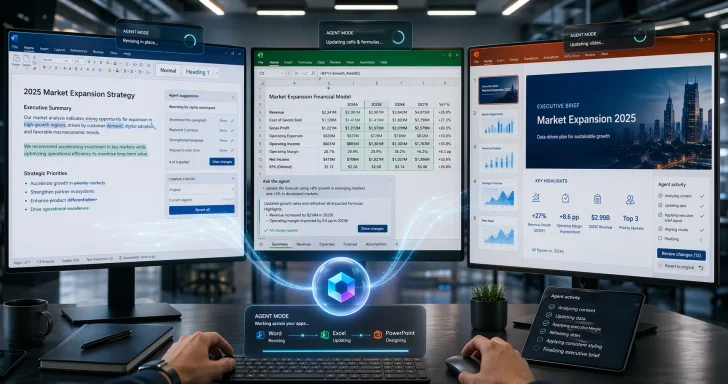
Microsoft’s own annout the direction of travel. The company says Copilot’s agentic capabilities in Word, Excel, and PowerPoint are now generally available, and that the system can take multi-step, app-native actions inside documents, worksheets, and presentations. Microsoft also says the experience is already showing stronger engagement and satisfaction, suggesting it sees this not merely as a product update but as a proof point for the next generation of office software.
This is not the first time Microsoft has used the language of agentic work. In September 2025, the company introduced Agent Mode and Office Agent as part of its “vibe working” push, with Excel and Word leading and PowerPoint following later. By March 2026, Microsoft was describing Wave 3 of Copilot as a system that would work alongside users in Word, Excel, PowerPoint, and Outlook, creating and refining content from start to finish inside the app. The April general-availability rollout is therefore best understood as the culmination of a staged launch rather than a sudden pivot.
That historical context matters because Microsoft is not just shipping features; it is redefining the intermodel was simple: ask Copilot a question, get a response, and decide whether to use it. The new model is closer to delegation: describe the outcome, let the agent do the work, then review the result. In enterprise software, that is a serious change in both productivity and governance.
Why the timing matters
The April timing suggests Microsoft is trying to convert long-running preview interest into broader user behavior before rivals settle on a competing standard. Office is one of the few software categories where a default can still matter enormously, and Microsoft knows that embedding agentic AI into Word, Excel, and PowerPoint creates a strong gravitational pull for the rest of the market. If users start expecting AI to work inside the app rather than around it, competitors will have to match both the interface and the trust model.
- Agent Mode is now a default experience, not a novelty.
- Word, Excel, and PowerPoint are becoming AI workspaces, not just file editors.
- Microsoft is tying product value to workflow continuity, not isolated prompts.
- The company is using early customer feedback as validation for broader rollout.
- Enterprise trust and permission handling are now part of microsoft.com]
Background
Microsoft’s Copilot journey started with a familiar promise: bring generative AI into the tools people already use every day. In the earliest version, Copilot was a conversational layer that could draft emails, summarize documents, and generate first-pass text or analysis. That was useful, but it was still an assistant at the edge ofthan inside it.
The company then began tightening the integration. Copilot was gradually aligned more closely with Word, Excel, PowerPoint, Outlook, and Teams, using contextual signals from the surrounding application to make responses more relevant. That made a real difference because the meaning of a prompt in Word is not the same as the meaning of a prompt in Excel. Microsoft’s bet is that app context is one of its strongest competitive advantages, especially where enterprise users care about accuracy, file state, and policy compliance.
In March 2026, Microsoft pushed further with what it called Wave 3 of Microsoft 365 Copilot. The company said the system would now work alongside users in Word, Excel, PowerPoint, and Outlook, creating, editing, and refining content from start to finish inside each app. Microsoft also emphasized that the work would remain transparent, reviewable, and reversible, which is critical in business settings where accidental edits or compliance mistakes can be costly.
At the same time, Microsoft had already been building a wider agent ecosystem around Copilot. The company introduced Office Agent and later described Word, Excel, and PowerPoint agents in Copilot chat, as well as a broader control and governance story centered on the enterprise use of agents. In other words, Agent Mode is part of a platform strategy, not a single feature.
From assistant to workflow layer
The significance of the shift is that Microsoft is increasingly asking users to trust Copilot with work products, not just ideas. That is a higher bar. Drafting a paragraph is one thing; changing formulas in a workbook or restructuring a deck is another. Microsoft’s answer is to keep the user in the loop, preserve reversibility, and bind the system to existing permissions and sensitivity labels.
Why Office is the right battlefield
Office remains one of the few places where AI can become immediately visible at scale. A cleaner draft in Word, a better analysis in Excel, or a polished deck in PowerPoint is something users can understand instantly. That makes the suite an ideal proving ground for agentic AI, because the output is tangible and the workflow pain is obvious. Microsoft is trying to make Copilot feel less like a chatbot and more like the operating system for knowledge work.
- Microsoft’s original Copilot pitch was assistive and conversational.
- The new model is iterative, embedded, and outcome-oriented.
- Office apps give Microsoft rich context and a huge installed base.
- Agent Mode is designed to reduce friction in high-volume knowledge work.
- Governance is now inseparable from usability.
What Agent Mode Actually Does
Agent Mode is best understood as a way for Copilot to operate inside the file rather than alongside it. Microsoft says the feature can take multi-step actions directly in documents, worksheets, and presentations, helping users move from first draft to final output faster. That means the model is no longer limited to one-off generation; it can iterate, revise, and adjust based on the structure of the artifact itself.
In Word, that translates to drafting, rewriting, restructuring, and tuning tone. In Excel, it means exploring data, explaining analysis, building formulas, and making changes directly in the workbook. In PowerPoint, it means updating existing presentations, aligning them to company templates, and turning more abstract inputs into structured slide narratives. Microsoft is effectively trying to automate the most repetitive part of knowledge work while preserving the familiar Office surface.
The in-app difference
The key idea is not just that Copilot can do more. It is that users can stay in the same place while the AI handles the mechanics of composition and editing. Microsoft says changes are transparent, reviewable, and reversible, which is vital because a system that edits in place has to be auditable in a way a chat output never needed to be. That is a major trust advantage if it works well.
Microsoft also frames the new experience as the default rather than a separate mode. That language matters because it suggests the company wants users to think of agentic behavior as the ordinary way Copilot works inside Office. In product terms, that is how you change habits: not by forcing a new workflow, but by making the new workflow feel like the obvious one.
Examples that show the ambition
Microsoft’s support documentation offers sample prompts that reveal the intended use cases. In Excel, the user can request a financial close report with variance-to-budget and year-over-year growth. In PowerPoint, the prompt can ask for a seven-slide executive brief with risks, mitigations, and next steps. In Word, the system can draft a customer brief with value statements and a 30-day checklist. Those are not toy examples; they are recognizably enterprise tasks.
- Agent Mode is designed for production work, not just brainstorming.
- It supports editing and refinement rather than only generation.
- Microsoft is targeting common enterprise artifacts like reports and decks.
- The experience is built around familiar Office conventions.
- Review and reversibility are central to the promise.
Why Excel Is the Hardest Test
Excel is arguably the most important proving ground for agentic AI in Office because it combines utility, complexity, and risk. If Copilot can genuinely help users explore data, build formulas, and transform analysis inside a workbook, that is a meaningful productivity gain. But Excel also punishes mistakes, and even a small error in a formula can have outsized consequences.
Microsoft appears to understand this tension. Its April announcement explicitly says it is focused on deeper, more reliable editing for complex workflows, especially high-stakes work such as finance spreadsheets and legal documents. That is the kind of language you use when you know the easy demo is not the real test. It also shows that Microsoft expects the feature to move beyond novelty into serious decision-making environments.
Data work becomes conversational
The most useful part of Copilot in Excel may be the reduction in cognitive overhead. Instead of forcing users to remember formula syntax or manually stitch together analyses, the AI can turn a conversational request into workbook changes. That could lower the barrier for casual users while speeding up experienced analysts who already know what they want but not always the quickest way to express it.
Still, this is where verification becomes non-negotiable. A workbook that looks polished is not necessarily a workbook that is correct. Microsoft’s insistence on transparency, previewing, and review suggests it knows the real challenge is not generating output, but generating output that survives scrutiny.
Enterprise impact
For enterprises, the upside is substantial if the system works as advertised. Finance teams can save time on recurring close packages, operations teams can standardize reporting, and managers can move from raw data to presentable insights faster. But that benefit depends on policy discipline, because the value of AI in spreadsheets collapses quickly if users trust it blindly.
- Excel is the highest-value and highest-risk Office surface.
- Formula generation and workbook editing are major labor savers.
- High-stakes scenarios demand stronger validation than casual tasks.
- Finance and legal use cases will be the real credibility test.
- The feature only helps if users keep a review mindset.
PowerPoint and the Presentation Layer
PowerPoint is where Microsoft can show whether Copilot can do more than compress text into slides. The company says the system can update existing decks with current talking points and data, while respecting company templates and presentation standards. That matters because PowerPoint is not just about content; it is about brand consistency, design logic, and narrative flow.
Microsoft’s support guidance makes the ambition even clearer. It describes an executive brief deck prompt that asks for a title slide, three slides of key insights, two slides of risks and mitigations, and a final next-steps slide. That is a very specific presentation architecture, and it hints at what Microsoft thinks enterprise users actually need: structured outputs that can go straight into a meeting.
From blank canvas to boardroom-ready
The real promise here is not speed alone. It is reducing the gap between raw information and boardroom-ready material. If Copilot can preserve layouts, object styles, and brand kits while improving the narrative, then PowerPoint becomes less of a formatting chore and more of a decision-support surface. That is a compelling value proposition for managers and consultants.
There is also a strategic angle. PowerPoint has long been one of the Office apps most vulnerable to AI disruption because slide creation is so repetitive and so visually mediated. By building agentic slide editing into the app itself, Microsoft is trying to keep that value chain inside its own ecosystem rather than ceding it to specialized AI presentation tools.
Consumer and business use cases
For consumers, the appeal is obvious: family budgets, school projects, and personal planning decks get easier. For businesses, the value is more structural, because PowerPoint remains one of the most common ways organizations communicate strategy, status, and recommendations. Microsoft’s challenge is to make the output feel polished enough to save time but flexible enough that teams do not feel locked into bland, generic AI styling.
- PowerPoint is about narrative, not just design.
- Templates and brand kits are part of the automation promise.
- Executive briefs and status decks are the likely sweet spot.
- AI slide creation competes directly with specialist presentation tools.
- Consistency will matter as much as speed.
Word and the Future of Drafting
Word may be the most intuitive place to see the value of Agent Mode because writing is already iterative. Microsoft says Copilot can draft, rewrite, restructure, and adjust tone, which maps neatly to how people actually work through documents. A blank page becomes less intimidating when the system can do the first pass and then refine it with the user.
That said, Word is also where AI-generated mediocrity becomes obvious very quickly. A document can be grammatically sound and still be strategically weak, logically incoherent, or stylistically wrong. That is why Microsoft’s emphasis on reviewability and user control is so important; the company is not pretending the AI can replace editorial judgment.
Drafting as collaboration
The most interesting thing about Word Agent Mode is how it reframes the act of writing. Instead of producing one static draft, Copilot can work through revisions in the file itself, allowing the user to steer the document toward a more final state. That makes the app feel less like a text editor and more like a collaborative drafting environment.
This is particularly relevant for enterprise content such as customer briefs, policy documents, and internal communications. Those formats are repetitive enough to benefit from automation but nua human oversight. Microsoft seems to be targeting exactly that middle ground where AI can save time without taking over authorship entirely.
A new expectation for writing tools
Once users get used to in-place editing, their expectations for writing software will change. They will no longer want a tool that merely suggests text; they will want a tool that can reorganize, summarize, and polish a document according to intent. That raises the bar for Word competitors and also increases pressure on Microsoft to maintain quality across very different writing styles. ([microsoft.csoft.com/en-us/microsoft-365/blog/2026/03/09/powering-frontier-transformation-with-copilot-and-agents/))
- Word is the easiest app to understand conceptually.
- Its real value lies in iterative editing, not single-shot drafts.
- Human judgment remains essential for tone, structure, and accuracy.
- Enterprise briefs and policy docs are prime use cases.
- Better drafting tools will raise user expectations across the suite.
Governance, Security, and Trust
Microsoft knows that the biggest obstacle to agentic productivity is not model quality alone; it is trust. That is why the company repeatedly emphasizes permissions, sensitivity labels, OneDrive and SharePoint storage, tenant controls, and reversibility. In enterprise environments, these details are not footnotes. They are the product.
The March announcement made this especially explicit by saying Copilot respects existing Microsoft 365 permissions and sensitivity labels and does not process protected content when extraction is not allowed. That is a crucial distinction from consumer-facing AI tools that can feel more permissive but less governed. Microsoft is clearly trying to make security a differentiator rather than a constraint.
Why controls matter more now
As agents become able to edit files directly, the risk surface expands. A chatbot that drafts text has relatively limited reach; an agent that touches actual worksheets and presentations can create compliance, versioning, and disclosure problems if it is not tightly managed. Microsoft’s answer is a layered model of controls, previews, and auditing that enterprise buyers can evaluate.
This is also where the company’s messaging around “enterprise-grade” becomes important. Microsoft is trying to distinguish between consumer convenience and business-grade governance, while still making the same core capabilities available to Personal and Family subscribers. That dual-track strategy could broaden adoption, but it also means the company must support a wider range of expectations.
The trust trade-off
Agentic AI is only as good as the confidence users have in its behavior. If a workbook edit is opaque, or a deck revision is hard to trace, users will retreat to manual workflows. Conversely, if Microsoft can make edits visible, explainable, and easy to reverse, it may create a durable preference for Copilot over competing assistants. That is the real competitive prize.
- Permissions and sensitivity labels are central, not optional.
- File storage and tenant controls support enterprise adoption.
- Transparency and reversibility reduce operational fear.
- Security posture will shape buying decisions as much as features.
- Governance is now part of the UX.
Competitive Pressure on Rivals
Microsoft’s move raises the stakes for every productivity platform trying to add AI in a credible way. Google, Adobe, Canva, Notion, and a growing crop of AI-native startups all face the same strategic question: do they offer a chat box near the workflow, or do they embed the assistant directly in the artifact? Microsoft is choosing the more defensible answer because Office is where the work already lives.
The company is also benefiting from a distribution advantage that rivals cannot easily copy. Microsoft can bundle agentic behavior into the apps users already have open, with familiar permissions and organizational context. That means the “friction cost” of trying the feature is low, while the switching cost of leaving the ecosystem remains high.
The platform advantage
Office is not just a suite; it is a workflow baseline. By making Agent Mode the default, Microsoft turns product familiarity into AI adoption fuel. Competitors may offer sharper individual features, but they still have to convince users to move their document creation, spreadsheet work, and presentation building into a new environment.
There is also a model strategy at play. Microsoft is increasingly comfortable talking about multi-model choice and the “best innovation from across the industry,” which suggests it wants to avoid being boxed into one vendor narrative. That is strategically smart because enterprise buyers often value flexibility nearly as much as intelligence.
Market implications
The broader market impact is likely to be twofold. First, agentic features will become table stakes much faster. Second, the battle will shift from “who has AI?” to “whose AI is trustworthy, contextual, and operationally safe?” That is a harder, more mature competition, and it favors companies that already control the enterprise workflow.
- Microsoft has the strongest distribution story in office productivity.
- Embedded agents are harder to dislodge than standalone chat tools.
- Multi-model positioning gives Microsoft strategic flexibility.
- Rival products must now compete on trust and workflow depth.
- The center of competition is moving from demos to operations.
Strengths and Opportunities
Microsoft’s rollout has real momentum because it connects a clear user need with a huge installed base and a familiar interface. The company is not asking users to learn a new product category; it is upgrading a category they already understand. That combination gives Agent Mode a rare chance to become habitual rather than experimental.
The opportunity is especially large in enterprise settings, where repeatable document work, spreadsheet analysis, and presentation creation are constant drains on time. If Copilot can reduce that friction while staying aligned with corporate controls, the productivity case becomes easy to explain to executives. If it works well enough, it may also strengthen Microsoft 365 lock-in in a way that rivals will struggle to match.
- Massive reach through Microsoft 365’s existing user base.
- Native workflow integration instead of bolt-on chat.
- Strong enterprise story around permissions and compliance.
- Broad consumer access through Personal and Family plans.
- Cross-app consistency that lowers learning friction.
- Higher engagement signals that support product momentum.
- Clear upgrade path from draft generation to full artifact creation.
Risks and Concerns
The biggest concern is overtrust. A feature that edits files directly can produce more polished mistakes, and polished mistakes are dangerous because they look finished. If users stop verifying output carefully, Microsoft could face credibility issues even when the underlying system is functioning as designed.
There is also a risk of uneven quality across the suite. Word may feel strong, Excel may require more caution, and PowerPoint may vary depending on template complexity and brand constraints. If the experience feels inconsistent, users will quickly learn to trust some surfaces and avoid others, which weakens the whole “seamless Copilot system” story.
The governance burden
Enterprise administrators will welcome stronger controls, but they will also expect clear policy enforcement and auditability. The more powerful the agent, the more expensive the failure mode. Microsoft’s challenge is to ensure that governance does not become a drag on usability, because overly cautious systems can push users back to manual work.
Another concern is pricing and packaging complexity. Microsoft is simultaneously marketing the feature to enterprise subscribers and making it available to Personal and Family users. That broad availability is good for adoption, but it may also blur the line between consumer convenience and enterprise-grade reliability if expectations are not carefully managed.
Practical adoption hurdles
Real-world adoption will depend on training, cultural acceptance, and confidence in review workflows. Many organizations will pilot the feature slowly, especially in finance, legal, HR, and sales operations. The risk is not that the feature is useless; the risk is that users will treat it as a novelty instead of a dependable tool.
- Overtrust could lead to errors that look polished.
- Inconsistent quality may limit use across different apps.
- Governance complexity could slow enterprise rollout.
- Pricing confusion may muddy consumer versus business expectations.
- Training needs will remain high despite automation.
- Verification fatigue could reduce real-world benefits.
- Template dependency may constrain creative flexibility.
Looking Ahead
The next phase for Microsoft will be less about proving that agentic Office is possible and more about proving that it is dependable at scale. The company has already said it wants deeper, more reliable editing, more transparency and control, and a more seamless Copilot system across Word, Excel, and PowerPoint. Those are the right priorities, because the future of AI productivity depends on trust as much as speed.
What will matter now is whether users keep shifting from prompting to delegating. If they do, Microsoft will have successfully changed the core interaction model of Office. If they do not, Agent Mode risks becoming another feature that impresses in demos but fades in routine work.
- Watch for deeper editing controls in complex documents and spreadsheets.
- Watch for PowerPoint rollout stability as it reaches more users.
- Watch for enterprise adoption in finance, legal, and operations teams.
- Watch for new governance tooling and policy integrations.
- Watch for whether users adopt agentic workflows as defaults or keep reverting to manual editing.
For Microsoft, the prize is not merely a better Copilot banner or a cleaner demo video. The prize is making Word, Excel, and PowerPoint feel like intelligent work surfaces where AI is present by default, useful by design, and safe enough to trust. If Microsoft can sustain that balance, Agent Mode will look less like a feature launch and more like the moment Office began to absorb the agent era.