

Microsoft’s latest move inside Word, Excel, and PowerPoint marks an important turning point for its productivity suite. What The Verge called “vibe working” is now, in Microsoft’s own language, the arrival of agentic capabilities: Copilot can take multi-step actions directly inside Office files rather than merely suggesting what a user should do next. That shift matters because it moves Microsoft’s AI story from chat-driven assistance toward a more complete, in-app workflow that feels closer to delegation than prompting. It also lands at a time when Microsoft is trying to make Copilot feel less like a bolt-on feature and more like the operating system of modern work.
For most of the last two years, Microsoft has been trying to answer a deceptively simple question: what happens after the demo? Early Copilot experiences were good at drafting text, summarizing content, and offering next-step ideas, but they were still fundamentally reactive. In Word, Excel, and PowerPoint, the user did the actual editing while Copilot hovered nearby as a helpful advisor. Microsoft now says the underlying models are finally strong enough to let Copilot act more directly, with the AI executing edits, restructuring content, and making app-native changes inside the document canvas itself.
That distinction is more than marketing. A passive assistant can answer questions, but an agent can complete tasks. In Microsoft’s framing, the new capabilities are designed to let Copilot understand the structure of a spreadsheet, the composition of a presentation, or the citation logic in a written brief, then carry out the work while the user watches and intervenes as needed. Microsoft says these capabilities have improved as models have become better at instruction following, reasoning, and handling multi-step edits without losing intent.
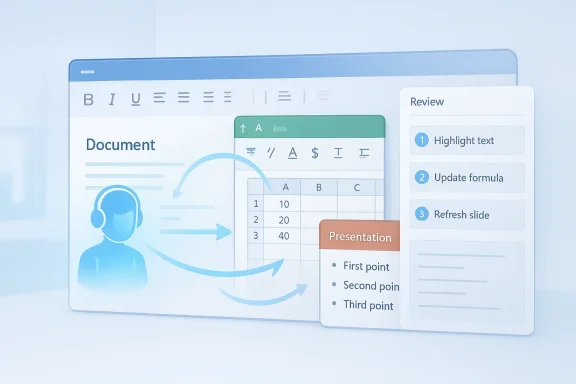
The company is also emphasizing control, not just automation. Microsoft says users will be able to review changes in real time through a sidebar showing what Copilot is doing, which is important in high-stakes work where trust is earned through transparency. That design choice is telling: Microsoft knows that if AI is going to edit your board deck or quarterly finance workbook, it cannot behave like an opaque black box. It has to be visible, reversible, and consistent with the user’s expectations.
This rollout also reflects a broader strategy around packaging and access. Microsoft’s current support and product pages say Word, Excel, and PowerPoint agents are available to Microsoft 365 users with or without a Microsoft 365 Copilot license, including Personal, Family, and Premium subscribers, while the new editing experiences are the default for Microsoft 365 Copilot and Microsoft 365 Premium subscribers. In other words, Microsoft is trying to seed the habit at the consumer edge while monetizing the deeper, more enterprise-focused value through subscriptions and Copilot licensing.
The timing is also notable because Microsoft has been previewing this direction for months. In September 2025, it introduced “vibe working” and described Agent Mode and Office Agent as the next phase of Copilot in Office. By March 2026, Microsoft was already calling these capabilities generally available in Word and Excel, with PowerPoint and Outlook still rolling out. The April 22 announcement is therefore less a sudden debut than the moment when Microsoft declared the experiment mature enough for broad default use.
The practical implication is that Office is becoming more like a workflow surface than a file editor. A user can ask for a report, a refreshed slide deck, or a workbook update, and Copilot can start acting on the artifact rather than generating a separate response. That saves time, but it also means Microsoft is betting that users want the AI to “live” inside the canvas instead of outside it in a chat pane. In productivity software, context is everything, so this is a meaningful change in interaction design.
That matters because a lot of enterprise writing is not about creativity; it is about synthesis. Project briefs, customer updates, policy memos, and internal reports often follow a predictable pattern, but they still require careful tailoring. Agentic Word can reduce the friction of assembling that first usable version, and in a business setting that is often where the most expensive time is lost. The value proposition is not “the AI writes your masterpiece”; it is “the AI gets you to a good, reviewable draft much faster.”
The challenge, of course, is precision. Excel users care less about whether the result looks polished and more about whether it is correct. A good-looking sheet with a hidden formula error is worse than no automation at all. That is why Microsoft’s claim that the model can preserve intent while making multi-step edits is so important: in Excel, reliability is the product. Without it, agentic features become a liability instead of a benefit.
That is a good fit for AI because presentation work is both structured and visual. A deck usually has a recognizable narrative skeleton, but every organization wants that skeleton to look like its own. If Copilot can refresh content while keeping the visual system intact, it could remove a lot of repetitive work from corporate communications, marketing, and internal operations teams. That would make it a genuine productivity win, not just a novelty.
That strategy makes sense. Microsoft does not need every user to become a power user; it needs enough users to build habit and enough business customers to justify the premium. By shipping the capability broadly, Microsoft normalizes AI inside Office. By reserving the most enterprise-meaningful experiences for Copilot-centric plans, it keeps the revenue engine aligned with workplace demand. It is a classic platform move, just dressed in AI language.
The inclusion of Work IQ as a grounding layer is also notable because it signals that Microsoft wants Copilot to use work context, not just generic language patterns. That should improve usefulness, but it also raises practical questions about permissions, data boundaries, and how much context is appropriate for which task. The more useful AI becomes, the more sensitive it becomes. That is a paradox every enterprise vendor now has to manage.
That matters because consumers are more likely to judge the experience by convenience than by policy nuance. If Copilot saves an hour on a homework project, a household budget, or a community group presentation, the value is obvious. If it gets the formatting right and the user only needs light cleanup, the feature feels magical. If it creates noisy drafts that require heavy correction, it quickly becomes another AI gimmick.
The strategic implication is that Microsoft is no longer just competing on “AI inside Office.” It is competing on how deeply AI can participate in the workflow without forcing users to leave the familiar app. That is a much stronger position than selling a separate chatbot that writes documents from scratch. The closer Copilot gets to acting like a native collaborator, the harder it becomes for rivals to dislodge.
The other thing to watch is how quickly Microsoft expands the pattern into adjacent apps and workflows. If the company can connect this agentic model across Word, Excel, PowerPoint, Outlook, and beyond, Copilot stops being a feature and starts behaving like the orchestration layer for Microsoft 365. That would be a profound shift in how the company defines modern productivity.
Source: The Verge Microsoft launches “vibe working” in Word, Excel, and PowerPoint
 Overview
For most of the last two years, Microsoft has been trying to answer a deceptively simple question: what happens after the demo? Early Copilot experiences were good at drafting text, summarizing content, and offering next-step ideas, but they were still fundamentally reactive. In Word, Excel, and PowerPoint, the user did the actual editing while Copilot hovered nearby as a helpful advisor. Microsoft now says the underlying models are finally strong enough to let Copilot act more directly, with the AI executing edits, restructuring content, and making app-native changes inside the document canvas itself.That distinction is more than marketing. A passive assistant can answer questions, but an agent can complete tasks. In Microsoft’s framing, the new capabilities are designed to let Copilot understand the structure of a spreadsheet, the composition of a presentation, or the citation logic in a written brief, then carry out the work while the user watches and intervenes as needed. Microsoft says these capabilities have improved as models have become better at instruction following, reasoning, and handling multi-step edits without losing intent.
The company is also emphasizing control, not just automation. Microsoft says users will be able to review changes in real time through a sidebar showing what Copilot is doing, which is important in high-stakes work where trust is earned through transparency. That design choice is telling: Microsoft knows that if AI is going to edit your board deck or quarterly finance workbook, it cannot behave like an opaque black box. It has to be visible, reversible, and consistent with the user’s expectations.
This rollout also reflects a broader strategy around packaging and access. Microsoft’s current support and product pages say Word, Excel, and PowerPoint agents are available to Microsoft 365 users with or without a Microsoft 365 Copilot license, including Personal, Family, and Premium subscribers, while the new editing experiences are the default for Microsoft 365 Copilot and Microsoft 365 Premium subscribers. In other words, Microsoft is trying to seed the habit at the consumer edge while monetizing the deeper, more enterprise-focused value through subscriptions and Copilot licensing.
The timing is also notable because Microsoft has been previewing this direction for months. In September 2025, it introduced “vibe working” and described Agent Mode and Office Agent as the next phase of Copilot in Office. By March 2026, Microsoft was already calling these capabilities generally available in Word and Excel, with PowerPoint and Outlook still rolling out. The April 22 announcement is therefore less a sudden debut than the moment when Microsoft declared the experiment mature enough for broad default use.
From Copilot as helper to Copilot as operator
The most important shift here is philosophical. Traditional productivity software assumes the human is the operator and the software is the instrument. Microsoft is trying to invert that relationship in a controlled way, making Copilot the one that performs the first draft of work while the human becomes the reviewer, editor, and judge. That is why Microsoft keeps repeating terms like agentic, multi-step, and in-app; those phrases signal a move from assistance to execution.The practical implication is that Office is becoming more like a workflow surface than a file editor. A user can ask for a report, a refreshed slide deck, or a workbook update, and Copilot can start acting on the artifact rather than generating a separate response. That saves time, but it also means Microsoft is betting that users want the AI to “live” inside the canvas instead of outside it in a chat pane. In productivity software, context is everything, so this is a meaningful change in interaction design.
Why this matters now
The timing lines up with a generational jump in model capability. Microsoft has been explicit that earlier Copilot versions were constrained by foundation models that were not powerful enough to reliably command applications. Now, with better reasoning and instruction following, Microsoft claims those limits are easing. That is the real product story underneath the branding: the software did not suddenly become smarter on its own; the models finally got good enough to make software control feel viable.- Copilot can now take direct action rather than only propose next steps.
- The interaction model is shifting from chat response to editable workflow.
- Real-time visibility is meant to preserve trust while increasing automation.
- Microsoft is trying to make AI feel native to Office, not layered on top.
- The change is especially meaningful for repeatable business tasks that start from templates.
The review loop becomes part of the product
Microsoft’s emphasis on reviewability is not incidental. If Copilot is going to make real edits, the user needs a clean way to inspect what changed, what assumptions were made, and where the AI may have overreached. The sidebar that reveals each step is important because it turns a hidden computation into a visible process. That visibility will likely be one of the biggest determinants of enterprise adoption.Word’s new editing role
Word may be the most natural fit for this change, but it is also the easiest place for failure to become obvious. Writing is deeply contextual, and good documents depend on tone, structure, citations, and audience. Microsoft says Copilot can now draft, rewrite, restructure, and refine text in place, which should make Word feel less like a blank page and more like an iterative drafting environment.That matters because a lot of enterprise writing is not about creativity; it is about synthesis. Project briefs, customer updates, policy memos, and internal reports often follow a predictable pattern, but they still require careful tailoring. Agentic Word can reduce the friction of assembling that first usable version, and in a business setting that is often where the most expensive time is lost. The value proposition is not “the AI writes your masterpiece”; it is “the AI gets you to a good, reviewable draft much faster.”
Where Word is likely to help most
For Word, the sweet spot is documents that combine repetitive structure with human judgment. That includes executive summaries, customer-facing one-pagers, status updates, proposals, and policy refreshes. In those cases, Copilot can carry the burden of arranging sections and adapting tone while the user handles accuracy, nuance, and strategic framing.- Drafting recurring business documents.
- Rewriting content for a different audience.
- Reorganizing long text into a clearer structure.
- Updating documents with new facts or revised talking points.
- Applying tone and style that match a brand or team voice.
Excel’s bigger leap
Excel may be the most consequential part of the rollout because spreadsheets are where AI has the hardest time earning trust. Microsoft says Copilot can make changes directly in a workbook, including adding formulas, building tables, and working with visuals. That is a bigger deal than auto-generating summaries, because spreadsheets are not just documents; they are decision engines. A model that can manipulate them safely can save meaningful time in finance, operations, planning, and analysis.The challenge, of course, is precision. Excel users care less about whether the result looks polished and more about whether it is correct. A good-looking sheet with a hidden formula error is worse than no automation at all. That is why Microsoft’s claim that the model can preserve intent while making multi-step edits is so important: in Excel, reliability is the product. Without it, agentic features become a liability instead of a benefit.
Why spreadsheets are the hardest test
Excel work often contains a chain of dependent assumptions, and a small change can ripple through an entire model. That means any AI assistant must respect formulas, table structures, references, and formatting conventions simultaneously. Microsoft appears to be positioning Copilot as an interpreter of spreadsheet logic, not just a text generator that happens to sit beside Excel. That distinction will determine whether the feature becomes a serious business tool or just a clever demo.- Adding or revising formulas.
- Creating or updating tables.
- Building charts and visuals.
- Explaining analysis in plain language.
- Restructuring worksheets without breaking intent.
PowerPoint and the politics of the deck
PowerPoint is where Microsoft’s vision becomes visible to everyone else in the organization. Decks are often how managers communicate strategy, how sales teams pitch, and how teams justify work to executives. Microsoft says Copilot can update existing decks with new information while preserving company templates and styling, which addresses one of the most common pain points in corporate presentation work: the endless cycle of rewriting slides while trying not to break the brand.That is a good fit for AI because presentation work is both structured and visual. A deck usually has a recognizable narrative skeleton, but every organization wants that skeleton to look like its own. If Copilot can refresh content while keeping the visual system intact, it could remove a lot of repetitive work from corporate communications, marketing, and internal operations teams. That would make it a genuine productivity win, not just a novelty.
Keeping the template is the real feature
Many AI tools can generate slides. Far fewer can generate slides that look like they belong inside a real enterprise environment. Microsoft is leaning hard into the claim that its system respects the existing template, which matters because presentation consistency is an organizational trust signal. If AI breaks branding, it creates more work than it saves.- Refreshing content in established decks.
- Updating talking points with current information.
- Preserving company-specific templates.
- Reducing repetitive slide production work.
- Speeding up executive brief creation.
Business model and subscription strategy
Microsoft’s rollout is also a commercial move, and it is easy to miss how carefully the company is threading the monetization needle. The company says the default experience is now available for Microsoft 365 Copilot and Microsoft 365 Premium subscribers, while support documentation says Word, Excel, and PowerPoint agents are also available to users on Personal and Family plans. That suggests Microsoft wants broad usage at the consumer edge, but deeper integration and higher-value workflows remain attached to paid tiers.That strategy makes sense. Microsoft does not need every user to become a power user; it needs enough users to build habit and enough business customers to justify the premium. By shipping the capability broadly, Microsoft normalizes AI inside Office. By reserving the most enterprise-meaningful experiences for Copilot-centric plans, it keeps the revenue engine aligned with workplace demand. It is a classic platform move, just dressed in AI language.
The bundle is the real moat
Microsoft has always understood that Office wins by being the default work substrate. Copilot makes that substrate more expensive, but also more defensible. If the AI is embedded in the same apps people already use every day, Microsoft can capture more of the workflow without forcing users into a separate product. That is a powerful advantage over point solutions that only tackle one task at a time.- Broad access helps drive familiarity.
- Premium plans keep the monetization story intact.
- Integration into Office reduces switching friction.
- Copilot becomes more valuable as it learns the workflow.
- The bundled model strengthens Microsoft’s ecosystem lock-in.
Enterprise adoption and governance
For enterprises, the promise is obvious: less manual editing, faster drafts, and more consistent output. But the real adoption question is whether Copilot can fit into governed workflows without introducing compliance, branding, or accuracy problems. Microsoft has clearly designed the experience to look reviewable rather than autonomous, which is the right call for business customers who cannot afford surprises.The inclusion of Work IQ as a grounding layer is also notable because it signals that Microsoft wants Copilot to use work context, not just generic language patterns. That should improve usefulness, but it also raises practical questions about permissions, data boundaries, and how much context is appropriate for which task. The more useful AI becomes, the more sensitive it becomes. That is a paradox every enterprise vendor now has to manage.
What IT teams will care about
IT buyers will likely focus less on the marketing and more on how the feature behaves under control. They will want to know whether it respects templates, whether it can be audited, how it handles permissions, and what happens when it makes a bad edit. Those are not secondary concerns; they are the conditions for deployment. If Microsoft gets those answers right, the feature could spread quickly across knowledge-worker organizations.- Permission and data boundaries.
- Template and brand consistency.
- Auditability of AI changes.
- Review and rollback controls.
- Behavior across desktop, web, and mobile surfaces.
Consumer impact and everyday utility
For consumers, the value proposition is more straightforward. A family user who wants a polished school report, a budget sheet, or a presentation no longer needs to start from scratch. Microsoft’s support pages explicitly say the agents are available to Personal, Family, and Premium subscribers, which broadens the audience beyond corporate buyers and makes the feature feel like a mainstream consumer upgrade rather than a niche enterprise tool.That matters because consumers are more likely to judge the experience by convenience than by policy nuance. If Copilot saves an hour on a homework project, a household budget, or a community group presentation, the value is obvious. If it gets the formatting right and the user only needs light cleanup, the feature feels magical. If it creates noisy drafts that require heavy correction, it quickly becomes another AI gimmick.
The everyday use cases are easy to imagine
Microsoft’s own support materials point to practical scenarios like customer briefs, financial reports, and executive decks. Those examples are telling because they show the company wants users to think in terms of outcomes, not commands. The feature is not just for professionals in the narrow sense; it is for anyone who needs a document, sheet, or slide that looks competent quickly.- School and home presentations.
- Personal budgets and planning sheets.
- Small-business reports and proposals.
- Community newsletters and event materials.
- Quick drafting for resumes, bios, and summaries.
Competitive implications
Microsoft’s move raises the pressure on every rival trying to claim a place in the AI productivity market. Google has long had its own AI-assisted document and spreadsheet story, and independent app builders are trying to reimagine office workflows from the ground up. But Microsoft’s advantage is obvious: it already owns the file formats, the desktop apps, the subscription bundle, and a huge installed base. That makes it much easier to turn AI from a feature into a habit.The strategic implication is that Microsoft is no longer just competing on “AI inside Office.” It is competing on how deeply AI can participate in the workflow without forcing users to leave the familiar app. That is a much stronger position than selling a separate chatbot that writes documents from scratch. The closer Copilot gets to acting like a native collaborator, the harder it becomes for rivals to dislodge.
Why platform control matters
Office applications are not just software; they are standards. Once Microsoft makes agentic editing feel normal inside Word, Excel, and PowerPoint, it raises the baseline expectation for productivity software everywhere else. Competitors will have to match the interaction model, not just the output quality. That is a high bar because it requires both model capability and deep application integration.- Microsoft controls the dominant work surface.
- AI is embedded where users already spend time.
- The subscription model can absorb feature expansion.
- Agentic workflows are harder to copy than standalone chat.
- Familiarity creates inertia in Microsoft’s favor.
Strengths and Opportunities
Microsoft’s announcement has a number of real strengths, and they mostly come down to the company solving a practical problem rather than inventing a flashy one. Users do not merely want more AI output; they want less friction in the apps they already know. If Microsoft keeps the experience reliable, reviewable, and fast, it could become one of the most consequential changes to Office in years.- Direct in-app editing removes the need to copy and paste between tools.
- Real-time transparency should help users trust the AI’s actions.
- Template preservation makes the feature useful for enterprise branding.
- Broader subscription access increases adoption and habit formation.
- App-specific behavior improves the odds that output feels native.
- Multi-step task handling is ideal for repetitive office workflows.
- Consumer availability broadens the funnel beyond business buyers.
Risks and Concerns
The risks are equally real, and they all center on trust. The more work Copilot does on behalf of the user, the more damaging mistakes become. A subtle spreadsheet error, a misquoted figure, or a deck that updates the wrong slide can create more correction work than the feature saves.- Accuracy errors could spread quickly inside important files.
- Over-automation may frustrate users who want tighter control.
- Brand drift is possible if template handling is imperfect.
- Governance gaps could complicate enterprise rollout.
- User confusion may arise if pricing and access rules feel inconsistent.
- Shadow adoption could increase when consumers use the same tools for work-like tasks.
- Dependence on AI suggestions could weaken core user skills over time.
Looking Ahead
The next phase will be less about announcement language and more about whether users keep coming back. Microsoft will need to prove that agentic editing is not just useful in a demo but dependable across messy, real-world work. That means handling incomplete prompts, mixed-quality source material, and documents that do not fit neat templates. If Copilot can survive those conditions, the feature will matter far beyond this week’s headlines.The other thing to watch is how quickly Microsoft expands the pattern into adjacent apps and workflows. If the company can connect this agentic model across Word, Excel, PowerPoint, Outlook, and beyond, Copilot stops being a feature and starts behaving like the orchestration layer for Microsoft 365. That would be a profound shift in how the company defines modern productivity.
- Broader rollout consistency across platforms.
- How well the review sidebar works in practice.
- Whether enterprise admins get enough control and visibility.
- How Microsoft packages the feature across subscription tiers.
- Whether users trust Excel edits with real data.
- Whether PowerPoint stays on-brand at scale.
- Whether competitors can answer with something equally integrated.
Source: The Verge Microsoft launches “vibe working” in Word, Excel, and PowerPoint
