
Microsoft has turned Windows 11 Paint into a split-brain image editor: ordinary PCs get modern layers, projects, background removal, and some cloud AI tools, while Copilot+ PCs unlock additional local AI features tied to newer neural processing hardware. That is the practical answer, but not the interesting one. The interesting part is that Paint has become Microsoft’s quietest argument for the future of Windows itself. The once-humble bitmap toy is now a test bed for subscriptions, local AI, cloud credits, content credentials, and hardware segmentation.
For decades, Paint was the Windows app people invoked with a smirk. It was fast, universal, uncomplicated, and limited in exactly the way a utility should be limited. You could crop a screenshot, circle a problem, paste an image from the clipboard, and get out before a “real” editor had finished loading.
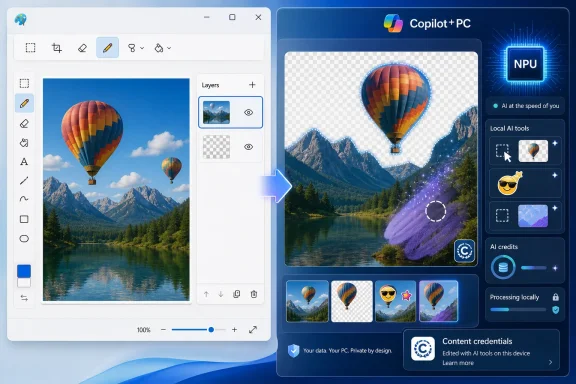
That role is not gone, but it has been complicated. In Windows 11, Paint has absorbed a surprising amount of capability: dark mode, a modernized toolbar, transparency support, layers, project files, background removal, generative erase, image creation, and Copilot+ PC-only editing features. Microsoft has not replaced Paint with Designer or Photos or Clipchamp. It has instead turned Paint into a storefront window for the Windows AI strategy.
That matters because Paint is not an optional pro tool discovered by creative professionals. It is an in-box app, one of the familiar defaults that ships with Windows and shapes what ordinary users think their PC can do. When Microsoft puts AI into Paint, it is not merely improving a drawing program. It is normalizing AI as a standard Windows capability.
The bargain is uneven. Some new Paint features are genuinely useful and broadly available. Others are gated by Microsoft account requirements, Microsoft 365 AI credits, Copilot+ hardware, or even specific processor families. Paint has become more capable, but it has also become a map of Microsoft’s new Windows hierarchy.
Layers are the key shift. A user can now separate objects, text, backgrounds, and pasted elements rather than flattening everything into one irreversible canvas. Transparency support also means Paint can work properly with PNG files in a way that fits modern web, app, and social media workflows.
The old flaw was persistence. Layers were useful only while the file was open; once the image was saved into a standard flattened format, the structure was gone. The newer project-file approach, using Microsoft Paint Project files, fixes that by letting users preserve layered work and return to it later.
That is not glamorous, but it is exactly the kind of feature that makes an in-box app graduate from “good enough in a pinch” to “good enough for many people.” A sysadmin mocking up an internal notice, a teacher preparing a classroom image, a support technician annotating screenshots, or a forum user composing a guide can now do more without reaching for Paint.NET, GIMP, Photoshop, or a web-based editor.
Paint is still not a professional image editor. It does not need to be. Microsoft’s more interesting play is to raise the floor of default Windows creativity just enough that the first tool many people try is already sitting on the PC.
Generative erase falls into a similar category, though with more caveats. Object removal has become familiar through phone photo apps, and Paint’s version brings that convenience into a desktop editing flow. The user brushes over an unwanted item, applies the change, and lets the model fill the gap.
These tools are compelling because they do not ask the user to adopt an entirely new creative model. They fit the old Paint rhythm: open image, make change, save image. The AI disappears into the command.
That is where Microsoft’s Windows AI push is strongest. Users are often skeptical of grand assistant claims, especially when a chatbot is awkwardly inserted into workflows that did not need one. But they are less skeptical of a button that removes a background, repairs a photo, or selects an object without requiring manual tracing.
Paint’s AI features show that the future of AI on Windows may not be a giant conversational overlay. It may be dozens of small interventions inside familiar apps. The question is whether Microsoft can resist turning each intervention into a licensing puzzle.
For Microsoft 365 Personal and Family subscribers, AI credits are part of the subscription package. Using certain advanced cloud AI features consumes those credits. In Paint, that means image generation and some generative editing can become metered actions rather than ordinary app commands.
There is a logic to this. Cloud AI costs money to run, and image generation is more expensive than changing a toolbar color or adding a new brush. Microsoft is not wrong to put limits around computationally expensive services.
But the presence of a metered cloud feature inside an in-box Windows app changes the emotional contract. Paint used to be a tool you owned because Windows was installed. Now parts of it resemble a client for Microsoft’s subscription platform.
That shift will not bother everyone. Many Microsoft 365 subscribers may see Paint’s AI features as a bonus. But for Windows traditionalists, the distinction is meaningful: Paint is no longer simply local software. It is a local shell around a mix of local features, cloud services, subscription entitlements, and hardware-specific capabilities.
On Copilot+ PCs, Paint gains features such as Cocreator, Object select, Sticker generator, and, depending on hardware, Generative fill. These are positioned as local AI experiences, relying on models installed on the PC rather than round-trips to the cloud. That distinction matters for latency, offline use, privacy posture, and Microsoft’s broader claim that AI PCs are not merely regular PCs with a sticker.
Cocreator is the clearest demo. The user sketches a rough image, adds a prompt, chooses a style, and watches Paint synthesize a more polished output. It is not just text-to-image. It is a hybrid between drawing and prompting, which makes more sense in Paint than a blank chatbot prompt ever could.
Object select is more utilitarian. Instead of manually outlining an item, users can hover and select objects the model detects. That capability belongs naturally in an image editor, and it is the sort of workflow improvement that can make local AI feel less like marketing and more like acceleration.
Sticker generator is lighter fare, but it serves Microsoft’s consumer story. It creates reusable visual objects from prompts and drops them into the canvas. Nobody should buy a Copilot+ PC for stickers, but stickers help make AI feel approachable to the nontechnical user Microsoft is courting.
Generative fill is the most ambitious because it moves from removing content to adding or replacing it. That also makes it the most sensitive feature. Filling part of an image from a text prompt is powerful, but it depends heavily on model quality, policy restrictions, and user expectations. When it works, it feels magical. When it fails, it reminds users that “AI-assisted editing” is still not the same thing as intent-aware craftsmanship.
But the feature map is messy. Some AI tools work on any Windows 11 PC. Some require a Microsoft account. Some require Microsoft 365 credits. Some require a Copilot+ PC. Some may require a particular Copilot+ platform, such as Snapdragon X hardware, depending on the feature and rollout.
That complexity is manageable for enthusiasts, but it is not elegant for mainstream users. “Open Paint and click Copilot” is simple. “Open Paint and see which subset of Copilot features your account, subscription, region, app version, Store updates, model downloads, and NPU qualify you for” is not.
This is the recurring problem with Microsoft’s Windows AI era. The company has many of the pieces: capable cloud services, local models, hardware partners, an operating system footprint, a subscription business, and familiar apps. What it often lacks is a clean user-facing story.
Paint exposes that tension in miniature. The app is better than it used to be. It is also harder to explain than it should be.
That is not a crisis for a home user who just wants to crop screenshots. It is more complicated for schools, regulated industries, government environments, and enterprises with strict policies around generative AI. Admins increasingly want clear controls for whether users can access cloud AI, generate synthetic images, or send content to external services.
Microsoft can argue that not all Paint AI is cloud AI. Some features run locally on Copilot+ PCs. Some are conventional app features. Some require subscriptions and accounts. But from an administrator’s perspective, that distinction does not eliminate the need for governance.
The problem is not simply that AI exists in Paint. The problem is that in-box Windows apps are becoming dynamic policy surfaces. Photos, Snipping Tool, Notepad, Paint, Edge, and Windows search are all places where Microsoft can introduce AI-driven behavior. If each app has different controls, different account requirements, and different disablement paths, enterprise trust erodes.
Microsoft has spent decades convincing organizations that Windows can be managed. The AI era tests whether that manageability extends to fast-moving consumer-style features inside default apps.
That is a good step. Content credentials based on the C2PA approach can help compatible software identify AI-generated or AI-edited material. As synthetic media becomes more common, provenance metadata will matter for journalism, education, legal review, corporate communications, and basic online trust.
But metadata is not magic. It can be stripped, ignored, or misunderstood. A small visual watermark can be cropped out. And a default-off or user-configurable watermark does not solve the larger problem of synthetic images circulating without context.
Paint’s role here is symbolic as much as technical. By putting content credentials into a mass-market Windows app, Microsoft is treating provenance as a mainstream concern. That is welcome. But the company should not pretend that optional watermarking turns consumer AI image generation into a solved governance problem.
The better view is humbler. Paint can help normalize disclosure. It cannot enforce honesty across the internet.
The new Paint is more powerful but less universal. Your experience depends on the PC beneath it and the Microsoft account above it. Two users can open the same app on Windows 11 and see different creative possibilities.
This is not unique to Paint. Windows itself is becoming more conditional. Features vary by region, chipset, NPU, account type, subscription, update channel, and policy state. Some of that is inevitable in a world where AI workloads can be local or cloud-based and where regulators treat markets differently. Still, the cumulative effect is fragmentation.
For enthusiasts, fragmentation can be interesting. It gives us release notes to parse and hardware distinctions to debate. For ordinary users, it can look arbitrary. Why does one Paint have Cocreator while another does not? Why does one feature cost credits while another does not? Why does a friend’s PC have a button that mine lacks?
Microsoft’s challenge is to make capability differences feel earned rather than capricious. Copilot+ PCs need exclusive features, or the category has no reason to exist. But Windows also needs to avoid making older or cheaper PCs feel artificially diminished.
Windows 11 has changed that in visible ways. Notepad gained tabs, autosave behavior, and AI-adjacent features. Snipping Tool became more capable. Photos evolved. Paint, most surprisingly, became a living product again.
That is good for Windows. In-box apps are part of the operating system’s perceived quality. A modern OS should not require a scavenger hunt for basic image editing, text editing, screen capture, and media handling.
Paint’s revival also suggests Microsoft has learned that nostalgia alone is not a product strategy. Keeping Paint around as a museum piece would have been easy. Updating it without destroying its basic accessibility is harder.
The result is imperfect but meaningful. Paint now sits in a rare category: a legacy Windows app that has gained modern features without becoming unrecognizable. The toolbar is busier, the Copilot menu is loaded, and the feature gates are annoying, but the core app still opens quickly and lets people edit images directly.
Edge is not just a browser; it is a shopping assistant, PDF tool, sidebar host, AI client, rewards surface, and Microsoft services launcher. Windows search is not just local search; it is web search, ads, recommendations, and cloud integration. The Start menu is not just a launcher; it is a feed, promotion channel, and account nudge.
Paint could drift in that direction if Microsoft is not careful. The Copilot button is useful as an organizer for AI features, but it also marks the app as a platform for whatever Microsoft wants to push next. Today that means image generation and local editing. Tomorrow it could mean template stores, cloud galleries, animation generators, brand kits, Designer tie-ins, or more aggressive subscription upsells.
Some of those additions might be useful. But Paint’s value has always depended on restraint. It is the app people trust because it does not make them negotiate with a workflow.
The best version of modern Paint would keep adding practical capability while preserving immediacy. The worst version would turn a beloved utility into yet another funnel.
That is an underrated design achievement. Many modern app redesigns punish casual users by making basic tasks harder in the name of sophistication. Paint has mostly avoided that fate.
The app theme can follow Windows light or dark mode. The toolbar can be auto-hidden. Full-screen mode can give the canvas more room. These are small conveniences, but they show that Microsoft has not entirely lost sight of Paint as a quick utility.
Even the AI menu is conceptually tidy. Grouping the new intelligent tools under Copilot keeps them from fully invading the traditional toolset. Users may object to the branding, but the containment is better than scattering AI buttons everywhere.
The problem is not day-to-day usability. The problem is trust, governance, and entitlement. Paint works. Understanding why a specific Paint feature appears, disappears, costs credits, or requires a different PC is the harder part.
That has practical consequences. Imaging a fleet is no longer enough to guarantee a consistent app experience. Blocking one cloud endpoint may not disable a local model. A Microsoft Store app update can alter the capabilities of a default Windows tool faster than a traditional OS feature release.
Admins should pay attention to Paint not because it is mission-critical, but because it is representative. If Microsoft is willing to put generative image tools into Paint, it is willing to put AI into any default workflow that can plausibly benefit from it.
The governance conversation must therefore move from “Do we allow Copilot?” to “Which AI features exist across Windows, which are cloud-backed, which are local, which require accounts, which create data-handling questions, and which can users access without additional approval?” That is a more tedious conversation, but it is the real one.
Home users have a different line to draw. They should ask whether a feature is local or cloud-based, whether it consumes credits, whether it adds provenance metadata, and whether the output is good enough to trust. AI image tools are impressive, but they are not neutral. They can hallucinate, distort, and quietly normalize synthetic content.
 Paint Is No Longer the Joke App in the Accessories Folder
For decades, Paint was the Windows app people invoked with a smirk. It was fast, universal, uncomplicated, and limited in exactly the way a utility should be limited. You could crop a screenshot, circle a problem, paste an image from the clipboard, and get out before a “real” editor had finished loading.That role is not gone, but it has been complicated. In Windows 11, Paint has absorbed a surprising amount of capability: dark mode, a modernized toolbar, transparency support, layers, project files, background removal, generative erase, image creation, and Copilot+ PC-only editing features. Microsoft has not replaced Paint with Designer or Photos or Clipchamp. It has instead turned Paint into a storefront window for the Windows AI strategy.
That matters because Paint is not an optional pro tool discovered by creative professionals. It is an in-box app, one of the familiar defaults that ships with Windows and shapes what ordinary users think their PC can do. When Microsoft puts AI into Paint, it is not merely improving a drawing program. It is normalizing AI as a standard Windows capability.
The bargain is uneven. Some new Paint features are genuinely useful and broadly available. Others are gated by Microsoft account requirements, Microsoft 365 AI credits, Copilot+ hardware, or even specific processor families. Paint has become more capable, but it has also become a map of Microsoft’s new Windows hierarchy.
The Best Paint Upgrade Is Still the Least Flashy One
The most important Paint improvements are not the ones wearing the Copilot badge. Layers, transparency, and project files change Paint from a disposable bitmap scratchpad into something closer to a lightweight editor. That is a bigger practical leap than any single prompt box.Layers are the key shift. A user can now separate objects, text, backgrounds, and pasted elements rather than flattening everything into one irreversible canvas. Transparency support also means Paint can work properly with PNG files in a way that fits modern web, app, and social media workflows.
The old flaw was persistence. Layers were useful only while the file was open; once the image was saved into a standard flattened format, the structure was gone. The newer project-file approach, using Microsoft Paint Project files, fixes that by letting users preserve layered work and return to it later.
That is not glamorous, but it is exactly the kind of feature that makes an in-box app graduate from “good enough in a pinch” to “good enough for many people.” A sysadmin mocking up an internal notice, a teacher preparing a classroom image, a support technician annotating screenshots, or a forum user composing a guide can now do more without reaching for Paint.NET, GIMP, Photoshop, or a web-based editor.
Paint is still not a professional image editor. It does not need to be. Microsoft’s more interesting play is to raise the floor of default Windows creativity just enough that the first tool many people try is already sitting on the PC.
Microsoft’s AI Pitch Works Best When It Removes Drudgery
The most defensible AI feature in Paint may be Remove background. It is simple, obvious, and aimed at a task that was previously annoying for non-experts. A single-click subject cutout is exactly the kind of “AI” that does not need philosophical framing.Generative erase falls into a similar category, though with more caveats. Object removal has become familiar through phone photo apps, and Paint’s version brings that convenience into a desktop editing flow. The user brushes over an unwanted item, applies the change, and lets the model fill the gap.
These tools are compelling because they do not ask the user to adopt an entirely new creative model. They fit the old Paint rhythm: open image, make change, save image. The AI disappears into the command.
That is where Microsoft’s Windows AI push is strongest. Users are often skeptical of grand assistant claims, especially when a chatbot is awkwardly inserted into workflows that did not need one. But they are less skeptical of a button that removes a background, repairs a photo, or selects an object without requiring manual tracing.
Paint’s AI features show that the future of AI on Windows may not be a giant conversational overlay. It may be dozens of small interventions inside familiar apps. The question is whether Microsoft can resist turning each intervention into a licensing puzzle.
The Subscription Layer Is Where Paint Stops Feeling Innocent
Image Creator is the point where Paint becomes less like a utility and more like a commercial surface. It lets users generate images from text prompts, drawing on the same broad category of image-generation tools now found across consumer AI services. But unlike the classic Paint toolset, this feature lives inside a Microsoft account and AI-credit economy.For Microsoft 365 Personal and Family subscribers, AI credits are part of the subscription package. Using certain advanced cloud AI features consumes those credits. In Paint, that means image generation and some generative editing can become metered actions rather than ordinary app commands.
There is a logic to this. Cloud AI costs money to run, and image generation is more expensive than changing a toolbar color or adding a new brush. Microsoft is not wrong to put limits around computationally expensive services.
But the presence of a metered cloud feature inside an in-box Windows app changes the emotional contract. Paint used to be a tool you owned because Windows was installed. Now parts of it resemble a client for Microsoft’s subscription platform.
That shift will not bother everyone. Many Microsoft 365 subscribers may see Paint’s AI features as a bonus. But for Windows traditionalists, the distinction is meaningful: Paint is no longer simply local software. It is a local shell around a mix of local features, cloud services, subscription entitlements, and hardware-specific capabilities.
Copilot+ PCs Turn Paint Into a Hardware Demo
The Copilot+ PC split is even more revealing. Microsoft’s new class of AI PCs requires modern AMD, Intel, or Qualcomm processors, at least 16GB of RAM, 512GB of storage, and an NPU capable of at least 40 TOPS. Paint uses that line to divide ordinary Windows 11 machines from systems that can run certain AI features locally.On Copilot+ PCs, Paint gains features such as Cocreator, Object select, Sticker generator, and, depending on hardware, Generative fill. These are positioned as local AI experiences, relying on models installed on the PC rather than round-trips to the cloud. That distinction matters for latency, offline use, privacy posture, and Microsoft’s broader claim that AI PCs are not merely regular PCs with a sticker.
Cocreator is the clearest demo. The user sketches a rough image, adds a prompt, chooses a style, and watches Paint synthesize a more polished output. It is not just text-to-image. It is a hybrid between drawing and prompting, which makes more sense in Paint than a blank chatbot prompt ever could.
Object select is more utilitarian. Instead of manually outlining an item, users can hover and select objects the model detects. That capability belongs naturally in an image editor, and it is the sort of workflow improvement that can make local AI feel less like marketing and more like acceleration.
Sticker generator is lighter fare, but it serves Microsoft’s consumer story. It creates reusable visual objects from prompts and drops them into the canvas. Nobody should buy a Copilot+ PC for stickers, but stickers help make AI feel approachable to the nontechnical user Microsoft is courting.
Generative fill is the most ambitious because it moves from removing content to adding or replacing it. That also makes it the most sensitive feature. Filling part of an image from a text prompt is powerful, but it depends heavily on model quality, policy restrictions, and user expectations. When it works, it feels magical. When it fails, it reminds users that “AI-assisted editing” is still not the same thing as intent-aware craftsmanship.
Local AI Is the Right Direction, But the Map Is Messy
Microsoft’s local AI argument is stronger than its credit-based cloud argument. Running models on the PC can reduce dependence on network availability, improve responsiveness, and make the expensive NPU in new machines feel less theoretical. Paint is an ideal proving ground because the tasks are visual, bounded, and easy for users to evaluate.But the feature map is messy. Some AI tools work on any Windows 11 PC. Some require a Microsoft account. Some require Microsoft 365 credits. Some require a Copilot+ PC. Some may require a particular Copilot+ platform, such as Snapdragon X hardware, depending on the feature and rollout.
That complexity is manageable for enthusiasts, but it is not elegant for mainstream users. “Open Paint and click Copilot” is simple. “Open Paint and see which subset of Copilot features your account, subscription, region, app version, Store updates, model downloads, and NPU qualify you for” is not.
This is the recurring problem with Microsoft’s Windows AI era. The company has many of the pieces: capable cloud services, local models, hardware partners, an operating system footprint, a subscription business, and familiar apps. What it often lacks is a clean user-facing story.
Paint exposes that tension in miniature. The app is better than it used to be. It is also harder to explain than it should be.
The Missing Off Switch Will Bother the People Microsoft Most Needs to Reassure
One detail deserves more attention than it will probably get: Paint’s new image creation and editing features cannot be broadly disabled inside the app. Users can customize the theme, hide the toolbar, and configure watermark behavior for AI-generated content, but the functional surface is essentially what Microsoft ships.That is not a crisis for a home user who just wants to crop screenshots. It is more complicated for schools, regulated industries, government environments, and enterprises with strict policies around generative AI. Admins increasingly want clear controls for whether users can access cloud AI, generate synthetic images, or send content to external services.
Microsoft can argue that not all Paint AI is cloud AI. Some features run locally on Copilot+ PCs. Some are conventional app features. Some require subscriptions and accounts. But from an administrator’s perspective, that distinction does not eliminate the need for governance.
The problem is not simply that AI exists in Paint. The problem is that in-box Windows apps are becoming dynamic policy surfaces. Photos, Snipping Tool, Notepad, Paint, Edge, and Windows search are all places where Microsoft can introduce AI-driven behavior. If each app has different controls, different account requirements, and different disablement paths, enterprise trust erodes.
Microsoft has spent decades convincing organizations that Windows can be managed. The AI era tests whether that manageability extends to fast-moving consumer-style features inside default apps.
Content Credentials Are Useful, But They Are Not a Moral Shield
Paint’s watermark setting is one of the more interesting additions because it acknowledges a hard truth: generated and edited images need provenance signals. Microsoft allows users to add a visible Copilot-style watermark and associated content credentials metadata to AI-created images.That is a good step. Content credentials based on the C2PA approach can help compatible software identify AI-generated or AI-edited material. As synthetic media becomes more common, provenance metadata will matter for journalism, education, legal review, corporate communications, and basic online trust.
But metadata is not magic. It can be stripped, ignored, or misunderstood. A small visual watermark can be cropped out. And a default-off or user-configurable watermark does not solve the larger problem of synthetic images circulating without context.
Paint’s role here is symbolic as much as technical. By putting content credentials into a mass-market Windows app, Microsoft is treating provenance as a mainstream concern. That is welcome. But the company should not pretend that optional watermarking turns consumer AI image generation into a solved governance problem.
The better view is humbler. Paint can help normalize disclosure. It cannot enforce honesty across the internet.
The Old Paint Was Universal; the New Paint Is Conditional
The defining trait of classic Paint was universality. If you sat down at a Windows PC, Paint was there, and it worked the same basic way. That sameness made it culturally durable.The new Paint is more powerful but less universal. Your experience depends on the PC beneath it and the Microsoft account above it. Two users can open the same app on Windows 11 and see different creative possibilities.
This is not unique to Paint. Windows itself is becoming more conditional. Features vary by region, chipset, NPU, account type, subscription, update channel, and policy state. Some of that is inevitable in a world where AI workloads can be local or cloud-based and where regulators treat markets differently. Still, the cumulative effect is fragmentation.
For enthusiasts, fragmentation can be interesting. It gives us release notes to parse and hardware distinctions to debate. For ordinary users, it can look arbitrary. Why does one Paint have Cocreator while another does not? Why does one feature cost credits while another does not? Why does a friend’s PC have a button that mine lacks?
Microsoft’s challenge is to make capability differences feel earned rather than capricious. Copilot+ PCs need exclusive features, or the category has no reason to exist. But Windows also needs to avoid making older or cheaper PCs feel artificially diminished.
Paint Shows Microsoft Learning From Its Own App History
There is a more charitable reading of all this: Microsoft is finally investing in the apps that make Windows feel complete. For years, many in-box apps seemed frozen, underfunded, or strategically neglected. Users installed third-party tools not only because they needed professional power, but because Microsoft’s defaults felt abandoned.Windows 11 has changed that in visible ways. Notepad gained tabs, autosave behavior, and AI-adjacent features. Snipping Tool became more capable. Photos evolved. Paint, most surprisingly, became a living product again.
That is good for Windows. In-box apps are part of the operating system’s perceived quality. A modern OS should not require a scavenger hunt for basic image editing, text editing, screen capture, and media handling.
Paint’s revival also suggests Microsoft has learned that nostalgia alone is not a product strategy. Keeping Paint around as a museum piece would have been easy. Updating it without destroying its basic accessibility is harder.
The result is imperfect but meaningful. Paint now sits in a rare category: a legacy Windows app that has gained modern features without becoming unrecognizable. The toolbar is busier, the Copilot menu is loaded, and the feature gates are annoying, but the core app still opens quickly and lets people edit images directly.
The Risk Is That Paint Becomes Another Front End for Everything
The danger is not that Paint becomes too capable. The danger is that it becomes too many things at once. Microsoft has a habit of turning successful surfaces into aggregation points for broader corporate strategy.Edge is not just a browser; it is a shopping assistant, PDF tool, sidebar host, AI client, rewards surface, and Microsoft services launcher. Windows search is not just local search; it is web search, ads, recommendations, and cloud integration. The Start menu is not just a launcher; it is a feed, promotion channel, and account nudge.
Paint could drift in that direction if Microsoft is not careful. The Copilot button is useful as an organizer for AI features, but it also marks the app as a platform for whatever Microsoft wants to push next. Today that means image generation and local editing. Tomorrow it could mean template stores, cloud galleries, animation generators, brand kits, Designer tie-ins, or more aggressive subscription upsells.
Some of those additions might be useful. But Paint’s value has always depended on restraint. It is the app people trust because it does not make them negotiate with a workflow.
The best version of modern Paint would keep adding practical capability while preserving immediacy. The worst version would turn a beloved utility into yet another funnel.
The Real Upgrade Is the One Windows Users Can Ignore Until They Need It
The strongest defense of Microsoft’s Paint strategy is that most of the new functionality can be ignored. A user who wants the old Paint experience can still open an image, draw a line, crop a screenshot, paste from the clipboard, and save. The advanced features are there when needed, not necessarily in the way.That is an underrated design achievement. Many modern app redesigns punish casual users by making basic tasks harder in the name of sophistication. Paint has mostly avoided that fate.
The app theme can follow Windows light or dark mode. The toolbar can be auto-hidden. Full-screen mode can give the canvas more room. These are small conveniences, but they show that Microsoft has not entirely lost sight of Paint as a quick utility.
Even the AI menu is conceptually tidy. Grouping the new intelligent tools under Copilot keeps them from fully invading the traditional toolset. Users may object to the branding, but the containment is better than scattering AI buttons everywhere.
The problem is not day-to-day usability. The problem is trust, governance, and entitlement. Paint works. Understanding why a specific Paint feature appears, disappears, costs credits, or requires a different PC is the harder part.
Where IT Pros Should Draw the Line
For WindowsForum readers, the lesson is not “AI bad” or “Paint good.” The lesson is that Microsoft is using familiar apps to move Windows into a new operating model. Features are no longer defined only by OS version. They are defined by hardware class, Store-delivered app updates, Microsoft account state, subscription entitlements, model availability, and policy controls.That has practical consequences. Imaging a fleet is no longer enough to guarantee a consistent app experience. Blocking one cloud endpoint may not disable a local model. A Microsoft Store app update can alter the capabilities of a default Windows tool faster than a traditional OS feature release.
Admins should pay attention to Paint not because it is mission-critical, but because it is representative. If Microsoft is willing to put generative image tools into Paint, it is willing to put AI into any default workflow that can plausibly benefit from it.
The governance conversation must therefore move from “Do we allow Copilot?” to “Which AI features exist across Windows, which are cloud-backed, which are local, which require accounts, which create data-handling questions, and which can users access without additional approval?” That is a more tedious conversation, but it is the real one.
Home users have a different line to draw. They should ask whether a feature is local or cloud-based, whether it consumes credits, whether it adds provenance metadata, and whether the output is good enough to trust. AI image tools are impressive, but they are not neutral. They can hallucinate, distort, and quietly normalize synthetic content.
The Paint Test for Windows AI
Paint’s transformation gives Microsoft a useful scorecard for the next phase of Windows. The app succeeds when AI is specific, bounded, and subordinate to the user’s task. It struggles when the business model becomes more visible than the feature.- Paint is now a real lightweight image editor, not merely a legacy bitmap utility kept around for nostalgia.
- Layers, transparency, and project files may matter more to everyday productivity than the headline AI features.
- Cloud AI tools bring Microsoft account and subscription-credit questions into an app that used to feel entirely local.
- Copilot+ PC features make Paint a showcase for NPUs, but they also make the Windows experience more fragmented.
- Optional content credentials are a useful disclosure mechanism, but they do not solve the broader synthetic-media trust problem.
- IT departments should treat Paint as an early warning sign for how quickly AI can spread through ordinary Windows workflows.
References
- Primary source: thurrott.com
Published: Sat, 20 Jun 2026 15:12:47 GMT
Paint - Thurrott.com
As with Notepad, another in-box app that dates back to the earliest days of Windows, Microsoft has extensively updated Paint since the initial release of Windows 11.www.thurrott.com - Official source: support.microsoft.com
Use Image Creator in Paint to generate AI art - Microsoft Support
Learn how to use Image Creator in Paint to generate diverse and realistic images using a powerful AI model called DALL-E.support.microsoft.com - Official source: microsoft.com
Paint for Creativity | Microsoft Windows
Explore Windows 11 creativity with Paint. Paint is the ultimate digital creation app for anyone who loves to draw, paint, design, or edit images.www.microsoft.com
- Official source: learn.microsoft.com
Application card - Microsoft Paint | Microsoft Learn
Learn about Microsoft Paint's AI features, capabilities, intended uses, and responsible AI considerations.learn.microsoft.com - Related coverage: techspot.com
Microsoft Paint AI eraser is now available for all Windows 11 users, not just Copilot PCs | TechSpot
Windows 11 users who open Paint should now begin seeing the option to erase objects or remove backgrounds from photos using GenAI. The features became available to...www.techspot.com - Related coverage: windowscentral.com
Windows 11's Paint app is gaining Photoshop-like project files | Windows Central
Microsoft Paint is getting a big update that introduces support for project files, letting you save your work-in-progress paint projects as .paint files.www.windowscentral.com
- Related coverage: windowslatest.com
Microsoft Paint's AI features for Windows 11 out in more regions, including Image Creator
Microsoft is rolling out a new update for MS Paint on Windows 11 that allows more people to try Paint Creator mode, among other features. www.windowslatest.com
- Related coverage: techradar.com
Windows 11's Paint app could soon create animations for you with AI, and boast a Nano Banana-style 'generative edit' | TechRadar
Microsoft's packing more AI into the Paint app (in testing)www.techradar.com - Related coverage: pcgamer.com
Microsoft's Paint now lets you save projects as layered files in the latest Insider build, as part of its continued efforts to make the default image editor great again | PC Gamer
Is it just me, or is Paint actually kinda good these days?www.pcgamer.com - Related coverage: mankatotechs.com
